

Devolutions has released UniGetUI 2026.1.11 for Windows 10 and Windows 11, delivering a stability-focused update to the open-source graphical package manager that wraps WinGet, Chocolatey, Scoop, pip, npm, and .NET Tool behind a single desktop interface. The release is not a glamour build; it is a repair pass. But for the kind of utility that sits between users and half a dozen package ecosystems, boring is not a weakness. It is the product.
Windows has spent years inching toward the package-management culture that Linux users have treated as ordinary for decades. Microsoft’s WinGet gave the platform a credible first-party command-line tool, but it did not solve the broader usability problem: most Windows users do not want to remember package IDs, command switches, repository quirks, or why one application updates through the Store while another appears only in Chocolatey or Scoop.
UniGetUI exists because that fragmentation is real. Its basic argument is simple: if Windows software is already scattered across multiple package managers, the user should not have to care which one happens to know about a given app. The interface pulls those sources together, presents software discovery and updates in a single place, and turns bulk install or removal into something closer to app-store behavior than shell scripting.
That makes UniGetUI unusually interesting for WindowsForum readers. It is not merely a convenience wrapper for hobbyists. It is a bridge between the CLI-first world of automation and the GUI-first habits of everyday Windows administration, especially on machines where a user wants modern update hygiene without handing the entire experience over to the Microsoft Store.
Version 2026.1.11 reinforces that identity by fixing the plumbing rather than adding another headline feature. The changelog’s emphasis on WinGet integration, Avalonia polish, remembered window placement, and PowerShell 7 update visibility is not random housekeeping. Those are precisely the places where a GUI package manager either earns trust or becomes another tray icon users ignore.
WinGet is the default gravitational body in this ecosystem. Chocolatey and Scoop remain important, especially for power users and managed setups with established workflows, but WinGet has the advantage of Microsoft’s blessing and deepening Windows visibility. If UniGetUI cannot reliably interpret WinGet state, updates, versions, and installation behavior, the entire “one interface for everything” premise gets weaker.
The tricky part is that WinGet itself is not just a database of installers. It is a moving ecosystem of manifests, installer technologies, Store entries, local detection rules, user scope versus machine scope installs, and publisher-provided versioning habits. A GUI sitting on top of it must translate that mess into buttons and progress bars without hiding too much or inventing certainty that is not there.
That is why “major fixes and improvements” to WinGet integration are meaningful even when they do not sound flashy. Package managers fail in small ways before users abandon them: an update does not appear, a version comparison looks wrong, an installer is detected under one name and updated under another, or a package source quietly behaves differently from the others. Those bugs do not merely annoy; they undermine confidence in the whole update pipeline.
For sysadmins, that confidence question is even sharper. UniGetUI is not a replacement for Intune, Configuration Manager, winget scripting, or enterprise patch platforms. But it can be part of the toolkit for small fleets, labs, power-user workstations, and lightly managed environments. In those contexts, a WinGet integration bug is not cosmetic. It can mean stale software remains stale because the interface failed to surface it.
Those sound like paper cuts, and in one sense they are. But UI migrations live or die on paper cuts. Users may tolerate a missing advanced feature for a while; they are less forgiving when a new interface looks subtly wrong, forgets its position, crashes in embedded web content, or feels like a downgrade from the thing it is supposed to replace.
The remembered window size and position change is a perfect example. Nobody downloads a release because a window remembers where it was. But everyone notices when a utility they open every week behaves like it has amnesia. These small affordances are what make software feel settled rather than experimental.
Avalonia also hints at a broader ambition. UniGetUI has historically been tied to Windows because its purpose is tied to Windows package managers, but a cross-platform UI foundation gives Devolutions more room to rationalize code, share interface work, and reduce the long-term burden of maintaining parallel experiences. The phrase “cross-platform” should not be overread as a promise that every Windows package workflow suddenly becomes portable. It does suggest, however, that the maintainers want a modern UI base that is not trapped by the lifecycle of one Windows presentation stack.
That is a sensible bet. Windows desktop development has too often made application authors choose between native feel, long-term maintainability, modern controls, and cross-platform optionality. UniGetUI does not need to become a design showcase. It needs an interface framework that lets the team move quickly without making the app feel alien on Windows.
That is why reliability releases matter disproportionately for this category of software. A note about PowerShell 7 updates not being displayed, for example, is more than a niche fix for shell enthusiasts. PowerShell 7 is a core tool for administrators, developers, and advanced Windows users. If a package manager front end fails to show that it needs updating, the user’s trust in the entire update view takes a hit.
The same principle applies to the “minimum age” feature being reworked to partially support WinGet. Minimum-age logic is the kind of feature that sounds obscure until you think about why it exists. Not every user wants to install an update the moment a manifest appears. Some prefer to wait a few days for obvious breakage, bad installers, or mistaken metadata to shake out.
That kind of delay is a pragmatic answer to the speed-versus-stability trade-off that every update system faces. Enterprise patching tools have long had rings, deferrals, and staged rollouts. Consumer software updaters often pretend the only two states are “install now” and “ignore.” UniGetUI’s attempt to bring some version of update aging into the GUI package-manager world is a recognition that Windows users need more nuance than a giant update-all button.
Partial support also tells us something. WinGet was not designed around every policy preference a third-party GUI might want to expose. UniGetUI can wrap, interpret, and supplement the underlying tools, but it cannot magically make them all behave identically. The project’s job is not to erase those differences; it is to make them manageable.
That transition comes with both promise and tension. On the positive side, a utility like UniGetUI benefits from disciplined release engineering, signed builds, stable downloads, and a team that can pay down architectural debt. Package management is security-sensitive by nature; users are literally granting a tool permission to fetch installers, elevate processes, and modify software across the machine. Amateur charm is not enough.
The tension is that community utilities often win loyalty precisely because they feel direct, nimble, and user-driven. When a project moves under a company’s umbrella, longtime users naturally watch for signs of bloat, account systems, telemetry creep, paywalls, or enterprise-first priorities. There is no evidence in this release that UniGetUI is being bent away from its open-source roots, but the suspicion is part of the social contract Devolutions has to manage.
Version 2026.1.11 reads like a company trying to do that carefully. It does not stuff the changelog with marketing vocabulary. It fixes WinGet issues, improves the Avalonia UI, remembers windows, patches crashes, and repairs update detection. That is exactly the sort of maintenance work that keeps a community tool credible after adoption by a larger steward.
The real test will be consistency. A single stability release is welcome; a cadence of stability releases is a strategy. UniGetUI’s value compounds when users believe that quirks will be addressed, package-manager changes will be tracked, and rough edges in the UI migration will not be allowed to linger for years.
For ordinary users, this fragmentation shows up as update fatigue. A browser updates itself, a GPU utility has a tray agent, a conferencing app nags at launch, Windows Update handles some Microsoft components, and a dozen smaller tools simply sit there until the user remembers them. Security guidance says to keep software updated; the Windows experience still makes that feel like an archaeological dig.
For administrators, the issue is control. On a corporate fleet, the answer is usually centralized management, policy, deployment rings, and reporting. But not every environment has that maturity. Small businesses, labs, nonprofits, classrooms, makerspaces, and consultant-managed machines often live in the gap between “one person updates everything manually” and “full enterprise endpoint management.”
UniGetUI does not turn that gap into a mature patch-management program. It does, however, give technically literate users a single place to see and act on a broader range of software updates than Windows provides out of the box. Its support for exporting package lists and importing them elsewhere also makes it useful for rebuilding a machine or standardizing a personal setup.
That “personal standard image” use case is underrated. Many Windows enthusiasts maintain an informal stack of must-have tools: browser, archive utility, terminal, shell, editor, media app, hardware monitor, remote access client, package managers, runtimes, and developer utilities. UniGetUI’s backup and export features turn that habit into something more repeatable, without requiring a full deployment system.
UniGetUI is strongest when it refuses to pretend those modes are enemies. It exposes package metadata, update availability, install and uninstall actions, bulk operations, custom parameters, skipped versions, ignored updates, and package sharing in a form that makes sense to people who understand software but may not remember every package-manager command. It also gives less technical users a safer route into the same ecosystem.
That matters because Windows administration is full of hybrid users. A developer may be comfortable in PowerShell but still prefer a visual update queue. A home-lab admin may script machine setup but use UniGetUI to audit what is installed. A family tech-support person may want a one-click way to update common apps without teaching every relative what
The product’s challenge is to keep that GUI from becoming a lowest-common-denominator layer. Advanced options such as custom install switches, architecture selection, older version installation, and remembered per-package preferences are crucial. They preserve the power of the underlying tools while making the common path easier.
That balance is hard. Hide too much and power users leave. Expose too much and the interface becomes a command-line manual with buttons. UniGetUI’s continuing polish work suggests the maintainers understand that the interface itself is not decoration; it is the product’s central act of translation.
In that context, reliability bugs can become security-adjacent. If update detection misses PowerShell 7, the user may remain on an older version longer than intended. If WinGet integration misreads package state, a vulnerable application may appear current when it is not. If a WebView crash or UI glitch interrupts update review, users may postpone the task and never return to it.
The same applies to provenance and transparency. UniGetUI’s ability to show metadata before installation, including publisher information and download details where available, is not just a convenience feature. It is part of how users decide whether a package looks legitimate. Windows package management still depends heavily on manifests, installer sources, and publisher behavior, so the interface should encourage inspection rather than blind clicking.
There is also a human security dimension. Users who cannot easily update third-party software often do not update it. They close pop-ups, defer restarts, ignore tray badges, and assume Windows Update covers more than it does. A competent GUI update manager can improve real-world patch hygiene simply by making the right action obvious.
That is why UniGetUI’s tray and widget integrations are more important than they may appear. Update visibility has to meet users where they are. If available updates are buried inside an app the user rarely opens, the tool becomes another static inventory. If the tray icon or widgets surface actionable updates without becoming nagware, UniGetUI has a better chance of changing behavior.
That creates a permanent risk of unevenness. A feature that works elegantly for Scoop may be approximate for WinGet. A package list exported from one machine may not recreate perfectly on another if sources, privileges, architectures, or installer availability differ. Bulk update behavior may be predictable most of the time and then baffling for one package whose installer makes unusual choices.
The only honest way to manage that is to surface enough context without overwhelming the user. UniGetUI cannot promise that every package manager behaves identically. It can promise a clearer control plane, better defaults, and a place where exceptions are visible rather than hidden in separate command histories.
This is also where the Avalonia transition needs care. A UI rewrite or port can accidentally flatten mature behaviors if the team focuses too much on visual parity and not enough on operational nuance. The 2026.1.11 fixes are encouraging because they address both cosmetics and function: the interface looks more like the original WinUI version, but it also stops crashing in a WebView and remembers its state.
The deeper issue is that UniGetUI is becoming infrastructure for people who may not think of it that way. Once a tool becomes the place a user checks for updates, installs new software, exports package lists, and monitors package state, it becomes part of the machine’s maintenance routine. Infrastructure has to be dull, predictable, and explicit about failure.
That combination makes every stability release more significant than its changelog length suggests. Users will forgive a project for lacking a dream feature. They are less forgiving when existing workflows regress during a transition. The fixes here appear designed to reassure users that the migration work is not coming at the expense of day-to-day reliability.
The WinGet improvements are the most visible part of that reassurance. If UniGetUI is going to be the friendly face of Windows package management, WinGet must feel first-class inside it. “Some edge cases may still exist” is not ideal marketing, but it is better than pretending the integration problem is solved forever.
The Avalonia improvements serve a different audience: users watching whether the new UI direction will preserve the quality of the old experience. Matching the original WinUI version, fixing borders, restoring translations, and remembering placement are small acts of continuity. They say the maintainers know that a migration is not successful until users stop noticing it.
PowerShell 7 update visibility, meanwhile, speaks directly to the admin and developer crowd. These are users likely to care about package managers in the first place, and they are precisely the users most likely to notice when a core tool fails to appear in an update queue. Fixing that bug is not just a patch; it is a message about priorities.
For administrators, the recommendation is more measured. UniGetUI is useful for individual workstations, small environments, testing, software discovery, and repeatable personal setups. It should not be mistaken for enterprise patch governance, compliance reporting, or policy-driven deployment. The fact that it can update many things does not mean it can prove every machine is patched.
For developers, the release is notable because it keeps PowerShell, npm, pip, and .NET Tool in the same conceptual frame as desktop apps. That reflects how modern Windows machines are actually used. A developer workstation is not neatly divided between “applications” and “toolchains”; both need updating, and both can become sources of drift.
For security-minded users, the best stance is to treat UniGetUI as a useful visibility layer, not an excuse to stop thinking. Review package sources, understand when an installer is coming from a trusted publisher, and be careful with bulk operations. Convenience is valuable, but package management still deserves attention.
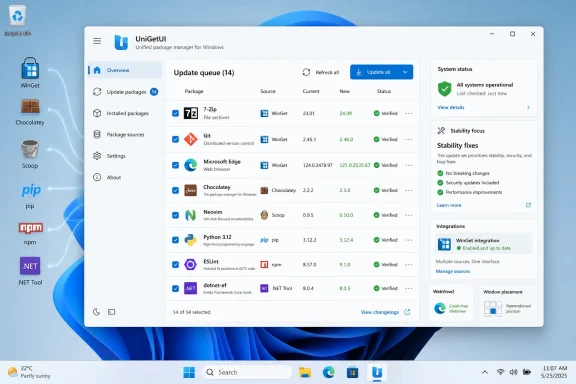 UniGetUI’s Pitch Is Still That Windows Package Management Needs a Front Door
Windows has spent years inching toward the package-management culture that Linux users have treated as ordinary for decades. Microsoft’s WinGet gave the platform a credible first-party command-line tool, but it did not solve the broader usability problem: most Windows users do not want to remember package IDs, command switches, repository quirks, or why one application updates through the Store while another appears only in Chocolatey or Scoop.UniGetUI exists because that fragmentation is real. Its basic argument is simple: if Windows software is already scattered across multiple package managers, the user should not have to care which one happens to know about a given app. The interface pulls those sources together, presents software discovery and updates in a single place, and turns bulk install or removal into something closer to app-store behavior than shell scripting.
That makes UniGetUI unusually interesting for WindowsForum readers. It is not merely a convenience wrapper for hobbyists. It is a bridge between the CLI-first world of automation and the GUI-first habits of everyday Windows administration, especially on machines where a user wants modern update hygiene without handing the entire experience over to the Microsoft Store.
Version 2026.1.11 reinforces that identity by fixing the plumbing rather than adding another headline feature. The changelog’s emphasis on WinGet integration, Avalonia polish, remembered window placement, and PowerShell 7 update visibility is not random housekeeping. Those are precisely the places where a GUI package manager either earns trust or becomes another tray icon users ignore.
The WinGet Fixes Matter Because WinGet Is the Center of Gravity
The most consequential line in this release is the least dramatic one: Devolutions says it fixed several issues affecting WinGet integration, while acknowledging that some edge cases may still remain. That caveat is honest, and it should be read as a realistic description of the Windows package-management stack rather than a confession of failure.WinGet is the default gravitational body in this ecosystem. Chocolatey and Scoop remain important, especially for power users and managed setups with established workflows, but WinGet has the advantage of Microsoft’s blessing and deepening Windows visibility. If UniGetUI cannot reliably interpret WinGet state, updates, versions, and installation behavior, the entire “one interface for everything” premise gets weaker.
The tricky part is that WinGet itself is not just a database of installers. It is a moving ecosystem of manifests, installer technologies, Store entries, local detection rules, user scope versus machine scope installs, and publisher-provided versioning habits. A GUI sitting on top of it must translate that mess into buttons and progress bars without hiding too much or inventing certainty that is not there.
That is why “major fixes and improvements” to WinGet integration are meaningful even when they do not sound flashy. Package managers fail in small ways before users abandon them: an update does not appear, a version comparison looks wrong, an installer is detected under one name and updated under another, or a package source quietly behaves differently from the others. Those bugs do not merely annoy; they undermine confidence in the whole update pipeline.
For sysadmins, that confidence question is even sharper. UniGetUI is not a replacement for Intune, Configuration Manager, winget scripting, or enterprise patch platforms. But it can be part of the toolkit for small fleets, labs, power-user workstations, and lightly managed environments. In those contexts, a WinGet integration bug is not cosmetic. It can mean stale software remains stale because the interface failed to surface it.
Avalonia Is the Long Bet Hiding Inside a Point Release
The 2026.1.11 changelog also continues the project’s migration story around Avalonia, the cross-platform UI framework that has become central to UniGetUI’s next chapter under Devolutions. This release improves the Avalonia interface so it better matches the older WinUI version, fixes a missing translation in the context menu, removes a transparent border around window edges, and addresses a WebView crash.Those sound like paper cuts, and in one sense they are. But UI migrations live or die on paper cuts. Users may tolerate a missing advanced feature for a while; they are less forgiving when a new interface looks subtly wrong, forgets its position, crashes in embedded web content, or feels like a downgrade from the thing it is supposed to replace.
The remembered window size and position change is a perfect example. Nobody downloads a release because a window remembers where it was. But everyone notices when a utility they open every week behaves like it has amnesia. These small affordances are what make software feel settled rather than experimental.
Avalonia also hints at a broader ambition. UniGetUI has historically been tied to Windows because its purpose is tied to Windows package managers, but a cross-platform UI foundation gives Devolutions more room to rationalize code, share interface work, and reduce the long-term burden of maintaining parallel experiences. The phrase “cross-platform” should not be overread as a promise that every Windows package workflow suddenly becomes portable. It does suggest, however, that the maintainers want a modern UI base that is not trapped by the lifecycle of one Windows presentation stack.
That is a sensible bet. Windows desktop development has too often made application authors choose between native feel, long-term maintainability, modern controls, and cross-platform optionality. UniGetUI does not need to become a design showcase. It needs an interface framework that lets the team move quickly without making the app feel alien on Windows.
A Package Manager GUI Cannot Afford to Be Almost Right
UniGetUI’s appeal is that it reduces friction, but its risk is that it can also reduce visibility. A command-line user sees the exact tool being invoked and the exact text it returns. A GUI user sees an action, a spinner, and a result. If the abstraction is accurate, that is a benefit. If it is leaky, the user is left guessing whether the problem belongs to UniGetUI, WinGet, Chocolatey, the installer, the network, Windows itself, or a stale manifest.That is why reliability releases matter disproportionately for this category of software. A note about PowerShell 7 updates not being displayed, for example, is more than a niche fix for shell enthusiasts. PowerShell 7 is a core tool for administrators, developers, and advanced Windows users. If a package manager front end fails to show that it needs updating, the user’s trust in the entire update view takes a hit.
The same principle applies to the “minimum age” feature being reworked to partially support WinGet. Minimum-age logic is the kind of feature that sounds obscure until you think about why it exists. Not every user wants to install an update the moment a manifest appears. Some prefer to wait a few days for obvious breakage, bad installers, or mistaken metadata to shake out.
That kind of delay is a pragmatic answer to the speed-versus-stability trade-off that every update system faces. Enterprise patching tools have long had rings, deferrals, and staged rollouts. Consumer software updaters often pretend the only two states are “install now” and “ignore.” UniGetUI’s attempt to bring some version of update aging into the GUI package-manager world is a recognition that Windows users need more nuance than a giant update-all button.
Partial support also tells us something. WinGet was not designed around every policy preference a third-party GUI might want to expose. UniGetUI can wrap, interpret, and supplement the underlying tools, but it cannot magically make them all behave identically. The project’s job is not to erase those differences; it is to make them manageable.
Devolutions Is Turning a Useful Utility Into Maintained Infrastructure
The Devolutions name matters here. UniGetUI began life as the kind of open-source utility that power users discover, recommend, and install on every new Windows machine. Under Devolutions, the project has been moving toward a more formalized release pipeline, clearer branding, and a longer-term engineering direction.That transition comes with both promise and tension. On the positive side, a utility like UniGetUI benefits from disciplined release engineering, signed builds, stable downloads, and a team that can pay down architectural debt. Package management is security-sensitive by nature; users are literally granting a tool permission to fetch installers, elevate processes, and modify software across the machine. Amateur charm is not enough.
The tension is that community utilities often win loyalty precisely because they feel direct, nimble, and user-driven. When a project moves under a company’s umbrella, longtime users naturally watch for signs of bloat, account systems, telemetry creep, paywalls, or enterprise-first priorities. There is no evidence in this release that UniGetUI is being bent away from its open-source roots, but the suspicion is part of the social contract Devolutions has to manage.
Version 2026.1.11 reads like a company trying to do that carefully. It does not stuff the changelog with marketing vocabulary. It fixes WinGet issues, improves the Avalonia UI, remembers windows, patches crashes, and repairs update detection. That is exactly the sort of maintenance work that keeps a community tool credible after adoption by a larger steward.
The real test will be consistency. A single stability release is welcome; a cadence of stability releases is a strategy. UniGetUI’s value compounds when users believe that quirks will be addressed, package-manager changes will be tracked, and rough edges in the UI migration will not be allowed to linger for years.
Windows Still Has an Update Gap the Store Cannot Fill
Microsoft has improved Windows application management, but it has not solved the problem that UniGetUI targets. The Microsoft Store is better than it used to be, WinGet is genuinely useful, and many mainstream apps have their own auto-updaters. Yet the resulting landscape is not unified. It is a patchwork of vendor updaters, Store packages, MSI installers, EXE installers, portable apps, developer tools, scripts, and command-line ecosystems.For ordinary users, this fragmentation shows up as update fatigue. A browser updates itself, a GPU utility has a tray agent, a conferencing app nags at launch, Windows Update handles some Microsoft components, and a dozen smaller tools simply sit there until the user remembers them. Security guidance says to keep software updated; the Windows experience still makes that feel like an archaeological dig.
For administrators, the issue is control. On a corporate fleet, the answer is usually centralized management, policy, deployment rings, and reporting. But not every environment has that maturity. Small businesses, labs, nonprofits, classrooms, makerspaces, and consultant-managed machines often live in the gap between “one person updates everything manually” and “full enterprise endpoint management.”
UniGetUI does not turn that gap into a mature patch-management program. It does, however, give technically literate users a single place to see and act on a broader range of software updates than Windows provides out of the box. Its support for exporting package lists and importing them elsewhere also makes it useful for rebuilding a machine or standardizing a personal setup.
That “personal standard image” use case is underrated. Many Windows enthusiasts maintain an informal stack of must-have tools: browser, archive utility, terminal, shell, editor, media app, hardware monitor, remote access client, package managers, runtimes, and developer utilities. UniGetUI’s backup and export features turn that habit into something more repeatable, without requiring a full deployment system.
The GUI Is Not a Betrayal of the Command Line
There is a certain strain of package-management purism that treats graphical front ends as training wheels. It is an old argument and not a very useful one. The command line is excellent for automation, precision, logging, and repeatability. A GUI is excellent for discovery, review, selective action, and users who do not live in a terminal.UniGetUI is strongest when it refuses to pretend those modes are enemies. It exposes package metadata, update availability, install and uninstall actions, bulk operations, custom parameters, skipped versions, ignored updates, and package sharing in a form that makes sense to people who understand software but may not remember every package-manager command. It also gives less technical users a safer route into the same ecosystem.
That matters because Windows administration is full of hybrid users. A developer may be comfortable in PowerShell but still prefer a visual update queue. A home-lab admin may script machine setup but use UniGetUI to audit what is installed. A family tech-support person may want a one-click way to update common apps without teaching every relative what
winget upgrade --all means.The product’s challenge is to keep that GUI from becoming a lowest-common-denominator layer. Advanced options such as custom install switches, architecture selection, older version installation, and remembered per-package preferences are crucial. They preserve the power of the underlying tools while making the common path easier.
That balance is hard. Hide too much and power users leave. Expose too much and the interface becomes a command-line manual with buttons. UniGetUI’s continuing polish work suggests the maintainers understand that the interface itself is not decoration; it is the product’s central act of translation.
Security Depends on the Boring Details
Any tool that installs and updates software at scale becomes part of the user’s security boundary. That does not mean UniGetUI should be treated with suspicion by default, but it does mean its maintenance quality matters. A package manager front end is trusted middleware: it brokers decisions between remote repositories, local machine state, installer behavior, and user approval.In that context, reliability bugs can become security-adjacent. If update detection misses PowerShell 7, the user may remain on an older version longer than intended. If WinGet integration misreads package state, a vulnerable application may appear current when it is not. If a WebView crash or UI glitch interrupts update review, users may postpone the task and never return to it.
The same applies to provenance and transparency. UniGetUI’s ability to show metadata before installation, including publisher information and download details where available, is not just a convenience feature. It is part of how users decide whether a package looks legitimate. Windows package management still depends heavily on manifests, installer sources, and publisher behavior, so the interface should encourage inspection rather than blind clicking.
There is also a human security dimension. Users who cannot easily update third-party software often do not update it. They close pop-ups, defer restarts, ignore tray badges, and assume Windows Update covers more than it does. A competent GUI update manager can improve real-world patch hygiene simply by making the right action obvious.
That is why UniGetUI’s tray and widget integrations are more important than they may appear. Update visibility has to meet users where they are. If available updates are buried inside an app the user rarely opens, the tool becomes another static inventory. If the tray icon or widgets surface actionable updates without becoming nagware, UniGetUI has a better chance of changing behavior.
The Risk Is Not That UniGetUI Does Too Little, But That It Touches Everything
The breadth of UniGetUI’s support is its selling point and its engineering burden. WinGet, Chocolatey, Scoop, pip, npm, and .NET Tool are not interchangeable back ends. They have different assumptions about scope, permissions, versioning, repositories, dependency handling, and what “installed” means.That creates a permanent risk of unevenness. A feature that works elegantly for Scoop may be approximate for WinGet. A package list exported from one machine may not recreate perfectly on another if sources, privileges, architectures, or installer availability differ. Bulk update behavior may be predictable most of the time and then baffling for one package whose installer makes unusual choices.
The only honest way to manage that is to surface enough context without overwhelming the user. UniGetUI cannot promise that every package manager behaves identically. It can promise a clearer control plane, better defaults, and a place where exceptions are visible rather than hidden in separate command histories.
This is also where the Avalonia transition needs care. A UI rewrite or port can accidentally flatten mature behaviors if the team focuses too much on visual parity and not enough on operational nuance. The 2026.1.11 fixes are encouraging because they address both cosmetics and function: the interface looks more like the original WinUI version, but it also stops crashing in a WebView and remembers its state.
The deeper issue is that UniGetUI is becoming infrastructure for people who may not think of it that way. Once a tool becomes the place a user checks for updates, installs new software, exports package lists, and monitors package state, it becomes part of the machine’s maintenance routine. Infrastructure has to be dull, predictable, and explicit about failure.
The 2026.1.11 Release Is a Maintenance Build With Strategic Consequences
It would be easy to dismiss UniGetUI 2026.1.11 as a minor bug-fix release. In version-number terms, that is fair. In product terms, it lands at a moment when the project is trying to do three difficult things at once: absorb a new stewardship model, modernize its interface foundation, and keep pace with the messy reality of Windows package sources.That combination makes every stability release more significant than its changelog length suggests. Users will forgive a project for lacking a dream feature. They are less forgiving when existing workflows regress during a transition. The fixes here appear designed to reassure users that the migration work is not coming at the expense of day-to-day reliability.
The WinGet improvements are the most visible part of that reassurance. If UniGetUI is going to be the friendly face of Windows package management, WinGet must feel first-class inside it. “Some edge cases may still exist” is not ideal marketing, but it is better than pretending the integration problem is solved forever.
The Avalonia improvements serve a different audience: users watching whether the new UI direction will preserve the quality of the old experience. Matching the original WinUI version, fixing borders, restoring translations, and remembering placement are small acts of continuity. They say the maintainers know that a migration is not successful until users stop noticing it.
PowerShell 7 update visibility, meanwhile, speaks directly to the admin and developer crowd. These are users likely to care about package managers in the first place, and they are precisely the users most likely to notice when a core tool fails to appear in an update queue. Fixing that bug is not just a patch; it is a message about priorities.
The Practical Read for Windows Users Is Cautious Optimism
For Windows enthusiasts, UniGetUI remains one of the more compelling ways to make third-party software maintenance less chaotic. It gives WinGet a friendlier surface, brings other package managers into the same room, and offers enough advanced controls to avoid feeling like a toy. Version 2026.1.11 does not change that equation; it strengthens it.For administrators, the recommendation is more measured. UniGetUI is useful for individual workstations, small environments, testing, software discovery, and repeatable personal setups. It should not be mistaken for enterprise patch governance, compliance reporting, or policy-driven deployment. The fact that it can update many things does not mean it can prove every machine is patched.
For developers, the release is notable because it keeps PowerShell, npm, pip, and .NET Tool in the same conceptual frame as desktop apps. That reflects how modern Windows machines are actually used. A developer workstation is not neatly divided between “applications” and “toolchains”; both need updating, and both can become sources of drift.
For security-minded users, the best stance is to treat UniGetUI as a useful visibility layer, not an excuse to stop thinking. Review package sources, understand when an installer is coming from a trusted publisher, and be careful with bulk operations. Convenience is valuable, but package management still deserves attention.
The Small Fixes Tell Windows Users Where This Project Is Headed
This release is useful less because it transforms UniGetUI than because it reveals the project’s near-term priorities. The work is concentrated where trust is either built or lost: update detection, WinGet behavior, UI continuity, and crash reduction.- UniGetUI 2026.1.11 is primarily a stability release for Windows 10 and Windows 11 users rather than a feature-heavy upgrade.
- The WinGet integration fixes are the most important changes because WinGet is now central to how many Windows users expect package management to work.
- The Avalonia UI improvements show that Devolutions is still pushing toward a modernized interface while trying to preserve the feel of the older WinUI version.
- The fix for missing PowerShell 7 updates matters for administrators and developers who rely on UniGetUI as an update visibility tool.
- The release is a reminder that UniGetUI is best viewed as a practical control plane for package managers, not a complete replacement for enterprise patch-management systems.
References
- Primary source: Neowin
Published: Thu, 28 May 2026 03:42:00 GMT
UniGetUI 2026.1.11 - Neowin
User-friendly graphical interface for the Windows Package Manager (winget). It simplifies app installation on Windows 10/11 and enables users to browse and install apps from a visual interface. www.neowin.net
- Related coverage: devolutions.net
Release notes | UniGetUI
Learn about all the new features, fixes and improvements made in Devolutions UniGetUI across the versions.devolutions.net - Official source: github.com
Releases · Devolutions/UniGetUI · GitHub
UniGetUI: The Graphical Interface for your package managers. Could be terribly described as a package manager manager to manage your package managers - Releases · Devolutions/UniGetUI github.com
- Related coverage: newreleases.io
Devolutions/UniGetUI 3.1.1 on GitHub
New release Devolutions/UniGetUI version 3.1.1 UniGetUI 3.1.1 on GitHub. newreleases.io
- Related coverage: unigetui.org
UniGetUI — Free Download for Windows PC
Download UniGetUI free for Windows 10/11. One GUI to manage WinGet, Scoop, Chocolatey, and more package managers.unigetui.org - Related coverage: computerbase.de
UniGetUI 2026.1.0: Zahlreiche Neuerungen nach Besitzerwechsel - ComputerBase
UniGetUI hat einen neuen Besitzer: Künftig wird sich Devolutions um die Entwicklung und alle Belange der grafischen Oberfläche kümmern.www.computerbase.de
- Related coverage: tweakers.net
UniGetUI 2026.1.1
Er is een nieuwe versie van UniGetUI uitgekomen. Dit programma wordt tegenwoordig door Devolutions uitgegeven, bekend van onder meer Remote Desktop Manager en diverse andere beveiligingsproducten, en dient als grafische gebruikersinterface voor de bekendste softwarebeheerprogramma's voor...tweakers.net
- Related coverage: deskmodder.de
UniGetUI 2026.1.0 mit Verbesserungen und wird jetzt von Devolutions weitergeführt
UniGetUI ändert nicht nur die Versionsnummern, sondern auch den Besitzer. Marti hat UniGetUI (damals WinGetUI) entwickelt und es wird jetzt von Devolutions weitergeführt. Das Projekt bleibt kostenlos, Open Source und unterliegt der MIT-Lizenz. Es ändert sich also vorerst nichts. Mit…www.deskmodder.de
