

Microsoft is testing an experimental “Enable OneJS-Based Edge NTP” flag in recent Edge Canary builds that can replace the browser’s normal New Tab page with a Microsoft 365-style cloud search experience after sign-in. The test is narrow, unfinished, and hidden behind a flag, but it points to a larger shift in how Microsoft may want Edge to behave at work. The New Tab page has always been prime browser real estate; this experiment treats it less like a customizable start screen and more like a front door to Microsoft 365. If that interpretation is right, the story is not a cosmetic redesign. It is Microsoft trying to make Edge’s most frequently opened surface part of its productivity cloud.
The modern browser tab is supposed to feel neutral. It is the place you go before you have decided where you are going, a pause between tasks, a clean slate with a search box and perhaps too much news, weather, advertising, or wallpaper. Microsoft’s Edge New Tab page has never been entirely neutral, but it has usually presented itself as a general-purpose launchpad: web search, quick links, a feed, account widgets, and the familiar gravity of Bing.
The Canary experiment described by PiunikaWeb and spotted by the reliable Edge watcher Leopeva64 moves that surface in a different direction. After enabling the “Enable OneJS-Based Edge NTP” flag, users who are not signed in are reportedly redirected to a Microsoft sign-in page. Once authenticated, the New Tab page becomes a simpler Microsoft 365-flavored surface with a search box and OneDrive-backed file suggestions.
That sounds small until you remember how often a New Tab page appears in the working day. A browser does not need to own the whole desktop if it can own the transition moments between tasks. Every Ctrl+T becomes an opportunity to remind a user that their next destination may not be the public web at all, but a document, a colleague, a SharePoint site, or an internal resource indexed somewhere inside Microsoft 365.
The screenshot PiunikaWeb captured in Edge Canary v151.0.4096.0 reportedly resembles Microsoft’s existing Microsoft 365 search page closely enough to suggest that the experiment may not be a fresh browser-native New Tab page. It may be a web app, or a web-app-like experience, surfaced inside Edge where the old New Tab page used to be. That distinction matters because Microsoft has spent years collapsing the boundaries between Windows, Edge, Microsoft 365, and its identity system. This test is another step in that direction.
But flags also reveal what engineering teams are willing to prototype. The notable phrase here is not “New Tab page”; it is “OneJS-Based.” According to Leopeva64’s research, OneJS appears to be an internal Microsoft system intended to unify JavaScript code across platforms and experiences. If that reading is correct, the test may be less about a new layout than about whether Microsoft can use a shared JavaScript foundation to run the same productivity surface in multiple places.
That would fit the direction of Microsoft’s current software strategy. The company increasingly treats Windows and Edge as hosts for cloud experiences that can be updated, flighted, and personalized independently of the underlying operating system. The desktop becomes a container; the account becomes the control plane; the web app becomes the product.
For users, the difference may be invisible at first. They open a tab and see a search box with files underneath. For administrators and developers, however, the consequences are more interesting. A browser-native New Tab page is governed by browser release cycles, browser policies, local rendering decisions, and local settings. A cloud-backed New Tab page can be modified server-side, targeted by tenant, adapted to license level, and integrated with Microsoft 365 services at a pace that does not wait for a full browser release.
That is the real experiment. Microsoft may be testing whether Edge’s default productivity surface can be treated like Microsoft 365 itself: identity-aware, cloud-delivered, and constantly flighted.
That context makes the New Tab experiment feel less like an isolated Edge tweak and more like a redistribution of Microsoft’s search estate. If Bing is no longer the work-search destination, Microsoft needs other habitual surfaces to carry that load. Edge’s address bar is one. Windows search is another. The New Tab page may be the most visually obvious one.
For enterprise users, the classic browser start page is often wasted space. Many organizations already use managed favorites, intranet home pages, SharePoint portals, or custom start pages because workers spend too much time rediscovering the same documents and internal resources. Microsoft’s version of that idea is predictable: rather than let each tenant build a portal from scratch, put Microsoft 365 search and recent cloud files directly where the browser opens.
This is the same logic behind Microsoft 365 Copilot’s broader positioning. The company wants work to begin not with an app icon, but with a query across organizational data. A user should not have to remember whether the thing they need is in OneDrive, SharePoint, Teams, Outlook, Loop, or a meeting recap. They should search from a Microsoft-controlled surface and let the service broker the result.
That is ambitious, but it also makes the New Tab page more sensitive. When a browser tab becomes a corporate file portal, the old consumer question of “Do I like this design?” becomes an enterprise question of governance, relevance, data boundaries, and user consent. A page that can surface work files must be judged differently from a page that merely shows headlines and a wallpaper.
That may make the feature feel irrelevant or even annoying to consumers. A personal Edge user who expects a lightweight New Tab page may see a forced sign-in prompt as yet another attempt to pull the browser deeper into a Microsoft account. Microsoft has already faced years of criticism for nudging sign-in, syncing, Bing defaults, shopping features, sidebars, and Copilot integrations into places where users expected a quieter browser.
For business users, the calculus is different. Edge for Business already relies on identity to separate work and personal browsing contexts, apply policies, and integrate with Microsoft 365. In that world, asking the user to authenticate before showing organizational files is not an intrusion; it is the security model.
The danger is that Microsoft often builds one mechanism and then has to decide how broadly to expose it. A cloud-based New Tab page that makes sense for Entra ID tenants could feel heavy-handed if it drifts into consumer Edge without clear controls. The company’s best version of this experiment would treat enterprise and consumer contexts differently instead of assuming that every user wants their browser start page to become a productivity dashboard.
That distinction will determine the reception. IT departments may welcome a managed, work-aware New Tab page if it respects policy and reduces portal sprawl. Enthusiasts will resist it if it looks like another default surface being converted into an ad for Microsoft’s ecosystem.
Microsoft 365 already has several surfaces that show recent files and recommended documents. The difference is location. Seeing those files inside the Microsoft 365 app is expected. Seeing them every time a new browser tab opens changes the psychological boundary. The browser is no longer merely a tool used to reach work; it becomes a surface that reflects work back at the user continuously.
For security-minded readers, the first question is not whether Edge technically respects permissions. It almost certainly would, because Microsoft 365 search and OneDrive results are permission-trimmed by design. The sharper question is what gets displayed in shared-screen, conference-room, remote-support, or family-PC scenarios. A New Tab page is one of the most casually exposed screens in computing.
That is manageable, but only if Microsoft gives administrators and users clear controls. Organizations will need policy options to enable, disable, scope, or brand the experience. Users will need predictable ways to hide sensitive recommendations or return to a simpler page. The success of a work-focused New Tab page will depend less on the search box than on the quiet administrative details around it.
This is where Microsoft’s enterprise instincts can either save the feature or doom it. If the company ships it as an opt-in Edge for Business capability with tenant-aware policy, it could become a useful productivity layer. If it arrives as another opaque cloud experiment that users have to reverse-engineer through flags, settings, and account states, it will be treated as clutter no matter how clever the backend is.
The company’s answer has been services. Edge is not just a Chromium browser; it is the Microsoft browser, which means vertical tabs, Collections, enterprise management, Bing integration, shopping tools, security features, PDF capabilities, sidebar apps, Copilot, and Microsoft 365 hooks. Some of these are genuinely useful. Some feel like product managers competing for pixels.
The OneJS New Tab experiment belongs to the useful-but-dangerous category. A work-aware New Tab page could make Edge more valuable for organizations standardized on Microsoft 365. It could also reinforce the perception that Edge is less a browser than a delivery vehicle for whatever Microsoft wants to promote this quarter.
That tension has defined Edge for years. Microsoft’s browser is often strongest when it solves boring enterprise problems: compatibility, policy, identity separation, update control, PDF handling, and security baselines. It is weakest when it behaves like a billboard. A New Tab page wired into Microsoft 365 search can be either, depending on implementation.
The argument Microsoft will make is obvious. Work happens in the browser; Microsoft 365 is where organizational knowledge lives; Edge should help users find that knowledge faster. The counterargument is just as obvious. The browser’s first obligation is to user agency, and the New Tab page should not become a contested surface where cloud services override local preference.
That may be true for many changes, but it also means Edge will feel more fluid under enterprise administrators’ feet. Browser management has become one of the central jobs of endpoint administration because the browser is now the main application runtime for countless business processes. A faster cadence makes early testing more important, not less.
A cloud-backed New Tab experience complicates that further. If the feature is controlled partly by Edge version and partly by server-side flighting, organizations may have to validate not just a browser build but a moving service surface. That is already normal in Microsoft 365, where features appear by tenant, ring, license, region, or policy state. Bringing that model into the browser’s New Tab page expands the area that admins must watch.
Extended Stable remains the escape valve for organizations that want slower feature movement. But Extended Stable cannot freeze every cloud-connected experience forever. If a New Tab page is essentially a Microsoft 365 web surface hosted in Edge, its behavior may change on a service timeline even when the browser binary moves more slowly. That distinction is where administrators should focus their attention.
The practical advice is not panic. The feature is a Canary flag, not a deployment notice. But it is another sign that Edge’s future will be shaped as much by Microsoft 365 service delivery as by browser version numbers. Enterprises that manage Edge as a static desktop application are already behind the curve.
A OneJS-based Microsoft 365 New Tab page makes sense only on one side of that divide. In a work profile, it could be a kind of lightweight command center: recent documents, organizational search, people lookup, and perhaps eventually Copilot-powered answers. In a personal profile, the same idea risks feeling like an enterprise portal accidentally dropped into a home browser.
This is why Microsoft’s profile logic matters. The company should not treat the New Tab page as a single global surface with minor account variations. It should treat it as two products. The work New Tab page can be opinionated, tenant-aware, and productivity-heavy. The personal New Tab page should remain user-directed, easily simplified, and free from the assumption that every search is a Microsoft 365 search.
There is precedent for getting this wrong. Microsoft has repeatedly blurred consumer and enterprise affordances in Windows and Edge, putting promotional prompts in professional contexts and enterprise-flavored services in consumer contexts. The backlash is rarely about one button or one widget. It is about accumulated mistrust.
If this experiment is truly aimed at business customers, Microsoft should say so when it is ready to discuss it. A browser surface built for Entra ID users should be marketed and managed as such. Ambiguity will only invite the familiar complaint that Edge is becoming too busy, too cloudy, and too eager to sign users in.
OneJS, if accurately understood as a shared Microsoft JavaScript foundation, would let Microsoft reduce duplicate implementations across browser, web, and possibly other shell surfaces. That could make features more consistent. It could also let Microsoft ship improvements to Microsoft 365 search experiences without separately rebuilding them for every host.
There are real advantages to that. A unified codebase can reduce divergence, speed up fixes, and make accessibility or localization improvements propagate more reliably. It can also help Microsoft present a consistent search experience whether a user starts from M365.cloud.microsoft, Edge’s address bar, Windows search, or a New Tab page.
But shared foundations also create shared failure modes. If the cloud surface is slow, unavailable, misconfigured, or confusing, the browser’s starting experience suffers. If the service changes unexpectedly, users experience that as Edge changing, even if the browser build itself did not. If the page depends too heavily on network conditions, the New Tab page stops feeling instant.
The traditional New Tab page has one job that users rarely articulate: it must appear immediately and get out of the way. Any cloud-based replacement must meet that standard before its productivity features matter. Microsoft cannot let the browser’s most common blank canvas become another loading spinner for the cloud.
The policy questions are predictable. Can the feature be disabled? Can it be enabled only for work profiles? Can tenants choose which content appears? Can recommended files be hidden on unmanaged devices? Does the experience honor existing Microsoft 365, OneDrive, SharePoint, sensitivity-label, and data-loss-prevention boundaries? Does it behave differently on shared Windows devices, kiosks, virtual desktops, or non-persistent sessions?
Microsoft has answers for some of these categories elsewhere in its stack, but that does not automatically settle the New Tab case. The placement changes the risk model. A search result page appears after intent. A New Tab page appears before intent. That makes accidental disclosure and user surprise more plausible.
There is also the matter of defaults. Enterprises tolerate Microsoft experimentation when it is ringed, documented, and manageable. They become less forgiving when a default browser surface changes before help desks, training teams, and compliance owners know what happened. The move to a two-week Edge cadence makes communication even more important.
If Microsoft eventually ships this, the feature should arrive with Edge management documentation, Message Center notices for Microsoft 365 tenants, and clear profile-specific policy controls. Without those, the technical merits of OneJS will be beside the point.
Microsoft is turning Edge into a browser that understands more context. It can know what profile you are using, what organization you belong to, what files you recently touched, what policies apply, what problems the browser is having, and what Microsoft 365 services might answer your next query. That is the substrate for an AI-heavy browser even when the visible feature is just a search box.
The company does not need to declare “AI New Tab page” for this to become part of its AI strategy. Once the New Tab page is connected to Microsoft 365 search, OneDrive content, identity, and a shared web foundation, Copilot-style features become a natural extension. Summaries of recent documents, suggested follow-ups from meetings, people cards, workflow reminders, and contextual troubleshooting could all fit into that surface.
That possibility will excite some organizations and alarm others. The browser is already where sensitive work happens. Making it more intelligent may reduce friction, but it also increases the importance of auditability, explainability, and administrative boundaries. The more Edge becomes a workplace assistant, the more it must behave like enterprise infrastructure rather than a consumer growth surface.
This is the delicate line Microsoft has to walk. The company’s AI and productivity ambitions are strongest when they respect the boring constraints of corporate IT. They are weakest when they arrive as surprise UI.
That move is logical. Microsoft has consolidated work search around Microsoft 365. It has made Edge for Business a key part of its enterprise browser pitch. It is accelerating Edge releases. It is embedding AI and diagnostics deeper into the browser. A New Tab page that behaves like a Microsoft 365 front end is not an outlier; it is the next piece of the puzzle.
The risks are equally logical. Browser users are sensitive to anything that feels like a forced portal. Administrators are wary of service-driven UI changes that outpace validation. Security teams will care about when and where file recommendations appear. And longtime Edge skeptics will see another example of Microsoft turning a browser surface into a Microsoft services surface.
The best outcome is a feature that is boringly well-governed. It should be profile-aware, policy-controlled, fast, reversible, and explicitly aimed at organizations that want Microsoft 365 search closer to the user’s workflow. The worst outcome is a vague rollout that leaves consumers annoyed, admins surprised, and support teams explaining why a new tab suddenly shows cloud files.
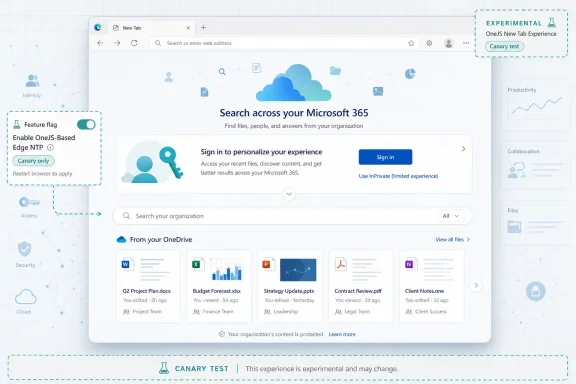 Microsoft Turns the Blank Page Into a Work Portal
The modern browser tab is supposed to feel neutral. It is the place you go before you have decided where you are going, a pause between tasks, a clean slate with a search box and perhaps too much news, weather, advertising, or wallpaper. Microsoft’s Edge New Tab page has never been entirely neutral, but it has usually presented itself as a general-purpose launchpad: web search, quick links, a feed, account widgets, and the familiar gravity of Bing.The Canary experiment described by PiunikaWeb and spotted by the reliable Edge watcher Leopeva64 moves that surface in a different direction. After enabling the “Enable OneJS-Based Edge NTP” flag, users who are not signed in are reportedly redirected to a Microsoft sign-in page. Once authenticated, the New Tab page becomes a simpler Microsoft 365-flavored surface with a search box and OneDrive-backed file suggestions.
That sounds small until you remember how often a New Tab page appears in the working day. A browser does not need to own the whole desktop if it can own the transition moments between tasks. Every Ctrl+T becomes an opportunity to remind a user that their next destination may not be the public web at all, but a document, a colleague, a SharePoint site, or an internal resource indexed somewhere inside Microsoft 365.
The screenshot PiunikaWeb captured in Edge Canary v151.0.4096.0 reportedly resembles Microsoft’s existing Microsoft 365 search page closely enough to suggest that the experiment may not be a fresh browser-native New Tab page. It may be a web app, or a web-app-like experience, surfaced inside Edge where the old New Tab page used to be. That distinction matters because Microsoft has spent years collapsing the boundaries between Windows, Edge, Microsoft 365, and its identity system. This test is another step in that direction.
The Flag Is Small, but the Architectural Hint Is Large
Canary flags are not promises. They are switches for experiments, temporary scaffolding, internal trials, and ideas that may never reach Stable. Anyone who has followed Chromium-based browsers knows that flags can vanish as quickly as they appear, and Microsoft is especially willing to trial features publicly before deciding whether they belong in the product.But flags also reveal what engineering teams are willing to prototype. The notable phrase here is not “New Tab page”; it is “OneJS-Based.” According to Leopeva64’s research, OneJS appears to be an internal Microsoft system intended to unify JavaScript code across platforms and experiences. If that reading is correct, the test may be less about a new layout than about whether Microsoft can use a shared JavaScript foundation to run the same productivity surface in multiple places.
That would fit the direction of Microsoft’s current software strategy. The company increasingly treats Windows and Edge as hosts for cloud experiences that can be updated, flighted, and personalized independently of the underlying operating system. The desktop becomes a container; the account becomes the control plane; the web app becomes the product.
For users, the difference may be invisible at first. They open a tab and see a search box with files underneath. For administrators and developers, however, the consequences are more interesting. A browser-native New Tab page is governed by browser release cycles, browser policies, local rendering decisions, and local settings. A cloud-backed New Tab page can be modified server-side, targeted by tenant, adapted to license level, and integrated with Microsoft 365 services at a pace that does not wait for a full browser release.
That is the real experiment. Microsoft may be testing whether Edge’s default productivity surface can be treated like Microsoft 365 itself: identity-aware, cloud-delivered, and constantly flighted.
Microsoft 365 Search Needed a Better Doorway
The timing is not random. Microsoft has been moving work search away from Bing and toward Microsoft 365 surfaces. Microsoft Search in Bing for work and school was retired in 2025, with Microsoft pointing users toward M365.cloud.microsoft, SharePoint Online, Edge for Business address-bar search, and Windows search as the continuing entry points for files, people, sites, and organizational results.That context makes the New Tab experiment feel less like an isolated Edge tweak and more like a redistribution of Microsoft’s search estate. If Bing is no longer the work-search destination, Microsoft needs other habitual surfaces to carry that load. Edge’s address bar is one. Windows search is another. The New Tab page may be the most visually obvious one.
For enterprise users, the classic browser start page is often wasted space. Many organizations already use managed favorites, intranet home pages, SharePoint portals, or custom start pages because workers spend too much time rediscovering the same documents and internal resources. Microsoft’s version of that idea is predictable: rather than let each tenant build a portal from scratch, put Microsoft 365 search and recent cloud files directly where the browser opens.
This is the same logic behind Microsoft 365 Copilot’s broader positioning. The company wants work to begin not with an app icon, but with a query across organizational data. A user should not have to remember whether the thing they need is in OneDrive, SharePoint, Teams, Outlook, Loop, or a meeting recap. They should search from a Microsoft-controlled surface and let the service broker the result.
That is ambitious, but it also makes the New Tab page more sensitive. When a browser tab becomes a corporate file portal, the old consumer question of “Do I like this design?” becomes an enterprise question of governance, relevance, data boundaries, and user consent. A page that can surface work files must be judged differently from a page that merely shows headlines and a wallpaper.
Sign-In Is the Product Boundary
The reported sign-in behavior is the clearest clue that this experiment is not meant to be judged as a generic Edge redesign. If enabling the flag sends an unsigned user to Microsoft authentication, the experience is fundamentally account-first. The page only makes sense once Microsoft knows who the user is and what tenant, files, permissions, and services apply.That may make the feature feel irrelevant or even annoying to consumers. A personal Edge user who expects a lightweight New Tab page may see a forced sign-in prompt as yet another attempt to pull the browser deeper into a Microsoft account. Microsoft has already faced years of criticism for nudging sign-in, syncing, Bing defaults, shopping features, sidebars, and Copilot integrations into places where users expected a quieter browser.
For business users, the calculus is different. Edge for Business already relies on identity to separate work and personal browsing contexts, apply policies, and integrate with Microsoft 365. In that world, asking the user to authenticate before showing organizational files is not an intrusion; it is the security model.
The danger is that Microsoft often builds one mechanism and then has to decide how broadly to expose it. A cloud-based New Tab page that makes sense for Entra ID tenants could feel heavy-handed if it drifts into consumer Edge without clear controls. The company’s best version of this experiment would treat enterprise and consumer contexts differently instead of assuming that every user wants their browser start page to become a productivity dashboard.
That distinction will determine the reception. IT departments may welcome a managed, work-aware New Tab page if it respects policy and reduces portal sprawl. Enthusiasts will resist it if it looks like another default surface being converted into an ad for Microsoft’s ecosystem.
OneDrive on the New Tab Page Changes the Privacy Conversation
A New Tab page that lists files from OneDrive is useful only because it is intimate. It knows what you have been working on, what you might need next, and which cloud documents are likely to matter. That is exactly why it can feel powerful in a work environment and unsettling in a personal browser.Microsoft 365 already has several surfaces that show recent files and recommended documents. The difference is location. Seeing those files inside the Microsoft 365 app is expected. Seeing them every time a new browser tab opens changes the psychological boundary. The browser is no longer merely a tool used to reach work; it becomes a surface that reflects work back at the user continuously.
For security-minded readers, the first question is not whether Edge technically respects permissions. It almost certainly would, because Microsoft 365 search and OneDrive results are permission-trimmed by design. The sharper question is what gets displayed in shared-screen, conference-room, remote-support, or family-PC scenarios. A New Tab page is one of the most casually exposed screens in computing.
That is manageable, but only if Microsoft gives administrators and users clear controls. Organizations will need policy options to enable, disable, scope, or brand the experience. Users will need predictable ways to hide sensitive recommendations or return to a simpler page. The success of a work-focused New Tab page will depend less on the search box than on the quiet administrative details around it.
This is where Microsoft’s enterprise instincts can either save the feature or doom it. If the company ships it as an opt-in Edge for Business capability with tenant-aware policy, it could become a useful productivity layer. If it arrives as another opaque cloud experiment that users have to reverse-engineer through flags, settings, and account states, it will be treated as clutter no matter how clever the backend is.
Edge Is Becoming a Shell for Microsoft’s Services
The Chromium switch made Edge technically credible. Microsoft no longer had to persuade developers to care about a proprietary rendering engine, and users no longer had to worry that the browser would mishandle modern websites. That victory created a new problem: if Edge is built on the same open-source foundation as Chrome, Microsoft must differentiate it somewhere else.The company’s answer has been services. Edge is not just a Chromium browser; it is the Microsoft browser, which means vertical tabs, Collections, enterprise management, Bing integration, shopping tools, security features, PDF capabilities, sidebar apps, Copilot, and Microsoft 365 hooks. Some of these are genuinely useful. Some feel like product managers competing for pixels.
The OneJS New Tab experiment belongs to the useful-but-dangerous category. A work-aware New Tab page could make Edge more valuable for organizations standardized on Microsoft 365. It could also reinforce the perception that Edge is less a browser than a delivery vehicle for whatever Microsoft wants to promote this quarter.
That tension has defined Edge for years. Microsoft’s browser is often strongest when it solves boring enterprise problems: compatibility, policy, identity separation, update control, PDF handling, and security baselines. It is weakest when it behaves like a billboard. A New Tab page wired into Microsoft 365 search can be either, depending on implementation.
The argument Microsoft will make is obvious. Work happens in the browser; Microsoft 365 is where organizational knowledge lives; Edge should help users find that knowledge faster. The counterargument is just as obvious. The browser’s first obligation is to user agency, and the New Tab page should not become a contested surface where cloud services override local preference.
The Faster Edge Cadence Raises the Stakes
Microsoft’s release-cycle change gives this experiment added significance. The company announced that Edge Stable will move to a two-week release cycle starting with Edge 152 on August 27, 2026, while Extended Stable remains on an eight-week rhythm. Microsoft’s stated pitch is that smaller, more frequent releases should deliver features and security improvements faster while making validation easier.That may be true for many changes, but it also means Edge will feel more fluid under enterprise administrators’ feet. Browser management has become one of the central jobs of endpoint administration because the browser is now the main application runtime for countless business processes. A faster cadence makes early testing more important, not less.
A cloud-backed New Tab experience complicates that further. If the feature is controlled partly by Edge version and partly by server-side flighting, organizations may have to validate not just a browser build but a moving service surface. That is already normal in Microsoft 365, where features appear by tenant, ring, license, region, or policy state. Bringing that model into the browser’s New Tab page expands the area that admins must watch.
Extended Stable remains the escape valve for organizations that want slower feature movement. But Extended Stable cannot freeze every cloud-connected experience forever. If a New Tab page is essentially a Microsoft 365 web surface hosted in Edge, its behavior may change on a service timeline even when the browser binary moves more slowly. That distinction is where administrators should focus their attention.
The practical advice is not panic. The feature is a Canary flag, not a deployment notice. But it is another sign that Edge’s future will be shaped as much by Microsoft 365 service delivery as by browser version numbers. Enterprises that manage Edge as a static desktop application are already behind the curve.
The Consumer Browser and the Work Browser Are Drifting Apart
Microsoft has tried to solve Edge’s identity problem with Edge for Business, which gives work profiles their own branding and management context. That was a necessary move because one browser now has to serve two very different audiences. Consumers want speed, compatibility, privacy, and a low-friction relationship with their preferred services. Businesses want policy, identity, compliance, search, managed updates, and integration with the Microsoft stack.A OneJS-based Microsoft 365 New Tab page makes sense only on one side of that divide. In a work profile, it could be a kind of lightweight command center: recent documents, organizational search, people lookup, and perhaps eventually Copilot-powered answers. In a personal profile, the same idea risks feeling like an enterprise portal accidentally dropped into a home browser.
This is why Microsoft’s profile logic matters. The company should not treat the New Tab page as a single global surface with minor account variations. It should treat it as two products. The work New Tab page can be opinionated, tenant-aware, and productivity-heavy. The personal New Tab page should remain user-directed, easily simplified, and free from the assumption that every search is a Microsoft 365 search.
There is precedent for getting this wrong. Microsoft has repeatedly blurred consumer and enterprise affordances in Windows and Edge, putting promotional prompts in professional contexts and enterprise-flavored services in consumer contexts. The backlash is rarely about one button or one widget. It is about accumulated mistrust.
If this experiment is truly aimed at business customers, Microsoft should say so when it is ready to discuss it. A browser surface built for Entra ID users should be marketed and managed as such. Ambiguity will only invite the familiar complaint that Edge is becoming too busy, too cloudy, and too eager to sign users in.
The Technical Foundation May Matter More Than the First UI
The early interface described by testers sounds almost underwhelming: a search box, files from OneDrive, and a layout resembling Microsoft 365 search. That is probably the point. The first version of a platform shift often looks simple because the hard work is underneath.OneJS, if accurately understood as a shared Microsoft JavaScript foundation, would let Microsoft reduce duplicate implementations across browser, web, and possibly other shell surfaces. That could make features more consistent. It could also let Microsoft ship improvements to Microsoft 365 search experiences without separately rebuilding them for every host.
There are real advantages to that. A unified codebase can reduce divergence, speed up fixes, and make accessibility or localization improvements propagate more reliably. It can also help Microsoft present a consistent search experience whether a user starts from M365.cloud.microsoft, Edge’s address bar, Windows search, or a New Tab page.
But shared foundations also create shared failure modes. If the cloud surface is slow, unavailable, misconfigured, or confusing, the browser’s starting experience suffers. If the service changes unexpectedly, users experience that as Edge changing, even if the browser build itself did not. If the page depends too heavily on network conditions, the New Tab page stops feeling instant.
The traditional New Tab page has one job that users rarely articulate: it must appear immediately and get out of the way. Any cloud-based replacement must meet that standard before its productivity features matter. Microsoft cannot let the browser’s most common blank canvas become another loading spinner for the cloud.
IT Will Ask About Policy Before It Asks About Design
Enthusiasts will debate whether the page looks clean. Administrators will ask whether they can control it. That is the correct order of operations for any feature that surfaces organizational files inside a browser shell.The policy questions are predictable. Can the feature be disabled? Can it be enabled only for work profiles? Can tenants choose which content appears? Can recommended files be hidden on unmanaged devices? Does the experience honor existing Microsoft 365, OneDrive, SharePoint, sensitivity-label, and data-loss-prevention boundaries? Does it behave differently on shared Windows devices, kiosks, virtual desktops, or non-persistent sessions?
Microsoft has answers for some of these categories elsewhere in its stack, but that does not automatically settle the New Tab case. The placement changes the risk model. A search result page appears after intent. A New Tab page appears before intent. That makes accidental disclosure and user surprise more plausible.
There is also the matter of defaults. Enterprises tolerate Microsoft experimentation when it is ringed, documented, and manageable. They become less forgiving when a default browser surface changes before help desks, training teams, and compliance owners know what happened. The move to a two-week Edge cadence makes communication even more important.
If Microsoft eventually ships this, the feature should arrive with Edge management documentation, Message Center notices for Microsoft 365 tenants, and clear profile-specific policy controls. Without those, the technical merits of OneJS will be beside the point.
The AI Browser Is Arriving Through Side Doors
The PiunikaWeb report also notes Microsoft’s recent testing of an AI-powered Edge tool that can diagnose and help fix browser issues. On the surface, that feature and the OneJS New Tab experiment belong to different categories. One is support automation; the other is productivity search. Together, they show the same strategic direction.Microsoft is turning Edge into a browser that understands more context. It can know what profile you are using, what organization you belong to, what files you recently touched, what policies apply, what problems the browser is having, and what Microsoft 365 services might answer your next query. That is the substrate for an AI-heavy browser even when the visible feature is just a search box.
The company does not need to declare “AI New Tab page” for this to become part of its AI strategy. Once the New Tab page is connected to Microsoft 365 search, OneDrive content, identity, and a shared web foundation, Copilot-style features become a natural extension. Summaries of recent documents, suggested follow-ups from meetings, people cards, workflow reminders, and contextual troubleshooting could all fit into that surface.
That possibility will excite some organizations and alarm others. The browser is already where sensitive work happens. Making it more intelligent may reduce friction, but it also increases the importance of auditability, explainability, and administrative boundaries. The more Edge becomes a workplace assistant, the more it must behave like enterprise infrastructure rather than a consumer growth surface.
This is the delicate line Microsoft has to walk. The company’s AI and productivity ambitions are strongest when they respect the boring constraints of corporate IT. They are weakest when they arrive as surprise UI.
The New Tab Page Is Becoming a Governance Surface
The lesson from this Canary flag is not that every Edge user is about to get a Microsoft 365 New Tab page. There is no evidence of that. The lesson is that Microsoft is exploring whether one of the browser’s most valuable surfaces should be rebuilt around cloud identity, shared web code, and organizational search.That move is logical. Microsoft has consolidated work search around Microsoft 365. It has made Edge for Business a key part of its enterprise browser pitch. It is accelerating Edge releases. It is embedding AI and diagnostics deeper into the browser. A New Tab page that behaves like a Microsoft 365 front end is not an outlier; it is the next piece of the puzzle.
The risks are equally logical. Browser users are sensitive to anything that feels like a forced portal. Administrators are wary of service-driven UI changes that outpace validation. Security teams will care about when and where file recommendations appear. And longtime Edge skeptics will see another example of Microsoft turning a browser surface into a Microsoft services surface.
The best outcome is a feature that is boringly well-governed. It should be profile-aware, policy-controlled, fast, reversible, and explicitly aimed at organizations that want Microsoft 365 search closer to the user’s workflow. The worst outcome is a vague rollout that leaves consumers annoyed, admins surprised, and support teams explaining why a new tab suddenly shows cloud files.
The Canary Flag Already Tells Admins Where to Look
The experiment is early, but it gives Windows and Edge watchers a useful map of what to monitor next. The details that matter are concrete, not speculative.- Microsoft is testing the experience behind a hidden Edge Canary flag, which means it is not a broad rollout and may never ship in its current form.
- The reported behavior requires Microsoft sign-in and appears to replace the normal New Tab page with a Microsoft 365 search-like surface.
- The presence of OneDrive files suggests the feature is more naturally suited to work or school accounts than to ordinary consumer browsing.
- The “OneJS” reference points to a possible shared technical foundation rather than merely a visual redesign.
- Edge’s move to a two-week Stable release cycle beginning with Edge 152 on August 27, 2026, makes early validation more important for organizations that manage browser change tightly.
- The feature’s enterprise viability will depend on policy controls, profile separation, performance, and clear communication more than on the first version of the interface.
References
- Primary source: PiunikaWeb
Published: 2026-06-16T07:36:07.409152
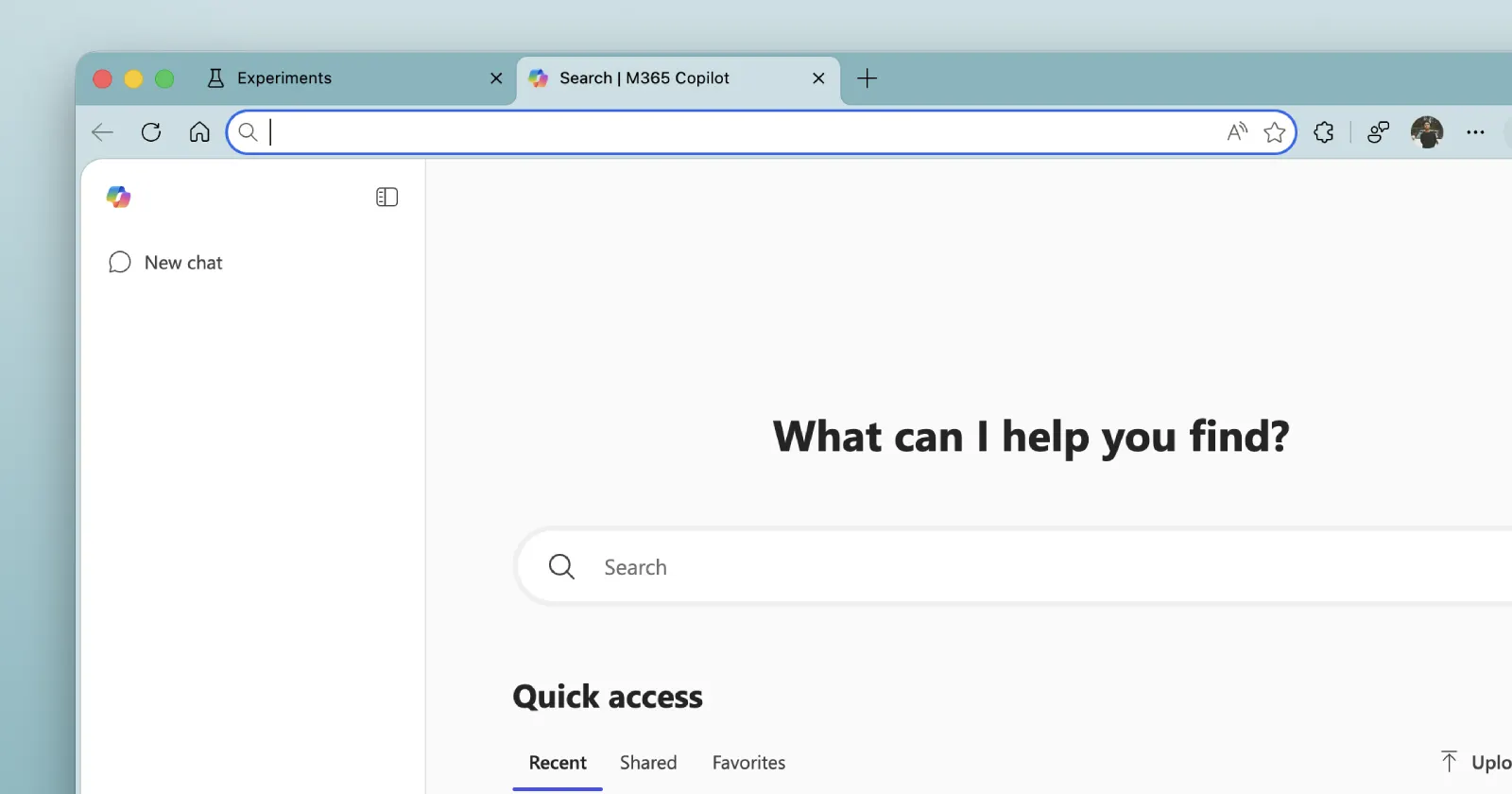
Microsoft appears to be experimenting with a different kind of New Tab page
Microsoft appears to be testing a OneJS-based New Tab Page in Edge Canary. The experiment replaces the traditional NTP with a cloud-based Microsoft 365 experience. piunikaweb.com
- Related coverage: windowscentral.com

Major Microsoft Edge versions will now ship every two weeks: Microsoft confirms plans to ship new Edge features and changes twice a month | Windows Central
Microsoft has announced that Edge will be moving to a two-week release cycle for major versions of the browser, matching Chrome.www.windowscentral.com - Official source: learn.microsoft.com

Microsoft Edge release schedule | Microsoft Learn
Microsoft Edge release schedulelearn.microsoft.com - Official source: blogs.windows.com

Faster updates, enterprise-friendly schedule: the new Microsoft Edge release cycle
Microsoft Edge is moving to a two-week release cycle, bringing new features and improvements to users and organizations faster than ever. This is great news for teams that thrive on innovation: instead of waiting a full month for the next update, youblogs.windows.com - Official source: support.microsoft.com
Get started with Search in the Microsoft 365 Copilot app | Microsoft Support
Learn what you can do with Search in the Microsoft 365 Copilot app.support.microsoft.com - Related coverage: windowsarea.de

Microsoft Edge wechselt zu zweiwöchigem Release-Zyklus
Der Edge-Browser soll künftig häufiger Updates bekommen: Microsoft hat gestern...windowsarea.de
- Official source: microsofters.com

Microsoft Edge tendrá actualizaciones cada dos semanas | Microsofters
Microsoft Edge pasará a un ciclo de dos semanas desde la versión 152, con Extended Stable intacto para empresas. microsofters.com
- Official source: microsoft.com
Microsoft 365 Roadmap | Microsoft 365
The Microsoft 365 Roadmap lists updates that are currently planned for applicable subscribers. Check here for more information on the status of new features and updates.www.microsoft.com
- Official source: m365.cloud.microsoft
Microsoft 365 Copilot - Sign in
Microsoft 365 Copilot is your AI-first productivity assistant, helping you chat, search, create, and collaborate.m365.cloud.microsoft
- Related coverage: systems-training.its.uq.edu.au

Microsoft Search
Microsoft Search is a fast, secure way to find work-related content across UQ’s Microsoft 365 suite including SharePoint, Teams, OneDrive and more.systems-training.its.uq.edu.au
- Official source: download.microsoft.com
- Related coverage: angeles.ccn-cert.cni.es
