

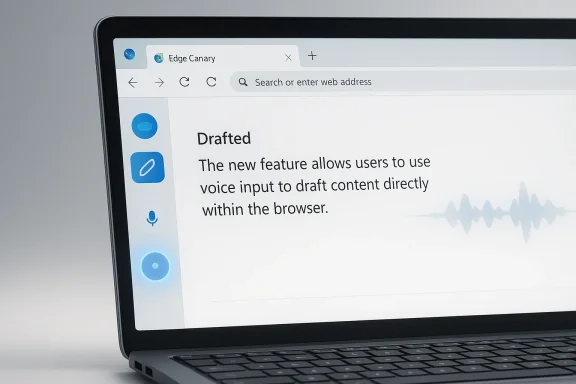
Microsoft is quietly turning Edge into a more conversational writing surface, and the implications go well beyond a small Canary-only experiment. A new microphone button reportedly appearing beside the Copilot pen icon in Edge Canary suggests Microsoft is testing voice input for the Help me write feature, allowing users to speak their prompt instead of typing it. That sounds like a convenience tweak, but it also fits a much larger pattern: Microsoft has been steadily folding Copilot Voice, browser integration, and AI-assisted drafting into a single productivity layer inside Edge and Microsoft’s broader ecosystem
Microsoft’s Copilot strategy has moved fast enough that even close observers can lose track of where one feature ends and another begins. What started as a chat assistant has become a family of related experiences spanning Edge, Windows, Microsoft 365, search, and mobile surfaces. The company’s own materials already describe Copilot as a browser-integrated assistant that can respond via chat or voice, and Edge support documentation shows that voice is not a side experiment anymore but a first-class interaction mode inside the browser
The specific Help me write feature in Edge is part of that arc. Microsoft has long positioned Edge Copilot as a tool for drafting emails, posts, summaries, and other text-heavy tasks without leaving the page. The writing experience already lives in the browser’s side panel, which means adding a microphone is less a conceptual leap than a refinement of the same workflow: capture intent, generate text, and keep the user inside Edge rather than bouncing them between apps or tabs
This is also consistent with Microsoft’s broader push toward voice-driven AI. Microsoft support says Copilot Voice can understand spoken input, process it in conversation, and produce spoken responses, with transcript output afterward. In other words, the company has already built the infrastructure for voice interaction; the new Edge Canary test appears to be about wiring that capability into a more specific writing workflow rather than inventing a new voice product from scratch
From a product strategy perspective, the move makes sense. Microsoft has been trying to make Copilot feel less like a separate destination and more like a continuous layer embedded where people already work. Edge is a natural place for that experiment because it is both a browser and an AI launchpad. If users can speak a draft into a text field, then let Copilot polish it, Microsoft gets closer to a browser that acts like a writing assistant by default rather than a passive window into the web
Still, it is important to keep the current status in perspective. Canary builds are where Microsoft tests changes that may never graduate unchanged to stable Edge. Features can be renamed, moved, gated behind flags, or withdrawn entirely. So the microphone next to Help me write should be read as a signal of direction, not as a guarantee of final product shape
This matters because Microsoft is not just chasing novelty. It is trying to reduce the number of steps between intent and output. Edge already lets Copilot help write. Voice input simply lowers the barrier to getting started, which is often the hardest part of writing anything online. The browser becomes less of a destination and more of a drafting surface with AI listening in the background
It also helps Microsoft normalize voice interaction across its products. The company already offers Copilot Voice in supported experiences and has documented microphone-based interaction in Edge and Copilot more broadly. Putting that capability into Help me write makes the voice layer feel less like a standalone gimmick and more like the operating style Microsoft expects users to adopt
This also shows why Microsoft keeps pushing the same interaction model across different surfaces. The more the company can normalize microphone-based interaction, the more Copilot becomes a habit rather than a novelty. That is important in a crowded AI market where differentiation is increasingly about workflow integration, not just model quality
This is especially valuable in browser-based tasks where the writing context is lightweight and informal. Emails, social posts, support replies, and form fields often do not justify opening a full document editor. For those cases, a quick voice-to-draft flow inside Edge can feel more immediate than switching tools. Microsoft is betting that small, repeated wins like that create sticky usage over time
The browser also gives Microsoft a clean, controlled environment in which to test interaction patterns. Unlike a full operating system change, a Canary browser feature can be iterated quickly. That means Microsoft can observe how often people use voice drafting, whether they trust it, and where it breaks down before committing to a wider rollout
That matters because Microsoft is trying to reduce the mental divide between “ask Copilot,” “talk to Copilot,” and “write with Copilot.” In a mature product, those are simply different expressions of the same assistant. The more Microsoft unifies those modes, the easier it becomes for users to move fluidly between search, drafting, and revision without feeling like they are changing tools
That convenience could matter even more for users who are already comfortable talking to digital assistants. Microsoft has spent years making voice a mainstream interface, and this test leans into that comfort. The result may be a more approachable drafting experience for people who do not think of themselves as “writers” but still need to produce decent text every day
That makes this test more than a productivity gimmick. It broadens the ways people can interact with the browser and gives Microsoft another chance to turn accessibility into a mainstream usability advantage. The best accessibility features are often the ones that improve the experience for everyone, not only for users with specific needs
That said, enterprises care less about novelty than repeatability. A feature has to work in noisy offices, in shared workspaces, and across varied hardware. If voice input becomes flaky, it will be relegated to edge cases. If it is robust, IT teams may start seeing it as another productivity enhancer in the browser stack
This is where Microsoft’s broader Copilot trust story becomes relevant. The company has been working hard to position Copilot as something that fits inside governed environments rather than bypassing them. If the Edge voice-writing feature follows that same philosophy, it has a better chance of being accepted by commercial customers instead of treated as a consumer-only experiment
That is a reasonable bet for browser-based work. Most users do not want to copy and paste between services if they can avoid it. A voice-to-draft feature inside Edge shortens the path from idea to output and keeps the user inside Microsoft’s ecosystem. That makes it not just a feature, but a retention mechanism
That said, integration cuts both ways. If the user experience becomes cluttered, inconsistent, or overly promotional, the feature could feel like an intrusion rather than a help. Microsoft has to balance ambition with restraint, especially in a browser where users are sensitive to changes in defaults and interface clutter
The next few Canary cycles will tell us a lot. Microsoft will need to decide whether the microphone lives permanently beside Help me write, whether it gets broader exposure, and whether the behavior is refined for different workflows. The company will also need to prove that the feature is useful enough to matter but unobtrusive enough not to annoy users who just want a browser that stays out of the way
Source: thewincentral.com Edge voice input, Copilot dictation feature, Help me write voice typing - WinCentral
 Background
Microsoft’s Copilot strategy has moved fast enough that even close observers can lose track of where one feature ends and another begins. What started as a chat assistant has become a family of related experiences spanning Edge, Windows, Microsoft 365, search, and mobile surfaces. The company’s own materials already describe Copilot as a browser-integrated assistant that can respond via chat or voice, and Edge support documentation shows that voice is not a side experiment anymore but a first-class interaction mode inside the browserThe specific Help me write feature in Edge is part of that arc. Microsoft has long positioned Edge Copilot as a tool for drafting emails, posts, summaries, and other text-heavy tasks without leaving the page. The writing experience already lives in the browser’s side panel, which means adding a microphone is less a conceptual leap than a refinement of the same workflow: capture intent, generate text, and keep the user inside Edge rather than bouncing them between apps or tabs
This is also consistent with Microsoft’s broader push toward voice-driven AI. Microsoft support says Copilot Voice can understand spoken input, process it in conversation, and produce spoken responses, with transcript output afterward. In other words, the company has already built the infrastructure for voice interaction; the new Edge Canary test appears to be about wiring that capability into a more specific writing workflow rather than inventing a new voice product from scratch
From a product strategy perspective, the move makes sense. Microsoft has been trying to make Copilot feel less like a separate destination and more like a continuous layer embedded where people already work. Edge is a natural place for that experiment because it is both a browser and an AI launchpad. If users can speak a draft into a text field, then let Copilot polish it, Microsoft gets closer to a browser that acts like a writing assistant by default rather than a passive window into the web
Still, it is important to keep the current status in perspective. Canary builds are where Microsoft tests changes that may never graduate unchanged to stable Edge. Features can be renamed, moved, gated behind flags, or withdrawn entirely. So the microphone next to Help me write should be read as a signal of direction, not as a guarantee of final product shape
What Microsoft Is Testing
The reported test is simple on the surface: a microphone button appears next to the pen icon inside the blue Copilot bubble in Edge Canary. Tap it, speak into a text field, and Copilot turns the spoken idea into polished prose. That is an important distinction. This is not merely voice search, and it is not just Copilot answering questions aloud. It is voice as an input method for composition, which is a different kind of productivity claim altogetherThe workflow changes the experience
The practical flow is straightforward: click into a text box, press the mic button, speak, and let Copilot draft. That short sequence removes a friction point that many users tolerate without thinking about it. For some tasks, typing is still best; for many others, especially rough drafting, speaking is faster and more natural than hunting for words on a keyboardThis matters because Microsoft is not just chasing novelty. It is trying to reduce the number of steps between intent and output. Edge already lets Copilot help write. Voice input simply lowers the barrier to getting started, which is often the hardest part of writing anything online. The browser becomes less of a destination and more of a drafting surface with AI listening in the background
Why a microphone button matters more than it seems
A microphone icon sounds minor, but input design shapes behavior. If users can speak instead of type, they are more likely to begin with rough ideas rather than waiting until they have perfectly structured text in mind. That is a subtle but meaningful shift, because generative AI tends to be most helpful when it can refine messy human intent into a cleaner first draftIt also helps Microsoft normalize voice interaction across its products. The company already offers Copilot Voice in supported experiences and has documented microphone-based interaction in Edge and Copilot more broadly. Putting that capability into Help me write makes the voice layer feel less like a standalone gimmick and more like the operating style Microsoft expects users to adopt
- It reduces friction at the start of writing.
- It reinforces Copilot as an input method, not just a chatbot.
- It may encourage more casual drafting and idea capture.
- It could make Edge more attractive for quick composition tasks.
- It strengthens Microsoft’s voice-first productivity narrative.
Why This Is a Big Deal
On the surface, this is a convenience feature. In strategic terms, it is a signal that Microsoft wants writing to feel more conversational and less mechanical. If the browser can listen, draft, and polish in one loop, then the act of writing online becomes less about manual text entry and more about directing an AI assistantAI-first productivity is becoming the default story
Microsoft has spent the last several product cycles framing Copilot as an ambient helper rather than an isolated chatbot. Voice is a natural extension of that philosophy because it fits the company’s “talk to the assistant” story better than keyboard-only prompting. The user is not submitting a search query so much as starting a dialogue that yields editable textThis also shows why Microsoft keeps pushing the same interaction model across different surfaces. The more the company can normalize microphone-based interaction, the more Copilot becomes a habit rather than a novelty. That is important in a crowded AI market where differentiation is increasingly about workflow integration, not just model quality
Voice lowers the activation energy for writing
A lot of writing friction is psychological. Users know what they want to say, but they hesitate because the first sentence feels hard. Speaking a draft removes that barrier. It lets the user externalize ideas quickly and then rely on AI to organize, rephrase, or elevate them into something usableThis is especially valuable in browser-based tasks where the writing context is lightweight and informal. Emails, social posts, support replies, and form fields often do not justify opening a full document editor. For those cases, a quick voice-to-draft flow inside Edge can feel more immediate than switching tools. Microsoft is betting that small, repeated wins like that create sticky usage over time
- Faster first drafts.
- Less dependency on keyboard precision.
- Better support for users who think aloud.
- More natural input for informal writing.
- Lower friction for repeat browser tasks.
How It Fits Microsoft’s Copilot Roadmap
The Edge Canary test should not be viewed in isolation. It sits inside a much broader Microsoft pattern: voice on one end, AI drafting in the middle, and contextual browser or app integration on the other. Microsoft already markets Copilot in Edge as an assistant that can respond by chat or voice, and the support docs for Copilot Voice show that voice is now a core product modality rather than an afterthoughtEdge is becoming a Copilot front door
Microsoft has made Edge one of the most visible places to interact with Copilot, and the browser is increasingly functioning as a launchpad for AI tasks. That is a smart position for Microsoft because the browser is where many knowledge workers spend a huge portion of the day. If Edge can own the “start writing here” moment, Microsoft gains a high-frequency entry point into everyday productivityThe browser also gives Microsoft a clean, controlled environment in which to test interaction patterns. Unlike a full operating system change, a Canary browser feature can be iterated quickly. That means Microsoft can observe how often people use voice drafting, whether they trust it, and where it breaks down before committing to a wider rollout
Voice is part of the larger Copilot stack
Microsoft’s own Copilot materials talk about chat, voice, and writing as interconnected experiences. The company says Copilot Voice uses speech recognition and natural language processing, and Edge materials explain how users can start voice search from the Copilot icon. Voice input for writing is therefore a logical next step, not a surprising detourThat matters because Microsoft is trying to reduce the mental divide between “ask Copilot,” “talk to Copilot,” and “write with Copilot.” In a mature product, those are simply different expressions of the same assistant. The more Microsoft unifies those modes, the easier it becomes for users to move fluidly between search, drafting, and revision without feeling like they are changing tools
A sign of what may come next
If voice drafting works well in Edge, it could spread to more surfaces. Microsoft has already shown interest in making AI more conversational across Windows and Copilot experiences, and voice is a natural bridge to that future. It would not be surprising to see similar input patterns appear in more Microsoft writing tools if the Edge test proves popular- More voice-first interactions in browser tools.
- Tighter alignment between Copilot and text entry points.
- Greater consistency across Microsoft services.
- Potential expansion into other drafting workflows.
- More emphasis on conversational productivity.
Consumer Impact
For consumers, the biggest win is convenience. Speaking a rough idea is often quicker than typing one, especially on a laptop, tablet, or smaller device. That could make Edge a more appealing browser for casual content creation, quick replies, and impromptu drafting sessions where the goal is to get something useful on the page fastEveryday writing gets easier
The most obvious use cases are ordinary ones: email replies, social media posts, notes, shopping messages, and short-form brainstorming. These are the moments when people are least likely to want a heavyweight editor and most likely to appreciate a little AI help. Speaking a sentence and letting Copilot smooth it out is a compelling shortcut when time is shortThat convenience could matter even more for users who are already comfortable talking to digital assistants. Microsoft has spent years making voice a mainstream interface, and this test leans into that comfort. The result may be a more approachable drafting experience for people who do not think of themselves as “writers” but still need to produce decent text every day
Accessibility is part of the story
Voice input is not only about speed. It also matters for accessibility, ergonomics, and situations where typing is difficult or inconvenient. A microphone-based drafting flow can help users who have mobility challenges, repetitive strain concerns, or simply prefer to speak rather than type for long stretchesThat makes this test more than a productivity gimmick. It broadens the ways people can interact with the browser and gives Microsoft another chance to turn accessibility into a mainstream usability advantage. The best accessibility features are often the ones that improve the experience for everyone, not only for users with specific needs
The consumer payoff may be subtle but sticky
A feature like this rarely wins praise through drama. It wins by quietly becoming part of the routine. If users find themselves speaking into Edge to draft a quick email or rewrite a paragraph, they may start to associate the browser with speed and ease, which is exactly the kind of emotional lock-in Microsoft wants- Faster casual writing.
- Better support for accessibility needs.
- Lower friction on small screens.
- More natural brainstorming.
- Stronger habit formation around Edge.
Enterprise and Work-Related Implications
For enterprises, the implications are more complicated. A voice-powered writing assistant in the browser can improve employee productivity, but it also raises questions about policy, consent, retention, and user behavior. Microsoft support documentation already makes clear that voice-based Copilot interactions depend on microphone permissions and platform settings, which is helpful, but businesses will still want clarity about what data is captured and how it is handledProductivity gains are obvious
In a work setting, the feature could accelerate routine drafting in web apps and internal tools. Employees spend a lot of time writing inside browsers now: CRM systems, help desks, SaaS dashboards, collaboration portals, and webmail all live there. If Microsoft makes voice drafting work reliably in those environments, the time savings could be meaningful across large teamsThat said, enterprises care less about novelty than repeatability. A feature has to work in noisy offices, in shared workspaces, and across varied hardware. If voice input becomes flaky, it will be relegated to edge cases. If it is robust, IT teams may start seeing it as another productivity enhancer in the browser stack
Governance will matter more than the demo
The moment a browser starts listening, IT and security teams begin asking different questions. Who can enable it? What permissions are required? Is any audio retained? Does a transcript persist? Can policy restrict usage? Microsoft’s current Copilot documentation suggests the company is aware of these issues, but the wider deployment picture will still need to be clearer before businesses embrace it at scaleThis is where Microsoft’s broader Copilot trust story becomes relevant. The company has been working hard to position Copilot as something that fits inside governed environments rather than bypassing them. If the Edge voice-writing feature follows that same philosophy, it has a better chance of being accepted by commercial customers instead of treated as a consumer-only experiment
Browser-based AI is becoming workplace infrastructure
The larger implication is that the browser is no longer just a place to view web content. It is turning into a work surface where AI assists in writing, search, summarization, and action. That is a meaningful shift for organizations that standardize on Microsoft products because it means productivity gains may come less from new software and more from changes to the browser itself- Potential time savings in web apps.
- Greater reliance on microphone permissions.
- Need for clearer data-handling policies.
- More pressure on IT governance.
- Stronger browser-as-workspace behavior.
Competitive Context
Microsoft is not alone in pushing AI-assisted writing and voice input, but it has one major advantage: distribution. Edge, Windows, Microsoft 365, and Copilot together create a tightly linked ecosystem that competitors must match feature by feature or beat on simplicity. Google, OpenAI, and others may have strong models, but Microsoft has the browser, the desktop, and the enterprise channel all pointing in the same directionThe battle is about workflow, not just model quality
In AI products, the quality of the underlying model matters, but workflow matters just as much. A slightly less capable model can still win if it is embedded where users already work and requires fewer steps to achieve a useful result. Microsoft is clearly betting that contextual convenience will matter more than standalone chatbot prestige in the long runThat is a reasonable bet for browser-based work. Most users do not want to copy and paste between services if they can avoid it. A voice-to-draft feature inside Edge shortens the path from idea to output and keeps the user inside Microsoft’s ecosystem. That makes it not just a feature, but a retention mechanism
Microsoft’s advantage is integration depth
The company can connect voice, writing, and browsing in ways that pure AI vendors cannot easily replicate. It already has voice interaction, it already has browser integration, and it already has a writing assistant surface. Bringing those together strengthens Microsoft’s case that Copilot is not a bolt-on chatbot but a practical layer across the software people use every dayThat said, integration cuts both ways. If the user experience becomes cluttered, inconsistent, or overly promotional, the feature could feel like an intrusion rather than a help. Microsoft has to balance ambition with restraint, especially in a browser where users are sensitive to changes in defaults and interface clutter
Rivals will respond in their own ways
It would not be surprising if competitors lean harder into their own strengths: Google into web-native simplicity, OpenAI into model capability, and other browser makers into privacy or speed. Microsoft’s challenge is to make Edge feel like the best place to start a draft without making the browser feel bloated or overmanaged. That is a delicate line, and it will determine whether this looks like innovation or feature sprawl- Microsoft has the advantage of ecosystem integration.
- Competitors may emphasize simplicity or privacy.
- Workflow convenience will matter more than branding.
- Browser-based AI is becoming a core battleground.
- Voice input is a feature and a retention strategy.
Strengths and Opportunities
Microsoft’s experiment is promising because it meets users where they already are. It does not ask them to learn a new app or redesign their workflow; it simply lets them speak instead of type inside the browser. That makes it a low-friction addition with a potentially high day-to-day payoff, especially if Microsoft keeps the implementation clean and responsive- Reduces typing friction in common tasks.
- Makes Copilot more approachable for casual users.
- Supports accessibility and alternative input habits.
- Strengthens Edge’s role as a productivity browser.
- Encourages faster first drafts and brainstorming.
- Fits Microsoft’s broader Copilot voice strategy.
- Could improve retention through repeat use.
Risks and Concerns
The main risk is that the feature feels smarter in demos than in real life. Voice input only helps if recognition is accurate, latency is low, and the resulting text is good enough to edit quickly. If it stumbles on accents, noisy rooms, or awkward phrasing, users may fall back to typing and regard the microphone button as decoration- Canary features can change or disappear.
- Microphone permissions may worry some users.
- Data-handling clarity will be critical.
- Accuracy may vary by environment and accent.
- Some users will still prefer keyboard input.
- Browser clutter could undermine usability.
- Enterprises may hesitate without governance detail.
Looking Ahead
If this test sticks, Microsoft could be laying the groundwork for a much more voice-native Edge experience. The company has already made clear that it sees voice as a major part of Copilot’s future, and voice-assisted writing is a logical extension of that vision. A browser that can hear a rough idea and return a polished draft is a small feature with a potentially large strategic footprintThe next few Canary cycles will tell us a lot. Microsoft will need to decide whether the microphone lives permanently beside Help me write, whether it gets broader exposure, and whether the behavior is refined for different workflows. The company will also need to prove that the feature is useful enough to matter but unobtrusive enough not to annoy users who just want a browser that stays out of the way
- Watch for broader rollout beyond Canary.
- Look for changes to the mic button’s placement or behavior.
- Monitor whether Microsoft ties it to Copilot Voice branding.
- See if the feature expands to more writing surfaces.
- Pay attention to enterprise governance and permissions.
Source: thewincentral.com Edge voice input, Copilot dictation feature, Help me write voice typing - WinCentral
