
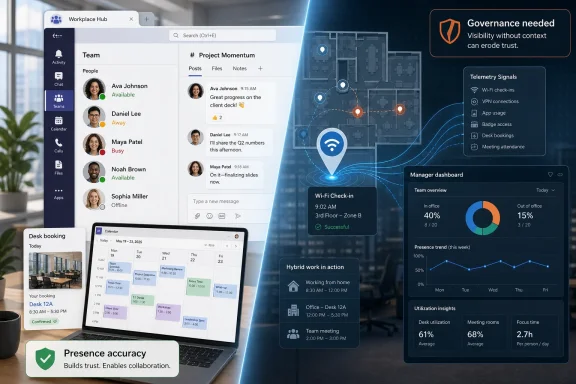
Microsoft Teams is adding web-based activity detection and Wi-Fi-assisted workplace check-in features in 2026, letting organizations improve presence and office-location signals while reigniting concerns that collaboration metadata can become employee-monitoring infrastructure. The controversy is not that Teams knows when a user is available; Teams has done that for years. The sharper issue is that Microsoft is steadily turning vague status dots into richer workplace telemetry at the exact moment employers are fighting over hybrid work, return-to-office compliance, and digital productivity measurement. A feature built to reduce friction can still become a management instrument once it lands inside a tenant with weak governance.
The humble Teams presence indicator has always carried more social weight than Microsoft’s documentation admits. “Available,” “Away,” “Busy,” and “In a meeting” are supposed to be lightweight signals that help colleagues decide whether to call, chat, or wait. In practice, they have become ambient workplace evidence — a green dot that reassures managers, a yellow dot that invites suspicion, and a red dot that may or may not mean someone is actually unavailable.
The RNZ report focuses on a Teams web setting that can detect user activity on the device even when the person is not actively using the Teams tab. Microsoft frames the option as a fix for inaccurate presence, especially for people using Teams in a browser while doing real work in other apps or tabs. Anyone who has watched Teams mark them “Away” while they were writing code, editing a spreadsheet, or working in a browser window understands the practical problem.
But accuracy cuts both ways. If Teams is wrong when it says a worker is away, fixing that error helps collaboration. If Teams becomes more reliable at showing when a worker is active outside Teams, it also becomes more useful for anyone tempted to watch availability as a proxy for effort. The same signal can support a colleague trying to reach you and a manager trying to infer whether you are working.
That is why the privacy concern is not paranoia. Microsoft is not shipping a secret keylogger, and this feature is not a full employee-surveillance suite. The concern is subtler and more realistic: collaboration platforms increasingly collect enough behavioral exhaust that organizations can misuse ordinary product features without buying anything marketed as surveillance software.
Microsoft’s “Keep my current status when I’m active outside of Teams on the web” setting is aimed at that mismatch. If enabled, Teams can keep the user’s presence aligned with broader device activity instead of only Teams-tab activity. That is a sensible product fix in a world where many users live in browsers and where Teams itself is often just one pane among many.
For IT departments, the appeal is obvious. Fewer false “Away” states mean fewer unnecessary pings, fewer accusations that Teams is broken, and fewer employees installing dubious mouse-jiggler utilities or browser hacks just to keep a status badge from lying. In a healthy workplace, better presence accuracy should reduce drama, not create it.
The trouble is that Microsoft’s product language lives in a best-case workplace. It assumes presence is used to coordinate work rather than score workers. RNZ’s interview with Auckland University security software expert Alex Baird gets at the central governance issue: if the data is collected to help teammates understand availability, that is one purpose; if it is used for performance tracking, that is another.
That distinction matters, but it does not end the argument. A feature that shows whether someone is in a building may help colleagues find each other, make room booking more useful, and reduce the stale-location problem that haunts hybrid offices. It may also make it easier for employers to compare stated work patterns with office attendance expectations.
Microsoft appears to understand the sensitivity. Reporting around the feature has repeatedly highlighted that it is off by default, controlled by tenant administrators, and dependent on user consent. Those are meaningful guardrails, especially compared with a silent tenant-wide rollout of location inference.
Still, consent inside an employment relationship is complicated. A worker can technically opt out and still reasonably worry that opting out will look suspicious. An admin can technically configure the feature responsibly and still face pressure from business leaders who want “just a dashboard” showing office presence trends. In enterprise software, the privacy battle is often decided less by the checkbox than by the policy culture around it.
That context makes Teams presence politically charged. If this were simply about making it easier to find a colleague in a large campus, it would be an unglamorous collaboration feature. But when companies are tightening hybrid policies, the same data begins to look like infrastructure for enforcement.
This is where Microsoft’s intent is only part of the story. Vendors often describe features according to their designed use, while workers judge them by their likely organizational use. Both sides may be telling the truth. Microsoft may genuinely be trying to improve collaboration visibility, and employees may genuinely see a path from visibility to monitoring.
The most important word in this debate is not “tracking.” It is purpose. A workplace can justify collecting certain information when the purpose is clear, narrow, and proportionate. It becomes harder to justify when the information quietly migrates into performance conversations, attendance disputes, or informal manager scorekeeping.
But admin control does not automatically equal governance. Many Microsoft 365 tenants are sprawling estates where defaults, policies, and user education lag behind feature velocity. A setting can be “optional” and still become effectively universal if it is promoted during rollout, left unexplained, or enabled by departments without a broader privacy review.
Individual opt-out also has limits. Baird’s RNZ comments point to a practical reality familiar to anyone who has administered software at scale: users do not consistently change settings, especially in complex productivity suites. A privacy-preserving design that depends on every employee noticing, understanding, and adjusting a toggle is weaker than one that starts with clear organizational policy.
The better model is layered. Administrators should decide whether the feature is appropriate, legal or HR teams should define acceptable use, managers should be told what they may not infer from presence, and users should get plain-language explanations before being asked to opt in. Otherwise, the burden shifts downward to the people with the least institutional power.
Teams presence is a communication signal, not a labor ledger. Treating it as a productivity metric encourages performative online behavior and punishes work that does not constantly generate digital motion. It also incentivizes the very evasive tools and habits that managers then cite as evidence that employees cannot be trusted.
For sysadmins and IT leaders, this is more than a cultural concern. Once presence becomes a management metric, IT becomes the accidental enforcement arm. Help desks get asked why someone was away at 2:13 p.m.; admins get asked whether historical presence can be exported; security teams get dragged into arguments that should have been handled by managers and HR.
A mature organization should reject that path early. If leadership wants attendance tracking, it should say so explicitly and use systems designed, reviewed, and governed for that purpose. Smuggling attendance pressure through Teams presence is bad management and bad data practice.
From a product strategy perspective, this is logical. Hybrid work is messy, and Microsoft wants Teams and Microsoft Places to become the connective tissue between people, rooms, desks, meetings, and schedules. If the platform can show who is in, who is remote, who is free, and where collaboration space exists, Microsoft can make a strong case that it is reducing coordination costs.
But platform gravity creates privacy gravity. Each new signal is defensible on its own. Calendar availability is useful. Presence is useful. Workplace location is useful. Device activity detection is useful. The combined picture, however, starts to resemble a behavioral map of the workday.
That does not mean Microsoft should abandon the feature set. It means the company should treat employee trust as a product requirement, not a press-office afterthought. Clear defaults, clear admin documentation, limited retention, visible user controls, and strong boundaries against secondary use are not extras; they are the difference between collaboration software and surveillance infrastructure.
The risk for employers is not only regulatory. It is reputational and relational. Workers who believe Teams is being used to watch them will change how they behave, how they communicate, and how much they trust IT messaging. The mere perception of surveillance can poison a tool that depends on habitual, open use.
There is also a security dimension. More telemetry means more data to protect, more access policies to audit, and more internal misuse scenarios to consider. A location or activity signal may look harmless until it reveals working patterns, medical accommodations, union activity, caregiving routines, or sensitive office visits.
This is where enterprises should be conservative. If a feature is not needed, leave it off. If it is needed, document why. If the organization cannot explain to employees what is collected, who can see it, and what it will not be used for, it is not ready to enable the feature.
Organizations should also think carefully about visibility scope. Baird’s point that a line manager may need different information than the entire organization is important. Presence and location data become riskier when visibility is broad, persistent, or detached from an immediate collaboration need.
A sensible deployment would treat workplace location as contextual and limited. It might help a teammate decide whether to walk to a desk or start a call. It should not become a searchable attendance archive for curious managers. It should not be casually available to people with no operational need.
The same applies to web activity presence. The feature may be useful for browser-based workers who are tired of false “Away” states. But users should understand that enabling it lets Teams infer activity beyond the Teams tab. That is a small expansion technically and a large one psychologically.
 Microsoft Turns the Status Dot Into Workplace Evidence
The humble Teams presence indicator has always carried more social weight than Microsoft’s documentation admits. “Available,” “Away,” “Busy,” and “In a meeting” are supposed to be lightweight signals that help colleagues decide whether to call, chat, or wait. In practice, they have become ambient workplace evidence — a green dot that reassures managers, a yellow dot that invites suspicion, and a red dot that may or may not mean someone is actually unavailable.The RNZ report focuses on a Teams web setting that can detect user activity on the device even when the person is not actively using the Teams tab. Microsoft frames the option as a fix for inaccurate presence, especially for people using Teams in a browser while doing real work in other apps or tabs. Anyone who has watched Teams mark them “Away” while they were writing code, editing a spreadsheet, or working in a browser window understands the practical problem.
But accuracy cuts both ways. If Teams is wrong when it says a worker is away, fixing that error helps collaboration. If Teams becomes more reliable at showing when a worker is active outside Teams, it also becomes more useful for anyone tempted to watch availability as a proxy for effort. The same signal can support a colleague trying to reach you and a manager trying to infer whether you are working.
That is why the privacy concern is not paranoia. Microsoft is not shipping a secret keylogger, and this feature is not a full employee-surveillance suite. The concern is subtler and more realistic: collaboration platforms increasingly collect enough behavioral exhaust that organizations can misuse ordinary product features without buying anything marketed as surveillance software.
The Web Setting Solves a Real Teams Problem
Teams on the web has a particular presence problem because browsers are not desktop collaboration clients. A web app may not always have the same visibility into system activity that a native desktop app has, and users often run Teams in a tab while their actual work happens elsewhere. The result is a product that can misrepresent availability precisely when the user is being productive.Microsoft’s “Keep my current status when I’m active outside of Teams on the web” setting is aimed at that mismatch. If enabled, Teams can keep the user’s presence aligned with broader device activity instead of only Teams-tab activity. That is a sensible product fix in a world where many users live in browsers and where Teams itself is often just one pane among many.
For IT departments, the appeal is obvious. Fewer false “Away” states mean fewer unnecessary pings, fewer accusations that Teams is broken, and fewer employees installing dubious mouse-jiggler utilities or browser hacks just to keep a status badge from lying. In a healthy workplace, better presence accuracy should reduce drama, not create it.
The trouble is that Microsoft’s product language lives in a best-case workplace. It assumes presence is used to coordinate work rather than score workers. RNZ’s interview with Auckland University security software expert Alex Baird gets at the central governance issue: if the data is collected to help teammates understand availability, that is one purpose; if it is used for performance tracking, that is another.
Wi-Fi Check-In Makes the Privacy Debate Harder to Contain
The web activity setting is not the only Teams change drawing scrutiny. Microsoft has also been rolling out a workplace check-in capability that can use an organization’s Wi-Fi to update a user’s work location when the feature is enabled and the user opts in. Microsoft has repositioned and delayed that capability after earlier backlash, emphasizing that it is meant for collaboration rather than compliance.That distinction matters, but it does not end the argument. A feature that shows whether someone is in a building may help colleagues find each other, make room booking more useful, and reduce the stale-location problem that haunts hybrid offices. It may also make it easier for employers to compare stated work patterns with office attendance expectations.
Microsoft appears to understand the sensitivity. Reporting around the feature has repeatedly highlighted that it is off by default, controlled by tenant administrators, and dependent on user consent. Those are meaningful guardrails, especially compared with a silent tenant-wide rollout of location inference.
Still, consent inside an employment relationship is complicated. A worker can technically opt out and still reasonably worry that opting out will look suspicious. An admin can technically configure the feature responsibly and still face pressure from business leaders who want “just a dashboard” showing office presence trends. In enterprise software, the privacy battle is often decided less by the checkbox than by the policy culture around it.
The Return-to-Office Backdrop Changes Everything
Microsoft is shipping these features into a labor environment that is already tense. Since the pandemic normalized remote work, office presence has become both a logistical question and a symbolic one. Employers want to know whether expensive real estate is being used; employees want flexibility without being reduced to badge swipes, VPN logs, or a status bubble.That context makes Teams presence politically charged. If this were simply about making it easier to find a colleague in a large campus, it would be an unglamorous collaboration feature. But when companies are tightening hybrid policies, the same data begins to look like infrastructure for enforcement.
This is where Microsoft’s intent is only part of the story. Vendors often describe features according to their designed use, while workers judge them by their likely organizational use. Both sides may be telling the truth. Microsoft may genuinely be trying to improve collaboration visibility, and employees may genuinely see a path from visibility to monitoring.
The most important word in this debate is not “tracking.” It is purpose. A workplace can justify collecting certain information when the purpose is clear, narrow, and proportionate. It becomes harder to justify when the information quietly migrates into performance conversations, attendance disputes, or informal manager scorekeeping.
Admin Control Is Necessary, Not Sufficient
Microsoft’s usual answer to enterprise controversy is administrative control, and to be fair, that is the right starting point. Tenant-level configuration lets organizations decide whether a feature belongs in their environment. It gives regulated industries, public-sector bodies, schools, and privacy-sensitive employers a way to say no or to stage a controlled rollout.But admin control does not automatically equal governance. Many Microsoft 365 tenants are sprawling estates where defaults, policies, and user education lag behind feature velocity. A setting can be “optional” and still become effectively universal if it is promoted during rollout, left unexplained, or enabled by departments without a broader privacy review.
Individual opt-out also has limits. Baird’s RNZ comments point to a practical reality familiar to anyone who has administered software at scale: users do not consistently change settings, especially in complex productivity suites. A privacy-preserving design that depends on every employee noticing, understanding, and adjusting a toggle is weaker than one that starts with clear organizational policy.
The better model is layered. Administrators should decide whether the feature is appropriate, legal or HR teams should define acceptable use, managers should be told what they may not infer from presence, and users should get plain-language explanations before being asked to opt in. Otherwise, the burden shifts downward to the people with the least institutional power.
Presence Is a Bad Productivity Metric
The dirty secret of Teams surveillance anxiety is that presence is not even a good way to measure work. A green dot can mean someone is actively solving a problem, reading a document, waiting in a meeting, or periodically touching a mouse. A yellow dot can mean someone is thinking, taking notes on paper, helping a colleague away from the keyboard, or doing focused work on another device.Teams presence is a communication signal, not a labor ledger. Treating it as a productivity metric encourages performative online behavior and punishes work that does not constantly generate digital motion. It also incentivizes the very evasive tools and habits that managers then cite as evidence that employees cannot be trusted.
For sysadmins and IT leaders, this is more than a cultural concern. Once presence becomes a management metric, IT becomes the accidental enforcement arm. Help desks get asked why someone was away at 2:13 p.m.; admins get asked whether historical presence can be exported; security teams get dragged into arguments that should have been handled by managers and HR.
A mature organization should reject that path early. If leadership wants attendance tracking, it should say so explicitly and use systems designed, reviewed, and governed for that purpose. Smuggling attendance pressure through Teams presence is bad management and bad data practice.
Microsoft’s Product Gravity Keeps Pulling Teams Toward the Office Graph
Teams is no longer just chat and meetings. It sits inside Microsoft 365, touches Outlook calendars, identity, devices, compliance tools, rooms, phone systems, Copilot workflows, and workplace analytics. That makes Teams a natural place for Microsoft to surface “where work is happening” signals.From a product strategy perspective, this is logical. Hybrid work is messy, and Microsoft wants Teams and Microsoft Places to become the connective tissue between people, rooms, desks, meetings, and schedules. If the platform can show who is in, who is remote, who is free, and where collaboration space exists, Microsoft can make a strong case that it is reducing coordination costs.
But platform gravity creates privacy gravity. Each new signal is defensible on its own. Calendar availability is useful. Presence is useful. Workplace location is useful. Device activity detection is useful. The combined picture, however, starts to resemble a behavioral map of the workday.
That does not mean Microsoft should abandon the feature set. It means the company should treat employee trust as a product requirement, not a press-office afterthought. Clear defaults, clear admin documentation, limited retention, visible user controls, and strong boundaries against secondary use are not extras; they are the difference between collaboration software and surveillance infrastructure.
The Legal Question Is Really an Organizational Discipline Question
Privacy law varies by jurisdiction, but the principle Baird raised in RNZ’s report is broadly familiar: collect data for a defined purpose, minimize what you collect, and do not repurpose it without a legitimate basis. That principle is easy to state and hard to operationalize inside a modern SaaS tenant.The risk for employers is not only regulatory. It is reputational and relational. Workers who believe Teams is being used to watch them will change how they behave, how they communicate, and how much they trust IT messaging. The mere perception of surveillance can poison a tool that depends on habitual, open use.
There is also a security dimension. More telemetry means more data to protect, more access policies to audit, and more internal misuse scenarios to consider. A location or activity signal may look harmless until it reveals working patterns, medical accommodations, union activity, caregiving routines, or sensitive office visits.
This is where enterprises should be conservative. If a feature is not needed, leave it off. If it is needed, document why. If the organization cannot explain to employees what is collected, who can see it, and what it will not be used for, it is not ready to enable the feature.
The Real Test Is Whether Employees Can Say No
Microsoft’s privacy posture around these Teams features depends heavily on opt-in framing. That is better than silent enablement, but the meaningful test is whether employees can decline without penalty, suspicion, or repeated nudging. Consent is not just a UI state; it is a workplace condition.Organizations should also think carefully about visibility scope. Baird’s point that a line manager may need different information than the entire organization is important. Presence and location data become riskier when visibility is broad, persistent, or detached from an immediate collaboration need.
A sensible deployment would treat workplace location as contextual and limited. It might help a teammate decide whether to walk to a desk or start a call. It should not become a searchable attendance archive for curious managers. It should not be casually available to people with no operational need.
The same applies to web activity presence. The feature may be useful for browser-based workers who are tired of false “Away” states. But users should understand that enabling it lets Teams infer activity beyond the Teams tab. That is a small expansion technically and a large one psychologically.
The Teams Toggle That Deserves a Policy Before a Rollout
For WindowsForum readers administering Microsoft 365 environments, the practical answer is not panic; it is preparation. Teams presence and workplace check-in features should be treated like any other workplace data feature that can affect employee privacy and trust. They deserve a rollout plan, not a shrug.- Organizations should decide in advance whether Teams presence data may be used for performance, attendance, or disciplinary purposes, and they should put that answer in writing.
- Tenant administrators should review whether the relevant Teams and Microsoft Places features are enabled, disabled, or available for opt-in before users discover them through rumor.
- Employees should receive a plain-language explanation of what device activity detection and workplace check-in do before they are asked to enable either setting.
- Visibility should be limited to the smallest audience that can justify a collaboration need, rather than exposed broadly across the organization by habit.
- Managers should be trained that Teams presence is not a productivity metric and that absence from a green dot is not evidence of absence from work.
- Security and privacy teams should audit retention, access, and reporting paths before richer presence or location signals become part of normal operations.
References
- Primary source: RNZ
Published: Wed, 17 Jun 2026 05:38:08 GMT
New Microsoft Teams feature raises privacy concerns | RNZ News
The use of the employee data collected needs to be considered, warns Auckland University's Alex Baird.www.rnz.co.nz - Related coverage: windowscentral.com
Microsoft’s controversial Wi‑Fi tracking in Teams is back — but this time with better privacy controls | Windows Central
After multiple delays, Microsoft finally launched its controversial Teams Wi‑Fi tracking feature, promising more transparency and better user control.www.windowscentral.com - Official source: support.microsoft.com
Change your status in Microsoft Teams | Microsoft Support
Learn how to change your status or availability in Microsoft Teams, set a duration for your status, and see who's online.support.microsoft.com - Related coverage: blog-en.topedia.com
Teams on the web can now detect device activity to improve presence accuracy | Topedia Blog
A new Teams on the web setting improves presence accuracy by detecting device activity in supported browsers, even outside the active Teams tab.blog-en.topedia.com - Related coverage: windowslatest.com
Microsoft admits Teams UI is crowded and causes embarrassing accidental screen shares, confirms a fix
Microsoft admits Teams UI is crowded, causes embarrassing accidental screen share problem, but it's getting fixed. www.windowslatest.com
- Related coverage: pcworld.com
Microsoft says new Teams location feature isn't for 'employee tracking' | PCWorld
When this new feature rolls out, your bosses and colleagues will always know where you are.www.pcworld.com
- Official source: learn.microsoft.com
User presence in Teams - Microsoft Teams | Microsoft Learn
Learn the Presence states in Teams and the administrative settings for the Presence feature.learn.microsoft.com - Related coverage: moneycontrol.com
'Where are you?' to Wi‑Fi tracking: Teams update sparks privacy concerns. Microsoft responds
The Microsoft Teams' 'Automatic update of work location' feature arrives as many companies intensify return‑to‑office mandates, leading employees to question whether location tracking could be used to monitor their compliance rather than collaboration.www.moneycontrol.com - Related coverage: alwaysbeyond.com
How to Keep Microsoft Teams Active
How to keep Microsoft Teams active and stop showing as Away. Built-in status settings, device power tweaks, and IT admin tips to stay green all day.www.alwaysbeyond.com - Related coverage: windowsforum.com
Microsoft Teams Retires Legacy External Meeting Controls (June 30, 2026) | Windows Forum
Microsoft’s latest Teams cleanup is another sign that Redmond is actively pruning older client-side integrations in the name of security, even when those...windowsforum.com - Related coverage: newsbytesapp.com
Microsoft Teams adds workplace check-in to auto detect office presence
Microsoft Teams now includes a Workplace Check-In feature that uses corporate Wi-Fi to detect office presence. The feature prioritizes user control and privacy settings.www.newsbytesapp.com
- Related coverage: itpro.com
Microsoft Teams is getting a new location tracking feature that lets bosses snoop on staff – research shows it could cause workforce pushback | IT Pro
The new Microsoft Teams location tracking feature aims to improve office coordination by monitoring employee activities based on Wi-FI.www.itpro.com - Related coverage: mbtelehealth.ca
- Related coverage: assets.ctfassets.net
