
OptiSigns launched Unified Device Management on June 16, 2026, from Houston, offering a platform that turns idle meeting-room displays into digital signs while managing Zoom Rooms, Microsoft Teams Rooms, Cisco Webex Rooms, and Google Meet hardware from one console. The pitch is deceptively simple: the biggest screens in the office should not go dark merely because nobody has booked the room. But the more interesting claim is not about signage; it is about whether a third-party layer can make the post-pandemic meeting room feel less like a stack of vendor portals and more like a managed workplace endpoint.
For years, the office display had an identity crisis. It was a television, then a wireless presentation target, then a room-system monitor, then a video wall for hybrid work’s great compromise. OptiSigns is now making the case that it should also be treated as a programmable surface whenever the room is idle.
That matters because the modern meeting room is no longer just furniture plus a calendar resource. It is a bundle of compute, camera, microphone, panel, operating system, collaboration account, network dependency, firmware channel, and license state. In that environment, the screen is not a passive object; it is the most visible part of an increasingly managed stack.
OptiSigns’ new Unified Device Management platform sits in that awkward middle space between digital signage and AV operations. It promises to discover and manage room systems across Zoom, Teams, Webex, and Google Meet, then use the idle-screen capability of those platforms to show announcements, dashboards, welcome messages, emergency notices, or workplace communications until the next meeting begins.
The company’s argument is that organizations already paid for those panels. If the display is available, powered, networked, and centrally addressable, leaving it blank between meetings is a waste of real estate. That is the easy part of the pitch. The harder part is convincing IT and facilities teams that another console will reduce complexity rather than add one more layer to it.
That distinction is important. In the company’s own support material, the implementation is not identical across vendors. Zoom Rooms and Cisco Webex Rooms can receive content through official APIs. Microsoft Teams Rooms and Google Meet hardware depend on a signage URL model, where administrators configure a custom source in the relevant management portal.
In other words, “one console” does not mean one universal protocol. It means OptiSigns is trying to normalize the operational experience above a fragmented vendor layer. That is a familiar pattern in enterprise IT: when platform owners do not standardize the control plane, a management vendor builds a higher-level one.
The meeting-room market is especially ripe for that maneuver because collaboration platforms have become both strategic and stubbornly siloed. A large organization may standardize on Teams for internal meetings, keep Zoom for customer-facing calls, maintain Webex rooms after an acquisition, and support Google Meet hardware in departments that grew up inside Workspace. The result is not a single hybrid-work strategy but a patchwork of rooms that all look similar to employees and very different to administrators.
OptiSigns is betting that digital signage is the friendliest way to enter that patchwork. Nobody wants to start a platform migration because a room display is blank between meetings. But many organizations might accept a lightweight tool that makes those blank screens useful, then discover they also want a consolidated list of room status, device health, restart controls, grouping, and content assignment.
The long-term management model was often secondary. A few flagship rooms received careful AV design. Smaller huddle rooms got appliance bars. Existing rooms were retrofitted. Satellite offices bought what was available. Acquired companies brought their own platform preferences with them.
The result is a workplace estate that resembles endpoint management but does not always behave like endpoint management. A Windows laptop can be enrolled in Intune, governed by conditional access, patched, inventoried, and retired through known processes. A meeting room may require Teams Rooms Pro Management, Zoom Web Portal, Cisco Control Hub, Google Admin console, an OEM hardware portal, and a ticket to facilities because someone unplugged the display behind a credenza.
That fragmentation has real consequences. Room outages are highly visible, especially when an executive meeting starts with the familiar ritual of “can everyone hear us?” Security teams want to know which devices are online and whether they are current. Facilities teams want rooms to communicate schedules and visitor information. Communications teams want prominent places to put internal messaging. None of those groups necessarily live in the same console.
OptiSigns’ announcement lands because it reframes those rooms as a fleet. That word is doing a lot of work. A fleet can be grouped, targeted, monitored, licensed, and automated. A collection of conference rooms is a floor plan. A fleet is an IT object.
Teams Rooms also illustrates why OptiSigns’ product is both useful and constrained. Microsoft has its own Teams Rooms Pro Management Portal, its own licensing model, its own certified hardware ecosystem, and its own idle digital signage capability for supported configurations. OptiSigns does not replace that stack. It rides alongside it.
The company’s setup guidance for Teams Rooms points to Microsoft’s digital signage option and requires Teams Rooms Pro on Windows 5.1 or later. That detail matters because it means the feature depends on the room already being in the right Microsoft management and licensing posture. For organizations still running older room software, unsupported Windows builds, or Basic licensing where Pro capabilities are required, OptiSigns is not a magic bridge over Microsoft’s requirements.
Still, the value proposition is plausible. Microsoft’s native tools are best for Teams Rooms. OptiSigns wants to be useful when Teams Rooms is only part of the room estate. In a mixed-platform organization, the difference between “configure signage in the Microsoft portal” and “coordinate room messaging across Teams, Zoom, Webex, and Meet” is operationally significant.
There is also a subtle Windows lifecycle dimension. Teams Rooms on Windows has been affected by the broader Windows 10 end-of-support pressure, and organizations with older room hardware have had to think about upgrade paths, Windows 11 compatibility, and app support timelines. Anything that helps inventory and rationalize room fleets will appeal to administrators who are already being asked to treat meeting rooms less like AV furniture and more like managed endpoints with lifecycle risk.
That does not invalidate the product. It clarifies it. Unified Device Management is not a single, equal-depth management plane across four collaboration ecosystems. It is a product that unifies enough of the workflow to make room signage and basic fleet visibility manageable across them.
The difference will matter to enterprise buyers. A facilities manager may care mostly that the correct message appears on the right displays and disappears when a meeting starts. An IT administrator will ask what health data is exposed, how often room state syncs, whether restart commands are platform-specific, how permissions are scoped, what audit trails exist, and what happens when a vendor API changes.
Those are not nitpicks. They are the difference between a convenient signage overlay and a trusted operational control plane. If OptiSigns wants the second identity, it will have to be transparent about per-platform capabilities, failure modes, and administrative permissions.
The encouraging sign is that the product appears to avoid installing additional software on the room device. That lowers the risk profile. Rather than asking admins to sideload agents onto purpose-built meeting systems, OptiSigns uses built-in room-platform behavior and administrative connections. In a managed collaboration environment, that is the right instinct.
That explains the examples OptiSigns is promoting: all-hands countdowns in the morning, visitor welcomes in lobby rooms, live sales dashboards on the floor, and content from Power BI, Google Slides, Tableau, and many other applications. This is not just “put a logo on the TV.” It is an attempt to turn meeting-room screens into a distributed office media network.
The timing is useful. Many companies are still renegotiating what the office is for. If employees commute in for collaboration, the office needs to feel intentional, informed, and alive. Screens that show stale HDMI input prompts do the opposite. They make the office feel abandoned even when the calendar says it is busy.
There is also a practical emergency communications angle. A centrally managed display network can be used for urgent notices, safety instructions, building issues, or service interruptions. That does not replace alerting systems, but it adds another visible channel in spaces where people gather.
The risk is noise. If every idle room screen becomes a carousel of corporate wallpaper, employees will learn to ignore it. The best deployments will treat these displays like scarce attention surfaces, not like dumping grounds for every department’s slide deck.
Meeting-room estates are uneven. A headquarters may have dozens of rooms worth activating, while smaller offices may have a handful of displays that are rarely used or physically unsuitable for signage. Some rooms may have screens positioned for participants but not hallway visibility. Others may be privacy-sensitive, executive-only, or too small to justify content management.
Per-active-room billing lets customers start with high-value spaces: lobbies, training rooms, all-hands rooms, sales floors, customer briefing centers, and heavily trafficked collaboration areas. If the product proves useful, the footprint can expand. If it becomes another abandoned dashboard, the blast radius is limited.
There is also a procurement advantage. Digital signage budgets, facilities budgets, and collaboration budgets often sit in different places. Charging only for activated rooms gives a champion inside one department a cleaner path to a pilot. The larger question is whether OptiSigns can convert those pilots into broader fleet-management commitments.
Each platform vendor wants to be the center of the room. Microsoft wants the Teams admin experience to govern Teams Rooms. Zoom wants Zoom Rooms to be managed in Zoom. Cisco has its own device and Control Hub logic. Google Meet hardware lives in the Google Workspace administrative world. The customer, however, often lives across all of them.
This is the opening for third-party management. The more heterogeneous the real estate, the less satisfying each native admin center becomes. A best-in-class portal for one platform is still only a partial answer when the company has three platforms in production.
But OptiSigns should not be mistaken for a direct replacement for those admin centers. Deep policy, firmware, licensing, identity, meeting configuration, and platform-specific diagnostics will remain vendor-native. The value is in cross-platform operational visibility and content control. That is less glamorous than full management sovereignty, but it may be enough.
The best analogy is not mobile device management replacing iOS or Android settings. It is a layer that lets admins do common work consistently while still dropping into native tools for specialized tasks. If OptiSigns embraces that role honestly, it can be useful without overpromising.
OptiSigns’ no-install approach helps. If the platform uses official APIs or existing signage URL mechanisms, it avoids the more alarming scenario of adding arbitrary software to room appliances. But administrators still need to evaluate OAuth scopes, service accounts, token storage, access controls, audit logs, and what happens when an OptiSigns administrator is compromised.
The signage content itself is another governance issue. A dashboard displayed in a sales area might contain sensitive pipeline data. A visitor welcome screen might reveal names, customer relationships, or meeting subjects. A room display inside a booked meeting should clear automatically, but content shown before or after meetings can still leak information if assignment rules are sloppy.
There is also the question of tenant boundaries. Large organizations may have separate business units, regions, or acquired subsidiaries using different collaboration tenants. A cross-platform signage console is attractive precisely because it centralizes control, but centralization cuts both ways. It can simplify governance or create a new high-value administrative target.
The correct enterprise posture is not fear; it is due diligence. Treat meeting-room signage as part of the endpoint and identity estate, not as a harmless AV decoration. The screen may be idle, but the administrative pathway behind it is not.
Meeting rooms are unforgiving environments for software. A failure that would be mildly annoying on a personal device becomes a public productivity tax when ten people are waiting. The tolerance for clever features is low if the basics are unreliable.
That means OptiSigns’ product will be judged by edge cases. What happens when a meeting is started ad hoc? What happens when a room is invited late? How quickly does signage resume after a call ends? Does a sleeping display behave differently from an awake room? How does the system behave when a vendor portal is reachable but a device is offline? Does content assignment lag behind room sync?
The company’s support material says signage appears only when the room is idle and that scheduled or incoming meetings take over the display. That is the right behavior. The market will decide whether it is consistent enough across vendors, hardware generations, and room configurations.
For IT pros, the evaluation should include real rooms, not just a lab. Test the executive boardroom, the aging huddle room, the dual-display training room, the Android appliance, the Windows-based Teams Room, the Webex device, and the room with questionable Wi-Fi that everyone complains about. Fleet management products reveal their value in ugly environments.
That shift has not been painless. IT teams inherit rooms they did not design. AV teams are asked to troubleshoot cloud authentication. Facilities teams care about room experience but may not control the tenant. Communications teams want screen time but do not want to learn four collaboration portals.
A unified room-management layer appeals because it gives these stakeholders a shared object. A room can have health, content, status, and group membership. It can belong to a floor, region, department, or campaign. It can be managed with a vocabulary closer to endpoint operations than to one-off AV projects.
This is not the death of AV expertise. If anything, it makes that expertise more important. But the operational model is changing. The room is becoming a managed service, and a managed service needs visibility beyond “someone opened a ticket.”
That makes it commercially plausible. Digital signage projects can die under the weight of installation costs, player hardware, cabling, and content governance. Meeting-room management projects can die because every platform owner defends its own console. OptiSigns is threading between those hazards with a feature that is visible enough for business users and operational enough for IT.
The risk is that the product gets categorized as “nice to have.” In a budget-constrained environment, idle-screen signage may sound less urgent than security, device refresh, or collaboration reliability. OptiSigns will need to show that the unified management side reduces support time, improves room visibility, or enables communications workflows that organizations already value.
There is also competition from the platforms themselves. Microsoft, Zoom, Cisco, and Google all have incentives to improve native room management and digital signage features. If a customer is single-platform, the native experience may be good enough. OptiSigns’ strongest case is heterogeneity: the messy, real-world estate where standardization is more aspiration than fact.
The next phase of workplace technology will not be won only by better cameras or sharper displays. It will be won by the tools that make rooms predictable, governable, and useful even when nobody is actively meeting in them. OptiSigns’ Unified Device Management is a modest product on its face, but it points toward a larger reality: the office screen is no longer idle space. It is infrastructure waiting for someone to manage it.
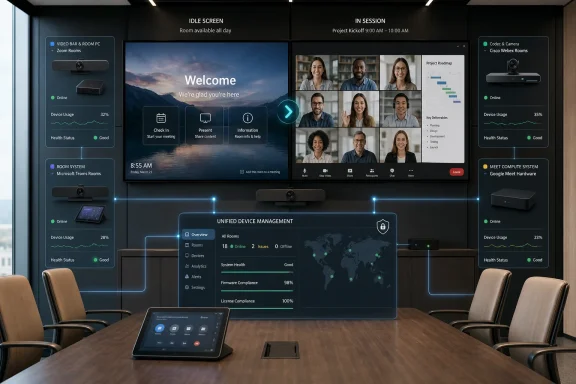 The Conference Room Screen Becomes an Endpoint Again
For years, the office display had an identity crisis. It was a television, then a wireless presentation target, then a room-system monitor, then a video wall for hybrid work’s great compromise. OptiSigns is now making the case that it should also be treated as a programmable surface whenever the room is idle.That matters because the modern meeting room is no longer just furniture plus a calendar resource. It is a bundle of compute, camera, microphone, panel, operating system, collaboration account, network dependency, firmware channel, and license state. In that environment, the screen is not a passive object; it is the most visible part of an increasingly managed stack.
OptiSigns’ new Unified Device Management platform sits in that awkward middle space between digital signage and AV operations. It promises to discover and manage room systems across Zoom, Teams, Webex, and Google Meet, then use the idle-screen capability of those platforms to show announcements, dashboards, welcome messages, emergency notices, or workplace communications until the next meeting begins.
The company’s argument is that organizations already paid for those panels. If the display is available, powered, networked, and centrally addressable, leaving it blank between meetings is a waste of real estate. That is the easy part of the pitch. The harder part is convincing IT and facilities teams that another console will reduce complexity rather than add one more layer to it.
The Idle Screen Is the Wedge, Not the Whole Product
Digital signage in meeting rooms is not a new idea. Teams Rooms, Zoom Rooms, Webex devices, and Google Meet hardware each have their own mechanisms for idle-screen content, room status, or custom display behavior. What OptiSigns is selling is not the invention of that behavior but the abstraction of it.That distinction is important. In the company’s own support material, the implementation is not identical across vendors. Zoom Rooms and Cisco Webex Rooms can receive content through official APIs. Microsoft Teams Rooms and Google Meet hardware depend on a signage URL model, where administrators configure a custom source in the relevant management portal.
In other words, “one console” does not mean one universal protocol. It means OptiSigns is trying to normalize the operational experience above a fragmented vendor layer. That is a familiar pattern in enterprise IT: when platform owners do not standardize the control plane, a management vendor builds a higher-level one.
The meeting-room market is especially ripe for that maneuver because collaboration platforms have become both strategic and stubbornly siloed. A large organization may standardize on Teams for internal meetings, keep Zoom for customer-facing calls, maintain Webex rooms after an acquisition, and support Google Meet hardware in departments that grew up inside Workspace. The result is not a single hybrid-work strategy but a patchwork of rooms that all look similar to employees and very different to administrators.
OptiSigns is betting that digital signage is the friendliest way to enter that patchwork. Nobody wants to start a platform migration because a room display is blank between meetings. But many organizations might accept a lightweight tool that makes those blank screens useful, then discover they also want a consolidated list of room status, device health, restart controls, grouping, and content assignment.
Hybrid Work Left Behind a Management Problem
The hybrid-work boom created an obvious demand for better meeting spaces, but it also created a less visible inventory problem. Offices added video bars, touch panels, room PCs, Android appliances, scheduling displays, cameras, beamforming microphones, and certified kits from different vendors at different speeds. Many of those systems were installed to solve immediate user pain: can people in the room hear remote participants, and can remote participants see people in the room?The long-term management model was often secondary. A few flagship rooms received careful AV design. Smaller huddle rooms got appliance bars. Existing rooms were retrofitted. Satellite offices bought what was available. Acquired companies brought their own platform preferences with them.
The result is a workplace estate that resembles endpoint management but does not always behave like endpoint management. A Windows laptop can be enrolled in Intune, governed by conditional access, patched, inventoried, and retired through known processes. A meeting room may require Teams Rooms Pro Management, Zoom Web Portal, Cisco Control Hub, Google Admin console, an OEM hardware portal, and a ticket to facilities because someone unplugged the display behind a credenza.
That fragmentation has real consequences. Room outages are highly visible, especially when an executive meeting starts with the familiar ritual of “can everyone hear us?” Security teams want to know which devices are online and whether they are current. Facilities teams want rooms to communicate schedules and visitor information. Communications teams want prominent places to put internal messaging. None of those groups necessarily live in the same console.
OptiSigns’ announcement lands because it reframes those rooms as a fleet. That word is doing a lot of work. A fleet can be grouped, targeted, monitored, licensed, and automated. A collection of conference rooms is a floor plan. A fleet is an IT object.
Microsoft Teams Rooms Makes This Especially Interesting
For WindowsForum readers, the Teams Rooms angle is the most consequential part of the announcement. Microsoft Teams Rooms has matured from a niche conferencing appliance category into a central part of Microsoft’s hybrid-work story, and Microsoft has reported more than one million Teams Rooms installations. That scale means even small management shifts ripple through a large installed base.Teams Rooms also illustrates why OptiSigns’ product is both useful and constrained. Microsoft has its own Teams Rooms Pro Management Portal, its own licensing model, its own certified hardware ecosystem, and its own idle digital signage capability for supported configurations. OptiSigns does not replace that stack. It rides alongside it.
The company’s setup guidance for Teams Rooms points to Microsoft’s digital signage option and requires Teams Rooms Pro on Windows 5.1 or later. That detail matters because it means the feature depends on the room already being in the right Microsoft management and licensing posture. For organizations still running older room software, unsupported Windows builds, or Basic licensing where Pro capabilities are required, OptiSigns is not a magic bridge over Microsoft’s requirements.
Still, the value proposition is plausible. Microsoft’s native tools are best for Teams Rooms. OptiSigns wants to be useful when Teams Rooms is only part of the room estate. In a mixed-platform organization, the difference between “configure signage in the Microsoft portal” and “coordinate room messaging across Teams, Zoom, Webex, and Meet” is operationally significant.
There is also a subtle Windows lifecycle dimension. Teams Rooms on Windows has been affected by the broader Windows 10 end-of-support pressure, and organizations with older room hardware have had to think about upgrade paths, Windows 11 compatibility, and app support timelines. Anything that helps inventory and rationalize room fleets will appeal to administrators who are already being asked to treat meeting rooms less like AV furniture and more like managed endpoints with lifecycle risk.
The API Story Is Where the Marketing Gets Real
Every cross-platform management product eventually collides with the same fact: vendors expose different controls, at different depths, under different terms. OptiSigns’ support documentation is refreshingly revealing here. Zoom and Webex can be pushed through official APIs, while Teams Rooms and Google Meet hardware use a signage URL approach rather than the same kind of push API.That does not invalidate the product. It clarifies it. Unified Device Management is not a single, equal-depth management plane across four collaboration ecosystems. It is a product that unifies enough of the workflow to make room signage and basic fleet visibility manageable across them.
The difference will matter to enterprise buyers. A facilities manager may care mostly that the correct message appears on the right displays and disappears when a meeting starts. An IT administrator will ask what health data is exposed, how often room state syncs, whether restart commands are platform-specific, how permissions are scoped, what audit trails exist, and what happens when a vendor API changes.
Those are not nitpicks. They are the difference between a convenient signage overlay and a trusted operational control plane. If OptiSigns wants the second identity, it will have to be transparent about per-platform capabilities, failure modes, and administrative permissions.
The encouraging sign is that the product appears to avoid installing additional software on the room device. That lowers the risk profile. Rather than asking admins to sideload agents onto purpose-built meeting systems, OptiSigns uses built-in room-platform behavior and administrative connections. In a managed collaboration environment, that is the right instinct.
The Office Display Is Becoming Internal Media
The signage side of the product should not be dismissed as cosmetic. Offices have struggled to make internal communications visible in a hybrid era. Email newsletters are ignored. Slack and Teams posts scroll away. Intranet banners are visited mainly by people looking for HR forms. A large display outside or inside a meeting room remains one of the few channels that can still interrupt the physical workplace.That explains the examples OptiSigns is promoting: all-hands countdowns in the morning, visitor welcomes in lobby rooms, live sales dashboards on the floor, and content from Power BI, Google Slides, Tableau, and many other applications. This is not just “put a logo on the TV.” It is an attempt to turn meeting-room screens into a distributed office media network.
The timing is useful. Many companies are still renegotiating what the office is for. If employees commute in for collaboration, the office needs to feel intentional, informed, and alive. Screens that show stale HDMI input prompts do the opposite. They make the office feel abandoned even when the calendar says it is busy.
There is also a practical emergency communications angle. A centrally managed display network can be used for urgent notices, safety instructions, building issues, or service interruptions. That does not replace alerting systems, but it adds another visible channel in spaces where people gather.
The risk is noise. If every idle room screen becomes a carousel of corporate wallpaper, employees will learn to ignore it. The best deployments will treat these displays like scarce attention surfaces, not like dumping grounds for every department’s slide deck.
Pricing by Active Room Is the Sensible Hook
OptiSigns says Unified Device Management is available on Standard plans and above, with a free trial and billing per active room. The company also says customers pay only for rooms they turn on. That is a smart packaging decision because most organizations will not want to license every room before proving the use case.Meeting-room estates are uneven. A headquarters may have dozens of rooms worth activating, while smaller offices may have a handful of displays that are rarely used or physically unsuitable for signage. Some rooms may have screens positioned for participants but not hallway visibility. Others may be privacy-sensitive, executive-only, or too small to justify content management.
Per-active-room billing lets customers start with high-value spaces: lobbies, training rooms, all-hands rooms, sales floors, customer briefing centers, and heavily trafficked collaboration areas. If the product proves useful, the footprint can expand. If it becomes another abandoned dashboard, the blast radius is limited.
There is also a procurement advantage. Digital signage budgets, facilities budgets, and collaboration budgets often sit in different places. Charging only for activated rooms gives a champion inside one department a cleaner path to a pilot. The larger question is whether OptiSigns can convert those pilots into broader fleet-management commitments.
This Is a Challenge to the Native Admin Centers
The announcement politely names the problem: teams often switch among Zoom Web Portal, Microsoft Teams admin center, Cisco Control Hub, and Google Admin console to understand room status, content, and health. That is a workflow complaint, but it is also a strategic critique of the collaboration vendors.Each platform vendor wants to be the center of the room. Microsoft wants the Teams admin experience to govern Teams Rooms. Zoom wants Zoom Rooms to be managed in Zoom. Cisco has its own device and Control Hub logic. Google Meet hardware lives in the Google Workspace administrative world. The customer, however, often lives across all of them.
This is the opening for third-party management. The more heterogeneous the real estate, the less satisfying each native admin center becomes. A best-in-class portal for one platform is still only a partial answer when the company has three platforms in production.
But OptiSigns should not be mistaken for a direct replacement for those admin centers. Deep policy, firmware, licensing, identity, meeting configuration, and platform-specific diagnostics will remain vendor-native. The value is in cross-platform operational visibility and content control. That is less glamorous than full management sovereignty, but it may be enough.
The best analogy is not mobile device management replacing iOS or Android settings. It is a layer that lets admins do common work consistently while still dropping into native tools for specialized tasks. If OptiSigns embraces that role honestly, it can be useful without overpromising.
Security Teams Will Ask About the New Control Plane
Any tool that touches meeting rooms deserves security scrutiny. These are not just displays; they are devices in spaces where confidential conversations happen, often signed into privileged collaboration tenants, sometimes connected to cameras and microphones, and frequently deployed in executive or customer-facing environments.OptiSigns’ no-install approach helps. If the platform uses official APIs or existing signage URL mechanisms, it avoids the more alarming scenario of adding arbitrary software to room appliances. But administrators still need to evaluate OAuth scopes, service accounts, token storage, access controls, audit logs, and what happens when an OptiSigns administrator is compromised.
The signage content itself is another governance issue. A dashboard displayed in a sales area might contain sensitive pipeline data. A visitor welcome screen might reveal names, customer relationships, or meeting subjects. A room display inside a booked meeting should clear automatically, but content shown before or after meetings can still leak information if assignment rules are sloppy.
There is also the question of tenant boundaries. Large organizations may have separate business units, regions, or acquired subsidiaries using different collaboration tenants. A cross-platform signage console is attractive precisely because it centralizes control, but centralization cuts both ways. It can simplify governance or create a new high-value administrative target.
The correct enterprise posture is not fear; it is due diligence. Treat meeting-room signage as part of the endpoint and identity estate, not as a harmless AV decoration. The screen may be idle, but the administrative pathway behind it is not.
The Product’s Success Depends on Boring Reliability
The promise that signage clears the moment a meeting starts is the sentence that matters most to end users. Nobody will praise a meeting-room display because it showed a beautiful dashboard at 9:55. They will absolutely remember if that dashboard is still on screen at 10:00 when the customer call begins.Meeting rooms are unforgiving environments for software. A failure that would be mildly annoying on a personal device becomes a public productivity tax when ten people are waiting. The tolerance for clever features is low if the basics are unreliable.
That means OptiSigns’ product will be judged by edge cases. What happens when a meeting is started ad hoc? What happens when a room is invited late? How quickly does signage resume after a call ends? Does a sleeping display behave differently from an awake room? How does the system behave when a vendor portal is reachable but a device is offline? Does content assignment lag behind room sync?
The company’s support material says signage appears only when the room is idle and that scheduled or incoming meetings take over the display. That is the right behavior. The market will decide whether it is consistent enough across vendors, hardware generations, and room configurations.
For IT pros, the evaluation should include real rooms, not just a lab. Test the executive boardroom, the aging huddle room, the dual-display training room, the Android appliance, the Windows-based Teams Room, the Webex device, and the room with questionable Wi-Fi that everyone complains about. Fleet management products reveal their value in ugly environments.
The AV Department and IT Department Keep Merging
OptiSigns’ announcement also reflects a broader organizational shift. The boundaries between AV, IT, facilities, internal communications, and security have blurred. Meeting rooms used to be maintained by specialists who thought in terms of signal paths, mounts, cables, DSPs, and control systems. Now they also need identity, cloud portals, firmware channels, remote diagnostics, and policy management.That shift has not been painless. IT teams inherit rooms they did not design. AV teams are asked to troubleshoot cloud authentication. Facilities teams care about room experience but may not control the tenant. Communications teams want screen time but do not want to learn four collaboration portals.
A unified room-management layer appeals because it gives these stakeholders a shared object. A room can have health, content, status, and group membership. It can belong to a floor, region, department, or campaign. It can be managed with a vocabulary closer to endpoint operations than to one-off AV projects.
This is not the death of AV expertise. If anything, it makes that expertise more important. But the operational model is changing. The room is becoming a managed service, and a managed service needs visibility beyond “someone opened a ticket.”
The OptiSigns Bet Is Small Enough to Work
The smartest thing about this launch is that it does not ask customers to rip and replace anything. It does not demand a new meeting platform, a new room appliance, or a new display. It tries to extract more value from hardware that is already installed and platforms that are already approved.That makes it commercially plausible. Digital signage projects can die under the weight of installation costs, player hardware, cabling, and content governance. Meeting-room management projects can die because every platform owner defends its own console. OptiSigns is threading between those hazards with a feature that is visible enough for business users and operational enough for IT.
The risk is that the product gets categorized as “nice to have.” In a budget-constrained environment, idle-screen signage may sound less urgent than security, device refresh, or collaboration reliability. OptiSigns will need to show that the unified management side reduces support time, improves room visibility, or enables communications workflows that organizations already value.
There is also competition from the platforms themselves. Microsoft, Zoom, Cisco, and Google all have incentives to improve native room management and digital signage features. If a customer is single-platform, the native experience may be good enough. OptiSigns’ strongest case is heterogeneity: the messy, real-world estate where standardization is more aspiration than fact.
The Rooms That Look Empty Are Full of Signals
The practical read is straightforward, but it comes with caveats. OptiSigns is offering a way to make idle room displays useful while reducing some cross-platform management friction, not a wholesale replacement for vendor-native room administration.- Organizations with mixed Zoom, Teams, Webex, and Google Meet rooms have the clearest reason to evaluate the platform.
- Teams Rooms customers should verify licensing, version requirements, and whether their rooms support Microsoft’s digital signage capability before assuming a smooth rollout.
- Security teams should review administrative permissions, content governance, and auditability before treating meeting-room signage as a low-risk communications channel.
- Facilities and internal communications teams should pilot high-traffic rooms first, because not every conference-room screen is equally valuable as signage.
- IT teams should test failure behavior around ad hoc meetings, sleeping displays, offline rooms, and vendor sync delays before scaling deployment.
The next phase of workplace technology will not be won only by better cameras or sharper displays. It will be won by the tools that make rooms predictable, governable, and useful even when nobody is actively meeting in them. OptiSigns’ Unified Device Management is a modest product on its face, but it points toward a larger reality: the office screen is no longer idle space. It is infrastructure waiting for someone to manage it.
References
- Primary source: The AI Journal
Published: 2026-06-16T17:42:07.405171
OptiSigns launches Unified Device Management for meeting rooms | The AI Journal
The new platform runs digital signage on idle meeting-room displays. It also manages Zoom, Teams, Webex, and Google Meet rooms from one place. aijourn.com
- Related coverage: hp.com
HP Debuts AI-Powered Unified Collaboration Ecosystem at InfoComm 2026 | HP® Official Site
Today, at InfoComm 2026, HP Inc. introduced AI-powered communication and collaboration solutions designed to transform how work gets done.www.hp.com
- Related coverage: support.optisigns.com
Room Integrations: Turn Your Meeting Rooms into Digital Signage – OptiSigns
Your meeting rooms sit idle most of the day. OptiSigns Room Integrations put that screen time to work: when a room is between meetings,...support.optisigns.com - Official source: microsoft.com
Your request has been blocked. This could be due to several reasons.
www.microsoft.com
- Official source: learn.microsoft.com
Plan for Microsoft Teams Rooms - Microsoft Teams | Microsoft Learn
This article explains the relevant planning considerations for deploying Microsoft Teams Rooms, the next generation of Skype Room Systems.learn.microsoft.com - Related coverage: avinteractive.com
Microsoft surpasses one million Teams Rooms installations | AV Magazine
CEO Satya Nadella, who announced the number, said AI features such automatic camera switching and speaker recognition would make hybrid meetings better.www.avinteractive.com
- Related coverage: techradar.com
As Windows 10 Team edition reaches EOL, Microsoft Teams Rooms will no longer work on Surface Hub v1, raising challenges for enterprises | TechRadar
Your expensive Surface Hub might need replacing soonwww.techradar.com - Related coverage: epcgroup.net
Microsoft Teams Rooms: 2026 Enterprise Deployment
Complete enterprise guide to Microsoft Teams Rooms (MTR). Hardware options from Poly, Logitech, Jabra, and Neat.www.epcgroup.net - Related coverage: scansource.com
- Related coverage: pexip.com
- Related coverage: m365maps.com
