
Microsoft announced on June 16, 2026 that its new Snapdragon X2-powered Surface Pro and Surface Laptop PCs will ship with Canva’s Affinity creative suite pre-installed and pinned to Start, with Surface haptics integrated into Affinity through the touchpad and Slim Pen. The move is not just a software bundle; it is Microsoft using Surface as a billboard for a different kind of creative Windows PC. For Affinity, it is distribution money cannot easily buy. For Adobe, it is a reminder that the old desktop software order is being challenged from two directions at once: subscription fatigue below and platform politics above.
Pre-installed software on Windows hardware has a long and mostly inglorious history. It conjures memories of trial antivirus pop-ups, desktop shortcuts nobody asked for, and OEM “value adds” that existed mainly to subsidize a cheaper sticker price. Microsoft’s Affinity deal lands differently because it is attached to the Surface brand, not a random bargain laptop, and because the company is not presenting it as a coupon or a 30-day trial.
Surface has always been Microsoft’s argument about what Windows hardware should be. Sometimes that argument was about kickstands and detachable keyboards. Sometimes it was about pen input, touch, Windows Hello, or the dream of one device that could behave like both tablet and laptop. With the new Surface Pro and Surface Laptop, Microsoft is trying to make the case that the Windows creative machine is no longer defined primarily by raw CPU charts or a legacy app catalog, but by a tighter loop between hardware, software, input, and AI-era mobility.
That is why Affinity’s placement matters. Microsoft says the app will be ready from first sign-in, pinned to the Start menu and tuned for Surface hardware. That kind of language is deliberately Apple-like: not “you can install this later,” but “this is part of the experience we designed.”
It is also a notable choice because Affinity is not Microsoft software. The company could have leaned harder on Clipchamp, Designer, Photos, Paint, or the Microsoft 365 orbit. Instead, it is elevating a third-party creative suite owned by Canva, a company that has spent years making design tools more accessible to non-specialists while increasingly pushing into territory once dominated by Adobe.
That message still needs help. Windows on Arm has improved dramatically since the awkward Surface Pro X era, but PC buyers have long memories. Compatibility concerns, peripheral habits, niche plug-ins, creative workflows, and old x86 dependencies do not disappear because a new chip has better benchmark numbers. For many Windows users, the question is not whether an Arm Surface is fast in Microsoft’s demos; it is whether it behaves predictably when real work gets messy.
Bundling Affinity gives Microsoft a practical answer in a category where perception matters. If a modern creative suite is present on day one, optimized for the machine, and wired into pen and touchpad haptics, the device feels less like a general-purpose laptop hoping creative users show up and more like a finished creative workstation for the mobile era. It is not enough to win over every Photoshop veteran, but it helps Microsoft tell a cleaner story.
There is a second layer here: graphics. Microsoft and its partners have spent the Copilot+ PC era talking heavily about NPUs and AI features, but creative professionals and serious hobbyists care about display quality, responsiveness, stylus feel, GPU acceleration, battery life under load, and whether the app in front of them feels native. Affinity gives Microsoft a canvas — literally and commercially — on which to demonstrate those claims.
A free professional-grade design suite pre-installed on premium Windows hardware is a very different proposition from a downloadable alternative that users must already know to seek out. Discovery has always been one of Adobe’s quiet strengths. Photoshop became a verb not merely because it was powerful, but because it was the default mental model for digital image editing. Creative Cloud became the standard in classrooms, agencies, corporate communications teams, and freelance workflows because the ecosystem compounded over decades.
Affinity has now been handed a small but meaningful wedge into that default. A Surface buyer who opens the Start menu and sees Affinity does not have to compare subscription tiers, search for alternatives, or decide whether a free design suite is trustworthy. The machine itself implies endorsement.
That endorsement matters even if many users never become power users. Software markets are shaped at the edges by casual adoption. The student who uses Affinity for a club poster, the small-business owner who edits product shots, the office worker who needs a quick layout, and the aspiring designer who cannot justify an Adobe subscription all contribute to a larger cultural shift: Adobe is no longer the only serious name a mainstream PC buyer encounters.
Apple has understood this for years. Trackpad feel, pen latency, animation timing, and systemwide consistency create a sense that the machine is responding as one object rather than as a pile of parts. Windows hardware has often had the opposite problem: excellent components, inconsistent execution. One laptop has a great display and a mediocre touchpad. Another has a good pen but poor palm rejection. Another has the right ports but a trackpad that feels like it came from a different decade.
Surface exists to fight that fragmentation. Haptics are part of that fight because they make invisible software states physically legible. A snapped window that lands with a tactile cue feels more certain. A pen stroke that has texture feels less like dragging glass. A timeline scrub that communicates through the touchpad gives users another signal beyond sight and sound.
Accessibility is not a side note here. Microsoft’s framing suggests that tactile feedback can help users who do not rely solely on visual or audio cues. That is a stronger argument than treating haptics as a luxury flourish. If Windows is going to become more multimodal, feedback needs to be multimodal too.
But Adobe is not suddenly in existential trouble because Affinity appears on Surface. Creative Cloud remains deeply embedded in professional workflows. Photoshop, Illustrator, InDesign, Premiere Pro, Lightroom, After Effects, Acrobat, Fonts, cloud documents, plug-ins, enterprise licensing, training pipelines, and agency handoff norms form a moat that no Start menu pin can erase. In many organizations, Adobe is less a software choice than an operating assumption.
Still, platform endorsement has power. Microsoft is not banning Adobe, and Windows remains Adobe’s biggest mainstream desktop stage alongside macOS. But Surface is Microsoft’s aspirational hardware brand, and aspirational placement influences what users try first. In software, trying first often becomes habit, and habit becomes institutional preference.
The most immediate pressure is likely at the entry and mid-tier levels. Adobe can defend the high end with workflow depth and industry inertia. It is more vulnerable among creators who need capable tools but not necessarily the full Creative Cloud machine. That is exactly the territory Canva has been colonizing, and Affinity gives Canva a more serious answer for users who outgrow templates but do not want a subscription suite.
By keeping Affinity recognizable as a professional design suite rather than simply swallowing it into Canva’s web-first product, Canva gets to address both ends of the market. Canva remains the accessible, collaborative, browser-friendly design environment. Affinity becomes the local, high-control, precision-oriented toolset for users who care about photo editing, vector work, page layout, color, and file handling.
Microsoft’s Surface deal strengthens that two-tier strategy. It says, in effect, that Affinity is not just the thing you download because you are angry at Adobe. It is software worthy of being part of a premium PC’s out-of-box creative identity.
That matters for trust. Creative professionals are conservative about tools because tools are not just tools; they are deadlines, archives, client files, printer requirements, plug-ins, habits, and muscle memory. Canva cannot buy that trust overnight. But being placed on Surface hardware gives Affinity a legitimacy boost at exactly the moment Canva is trying to make the suite feel like a durable professional platform rather than a clever acquisition.
That puts pressure on every part of the pitch. If Microsoft asks users to pay premium money, the experience has to feel premium every hour, not only during launch demos. Arm compatibility has to be boring. Battery claims have to survive real browser tabs, video calls, external monitors, and creative workloads. The touchpad and pen have to feel excellent. The pre-installed creative app has to feel like a feature, not bloatware with better branding.
The Affinity bundle helps, but it also raises expectations. A buyer who sees a Surface Pro marketed as a pen-forward creative machine will expect the full stack to behave accordingly. If Affinity runs well, haptics feel natural, and battery life holds up, Microsoft gets to claim a differentiated Windows creative device. If any of those pieces wobble, the bundle becomes another example of Surface promising a future that everyday Windows still struggles to deliver.
This has been the Surface paradox for more than a decade. Microsoft’s hardware is often most interesting when it points toward a better Windows ecosystem than the one most people actually use. The best Surface ideas eventually spread; the worst remain expensive demonstrations. Affinity’s integration will be judged by whether it feels like the former.
But not every pre-install is the same. The difference is whether the software advances the device’s core purpose. A premium creative-capable Surface shipping with a serious design suite is more defensible than a random game trial or shopping app. The Start menu pin is still marketing, but it is marketing that aligns with the hardware claim.
This is the standard Microsoft should be held to. If Surface is going to ship with third-party software, that software should be native-feeling, removable, privacy-respecting, and meaningfully connected to what the device is sold to do. It should not exist because someone paid for the square footage. It should exist because the machine is better with it there.
Affinity has a plausible case. It gives users real creative capability immediately, it supports the pen-and-touch story, and its free-to-use model removes the most obvious trialware stink. The burden now shifts to execution: performance, updates, file compatibility, and whether Microsoft and Canva keep the integration alive after launch week.
Microsoft has tried to change that before. The Surface Studio was a spectacular statement piece, even if it never became mainstream. Surface Book promised a detachable performance laptop with pen support. Surface Laptop Studio aimed at creators who wanted a flexible display and discrete graphics. The Surface Pro line has always appealed to artists and note-takers in theory, though not every generation nailed the balance of thermals, battery life, performance, and lapability.
The new Surface-Affinity partnership is less dramatic than a giant drafting-table desktop, but it may be more practical. Instead of asking the market to accept a new form factor, Microsoft is improving the everyday laptop and tablet experience while putting a creative app in front of users immediately. That is a subtler bet: not that everyone will become a professional designer, but that creative capability should feel native to a premium Windows PC.
That fits the broader direction of personal computing. The line between “creator” and “normal user” has collapsed. Office workers edit images. Students make videos. Small businesses design ads. Streamers need thumbnails. Developers create diagrams. Families publish photo books. A design suite is no longer a niche accessory; it is increasingly part of the general productivity stack.
The enterprise calculus will depend on SKU, channel, and manageability. If Affinity is present only on certain consumer Surface configurations, business buyers may treat it as irrelevant. If it appears across broader Surface deployments, administrators will want clear documentation on how it updates, what services it contacts, whether it can be removed cleanly, and how it behaves under standard Windows management tools.
There is also the licensing question. Free-to-use does not automatically mean friction-free in regulated or managed environments. Organizations still need to understand account requirements, cloud features, telemetry, file storage behavior, AI-related terms, and whether the app can be used without binding corporate work to a consumer identity. Canva and Microsoft will need to be unusually clear here if they want Affinity to be more than a consumer showcase.
That said, IT should not dismiss the upside. If Affinity becomes a capable, manageable, low-cost alternative for departments that do not require full Adobe licensing, it could reduce software spend and simplify access for occasional creative work. Many organizations overbuy expensive creative seats because there is no trusted middle option. A Surface-endorsed Affinity could make that middle option easier to argue for.
That is why Microsoft’s choice of Affinity is so interesting. It places a Canva-owned app inside the first-run Windows experience on Microsoft’s own hardware. In an era when platform owners are under scrutiny for self-preferencing, this is a case of Microsoft using its platform power to elevate a partner rather than only its own software. That does not make it neutral, but it does make it strategically revealing.
Microsoft is trying to strengthen Windows by making the ecosystem around it look healthier. Surface cannot beat Apple simply by copying Apple’s vertical integration because Microsoft does not control the Windows software universe in the same way. Its better move is selective orchestration: bring the right third parties close enough that the hardware feels coherent without pretending Windows is a closed garden.
Affinity is a test of that model. If it feels integrated but not forced, useful but not invasive, premium but not exclusionary, Microsoft will have found a better version of bundling. If users experience it as another promoted app, the old bloatware reflex will return quickly.
In that context, Microsoft’s Surface deal is one more gravitational shift away from Adobe as the assumed default. Not because Affinity is instantly equivalent in every workflow, and not because Canva can simply declare itself professional-class by acquisition. The shift is cultural: users are increasingly willing to ask whether they need Adobe at all.
That question used to be heresy in many creative environments. Now it is budget discipline. It is also partly resentment. Subscription pricing, account requirements, cloud dependencies, AI training anxieties, cancellation controversies, and enterprise licensing complexity have made Adobe a company many customers rely on but do not necessarily love.
Affinity benefits from that emotional opening. Microsoft benefits by making Windows feel like the place where alternatives can thrive. Canva benefits by gaining credibility above its traditional center of gravity. Adobe remains powerful, but it is being forced to defend default status in places where it once simply inherited it.
The danger is that Microsoft sometimes mistakes a showcase for an ecosystem. A Surface device can demonstrate haptic feedback in Affinity, but the broader Windows world needs APIs, developer incentives, design guidance, and OEM commitment if tactile feedback is to become more than a Surface party trick. A Snapdragon X2 Surface can show Windows on Arm at its best, but users still need confidence that the long tail of Windows software behaves.
The opportunity is that these pieces reinforce each other when done well. A responsive Arm laptop with strong battery life makes creative work more mobile. A good pen and haptic touchpad make the device feel more precise. A free creative suite lowers the barrier to experimentation. A polished out-of-box experience makes Windows feel less like a platform assembled by committee.
That is the version of Surface Microsoft has been chasing since the beginning: not merely a PC, but a proof point. Affinity gives this generation a sharper proof point than another abstract AI demo would have.
 Microsoft Turns a Bundle Into a Creative Platform Argument
Pre-installed software on Windows hardware has a long and mostly inglorious history. It conjures memories of trial antivirus pop-ups, desktop shortcuts nobody asked for, and OEM “value adds” that existed mainly to subsidize a cheaper sticker price. Microsoft’s Affinity deal lands differently because it is attached to the Surface brand, not a random bargain laptop, and because the company is not presenting it as a coupon or a 30-day trial.Surface has always been Microsoft’s argument about what Windows hardware should be. Sometimes that argument was about kickstands and detachable keyboards. Sometimes it was about pen input, touch, Windows Hello, or the dream of one device that could behave like both tablet and laptop. With the new Surface Pro and Surface Laptop, Microsoft is trying to make the case that the Windows creative machine is no longer defined primarily by raw CPU charts or a legacy app catalog, but by a tighter loop between hardware, software, input, and AI-era mobility.
That is why Affinity’s placement matters. Microsoft says the app will be ready from first sign-in, pinned to the Start menu and tuned for Surface hardware. That kind of language is deliberately Apple-like: not “you can install this later,” but “this is part of the experience we designed.”
It is also a notable choice because Affinity is not Microsoft software. The company could have leaned harder on Clipchamp, Designer, Photos, Paint, or the Microsoft 365 orbit. Instead, it is elevating a third-party creative suite owned by Canva, a company that has spent years making design tools more accessible to non-specialists while increasingly pushing into territory once dominated by Adobe.
The Snapdragon X2 Surface Pitch Needs More Than Benchmarks
The Affinity news is riding alongside a broader Surface refresh built around Qualcomm’s Snapdragon X2 processors. Microsoft’s new consumer Surface Pro and Surface Laptop machines are being positioned as premium Copilot+ PCs with improved graphics performance, longer battery life, haptic feedback, and thinner, lighter industrial design. The message is simple: Windows on Arm is no longer an experiment, and Surface is again the machine meant to prove it.That message still needs help. Windows on Arm has improved dramatically since the awkward Surface Pro X era, but PC buyers have long memories. Compatibility concerns, peripheral habits, niche plug-ins, creative workflows, and old x86 dependencies do not disappear because a new chip has better benchmark numbers. For many Windows users, the question is not whether an Arm Surface is fast in Microsoft’s demos; it is whether it behaves predictably when real work gets messy.
Bundling Affinity gives Microsoft a practical answer in a category where perception matters. If a modern creative suite is present on day one, optimized for the machine, and wired into pen and touchpad haptics, the device feels less like a general-purpose laptop hoping creative users show up and more like a finished creative workstation for the mobile era. It is not enough to win over every Photoshop veteran, but it helps Microsoft tell a cleaner story.
There is a second layer here: graphics. Microsoft and its partners have spent the Copilot+ PC era talking heavily about NPUs and AI features, but creative professionals and serious hobbyists care about display quality, responsiveness, stylus feel, GPU acceleration, battery life under load, and whether the app in front of them feels native. Affinity gives Microsoft a canvas — literally and commercially — on which to demonstrate those claims.
Affinity Gets the Shortcut Adobe Used to Own
Affinity’s rise has always been partly about economics. Serif built the original Affinity apps as serious alternatives to Adobe’s Photoshop, Illustrator, and InDesign, winning fans with one-time purchase pricing, responsive performance, and a refusal to make every customer feel like a rental account. Canva’s acquisition changed the strategic frame, and the relaunched Affinity suite being free-to-use made the challenge much sharper.A free professional-grade design suite pre-installed on premium Windows hardware is a very different proposition from a downloadable alternative that users must already know to seek out. Discovery has always been one of Adobe’s quiet strengths. Photoshop became a verb not merely because it was powerful, but because it was the default mental model for digital image editing. Creative Cloud became the standard in classrooms, agencies, corporate communications teams, and freelance workflows because the ecosystem compounded over decades.
Affinity has now been handed a small but meaningful wedge into that default. A Surface buyer who opens the Start menu and sees Affinity does not have to compare subscription tiers, search for alternatives, or decide whether a free design suite is trustworthy. The machine itself implies endorsement.
That endorsement matters even if many users never become power users. Software markets are shaped at the edges by casual adoption. The student who uses Affinity for a club poster, the small-business owner who edits product shots, the office worker who needs a quick layout, and the aspiring designer who cannot justify an Adobe subscription all contribute to a larger cultural shift: Adobe is no longer the only serious name a mainstream PC buyer encounters.
Haptics Are Microsoft’s Quiet Attempt to Make Windows Feel Designed
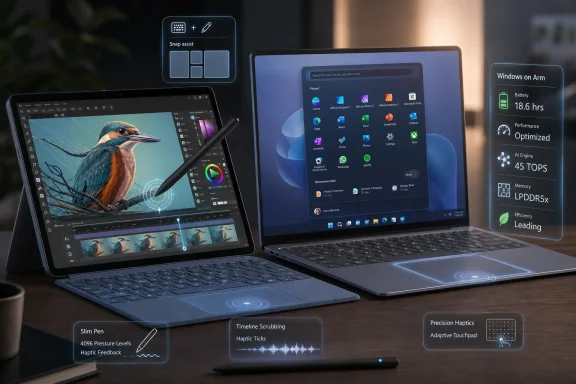
The most interesting part of the announcement may not be that Affinity is installed, but that Microsoft is tying it to Surface haptics. The company describes subtle tactile feedback through the new Surface Laptop touchpad and Surface Slim Pen on Surface Pro, applying it to actions such as snapping windows, scrubbing video, and creating in Affinity. That sounds small, but small is where premium hardware often wins.Apple has understood this for years. Trackpad feel, pen latency, animation timing, and systemwide consistency create a sense that the machine is responding as one object rather than as a pile of parts. Windows hardware has often had the opposite problem: excellent components, inconsistent execution. One laptop has a great display and a mediocre touchpad. Another has a good pen but poor palm rejection. Another has the right ports but a trackpad that feels like it came from a different decade.
Surface exists to fight that fragmentation. Haptics are part of that fight because they make invisible software states physically legible. A snapped window that lands with a tactile cue feels more certain. A pen stroke that has texture feels less like dragging glass. A timeline scrub that communicates through the touchpad gives users another signal beyond sight and sound.
Accessibility is not a side note here. Microsoft’s framing suggests that tactile feedback can help users who do not rely solely on visual or audio cues. That is a stronger argument than treating haptics as a luxury flourish. If Windows is going to become more multimodal, feedback needs to be multimodal too.
The Adobe Angle Is Real, Even If It Is Easy to Overstate
It is tempting to cast this as Microsoft stabbing Adobe in the back. The symbolism is obvious: the flagship Windows hardware line is shipping with one of Adobe’s most credible challengers, and that challenger is now backed by Canva’s enormous user base and brand momentum. For photographers, designers, and publishers who have watched Adobe’s pricing, licensing, and AI policies with suspicion, the narrative writes itself.But Adobe is not suddenly in existential trouble because Affinity appears on Surface. Creative Cloud remains deeply embedded in professional workflows. Photoshop, Illustrator, InDesign, Premiere Pro, Lightroom, After Effects, Acrobat, Fonts, cloud documents, plug-ins, enterprise licensing, training pipelines, and agency handoff norms form a moat that no Start menu pin can erase. In many organizations, Adobe is less a software choice than an operating assumption.
Still, platform endorsement has power. Microsoft is not banning Adobe, and Windows remains Adobe’s biggest mainstream desktop stage alongside macOS. But Surface is Microsoft’s aspirational hardware brand, and aspirational placement influences what users try first. In software, trying first often becomes habit, and habit becomes institutional preference.
The most immediate pressure is likely at the entry and mid-tier levels. Adobe can defend the high end with workflow depth and industry inertia. It is more vulnerable among creators who need capable tools but not necessarily the full Creative Cloud machine. That is exactly the territory Canva has been colonizing, and Affinity gives Canva a more serious answer for users who outgrow templates but do not want a subscription suite.
Canva Is Turning Affinity Into a Trojan Horse for Serious Creators
Canva’s challenge has always been credibility at the professional end. The company is wildly popular because it makes design approachable, collaborative, and fast. It is also easy for professionals to dismiss as template software for social posts, school flyers, and marketing teams in a hurry. Affinity changes that perception.By keeping Affinity recognizable as a professional design suite rather than simply swallowing it into Canva’s web-first product, Canva gets to address both ends of the market. Canva remains the accessible, collaborative, browser-friendly design environment. Affinity becomes the local, high-control, precision-oriented toolset for users who care about photo editing, vector work, page layout, color, and file handling.
Microsoft’s Surface deal strengthens that two-tier strategy. It says, in effect, that Affinity is not just the thing you download because you are angry at Adobe. It is software worthy of being part of a premium PC’s out-of-box creative identity.
That matters for trust. Creative professionals are conservative about tools because tools are not just tools; they are deadlines, archives, client files, printer requirements, plug-ins, habits, and muscle memory. Canva cannot buy that trust overnight. But being placed on Surface hardware gives Affinity a legitimacy boost at exactly the moment Canva is trying to make the suite feel like a durable professional platform rather than a clever acquisition.
Surface Still Has to Survive the Premium PC Reality Check
The risk for Microsoft is that the Surface story is becoming more ambitious at the same time prices are moving further into premium territory. The new Snapdragon X2 Surface devices are not budget machines. They compete against MacBook Airs, MacBook Pros, high-end Windows ultrabooks, creator laptops with discrete GPUs, and increasingly capable tablets with keyboard accessories.That puts pressure on every part of the pitch. If Microsoft asks users to pay premium money, the experience has to feel premium every hour, not only during launch demos. Arm compatibility has to be boring. Battery claims have to survive real browser tabs, video calls, external monitors, and creative workloads. The touchpad and pen have to feel excellent. The pre-installed creative app has to feel like a feature, not bloatware with better branding.
The Affinity bundle helps, but it also raises expectations. A buyer who sees a Surface Pro marketed as a pen-forward creative machine will expect the full stack to behave accordingly. If Affinity runs well, haptics feel natural, and battery life holds up, Microsoft gets to claim a differentiated Windows creative device. If any of those pieces wobble, the bundle becomes another example of Surface promising a future that everyday Windows still struggles to deliver.
This has been the Surface paradox for more than a decade. Microsoft’s hardware is often most interesting when it points toward a better Windows ecosystem than the one most people actually use. The best Surface ideas eventually spread; the worst remain expensive demonstrations. Affinity’s integration will be judged by whether it feels like the former.
Pre-Installation Is No Longer a Dirty Word if the Software Earns Its Place
Windows users are right to be suspicious of pre-installed apps. For years, the PC industry trained customers to associate bundled software with clutter, nags, and uninstall chores. Microsoft itself has not always helped, filling Start menus and setup flows with consumer services, recommendations, and promotional surfaces that blur the line between helpful and intrusive.But not every pre-install is the same. The difference is whether the software advances the device’s core purpose. A premium creative-capable Surface shipping with a serious design suite is more defensible than a random game trial or shopping app. The Start menu pin is still marketing, but it is marketing that aligns with the hardware claim.
This is the standard Microsoft should be held to. If Surface is going to ship with third-party software, that software should be native-feeling, removable, privacy-respecting, and meaningfully connected to what the device is sold to do. It should not exist because someone paid for the square footage. It should exist because the machine is better with it there.
Affinity has a plausible case. It gives users real creative capability immediately, it supports the pen-and-touch story, and its free-to-use model removes the most obvious trialware stink. The burden now shifts to execution: performance, updates, file compatibility, and whether Microsoft and Canva keep the integration alive after launch week.
Windows Creative PCs Need a Better Default Story
For years, Windows has had a strange relationship with creators. On one hand, it offers unmatched hardware variety, powerful desktops, gaming GPUs, workstation-class laptops, broad peripheral support, and deep legacy compatibility. On the other hand, the cultural image of mobile creative work has often belonged to Apple, especially in photography, design, music, video, and publishing.Microsoft has tried to change that before. The Surface Studio was a spectacular statement piece, even if it never became mainstream. Surface Book promised a detachable performance laptop with pen support. Surface Laptop Studio aimed at creators who wanted a flexible display and discrete graphics. The Surface Pro line has always appealed to artists and note-takers in theory, though not every generation nailed the balance of thermals, battery life, performance, and lapability.
The new Surface-Affinity partnership is less dramatic than a giant drafting-table desktop, but it may be more practical. Instead of asking the market to accept a new form factor, Microsoft is improving the everyday laptop and tablet experience while putting a creative app in front of users immediately. That is a subtler bet: not that everyone will become a professional designer, but that creative capability should feel native to a premium Windows PC.
That fits the broader direction of personal computing. The line between “creator” and “normal user” has collapsed. Office workers edit images. Students make videos. Small businesses design ads. Streamers need thumbnails. Developers create diagrams. Families publish photo books. A design suite is no longer a niche accessory; it is increasingly part of the general productivity stack.
IT Departments Will See Both Promise and Another Image to Manage
For WindowsForum.com’s sysadmin readership, the consumer excitement around bundled creative software is only part of the story. Pre-installed apps can complicate device imaging, policy baselines, app control, vulnerability management, privacy reviews, and user support. A Start menu pin that looks friendly to Microsoft marketing can look like another variable to an endpoint administrator.The enterprise calculus will depend on SKU, channel, and manageability. If Affinity is present only on certain consumer Surface configurations, business buyers may treat it as irrelevant. If it appears across broader Surface deployments, administrators will want clear documentation on how it updates, what services it contacts, whether it can be removed cleanly, and how it behaves under standard Windows management tools.
There is also the licensing question. Free-to-use does not automatically mean friction-free in regulated or managed environments. Organizations still need to understand account requirements, cloud features, telemetry, file storage behavior, AI-related terms, and whether the app can be used without binding corporate work to a consumer identity. Canva and Microsoft will need to be unusually clear here if they want Affinity to be more than a consumer showcase.
That said, IT should not dismiss the upside. If Affinity becomes a capable, manageable, low-cost alternative for departments that do not require full Adobe licensing, it could reduce software spend and simplify access for occasional creative work. Many organizations overbuy expensive creative seats because there is no trusted middle option. A Surface-endorsed Affinity could make that middle option easier to argue for.
The Start Menu Is Becoming a Battlefield Again
The pinning of Affinity to Start may sound like a tiny detail, but Windows real estate is political. The Start menu is not merely a launcher; it is Microsoft’s most visible statement about what belongs in the user’s computing life. Every pinned app, recommendation, cloud prompt, and promoted service competes for legitimacy.That is why Microsoft’s choice of Affinity is so interesting. It places a Canva-owned app inside the first-run Windows experience on Microsoft’s own hardware. In an era when platform owners are under scrutiny for self-preferencing, this is a case of Microsoft using its platform power to elevate a partner rather than only its own software. That does not make it neutral, but it does make it strategically revealing.
Microsoft is trying to strengthen Windows by making the ecosystem around it look healthier. Surface cannot beat Apple simply by copying Apple’s vertical integration because Microsoft does not control the Windows software universe in the same way. Its better move is selective orchestration: bring the right third parties close enough that the hardware feels coherent without pretending Windows is a closed garden.
Affinity is a test of that model. If it feels integrated but not forced, useful but not invasive, premium but not exclusionary, Microsoft will have found a better version of bundling. If users experience it as another promoted app, the old bloatware reflex will return quickly.
Adobe’s Real Problem Is Not One Rival, but a Change in Gravity
Adobe can compete feature for feature with almost anyone. Its deeper challenge is that the software market around creative work is fragmenting. Canva owns ease and collaboration for non-designers. Affinity attacks price and local professional workflows. Figma changed interface design and collaboration expectations before Adobe failed to acquire it. AI image and layout tools are reshaping what casual users expect from creative software. Mobile-first tools have trained a generation to create without opening a heavyweight desktop suite.In that context, Microsoft’s Surface deal is one more gravitational shift away from Adobe as the assumed default. Not because Affinity is instantly equivalent in every workflow, and not because Canva can simply declare itself professional-class by acquisition. The shift is cultural: users are increasingly willing to ask whether they need Adobe at all.
That question used to be heresy in many creative environments. Now it is budget discipline. It is also partly resentment. Subscription pricing, account requirements, cloud dependencies, AI training anxieties, cancellation controversies, and enterprise licensing complexity have made Adobe a company many customers rely on but do not necessarily love.
Affinity benefits from that emotional opening. Microsoft benefits by making Windows feel like the place where alternatives can thrive. Canva benefits by gaining credibility above its traditional center of gravity. Adobe remains powerful, but it is being forced to defend default status in places where it once simply inherited it.
The Surface-Affinity Deal Shows Where Microsoft Wants Windows to Go
This announcement is ultimately less about one app than about Microsoft’s preferred future for Windows hardware. The company wants premium PCs that feel alive through haptics, efficient through Arm silicon, useful through AI hardware, and differentiated through software experiences tuned to the device. That is the Surface formula for 2026.The danger is that Microsoft sometimes mistakes a showcase for an ecosystem. A Surface device can demonstrate haptic feedback in Affinity, but the broader Windows world needs APIs, developer incentives, design guidance, and OEM commitment if tactile feedback is to become more than a Surface party trick. A Snapdragon X2 Surface can show Windows on Arm at its best, but users still need confidence that the long tail of Windows software behaves.
The opportunity is that these pieces reinforce each other when done well. A responsive Arm laptop with strong battery life makes creative work more mobile. A good pen and haptic touchpad make the device feel more precise. A free creative suite lowers the barrier to experimentation. A polished out-of-box experience makes Windows feel less like a platform assembled by committee.
That is the version of Surface Microsoft has been chasing since the beginning: not merely a PC, but a proof point. Affinity gives this generation a sharper proof point than another abstract AI demo would have.
The Real Test Begins After the First Affinity Icon Click
The news is easy to summarize, but its consequences depend on what happens after buyers sign in, open the app, and try to work. The practical stakes are not hidden in the launch copy; they are in the daily friction that either makes a bundled app feel indispensable or sends users back to old defaults.- Microsoft is using the new Snapdragon X2 Surface launch to frame Windows on Arm as a premium creative platform, not merely a battery-life story.
- Affinity gains unusually valuable distribution by appearing on Surface devices from first sign-in, especially because it is positioned as a serious free-to-use creative suite.
- Adobe is not displaced by a Start menu pin, but Microsoft’s endorsement gives one of its most visible challengers mainstream legitimacy.
- Surface haptics are the most technically interesting part of the deal because they tie software actions to tactile feedback across pen, touchpad, Windows, and creative workflows.
- IT administrators will need clarity on removal, updating, account behavior, telemetry, and licensing before treating Affinity as an enterprise-friendly Adobe alternative.
- The partnership will matter only if Microsoft and Canva maintain the integration beyond launch and make it feel like part of the device rather than another promotional preload.
References
- Primary source: PetaPixel
Published: Wed, 17 Jun 2026 15:37:43 GMT
Affinity Will Now Come Pre-Installed on Windows Surface Computers | PetaPixel
Microsoft announced the Surface and Surface Pro laptops this week along with the note that they will all ship with Affinity pre-installed.petapixel.com
- Related coverage: techradar.com
Microsoft reveals new Surface Pro and Surface Laptop with big graphics upgrades from Snapdragon X2 CPUs — but they're seriously pricey | TechRadar
Around an up to 50% boost in graphics performancewww.techradar.com - Related coverage: windowscentral.com
Microsoft unveils Surface Laptop 8 and Surface Pro 12 with Snapdragon X2 chips, featuring better performance and battery life, and higher price tags to match | Windows Central
As expected, Microsoft has unveiled refreshed Surface Pro and Surface Laptop devices with Qualcomm's latest SoC and new colors, but are $500 and $600 more expensive than their predecessors.www.windowscentral.com - Related coverage: tomshardware.com
Microsoft debuts Surface Pro and Surface Laptop with new jade green color and Qualcomm Snapdragon X2 chips — refreshed devices start at $1,499 with 16GB of RAM | Tom's Hardware
The Laptop features Microsoft's new haptic touchpad.www.tomshardware.com - Official source: blogs.windows.com
Introducing the next Surface Pro and Surface Laptop, built for performance and flexibility
For more than 13 years, Surface has been shaped by the people who use it. Architects sketch buildings, developers train models, students build startups and field engineers solve problems that rarely make headlines. We didn't intend to design for onblogs.windows.com - Related coverage: notebookcheck.net
Detailed leak reveals new Surface Laptop 8 (Snapdragon X2): Full specs, colors, release date - Notebookcheck News
A detailed new leak has revealed that Microsoft is set to launch the ARM-based Surface Laptop 8 on June 16, 2026. Featuring Qualcomm's Snapdragon X2 Elite and Plus chips, the new models offer up to 80 TOPS of AI performance, a new "Jade" color option, and an anticipated OLED... www.notebookcheck.net
- Related coverage: phonearena.com
A new Surface Pro with Snapdragon X2 Elite power leaks in great detail ahead of June 16 launch - PhoneArena
Microsoft's next-gen 13-inch flagship will be considerably faster than its predecessor and last longer between charges.www.phonearena.com - Related coverage: engadget.com
Microsoft's New Surface Pro And Surface Laptop Cost $500 And $600 More Than Their Predecessors
Microsoft's new Surface Pro and Surface Laptop are about 50 to 60 percent more expensive than the previous generation. Thanks, AI!www.engadget.com - Related coverage: thurrott.com
Microsoft Announces New Surface Pro and Surface Laptop With Snapdragon X2 Chips
Microsoft is launching today new consumer versions of its Surface Pro and Surface Laptop powered by Qualcomm’s Snapdragon X2 chips.www.thurrott.com - Related coverage: thenextweb.com
Microsoft's new Surface Laptop has a trackpad that rumbles like a game controller
The new Surface Laptop and Surface Pro feature haptic trackpads that vibrate when you snap windows or align objects. ARM-only, starting at $1,500. No Intel option.thenextweb.com - Official source: microsoft.com
Surface Pro 12th Edition (12", 13") 2-in-1 laptop tablet | Microsoft Surface
Surface Pro 12th Edition is the latest versatile 2‑in‑1 with laptop performance, tablet flexibility, and all‑day battery life for work, creativity, and more. Available in 12 inch 13-inch.www.microsoft.com - Related coverage: axios.com
Microsoft debuts Nvidia-powered Microsoft Surface Ultra laptop
Microsoft is trying again to redefine the PC for the AI era.www.axios.com
- Related coverage: iphoneincanada.ca
Microsoft Goes All-In on Ultra-Premium New Surface Lineup | iPhone in Canada
Microsoft has launched its premium new Surface Pro and Surface Laptop lineup powered by Qualcomm Snapdragon X2 silicon, featuring major upgrades.www.iphoneincanada.ca - Official source: news.microsoft.com
- Official source: cdn-dynmedia-1.microsoft.com
