

Google began rolling out Android 17 to supported Pixel phones on June 16, 2026, while Microsoft introduced Snapdragon X2-powered Surface Pro and Surface Laptop models the same day, turning an ordinary “Lilbits” roundup into a snapshot of where personal computing is heading. The news is not that phones, laptops, headsets, and maker boards all received incremental upgrades. It is that every platform vendor is now trying to make its device feel less like a sealed endpoint and more like a movable workspace. Android wants to be a desktop, Surface wants Windows on Arm to feel routine, and even LoRa hobby hardware is borrowing the shape language of the smartphone.
Android 17’s most visible change is also its most philosophically loaded: floating app windows, branded here as “bubbles,” are no longer just a messaging convenience or a developer curiosity. They are Google’s latest attempt to make Android behave less like a single-pane phone OS and more like a flexible computing environment that can stretch across foldables, tablets, external displays, and whatever a “Googlebook” eventually turns out to be.
That matters because Android’s biggest weakness on larger screens has never been raw app count. It has been the awkwardness of turning phone-shaped software into a coherent workspace. Split-screen and taskbars helped, but they still treated multitasking as a negotiated exception. Floating windows make multitasking feel closer to the default mental model of a desktop.
The timing is not accidental. Foldables are no longer science projects, Android tablets have regained some commercial oxygen, and Google has spent years trying to convince developers that large-screen layouts are worth caring about. Android 17 effectively raises the stakes: if apps can be popped into resizable bubbles, developers that still assume one full-screen phone view may start to look lazy rather than merely conventional.
For WindowsForum readers, the interesting part is not whether Android is “becoming Windows.” That framing is too cute and too narrow. The real story is that Google is importing just enough desktop grammar to make Android credible in situations where users already have a keyboard, a stand, a second screen, or a foldable slab pretending to be a tiny laptop.
This is where the “Googlebook” reference becomes more than a throwaway. Google has spent years with two overlapping client platforms: Android, the dominant mobile OS, and ChromeOS, the quiet success story in education and low-friction laptops. If Android 17 is pushing deeper into desktop-style multitasking, and if ChromeOS is increasingly expected to run Android software well, the boundary between those worlds becomes less architectural and more commercial.
That does not mean ChromeOS disappears tomorrow. Platforms rarely die on the day their successor becomes plausible. But Android 17 makes the future shape easier to see: a Google-controlled client stack where phones, foldables, tablets, and lightweight laptops share more behaviors, more apps, and more state.
Microsoft should recognize the pattern because it has been chasing the same idea from the other direction. Windows has long wanted to follow the user across devices; Android has long wanted to be taken seriously beyond the phone. The difference is that Google controls the dominant mobile platform and can gradually expand upward, while Microsoft still depends on partnerships, web services, and Windows’ gravitational pull on legacy productivity.
That is why the Surface announcement matters even if the prices make enthusiasts wince. A Surface Laptop starting around the high end of the mainstream market and a Surface Pro pushing even higher are not mass-market reassurance devices. They are Microsoft’s reference hardware for what it thinks premium Windows mobility should look like when x86 is no longer the automatic answer.
The Surface Pro is especially important because the detachable form factor has always been Microsoft’s most stubborn hardware argument. The company has spent more than a decade insisting that a tablet can be a real PC if Windows, silicon, pen input, keyboard accessories, and industrial design line up correctly. Arm chips have the potential to make that argument cleaner: fanless or quieter designs, longer standby, better thermals, and mobile-class connectivity habits.
But Surface also carries the burden of Windows compatibility. Every Snapdragon Surface invites the same question from IT departments and power users: does the software actually run, and does it run well enough that nobody has to think about the processor? Microsoft has improved emulation, developers have shipped more native Arm64 apps, and enterprise software vendors are more aware of the target than they were in the Surface Pro X era. Yet the last mile is always local: the VPN client, the printer utility, the line-of-business app nobody has touched since 2017.
That is a high bar, because buyers remember the awkward years. Windows RT was too locked down, Surface Pro X was too early, and the first waves of Arm PCs were dogged by app gaps and performance caveats. Even when the technology improved, the reputation lagged. In client computing, one bad deployment story can outweigh a dozen benchmark charts.
The Copilot+ branding complicates this further. Microsoft wants neural processing units, local AI features, and battery-efficient compute to feel like part of a coherent future. But many Windows users still evaluate laptops through older, practical questions: battery life, keyboard quality, screen quality, ports, heat, repairability, and whether their everyday apps behave. AI can sell a keynote; compatibility sells a fleet.
The pricing also reveals Microsoft’s confidence and its vulnerability. Premium Surface devices have rarely competed on bargain value, but the more expensive Windows on Arm becomes, the more it must justify itself against MacBooks, conventional Intel and AMD laptops, and cheaper Snapdragon machines from OEM partners. If Microsoft wants Snapdragon Surface to be the aspirational Windows laptop, it has to make the premium feel like engineering rather than tax.
The claimed CPU, GPU, and NPU jumps over prior flagship XR silicon tell us where the pressure is. Headsets and glasses need more graphics performance for convincing displays, more AI acceleration for perception and interaction, and better efficiency because nobody wants a face computer that runs hot or dies before lunch. Qualcomm’s job is to make all of that feel achievable without turning every headset into a backpack workstation.
This is where the language of “AI PCs” and “spatial computing” begins to converge. Whether the screen is on a desk, in your hand, or strapped to your head, the platform vendors are betting on local inference, camera-driven context, and persistent state. The device has to understand what you are doing, not just render a UI.
The unresolved problem is that XR remains a market of impressive demos and uneven daily utility. Faster chips help, but they do not answer the social, ergonomic, and software questions. Qualcomm can make better engines; somebody else still has to build the car people want to drive.
That price immediately narrows the audience. At more than the cost of many laptops, tablets, and VR headsets, Specs are not an impulse gadget. They are a statement purchase for developers, creators, early adopters, and perhaps a small set of professionals who believe Snap’s AR ecosystem can become a serious canvas.
The challenge for Snap is that smart glasses occupy a brutal middle ground. If they are too limited, people compare them to cheaper camera glasses. If they are too capable, they become expensive, battery-constrained face computers with social friction. The promised hand tracking, dual displays, and multi-hour battery life suggest Snap is aiming above lightweight notification glasses but below full mixed-reality headsets.
Snap also has a platform problem that Apple, Google, and Microsoft understand well: hardware without a software flywheel is a novelty. Snap has Lens Studio and years of AR experience inside its camera products, which gives it more credibility than a random gadget startup. But moving AR from a phone screen to glasses changes the interaction model, privacy expectations, and developer economics all at once.
LoRa boards and Meshtastic-style devices traditionally live in the world of hobbyist pragmatism. They are exposed boards, 3D-printed cases, tiny monochrome screens, antenna experiments, and firmware flashing rituals. A phone-like dev kit changes the audience. It suggests off-grid communication hardware wants to be operated, carried, and understood like a consumer device, even when it remains deeply experimental.
That shift matters for resilience-minded users. Long-range, low-power mesh communication has attracted interest from hikers, emergency-preparedness communities, field researchers, and people who simply distrust the fragility of carrier networks. The more these devices resemble phones, the easier it becomes to imagine them as companions rather than projects.
There is a tension here, though. The smartphone shape is familiar, but it can also flatten expectations. A LoRa dev kit is not a normal phone, a Meshtastic node is not a carrier replacement, and off-grid messaging has constraints that mainstream users may not understand. Good hardware design can invite new users in; it cannot repeal physics, spectrum rules, or the realities of mesh coverage.
Android 17’s bubbles and Continue On feature make more sense in that context. They are not isolated conveniences; they are connective tissue. Google wants the task, not the device, to be the unit of computing. If it can make Android feel competent on phones, tablets, foldables, and lightweight laptops, it reduces the need for users to leave the Google environment when work gets more complex.
Microsoft is making a parallel argument with Surface and Windows on Arm. It wants Windows to remain the place where serious work happens, but it also wants that work to happen on thinner, cooler, more battery-efficient devices that borrow the best habits of mobile hardware. Surface is the showcase because Microsoft cannot afford to let OEMs define the first impression alone.
Snap and Qualcomm push the same question into spatial computing. If glasses become a real interface, the winner will not simply be the company with the brightest display or fastest chip. It will be the company that moves identity, apps, notifications, content, and developer tools across screens without making the user feel like they are constantly starting over.
Surface on Snapdragon X2 raises a different set of fleet questions. Windows on Arm may be ready for more users, but enterprise readiness is rarely binary. Organizations will need to validate endpoint security tooling, remote management agents, accessibility software, peripheral drivers, VPN clients, browser extensions, and legacy applications before treating Arm and x86 as interchangeable.
The AI angle adds another layer. NPUs promise local processing and better battery life, but administrators will want to know which features run locally, which touch cloud services, which can be disabled, and how data is retained. Microsoft has learned the hard way that Windows users react sharply when AI features feel opaque or involuntary.
XR and AR hardware remain even harder to operationalize. Cameras, microphones, spatial mapping, and wearable displays create obvious privacy and compliance concerns. A $2,200 pair of AR glasses is not just a device on the network; it is a sensor platform pointed at the workplace.
That does not mean every bet will work. Most users still want dependable devices more than visionary convergence. A floating Android window that breaks an app, a Windows Arm laptop that fails a driver check, or AR glasses that feel socially awkward will lose to boring hardware that gets the job done.
The more realistic near-term outcome is uneven convergence. Power users will mix devices aggressively, enterprises will certify slowly, and developers will follow the platforms that give them paying customers. The future arrives first as a set of annoying edge cases, then as a procurement option, and only later as the thing everyone pretends was obvious.
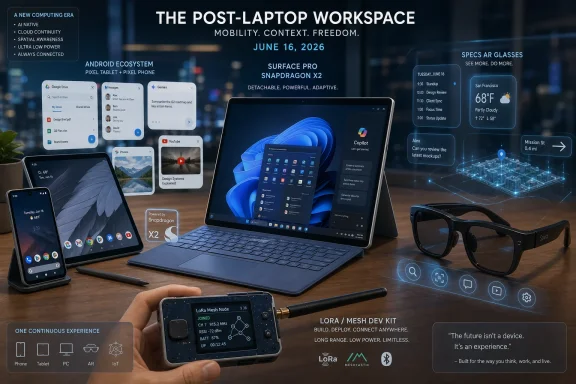 Android 17 Treats the Phone as a Window Manager in Waiting
Android 17’s most visible change is also its most philosophically loaded: floating app windows, branded here as “bubbles,” are no longer just a messaging convenience or a developer curiosity. They are Google’s latest attempt to make Android behave less like a single-pane phone OS and more like a flexible computing environment that can stretch across foldables, tablets, external displays, and whatever a “Googlebook” eventually turns out to be.That matters because Android’s biggest weakness on larger screens has never been raw app count. It has been the awkwardness of turning phone-shaped software into a coherent workspace. Split-screen and taskbars helped, but they still treated multitasking as a negotiated exception. Floating windows make multitasking feel closer to the default mental model of a desktop.
The timing is not accidental. Foldables are no longer science projects, Android tablets have regained some commercial oxygen, and Google has spent years trying to convince developers that large-screen layouts are worth caring about. Android 17 effectively raises the stakes: if apps can be popped into resizable bubbles, developers that still assume one full-screen phone view may start to look lazy rather than merely conventional.
For WindowsForum readers, the interesting part is not whether Android is “becoming Windows.” That framing is too cute and too narrow. The real story is that Google is importing just enough desktop grammar to make Android credible in situations where users already have a keyboard, a stand, a second screen, or a foldable slab pretending to be a tiny laptop.
The Continue On Feature Is Google’s Quietest Shot at the PC
The flashier Android 17 features will get the screenshots, but the “Continue On” concept may be the more strategic move. The promise is familiar: start something on one Android device, pick it up on another, and stop thinking quite so much about which slab is in your hand. Apple has trained its users to expect this kind of continuity; Microsoft has tried to approximate it across Windows and Android; Google now wants to make it feel native inside its own ecosystem.This is where the “Googlebook” reference becomes more than a throwaway. Google has spent years with two overlapping client platforms: Android, the dominant mobile OS, and ChromeOS, the quiet success story in education and low-friction laptops. If Android 17 is pushing deeper into desktop-style multitasking, and if ChromeOS is increasingly expected to run Android software well, the boundary between those worlds becomes less architectural and more commercial.
That does not mean ChromeOS disappears tomorrow. Platforms rarely die on the day their successor becomes plausible. But Android 17 makes the future shape easier to see: a Google-controlled client stack where phones, foldables, tablets, and lightweight laptops share more behaviors, more apps, and more state.
Microsoft should recognize the pattern because it has been chasing the same idea from the other direction. Windows has long wanted to follow the user across devices; Android has long wanted to be taken seriously beyond the phone. The difference is that Google controls the dominant mobile platform and can gradually expand upward, while Microsoft still depends on partnerships, web services, and Windows’ gravitational pull on legacy productivity.
Surface on Snapdragon X2 Is the Second Act Windows on Arm Needed
Microsoft’s new Surface Pro and Surface Laptop models with Qualcomm Snapdragon X2 processors are not just another spec refresh. They are the follow-through to the Windows on Arm reset that began in earnest with the first Copilot+ PC wave. In 2024, Microsoft and Qualcomm had to prove that Arm PCs were no longer weird battery-life curiosities with unacceptable compatibility compromises. In 2026, the job is harder: they have to prove the category is normal.That is why the Surface announcement matters even if the prices make enthusiasts wince. A Surface Laptop starting around the high end of the mainstream market and a Surface Pro pushing even higher are not mass-market reassurance devices. They are Microsoft’s reference hardware for what it thinks premium Windows mobility should look like when x86 is no longer the automatic answer.
The Surface Pro is especially important because the detachable form factor has always been Microsoft’s most stubborn hardware argument. The company has spent more than a decade insisting that a tablet can be a real PC if Windows, silicon, pen input, keyboard accessories, and industrial design line up correctly. Arm chips have the potential to make that argument cleaner: fanless or quieter designs, longer standby, better thermals, and mobile-class connectivity habits.
But Surface also carries the burden of Windows compatibility. Every Snapdragon Surface invites the same question from IT departments and power users: does the software actually run, and does it run well enough that nobody has to think about the processor? Microsoft has improved emulation, developers have shipped more native Arm64 apps, and enterprise software vendors are more aware of the target than they were in the Surface Pro X era. Yet the last mile is always local: the VPN client, the printer utility, the line-of-business app nobody has touched since 2017.
Microsoft Is Selling Confidence, Not Just Silicon
The strongest version of Microsoft’s Surface pitch is not “Snapdragon X2 is faster.” Faster is table stakes. The stronger pitch is that Windows on Arm has become sufficiently boring for a premium Surface buyer to stop treating it as a gamble.That is a high bar, because buyers remember the awkward years. Windows RT was too locked down, Surface Pro X was too early, and the first waves of Arm PCs were dogged by app gaps and performance caveats. Even when the technology improved, the reputation lagged. In client computing, one bad deployment story can outweigh a dozen benchmark charts.
The Copilot+ branding complicates this further. Microsoft wants neural processing units, local AI features, and battery-efficient compute to feel like part of a coherent future. But many Windows users still evaluate laptops through older, practical questions: battery life, keyboard quality, screen quality, ports, heat, repairability, and whether their everyday apps behave. AI can sell a keynote; compatibility sells a fleet.
The pricing also reveals Microsoft’s confidence and its vulnerability. Premium Surface devices have rarely competed on bargain value, but the more expensive Windows on Arm becomes, the more it must justify itself against MacBooks, conventional Intel and AMD laptops, and cheaper Snapdragon machines from OEM partners. If Microsoft wants Snapdragon Surface to be the aspirational Windows laptop, it has to make the premium feel like engineering rather than tax.
Qualcomm’s Reality Elite Shows the Same Silicon Story Moving to the Face
Qualcomm’s Snapdragon Reality Elite announcement sits adjacent to the Surface news, but it belongs in the same argument. The company is trying to become the default compute provider for the next generation of mobile-ish devices: laptops, XR headsets, smart glasses, handhelds, and hybrid form factors that do not yet have stable category names.The claimed CPU, GPU, and NPU jumps over prior flagship XR silicon tell us where the pressure is. Headsets and glasses need more graphics performance for convincing displays, more AI acceleration for perception and interaction, and better efficiency because nobody wants a face computer that runs hot or dies before lunch. Qualcomm’s job is to make all of that feel achievable without turning every headset into a backpack workstation.
This is where the language of “AI PCs” and “spatial computing” begins to converge. Whether the screen is on a desk, in your hand, or strapped to your head, the platform vendors are betting on local inference, camera-driven context, and persistent state. The device has to understand what you are doing, not just render a UI.
The unresolved problem is that XR remains a market of impressive demos and uneven daily utility. Faster chips help, but they do not answer the social, ergonomic, and software questions. Qualcomm can make better engines; somebody else still has to build the car people want to drive.
Snap’s $2,200 Specs Are a Consumer Product With Developer-Platform Anxiety
Snap’s new Specs AR glasses, available for preorder at roughly $2,200, are the most provocative item in the roundup because they refuse to hide behind enterprise language. These are not merely industrial training goggles or developer-only prototypes. Snap is making a consumer-facing bet that augmented reality glasses deserve to exist before the mass market has clearly asked for them.That price immediately narrows the audience. At more than the cost of many laptops, tablets, and VR headsets, Specs are not an impulse gadget. They are a statement purchase for developers, creators, early adopters, and perhaps a small set of professionals who believe Snap’s AR ecosystem can become a serious canvas.
The challenge for Snap is that smart glasses occupy a brutal middle ground. If they are too limited, people compare them to cheaper camera glasses. If they are too capable, they become expensive, battery-constrained face computers with social friction. The promised hand tracking, dual displays, and multi-hour battery life suggest Snap is aiming above lightweight notification glasses but below full mixed-reality headsets.
Snap also has a platform problem that Apple, Google, and Microsoft understand well: hardware without a software flywheel is a novelty. Snap has Lens Studio and years of AR experience inside its camera products, which gives it more credibility than a random gadget startup. But moving AR from a phone screen to glasses changes the interaction model, privacy expectations, and developer economics all at once.
The Smartphone Is Becoming the Shape Everything Escapes From
The phone-like LoRa development kit in Liliputing’s roundup may seem like the oddball item, but it is actually the punchline. Even maker hardware is converging on the smartphone as the default physical metaphor: rectangular screen, handheld body, battery, radios, sensors, and a user interface that assumes direct manipulation rather than serial-console patience.LoRa boards and Meshtastic-style devices traditionally live in the world of hobbyist pragmatism. They are exposed boards, 3D-printed cases, tiny monochrome screens, antenna experiments, and firmware flashing rituals. A phone-like dev kit changes the audience. It suggests off-grid communication hardware wants to be operated, carried, and understood like a consumer device, even when it remains deeply experimental.
That shift matters for resilience-minded users. Long-range, low-power mesh communication has attracted interest from hikers, emergency-preparedness communities, field researchers, and people who simply distrust the fragility of carrier networks. The more these devices resemble phones, the easier it becomes to imagine them as companions rather than projects.
There is a tension here, though. The smartphone shape is familiar, but it can also flatten expectations. A LoRa dev kit is not a normal phone, a Meshtastic node is not a carrier replacement, and off-grid messaging has constraints that mainstream users may not understand. Good hardware design can invite new users in; it cannot repeal physics, spectrum rules, or the realities of mesh coverage.
The Operating System Wars Are Turning Into Continuity Wars
Seen together, the day’s announcements point to a broader platform shift. The old fight was about which operating system owned the device in front of you. The newer fight is about which ecosystem owns the handoff between devices.Android 17’s bubbles and Continue On feature make more sense in that context. They are not isolated conveniences; they are connective tissue. Google wants the task, not the device, to be the unit of computing. If it can make Android feel competent on phones, tablets, foldables, and lightweight laptops, it reduces the need for users to leave the Google environment when work gets more complex.
Microsoft is making a parallel argument with Surface and Windows on Arm. It wants Windows to remain the place where serious work happens, but it also wants that work to happen on thinner, cooler, more battery-efficient devices that borrow the best habits of mobile hardware. Surface is the showcase because Microsoft cannot afford to let OEMs define the first impression alone.
Snap and Qualcomm push the same question into spatial computing. If glasses become a real interface, the winner will not simply be the company with the brightest display or fastest chip. It will be the company that moves identity, apps, notifications, content, and developer tools across screens without making the user feel like they are constantly starting over.
Enterprise IT Will Care Less About the Demos Than the Failure Modes
For sysadmins, the consumer gloss hides the familiar operational questions. Android 17’s multitasking improvements are useful only if management controls, app compatibility, data separation, and update timing remain predictable. Floating windows are great until a regulated workflow leaks information into the wrong capture, recording, or overlay context.Surface on Snapdragon X2 raises a different set of fleet questions. Windows on Arm may be ready for more users, but enterprise readiness is rarely binary. Organizations will need to validate endpoint security tooling, remote management agents, accessibility software, peripheral drivers, VPN clients, browser extensions, and legacy applications before treating Arm and x86 as interchangeable.
The AI angle adds another layer. NPUs promise local processing and better battery life, but administrators will want to know which features run locally, which touch cloud services, which can be disabled, and how data is retained. Microsoft has learned the hard way that Windows users react sharply when AI features feel opaque or involuntary.
XR and AR hardware remain even harder to operationalize. Cameras, microphones, spatial mapping, and wearable displays create obvious privacy and compliance concerns. A $2,200 pair of AR glasses is not just a device on the network; it is a sensor platform pointed at the workplace.
The June 16 Roundup Was Really About the Post-Laptop Workspace
The concrete lesson from this cluster of announcements is that “mobile” and “desktop” are no longer clean categories. Android is gaining desktop behaviors, Windows laptops are adopting mobile silicon, XR chips are chasing PC-like workloads, and maker devices are taking cues from phones. The industry is not eliminating the laptop so much as distributing laptop-like expectations across more hardware.That does not mean every bet will work. Most users still want dependable devices more than visionary convergence. A floating Android window that breaks an app, a Windows Arm laptop that fails a driver check, or AR glasses that feel socially awkward will lose to boring hardware that gets the job done.
The more realistic near-term outcome is uneven convergence. Power users will mix devices aggressively, enterprises will certify slowly, and developers will follow the platforms that give them paying customers. The future arrives first as a set of annoying edge cases, then as a procurement option, and only later as the thing everyone pretends was obvious.
The Practical Read on a Very Expensive Platform Week
The day’s news is best understood as a set of directional signals rather than a single product cycle. None of these announcements alone proves that Android laptops, Arm Surfaces, consumer AR glasses, or phone-like LoRa devices will dominate. Together, they show where the industry’s largest and most interesting players think the next interface battle will be fought.- Android 17’s floating bubbles are a serious attempt to make Android more credible on large screens, foldables, and laptop-like devices.
- Google’s Continue On feature points toward an ecosystem strategy where the task follows the user across Android hardware.
- Microsoft’s Snapdragon X2 Surface devices are a confidence test for Windows on Arm, especially at premium prices.
- Qualcomm’s XR silicon push shows that AI acceleration and graphics efficiency are now central to headsets and glasses, not just PCs.
- Snap’s Specs preorder pricing makes the glasses an early-adopter and developer bet, even if the branding is aimed at consumers.
- Phone-like LoRa dev kits show that even off-grid and maker hardware is being pulled toward consumer-device usability.
References
- Primary source: Liliputing
Published: Tue, 16 Jun 2026 20:51:42 GMT
Lilbits: Android 17 released, Microsoft Surface with Snapdragon X2, and a phone-like LoRa dev kit - Liliputing
Lilbits: Android 17 released, Microsoft Surface with Snapdragon X2, and a phone-like LoRa dev kitliliputing.com - Official source: blogs.windows.com
Introducing the next Surface Pro and Surface Laptop, built for performance and flexibility
For more than 13 years, Surface has been shaped by the people who use it. Architects sketch buildings, developers train models, students build startups and field engineers solve problems that rarely make headlines. We didn't intend to design for onblogs.windows.com - Related coverage: uploadvr.com
Qualcomm Announces Snapdragon Reality Elite, Its New Flagship XR Chipset
Qualcomm just announced Snapdragon Reality Elite, its new flagship XR chipset, and it will debut in the compute puck of Xreal's Aura Android XR device this fall. www.uploadvr.com
- Related coverage: pccentral.net
Microsoft Surface Laptop 8 Leak Reveals Snapdragon X2, OLED Display, and Jade Color
A detailed leak reveals the Microsoft Surface Laptop 8 with Snapdragon X2 chips, OLED display option, new Jade color, up to 32GB RAM, 2TB SSD, and 20-hour battery. Launching June 16, 2026.pccentral.net - Related coverage: notebookcheck.net
New Microsoft Surface PCs launching with Qualcomm Snapdragon X2 in 2026 - Notebookcheck News
Microsoft has released Surface Laptop 8 and Surface Pro 12 devices globally. At the same time, the company has confirmed that Qualcomm Snapdragon X2 models are coming, but not until 'later this year'. www.notebookcheck.net
- Related coverage: thurrott.com
Google Releases Android 17 - Thurrott.com
Google has finalized the initial release of Android 17, and it's rolling out first on supported Pixel devices starting today.www.thurrott.com
- Related coverage: windowscentral.com
Microsoft confirms that it will bring Snapdragon X2 chips to new Surface Pro and Surface Laptop this year | Windows Central
Although not available today, the company has confirmed that customers will be able to buy its new Surface devices with Snapdragon X2 chips later this year.www.windowscentral.com - Official source: microsoft.com
Surface Pro for Business 12th Edition – Intel and Snapdragon Laptop Tablet | Microsoft Surface
Discover Surface Pro for Business 12th Edition. These AI 2-in-1 laptop tablets are available with Intel® or Snapdragon® processors in 12-inch or 13-inch, with optional 5G. Built for teams that work anywhere.www.microsoft.com
- Related coverage: androidcentral.com
Android 17: Everything you need to know | Android Central
Here's a look at all the updates in Android 17.www.androidcentral.com - Related coverage: techradar.com
Microsoft's next-gen Surface devices don't sound exciting going by rumors — and I worry they'll be poor value even compared to MacBooks | TechRadar
A minor upgrade, but with major prices hikes?www.techradar.com - Related coverage: tomshardware.com
- Official source: 9to5google.com
Snap Specs look like that and cost $2,195 [Gallery]
Snap, the parent company of Snapchat, has just announced the long-anticipated release of its Specs AR smart glasses which will...9to5google.com - Related coverage: gadgetsnow.indiatimes.com
Microsoft Surface Pro Leak Tips Snapdragon X2 Elite And June 16 Launch
gadgetsnow.indiatimes.com
- Related coverage: businesswire.com
- Official source: news.microsoft.com
</rdf:Alt> </dc:title> <dc:description><rdf:Alt><rdf:li xml:lang="x-default"/> </rdf:Alt> </dc:description> <dc:creator><rdf:Seq><rdf:li>Joseph Galbraith (MBO Partners, Inc.)
</rdf:Alt> </dc:description> <dc:creator><rdf:Seq><rdf:li>Joseph Galbraith (MBO Partners, Inc.)news.microsoft.com
- Official source: cdn-dynmedia-1.microsoft.com
!! SpecificProject Only -MSSurface_Logo_horizontal_C-CoPilot Gray_RGB
PDF documentcdn-dynmedia-1.microsoft.com
- Related coverage: cnx-software.com
T-Display-P4 smartphone-like devkit features ESP32-P4 MCU, ESP32-C6 wireless SoC, and SX1262/LR2021 LoRa transceiver - CNX Software
LILYGO T-Display-P4 is a feature-rich ESP32-P4 + ESP32-C6 devkit, but with a smartphone-like design and support for GPS, Ethernet, and LoRaWAN throughwww.cnx-software.com - Related coverage: thequantumdispatch.com
LILYGO T-Display-P4 Packs GPS, LoRaWAN, and Ethernet Into a Smartphone-Style ESP32 Dev Board — The Quantum Dispatch
LILYGO's new T-Display-P4 combines the ESP32-P4 RISC-V chip with GPS, LoRa radio, Wi-Fi 6, Ethernet, and a crisp 4-inch touch display in a hacker-friendly handheld launching today.thequantumdispatch.com - Related coverage: techcrunch.com
Hands-on with a prototype of Clicks' Communicator, a new BlackBerry-like smartphone | TechCrunch
TechCrunch goes hands-on at the CES 2026 show with the new Clicks Communicator, a new Android smartphone with a physical keyboard.techcrunch.com - Related coverage: specfive.com
SpecFive LLC - SpecFive Spectre MKII | Android Mesh Phone for Off-Grid Communication
SpecFive Spectre MKII is a powerful Android mesh phone designed for off-grid communication, outdoor adventures, emergency response, and remote connectivity. specfive.com
- Related coverage: lunar.computer
Seeed Studio and Semtech Launch LR2021 LoRa Plus Development Kit With 2.6 Mbps Speeds and Linux-Friendly Tools
Seeed Studio and Semtech's new LR2021 development kit delivers LoRa speeds up to 2.6 Mbps with dual-band support and satellite connectivity for $99.lunar.computer
