
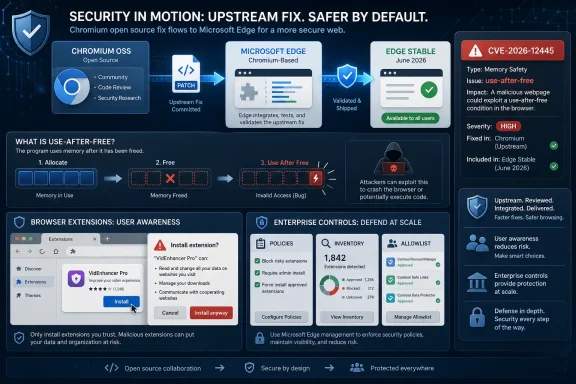
Microsoft documents CVE-2026-12445 in the Security Update Guide because the bug is in Chromium open-source code used by Microsoft Edge, and the June 2026 Edge security update is Microsoft’s signal that Edge has absorbed the upstream fix. This is not Microsoft claiming the flaw originated in Edge-specific code. It is Microsoft telling Windows administrators that a browser shipped and serviced by Microsoft was affected until the relevant Edge build landed.
The short answer is dependency ownership. Microsoft Edge is Chromium-based, which means large parts of its rendering, JavaScript, extension, networking, and browser-platform plumbing come from the same open-source project that underpins Google Chrome. When Chromium fixes a security flaw, Edge may need that fix too.
That is why a CVE that looks like a “Chrome CVE” can appear in Microsoft’s Security Update Guide. The Security Update Guide is not limited to bugs written by Microsoft engineers. It is also a customer-facing ledger of vulnerabilities that affect Microsoft products because those products consume shared components.
CVE-2026-12445 is described as a use-after-free issue in Chromium’s Extensions component. In practical terms, the relevant question for Windows users is not whether the bug was born in Google’s tree or Microsoft’s tree. The question is whether Edge shipped the vulnerable Chromium code and whether Microsoft has now shipped a build that removes it.
That is the logic behind Microsoft’s wording: the vulnerability is in Chromium OSS, Edge consumes Chromium OSS, and the SUG entry exists to announce that the latest Chromium-based Edge is no longer vulnerable.
The SUG is therefore closer to an operational patch record. It tells defenders what Microsoft product is affected, what Microsoft has done about it, and where administrators should look for remediation status. For Edge, that often means entries tied to Chromium CVEs.
This matters because Edge is installed broadly across Windows fleets, often as the default or mandated enterprise browser. If Microsoft stayed silent whenever a vulnerability originated upstream, administrators would be forced to reconcile Google advisories, Chromium commits, Edge release notes, and local deployment status on their own. The SUG entry collapses that chain into one Microsoft-facing signal.
The distinction is especially important in managed environments. A sysadmin does not patch “Chromium” in the abstract; they patch Edge Stable, Edge Extended Stable, Edge WebView2 Runtime, Chrome, Brave, Electron apps, or some other Chromium consumer. The same upstream vulnerability can have several downstream patch timelines.
A use-after-free bug is a memory-safety flaw. It occurs when software continues to use memory after it has been freed, potentially allowing corruption of program state. In browser security terms, this class of bug is serious because memory corruption can sometimes be shaped into code execution, sandbox escapes, or other exploit primitives depending on the surrounding conditions.
The key detail here is the attack path described for this CVE: exploitation involves convincing a user to install a malicious extension. That is not the same as a drive-by web page attack where merely visiting a site is enough. But it is also not a trivial barrier, because malicious or compromised extensions have long been a realistic enterprise problem.
For consumers, the mitigation is straightforward: keep Edge current and be ruthless about installed extensions. For administrators, the better answer is policy. Browser extension allowlists, blocklists, permission review, and centralized extension inventory are now part of endpoint security, not optional browser hygiene.
So the safe question is not “Does my Edge version numerically match Chrome’s fixed version?” It usually will not. The safe question is “Am I running the Edge build Microsoft says contains the latest Chromium security updates?”
As of Microsoft’s June 2026 Edge release notes, Edge Stable received version 149.0.4022.80 on June 18, 2026, with Microsoft stating that it incorporates the latest Chromium project security updates. Earlier June builds, including 149.0.4022.69 and 149.0.4022.62, also carried security-related Chromium update language, with the June 9 build explicitly called out for a separate exploited Chromium CVE.
That rolling cadence is the point. Browser security is no longer tied neatly to Patch Tuesday. Edge updates can arrive several times in a month when Chromium fixes need to move quickly.
In Microsoft Edge on Windows, open the menu, choose Help and feedback, then choose About Microsoft Edge. You can also type
That restart matters. Many users believe they are protected because the browser downloaded an update in the background. In reality, Chromium-based browsers often need a relaunch before the newly installed build replaces the running process. On a heavily used workstation, a browser can remain open for days, carrying vulnerable code long after an update package is staged.
For enterprises, the version check should not depend on users clicking through a menu. Edge version reporting belongs in endpoint management, vulnerability management, or configuration inventory. If the fleet cannot tell you which browser builds are running, the CVE entry is only half useful.
That race is not theoretical. Chromium vulnerabilities have repeatedly moved fast enough that Microsoft, Google, Linux distributions, and other Chromium vendors must issue out-of-band browser updates. In that world, waiting for the next monthly operating-system patch cycle is the wrong mental model.
Edge complicates the picture in a useful way. Because it is serviced separately from Windows, Microsoft can ship browser fixes quickly without waiting for a full OS cumulative update. But that also means administrators need browser-specific update monitoring rather than assuming Windows Update compliance equals browser compliance.
The result is a split responsibility model. Microsoft must ingest and ship the Chromium fix. Administrators must make sure Edge updates are allowed, delivered, and relaunched. Users must stop treating the browser restart button as optional.
The old model assumed that browser add-ons were a personal preference. The modern model treats them as software supply chain components. An extension can read page content, manipulate traffic, inject scripts, interact with identity flows, and request sensitive permissions. Even when an extension is not malicious, its update channel can become an exposure point.
For a vulnerability that requires a malicious extension, patching the browser is necessary but not sufficient. The browser fix closes this specific memory-safety hole, but the organization still needs to know which extensions are installed, who approved them, what permissions they request, and whether abandoned extensions remain in the environment.
That is where Edge’s enterprise policy stack matters. Admins can control extension installation sources, block specific IDs, allow only approved extensions, and monitor extension requests. Those controls turn the CVE from a user-by-user guessing game into an auditable policy decision.
But the sentence hides the complexity of modern software maintenance. Edge is simultaneously a Microsoft product, a Chromium downstream, a Windows platform component, an enterprise-managed application, and a cross-platform browser. A vulnerability can be “in Chrome” in one advisory, “in Chromium” in another, and “affecting Microsoft Edge” in a third without contradiction.
The better mental model is inheritance. Edge inherits many Chromium vulnerabilities because it inherits Chromium code. Microsoft’s job is to pull in the fix, validate it against Edge’s own changes and release channels, and publish a Microsoft-facing update record. The SUG entry is that record.
This also explains why the SUG may include entries that look irrelevant to traditional Windows patching. If the affected product is supported by Microsoft and installed on Windows systems at scale, the guide is where many defenders expect to see it.
That has operational consequences. Change windows built around monthly patching can lag behind browser threat reality. Vulnerability scanners may flag Chrome-family CVEs against Edge, Chrome, WebView2, or embedded Chromium runtimes. Security teams may ask why a “Google” CVE appears on Microsoft assets. The answer is usually shared code plus independent distribution.
Edge’s update system generally helps here, because it can update automatically. But enterprises often interrupt that default with network controls, update rings, compatibility holds, kiosk configurations, VDI images, or application-control policies. Every one of those choices can turn an automatically fixed browser into a lingering exposure.
The fix is not to panic-patch every browser release without process. The fix is to define a browser security SLA. High-severity Chromium updates should have a shorter clock than routine feature updates, and exploited-in-the-wild updates should have a shorter clock still.
 Microsoft’s Browser Is No Longer Just Microsoft’s Code
The short answer is dependency ownership. Microsoft Edge is Chromium-based, which means large parts of its rendering, JavaScript, extension, networking, and browser-platform plumbing come from the same open-source project that underpins Google Chrome. When Chromium fixes a security flaw, Edge may need that fix too.That is why a CVE that looks like a “Chrome CVE” can appear in Microsoft’s Security Update Guide. The Security Update Guide is not limited to bugs written by Microsoft engineers. It is also a customer-facing ledger of vulnerabilities that affect Microsoft products because those products consume shared components.
CVE-2026-12445 is described as a use-after-free issue in Chromium’s Extensions component. In practical terms, the relevant question for Windows users is not whether the bug was born in Google’s tree or Microsoft’s tree. The question is whether Edge shipped the vulnerable Chromium code and whether Microsoft has now shipped a build that removes it.
That is the logic behind Microsoft’s wording: the vulnerability is in Chromium OSS, Edge consumes Chromium OSS, and the SUG entry exists to announce that the latest Chromium-based Edge is no longer vulnerable.
The Security Update Guide Is a Patch Receipt, Not a Blame Sheet
It is easy to read the Security Update Guide as a list of Microsoft mistakes. That reading is too narrow for the modern Windows ecosystem. Today, Windows ships and supports software built from a mix of Microsoft code, open-source projects, third-party libraries, and service-driven components.The SUG is therefore closer to an operational patch record. It tells defenders what Microsoft product is affected, what Microsoft has done about it, and where administrators should look for remediation status. For Edge, that often means entries tied to Chromium CVEs.
This matters because Edge is installed broadly across Windows fleets, often as the default or mandated enterprise browser. If Microsoft stayed silent whenever a vulnerability originated upstream, administrators would be forced to reconcile Google advisories, Chromium commits, Edge release notes, and local deployment status on their own. The SUG entry collapses that chain into one Microsoft-facing signal.
The distinction is especially important in managed environments. A sysadmin does not patch “Chromium” in the abstract; they patch Edge Stable, Edge Extended Stable, Edge WebView2 Runtime, Chrome, Brave, Electron apps, or some other Chromium consumer. The same upstream vulnerability can have several downstream patch timelines.
Extension Bugs Sit in an Awkward Trust Zone
CVE-2026-12445 being in the Extensions component should get attention without triggering panic. Extension vulnerabilities live in an awkward part of the browser security model: extensions are intentionally powerful, user-installable, and deeply integrated into browsing workflows. That makes them useful for password managers, accessibility tools, endpoint agents, and productivity add-ons. It also makes them a recurring attack surface.A use-after-free bug is a memory-safety flaw. It occurs when software continues to use memory after it has been freed, potentially allowing corruption of program state. In browser security terms, this class of bug is serious because memory corruption can sometimes be shaped into code execution, sandbox escapes, or other exploit primitives depending on the surrounding conditions.
The key detail here is the attack path described for this CVE: exploitation involves convincing a user to install a malicious extension. That is not the same as a drive-by web page attack where merely visiting a site is enough. But it is also not a trivial barrier, because malicious or compromised extensions have long been a realistic enterprise problem.
For consumers, the mitigation is straightforward: keep Edge current and be ruthless about installed extensions. For administrators, the better answer is policy. Browser extension allowlists, blocklists, permission review, and centralized extension inventory are now part of endpoint security, not optional browser hygiene.
Edge’s Version Number Will Not Mirror Chrome’s, and That Is Fine
One common source of confusion is version comparison. A Chromium CVE description may say that Google Chrome prior to a particular Chrome version is vulnerable. Microsoft Edge will usually have a different version number because Edge has its own release train, packaging, branding, enterprise policies, and downstream integration work.So the safe question is not “Does my Edge version numerically match Chrome’s fixed version?” It usually will not. The safe question is “Am I running the Edge build Microsoft says contains the latest Chromium security updates?”
As of Microsoft’s June 2026 Edge release notes, Edge Stable received version 149.0.4022.80 on June 18, 2026, with Microsoft stating that it incorporates the latest Chromium project security updates. Earlier June builds, including 149.0.4022.69 and 149.0.4022.62, also carried security-related Chromium update language, with the June 9 build explicitly called out for a separate exploited Chromium CVE.
That rolling cadence is the point. Browser security is no longer tied neatly to Patch Tuesday. Edge updates can arrive several times in a month when Chromium fixes need to move quickly.
The Version Check Is the User-Facing Control
Microsoft’s “How can I see the version of the browser?” prompt is more than a help-desk nicety. It is the fastest way to determine whether the local browser has actually received the fix.In Microsoft Edge on Windows, open the menu, choose Help and feedback, then choose About Microsoft Edge. You can also type
edge://settings/help in the address bar. The About page shows the installed version and normally triggers an update check. If an update is available, Edge downloads it and asks for a restart.That restart matters. Many users believe they are protected because the browser downloaded an update in the background. In reality, Chromium-based browsers often need a relaunch before the newly installed build replaces the running process. On a heavily used workstation, a browser can remain open for days, carrying vulnerable code long after an update package is staged.
For enterprises, the version check should not depend on users clicking through a menu. Edge version reporting belongs in endpoint management, vulnerability management, or configuration inventory. If the fleet cannot tell you which browser builds are running, the CVE entry is only half useful.
The Real Risk Is Patch Latency, Not the Microsoft-Google Label
The “Chrome CVE in Microsoft’s guide” phrasing can make this look like a taxonomy problem. It is really a timing problem. Shared browser code creates a race between upstream disclosure, downstream integration, package distribution, browser restart, and enterprise validation.That race is not theoretical. Chromium vulnerabilities have repeatedly moved fast enough that Microsoft, Google, Linux distributions, and other Chromium vendors must issue out-of-band browser updates. In that world, waiting for the next monthly operating-system patch cycle is the wrong mental model.
Edge complicates the picture in a useful way. Because it is serviced separately from Windows, Microsoft can ship browser fixes quickly without waiting for a full OS cumulative update. But that also means administrators need browser-specific update monitoring rather than assuming Windows Update compliance equals browser compliance.
The result is a split responsibility model. Microsoft must ingest and ship the Chromium fix. Administrators must make sure Edge updates are allowed, delivered, and relaunched. Users must stop treating the browser restart button as optional.
The Enterprise Lesson Is Extension Governance
CVE-2026-12445 also lands in the middle of a broader browser-management shift. Microsoft has been adding more Edge management capabilities, including better visibility into installed extensions across managed users. That is not an accident. Extensions are now a governance surface.The old model assumed that browser add-ons were a personal preference. The modern model treats them as software supply chain components. An extension can read page content, manipulate traffic, inject scripts, interact with identity flows, and request sensitive permissions. Even when an extension is not malicious, its update channel can become an exposure point.
For a vulnerability that requires a malicious extension, patching the browser is necessary but not sufficient. The browser fix closes this specific memory-safety hole, but the organization still needs to know which extensions are installed, who approved them, what permissions they request, and whether abandoned extensions remain in the environment.
That is where Edge’s enterprise policy stack matters. Admins can control extension installation sources, block specific IDs, allow only approved extensions, and monitor extension requests. Those controls turn the CVE from a user-by-user guessing game into an auditable policy decision.
Microsoft’s Wording Is Dry Because the Dependency Chain Is Messy
The MSRC explanation is almost bureaucratically terse: Chromium OSS, consumed by Edge, documented to announce Edge is no longer vulnerable. That dryness is deliberate. It avoids overclaiming and keeps the record focused on remediation.But the sentence hides the complexity of modern software maintenance. Edge is simultaneously a Microsoft product, a Chromium downstream, a Windows platform component, an enterprise-managed application, and a cross-platform browser. A vulnerability can be “in Chrome” in one advisory, “in Chromium” in another, and “affecting Microsoft Edge” in a third without contradiction.
The better mental model is inheritance. Edge inherits many Chromium vulnerabilities because it inherits Chromium code. Microsoft’s job is to pull in the fix, validate it against Edge’s own changes and release channels, and publish a Microsoft-facing update record. The SUG entry is that record.
This also explains why the SUG may include entries that look irrelevant to traditional Windows patching. If the affected product is supported by Microsoft and installed on Windows systems at scale, the guide is where many defenders expect to see it.
The Browser Has Become a Patch Domain of Its Own
For years, many Windows administrators thought in terms of operating-system patches, Office patches, and maybe Adobe or Java as special cases. That model is obsolete. The browser is now its own high-frequency patch domain, and Chromium is the gravitational center of much of it.That has operational consequences. Change windows built around monthly patching can lag behind browser threat reality. Vulnerability scanners may flag Chrome-family CVEs against Edge, Chrome, WebView2, or embedded Chromium runtimes. Security teams may ask why a “Google” CVE appears on Microsoft assets. The answer is usually shared code plus independent distribution.
Edge’s update system generally helps here, because it can update automatically. But enterprises often interrupt that default with network controls, update rings, compatibility holds, kiosk configurations, VDI images, or application-control policies. Every one of those choices can turn an automatically fixed browser into a lingering exposure.
The fix is not to panic-patch every browser release without process. The fix is to define a browser security SLA. High-severity Chromium updates should have a shorter clock than routine feature updates, and exploited-in-the-wild updates should have a shorter clock still.
The Small Version Screen Carries the Big Answer
For this particular CVE, the practical checks are concrete:- Microsoft lists CVE-2026-12445 because Microsoft Edge uses Chromium code and Microsoft is documenting that Edge has taken the relevant upstream fix.
- The issue is not evidence that the bug originated in Edge-specific Microsoft code.
- Users can check Edge by opening the About Microsoft Edge page or by entering
edge://settings/helpin the address bar. - A downloaded browser update may still require a relaunch before the fixed build is actually running.
- Administrators should verify Edge versions centrally and manage extensions with policy rather than relying on user judgment.
- Chrome version numbers and Edge version numbers do not need to match; the important fact is whether the installed Edge build is the Microsoft build that includes the Chromium security updates.
References
- Primary source: MSRC
Published: 2026-06-19T13:52:26-07:00
Security Update Guide - Microsoft Security Response Center
 msrc.microsoft.com
- Related coverage: thewindowsupdate.com
Chromium: CVE-2026-4458 Use after free in Extensions – TheWindowsUpdate.com
 thewindowsupdate.com
- Related coverage: sentinelone.com
CVE-2026-4458: Google Chrome Use After Free Vulnerability
CVE-2026-4458 is a use after free vulnerability in Google Chrome Extensions. Learn about its impact, affected versions, and mitigation methods.www.sentinelone.com
- Related coverage: vulnerability.circl.lu
Vulnerability-Lookup
Vulnerability-Lookup - Fast vulnerability lookup correlation from different sources.vulnerability.circl.lu - Related coverage: precogs.ai
CVE-2026-4458: Use after free in Extensions in Google Chrome prior to 146. | Precogs AI | Precogs AI
Use after free in Extensions in Google Chrome prior to 146.www.precogs.ai - Related coverage: radar.offseq.com
- Related coverage: wiz.io
CVE-2025-12445 Impact, Exploitability, and Mitigation Steps | Wiz
Understand the critical aspects of CVE-2025-12445 with a detailed vulnerability assessment, exploitation potential, affected technologies, and remediation guidance.www.wiz.io - Official source: learn.microsoft.com
Release notes for Microsoft Edge Security Updates | Microsoft Learn
Release notes for Microsoft Edge Security Updateslearn.microsoft.com - Related coverage: bleepingcomputer.com
- Related coverage: tomsguide.com
Google issues critical Chrome update to patch zero-day vulnerability | Tom's Guide
A brand new Chrome vulnerability has been patched by Google, which means its time to update your browser again.www.tomsguide.com - Related coverage: www2.gov.bc.ca
- Related coverage: aha.org
h isac tlp white microsoft edge addresses exploited zero day vulnerability cve 2024 7971 8 23 2024
PDF documentwww.aha.org
