Microsoft documents CVE-2026-12456 in the Security Update Guide because the flaw is in Chromium, the open-source browser engine code used by Microsoft Edge, and Microsoft is using the advisory to tell Edge users that current Chromium-based Edge builds include the fix. That answer is technically simple, but it points to a bigger reality of modern browser security: Edge is now patched on a Chromium clock as much as a Windows clock. If Chrome has a vulnerability in shared Chromium code, Edge owners need to know whether Microsoft’s browser inherited the bug, shipped the fix, or sits somewhere awkwardly in between.
The confusing part of CVE-2026-12456 is the branding. The vulnerability is described as a Chrome or Chromium issue, yet it appears in Microsoft’s Security Update Guide, the same place admins expect to see Windows, Office, Exchange, SharePoint, .NET, and Azure-related advisories. That is not a clerical error; it is how the browser ecosystem works now.
Microsoft Edge, since its Chromium rebirth, consumes large parts of the same open-source codebase that powers Google Chrome, Brave, Vivaldi, Opera, and many embedded browser surfaces. Microsoft adds its own identity, enterprise policy layer, Microsoft account integration, security defaults, and Windows-specific plumbing, but the underlying engine and many browser components still come from Chromium. When a bug is fixed upstream in Chromium, Microsoft has to evaluate whether Edge is affected and ship a patched Edge build.
That is why the Security Update Guide entry matters. It is less a declaration that “Chrome is Microsoft’s problem” than a declaration that “this Chromium problem was relevant to a Microsoft-supported product.” For Windows admins, that distinction is not academic. A vulnerability scanner, compliance dashboard, or patch-management report will not care that the original bug lived upstream if the exposed executable on a managed endpoint is
For Chromium CVEs, Microsoft’s role is usually to say whether Microsoft Edge is affected and which Edge version is no longer vulnerable. The advisory language is often terse because Microsoft is not necessarily the original discoverer, maintainer, or assigner of the bug. Google or the Chromium project may publish the primary technical detail, while Microsoft publishes the customer-facing status for Edge.
That division of labor can feel unsatisfying when an admin wants one clean answer. But in practice, it is a useful signal. The inclusion of CVE-2026-12456 in Microsoft’s guide means Edge users should treat it as part of their browser patching obligations, not dismiss it as “just a Chrome issue.”
Extensions are a dangerous place for browser bugs because they sit near the boundary between user intent, website content, browser privilege, and cross-origin isolation. A normal web page is supposed to be fenced in by the same-origin policy, site isolation, permission prompts, and sandboxing. Extensions complicate that model because users intentionally grant them broader powers: reading pages, modifying content, handling requests, storing data, or interacting with browser APIs.
That does not mean every extension vulnerability is catastrophic. Some require a malicious extension to be installed. Some require user interaction. Some require another compromise first. But extension bugs are still worth fast patching because attackers love seams, and browser extensions are one of the messiest seams in consumer and enterprise computing.
In Microsoft Edge, the version is visible from the browser’s own About page. Open Edge, select the three-dot menu in the upper-right corner, choose Help and feedback, and then choose About Microsoft Edge. You can also type
That page shows the installed version and usually triggers an update check. If an update is available, Edge will download it and ask for a restart to finish applying it. The important bit is not just seeing a high version number; it is making sure the page says Edge is up to date after the check completes.
For administrators, the same check can be performed at scale through management tooling, inventory systems, vulnerability scanners, or Edge management policies. The home-user version of the answer is “open About Microsoft Edge.” The enterprise version is “prove every supported channel in your fleet has advanced beyond the vulnerable build.”
That is why a Microsoft Security Update Guide entry for a Chromium CVE can appear to float outside the familiar Patch Tuesday bundle. Edge updates are delivered through Microsoft Edge Update, not exclusively through the classic Windows Update cadence. On managed systems, policy choices can delay, pin, or channel-shift updates, which is useful for compatibility testing but risky if administrators forget that browsers are exposed to hostile internet content every working day.
The modern browser is also not a single app in the old sense. It is a document viewer, identity surface, password manager, PDF reader, web app runtime, enterprise portal, extension host, and sometimes the front end for line-of-business applications. If the browser lags behind, the exposure is not limited to someone casually browsing the web. It can affect authentication flows, SaaS access, intranet apps, and embedded WebView-based workflows.
That matters because open-source consumption does not make responsibility disappear. If Microsoft ships the code, supports the browser, and asks enterprises to standardize on it, then Microsoft must also tell those customers when inherited code creates risk. The same principle applies across the industry: Linux distributions document upstream kernel and package vulnerabilities, appliance vendors document bundled library bugs, and cloud providers patch open-source components inside managed services.
The difference with browsers is visibility. Everyone recognizes Chrome and Edge as branded products, so a Chrome CVE in Microsoft’s guide looks odd at first glance. Underneath, it is just the software supply chain showing through the paint.
For Edge, the mapping is straightforward in principle but still operationally annoying. If the vulnerable Chromium code shipped inside Edge, then Edge must be updated. If a scanner flags the CVE against Edge, the fix is not to install Chrome’s update; it is to install Microsoft’s patched Edge build.
This also explains why admins sometimes see duplicate-looking browser advisories. Google may publish Chrome stable release notes. Microsoft may publish Edge release notes and Security Update Guide entries. Third-party scanners may publish plugin checks. Security teams then have to reconcile all of those into a single compliance state: vulnerable or not vulnerable on this machine.
Edge gives administrators policy controls for extension installation, blocklists, allowlists, update behavior, and store access. Those controls are not glamorous, but they turn a browser from a user-personalized plug-in playground into a managed application platform. In a high-risk environment, the difference between “any extension from the store” and “approved extensions only” is enormous.
There is a cultural hurdle here. Many users think of extensions as harmless convenience tools: coupon finders, PDF helpers, grammar checkers, tab managers, screen recorders. Security teams know better. An extension that can read and change site data is sitting inside the most sensitive workflow many employees have: the browser session where they access email, finance systems, customer records, source repositories, and identity portals.
For IT departments, there is one more layer: channel awareness. Edge Stable, Beta, Dev, and Canary do not carry identical version numbers or risk profiles. Most enterprise users should be on Stable unless there is a deliberate testing reason not to be. A patched Beta version does not help a Stable deployment, and a patched Stable version does not prove that every WebView2 runtime or specialized app environment is current.
The version number also has to be interpreted against Microsoft’s fixed-build information, not guessed by eye. Browser version strings are long because they encode major versions, branches, and build revisions. A machine that is “on Edge 149” may still be vulnerable if the fixed version is a later 149 build. That is why security teams should compare the full version string, not just the major number.
Not every Chrome or Edge CVE automatically implies WebView2 exposure. The affected component, runtime configuration, application behavior, and update channel all matter. But WebView2 has made Chromium part of the Windows application substrate, not merely a browser choice.
That should change how organizations talk about browser updates. Edge is visible; WebView2 is often invisible. Users know when they open a browser, but they may not know when a business app, chat client, installer, help viewer, or management console is rendering web content through a Chromium-based runtime. In that world, “we patched the browser” is a good start, not always the end of the conversation.
Enterprises often have more complicated update policies. They may delay updates for validation, route them through management systems, or stage rollouts across rings. That discipline is defensible for operating system upgrades and business-critical software. It becomes dangerous when a browser security fix is treated like a cosmetic feature release.
The best enterprise posture is not “install everything instantly everywhere.” It is controlled urgency. Fast rings should catch compatibility problems quickly, security teams should know which CVEs are being held back by policy, and broad deployment should move on a timetable measured in hours or days for serious browser flaws, not weeks.
That shared foundation has benefits. Security fixes can propagate across a vast ecosystem, and vendors are not each maintaining entirely separate rendering engines with entirely separate bug classes. But it also creates moments of confusion like this one, where a vulnerability that looks like a Google Chrome issue appears in a Microsoft security feed.
The right interpretation is not that Microsoft is padding the Security Update Guide. It is that Microsoft is acknowledging the chain of custody. Edge consumed Chromium code; Chromium had a vulnerability; Edge needed a fixed build; Microsoft documented that fact for its customers.
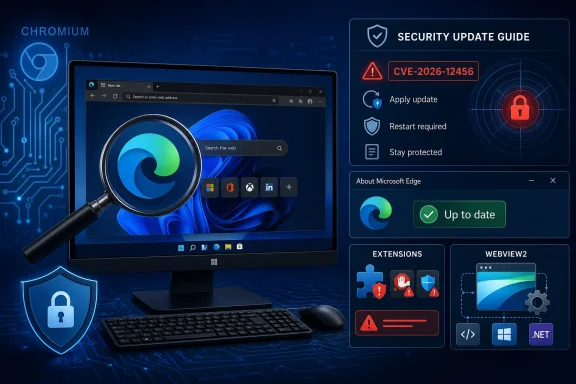 Edge Is Microsoft’s Browser, but Chromium Is the Shared Attack Surface
The confusing part of CVE-2026-12456 is the branding. The vulnerability is described as a Chrome or Chromium issue, yet it appears in Microsoft’s Security Update Guide, the same place admins expect to see Windows, Office, Exchange, SharePoint, .NET, and Azure-related advisories. That is not a clerical error; it is how the browser ecosystem works now.Microsoft Edge, since its Chromium rebirth, consumes large parts of the same open-source codebase that powers Google Chrome, Brave, Vivaldi, Opera, and many embedded browser surfaces. Microsoft adds its own identity, enterprise policy layer, Microsoft account integration, security defaults, and Windows-specific plumbing, but the underlying engine and many browser components still come from Chromium. When a bug is fixed upstream in Chromium, Microsoft has to evaluate whether Edge is affected and ship a patched Edge build.
That is why the Security Update Guide entry matters. It is less a declaration that “Chrome is Microsoft’s problem” than a declaration that “this Chromium problem was relevant to a Microsoft-supported product.” For Windows admins, that distinction is not academic. A vulnerability scanner, compliance dashboard, or patch-management report will not care that the original bug lived upstream if the exposed executable on a managed endpoint is
msedge.exe.The Security Update Guide Has Become a Translation Layer
Microsoft’s Security Update Guide is not merely a list of Patch Tuesday Windows fixes. It is now a translation layer between vulnerability identifiers and Microsoft’s product estate. That estate includes traditional Windows components, cloud services, developer frameworks, and browsers that import upstream open-source code.For Chromium CVEs, Microsoft’s role is usually to say whether Microsoft Edge is affected and which Edge version is no longer vulnerable. The advisory language is often terse because Microsoft is not necessarily the original discoverer, maintainer, or assigner of the bug. Google or the Chromium project may publish the primary technical detail, while Microsoft publishes the customer-facing status for Edge.
That division of labor can feel unsatisfying when an admin wants one clean answer. But in practice, it is a useful signal. The inclusion of CVE-2026-12456 in Microsoft’s guide means Edge users should treat it as part of their browser patching obligations, not dismiss it as “just a Chrome issue.”
“Extensions” Is a Small Word for a Large Risk Boundary
The vulnerability description points to insufficient validation of untrusted input in Extensions. That phrasing is classic CVE language: precise enough to classify the bug, not detailed enough to arm attackers before patches are widely deployed. The key idea is that extension-related code handled something it should not have trusted.Extensions are a dangerous place for browser bugs because they sit near the boundary between user intent, website content, browser privilege, and cross-origin isolation. A normal web page is supposed to be fenced in by the same-origin policy, site isolation, permission prompts, and sandboxing. Extensions complicate that model because users intentionally grant them broader powers: reading pages, modifying content, handling requests, storing data, or interacting with browser APIs.
That does not mean every extension vulnerability is catastrophic. Some require a malicious extension to be installed. Some require user interaction. Some require another compromise first. But extension bugs are still worth fast patching because attackers love seams, and browser extensions are one of the messiest seams in consumer and enterprise computing.
The Practical Answer Is Version Checking, Not CVE Archaeology
For most Windows users, the right response is not to spend an afternoon decoding Chromium issue trackers. The right response is to check whether Edge is updated. Browser security has become too fast-moving for manual CVE-by-CVE triage on ordinary desktops.In Microsoft Edge, the version is visible from the browser’s own About page. Open Edge, select the three-dot menu in the upper-right corner, choose Help and feedback, and then choose About Microsoft Edge. You can also type
edge://settings/help directly into the address bar.That page shows the installed version and usually triggers an update check. If an update is available, Edge will download it and ask for a restart to finish applying it. The important bit is not just seeing a high version number; it is making sure the page says Edge is up to date after the check completes.
For administrators, the same check can be performed at scale through management tooling, inventory systems, vulnerability scanners, or Edge management policies. The home-user version of the answer is “open About Microsoft Edge.” The enterprise version is “prove every supported channel in your fleet has advanced beyond the vulnerable build.”
Browser Updates Are Not Patch Tuesday Anymore
The old Windows patching rhythm trained a generation of IT departments to think monthly. Browser security punishes that habit. Chromium vulnerabilities often land on their own schedule, and browser vendors ship stable-channel updates whenever the risk and release process justify it.That is why a Microsoft Security Update Guide entry for a Chromium CVE can appear to float outside the familiar Patch Tuesday bundle. Edge updates are delivered through Microsoft Edge Update, not exclusively through the classic Windows Update cadence. On managed systems, policy choices can delay, pin, or channel-shift updates, which is useful for compatibility testing but risky if administrators forget that browsers are exposed to hostile internet content every working day.
The modern browser is also not a single app in the old sense. It is a document viewer, identity surface, password manager, PDF reader, web app runtime, enterprise portal, extension host, and sometimes the front end for line-of-business applications. If the browser lags behind, the exposure is not limited to someone casually browsing the web. It can affect authentication flows, SaaS access, intranet apps, and embedded WebView-based workflows.
Microsoft’s Wording Is Bland Because the Supply Chain Is Complicated
The advisory’s phrasing — that Chromium OSS is consumed by Microsoft Edge and the Security Update Guide entry announces that the latest Edge version is no longer vulnerable — is bureaucratic, but it is doing careful legal and technical work. Microsoft is not pretending the bug originated in Edge-specific code. It is saying the fixed Edge release incorporates the relevant Chromium remediation.That matters because open-source consumption does not make responsibility disappear. If Microsoft ships the code, supports the browser, and asks enterprises to standardize on it, then Microsoft must also tell those customers when inherited code creates risk. The same principle applies across the industry: Linux distributions document upstream kernel and package vulnerabilities, appliance vendors document bundled library bugs, and cloud providers patch open-source components inside managed services.
The difference with browsers is visibility. Everyone recognizes Chrome and Edge as branded products, so a Chrome CVE in Microsoft’s guide looks odd at first glance. Underneath, it is just the software supply chain showing through the paint.
The Name on the CVE Is Not the Name on the Risk
CVE identifiers often preserve the origin story of a vulnerability, not the full blast radius. A CVE may be assigned against Google Chrome, Chromium, an open-source library, or a specific component name, while the vulnerable code may be present in several downstream products. That is why mature vulnerability management programs map CVEs to installed assets rather than relying on product branding alone.For Edge, the mapping is straightforward in principle but still operationally annoying. If the vulnerable Chromium code shipped inside Edge, then Edge must be updated. If a scanner flags the CVE against Edge, the fix is not to install Chrome’s update; it is to install Microsoft’s patched Edge build.
This also explains why admins sometimes see duplicate-looking browser advisories. Google may publish Chrome stable release notes. Microsoft may publish Edge release notes and Security Update Guide entries. Third-party scanners may publish plugin checks. Security teams then have to reconcile all of those into a single compliance state: vulnerable or not vulnerable on this machine.
The Extension Angle Should Push Enterprises Toward Inventory Discipline
CVE-2026-12456 is a reminder that extension governance is part of browser security, not a nice-to-have. Even if the fix is purely in the browser engine, the attack path described by extension-related vulnerabilities often assumes that users can install or be tricked into installing browser extensions. That is exactly the kind of assumption enterprises can influence.Edge gives administrators policy controls for extension installation, blocklists, allowlists, update behavior, and store access. Those controls are not glamorous, but they turn a browser from a user-personalized plug-in playground into a managed application platform. In a high-risk environment, the difference between “any extension from the store” and “approved extensions only” is enormous.
There is a cultural hurdle here. Many users think of extensions as harmless convenience tools: coupon finders, PDF helpers, grammar checkers, tab managers, screen recorders. Security teams know better. An extension that can read and change site data is sitting inside the most sensitive workflow many employees have: the browser session where they access email, finance systems, customer records, source repositories, and identity portals.
Consumers Should Check the About Page; Admins Should Check the Channel
For an individual user, checking the browser version is simple. Openedge://settings/help, wait for Edge to check for updates, and restart the browser if prompted. If the page says Microsoft Edge is up to date, you have done the practical thing.For IT departments, there is one more layer: channel awareness. Edge Stable, Beta, Dev, and Canary do not carry identical version numbers or risk profiles. Most enterprise users should be on Stable unless there is a deliberate testing reason not to be. A patched Beta version does not help a Stable deployment, and a patched Stable version does not prove that every WebView2 runtime or specialized app environment is current.
The version number also has to be interpreted against Microsoft’s fixed-build information, not guessed by eye. Browser version strings are long because they encode major versions, branches, and build revisions. A machine that is “on Edge 149” may still be vulnerable if the fixed version is a later 149 build. That is why security teams should compare the full version string, not just the major number.
WebView2 Is the Quiet Complication
There is another reason Chromium CVEs belong in Microsoft’s orbit: WebView2. Many Windows applications embed web content using the Microsoft Edge WebView2 Runtime, which is also Chromium-based. Depending on the vulnerability and the affected component, the browser is not always the only place administrators need to think about Chromium code.Not every Chrome or Edge CVE automatically implies WebView2 exposure. The affected component, runtime configuration, application behavior, and update channel all matter. But WebView2 has made Chromium part of the Windows application substrate, not merely a browser choice.
That should change how organizations talk about browser updates. Edge is visible; WebView2 is often invisible. Users know when they open a browser, but they may not know when a business app, chat client, installer, help viewer, or management console is rendering web content through a Chromium-based runtime. In that world, “we patched the browser” is a good start, not always the end of the conversation.
The Advisory Is Also a Nudge About Automatic Updates
Microsoft Edge normally updates automatically, and that is the right default. Browser vendors have spent years making update friction as low as possible because user-driven patching fails at internet scale. The About page remains useful because it gives users and help desks a quick way to force a check and confirm the installed build.Enterprises often have more complicated update policies. They may delay updates for validation, route them through management systems, or stage rollouts across rings. That discipline is defensible for operating system upgrades and business-critical software. It becomes dangerous when a browser security fix is treated like a cosmetic feature release.
The best enterprise posture is not “install everything instantly everywhere.” It is controlled urgency. Fast rings should catch compatibility problems quickly, security teams should know which CVEs are being held back by policy, and broad deployment should move on a timetable measured in hours or days for serious browser flaws, not weeks.
A Small CVE Entry Reveals the New Browser Contract
The old browser contract was simple: pick a browser, keep it installed, and blame that browser’s vendor when something breaks. The Chromium era changed the arrangement. Microsoft, Google, and other vendors now share a large technical foundation while competing on integration, services, policy, performance, privacy posture, and platform defaults.That shared foundation has benefits. Security fixes can propagate across a vast ecosystem, and vendors are not each maintaining entirely separate rendering engines with entirely separate bug classes. But it also creates moments of confusion like this one, where a vulnerability that looks like a Google Chrome issue appears in a Microsoft security feed.
The right interpretation is not that Microsoft is padding the Security Update Guide. It is that Microsoft is acknowledging the chain of custody. Edge consumed Chromium code; Chromium had a vulnerability; Edge needed a fixed build; Microsoft documented that fact for its customers.
The Version Check Is the User-Friendly Part of a Messy System
Here is the practical workflow that matters for CVE-2026-12456 and similar Chromium-derived Edge advisories:- Open Microsoft Edge and go to
edge://settings/helpto view the exact installed version and trigger an update check. - Restart Edge when prompted, because many browser updates do not fully apply until the browser relaunches.
- Compare the full Edge version string against Microsoft’s fixed-version guidance rather than relying only on the major version number.
- In managed environments, verify Edge Stable, any non-Stable channels, and WebView2 Runtime deployments separately where they are in use.
- Review extension policies, because extension-related vulnerabilities are a reminder that browser add-ons are part of the endpoint attack surface.
- Treat Chromium CVEs in Microsoft’s guide as Edge-relevant unless Microsoft’s advisory or your vendor tooling clearly says otherwise.
References
- Primary source: MSRC
Published: 2026-06-19T13:52:36-07:00
Security Update Guide - Microsoft Security Response Center
 msrc.microsoft.com
- Related coverage: datacomm.com
- Related coverage: vulnerability.circl.lu
Vulnerability-Lookup
Vulnerability-Lookup - Fast vulnerability lookup correlation from different sources.vulnerability.circl.lu - Related coverage: thewindowsupdate.com
- Related coverage: rapid7.com
Rapid7 Vulnerability Database
Rapid7's VulnDB is curated repository of vetted computer software exploits and exploitable vulnerabilities.www.rapid7.com - Related coverage: buildings.honeywell.com
The purpose of this document is to identify the patches that have been delivered by Microsoft® which have been tested against Pro-Watch
PDF documentbuildings.honeywell.com