
Microsoft documented CVE-2026-12460 in its Security Update Guide because the bug lives in Chromium open-source code that Microsoft Edge consumes, and the company uses the guide to tell customers that updated Edge builds are no longer vulnerable. The short version is that this is a Chrome-family flaw, not a Windows flaw, but Edge is now part of that family. That makes the Security Update Guide less a Windows patch ledger than a map of Microsoft’s real software supply chain. For administrators, the lesson is simple: if Chromium ships in your estate under a Microsoft badge, Chromium CVEs are Microsoft exposure too.
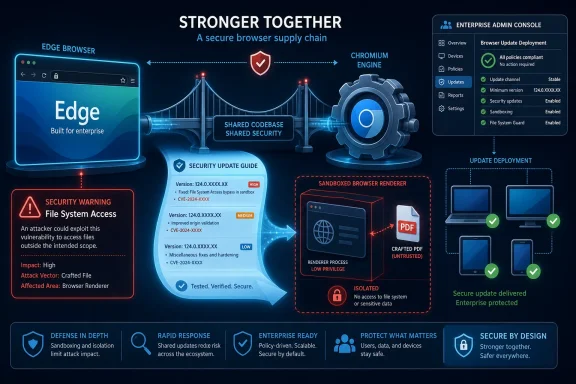
The confusion around CVE-2026-12460 is understandable because the phrasing looks, at first glance, like a category error. “Insufficient policy enforcement in File System Access” sounds like a Chrome issue, and the underlying vulnerable code is indeed in Chromium open-source software. But Microsoft Edge is Chromium-based, and that means Edge inherits large parts of the same browser engine, APIs, sandbox model, PDF handling, and web-platform behavior that Google Chrome uses.
That inheritance is the entire point of modern Edge. Microsoft stopped trying to maintain a separate browser engine as the web consolidated around Chromium, then rebuilt Edge on top of the same open-source foundation. The upside is compatibility, faster standards alignment, and a shared security research ecosystem. The downside is that when Chromium has a meaningful flaw, Edge may need to answer for it too.
That is why the Security Update Guide entry exists. It is not Microsoft claiming ownership of the original bug in the way it would for a Windows kernel vulnerability or an Exchange Server remote code execution flaw. It is Microsoft telling customers that a Microsoft-shipped product contained affected Chromium code and that the latest Edge release incorporates the fix.
This is a subtle but important distinction. A vulnerability can be “in Chrome” as a matter of discovery and upstream project ownership while still being “in Edge” as a matter of deployed customer risk. Security teams do not patch source-code repositories; they patch the binaries installed on endpoints.
Edge is the cleanest example. It is a Microsoft product, but its security calendar often follows Chromium. When Google’s Chromium project fixes a browser engine vulnerability, Microsoft must evaluate whether Edge is affected, build and test its own release, and then document the result for customers who rely on Microsoft’s vulnerability data rather than Google’s Chrome release notes.
That documentation matters because enterprise tooling often keys off Microsoft’s records. Vulnerability management platforms, compliance dashboards, asset inventories, and patch reports ingest Microsoft’s Security Update Guide data to determine whether a Windows device is exposed. If Microsoft did not publish Chromium-related Edge CVEs there, many organizations would have an official-looking blind spot.
The guide is therefore doing two jobs at once. It remains a disclosure mechanism for Microsoft-originated vulnerabilities, but it also serves as a translated risk statement for third-party and open-source code that Microsoft packages into its products. CVE-2026-12460 sits squarely in that second category.
The File System Access API is part of that shift. It gives web applications a controlled way to interact with local files and directories, typically mediated by user prompts, permissions, origin rules, and browser policy enforcement. Done correctly, it enables useful web apps without handing every website a skeleton key to the user’s disk.
A vulnerability described as insufficient policy enforcement signals that one of those boundaries did not hold as intended. In the publicly visible summaries, CVE-2026-12460 is described as a Chromium vulnerability that could allow a remote attacker who had already compromised the renderer process to bypass site isolation through a crafted PDF file. That caveat matters: this is not being described as a simple “visit a page and your whole file system is exposed” bug. It is part of the layered chess game inside the browser sandbox.
But layered bugs are still serious. Browser exploitation often chains weaknesses together: one flaw gets code execution in a renderer, another escapes a sandbox or bypasses isolation, and a third reaches data that should have remained fenced off. A bug that sounds narrow on its own can become valuable when paired with another vulnerability.
That is why browser vendors often move quickly even when the description feels abstract. The browser security model is built on many compartments, and attackers make progress by finding the seams between them.
That shared foundation is both a triumph and a concentration risk. A Chromium fix can protect a massive share of the web population quickly, because many vendors can take the same upstream patch and ship it downstream. But a Chromium bug can also ripple through multiple branded browsers, each with its own update mechanism and release timing.
Microsoft’s job is not simply to wait for Google. Edge has its own release channels, enterprise policies, compatibility testing, and packaging. Microsoft also has to communicate to customers who may not read Chrome advisories because they standardized on Edge. That is the reason a Chrome-origin CVE can show up in a Microsoft security channel without being a contradiction.
The branding gap is where confusion enters. Users see “Google Chrome” in vulnerability databases and “Microsoft Edge” in the Security Update Guide, then wonder whether scanners are double-counting or misclassifying the issue. Sometimes scanners do get product matching wrong, especially where Chromium-based browsers share identifiers, version patterns, or library names. But the basic idea is legitimate: Edge can be affected by Chromium vulnerabilities because Edge includes Chromium.
This is the same software supply-chain story that enterprise security teams already understand for OpenSSL, libxml, zlib, Electron, and countless npm or NuGet packages. The difference is that the browser is visible, politically charged, and installed everywhere.
Edge’s built-in PDF viewer is convenient precisely because it collapses a common document workflow into the browser. That convenience also means browser security and document security are no longer separate operational categories. A PDF opened in the browser is not merely “a document”; it is content being parsed, rendered, sandboxed, and permissioned by a complex application platform.
The available public language around CVE-2026-12460 does not support panic. It does, however, support urgency. A vulnerability involving renderer compromise, site isolation, and crafted PDFs belongs in the category of bugs that defenders should treat as browser-chain material. That is especially true in environments where users routinely open externally supplied PDFs in the default browser.
For most organizations, the practical mitigation is not exotic. Update Edge, verify the installed version, make sure auto-update policies are not broken, and confirm that vulnerability scanners understand the fixed build. If the estate includes Chrome as well as Edge, update both. If it includes WebView2-dependent applications, verify those runtimes separately where your tooling exposes them.
There is also a faster route for people who live in address bars: type
The version string matters because “latest” is not a reliable operational state. A browser may be waiting for relaunch. A machine may be pinned by policy. A device may be offline, behind a filtering proxy, or pointed at an internal update service that has not staged the current build. A vulnerability scanner may also continue flagging a CVE until it sees the exact fixed version or a later one.
For home users, the About page is usually enough. For administrators, it is only the first layer. Fleet verification should come from endpoint management, inventory queries, registry or application inventory data, update compliance reports, and vulnerability management tools that can distinguish Edge Stable, Beta, Dev, Canary, and WebView2 Runtime where applicable.
Edge updates can be governed by Microsoft Edge Update policies. Organizations may pin versions, stagger rollout, disable updates, route traffic through internal distribution points, or depend on management platforms that introduce their own timing. Those choices may be defensible for compatibility, but they make verification mandatory.
The risk is not that Microsoft failed to publish a fix. The risk is that a company assumes the fix arrived everywhere because the vendor’s advisory says the latest version is no longer vulnerable. Those are different claims. Vendor remediation means a patched build exists; enterprise remediation means the patched build is installed and running on the devices that matter.
That distinction becomes especially important with browser restarts. A browser can download an update but remain on the old running code until the user closes and reopens it. In kiosk environments, call centers, shared workstations, virtual desktops, and long-lived admin sessions, that restart gap can persist longer than security teams expect.
The operational question should therefore be specific: which Edge channel is installed, what version is running, when did it last update, and has the browser process restarted since the update landed?
The right response is not to dismiss the alert because the label feels wrong. The right response is to identify the installed browser and compare its version against the fixed release documented by the vendor responsible for that product. For Edge, Microsoft’s statement controls the Microsoft product story. For Chrome, Google’s Chrome release information controls the Chrome story.
This is where security teams can lose time. One team sees “Chrome CVE” and says the company does not deploy Chrome. Another sees “Edge affected” and assumes Microsoft has bundled a Windows patch. A third waits for Patch Tuesday even though the browser update may already be available through Edge’s own update channel.
Modern vulnerability response requires product literacy. Edge is not serviced exactly like Windows. Chrome is not serviced exactly like Edge. WebView2 is not always the same thing as the interactive browser. A clean patch process has to know the difference.
The Security Update Guide gives defenders a Microsoft-native artifact to point to. It tells security operations teams, auditors, and risk committees that the issue has been assessed in the context of Edge. That matters in environments where official vendor documentation carries more weight than upstream project notes or third-party vulnerability databases.
This is especially important because Edge is deeply integrated into the Windows desktop experience. It is the default browser in many organizations, the built-in PDF viewer for many users, and the runtime-adjacent sibling of WebView2 applications that embed web content inside desktop software. Even when the vulnerable code originated elsewhere, the exposure lands inside Microsoft-managed infrastructure.
The guide entry is therefore not noise. It is Microsoft accepting the communication burden that comes with shipping a Chromium-based browser to enterprise customers.
That is why Microsoft’s explanation is so direct: the vulnerability is in Chromium OSS consumed by Edge, and the Security Update Guide entry announces that the latest Edge version is no longer vulnerable. In other words, the CVE appears there because Microsoft customers need to know when Microsoft’s Chromium-based browser has crossed from exposed to fixed.
For Windows enthusiasts, this is also a useful mental model for the post-EdgeHTML era. Edge is Microsoft’s browser experience, Microsoft’s enterprise policy surface, Microsoft’s sync and services wrapper, and Microsoft’s Windows integration point. But its core web engine is part of a broader Chromium ecosystem, and security defects in that ecosystem can land in Microsoft’s lap.
The practical result is that browser hygiene can no longer be treated as a secondary patching chore. Browsers sit directly in the path of untrusted content, identity sessions, enterprise SaaS, local file workflows, and remote collaboration. They deserve the same urgency as operating-system fixes, and in some cases more.
CVE-2026-12460 will fade into the normal churn of browser security advisories, but the confusion it creates is worth remembering. Microsoft’s Security Update Guide is not merely saying “Chrome had a bug”; it is saying that Microsoft shipped a product built on the affected code and has now shipped a version that closes the exposure. In a world where the browser is both application platform and document reader, that kind of supply-chain transparency is not clutter. It is the minimum map administrators need for the next Chromium flaw that arrives under a Microsoft icon.
 Microsoft’s Browser Is a Microsoft Product, Even When the Bug Starts Upstream
The confusion around CVE-2026-12460 is understandable because the phrasing looks, at first glance, like a category error. “Insufficient policy enforcement in File System Access” sounds like a Chrome issue, and the underlying vulnerable code is indeed in Chromium open-source software. But Microsoft Edge is Chromium-based, and that means Edge inherits large parts of the same browser engine, APIs, sandbox model, PDF handling, and web-platform behavior that Google Chrome uses.That inheritance is the entire point of modern Edge. Microsoft stopped trying to maintain a separate browser engine as the web consolidated around Chromium, then rebuilt Edge on top of the same open-source foundation. The upside is compatibility, faster standards alignment, and a shared security research ecosystem. The downside is that when Chromium has a meaningful flaw, Edge may need to answer for it too.
That is why the Security Update Guide entry exists. It is not Microsoft claiming ownership of the original bug in the way it would for a Windows kernel vulnerability or an Exchange Server remote code execution flaw. It is Microsoft telling customers that a Microsoft-shipped product contained affected Chromium code and that the latest Edge release incorporates the fix.
This is a subtle but important distinction. A vulnerability can be “in Chrome” as a matter of discovery and upstream project ownership while still being “in Edge” as a matter of deployed customer risk. Security teams do not patch source-code repositories; they patch the binaries installed on endpoints.
The Security Update Guide Has Become a Product-Risk Ledger
For years, Microsoft’s Security Update Guide has been treated by many admins as Patch Tuesday’s master index. That instinct is still useful, but it is increasingly incomplete. Modern Microsoft products update on their own schedules, pull in open-source components, and sometimes remediate exposure through browser updates, cloud-side changes, app-store packages, or evergreen runtimes rather than through the familiar monthly Windows cumulative update.Edge is the cleanest example. It is a Microsoft product, but its security calendar often follows Chromium. When Google’s Chromium project fixes a browser engine vulnerability, Microsoft must evaluate whether Edge is affected, build and test its own release, and then document the result for customers who rely on Microsoft’s vulnerability data rather than Google’s Chrome release notes.
That documentation matters because enterprise tooling often keys off Microsoft’s records. Vulnerability management platforms, compliance dashboards, asset inventories, and patch reports ingest Microsoft’s Security Update Guide data to determine whether a Windows device is exposed. If Microsoft did not publish Chromium-related Edge CVEs there, many organizations would have an official-looking blind spot.
The guide is therefore doing two jobs at once. It remains a disclosure mechanism for Microsoft-originated vulnerabilities, but it also serves as a translated risk statement for third-party and open-source code that Microsoft packages into its products. CVE-2026-12460 sits squarely in that second category.
The File System Access API Is Powerful Enough to Deserve Suspicion
The “File System Access” wording is not incidental. Modern browsers are no longer just document viewers; they are application platforms. Web apps can edit photos, process PDFs, manipulate local files, cache data offline, and behave in ways that would once have required a native desktop application.The File System Access API is part of that shift. It gives web applications a controlled way to interact with local files and directories, typically mediated by user prompts, permissions, origin rules, and browser policy enforcement. Done correctly, it enables useful web apps without handing every website a skeleton key to the user’s disk.
A vulnerability described as insufficient policy enforcement signals that one of those boundaries did not hold as intended. In the publicly visible summaries, CVE-2026-12460 is described as a Chromium vulnerability that could allow a remote attacker who had already compromised the renderer process to bypass site isolation through a crafted PDF file. That caveat matters: this is not being described as a simple “visit a page and your whole file system is exposed” bug. It is part of the layered chess game inside the browser sandbox.
But layered bugs are still serious. Browser exploitation often chains weaknesses together: one flaw gets code execution in a renderer, another escapes a sandbox or bypasses isolation, and a third reaches data that should have remained fenced off. A bug that sounds narrow on its own can become valuable when paired with another vulnerability.
That is why browser vendors often move quickly even when the description feels abstract. The browser security model is built on many compartments, and attackers make progress by finding the seams between them.
Chromium Turns Competitors Into Patch-Schedule Roommates
The browser market still looks competitive on the surface. Chrome, Edge, Brave, Vivaldi, Opera, and others have different interfaces, business models, sync services, privacy defaults, and enterprise management stories. Underneath, many of them share Chromium.That shared foundation is both a triumph and a concentration risk. A Chromium fix can protect a massive share of the web population quickly, because many vendors can take the same upstream patch and ship it downstream. But a Chromium bug can also ripple through multiple branded browsers, each with its own update mechanism and release timing.
Microsoft’s job is not simply to wait for Google. Edge has its own release channels, enterprise policies, compatibility testing, and packaging. Microsoft also has to communicate to customers who may not read Chrome advisories because they standardized on Edge. That is the reason a Chrome-origin CVE can show up in a Microsoft security channel without being a contradiction.
The branding gap is where confusion enters. Users see “Google Chrome” in vulnerability databases and “Microsoft Edge” in the Security Update Guide, then wonder whether scanners are double-counting or misclassifying the issue. Sometimes scanners do get product matching wrong, especially where Chromium-based browsers share identifiers, version patterns, or library names. But the basic idea is legitimate: Edge can be affected by Chromium vulnerabilities because Edge includes Chromium.
This is the same software supply-chain story that enterprise security teams already understand for OpenSSL, libxml, zlib, Electron, and countless npm or NuGet packages. The difference is that the browser is visible, politically charged, and installed everywhere.
The PDF Angle Should Get Admins’ Attention
The mention of a crafted PDF file gives CVE-2026-12460 a familiar enterprise flavor. PDFs remain one of the most common formats flowing through email, ticketing systems, web portals, legal workflows, financial systems, HR platforms, and document-management tools. Even when organizations lock down Office macros and block executable attachments, PDF handling remains hard to eliminate.Edge’s built-in PDF viewer is convenient precisely because it collapses a common document workflow into the browser. That convenience also means browser security and document security are no longer separate operational categories. A PDF opened in the browser is not merely “a document”; it is content being parsed, rendered, sandboxed, and permissioned by a complex application platform.
The available public language around CVE-2026-12460 does not support panic. It does, however, support urgency. A vulnerability involving renderer compromise, site isolation, and crafted PDFs belongs in the category of bugs that defenders should treat as browser-chain material. That is especially true in environments where users routinely open externally supplied PDFs in the default browser.
For most organizations, the practical mitigation is not exotic. Update Edge, verify the installed version, make sure auto-update policies are not broken, and confirm that vulnerability scanners understand the fixed build. If the estate includes Chrome as well as Edge, update both. If it includes WebView2-dependent applications, verify those runtimes separately where your tooling exposes them.
The Version Number Is the Evidence, Not the Feeling of Being Updated
The user-facing answer to “How can I see the version of the browser?” is straightforward. In Microsoft Edge, open the three-dot menu, choose Help and feedback, then choose About Microsoft Edge. Edge will display the installed version and normally check for updates from that page.There is also a faster route for people who live in address bars: type
edge://settings/help into Edge and press Enter. That opens the same About page. If an update is available, Edge will usually download it there and ask for a restart to finish applying it.The version string matters because “latest” is not a reliable operational state. A browser may be waiting for relaunch. A machine may be pinned by policy. A device may be offline, behind a filtering proxy, or pointed at an internal update service that has not staged the current build. A vulnerability scanner may also continue flagging a CVE until it sees the exact fixed version or a later one.
For home users, the About page is usually enough. For administrators, it is only the first layer. Fleet verification should come from endpoint management, inventory queries, registry or application inventory data, update compliance reports, and vulnerability management tools that can distinguish Edge Stable, Beta, Dev, Canary, and WebView2 Runtime where applicable.
Auto-Update Is Not a Strategy Unless Someone Verifies It
Browsers have trained users to believe that updates are automatic, invisible, and therefore solved. That belief is mostly reasonable on consumer machines, but it becomes dangerous in managed environments. Enterprise controls are often designed to slow change, and anything that slows change can also slow security fixes.Edge updates can be governed by Microsoft Edge Update policies. Organizations may pin versions, stagger rollout, disable updates, route traffic through internal distribution points, or depend on management platforms that introduce their own timing. Those choices may be defensible for compatibility, but they make verification mandatory.
The risk is not that Microsoft failed to publish a fix. The risk is that a company assumes the fix arrived everywhere because the vendor’s advisory says the latest version is no longer vulnerable. Those are different claims. Vendor remediation means a patched build exists; enterprise remediation means the patched build is installed and running on the devices that matter.
That distinction becomes especially important with browser restarts. A browser can download an update but remain on the old running code until the user closes and reopens it. In kiosk environments, call centers, shared workstations, virtual desktops, and long-lived admin sessions, that restart gap can persist longer than security teams expect.
The operational question should therefore be specific: which Edge channel is installed, what version is running, when did it last update, and has the browser process restarted since the update landed?
Vulnerability Scanners Will Keep Making This Look Messier Than It Is
CVE-2026-12460 is also a reminder that vulnerability management is part technical reality and part data interpretation. A scanner may report the CVE against “Google Chrome,” “Microsoft Edge,” “Chromium,” or a generic browser component depending on how it maps CPEs, installed software names, file versions, and vendor advisories. That can make a legitimate finding look like a false positive.The right response is not to dismiss the alert because the label feels wrong. The right response is to identify the installed browser and compare its version against the fixed release documented by the vendor responsible for that product. For Edge, Microsoft’s statement controls the Microsoft product story. For Chrome, Google’s Chrome release information controls the Chrome story.
This is where security teams can lose time. One team sees “Chrome CVE” and says the company does not deploy Chrome. Another sees “Edge affected” and assumes Microsoft has bundled a Windows patch. A third waits for Patch Tuesday even though the browser update may already be available through Edge’s own update channel.
Modern vulnerability response requires product literacy. Edge is not serviced exactly like Windows. Chrome is not serviced exactly like Edge. WebView2 is not always the same thing as the interactive browser. A clean patch process has to know the difference.
Microsoft’s Documentation Is Also a Signal to Regulated Customers
There is another reason Microsoft publishes entries like this: auditability. Large organizations need vendor-backed records showing that a product was affected and that a fix exists. “Google fixed Chromium” may be technically relevant, but it is not always sufficient for a Microsoft-standardized enterprise explaining the status of Microsoft Edge.The Security Update Guide gives defenders a Microsoft-native artifact to point to. It tells security operations teams, auditors, and risk committees that the issue has been assessed in the context of Edge. That matters in environments where official vendor documentation carries more weight than upstream project notes or third-party vulnerability databases.
This is especially important because Edge is deeply integrated into the Windows desktop experience. It is the default browser in many organizations, the built-in PDF viewer for many users, and the runtime-adjacent sibling of WebView2 applications that embed web content inside desktop software. Even when the vulnerable code originated elsewhere, the exposure lands inside Microsoft-managed infrastructure.
The guide entry is therefore not noise. It is Microsoft accepting the communication burden that comes with shipping a Chromium-based browser to enterprise customers.
The Real Boundary Is Between Patched and Unpatched, Not Chrome and Edge
It is tempting to treat CVE naming and product branding as the main story. They are not. The main story is whether the browser code on a machine still contains the vulnerable behavior. If it does, the logo in the taskbar is secondary.That is why Microsoft’s explanation is so direct: the vulnerability is in Chromium OSS consumed by Edge, and the Security Update Guide entry announces that the latest Edge version is no longer vulnerable. In other words, the CVE appears there because Microsoft customers need to know when Microsoft’s Chromium-based browser has crossed from exposed to fixed.
For Windows enthusiasts, this is also a useful mental model for the post-EdgeHTML era. Edge is Microsoft’s browser experience, Microsoft’s enterprise policy surface, Microsoft’s sync and services wrapper, and Microsoft’s Windows integration point. But its core web engine is part of a broader Chromium ecosystem, and security defects in that ecosystem can land in Microsoft’s lap.
The practical result is that browser hygiene can no longer be treated as a secondary patching chore. Browsers sit directly in the path of untrusted content, identity sessions, enterprise SaaS, local file workflows, and remote collaboration. They deserve the same urgency as operating-system fixes, and in some cases more.
The CVE Is a Small Entry in a Much Bigger Browser-Supply-Chain Story
The concrete response to CVE-2026-12460 is not complicated, but the pattern behind it is important.- Microsoft included the CVE because Edge is Chromium-based and can inherit vulnerabilities from Chromium open-source components.
- The Security Update Guide entry is meant to document that updated Microsoft Edge builds are no longer vulnerable.
- Users can check Edge by opening the three-dot menu, selecting Help and feedback, and then selecting About Microsoft Edge.
- Users can also go directly to
edge://settings/helpto view the installed version and trigger an update check. - Administrators should verify deployed versions across the fleet rather than assuming automatic updates have completed.
- Security teams should treat Chromium CVEs as potentially relevant to every Chromium-based browser and runtime in their environment, not just Google Chrome.
CVE-2026-12460 will fade into the normal churn of browser security advisories, but the confusion it creates is worth remembering. Microsoft’s Security Update Guide is not merely saying “Chrome had a bug”; it is saying that Microsoft shipped a product built on the affected code and has now shipped a version that closes the exposure. In a world where the browser is both application platform and document reader, that kind of supply-chain transparency is not clutter. It is the minimum map administrators need for the next Chromium flaw that arrives under a Microsoft icon.
References
- Primary source: MSRC
Published: 2026-06-19T13:52:40-07:00
Security Update Guide - Microsoft Security Response Center
 msrc.microsoft.com
- Official source: support.microsoft.com
Enhance your security on the web with Microsoft Edge | Microsoft Support
Learn how Microsoft Edge provides enhanced security for browsing the web.support.microsoft.com - Official source: microsoft.com
MSRC - Microsoft Security Response Center
The Microsoft Security Response Center is part of the defender community and on the front line of security response evolution. For over twenty years, we have been engaged with security researchers working to protect customers and the broader ecosystem.www.microsoft.com
- Official source: learn.microsoft.com
Microsoft Edge Browser Policy Documentation | Microsoft Learn
Windows and Mac documentation for all policies supported by the Microsoft Edge Browserlearn.microsoft.com - Related coverage: windowscentral.com
Major Microsoft Edge versions will now ship every two weeks: Microsoft confirms plans to ship new Edge features and changes twice a month | Windows Central
Microsoft has announced that Edge will be moving to a two-week release cycle for major versions of the browser, matching Chrome.www.windowscentral.com - Related coverage: techradar.com
Microsoft Edge Review: Features, Usage, and Competition | TechRadar
Outstanding performance at surprisingly low battery consumptionwww.techradar.com
- Related coverage: psni.police.uk
- Related coverage: aha.org
h isac tlp white microsoft edge addresses exploited zero day vulnerability cve 2024 7971 8 23 2024
PDF documentwww.aha.org
- Related coverage: yoakumhospital.org
- Related coverage: edgeuser.com
