

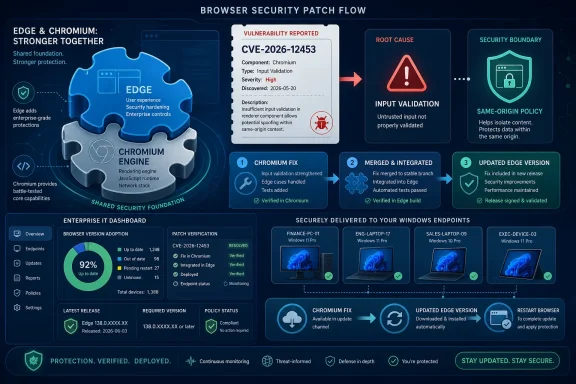
CVE-2026-12453 appears in Microsoft’s Security Update Guide because the bug lives in Chromium, the open-source browser engine Microsoft Edge consumes, and Microsoft is using the guide to tell Edge customers that updated Edge builds have absorbed the Chromium fix. That is the practical answer, but it is also the beginning of a larger story: modern browser security no longer maps neatly to the logo on the browser icon. When Edge inherits Chromium’s power, compatibility, and release tempo, it also inherits Chromium’s vulnerability paperwork.
The confusing part of CVE-2026-12453 is not the vulnerability description. “Insufficient validation of untrusted input in Input” is the sort of terse Chromium security phrasing administrators have seen for years. The confusing part is the venue: a Chrome-flavored CVE showing up in Microsoft’s Security Update Guide.
That is not a clerical mistake. Microsoft Edge, since its move to Chromium, is built on the same broad browser foundation as Google Chrome and several other modern browsers. When Chromium fixes a security bug in shared code, Edge must take that fix too, assuming the affected component is present in the Edge build Microsoft ships.
This is why Microsoft’s advisory language matters. The company is not saying that the bug was originally discovered in a proprietary Microsoft Edge feature. It is saying that Chromium open-source software is consumed by Edge, and that the Security Update Guide is the place Microsoft uses to communicate whether Microsoft’s browser is still exposed.
For Windows users, that distinction can feel academic. If the vulnerable code is in the browser they use every day, the origin story matters less than the installed version. For IT departments, however, the distinction matters a great deal, because vulnerability scanners, patch dashboards, compliance exports, and executive reports often sort risk by vendor name. A “Google Chrome” CVE in a Microsoft portal is not noise; it is supply-chain visibility.
Edge’s use of Chromium means Microsoft does not need to independently reinvent every rendering and web-platform feature. The tradeoff is that Microsoft participates in a security ecosystem where vulnerability disclosure, patch development, and downstream packaging are interdependent. A Chromium CVE may originate from Google’s security process, a third-party researcher, a Chromium project bug, or another contributor, but the fix still needs to land in every affected downstream browser.
That is why the Security Update Guide includes this kind of item. Microsoft customers do not patch “Chromium” as an abstract upstream project. They patch Microsoft Edge, Microsoft Edge WebView2 Runtime, or managed browser channels deployed across Windows endpoints. The guide translates upstream security work into Microsoft’s customer-facing patch language.
This is also why the phrase “no longer vulnerable” is doing important work. Microsoft is not merely acknowledging that a Chromium issue exists. It is declaring that the current Edge update line contains the relevant fix, allowing administrators to treat the advisory as actionable rather than theoretical.
The description indicates insufficient validation of untrusted input. In plain English, some data supplied through a crafted page was not checked rigorously enough before Chromium’s input-related code acted on it. The reported consequence is especially relevant: a remote attacker who had already compromised the renderer process could bypass same-origin policy through a crafted HTML page.
That wording narrows the scenario, but it does not make the bug ignorable. “Had compromised the renderer process” means this is not described as a one-click, standalone full-browser compromise. It suggests a chained attack model, where one vulnerability or exploit primitive gets an attacker into the renderer and this flaw helps them cross a security boundary that should still hold.
Browsers are designed with layers. The renderer is supposed to be constrained. Site isolation and same-origin policy are supposed to prevent one website from casually reading or interfering with another. When a bug helps an attacker bypass one of those boundaries, it becomes valuable as part of a larger exploit chain.
Security people sometimes talk about browser sandboxing as though it is one wall. In reality, browser defense is a series of walls, doors, guards, and assumptions. Same-origin policy is one of the rules that determines which web content can interact with which other web content.
A bypass does not automatically mean every password on the machine is gone. It does mean one of the core browser boundaries may be weakened under the right conditions. That is enough to matter, especially in environments where browsers are the front door to identity providers, management portals, source repositories, ticketing systems, and internal apps.
The wording of CVE-2026-12453 suggests the attacker needs a compromised renderer first. But exploit chains are how serious browser attacks often work. One bug gets code execution or memory access in a constrained context; another bug turns that foothold into access across boundaries; a third may escape a sandbox or steal tokens. Administrators should read these advisories not as isolated trivia, but as pieces of a chain Microsoft and Chromium are trying to break.
Edge makes this visible because it sits at the intersection of Windows, Chromium, identity, enterprise management, and the web. When Microsoft documents a Chromium CVE, it is effectively admitting what the industry has learned the hard way: customers manage products, but attackers exploit components.
This is a good thing, even if it makes reports messier. Hiding Chromium-origin issues from Microsoft’s guide would make Edge look cleaner on paper while leaving administrators with less useful information. Including the CVE makes the patch relationship explicit.
It also helps vulnerability management teams reconcile scanner output. A tool may flag CVE-2026-12453 based on an installed Edge version. A Microsoft advisory gives the organization a Microsoft-recognized source to confirm remediation status. Without that, teams end up arguing over whether a “Chrome” CVE applies to Edge at all.
The answer is: sometimes it does, sometimes it does not, and the deciding factor is whether the affected Chromium code is present and vulnerable in the Edge build. In this case, Microsoft’s own advisory says Edge consumed the vulnerable Chromium OSS and that the latest Edge release is no longer vulnerable.
In Microsoft Edge, the fastest way is to open the browser and type
The menu path is nearly as simple. Open Edge, select the three-dot menu in the upper-right corner, choose Help and feedback, and then choose About Microsoft Edge. That page shows the version and update state.
For Google Chrome, the equivalent is
For managed Windows fleets, the browser UI is only part of the story. Administrators may also need to inventory Edge versions through Microsoft Intune, Configuration Manager, Defender Vulnerability Management, PowerShell, endpoint management agents, or software inventory tooling. The important point is that “installed” and “restarted” are not always the same thing. Browser updates often stage in the background but do not fully apply until the browser process exits and relaunches.
That restart detail is where home-user advice and enterprise reality diverge. A consumer can close the browser and reopen it. A hospital workstation, call-center desktop, kiosk, VDI image, or developer machine with dozens of pinned tabs may keep Edge alive for days. In those environments, “we deployed the update” is not always equivalent to “the vulnerable browser process is gone.”
But the security side of that bargain depends on speed. Chromium bugs move quickly from discovery to patch to public advisory. Once a fix is released, attackers can study patches, infer vulnerability details, and look for machines that have not yet updated. The gap between upstream fix and downstream deployment becomes the danger zone.
Microsoft generally moves quickly with Edge security updates, and the company’s release notes repeatedly frame Stable channel updates as incorporating Chromium security updates. That is the correct operational posture. Edge cannot be a Chromium browser only when compatibility is convenient; it must also be a Chromium browser when security fixes need to ship.
For administrators, this means Edge should not be treated like a passive Windows accessory patched only on Patch Tuesday. Edge has its own update cadence. It may receive security updates out of band. In a browser-heavy enterprise, that cadence is not an annoyance; it is part of the defense model.
That last point deserves more attention. Microsoft Edge WebView2 Runtime allows Windows applications to embed web content using the Edge/Chromium engine. Many users who rarely open Edge directly may still have Chromium-based web rendering on the system through applications that depend on WebView2.
A Chromium security issue can therefore matter in more than one place. The visible Edge browser is the obvious target. WebView2-dependent applications may also be relevant, depending on how the runtime is updated and whether the vulnerable component is reachable. Security teams should avoid reducing the issue to “Do our users browse with Edge?” The better question is, “Where do we have Microsoft’s Chromium runtime installed, and is it current?”
Microsoft’s decision to publish Chromium-origin CVEs in its own guide helps answer that broader question. It gives Windows administrators a Microsoft product lens for a shared-code vulnerability. That is precisely what a modern security guide should do.
The right response is more disciplined. This is not the same as a confirmed, actively exploited, full-chain zero-day with public exploit code. It is also not harmless. Browser boundary bypasses are valuable because they compose well with other bugs.
Enterprise risk depends on exposure. Organizations with high-value web sessions, unmanaged extensions, legacy web apps, aggressive tab persistence, or users frequently handling untrusted links should care more. So should organizations where browsers are used to administer cloud infrastructure, identity platforms, finance systems, or production dashboards.
For consumers, the advice is simpler: update the browser and restart it. Modern browsers have made updates relatively painless because the alternative is untenable. The web is an adversarial execution environment, and the browser is the application most people use to run untrusted code all day.
Security advisories are often written in a language that feels detached from the work of maintaining machines. They speak of affected products, attack vectors, severities, and acknowledgments. Administrators have to translate that into tickets, rings, deadlines, reboot communications, exception lists, and compliance evidence.
For CVE-2026-12453, the translation is straightforward. Check whether Edge is installed. Check the version. Update to the current Stable release or the appropriate managed channel release. Restart the browser. Confirm inventory has moved.
The harder part is cultural. Organizations that still treat browser patching as lower priority than operating-system patching are living in the wrong decade. The browser is where identity, SaaS, documents, messaging, and administrative portals converge. A browser boundary bug can be a workstation problem, an account problem, and a cloud problem at once.
Good endpoint programs know the difference between installing updates and proving that vulnerable processes have aged out. They can identify browser versions, update channels, policy controls, and devices stuck behind failed updaters. They also know which business units resist browser restarts and which kiosks or persistent sessions need special handling.
Edge policies can help, but policy is not magic. Administrators can configure update behavior, notifications, and restart-related settings, but users and workloads still determine when code stops running. In high-risk environments, forcing browser relaunch after a grace period may be less disruptive than carrying known browser exposure indefinitely.
There is also a reporting lesson. Security teams should explain Chromium CVEs in Microsoft products plainly to stakeholders. The message should not be, “Google had a bug, but somehow Microsoft is affected.” The message should be, “Edge uses Chromium components, Microsoft shipped the fixed Edge build, and our job is to verify our endpoints are running it.”
On Windows, users can also reach Edge’s version page through Settings and more, Help and feedback, and About Microsoft Edge. The page displays the version number and update status. If the browser says it is up to date but the version is still below the fixed release your organization expects, that is a signal to check update policy, channel assignment, or network access to update services.
For administrators, the user-interface method is useful for spot checks but inadequate for fleet assurance. Managed environments should inventory browser versions centrally and look for lagging endpoints. Machines that are offline, rarely rebooted, pinned to an extended channel, or blocked by policy deserve special attention.
The key is not memorizing every Chromium version number. It is maintaining a process that can answer three questions quickly: which fixed version applies to our channel, which devices are below it, and which users still need to relaunch the browser?
Microsoft documenting a Chromium vulnerability in the Security Update Guide is therefore not an oddity. It is the correct shape of modern disclosure. Customers need to know when Microsoft products include vulnerable open-source code, and they need Microsoft to say when its shipped products have moved to fixed builds.
That transparency does create awkward optics. A Microsoft security page discussing a Chrome CVE may look strange to users who still think of browser brands as separate kingdoms. But the web platform has not worked that way for years. Chromium’s dominance means a bug in shared browser code can ripple across products, vendors, and operating systems.
The healthier interpretation is that the advisory is evidence of the dependency being tracked. The less healthy alternative would be silence, leaving administrators to infer Edge exposure from Chrome advisories and third-party scanners. Nobody running a Windows fleet should prefer that.
 Microsoft’s Browser Is Not Just Microsoft’s Browser Anymore
The confusing part of CVE-2026-12453 is not the vulnerability description. “Insufficient validation of untrusted input in Input” is the sort of terse Chromium security phrasing administrators have seen for years. The confusing part is the venue: a Chrome-flavored CVE showing up in Microsoft’s Security Update Guide.That is not a clerical mistake. Microsoft Edge, since its move to Chromium, is built on the same broad browser foundation as Google Chrome and several other modern browsers. When Chromium fixes a security bug in shared code, Edge must take that fix too, assuming the affected component is present in the Edge build Microsoft ships.
This is why Microsoft’s advisory language matters. The company is not saying that the bug was originally discovered in a proprietary Microsoft Edge feature. It is saying that Chromium open-source software is consumed by Edge, and that the Security Update Guide is the place Microsoft uses to communicate whether Microsoft’s browser is still exposed.
For Windows users, that distinction can feel academic. If the vulnerable code is in the browser they use every day, the origin story matters less than the installed version. For IT departments, however, the distinction matters a great deal, because vulnerability scanners, patch dashboards, compliance exports, and executive reports often sort risk by vendor name. A “Google Chrome” CVE in a Microsoft portal is not noise; it is supply-chain visibility.
The Shared Engine Makes Vulnerability Ownership Messy
Chromium has become one of the most consequential pieces of client-side infrastructure in computing. It renders the web, executes JavaScript, brokers access to device features, enforces origin boundaries, runs extensions, and mediates a large share of enterprise SaaS usage. That makes it less like a single application component and more like a platform runtime.Edge’s use of Chromium means Microsoft does not need to independently reinvent every rendering and web-platform feature. The tradeoff is that Microsoft participates in a security ecosystem where vulnerability disclosure, patch development, and downstream packaging are interdependent. A Chromium CVE may originate from Google’s security process, a third-party researcher, a Chromium project bug, or another contributor, but the fix still needs to land in every affected downstream browser.
That is why the Security Update Guide includes this kind of item. Microsoft customers do not patch “Chromium” as an abstract upstream project. They patch Microsoft Edge, Microsoft Edge WebView2 Runtime, or managed browser channels deployed across Windows endpoints. The guide translates upstream security work into Microsoft’s customer-facing patch language.
This is also why the phrase “no longer vulnerable” is doing important work. Microsoft is not merely acknowledging that a Chromium issue exists. It is declaring that the current Edge update line contains the relevant fix, allowing administrators to treat the advisory as actionable rather than theoretical.
“Input” Is a Small Word for a Large Attack Surface
The component name in CVE-2026-12453, “Input,” sounds almost harmless. In browser security, it is anything but. Input handling sits near the boundary between messy, attacker-controlled web content and the browser’s internal assumptions about what is safe, valid, and isolated.The description indicates insufficient validation of untrusted input. In plain English, some data supplied through a crafted page was not checked rigorously enough before Chromium’s input-related code acted on it. The reported consequence is especially relevant: a remote attacker who had already compromised the renderer process could bypass same-origin policy through a crafted HTML page.
That wording narrows the scenario, but it does not make the bug ignorable. “Had compromised the renderer process” means this is not described as a one-click, standalone full-browser compromise. It suggests a chained attack model, where one vulnerability or exploit primitive gets an attacker into the renderer and this flaw helps them cross a security boundary that should still hold.
Browsers are designed with layers. The renderer is supposed to be constrained. Site isolation and same-origin policy are supposed to prevent one website from casually reading or interfering with another. When a bug helps an attacker bypass one of those boundaries, it becomes valuable as part of a larger exploit chain.
Same-Origin Policy Is the Browser’s Quiet Constitution
The same-origin policy is one of the old, boring, indispensable rules that makes the modern web possible. It is what helps keep a malicious page from reading your webmail, your banking session, your corporate dashboard, or a cloud admin console simply because those pages are also open in the browser.Security people sometimes talk about browser sandboxing as though it is one wall. In reality, browser defense is a series of walls, doors, guards, and assumptions. Same-origin policy is one of the rules that determines which web content can interact with which other web content.
A bypass does not automatically mean every password on the machine is gone. It does mean one of the core browser boundaries may be weakened under the right conditions. That is enough to matter, especially in environments where browsers are the front door to identity providers, management portals, source repositories, ticketing systems, and internal apps.
The wording of CVE-2026-12453 suggests the attacker needs a compromised renderer first. But exploit chains are how serious browser attacks often work. One bug gets code execution or memory access in a constrained context; another bug turns that foothold into access across boundaries; a third may escape a sandbox or steal tokens. Administrators should read these advisories not as isolated trivia, but as pieces of a chain Microsoft and Chromium are trying to break.
The Security Update Guide Is Becoming a Map of Software Dependencies
Microsoft’s Security Update Guide used to feel, to many Windows administrators, like a map of Microsoft-owned bugs in Microsoft-owned code. That mental model is obsolete. The modern Windows endpoint is an ecosystem of first-party code, open-source components, bundled runtimes, web engines, drivers, codecs, language libraries, and cloud-connected update mechanisms.Edge makes this visible because it sits at the intersection of Windows, Chromium, identity, enterprise management, and the web. When Microsoft documents a Chromium CVE, it is effectively admitting what the industry has learned the hard way: customers manage products, but attackers exploit components.
This is a good thing, even if it makes reports messier. Hiding Chromium-origin issues from Microsoft’s guide would make Edge look cleaner on paper while leaving administrators with less useful information. Including the CVE makes the patch relationship explicit.
It also helps vulnerability management teams reconcile scanner output. A tool may flag CVE-2026-12453 based on an installed Edge version. A Microsoft advisory gives the organization a Microsoft-recognized source to confirm remediation status. Without that, teams end up arguing over whether a “Chrome” CVE applies to Edge at all.
The answer is: sometimes it does, sometimes it does not, and the deciding factor is whether the affected Chromium code is present and vulnerable in the Edge build. In this case, Microsoft’s own advisory says Edge consumed the vulnerable Chromium OSS and that the latest Edge release is no longer vulnerable.
Version Numbers Are the Real Security Boundary
The user-facing question attached to the advisory is simple: how can I see the version of the browser? That is exactly the right question. CVE names tell you what class of risk exists; installed version numbers tell you whether your machine has moved past it.In Microsoft Edge, the fastest way is to open the browser and type
edge://settings/help into the address bar. Edge will open the About page, display the installed version, and usually check for updates automatically. If an update is available, the page should download it and prompt for a restart of the browser.The menu path is nearly as simple. Open Edge, select the three-dot menu in the upper-right corner, choose Help and feedback, and then choose About Microsoft Edge. That page shows the version and update state.
For Google Chrome, the equivalent is
chrome://settings/help, or the three-dot menu, Help, and About Google Chrome. Chrome will likewise display the installed version and check for updates.For managed Windows fleets, the browser UI is only part of the story. Administrators may also need to inventory Edge versions through Microsoft Intune, Configuration Manager, Defender Vulnerability Management, PowerShell, endpoint management agents, or software inventory tooling. The important point is that “installed” and “restarted” are not always the same thing. Browser updates often stage in the background but do not fully apply until the browser process exits and relaunches.
That restart detail is where home-user advice and enterprise reality diverge. A consumer can close the browser and reopen it. A hospital workstation, call-center desktop, kiosk, VDI image, or developer machine with dozens of pinned tabs may keep Edge alive for days. In those environments, “we deployed the update” is not always equivalent to “the vulnerable browser process is gone.”
Edge’s Chromium Inheritance Is a Strength Until the Calendar Slips
The move to Chromium gave Edge immediate compatibility benefits. Sites that tested primarily against Chrome were less likely to break. Web developers had one fewer rendering-engine target to worry about. Microsoft could focus on enterprise management, Windows integration, battery life, PDF handling, security features, and commercial browser services rather than maintaining a separate web platform stack at full scale.But the security side of that bargain depends on speed. Chromium bugs move quickly from discovery to patch to public advisory. Once a fix is released, attackers can study patches, infer vulnerability details, and look for machines that have not yet updated. The gap between upstream fix and downstream deployment becomes the danger zone.
Microsoft generally moves quickly with Edge security updates, and the company’s release notes repeatedly frame Stable channel updates as incorporating Chromium security updates. That is the correct operational posture. Edge cannot be a Chromium browser only when compatibility is convenient; it must also be a Chromium browser when security fixes need to ship.
For administrators, this means Edge should not be treated like a passive Windows accessory patched only on Patch Tuesday. Edge has its own update cadence. It may receive security updates out of band. In a browser-heavy enterprise, that cadence is not an annoyance; it is part of the defense model.
The CVE Label Is Less Important Than the Installed Runtime
One trap in Chromium-related vulnerability management is obsessing over the brand attached to the CVE. If the advisory says Chrome, Edge teams may ignore it. If the scanner says Edge, Chrome teams may assume duplication. If WebView2 is present, application owners may not realize the browser engine exists outside the visible browser.That last point deserves more attention. Microsoft Edge WebView2 Runtime allows Windows applications to embed web content using the Edge/Chromium engine. Many users who rarely open Edge directly may still have Chromium-based web rendering on the system through applications that depend on WebView2.
A Chromium security issue can therefore matter in more than one place. The visible Edge browser is the obvious target. WebView2-dependent applications may also be relevant, depending on how the runtime is updated and whether the vulnerable component is reachable. Security teams should avoid reducing the issue to “Do our users browse with Edge?” The better question is, “Where do we have Microsoft’s Chromium runtime installed, and is it current?”
Microsoft’s decision to publish Chromium-origin CVEs in its own guide helps answer that broader question. It gives Windows administrators a Microsoft product lens for a shared-code vulnerability. That is precisely what a modern security guide should do.
The Advisory’s Severity Is Not a Substitute for Judgment
CVE-2026-12453 has been described in public vulnerability databases as a high-severity Chromium issue affecting Chrome before a fixed version. The attack scenario, as described, requires a compromised renderer process before the same-origin policy bypass becomes useful. That combination can tempt teams into either overreacting or underreacting.The right response is more disciplined. This is not the same as a confirmed, actively exploited, full-chain zero-day with public exploit code. It is also not harmless. Browser boundary bypasses are valuable because they compose well with other bugs.
Enterprise risk depends on exposure. Organizations with high-value web sessions, unmanaged extensions, legacy web apps, aggressive tab persistence, or users frequently handling untrusted links should care more. So should organizations where browsers are used to administer cloud infrastructure, identity platforms, finance systems, or production dashboards.
For consumers, the advice is simpler: update the browser and restart it. Modern browsers have made updates relatively painless because the alternative is untenable. The web is an adversarial execution environment, and the browser is the application most people use to run untrusted code all day.
The Patch Is the Message
The most important sentence in Microsoft’s explanation is not the one naming Chromium OSS. It is the one saying the latest version of Microsoft Edge is no longer vulnerable. That sentence turns a CVE entry into a deployment instruction.Security advisories are often written in a language that feels detached from the work of maintaining machines. They speak of affected products, attack vectors, severities, and acknowledgments. Administrators have to translate that into tickets, rings, deadlines, reboot communications, exception lists, and compliance evidence.
For CVE-2026-12453, the translation is straightforward. Check whether Edge is installed. Check the version. Update to the current Stable release or the appropriate managed channel release. Restart the browser. Confirm inventory has moved.
The harder part is cultural. Organizations that still treat browser patching as lower priority than operating-system patching are living in the wrong decade. The browser is where identity, SaaS, documents, messaging, and administrative portals converge. A browser boundary bug can be a workstation problem, an account problem, and a cloud problem at once.
Administrators Should Read This as a Process Test
CVE-2026-12453 is not just a one-off patch item. It is a useful test of whether an organization’s vulnerability process understands shared components. If a dashboard shows the CVE under Google Chrome but not Microsoft Edge, the inventory may be incomplete. If it shows Edge but nobody owns browser updates outside Windows Update, the operating model may be stale.Good endpoint programs know the difference between installing updates and proving that vulnerable processes have aged out. They can identify browser versions, update channels, policy controls, and devices stuck behind failed updaters. They also know which business units resist browser restarts and which kiosks or persistent sessions need special handling.
Edge policies can help, but policy is not magic. Administrators can configure update behavior, notifications, and restart-related settings, but users and workloads still determine when code stops running. In high-risk environments, forcing browser relaunch after a grace period may be less disruptive than carrying known browser exposure indefinitely.
There is also a reporting lesson. Security teams should explain Chromium CVEs in Microsoft products plainly to stakeholders. The message should not be, “Google had a bug, but somehow Microsoft is affected.” The message should be, “Edge uses Chromium components, Microsoft shipped the fixed Edge build, and our job is to verify our endpoints are running it.”
Checking the Browser Version Is the Small Step That Prevents Big Confusion
The practical version check is simple enough to standardize in help desk scripts and user advisories. In Edge, typeedge://settings/help, wait for the About page to check for updates, and restart Edge if prompted. In Chrome, type chrome://settings/help and do the same.On Windows, users can also reach Edge’s version page through Settings and more, Help and feedback, and About Microsoft Edge. The page displays the version number and update status. If the browser says it is up to date but the version is still below the fixed release your organization expects, that is a signal to check update policy, channel assignment, or network access to update services.
For administrators, the user-interface method is useful for spot checks but inadequate for fleet assurance. Managed environments should inventory browser versions centrally and look for lagging endpoints. Machines that are offline, rarely rebooted, pinned to an extended channel, or blocked by policy deserve special attention.
The key is not memorizing every Chromium version number. It is maintaining a process that can answer three questions quickly: which fixed version applies to our channel, which devices are below it, and which users still need to relaunch the browser?
This CVE Tells Windows Shops Where the Web Platform Really Lives
CVE-2026-12453 is a reminder that Windows security is no longer bounded by Windows components. A Windows endpoint is a host for browsers, embedded web runtimes, identity brokers, cloud sync agents, office plugins, endpoint sensors, and open-source libraries. The attack surface is assembled from many supply chains.Microsoft documenting a Chromium vulnerability in the Security Update Guide is therefore not an oddity. It is the correct shape of modern disclosure. Customers need to know when Microsoft products include vulnerable open-source code, and they need Microsoft to say when its shipped products have moved to fixed builds.
That transparency does create awkward optics. A Microsoft security page discussing a Chrome CVE may look strange to users who still think of browser brands as separate kingdoms. But the web platform has not worked that way for years. Chromium’s dominance means a bug in shared browser code can ripple across products, vendors, and operating systems.
The healthier interpretation is that the advisory is evidence of the dependency being tracked. The less healthy alternative would be silence, leaving administrators to infer Edge exposure from Chrome advisories and third-party scanners. Nobody running a Windows fleet should prefer that.
The Browser Badge Matters Less Than the Update Habit
The concrete lessons from CVE-2026-12453 are not complicated, but they are easy to miss when teams get distracted by vendor labels. Microsoft included the CVE because Edge consumes Chromium OSS, and the remediation path is to run a fixed Edge build.- Microsoft Edge can be affected by Chromium vulnerabilities even when the CVE description or public discussion sounds Chrome-centric.
- The Security Update Guide entry exists to document Microsoft Edge exposure and to announce that updated Edge builds are no longer vulnerable.
- Users can check Edge by opening
edge://settings/help, letting the browser update, and restarting it when prompted. - Administrators should verify browser versions centrally rather than relying on users to report successful updates.
- Browser restarts matter because an update that has downloaded may not protect a still-running vulnerable process.
- WebView2 and embedded Chromium-based runtimes should be part of the inventory conversation, not an afterthought.
References
- Primary source: MSRC
Published: 2026-06-19T13:52:33-07:00
Security Update Guide - Microsoft Security Response Center
 msrc.microsoft.com
- Official source: support.microsoft.com
Getting the latest Microsoft Edge update just got easier | Microsoft Support
Getting the latest Microsoft Edge update just got easiersupport.microsoft.com - Official source: learn.microsoft.com
Release notes for Microsoft Edge Security Updates | Microsoft Learn
Release notes for Microsoft Edge Security Updateslearn.microsoft.com - Related coverage: netservicesgroup.com
Chromium: CVE-2026-0903 Insufficient validation of untrusted input in Downloads - Network Services Group
This CVE was assigned by Chrome. Microsoft Edge (Chromium-based) ingests Chromium, which addresses this vulnerability. Please see [Google Chrome Releases](https://chromereleases.googleblog.com/2024 ) for more information.www.netservicesgroup.com - Related coverage: www2.gov.bc.ca
- Related coverage: mphasis.com
Zero-day Vulnerability in Chrome
Google has released a security update for the Chrome browser that addresses close to a dozen vulnerabilities, including a zero-day flaw that is being exploited in the wild.www.mphasis.com
