
Microsoft documented CVE-2026-12449 in the Security Update Guide on June 17, 2026, because the flaw is in Chromium open-source code used by Microsoft Edge, and Edge was considered protected once its current Chromium-based build incorporated the upstream fix. That short answer is almost too neat, because it hides the larger reality of modern browser security: Microsoft no longer owns every line of code that decides whether Edge is safe. The Security Update Guide is therefore not just a list of “Microsoft bugs.” It is also a public accountability ledger for the third-party code Microsoft ships to hundreds of millions of Windows users.
CVE-2026-12449 is described as a use-after-free vulnerability in Chromoting, the Chromium component family associated with remote access functionality. The public vulnerability description says Google Chrome on Windows before version 149.0.7827.155 could allow a local attacker to perform operating-system-level privilege escalation through a malicious file. Chromium rated the issue high severity, which puts it below the “drop everything” tier but well above the kind of defect administrators can safely ignore.
The confusion comes from the branding. Users see “Chrome” in the CVE description and reasonably ask why it appears in Microsoft’s Security Update Guide. The answer is that Edge is Chromium-based, and Chromium is not merely a rendering engine bolted onto the side of the browser. It is a sprawling shared platform: networking, sandboxing, JavaScript execution, media handling, PDF processing, UI plumbing, and many security-sensitive subsystems are inherited from the upstream Chromium project.
That means a Chromium flaw can become an Edge flaw even if no Microsoft engineer wrote the vulnerable code. The vendor of record for the browser on a Windows desktop is still Microsoft. If Microsoft distributes Edge with vulnerable Chromium code inside it, the operational risk belongs to Edge users and to the administrators responsible for them.
This is why the Security Update Guide language matters. Microsoft is not claiming it discovered a proprietary Microsoft-only bug. It is documenting that Chromium open-source software consumed by Edge contained the vulnerability, and that the latest Edge build is no longer vulnerable. In other words, the entry exists less to explain Google Chrome than to close the loop for Microsoft’s own customers.
That makes the Security Update Guide a supply-chain document as much as a vulnerability catalog. When Microsoft lists a Chromium CVE there, it is telling enterprises that a dependency shipped inside Edge had to be remediated. The distinction may sound academic until a scanner flags a fleet of devices and a security team needs to answer a basic audit question: “Was this Microsoft endpoint exposed, and what version fixes it?”
For many organizations, the Security Update Guide is the source of truth because it maps vulnerability identifiers to Microsoft products, support channels, and remediation status. A Chrome release note may tell the web-security world that Google patched a Chromium bug. But a Microsoft security entry tells Windows shops whether the same upstream issue has crossed the boundary into their Microsoft estate.
This is especially important because Chromium vulnerabilities do not propagate uniformly. Some affect Chrome only because they live in Google-specific services or packaging. Others affect every browser that consumes a vulnerable Chromium component. Still others affect only certain platforms, feature flags, or configurations. The mere presence of the word “Chromium” is not enough to decide exposure; the product vendor has to say how the bug lands in its own build.
CVE-2026-12449 appears to fall into the category Microsoft has treated as relevant to Edge because the vulnerable open-source component is consumed by Microsoft Edge. The Security Update Guide entry is therefore a translation layer: it converts an upstream Chromium security event into Microsoft customer action.
Browsers are unusually fertile ground for this class of vulnerability because they are massive, stateful, and exposed to hostile inputs all day. They parse documents, decode media, manage graphics, run scripts, isolate processes, broker permissions, and communicate with operating-system services. A modern browser is less an app than a compact operating system with a URL bar.
The reported impact of CVE-2026-12449 is not the classic “visit a website and get code execution” story. The public description points to local privilege escalation on Windows through a malicious file, with user interaction required. That still matters. Local privilege escalation is often the second step in an attack chain: first gain a foothold with phishing, a document lure, a malicious download, or a compromised account, then use a local bug to break out of the original privilege boundary.
The Chromoting angle is also notable because remote-access code sits at an uncomfortable intersection of convenience and risk. Features designed to move input, screen state, files, or session control across boundaries must be engineered defensively. A memory-safety bug in that neighborhood is the kind of issue security teams instinctively treat with caution, even when exploitation is not reported in the wild.
Microsoft’s entry does not necessarily mean Edge users were facing active exploitation. It means the vulnerable code path was relevant enough to Edge that Microsoft wanted its customers to have a clear patch signal. In enterprise security, that signal is often more valuable than a deep technical postmortem.
But the tradeoff is that Edge now inherits Chromium’s security weather. When upstream Chromium ships a fix for V8, WebRTC, Skia, PDF, media handling, extensions, downloads, or a component like Chromoting, Microsoft must ingest it, validate it, and ship it quickly enough that Edge does not become the lagging browser in the patch race. The cadence is relentless because browsers are among the most attacked pieces of software on any endpoint.
This does not make Edge uniquely weak. Chrome, Brave, Opera, Vivaldi, and other Chromium-based browsers share the same structural exposure to upstream Chromium issues. The difference for Windows admins is that Edge is built into the Microsoft management universe. It is present by default on supported Windows systems, commonly tied into enterprise identity and policy, and frequently relied on by WebView2-based applications.
That ubiquity changes the risk calculation. A vulnerable optional browser may be a software-inventory problem. A vulnerable default browser and embedded web runtime can become a platform problem. Even if employees swear they “use Chrome,” Edge may still be present, updateable, callable by links, used by system experiences, or required by applications.
That is why Microsoft’s public documentation of Chromium CVEs should not be read as embarrassment. It is the cost of shipping a browser that is both a Microsoft product and a downstream Chromium distribution. The honest posture is not “this was not our bug.” It is “this was in code we ship, and here is the version state you need.”
To check the version of Microsoft Edge, open Edge, select the three-dot menu in the upper-right corner, choose Help and feedback, and then select About Microsoft Edge. You can also type
For Google Chrome, the equivalent path is the three-dot menu, Help, then About Google Chrome, or
That restart requirement is where many patching assumptions quietly fail. Browsers can download an update in the background and still remain on the old executable until every process exits. On a heavily used workstation, especially one with background apps or pinned web apps, the vulnerable version may linger longer than the admin dashboard implies.
For managed environments, the version check needs to happen at inventory scale. Administrators should verify Edge Stable, Extended Stable, Beta, Dev, and Canary separately if those channels are allowed. They should also check Microsoft Edge WebView2 Runtime where applicable, because embedded Chromium runtimes can matter even when the visible browser looks current.
Edge’s management story gives administrators considerable control over update behavior. That control is powerful, but it can also create self-inflicted exposure. Target version overrides, rollback policies, update suppression windows, and Extended Stable channels all exist for operational reasons. They are also mechanisms by which a browser can intentionally or accidentally remain behind the security line.
The uncomfortable truth is that browser patching is now closer to antivirus signature freshness than traditional monthly Windows servicing. Waiting for the next Patch Tuesday may be too slow for high-severity Chromium bugs. Browser vendors routinely ship out-of-band security updates because attackers prize browser primitives, memory corruption, sandbox escapes, and privilege escalation paths.
CVE-2026-12449 is a good example of why the monthly-patch mindset is inadequate. Even without public exploitation, a high-severity local privilege escalation tied to a browser component deserves fast validation. It may not require panic, but it does require operational muscle memory: identify affected builds, confirm update availability, push restart prompts, and verify post-update state.
For home users, the advice is simpler but no less important. Visit the About page, let the browser update, and relaunch it. If Edge says it is managed by an organization, the update policy may be controlled by work or school IT; in that case, the user may need to wait for the managed rollout or contact support if the browser remains behind.
That noise is not merely an annoyance. It consumes time in SOC queues, vulnerability management meetings, and patch-compliance reports. If the scanner says a Windows 11 endpoint is exposed to a Chrome CVE because Edge is installed, the security team needs to know whether Microsoft has mapped the CVE to Edge, what Edge version remediates it, and whether the installed build is actually below that threshold.
The Security Update Guide helps by giving Microsoft customers a vendor-backed mapping. It does not eliminate all ambiguity, but it gives administrators something better than inference. If Microsoft says a Chromium OSS vulnerability is documented because Edge consumes that code and the latest Edge is no longer vulnerable, the path to closure is version-based remediation rather than debate over branding.
There is still room for caution. A CVE affecting Google Chrome on Windows prior to a particular Chrome version does not automatically imply every Chromium-based browser build is vulnerable in the same way. Downstream vendors may disable features, carry patches early, diverge in platform integration, or ship different mitigations. The reverse is also true: a downstream browser can remain vulnerable after Chrome is patched if it has not yet integrated the fix.
That is why vulnerability management should resist both lazy extremes. It is wrong to dismiss the entry because “it says Chrome.” It is also wrong to assume every Chromium derivative is vulnerable without checking the vendor’s advisory and installed version. The correct posture is boring, specific, and auditable.
That distinction matters for defenders. Modern browsers handle downloads, protocol links, remote support features, identity flows, file previews, PDF documents, password managers, extension ecosystems, and app-like web experiences. The attack surface is not confined to the tab currently showing a website. It extends into the ways browsers mediate trust between files, users, networks, and the operating system.
Chromoting-related code sits near one of the browser world’s perennial tensions. Remote access is useful for support, administration, accessibility, and personal convenience. It also demands strict control over session state and memory safety because any weakness around remote control or local mediation can be disproportionately valuable to an attacker.
The public description of this CVE does not justify melodrama. It does not say remote attackers can instantly take over every Edge session. It does say a local attacker could escalate privileges through a malicious file in affected Chrome-on-Windows builds, and Microsoft’s documentation says the Chromium OSS issue was relevant enough to Edge to publish in its own guide. That is the sober reading, and it is sufficient.
The broader lesson is that browser hardening cannot stop at blocking sketchy sites. Enterprises need download controls, attachment scanning, application control, least-privilege desktops, rapid browser updating, and telemetry that can distinguish a patched browser from a browser merely scheduled to patch. Browser CVEs increasingly live at the intersection of user behavior and system privilege.
This is also a quiet acknowledgement that open-source consumption is not a way to outsource responsibility. Microsoft benefits enormously from Chromium’s engineering velocity and security research ecosystem. It also inherits the obligation to track upstream defects and tell customers what they mean for Edge. That is how open-source reuse works at Microsoft’s scale: the code may be shared, but the customer relationship is not.
For IT pros, the practical consequence is that Microsoft’s Security Update Guide should be read alongside browser release notes, not instead of them. The guide tells you how Microsoft classifies and remediates the issue for Microsoft products. Browser release notes and CVE records can add upstream context, such as affected Chrome versions, severity, exploitability, or platform scope.
The Microsoft entry is especially valuable when auditors or executives ask why a “Google Chrome” vulnerability appears in a Microsoft remediation plan. The answer is not that the scanner is necessarily wrong, nor that Microsoft is claiming ownership of Google’s bug. The answer is that Edge incorporates Chromium OSS, and Microsoft documents relevant upstream vulnerabilities so customers can confirm the Microsoft-shipped browser is fixed.
That is a mature security story, if not always an elegant one. Shared code gives the industry faster compatibility and faster fixes. It also gives administrators a world where product boundaries are blurrier than procurement documents pretend.
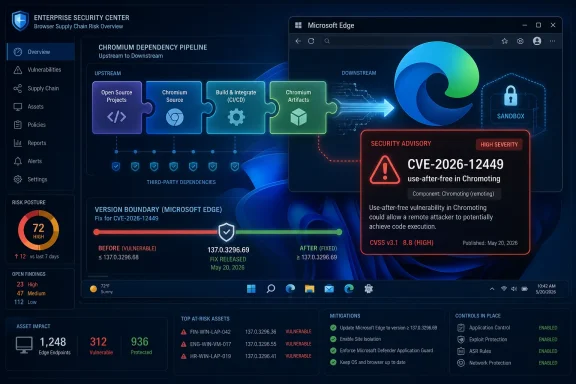 Microsoft’s Browser Is Microsoft’s Problem, Even When the Bug Is Google’s
CVE-2026-12449 is described as a use-after-free vulnerability in Chromoting, the Chromium component family associated with remote access functionality. The public vulnerability description says Google Chrome on Windows before version 149.0.7827.155 could allow a local attacker to perform operating-system-level privilege escalation through a malicious file. Chromium rated the issue high severity, which puts it below the “drop everything” tier but well above the kind of defect administrators can safely ignore.The confusion comes from the branding. Users see “Chrome” in the CVE description and reasonably ask why it appears in Microsoft’s Security Update Guide. The answer is that Edge is Chromium-based, and Chromium is not merely a rendering engine bolted onto the side of the browser. It is a sprawling shared platform: networking, sandboxing, JavaScript execution, media handling, PDF processing, UI plumbing, and many security-sensitive subsystems are inherited from the upstream Chromium project.
That means a Chromium flaw can become an Edge flaw even if no Microsoft engineer wrote the vulnerable code. The vendor of record for the browser on a Windows desktop is still Microsoft. If Microsoft distributes Edge with vulnerable Chromium code inside it, the operational risk belongs to Edge users and to the administrators responsible for them.
This is why the Security Update Guide language matters. Microsoft is not claiming it discovered a proprietary Microsoft-only bug. It is documenting that Chromium open-source software consumed by Edge contained the vulnerability, and that the latest Edge build is no longer vulnerable. In other words, the entry exists less to explain Google Chrome than to close the loop for Microsoft’s own customers.
The Security Update Guide Has Become a Supply-Chain Ledger
The old mental model of patching was simpler: Windows had Windows vulnerabilities, Office had Office vulnerabilities, and Internet Explorer had Internet Explorer vulnerabilities. The Chromium era broke that clarity. Edge is a Microsoft product built atop a browser platform largely developed in public, by Google and the Chromium community, then integrated, modified, packaged, signed, and updated by Microsoft.That makes the Security Update Guide a supply-chain document as much as a vulnerability catalog. When Microsoft lists a Chromium CVE there, it is telling enterprises that a dependency shipped inside Edge had to be remediated. The distinction may sound academic until a scanner flags a fleet of devices and a security team needs to answer a basic audit question: “Was this Microsoft endpoint exposed, and what version fixes it?”
For many organizations, the Security Update Guide is the source of truth because it maps vulnerability identifiers to Microsoft products, support channels, and remediation status. A Chrome release note may tell the web-security world that Google patched a Chromium bug. But a Microsoft security entry tells Windows shops whether the same upstream issue has crossed the boundary into their Microsoft estate.
This is especially important because Chromium vulnerabilities do not propagate uniformly. Some affect Chrome only because they live in Google-specific services or packaging. Others affect every browser that consumes a vulnerable Chromium component. Still others affect only certain platforms, feature flags, or configurations. The mere presence of the word “Chromium” is not enough to decide exposure; the product vendor has to say how the bug lands in its own build.
CVE-2026-12449 appears to fall into the category Microsoft has treated as relevant to Edge because the vulnerable open-source component is consumed by Microsoft Edge. The Security Update Guide entry is therefore a translation layer: it converts an upstream Chromium security event into Microsoft customer action.
Use-After-Free Bugs Are Still the Browser’s Old Enemy
A use-after-free flaw is one of the oldest and most stubborn classes of memory-safety bug. In plain English, software frees a chunk of memory and later continues to use it as though it were still valid. If an attacker can influence what occupies that memory afterward, the program may be tricked into reading, writing, or executing data in unsafe ways.Browsers are unusually fertile ground for this class of vulnerability because they are massive, stateful, and exposed to hostile inputs all day. They parse documents, decode media, manage graphics, run scripts, isolate processes, broker permissions, and communicate with operating-system services. A modern browser is less an app than a compact operating system with a URL bar.
The reported impact of CVE-2026-12449 is not the classic “visit a website and get code execution” story. The public description points to local privilege escalation on Windows through a malicious file, with user interaction required. That still matters. Local privilege escalation is often the second step in an attack chain: first gain a foothold with phishing, a document lure, a malicious download, or a compromised account, then use a local bug to break out of the original privilege boundary.
The Chromoting angle is also notable because remote-access code sits at an uncomfortable intersection of convenience and risk. Features designed to move input, screen state, files, or session control across boundaries must be engineered defensively. A memory-safety bug in that neighborhood is the kind of issue security teams instinctively treat with caution, even when exploitation is not reported in the wild.
Microsoft’s entry does not necessarily mean Edge users were facing active exploitation. It means the vulnerable code path was relevant enough to Edge that Microsoft wanted its customers to have a clear patch signal. In enterprise security, that signal is often more valuable than a deep technical postmortem.
Edge’s Chromium Foundation Cuts Both Ways
Edge’s move to Chromium solved real problems. It gave Microsoft better compatibility with the modern web, reduced the burden on developers who once had to test against another rendering stack, and put Edge on the same general security cadence as the dominant browser platform. For ordinary Windows users, the result has usually been fewer broken sites and faster adoption of web-platform fixes.But the tradeoff is that Edge now inherits Chromium’s security weather. When upstream Chromium ships a fix for V8, WebRTC, Skia, PDF, media handling, extensions, downloads, or a component like Chromoting, Microsoft must ingest it, validate it, and ship it quickly enough that Edge does not become the lagging browser in the patch race. The cadence is relentless because browsers are among the most attacked pieces of software on any endpoint.
This does not make Edge uniquely weak. Chrome, Brave, Opera, Vivaldi, and other Chromium-based browsers share the same structural exposure to upstream Chromium issues. The difference for Windows admins is that Edge is built into the Microsoft management universe. It is present by default on supported Windows systems, commonly tied into enterprise identity and policy, and frequently relied on by WebView2-based applications.
That ubiquity changes the risk calculation. A vulnerable optional browser may be a software-inventory problem. A vulnerable default browser and embedded web runtime can become a platform problem. Even if employees swear they “use Chrome,” Edge may still be present, updateable, callable by links, used by system experiences, or required by applications.
That is why Microsoft’s public documentation of Chromium CVEs should not be read as embarrassment. It is the cost of shipping a browser that is both a Microsoft product and a downstream Chromium distribution. The honest posture is not “this was not our bug.” It is “this was in code we ship, and here is the version state you need.”
The Version Number Is the Security Boundary Users Can Actually Check
For an end user, the practical question is not whether a CVE began in Chromium, Google Chrome, or Microsoft’s fork of it. The practical question is whether the installed browser version is new enough. In this case, the public Chrome-side fix version is 149.0.7827.155 or later for Windows, and Microsoft’s Security Update Guide indicates that the latest Microsoft Edge Chromium-based release is no longer vulnerable.To check the version of Microsoft Edge, open Edge, select the three-dot menu in the upper-right corner, choose Help and feedback, and then select About Microsoft Edge. You can also type
edge://settings/help directly into the address bar. That page displays the installed version and normally triggers an update check.For Google Chrome, the equivalent path is the three-dot menu, Help, then About Google Chrome, or
chrome://settings/help in the address bar. The page shows the installed Chrome version and checks for available updates. In both browsers, a restart is often required before the patched version is actually running.That restart requirement is where many patching assumptions quietly fail. Browsers can download an update in the background and still remain on the old executable until every process exits. On a heavily used workstation, especially one with background apps or pinned web apps, the vulnerable version may linger longer than the admin dashboard implies.
For managed environments, the version check needs to happen at inventory scale. Administrators should verify Edge Stable, Extended Stable, Beta, Dev, and Canary separately if those channels are allowed. They should also check Microsoft Edge WebView2 Runtime where applicable, because embedded Chromium runtimes can matter even when the visible browser looks current.
“Latest” Is Not a Policy
Microsoft’s phrasing that the latest Edge version is no longer vulnerable is useful, but it is not a complete enterprise control. “Latest” can mean different things depending on release channel, update deferrals, Extended Stable policy, network restrictions, update service health, and whether the device has been powered on and restarted. A laptop in a drawer is always compliant until it wakes up and proves otherwise.Edge’s management story gives administrators considerable control over update behavior. That control is powerful, but it can also create self-inflicted exposure. Target version overrides, rollback policies, update suppression windows, and Extended Stable channels all exist for operational reasons. They are also mechanisms by which a browser can intentionally or accidentally remain behind the security line.
The uncomfortable truth is that browser patching is now closer to antivirus signature freshness than traditional monthly Windows servicing. Waiting for the next Patch Tuesday may be too slow for high-severity Chromium bugs. Browser vendors routinely ship out-of-band security updates because attackers prize browser primitives, memory corruption, sandbox escapes, and privilege escalation paths.
CVE-2026-12449 is a good example of why the monthly-patch mindset is inadequate. Even without public exploitation, a high-severity local privilege escalation tied to a browser component deserves fast validation. It may not require panic, but it does require operational muscle memory: identify affected builds, confirm update availability, push restart prompts, and verify post-update state.
For home users, the advice is simpler but no less important. Visit the About page, let the browser update, and relaunch it. If Edge says it is managed by an organization, the update policy may be controlled by work or school IT; in that case, the user may need to wait for the managed rollout or contact support if the browser remains behind.
Vulnerability Scanners Will Keep Making This Look Messier Than It Is
Security scanners often struggle with Chromium-based browsers because CVE metadata, product naming, CPE matching, and vendor advisories do not always line up cleanly. A scanner may see “Chrome,” “Chromium,” “Edge Chromium,” or a generic browser component and raise an alert that looks more definitive than the evidence supports. Sometimes it is right. Sometimes it is noisy.That noise is not merely an annoyance. It consumes time in SOC queues, vulnerability management meetings, and patch-compliance reports. If the scanner says a Windows 11 endpoint is exposed to a Chrome CVE because Edge is installed, the security team needs to know whether Microsoft has mapped the CVE to Edge, what Edge version remediates it, and whether the installed build is actually below that threshold.
The Security Update Guide helps by giving Microsoft customers a vendor-backed mapping. It does not eliminate all ambiguity, but it gives administrators something better than inference. If Microsoft says a Chromium OSS vulnerability is documented because Edge consumes that code and the latest Edge is no longer vulnerable, the path to closure is version-based remediation rather than debate over branding.
There is still room for caution. A CVE affecting Google Chrome on Windows prior to a particular Chrome version does not automatically imply every Chromium-based browser build is vulnerable in the same way. Downstream vendors may disable features, carry patches early, diverge in platform integration, or ship different mitigations. The reverse is also true: a downstream browser can remain vulnerable after Chrome is patched if it has not yet integrated the fix.
That is why vulnerability management should resist both lazy extremes. It is wrong to dismiss the entry because “it says Chrome.” It is also wrong to assume every Chromium derivative is vulnerable without checking the vendor’s advisory and installed version. The correct posture is boring, specific, and auditable.
Chromoting Is a Reminder That Browser Risk Is No Longer Just Web Pages
The browser security conversation often defaults to malicious websites, JavaScript engines, and drive-by exploitation. CVE-2026-12449 is more interesting because its public impact description involves a malicious file and local privilege escalation. That shifts the story from “web content attacks the browser” to “browser-adjacent code participates in a broader endpoint attack.”That distinction matters for defenders. Modern browsers handle downloads, protocol links, remote support features, identity flows, file previews, PDF documents, password managers, extension ecosystems, and app-like web experiences. The attack surface is not confined to the tab currently showing a website. It extends into the ways browsers mediate trust between files, users, networks, and the operating system.
Chromoting-related code sits near one of the browser world’s perennial tensions. Remote access is useful for support, administration, accessibility, and personal convenience. It also demands strict control over session state and memory safety because any weakness around remote control or local mediation can be disproportionately valuable to an attacker.
The public description of this CVE does not justify melodrama. It does not say remote attackers can instantly take over every Edge session. It does say a local attacker could escalate privileges through a malicious file in affected Chrome-on-Windows builds, and Microsoft’s documentation says the Chromium OSS issue was relevant enough to Edge to publish in its own guide. That is the sober reading, and it is sufficient.
The broader lesson is that browser hardening cannot stop at blocking sketchy sites. Enterprises need download controls, attachment scanning, application control, least-privilege desktops, rapid browser updating, and telemetry that can distinguish a patched browser from a browser merely scheduled to patch. Browser CVEs increasingly live at the intersection of user behavior and system privilege.
Microsoft’s Transparency Is Doing Two Jobs at Once
There is a public-relations upside for Microsoft in documenting Chromium CVEs: it gets to say the latest Edge is protected. But the more important function is operational transparency. Customers need to see when Microsoft has absorbed upstream fixes, especially when those fixes correspond to CVEs already circulating through scanner feeds and threat-intelligence products.This is also a quiet acknowledgement that open-source consumption is not a way to outsource responsibility. Microsoft benefits enormously from Chromium’s engineering velocity and security research ecosystem. It also inherits the obligation to track upstream defects and tell customers what they mean for Edge. That is how open-source reuse works at Microsoft’s scale: the code may be shared, but the customer relationship is not.
For IT pros, the practical consequence is that Microsoft’s Security Update Guide should be read alongside browser release notes, not instead of them. The guide tells you how Microsoft classifies and remediates the issue for Microsoft products. Browser release notes and CVE records can add upstream context, such as affected Chrome versions, severity, exploitability, or platform scope.
The Microsoft entry is especially valuable when auditors or executives ask why a “Google Chrome” vulnerability appears in a Microsoft remediation plan. The answer is not that the scanner is necessarily wrong, nor that Microsoft is claiming ownership of Google’s bug. The answer is that Edge incorporates Chromium OSS, and Microsoft documents relevant upstream vulnerabilities so customers can confirm the Microsoft-shipped browser is fixed.
That is a mature security story, if not always an elegant one. Shared code gives the industry faster compatibility and faster fixes. It also gives administrators a world where product boundaries are blurrier than procurement documents pretend.
The Patch Signal Hidden Inside CVE-2026-12449
For WindowsForum readers, this CVE is less about panic than hygiene. It is a reminder that Edge security is now tied to Chromium intake speed, browser restart behavior, and the accuracy of fleet inventory. The actionable facts are plain enough, but they point to a broader discipline that many environments still treat too casually.- CVE-2026-12449 is listed by Microsoft because Microsoft Edge consumes Chromium open-source code affected by the vulnerability.
- The public Chrome-side description identifies a high-severity use-after-free issue in Chromoting on Windows before version 149.0.7827.155.
- Edge users should check
edge://settings/helpor the About Microsoft Edge page to confirm the installed build has updated and relaunched. - Administrators should verify actual running browser versions rather than assuming background update download equals remediation.
- Vulnerability teams should treat Microsoft’s Security Update Guide entry as the product-specific mapping that explains why a Chrome-origin CVE matters to Edge.
- The right response is rapid version validation and restart enforcement, not brand-name arguments over whether the bug “belongs” to Google or Microsoft.
References
- Primary source: MSRC
Published: 2026-06-19T13:52:56-07:00
Security Update Guide - Microsoft Security Response Center
 msrc.microsoft.com
- Related coverage: vulnerability.circl.lu
Vulnerability-Lookup
Vulnerability-Lookup - Fast vulnerability lookup correlation from different sources.vulnerability.circl.lu - Related coverage: leakycreds.com
- Related coverage: cve.yack.one
Edge Chromium - Yack CVE
View all 227 CVE security vulnerabilities affecting Edge Chromium. Track critical security issues and updates.cve.yack.one - Related coverage: radar.offseq.com
CVE-2026-7898: Use after free in Google Chrome - Live Threat Intelligence - Threat Radar | OffSeq.com
Detailed information about CVE-2026-7898: Use after free in Google Chrome affecting Google Chrome. Get real-time updates, technical details, and mitigation straradar.offseq.com - Related coverage: stack.watch

- Related coverage: sentinelone.com
CVE-2026-7898: Google Chrome Use-After-Free Vulnerability
CVE-2026-7898 is a use-after-free vulnerability in Google Chrome on Linux. Learn about its impact, affected versions, and mitigation methods.www.sentinelone.com
- Related coverage: vulnios.com
🔴 Chromium: CVE-2026-7898 Use after free in Chromoting | Vulnios Thre · Vulnios
This CVE was assigned by Chrome. Microsoft Edge (Chromium-based) ingests Chromium, which addresses this vulnerability. Please see [Google Chrome Releases](httpsvulnios.com - Related coverage: www2.gov.bc.ca
- Related coverage: aha.org
h isac tlp white microsoft edge addresses exploited zero day vulnerability cve 2024 7971 8 23 2024
PDF documentwww.aha.org
