
On June 19, 2026, Microsoft highlighted Windle International Kenya & Somalia’s use of Microsoft 365, Teams, SharePoint, Forms, and Copilot to support roughly 10,000 learners across Kakuma and Dadaab refugee camps, nearby host communities, and Nairobi. The story is not merely another cloud-product case study. It is a reminder that the most consequential uses of workplace software often happen far from the corporate offices those tools were designed to serve. In refugee education, Microsoft’s familiar stack becomes infrastructure for continuity, staffing, attendance, and aspiration.
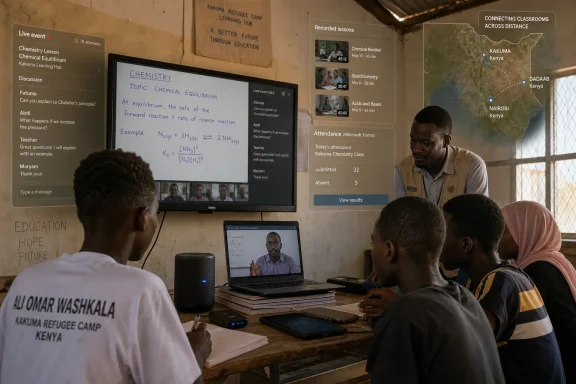
The image Microsoft wants readers to remember is a secondary student, Ali Omar Washkala, watching simulated chemical reactions in a crowded classroom at Kakuma Refugee Camp. It is a tidy anecdote, and like all vendor case studies, it arrives polished. But the details matter: shared devices, virtual labs, recorded lessons, remote teachers, and students trying to learn science in conditions where ordinary educational assumptions break down.
Windle International Kenya & Somalia operates in places where scarcity is not a management buzzword. Teacher shortages, overcrowded classrooms, uneven connectivity, high dropout risk, and limited funding are not temporary obstacles to be optimized away. They are the operating environment. The point of the Microsoft deployment is not to make a good school slightly more modern; it is to make an overburdened school system more durable.
That distinction is important for WindowsForum readers because Microsoft 365 is usually discussed through the lens of licensing, compliance, identity, endpoint management, or Copilot’s return on investment. Here, the same product family is being used as a kind of educational logistics layer. Teams is not just a meeting app. SharePoint is not just a document repository. Forms is not just a survey tool. In Windle’s hands, the stack becomes a way to stretch human expertise across geography and need.
The strongest argument in Microsoft’s story is not that technology can replace teachers. It is that, in places where there are not enough teachers, technology can keep a lesson from disappearing altogether. That is a narrower claim, but a more credible one.
For a corporate IT department, this sounds like familiar hybrid-work machinery. For a refugee school, it is closer to a staffing intervention. When a qualified teacher cannot be physically present in every classroom, the question becomes whether the school cancels, improvises, or distributes the teacher’s presence through technology. Windle is choosing the third option.
There are risks in that model. Remote instruction can become passive very quickly, especially when the receiving classroom has too many students, too few devices, or unreliable internet. The presence of support staff is therefore not incidental; it is the difference between a broadcast and a class. Microsoft’s tools provide the channel, but Windle’s human layer makes the channel educational.
That is where the article’s strongest lesson for IT professionals emerges. Digital transformation succeeds when the software is boring enough to be dependable and flexible enough to be repurposed. Windle is not describing a moonshot metaverse classroom. It is describing Teams, projectors, speakers, shared files, offline recordings, and attendance forms. The system is not glamorous, which is precisely why it has a chance to survive daily use.
Microsoft’s case study notes that lessons are available in Teams classroom channels and can be played offline in remote classrooms when connectivity is spotty. That offline detail deserves more attention than the standard cloud narrative usually gives it. The cloud is powerful, but education systems in low-resource environments need graceful degradation. If the internet fails, the lesson should not vanish with it.
This is a useful corrective to the way rich-world technology vendors often sell cloud services. The assumption is usually that connectivity is constant, devices are personal, and support is nearby. Windle’s deployment operates from the opposite premise. Connectivity may fail, devices may be shared, and support staff may be doing several jobs at once. A usable system has to tolerate those conditions.
The result is a different benchmark for Microsoft 365. The question is not whether it can produce the slickest digital classroom. The question is whether it can remain useful when the classroom is crowded, the network is unreliable, and the teacher is somewhere else.
That is the kind of AI use case that deserves less hype and more deployment discipline. It does not require pretending that large language models are flawless teachers. It asks them to help summarize, structure, and surface patterns from information that humans already collect but struggle to process quickly. For a nonprofit with limited staff, the saved hours can be redirected toward classroom observation, teacher coaching, and learner support.
The attendance workflow is similarly practical. Teachers use Microsoft Forms to capture attendance, with data flowing into a central SharePoint hub. Staff can adjust the frequency of forms in classrooms where attendance is inconsistent, creating a more granular view of which students are present for the whole day and which are drifting in and out.
That matters because dropout prevention is often a race against time. Paper attendance records may eventually reveal a pattern, but eventually is not good enough when a student is at risk of leaving school permanently. If Forms, SharePoint, and Copilot help staff identify absences earlier, the software has moved from back-office convenience to frontline intervention.
Still, this is exactly where caution belongs. Attendance data about minors, refugees, and vulnerable families is sensitive by definition. Microsoft’s customer story emphasizes secure collection and analysis, but any system that centralizes such data needs governance: access controls, retention policies, auditability, and a clear understanding of who can see what. In humanitarian contexts, data is never neutral. It can protect people, but it can also expose them if mishandled.
But the setting changes the stakes. In a school system stretched by shortages, every hour spent duplicating lesson plans is an hour not spent giving feedback, coaching students, or preparing for the next class. Collaboration is not a productivity nicety. It is a force multiplier for a workforce already under strain.
This is also where Microsoft’s ecosystem advantage becomes obvious. Teams, SharePoint, Forms, and Copilot are not separate point solutions duct-taped together. They are designed to pass work among meetings, files, forms, summaries, and dashboards. That integration can become lock-in, but it can also lower the operational burden for organizations that cannot afford a sprawling custom stack.
For Windle, the practical question is not whether SharePoint is the best possible content-management system in the abstract. It is whether teachers can use it today, whether it works with the rest of their workflow, and whether it reduces friction enough to matter. The answer, at least according to the case study, appears to be yes.
That does not mean screens are inherently better than chalkboards. It means the old comparison is too neat. Windle’s example is not a debate between traditional and digital schooling in a well-funded suburb. It is a choice among imperfect delivery models in an environment where scale, cost, distance, and teacher availability collide.
Students’ comments in Microsoft’s story are revealing because they focus on comprehension and confidence. Washkala says videos, animations, and interactive tools make difficult topics easier to understand. He also connects digital skills to future opportunity, including online research and presentations. That is not a small thing in communities where access to post-secondary education and formal employment can be sharply constrained.
The virtual chemistry lab is symbolically powerful for another reason. Science education depends on experimentation, visualization, and practice, but physical labs require materials, maintenance, safety controls, and funding. A simulation is not a full replacement for hands-on science, but it can let students encounter processes they might otherwise only read about. Again, the meaningful comparison is not perfection versus compromise. It is access versus absence.
That matters because travel is not a minor inconvenience for educators working in refugee and remote communities. It can be costly, disruptive, and exclusionary. Microsoft’s story says virtual training has improved completion, especially among women and refugees. If that holds across time, it may be one of the deployment’s most important outcomes.
Teacher pipelines are slow systems. A streamed classroom can relieve today’s shortage, but training local educators can change tomorrow’s capacity. When refugee teachers are able to qualify, remain in the profession, and teach students who share parts of their lived experience, the classroom gains more than staffing. It gains credibility and aspiration.
This is the deeper version of digital inclusion. It is not only about handing students devices or giving them access to software. It is about making professional pathways reachable for people who would otherwise be filtered out by geography, cost, and institutional logistics.
That should be a useful warning to the industry. AI may accelerate reporting, summarize attendance trends, and help staff see patterns sooner, but it cannot substitute for devices, connectivity, teacher training, curriculum alignment, classroom supervision, and trust. If those layers are missing, Copilot becomes a shiny interface over institutional fragility.
Microsoft also benefits from telling this story. The company has spent years positioning Microsoft 365 as the default productivity layer for enterprises, schools, governments, and nonprofits. A refugee-education case study lets it argue that the same stack can support humanitarian and public-interest work. That is good marketing, but it is not empty marketing if the deployment is actually improving continuity and retention.
The burden is sustainability. Case studies capture a moment when a project is coherent, funded, and narratively clean. Real schools have to live with renewals, device breakage, staff turnover, cyber risk, changing licensing terms, and the slow entropy of systems that nobody has time to maintain. Windle’s model will be worth watching not because it uses Microsoft 365 today, but because it tests whether cloud productivity infrastructure can remain useful under long-term humanitarian pressure.
But collecting better data does not automatically produce better outcomes. Someone has to respond. A dashboard that identifies risk without giving staff the time, transport, authority, or community relationships to act is just a more elegant form of helplessness. The value of Microsoft 365 here depends on whether Windle can convert insight into intervention.
There is also the question of consent and proportionality. Refugee students are not ordinary consumers clicking through a privacy notice. They are young people in vulnerable circumstances, often dependent on institutions for education and services. Systems that track attendance, performance, communications, and risk signals need a high standard of care.
For IT administrators, this is familiar territory with sharper edges. Identity management, role-based access, data minimization, endpoint security, and retention policies are not bureaucratic extras. They are the controls that determine whether digitization protects students or creates new exposure. Humanitarian technology needs the same discipline as enterprise technology, plus a stronger ethical reflex.
That familiarity is both strength and weakness. On the strength side, teachers and staff are not being asked to master an exotic platform that only one vendor or donor understands. The tools map onto skills that are useful outside the school system, giving students and educators exposure to software used in many workplaces. Training on Microsoft 365 can therefore serve both immediate education delivery and longer-term digital literacy.
On the weakness side, depending heavily on one ecosystem can make an organization vulnerable to pricing, licensing changes, account-management complexity, and support constraints. Nonprofits often receive favorable terms, but favorable terms are still terms. The more deeply workflows are built around Microsoft 365, the more difficult it becomes to leave.
That is not an argument against the deployment. It is an argument for clear-eyed governance. Windle should know what data lives where, how exportable it is, what happens if licenses change, and how much local capacity exists to administer the tenant securely. The humanitarian value of a platform increases when the institution using it can control its own dependency.
It also sharpens the way we should judge Microsoft’s AI and cloud claims. The company often talks about productivity in abstract terms: hours saved, meetings summarized, workflows automated. Windle gives those abstractions a human scale. A weekly report compressed from several hours to under an hour is not just efficiency if the saved time goes back into classrooms. Attendance trends are not just analytics if they trigger outreach to a student at risk of dropping out.
The lesson for IT pros is not that every organization should copy Windle’s configuration. The lesson is that successful technology projects begin with a painfully specific problem. Windle did not start with “deploy AI.” It started with too few teachers, too many students, expensive training, inconsistent attendance, and fragile continuity. Microsoft 365 became useful because it was aimed at those problems.
That is the difference between transformation and procurement. Buying software is easy compared with reshaping routines around it. Windle’s story suggests that the organization has done the harder work: embedding the tools into teaching, training, reporting, and retention.
 Microsoft’s Office Suite Finds Its Hardest Classroom
The image Microsoft wants readers to remember is a secondary student, Ali Omar Washkala, watching simulated chemical reactions in a crowded classroom at Kakuma Refugee Camp. It is a tidy anecdote, and like all vendor case studies, it arrives polished. But the details matter: shared devices, virtual labs, recorded lessons, remote teachers, and students trying to learn science in conditions where ordinary educational assumptions break down.Windle International Kenya & Somalia operates in places where scarcity is not a management buzzword. Teacher shortages, overcrowded classrooms, uneven connectivity, high dropout risk, and limited funding are not temporary obstacles to be optimized away. They are the operating environment. The point of the Microsoft deployment is not to make a good school slightly more modern; it is to make an overburdened school system more durable.
That distinction is important for WindowsForum readers because Microsoft 365 is usually discussed through the lens of licensing, compliance, identity, endpoint management, or Copilot’s return on investment. Here, the same product family is being used as a kind of educational logistics layer. Teams is not just a meeting app. SharePoint is not just a document repository. Forms is not just a survey tool. In Windle’s hands, the stack becomes a way to stretch human expertise across geography and need.
The strongest argument in Microsoft’s story is not that technology can replace teachers. It is that, in places where there are not enough teachers, technology can keep a lesson from disappearing altogether. That is a narrower claim, but a more credible one.
The Teacher Shortage Is the Platform’s Real Use Case
The most striking part of Windle’s model is its use of Microsoft Teams to let one teacher instruct multiple classrooms. A teacher leads one class in person while the lesson is streamed to another location, where support staff supervise students and help them participate through two-way audio. The system also records lessons, giving absent students or those needing review another route back into the material.For a corporate IT department, this sounds like familiar hybrid-work machinery. For a refugee school, it is closer to a staffing intervention. When a qualified teacher cannot be physically present in every classroom, the question becomes whether the school cancels, improvises, or distributes the teacher’s presence through technology. Windle is choosing the third option.
There are risks in that model. Remote instruction can become passive very quickly, especially when the receiving classroom has too many students, too few devices, or unreliable internet. The presence of support staff is therefore not incidental; it is the difference between a broadcast and a class. Microsoft’s tools provide the channel, but Windle’s human layer makes the channel educational.
That is where the article’s strongest lesson for IT professionals emerges. Digital transformation succeeds when the software is boring enough to be dependable and flexible enough to be repurposed. Windle is not describing a moonshot metaverse classroom. It is describing Teams, projectors, speakers, shared files, offline recordings, and attendance forms. The system is not glamorous, which is precisely why it has a chance to survive daily use.
Recorded Lessons Become a Hedge Against Disruption
In stable schools, recorded lessons are often treated as a convenience. In refugee education, they become a hedge against interruption. Students may miss school because of family obligations, movement, illness, safety concerns, administrative requirements, or the daily instability that comes with displacement. A recording cannot solve those problems, but it can reduce the academic penalty of encountering them.Microsoft’s case study notes that lessons are available in Teams classroom channels and can be played offline in remote classrooms when connectivity is spotty. That offline detail deserves more attention than the standard cloud narrative usually gives it. The cloud is powerful, but education systems in low-resource environments need graceful degradation. If the internet fails, the lesson should not vanish with it.
This is a useful corrective to the way rich-world technology vendors often sell cloud services. The assumption is usually that connectivity is constant, devices are personal, and support is nearby. Windle’s deployment operates from the opposite premise. Connectivity may fail, devices may be shared, and support staff may be doing several jobs at once. A usable system has to tolerate those conditions.
The result is a different benchmark for Microsoft 365. The question is not whether it can produce the slickest digital classroom. The question is whether it can remain useful when the classroom is crowded, the network is unreliable, and the teacher is somewhere else.
Copilot’s Most Convincing Role Is Administrative, Not Magical
Microsoft’s case study inevitably brings in Microsoft 365 Copilot, but the most persuasive example is not a chatbot tutoring students in real time. It is administrative compression. Windle staff reportedly use Copilot to turn scattered updates from WhatsApp, email threads, Excel spreadsheets, and school reports into narrative summaries and dashboards, reducing a weekly reporting task from three or four hours to about 45 minutes.That is the kind of AI use case that deserves less hype and more deployment discipline. It does not require pretending that large language models are flawless teachers. It asks them to help summarize, structure, and surface patterns from information that humans already collect but struggle to process quickly. For a nonprofit with limited staff, the saved hours can be redirected toward classroom observation, teacher coaching, and learner support.
The attendance workflow is similarly practical. Teachers use Microsoft Forms to capture attendance, with data flowing into a central SharePoint hub. Staff can adjust the frequency of forms in classrooms where attendance is inconsistent, creating a more granular view of which students are present for the whole day and which are drifting in and out.
That matters because dropout prevention is often a race against time. Paper attendance records may eventually reveal a pattern, but eventually is not good enough when a student is at risk of leaving school permanently. If Forms, SharePoint, and Copilot help staff identify absences earlier, the software has moved from back-office convenience to frontline intervention.
Still, this is exactly where caution belongs. Attendance data about minors, refugees, and vulnerable families is sensitive by definition. Microsoft’s customer story emphasizes secure collection and analysis, but any system that centralizes such data needs governance: access controls, retention policies, auditability, and a clear understanding of who can see what. In humanitarian contexts, data is never neutral. It can protect people, but it can also expose them if mishandled.
SharePoint Becomes the Staff Room
Windle’s use of SharePoint for lesson collaboration may sound ordinary to anyone who has watched a department migrate from file shares to Microsoft 365. Teachers group themselves by subject and grade, divide up lesson-preparation work, and refine materials together. That is workplace collaboration at its most familiar.But the setting changes the stakes. In a school system stretched by shortages, every hour spent duplicating lesson plans is an hour not spent giving feedback, coaching students, or preparing for the next class. Collaboration is not a productivity nicety. It is a force multiplier for a workforce already under strain.
This is also where Microsoft’s ecosystem advantage becomes obvious. Teams, SharePoint, Forms, and Copilot are not separate point solutions duct-taped together. They are designed to pass work among meetings, files, forms, summaries, and dashboards. That integration can become lock-in, but it can also lower the operational burden for organizations that cannot afford a sprawling custom stack.
For Windle, the practical question is not whether SharePoint is the best possible content-management system in the abstract. It is whether teachers can use it today, whether it works with the rest of their workflow, and whether it reduces friction enough to matter. The answer, at least according to the case study, appears to be yes.
Digital Learning Is Not a Luxury When the Alternative Is No Lesson
The temptation in stories like this is to frame digital education as a futuristic upgrade. That misses the point. In Kakuma and Dadaab, digitally enhanced learning is being used to deal with present-tense shortages and constraints. The alternative to a streamed lesson may not be a better in-person lesson. It may be no qualified instruction at all.That does not mean screens are inherently better than chalkboards. It means the old comparison is too neat. Windle’s example is not a debate between traditional and digital schooling in a well-funded suburb. It is a choice among imperfect delivery models in an environment where scale, cost, distance, and teacher availability collide.
Students’ comments in Microsoft’s story are revealing because they focus on comprehension and confidence. Washkala says videos, animations, and interactive tools make difficult topics easier to understand. He also connects digital skills to future opportunity, including online research and presentations. That is not a small thing in communities where access to post-secondary education and formal employment can be sharply constrained.
The virtual chemistry lab is symbolically powerful for another reason. Science education depends on experimentation, visualization, and practice, but physical labs require materials, maintenance, safety controls, and funding. A simulation is not a full replacement for hands-on science, but it can let students encounter processes they might otherwise only read about. Again, the meaningful comparison is not perfection versus compromise. It is access versus absence.
The Gender and Refugee-Teacher Angle Deserves More Attention
Windle’s digital training model extends beyond students to teacher development. The organization uses Teams to connect trainees and educators with Kenyan, regional, and international partners. Instead of requiring teachers to travel to Nairobi for training, Windle can stream instruction into local conference rooms equipped with laptops, projectors, and two-way speakers.That matters because travel is not a minor inconvenience for educators working in refugee and remote communities. It can be costly, disruptive, and exclusionary. Microsoft’s story says virtual training has improved completion, especially among women and refugees. If that holds across time, it may be one of the deployment’s most important outcomes.
Teacher pipelines are slow systems. A streamed classroom can relieve today’s shortage, but training local educators can change tomorrow’s capacity. When refugee teachers are able to qualify, remain in the profession, and teach students who share parts of their lived experience, the classroom gains more than staffing. It gains credibility and aspiration.
This is the deeper version of digital inclusion. It is not only about handing students devices or giving them access to software. It is about making professional pathways reachable for people who would otherwise be filtered out by geography, cost, and institutional logistics.
The Microsoft Story Is Persuasive Because It Is Not Really About Copilot
Despite the page’s placement in Microsoft’s AI-era customer-story machinery, the Windle example is most convincing when it is least dazzled by AI. Copilot is useful in the story, but it is not the foundation. The foundation is a long-running productivity suite being adapted to the messy realities of education in displacement settings.That should be a useful warning to the industry. AI may accelerate reporting, summarize attendance trends, and help staff see patterns sooner, but it cannot substitute for devices, connectivity, teacher training, curriculum alignment, classroom supervision, and trust. If those layers are missing, Copilot becomes a shiny interface over institutional fragility.
Microsoft also benefits from telling this story. The company has spent years positioning Microsoft 365 as the default productivity layer for enterprises, schools, governments, and nonprofits. A refugee-education case study lets it argue that the same stack can support humanitarian and public-interest work. That is good marketing, but it is not empty marketing if the deployment is actually improving continuity and retention.
The burden is sustainability. Case studies capture a moment when a project is coherent, funded, and narratively clean. Real schools have to live with renewals, device breakage, staff turnover, cyber risk, changing licensing terms, and the slow entropy of systems that nobody has time to maintain. Windle’s model will be worth watching not because it uses Microsoft 365 today, but because it tests whether cloud productivity infrastructure can remain useful under long-term humanitarian pressure.
The Data Dividend Comes With a Duty of Care
Attendance analytics may be the least glamorous part of the story, but it could have the largest institutional effect. If staff can see absenteeism patterns sooner, they can intervene before a student slips away. That is particularly important for girls, who often face additional social, financial, and cultural pressure to leave school.But collecting better data does not automatically produce better outcomes. Someone has to respond. A dashboard that identifies risk without giving staff the time, transport, authority, or community relationships to act is just a more elegant form of helplessness. The value of Microsoft 365 here depends on whether Windle can convert insight into intervention.
There is also the question of consent and proportionality. Refugee students are not ordinary consumers clicking through a privacy notice. They are young people in vulnerable circumstances, often dependent on institutions for education and services. Systems that track attendance, performance, communications, and risk signals need a high standard of care.
For IT administrators, this is familiar territory with sharper edges. Identity management, role-based access, data minimization, endpoint security, and retention policies are not bureaucratic extras. They are the controls that determine whether digitization protects students or creates new exposure. Humanitarian technology needs the same discipline as enterprise technology, plus a stronger ethical reflex.
A Familiar Stack Becomes a Public-Interest Platform
One reason Windle’s deployment is compelling is that it does not require readers to believe in a bespoke educational miracle. Microsoft Teams has already been tested at planetary scale by schools, businesses, and governments. SharePoint has spent decades absorbing documents and workflows. Forms is simple enough to be adopted quickly. Copilot adds a newer automation layer, but the core pattern is familiar.That familiarity is both strength and weakness. On the strength side, teachers and staff are not being asked to master an exotic platform that only one vendor or donor understands. The tools map onto skills that are useful outside the school system, giving students and educators exposure to software used in many workplaces. Training on Microsoft 365 can therefore serve both immediate education delivery and longer-term digital literacy.
On the weakness side, depending heavily on one ecosystem can make an organization vulnerable to pricing, licensing changes, account-management complexity, and support constraints. Nonprofits often receive favorable terms, but favorable terms are still terms. The more deeply workflows are built around Microsoft 365, the more difficult it becomes to leave.
That is not an argument against the deployment. It is an argument for clear-eyed governance. Windle should know what data lives where, how exportable it is, what happens if licenses change, and how much local capacity exists to administer the tenant securely. The humanitarian value of a platform increases when the institution using it can control its own dependency.
WindowsForum Readers Should Recognize the Pattern
This story belongs on WindowsForum not because it is about Windows in the narrow sense, but because it is about the Microsoft ecosystem as lived infrastructure. Many readers here administer the same stack in offices, schools, clinics, councils, and small businesses. The Windle example shows the same tools under far harsher constraints.It also sharpens the way we should judge Microsoft’s AI and cloud claims. The company often talks about productivity in abstract terms: hours saved, meetings summarized, workflows automated. Windle gives those abstractions a human scale. A weekly report compressed from several hours to under an hour is not just efficiency if the saved time goes back into classrooms. Attendance trends are not just analytics if they trigger outreach to a student at risk of dropping out.
The lesson for IT pros is not that every organization should copy Windle’s configuration. The lesson is that successful technology projects begin with a painfully specific problem. Windle did not start with “deploy AI.” It started with too few teachers, too many students, expensive training, inconsistent attendance, and fragile continuity. Microsoft 365 became useful because it was aimed at those problems.
That is the difference between transformation and procurement. Buying software is easy compared with reshaping routines around it. Windle’s story suggests that the organization has done the harder work: embedding the tools into teaching, training, reporting, and retention.
The Kakuma Classroom Shows Where the Microsoft Stack Actually Matters
The practical readout from Windle’s deployment is more grounded than the usual AI-era sales pitch. It is about coverage, continuity, collaboration, and early warning signals, not a fantasy of fully automated education.- Microsoft Teams is being used to extend scarce teaching capacity by streaming live lessons into remote classrooms with local support staff present.
- Recorded lessons give students a way to recover from absences and disruptions, especially where connectivity is unreliable and offline playback matters.
- SharePoint-based collaboration helps teachers divide lesson-planning work and reuse materials instead of rebuilding everything alone.
- Microsoft Forms and SharePoint create a faster attendance pipeline that can help staff identify students at risk of dropping out.
- Microsoft 365 Copilot appears most credible when it reduces administrative reporting time and helps staff surface trends from existing data.
- The long-term test will be whether Windle can sustain governance, privacy, training, licensing, and local technical capacity after the glow of the case study fades.
References
- Primary source: Microsoft
Published: 2026-06-20T02:12:09.938176
Loading…
www.microsoft.com - Related coverage: unhcr.org
Loading…
www.unhcr.org - Related coverage: reporting.unhcr.org
Loading…
reporting.unhcr.org - Related coverage: unrefugees.org
Loading…
www.unrefugees.org - Related coverage: unesco.org
Loading…
www.unesco.org - Related coverage: acnur.org
Loading…
www.acnur.org
