

Microsoft Teams for Education is adding six assignment-focused features in 2026, including AI-use guidelines, standards integration, AI-generated rubrics, a cleaner feedback interface, localized assignment settings, and Learning Zone activities for teachers and students using Teams in classrooms around the world, according to recent Microsoft-focused coverage. The update is less about making Teams look new than about making the assignment workflow behave like the center of Microsoft’s education strategy. Microsoft is trying to turn the most routine classroom task — assigning, assessing, returning work — into the place where AI policy, curriculum compliance, and student engagement all meet. That makes this a practical upgrade for teachers, but also a revealing one for IT leaders watching how generative AI is being normalized inside Microsoft 365.
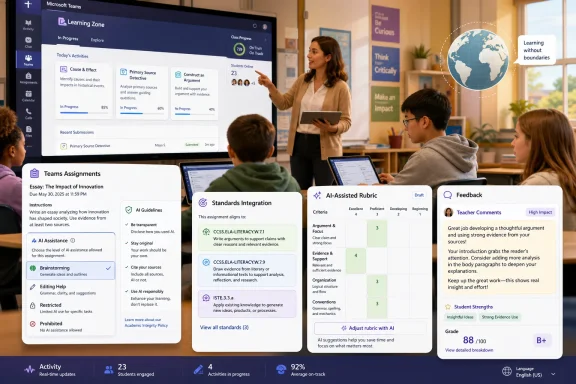
The most consequential of the six additions is not the flashiest. Teams Assignments now lets teachers define how students may use AI on a given task, with options ranging from full AI access to editing help, brainstorming support, or complete restriction. That sounds like a settings menu, but in practice it is Microsoft admitting that the old binary debate — allow AI or ban it — has collapsed.
Classrooms have already moved beyond that binary. A history teacher may want students to use AI to brainstorm essay angles but not write paragraphs. A language teacher may permit editing assistance while still grading original sentence construction. A computer science teacher may ask students to use Copilot-style tools openly, then explain what they accepted, rejected, or debugged.
Embedding those boundaries directly into Teams matters because rules written in a syllabus are easy to miss, reinterpret, or dispute. Rules attached to the assignment itself are harder to ignore. They appear at the moment students need them, not buried in a policy document introduced weeks earlier.
This is also a subtle win for administrators. Schools have been trying to write AI policies at district, state, and institutional levels, but teachers need a way to apply those policies differently across tasks. Microsoft’s approach gives educators a controlled vocabulary for AI use without pretending every assignment has the same pedagogical purpose.
By giving teachers assignment-level control, Teams can support a more realistic classroom contract. Students can be told that AI is welcome for idea generation on one task, limited to editing on another, and prohibited entirely on a third. That is closer to how professional work now functions, where AI use is often allowed under conditions rather than universally blessed or banned.
There is still a risk that the feature becomes decorative rather than enforceable. A dropdown in Teams does not prove whether a student used ChatGPT, Copilot, Gemini, or some other tool outside the Microsoft environment. Nor does it solve the larger academic integrity problem created by cheap, fluent text generation.
But enforcement is not the only point. A visible guideline changes the evidentiary and instructional context. When expectations are stated inside the assignment, teachers can grade against them, students can ask better questions, and schools can move the conversation from suspicion to declared practice.
Standards alignment is a daily burden in many schools. Teachers must show that tasks map to district requirements, national frameworks, inspection regimes, or accreditation expectations. Too often, that mapping happens in separate planning systems, spreadsheets, LMS exports, or documents that are invisible to students.
Bringing standards into the assignment flow makes the alignment more operational. A teacher building an assignment can connect it to required benchmarks at the point of creation. Students can see more clearly what the task is meant to demonstrate. Administrators can more easily understand whether digital work reflects the curriculum on paper.
This is Microsoft’s broader education pitch in miniature. Teams is not trying to be only a chat app, a file repository, or a video classroom. It is trying to become the workflow surface where instruction, compliance, feedback, and measurement converge.
Rubrics are one of those teaching tools that everyone praises and almost nobody has enough time to perfect. A good rubric clarifies expectations before submission and makes feedback more consistent afterward. A weak rubric, however, becomes a grading costume: it looks objective while hiding vague criteria underneath.
AI can help with the first draft. It can turn standards into criteria, suggest performance levels, and produce language that teachers can edit. That is useful, especially for newer teachers or those adapting materials across grade levels.
The catch is that AI-generated rubrics can also import generic educational phrasing at scale. If teachers accept them uncritically, assessment may become smoother but shallower. The best version of this feature is not “click once and grade”; it is “draft quickly, revise professionally, and make expectations clearer than before.”
Digital assignment systems often treat feedback as an administrative byproduct. The grade is visible, the submission status is visible, the attached file is visible, and the comments are somewhere in the machinery. Teachers then wonder why students repeat mistakes that were already addressed.
A feedback-first layout changes the hierarchy. It tells students that the comment is not an afterthought but the educational payload of the returned assignment. For formative work especially, that matters more than the score.
There is also a teacher-side benefit. Anything that shortens the time between reviewing work and leaving actionable comments has real value. In schools, the bottleneck is rarely whether teachers care about feedback; it is whether the system makes high-quality feedback sustainable at scale.
Microsoft’s reported localization work adjusts language, terminology, and formatting to regional expectations. That matters for schools outside the United States, but also for multinational institutions, international schools, and districts serving diverse communities. The more Teams can reflect local educational norms, the less it feels like imported enterprise software wearing a school badge.
Localization also has accessibility implications. Students should not have to mentally translate platform language before engaging with the assignment. Teachers should not have to explain why software terms differ from the vocabulary used in their curriculum or inspection system.
This is one of the places where Microsoft’s global footprint is both an advantage and a responsibility. If Teams is going to be a default education platform in many countries, it cannot assume one school vocabulary fits all.
This moves assignments away from the old upload-and-grade model. Instead of “read this, complete that, submit a file,” an assignment can become a guided activity with embedded practice, feedback, and progress signals. That is where Microsoft’s education strategy starts to look less like a learning management system add-on and more like an instructional platform.
For students, the benefit is immediacy. Waiting days for feedback on a submitted file is normal in school but alien to most digital experiences. If an interactive lesson can tell a student where they are struggling while the work is still in progress, the assignment becomes more teachable.
For teachers, the value is visibility. Real-time or near-real-time performance data can show whether a class misunderstood the concept, whether a few students need intervention, or whether an activity is pitched at the wrong level. That does not replace teacher judgment, but it can sharpen it.
Teams has always had an awkward dual identity in education. It is a collaboration tool adapted for classrooms, but it is also a hub for assignments, files, meetings, grades, and apps. That flexibility helped Microsoft during remote learning, but it also made Teams feel sprawling.
These 2026 assignment features try to impose more coherence. AI rules belong next to the assignment. Standards belong next to the task. Rubrics belong next to grading. Feedback belongs where students will see it. Interactive activities belong inside the work stream rather than scattered across external tools.
That is a platform argument. Microsoft is saying that schools should not need one tool for AI policy, another for curriculum alignment, another for rubrics, another for interactive lessons, and another for collaboration. Whether schools accept that argument will depend less on feature announcements than on reliability, usability, licensing, and administrator control.
Assignment-level AI guidelines are helpful, but they also create expectations. If a district says AI is restricted in certain grades or subjects, administrators will want to know whether Teams can enforce defaults, report usage patterns, or integrate with broader Microsoft 365 Education policies. Teacher flexibility is valuable only if it does not undermine institutional rules.
Standards integration raises a different set of concerns. Schools will need confidence that the standards library is current, regionally accurate, and appropriate for their jurisdiction. A stale or mismatched benchmark is not just an inconvenience; it can create compliance headaches.
Learning Zone integration also deserves scrutiny. Partner content can enrich lessons, but IT teams will want to understand which apps, services, and data flows are involved. The more assignments become interactive and app-connected, the more the assignment workflow becomes part of the school’s security and privacy perimeter.
That is the right instinct. Teachers should not have to invent a new AI policy from scratch for every essay, lab report, worksheet, or project. Students should not have to guess whether “AI allowed” means spell-checking, outlining, paraphrasing, or full answer generation. Administrators should not have to rely entirely on training sessions to make policy visible.
But product design can also oversimplify values. A dropdown cannot capture every pedagogical nuance. A generated rubric cannot know a teacher’s classroom context unless the teacher supplies and refines it. A standards-aligned assignment is not automatically a good assignment.
The danger is that AI governance becomes a UI ritual: choose a setting, generate a rubric, attach a standard, and assume the hard thinking has happened. The opportunity is better: use the software to make expectations explicit, then preserve teacher judgment where it matters most.
That shift reflects where education technology is heading. The assignment is no longer just the endpoint of instruction; it is where learning objectives are declared, AI permissions are negotiated, evidence is collected, feedback is delivered, and interactive support is embedded. In that world, the assignment screen becomes one of the most important interfaces in the school.
The risk is familiar to anyone who has watched enterprise software absorb human workflows. More capability can mean more complexity. Teachers already face crowded platforms, shifting policies, and limited time. If Microsoft adds power without reducing cognitive load, these features could become another layer of setup work.
Still, the direction is sensible. Schools need AI rules that are visible at the point of learning, not abstract statements filed away in policy portals. Teachers need faster ways to align work with standards and provide feedback without surrendering professional judgment. Students need clearer expectations about when AI is a tool, when it is a crutch, and when it is out of bounds.
Microsoft’s challenge now is execution. If Teams makes these controls simple, transparent, and reliable, the 2026 assignment upgrades could become one of the more meaningful education updates in Microsoft 365. If not, they will join the long list of edtech features that looked sensible in a demo and felt heavier in the classroom. The future classroom will not be defined by whether AI is present; it will be defined by whether platforms help teachers use it deliberately, visibly, and in service of learning rather than convenience alone.
 Microsoft Moves the AI Debate Into the Assignment Box
The most consequential of the six additions is not the flashiest. Teams Assignments now lets teachers define how students may use AI on a given task, with options ranging from full AI access to editing help, brainstorming support, or complete restriction. That sounds like a settings menu, but in practice it is Microsoft admitting that the old binary debate — allow AI or ban it — has collapsed.Classrooms have already moved beyond that binary. A history teacher may want students to use AI to brainstorm essay angles but not write paragraphs. A language teacher may permit editing assistance while still grading original sentence construction. A computer science teacher may ask students to use Copilot-style tools openly, then explain what they accepted, rejected, or debugged.
Embedding those boundaries directly into Teams matters because rules written in a syllabus are easy to miss, reinterpret, or dispute. Rules attached to the assignment itself are harder to ignore. They appear at the moment students need them, not buried in a policy document introduced weeks earlier.
This is also a subtle win for administrators. Schools have been trying to write AI policies at district, state, and institutional levels, but teachers need a way to apply those policies differently across tasks. Microsoft’s approach gives educators a controlled vocabulary for AI use without pretending every assignment has the same pedagogical purpose.
The New Classroom Rule Is Granular Permission
The four AI-use modes are significant because they recognize that “AI use” is not one behavior. Brainstorming, proofreading, summarizing, drafting, translating, coding, and generating an answer from scratch are all different acts. Treating them as one category has made school AI policy harder than it needs to be.By giving teachers assignment-level control, Teams can support a more realistic classroom contract. Students can be told that AI is welcome for idea generation on one task, limited to editing on another, and prohibited entirely on a third. That is closer to how professional work now functions, where AI use is often allowed under conditions rather than universally blessed or banned.
There is still a risk that the feature becomes decorative rather than enforceable. A dropdown in Teams does not prove whether a student used ChatGPT, Copilot, Gemini, or some other tool outside the Microsoft environment. Nor does it solve the larger academic integrity problem created by cheap, fluent text generation.
But enforcement is not the only point. A visible guideline changes the evidentiary and instructional context. When expectations are stated inside the assignment, teachers can grade against them, students can ask better questions, and schools can move the conversation from suspicion to declared practice.
Curriculum Standards Become Part of the Workflow, Not a Binder on the Shelf
The second major addition is standards integration. Teams Assignments can now attach state or national curriculum standards directly to work, with benchmarks reportedly spanning more than 50 countries. That is the kind of feature that sounds bureaucratic until you remember how much of teaching already is.Standards alignment is a daily burden in many schools. Teachers must show that tasks map to district requirements, national frameworks, inspection regimes, or accreditation expectations. Too often, that mapping happens in separate planning systems, spreadsheets, LMS exports, or documents that are invisible to students.
Bringing standards into the assignment flow makes the alignment more operational. A teacher building an assignment can connect it to required benchmarks at the point of creation. Students can see more clearly what the task is meant to demonstrate. Administrators can more easily understand whether digital work reflects the curriculum on paper.
This is Microsoft’s broader education pitch in miniature. Teams is not trying to be only a chat app, a file repository, or a video classroom. It is trying to become the workflow surface where instruction, compliance, feedback, and measurement converge.
AI-Generated Rubrics Are a Labor-Saving Tool With a Pedagogical Catch
Standards-aligned rubrics extend that logic. If an assignment is tied to a curriculum benchmark, Teams can use AI to help generate a rubric around it. For teachers facing large class loads, repeated assessment cycles, or multiple levels of differentiation, this is an obvious productivity gain.Rubrics are one of those teaching tools that everyone praises and almost nobody has enough time to perfect. A good rubric clarifies expectations before submission and makes feedback more consistent afterward. A weak rubric, however, becomes a grading costume: it looks objective while hiding vague criteria underneath.
AI can help with the first draft. It can turn standards into criteria, suggest performance levels, and produce language that teachers can edit. That is useful, especially for newer teachers or those adapting materials across grade levels.
The catch is that AI-generated rubrics can also import generic educational phrasing at scale. If teachers accept them uncritically, assessment may become smoother but shallower. The best version of this feature is not “click once and grade”; it is “draft quickly, revise professionally, and make expectations clearer than before.”
Feedback Gets the Interface Attention It Always Needed
The redesigned feedback interface may be the least glamorous update, but teachers may feel it most often. Microsoft is reportedly making feedback more prominent and reducing the visual noise around assignment details. That is a practical concession to a simple truth: feedback is only useful if students actually read it.Digital assignment systems often treat feedback as an administrative byproduct. The grade is visible, the submission status is visible, the attached file is visible, and the comments are somewhere in the machinery. Teachers then wonder why students repeat mistakes that were already addressed.
A feedback-first layout changes the hierarchy. It tells students that the comment is not an afterthought but the educational payload of the returned assignment. For formative work especially, that matters more than the score.
There is also a teacher-side benefit. Anything that shortens the time between reviewing work and leaving actionable comments has real value. In schools, the bottleneck is rarely whether teachers care about feedback; it is whether the system makes high-quality feedback sustainable at scale.
Localization Is Boring Until It Saves a Lesson
Localized assignment settings sound minor because language variants and regional terminology rarely make keynote slides. Yet in education software, small mismatches can create outsized friction. “Color” versus “colour” is a trivial example; grade names, school stages, date formats, and curriculum language can be much more consequential.Microsoft’s reported localization work adjusts language, terminology, and formatting to regional expectations. That matters for schools outside the United States, but also for multinational institutions, international schools, and districts serving diverse communities. The more Teams can reflect local educational norms, the less it feels like imported enterprise software wearing a school badge.
Localization also has accessibility implications. Students should not have to mentally translate platform language before engaging with the assignment. Teachers should not have to explain why software terms differ from the vocabulary used in their curriculum or inspection system.
This is one of the places where Microsoft’s global footprint is both an advantage and a responsibility. If Teams is going to be a default education platform in many countries, it cannot assume one school vocabulary fits all.
Learning Zone Shows Microsoft Wants Assignments to Become Activities
The Learning Zone integration points to a bigger shift. Teachers can attach interactive lessons to assignments, including partner-created material such as NASA educational content or Minecraft for Education activities, as well as custom lessons. Students can complete the work inside Teams and receive real-time performance feedback.This moves assignments away from the old upload-and-grade model. Instead of “read this, complete that, submit a file,” an assignment can become a guided activity with embedded practice, feedback, and progress signals. That is where Microsoft’s education strategy starts to look less like a learning management system add-on and more like an instructional platform.
For students, the benefit is immediacy. Waiting days for feedback on a submitted file is normal in school but alien to most digital experiences. If an interactive lesson can tell a student where they are struggling while the work is still in progress, the assignment becomes more teachable.
For teachers, the value is visibility. Real-time or near-real-time performance data can show whether a class misunderstood the concept, whether a few students need intervention, or whether an activity is pitched at the wrong level. That does not replace teacher judgment, but it can sharpen it.
The Competitive Target Is the LMS, Not Just Google Classroom
It would be easy to read these updates as Microsoft chasing Google Classroom feature parity. That is partly true, but too narrow. The bigger competitive target is the modern LMS stack: the mix of classroom management, standards tracking, assessment tooling, content delivery, analytics, and now AI governance.Teams has always had an awkward dual identity in education. It is a collaboration tool adapted for classrooms, but it is also a hub for assignments, files, meetings, grades, and apps. That flexibility helped Microsoft during remote learning, but it also made Teams feel sprawling.
These 2026 assignment features try to impose more coherence. AI rules belong next to the assignment. Standards belong next to the task. Rubrics belong next to grading. Feedback belongs where students will see it. Interactive activities belong inside the work stream rather than scattered across external tools.
That is a platform argument. Microsoft is saying that schools should not need one tool for AI policy, another for curriculum alignment, another for rubrics, another for interactive lessons, and another for collaboration. Whether schools accept that argument will depend less on feature announcements than on reliability, usability, licensing, and administrator control.
IT Departments Will See Policy Surface Area, Not Just Teacher Convenience
For sysadmins and education IT teams, the immediate question is not whether these features are clever. It is how they are governed. Any feature that touches AI, student work, curriculum metadata, or third-party content raises questions about permissions, data handling, auditability, and support.Assignment-level AI guidelines are helpful, but they also create expectations. If a district says AI is restricted in certain grades or subjects, administrators will want to know whether Teams can enforce defaults, report usage patterns, or integrate with broader Microsoft 365 Education policies. Teacher flexibility is valuable only if it does not undermine institutional rules.
Standards integration raises a different set of concerns. Schools will need confidence that the standards library is current, regionally accurate, and appropriate for their jurisdiction. A stale or mismatched benchmark is not just an inconvenience; it can create compliance headaches.
Learning Zone integration also deserves scrutiny. Partner content can enrich lessons, but IT teams will want to understand which apps, services, and data flows are involved. The more assignments become interactive and app-connected, the more the assignment workflow becomes part of the school’s security and privacy perimeter.
Microsoft’s Bet Is That Responsible AI Needs Product Design
The most interesting idea running through these features is that responsible AI adoption cannot live only in policy documents. Microsoft has spent the past few years telling schools and enterprises to govern AI thoughtfully. With Teams Assignments, it is putting some of that governance into product design.That is the right instinct. Teachers should not have to invent a new AI policy from scratch for every essay, lab report, worksheet, or project. Students should not have to guess whether “AI allowed” means spell-checking, outlining, paraphrasing, or full answer generation. Administrators should not have to rely entirely on training sessions to make policy visible.
But product design can also oversimplify values. A dropdown cannot capture every pedagogical nuance. A generated rubric cannot know a teacher’s classroom context unless the teacher supplies and refines it. A standards-aligned assignment is not automatically a good assignment.
The danger is that AI governance becomes a UI ritual: choose a setting, generate a rubric, attach a standard, and assume the hard thinking has happened. The opportunity is better: use the software to make expectations explicit, then preserve teacher judgment where it matters most.
The Six Features That Reveal Microsoft’s Classroom Strategy
These Teams updates are best read together, not as isolated conveniences. Microsoft is tightening the assignment workflow so that policy, standards, grading, feedback, localization, and interactive learning live closer to the same daily teacher action.- Teachers can now set assignment-level AI-use expectations, making classroom AI policy more visible and more task-specific.
- Standards integration can help educators connect assignments to required benchmarks from supported regional or national frameworks.
- AI-assisted rubric generation may reduce setup time, but teachers still need to review and refine the criteria.
- The redesigned feedback interface puts teacher comments closer to the center of the student experience.
- Localized assignment settings make Teams more usable across different school systems and regional vocabularies.
- Learning Zone integration turns assignments into more interactive activities, with partner content and real-time feedback inside the Teams workflow.
The Assignment Is Becoming the Operating System of Schoolwork
For years, the digital assignment was treated as a container. It held instructions, files, due dates, submissions, grades, and maybe comments. Microsoft’s 2026 Teams for Education updates suggest that container is being rebuilt into something more active and more governed.That shift reflects where education technology is heading. The assignment is no longer just the endpoint of instruction; it is where learning objectives are declared, AI permissions are negotiated, evidence is collected, feedback is delivered, and interactive support is embedded. In that world, the assignment screen becomes one of the most important interfaces in the school.
The risk is familiar to anyone who has watched enterprise software absorb human workflows. More capability can mean more complexity. Teachers already face crowded platforms, shifting policies, and limited time. If Microsoft adds power without reducing cognitive load, these features could become another layer of setup work.
Still, the direction is sensible. Schools need AI rules that are visible at the point of learning, not abstract statements filed away in policy portals. Teachers need faster ways to align work with standards and provide feedback without surrendering professional judgment. Students need clearer expectations about when AI is a tool, when it is a crutch, and when it is out of bounds.
Microsoft’s challenge now is execution. If Teams makes these controls simple, transparent, and reliable, the 2026 assignment upgrades could become one of the more meaningful education updates in Microsoft 365. If not, they will join the long list of edtech features that looked sensible in a demo and felt heavier in the classroom. The future classroom will not be defined by whether AI is present; it will be defined by whether platforms help teachers use it deliberately, visibly, and in service of learning rather than convenience alone.
References
- Primary source: Geeky Gadgets
Published: Thu, 11 Jun 2026 08:46:46 GMT
New Microsoft Teams Assignments Features for Teachers in 2026 - Geeky Gadgets
Learn how the 2026 Microsoft Teams update streamlines grading and boosts student engagement with Learning Zone integration and AI-aligned rubrics.www.geeky-gadgets.com - Official source: support.microsoft.com
Create and manage grading rubrics in Microsoft Teams | Microsoft Support
Learn how to create grading rubrics in Microsoft Teams. Assess student work with customized rubrics you can re-use.support.microsoft.com - Official source: learn.microsoft.com
Assignments for Teams - Microsoft Teams | Microsoft Learn
Learn how to manage assignments in the Microsoft Teams admin center in Teams for Education.learn.microsoft.com - Official source: learningzone.microsoft.com
Microsoft Learning Zone
Design interactive lessons that engage every learner with an AI powered app for Copilot+ PCslearningzone.microsoft.com - Official source: microsoft.com
Introducing Microsoft innovations and programs to support AI-powered teaching and learning | Microsoft Education Blog
Announcing Microsoft Elevate for Educators—connecting educators, community, professional learning, and AI tools to enhance teaching. Join us.www.microsoft.com - Related coverage: thewincentral.com
Microsoft Teams Adds AI Guidelines for Education Assignments - WinCentral
Microsoft Teams for Education now lets teachers set custom AI usage rules for assignments, helping guide responsible student use of AI globally. - Read in AI News on WinCentral thewincentral.com
- Official source: cdn-dynmedia-1.microsoft.com
- Official source: techcommunity.microsoft.com
What’s New in Microsoft EDU, Bett Edition January 2026 | Microsoft Community Hub
Welcome to our update for Microsoft Education and our special Bett 2026 edition! The Bett conference takes place in London during the week of January 21st -... techcommunity.microsoft.com
- Related coverage: hubsite365.com
Microsoft Teams: 6 Assignment Upgrades
Microsoft expert on Teams Assignments updates: AI guidance, standards, rubrics, focused feedback, Learning Zone www.hubsite365.com
- Related coverage: teachnet.ie
Using AI to enhance Assignments in Teams for Education – Teachnet.ie
A new academic year means lots of new advancements in the use of AI! My favourite new addition to Microsoft Teams for Education is the use of AI to enhance assignment instructions & create rubrics for assignments. By using AI to enhance assignments you can type one sentence into the...teachnet.ie - Official source: download.microsoft.com
