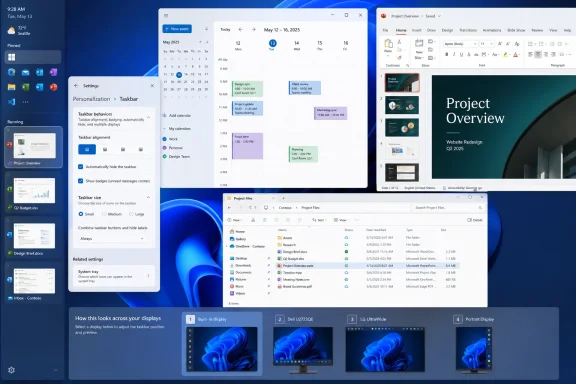
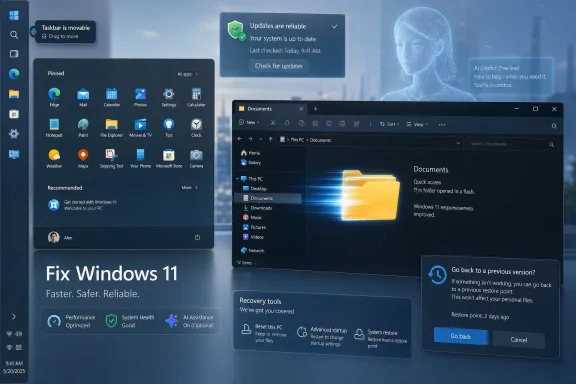
Microsoft is previewing a set of Windows 11 changes in 2026 that restore several user-requested controls, including movable taskbars, Start and taskbar personalization, a redesigned Feedback Hub, and enterprise app-removal policies, after years of complaints that Windows 11 prioritized Microsoft’s agenda over user choice. That is not the same thing as Microsoft handing the keys back to users. But it is a meaningful shift in posture: Windows 11’s next wave of updates looks less like a lecture from Redmond and more like a negotiated settlement with the people who actually live in the operating system all day. The question now is whether Microsoft can make listening a habit rather than a marketing beat.
The Windows 11 taskbar has been a symbol of Microsoft’s modern Windows problem since the operating system launched. It looked cleaner, behaved more consistently on paper, and fit the centered visual language Microsoft wanted. It also removed muscle-memory features that many users had relied on for years, including the ability to move the taskbar to the top or sides of the screen.
That was never a niche complaint in the way Microsoft sometimes seemed to treat it. Developers, spreadsheet-heavy office workers, ultrawide-monitor users, accessibility-minded users, and anyone who simply preferred a vertical workflow all had a practical reason to dislike the regression. The taskbar was not just decoration; it was part of how people organized work.
Microsoft’s previewed return of taskbar positioning is therefore more important than the checkbox itself. The company is acknowledging that personalization is not a cosmetic luxury when the interface is used eight hours a day. A bottom-only taskbar may be clean for screenshots, but Windows is not an appliance UI; it is a general-purpose work environment whose value comes partly from its willingness to accommodate weird, personal, deeply ingrained workflows.
This is the kind of change that sounds small until it lands on a real machine. A vertical taskbar can reclaim vertical space on laptops. A top taskbar can match old habits from earlier Windows setups or Linux desktops. A taskbar that respects position, alignment, labels, and flyout behavior is not revolutionary, but it is the kind of boring competence Windows 11 has too often lacked.
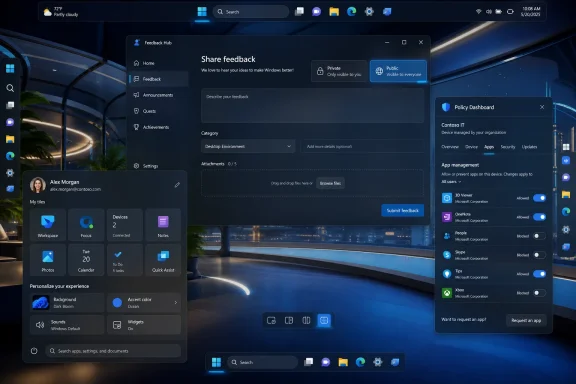
The redesigned Feedback Hub, now being previewed with Insiders, tries to make that loop less absurd. Microsoft has simplified the submission flow, reorganized navigation, added a compliment feedback type, and made it easier to distinguish private from public feedback. None of that guarantees better decisions, but it removes friction from the basic act of telling Microsoft what is broken, confusing, or unexpectedly good.
There is a cynical reading here, and it is not entirely wrong. A prettier feedback app can become a pressure-release valve if the company uses it to collect discontent without changing course. Windows users have seen this movie before: telemetry dashboards, Insider rings, staged rollouts, A/B tests, “we’re listening” blog posts, and then a feature no one asked for appears in the taskbar anyway.
But the timing matters. Microsoft is not merely refreshing the Feedback Hub in isolation; it is pairing that work with highly visible reversals on Start and taskbar behavior. That combination makes the Hub less like corporate theater and more like infrastructure for a product team trying to rebuild credibility.
Windows 11 arrived with stricter hardware requirements, a redesigned shell, a more opinionated Start menu, a more constrained taskbar, and an increasingly promotional relationship with Microsoft accounts, OneDrive, Edge, Copilot, and Store-distributed experiences. Some of those decisions had defensible technical or security motivations. Taken together, they made Windows feel less like a neutral platform and more like a surface for Microsoft’s growth strategy.
That perception is poisonous for an operating system. Users may tolerate ads in a free web service, but they react differently when the Start menu, Settings app, lock screen, or notification surface becomes a venue for nudges. Windows users bought the PC, configured the PC, maintained the PC, and in many workplaces are responsible for securing the PC. They do not want the operating system behaving like a sales associate.
The latest preview changes appear to recognize that user control is not an anti-Microsoft position. It is the condition under which users keep trusting Windows as a daily tool. If Microsoft wants to sell AI features, cloud services, and premium hardware through Windows, it first needs Windows to feel like it is on the user’s side.
Recent Insider work around Start suggests Microsoft is trying to soften that posture. More flexible layouts, better control over what appears, and a renewed focus on personalization all point in the same direction: the Start menu should launch the user’s work, not Microsoft’s priorities.
That sounds obvious, but it has been a recurring problem across modern Windows. The operating system increasingly assumes that surfacing content, recommendations, cloud hooks, and account benefits is part of helping the user. Sometimes it is. Often, it is just clutter with a product-manager rationale.
For IT pros, Start menu discipline matters because the Start menu is one of the first things users blame when a Windows deployment feels wrong. If a company spends months preparing a migration only for employees to open Start and see consumer-style recommendations, the help desk inherits the annoyance. Microsoft’s interface experiments do not stay in Redmond; they land as tickets.
Preinstalled apps are not just aesthetic clutter in managed environments. They complicate imaging, compliance, user training, vulnerability management, and support boundaries. A school district does not necessarily want the same Windows inbox app mix as a home user. A regulated business may need to justify every installed component. A locked-down workstation may not have any reason to expose consumer-oriented experiences.
Microsoft’s willingness to make removal more policy-driven is a sign that it understands one Windows image cannot serve every deployment scenario by sheer force of branding. Admins do not need every inbox app to vanish for everyone. They need supported, documented, repeatable ways to define what belongs on their machines.
That distinction matters. Unsupported debloating scripts have flourished partly because Microsoft left gaps between what users wanted and what Windows officially allowed. When the supported path is too limited, the community builds its own path, and the results can range from elegant to reckless. A better policy surface is not just more convenient; it is safer.
This is especially awkward when Microsoft says it is responding to feedback. Which users will see the response? Which build? Which channel? Which region? Which managed policy state? A feature can be “rolling out” and still be absent from a user’s machine for weeks. That ambiguity makes it harder for administrators to plan and harder for journalists, support desks, and ordinary users to explain what Windows 11 actually does today.
Gradual rollout is defensible. It reduces blast radius, lets Microsoft catch regressions, and gives the company room to halt bad deployments before they become universal. But gradual rollout also erodes the clean contract users once expected from Windows updates: install update, receive documented behavior.
If Microsoft wants feedback-driven development to feel real, it needs to pair it with clearer communication about availability. “We heard you” is less persuasive when the fix is hidden behind a flighting toggle, an Insider channel, a staged rollout, or a server-side switch no one can see.
That tension has already shaped user reactions to features such as Recall, Copilot integration, AI-powered Settings help, and cross-device experiences. Some users are curious. Some are enthusiastic. Many are not opposed to AI in principle; they are opposed to AI arriving as an assumed default in places where privacy, performance, or workflow predictability matter.
The feedback-aware Windows Microsoft is now advertising will be tested hardest here. It is easy to restore a movable taskbar because users overwhelmingly asked for it and the old behavior has years of precedent. It is harder to decide how aggressively AI should appear in search, Settings, screenshots, app suggestions, and system troubleshooting.
This is where Microsoft must separate opt-in usefulness from platform coercion. AI features that save time, explain errors, improve accessibility, or help users find buried settings may earn their place. AI features that feel like surveillance, upsell, or clutter will deepen the trust problem Microsoft is trying to escape.
That is a healthier dynamic than the old model of shipping a controversial interface decision and defending it for three years. But it also puts more pressure on Microsoft to treat Insider feedback as representative without pretending it is democratic. Insiders are not average users. They are more technical, more vocal, more tolerant of instability, and more likely to care about features such as taskbar labels and policy granularity.
Still, Windows enthusiasts often spot real problems before they scale. They understand friction because they hit the edges of the system first. When they complain that a workflow regression is not merely a preference but a productivity tax, Microsoft should listen.
The challenge is to avoid designing only for the loudest subgroup. A good Windows release needs to satisfy power users without overwhelming casual users, satisfy enterprise admins without making home PCs feel like managed endpoints, and satisfy Microsoft’s product ambitions without making the desktop feel like rented space.
The skeptical interpretation is that Microsoft is doing just enough to lower the temperature while continuing to reserve the right to push accounts, cloud services, AI, and promotional surfaces through Windows whenever it suits the business. That skepticism is earned. Windows users have been trained to wait for the second shoe.
The truth is probably less dramatic. Microsoft is a huge company with competing incentives. Some teams are clearly trying to improve the Windows experience in concrete, user-respecting ways. Other incentives still point toward engagement metrics, subscription funnels, cloud attachment, and AI adoption. Windows 11’s next update wave is interesting because, for once, the user-respecting side appears to be winning a few visible battles.
That does not make Windows 11 suddenly perfect. It makes it more negotiable. And after several years in which many users felt the operating system was becoming less negotiable, that is a real change.
The feature is still incomplete. Microsoft says tooltips, flyouts, animations, small taskbar support, and the “never combine taskbar icons” option should continue working, but touch gestures, the Search box, Ask Copilot, auto-hide behavior, and the touch-optimized taskbar do not yet fully support alternate taskbar positions.
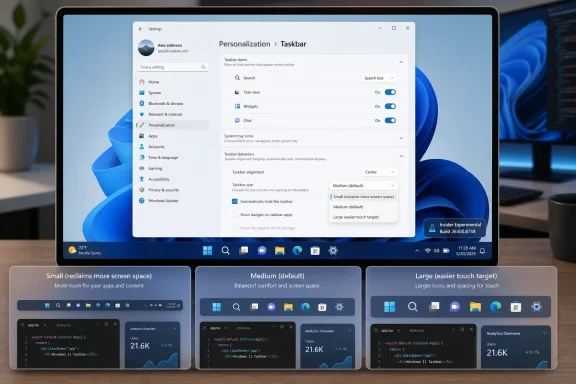
The same build also adds a smaller taskbar button option, letting users reduce both icon size and taskbar height while keeping Start, Search, and the system tray aligned. For admins, the practical takeaway is that Microsoft is testing the restored taskbar flexibility in a limited Insider channel first, so this is not yet a broad production rollout.
Build 28120.2387 also introduces a new K-12 upgrade path that lets eligible schools move Windows 11 Home devices to Windows 11 Pro Education at no extra cost. That upgrade is one-way unless the device is clean-installed back to Windows 11 Home.
 Microsoft Finally Admits the Taskbar Was Not a Sacred Object
The Windows 11 taskbar has been a symbol of Microsoft’s modern Windows problem since the operating system launched. It looked cleaner, behaved more consistently on paper, and fit the centered visual language Microsoft wanted. It also removed muscle-memory features that many users had relied on for years, including the ability to move the taskbar to the top or sides of the screen.That was never a niche complaint in the way Microsoft sometimes seemed to treat it. Developers, spreadsheet-heavy office workers, ultrawide-monitor users, accessibility-minded users, and anyone who simply preferred a vertical workflow all had a practical reason to dislike the regression. The taskbar was not just decoration; it was part of how people organized work.
Microsoft’s previewed return of taskbar positioning is therefore more important than the checkbox itself. The company is acknowledging that personalization is not a cosmetic luxury when the interface is used eight hours a day. A bottom-only taskbar may be clean for screenshots, but Windows is not an appliance UI; it is a general-purpose work environment whose value comes partly from its willingness to accommodate weird, personal, deeply ingrained workflows.
This is the kind of change that sounds small until it lands on a real machine. A vertical taskbar can reclaim vertical space on laptops. A top taskbar can match old habits from earlier Windows setups or Linux desktops. A taskbar that respects position, alignment, labels, and flyout behavior is not revolutionary, but it is the kind of boring competence Windows 11 has too often lacked.
The Feedback Hub Becomes More Than a Suggestion Box in the Basement
Microsoft’s other telling move is the Feedback Hub overhaul. The company has long told Windows users to file feedback, but the old experience often felt like shouting into a well: submit a complaint, upvote someone else’s complaint, then wait months or years to learn whether anyone inside Microsoft cared.The redesigned Feedback Hub, now being previewed with Insiders, tries to make that loop less absurd. Microsoft has simplified the submission flow, reorganized navigation, added a compliment feedback type, and made it easier to distinguish private from public feedback. None of that guarantees better decisions, but it removes friction from the basic act of telling Microsoft what is broken, confusing, or unexpectedly good.
There is a cynical reading here, and it is not entirely wrong. A prettier feedback app can become a pressure-release valve if the company uses it to collect discontent without changing course. Windows users have seen this movie before: telemetry dashboards, Insider rings, staged rollouts, A/B tests, “we’re listening” blog posts, and then a feature no one asked for appears in the taskbar anyway.
But the timing matters. Microsoft is not merely refreshing the Feedback Hub in isolation; it is pairing that work with highly visible reversals on Start and taskbar behavior. That combination makes the Hub less like corporate theater and more like infrastructure for a product team trying to rebuild credibility.
Windows 11’s Real Problem Was Never Just Missing Features
The backlash to Windows 11 has often been framed as nostalgia: users wanting Windows 10 back, power users rejecting visual change, or administrators resisting the inevitable. That framing lets Microsoft off too easily. The deeper issue has been trust.Windows 11 arrived with stricter hardware requirements, a redesigned shell, a more opinionated Start menu, a more constrained taskbar, and an increasingly promotional relationship with Microsoft accounts, OneDrive, Edge, Copilot, and Store-distributed experiences. Some of those decisions had defensible technical or security motivations. Taken together, they made Windows feel less like a neutral platform and more like a surface for Microsoft’s growth strategy.
That perception is poisonous for an operating system. Users may tolerate ads in a free web service, but they react differently when the Start menu, Settings app, lock screen, or notification surface becomes a venue for nudges. Windows users bought the PC, configured the PC, maintained the PC, and in many workplaces are responsible for securing the PC. They do not want the operating system behaving like a sales associate.
The latest preview changes appear to recognize that user control is not an anti-Microsoft position. It is the condition under which users keep trusting Windows as a daily tool. If Microsoft wants to sell AI features, cloud services, and premium hardware through Windows, it first needs Windows to feel like it is on the user’s side.
Start Menu Restraint Is a Bigger Deal Than It Looks
The Start menu has become another front in this argument. Windows 11’s Start redesign traded the old tile-heavy model for something visually simpler, but Microsoft repeatedly filled that simplicity with recommendations, account prompts, and layout decisions that many users found less useful than the system it replaced.Recent Insider work around Start suggests Microsoft is trying to soften that posture. More flexible layouts, better control over what appears, and a renewed focus on personalization all point in the same direction: the Start menu should launch the user’s work, not Microsoft’s priorities.
That sounds obvious, but it has been a recurring problem across modern Windows. The operating system increasingly assumes that surfacing content, recommendations, cloud hooks, and account benefits is part of helping the user. Sometimes it is. Often, it is just clutter with a product-manager rationale.
For IT pros, Start menu discipline matters because the Start menu is one of the first things users blame when a Windows deployment feels wrong. If a company spends months preparing a migration only for employees to open Start and see consumer-style recommendations, the help desk inherits the annoyance. Microsoft’s interface experiments do not stay in Redmond; they land as tickets.
Enterprise App Removal Shows Microsoft Heard the Other Half of the Complaint
The consumer-facing changes will get the headlines, but the enterprise app-removal policy may be the more important signal for administrators. Microsoft has been expanding policy support that lets Enterprise and Education customers remove default Microsoft Store packages using a dynamic app removal list. That is not glamorous, but it is exactly the kind of knob enterprise IT has been asking for.Preinstalled apps are not just aesthetic clutter in managed environments. They complicate imaging, compliance, user training, vulnerability management, and support boundaries. A school district does not necessarily want the same Windows inbox app mix as a home user. A regulated business may need to justify every installed component. A locked-down workstation may not have any reason to expose consumer-oriented experiences.
Microsoft’s willingness to make removal more policy-driven is a sign that it understands one Windows image cannot serve every deployment scenario by sheer force of branding. Admins do not need every inbox app to vanish for everyone. They need supported, documented, repeatable ways to define what belongs on their machines.
That distinction matters. Unsupported debloating scripts have flourished partly because Microsoft left gaps between what users wanted and what Windows officially allowed. When the supported path is too limited, the community builds its own path, and the results can range from elegant to reckless. A better policy surface is not just more convenient; it is safer.
The Update Model Is Still the Part Microsoft Has Not Fully Solved
For all the encouraging signs, Microsoft’s Windows servicing model remains a major source of anxiety. Windows 11 is now shaped through a mix of annual releases, enablement-style updates, monthly cumulative updates, controlled feature rollouts, Insider channels, Store app updates, and cloud-influenced experiences. Even when the engineering is sound, the user experience can feel like weather.This is especially awkward when Microsoft says it is responding to feedback. Which users will see the response? Which build? Which channel? Which region? Which managed policy state? A feature can be “rolling out” and still be absent from a user’s machine for weeks. That ambiguity makes it harder for administrators to plan and harder for journalists, support desks, and ordinary users to explain what Windows 11 actually does today.
Gradual rollout is defensible. It reduces blast radius, lets Microsoft catch regressions, and gives the company room to halt bad deployments before they become universal. But gradual rollout also erodes the clean contract users once expected from Windows updates: install update, receive documented behavior.
If Microsoft wants feedback-driven development to feel real, it needs to pair it with clearer communication about availability. “We heard you” is less persuasive when the fix is hidden behind a flighting toggle, an Insider channel, a staged rollout, or a server-side switch no one can see.
AI Is the Shadow Hanging Over Every User-Control Promise
No discussion of Windows 11 user feedback is complete without Copilot and the broader AI push. Microsoft’s AI strategy has made Windows feel newly strategic inside the company, and that is both a blessing and a threat. It brings investment, engineering attention, and new hardware partnerships. It also increases the temptation to make the operating system serve Microsoft’s AI roadmap before it serves user intent.That tension has already shaped user reactions to features such as Recall, Copilot integration, AI-powered Settings help, and cross-device experiences. Some users are curious. Some are enthusiastic. Many are not opposed to AI in principle; they are opposed to AI arriving as an assumed default in places where privacy, performance, or workflow predictability matter.
The feedback-aware Windows Microsoft is now advertising will be tested hardest here. It is easy to restore a movable taskbar because users overwhelmingly asked for it and the old behavior has years of precedent. It is harder to decide how aggressively AI should appear in search, Settings, screenshots, app suggestions, and system troubleshooting.
This is where Microsoft must separate opt-in usefulness from platform coercion. AI features that save time, explain errors, improve accessibility, or help users find buried settings may earn their place. AI features that feel like surveillance, upsell, or clutter will deepen the trust problem Microsoft is trying to escape.
The Insider Program Is Becoming a Court of Public Opinion
The Windows Insider Program has always been part testing pipeline, part fan club, and part early-warning system. In 2026, it increasingly looks like Microsoft’s public jury. The company floats changes, watches the reaction, adjusts language, and sometimes changes course before the mainstream release channel gets involved.That is a healthier dynamic than the old model of shipping a controversial interface decision and defending it for three years. But it also puts more pressure on Microsoft to treat Insider feedback as representative without pretending it is democratic. Insiders are not average users. They are more technical, more vocal, more tolerant of instability, and more likely to care about features such as taskbar labels and policy granularity.
Still, Windows enthusiasts often spot real problems before they scale. They understand friction because they hit the edges of the system first. When they complain that a workflow regression is not merely a preference but a productivity tax, Microsoft should listen.
The challenge is to avoid designing only for the loudest subgroup. A good Windows release needs to satisfy power users without overwhelming casual users, satisfy enterprise admins without making home PCs feel like managed endpoints, and satisfy Microsoft’s product ambitions without making the desktop feel like rented space.
This Is Progress, Not Proof
The optimistic interpretation is that Microsoft has turned a corner. The company has publicly acknowledged quality concerns, previewed changes tied to long-running complaints, modernized the feedback path, and exposed more controls for administrators. That is more than a gesture.The skeptical interpretation is that Microsoft is doing just enough to lower the temperature while continuing to reserve the right to push accounts, cloud services, AI, and promotional surfaces through Windows whenever it suits the business. That skepticism is earned. Windows users have been trained to wait for the second shoe.
The truth is probably less dramatic. Microsoft is a huge company with competing incentives. Some teams are clearly trying to improve the Windows experience in concrete, user-respecting ways. Other incentives still point toward engagement metrics, subscription funnels, cloud attachment, and AI adoption. Windows 11’s next update wave is interesting because, for once, the user-respecting side appears to be winning a few visible battles.
That does not make Windows 11 suddenly perfect. It makes it more negotiable. And after several years in which many users felt the operating system was becoming less negotiable, that is a real change.
The New Windows Bargain Is Written in Small Controls
The most important lesson from this update cycle is not that one feature is returning or one app is being redesigned. It is that Windows earns loyalty through accumulated respect. Small controls matter because they tell users the machine is still theirs.- Microsoft is previewing the return of taskbar positioning, including top, left, right, and bottom placements, after years of user complaints about Windows 11’s fixed taskbar.
- The redesigned Feedback Hub matters only if Microsoft continues tying visible product changes to the feedback it collects.
- Start menu and taskbar personalization are not cosmetic extras; they are core productivity features for users who live in Windows all day.
- Enterprise app-removal policies show Microsoft is beginning to address administrative control through supported tools rather than leaving admins to rely on brittle workarounds.
- Gradual rollouts remain a communication problem because users and IT departments need to know not just what Microsoft announced, but when a change will actually appear.
- The AI push will test whether Microsoft’s new listening posture is durable or whether user choice still loses when strategic priorities are on the line.
Update: Experimental 26H1 build turns movable taskbar into a live Insider feature (July 7, 2026)
WindowsReport says Windows 11 Insider Experimental Preview Build 28120.2387 is now available in the Experimental 26H1 channel, moving the long-promised taskbar repositioning change from roadmap talk into an actual Insider build. In this preview, users can choose bottom, top, left, or right taskbar placement from Settings under Taskbar behaviors.The feature is still incomplete. Microsoft says tooltips, flyouts, animations, small taskbar support, and the “never combine taskbar icons” option should continue working, but touch gestures, the Search box, Ask Copilot, auto-hide behavior, and the touch-optimized taskbar do not yet fully support alternate taskbar positions.
The same build also adds a smaller taskbar button option, letting users reduce both icon size and taskbar height while keeping Start, Search, and the system tray aligned. For admins, the practical takeaway is that Microsoft is testing the restored taskbar flexibility in a limited Insider channel first, so this is not yet a broad production rollout.
Build 28120.2387 also introduces a new K-12 upgrade path that lets eligible schools move Windows 11 Home devices to Windows 11 Pro Education at no extra cost. That upgrade is one-way unless the device is clean-installed back to Windows 11 Home.
References
- Primary source: Mix93.3
Published: 2026-07-02T13:23:10.383538
- Related coverage: windowscentral.com
Microsoft warns Windows 11 version 24H2 support is coming to an end for some devices soon: Here's what that means and how you can stay secure | Windows Central
If you're running Windows 11 Home or Pro on version 24H2 in 2026, you'll soon need to upgrade to remain supported.www.windowscentral.com - Related coverage: techradar.com
Windows 11's File Explorer is getting a long-awaited revamp — but here's hoping a future update doesn't ruin it | TechRadar
The revamp I've been waiting forwww.techradar.com - Official source: learn.microsoft.com
Windows 11 April 2026 Cumulative Update causes app crashes every ~24 hours (Outlook + Explorer) - resolved by user logoff - Microsoft Q&A
We are experiencing a reproducible issue across multiple Windows 11 devices that appears to be related to a recent cumulative update and user-session runtime state, not a specific application. Summary We are experiencing a reproducible issue across…learn.microsoft.com - Related coverage: pcworld.com
Microsoft's Windows 11 fix list for the year: 18 changes promised | PCWorld
Microsoft has committed to various Windows 11 improvements in 2026, including fixes for File Explorer, the taskbar, dark mode, and more.www.pcworld.com - Related coverage: windowslatest.com
18 new features coming to Windows 11 in 2026, confirmed by Microsoft
Windows 11 is getting major upgrades with faster performance, improved File Explorer, better updates, native apps, etc. Here is the full list. www.windowslatest.com
- Official source: techcommunity.microsoft.com
- Official source: blogs.windows.com
Improving Windows quality: Making Taskbar and Start more personal
In our commitment to Windows quality, we outlined our plans to deliver improvements in performance, reliability, and craft. We are also committed toblogs.windows.com
Last edited: