
Microsoft WordArt remains available in modern Microsoft Word, Excel, PowerPoint, and other Office apps in 2026, but the once-prominent decorative text feature now lives mostly under the Insert tab rather than at the center of everyday document creation. Its survival is not an accident. WordArt is a fossil from the era when office software doubled as a first design studio, and its quiet retreat says more about how Microsoft Office changed than about one gaudy button.
The strange thing about WordArt is not that people stopped using it. The strange thing is that Microsoft never really killed it.
In a software industry that routinely buries features under the language of “modernization,” WordArt has lingered. It still appears in Microsoft’s own instructions for current Word versions, tucked into the Insert tab, ready to turn ordinary text into arched, shadowed, glowing display type. It is no longer the star attraction of a school report, a birthday invitation, or a homemade flyer, but it remains available to anyone who remembers where to look.
That endurance matters because WordArt belongs to a class of Office features that shaped how many users first understood computers. Before Canva templates, web-based design tools, mobile editing apps, and AI-generated graphics, the family PC’s productivity suite was the creative suite. If you wanted a title that looked special, you did not open a dedicated typography tool. You clicked WordArt.
Microsoft has not deprecated WordArt so much as domesticated it. The feature has been absorbed into the broader Office drawing and text-effects system, where it now functions as one more formatting option rather than a cultural object. That is how old software survives in Microsoft’s ecosystem: not by remaining beloved, but by becoming harmless.
That made Word a kind of accidental design environment. The page was visible, printable, and forgiving enough for experimentation. A child making a school project, a church volunteer making a bulletin, or a parent making a yard-sale sign all worked in the same interface because that was the software already installed.
WordArt fit that world perfectly. It offered instant spectacle without requiring design knowledge. A plain heading could become metallic, warped, tilted, shadowed, or inflated with only a few clicks, and the result looked unmistakably “computer-made” in a period when that still had novelty value.
The feature’s excess was the point. Nobody chose WordArt because it was subtle. They chose it because it announced that a document had been touched by software, and in that era the visible mark of software felt modern.
That is why nostalgia around WordArt tends to be so vivid. It is not merely nostalgia for a formatting feature; it is nostalgia for a period when discovering a menu item could feel like unlocking a new machine. Office had hidden rooms, and WordArt was one of the brightest.
WordArt did not ask users to understand kerning, hierarchy, print resolution, accessibility, or brand consistency. It invited them to play. The results were often garish, but the interaction was empowering: select the text, choose the style, watch the page transform.
That was an important step in the mainstreaming of digital creativity. A generation of users learned that text was not fixed. It could be stretched, colored, outlined, rotated, and treated as an object. Long before the phrase no-code creativity became fashionable, WordArt gave ordinary users a tiny piece of visual control.
The feature also worked because it was immediate. Office’s older design tools may look clumsy now, but they were tactile in a way that modern productivity interfaces often are not. You clicked a gallery, dragged a handle, and saw the result. It was not professional layout, but it was direct manipulation, and that made it memorable.
The modern critique of WordArt is easy: it encouraged visual excess. The more interesting observation is that Microsoft created a feature that taught users to expect creative agency inside productivity software. That expectation never went away. It migrated.
In today’s Word, WordArt sits under Insert, alongside other objects that can be added to a document. That placement is logical. It is also revealing. WordArt is treated less as a core writing tool and more as an inserted decorative object.
This is the kind of interface decision that quietly changes behavior. Users do not need Microsoft to remove a feature for that feature to fade from daily life. Moving it out of the main path is enough. Software culture is shaped by defaults, proximity, and what the interface implies is normal.
The Home tab tells users what Microsoft thinks they will do constantly: choose styles, adjust fonts, align paragraphs, apply headings, manage spacing. The Insert tab tells users what they may occasionally add. WordArt’s relocation to that neighborhood sends a message: this is available, but it is no longer part of the ordinary act of writing.
That message matches broader changes in document culture. Academic papers, professional reports, résumés, contracts, and business documents have all moved toward restraint. Templates, corporate branding, accessibility requirements, and digital distribution have reduced the appetite for decorative text effects. WordArt did not become impossible. It became socially inappropriate.
A Word document in 2001 might have been printed, stapled, and handed in. A Word document in 2026 may be uploaded to a portal, converted to PDF, scanned by plagiarism tools, reviewed in Teams, opened on mobile, or fed through an accessibility workflow. In that chain, flashy text effects are not merely unnecessary. They can be friction.
The rise of digital-first reading also hurt WordArt. A shadowed, arched title may look amusing on a printed cover sheet, but it does little for a document that will be read in a browser pane or previewed in a file list. Modern document design values legibility, structure, and semantic meaning. A heading should be a heading, not just a stylized text object that looks like one.
That is a practical shift, not just an aesthetic one. Screen readers, reflowable layouts, search indexing, and collaboration tools all reward clean structure. WordArt belongs to a visual-first model of documents, where the page is primarily a canvas. Modern Office has had to serve a world where the document is also data.
This is one reason WordArt can remain in the product without reclaiming its old status. It still has use cases, especially for casual signs, labels, invitations, classroom materials, and playful presentations. But it no longer aligns with the mainstream definition of a well-made document.
In the 1990s and early 2000s, Office was where many users went to make things that looked designed. Today, that work has splintered across specialized tools. Canva, Adobe Express, Figma, browser-based meme generators, social media editors, and mobile layout apps all compete for the casual creativity that once happened in Word.
Those tools are not merely prettier versions of WordArt. They begin from a different assumption. Instead of asking users to decorate a blank page, they offer templates, asset libraries, stock photography, social-media dimensions, brand palettes, and export formats tuned to online distribution. They meet users where modern visual work actually goes.
WordArt was built for a paper-and-printer culture. Its natural output was a page. The modern amateur designer often needs an Instagram tile, a slide, a banner, a thumbnail, a Discord graphic, or a short video title card. Word’s page metaphor is still powerful for documents, but it is no longer the center of everyday visual communication.
That helps explain why younger users may not know WordArt exists. They have not stopped decorating text. They are doing it elsewhere, inside apps that make Microsoft’s old effects look both nostalgic and constrained. The impulse survived; the venue changed.
In that sense, WordArt did not lose because people became more tasteful. It lost because the creative job it once performed moved into software designed specifically for that job.
PowerPoint now leans heavily on themes, designer suggestions, stock assets, icons, layouts, and presentation coherence. The goal is less “make this title explode” and more “make this deck look like it was not assembled at midnight.” Microsoft has pushed users toward consistency because the professional cost of bad slides is higher than the cost of a bad school cover page.
That does not mean PowerPoint became visually conservative. It means spectacle has been systematized. Effects are now wrapped in themes and templates, and the user is nudged toward visual choices that fit a broader design language.
WordArt’s old appeal was the opposite. It was individualistic and unruly. It let a single line of text ignore the rest of the page. That made it fun, but it also made it hard to reconcile with modern Office’s template-driven professionalism.
The same tension runs through Microsoft 365 as a whole. Microsoft sells Office as a productivity platform for collaboration, compliance, cloud storage, and AI assistance. WordArt belongs to an earlier promise: that productivity software could also be a toy box.
That matters in Office, perhaps more than in any other consumer software suite. Word documents are not disposable. They live in archives, shared drives, school districts, small businesses, and family folders for decades. A company that breaks old Office objects risks breaking institutional memory.
WordArt’s continued presence is therefore partly about compatibility. Documents created years ago may contain WordArt objects, and users need to open, edit, or at least view them. Microsoft’s support materials still describe how to insert and work with WordArt in current desktop apps, while the web versions have more limited capabilities around existing WordArt objects. That split is characteristic of modern Microsoft 365: the desktop apps remain the full-fidelity environment, while the web apps cover a growing but not identical subset.
This persistence is one of Microsoft Office’s underrated strengths and one of its burdens. The suite carries decades of decisions forward. Some are essential; others are odd. Together they make Office feel both powerful and crowded.
WordArt is a perfect example. It is too familiar to remove casually, too marginal to promote aggressively, and too deeply tied to Office’s visual history to disappear without someone noticing.
That nostalgia can be easy to dismiss. Tech culture often treats old interfaces as embarrassing, especially when they violate contemporary design minimalism. But nostalgia points to real user needs. WordArt was discoverable, playful, and low-stakes. It made a complex program feel approachable.
Modern Microsoft 365 is far more capable, but it is also more abstract. Files live in OneDrive, comments sync across devices, Copilot drafts text, sensitivity labels classify documents, and sharing settings determine access. These are powerful systems, but they do not produce the same small thrill as making a school-project title bend into a rainbow arch.
That contrast matters for product design. As software becomes more cloud-connected and AI-assisted, the user’s sense of direct control can weaken. WordArt was crude, but it was unquestionably yours. You chose the style; you saw the result; you owned the mistake.
The best modern tools do not need to revive WordArt’s exact look. They do need to remember the pleasure of immediate, visible, reversible experimentation.
Today, Microsoft is making a much larger bet on generative AI across Microsoft 365. Copilot can draft, summarize, rewrite, analyze, and assist across Office apps. The pitch is productivity, not novelty, but the psychological hook is familiar: give the machine a small instruction and watch it produce something that feels beyond what you could have made manually.
That parallel should be humbling. WordArt was once magical, then ordinary, then tacky, then nostalgic. Many AI features will follow a similar arc. The first time software drafts a memo or creates a slide outline, it feels astonishing. The hundredth time, users begin to judge whether the output is actually useful, appropriate, and worth trusting.
WordArt’s decline shows that novelty does not guarantee permanence. A feature survives at the center of workflow only if it keeps matching the surrounding culture. Decorative text stopped matching the culture of documents. Some AI features may find the same fate if they remain impressive demos rather than dependable tools.
Microsoft seems aware of this, at least strategically. The company is embedding Copilot into everyday workflows rather than treating it as a novelty gallery. But the WordArt lesson still applies: the feature that dazzles at launch can become the feature users ignore if it does not mature into a habit.
The old WordArt-heavy school assignment may have been visually chaotic, but it carried evidence of the author’s choices. The student picked the style, the color, the distortion, the placement. It was a small act of ownership, even when the outcome was objectively terrible.
Modern tools often route users toward polished sameness. Templates are efficient because they reduce decisions. AI drafting tools may go further, generating not just the layout but the language, tone, and structure. The risk is not that documents will become ugly. The risk is that they will become frictionlessly generic.
WordArt reminds us that bad taste can be a stage in learning. People become better makers by making things, not by having every decision pre-corrected. A software environment that never lets users create something ridiculous may also be an environment that limits creative confidence.
This does not mean Word should put WordArt back on the Home tab. It does mean productivity software should leave room for playful misuse. Many of the most meaningful user discoveries begin as misuse before they become skill.
Decorative text can create real issues when it substitutes for structured headings or meaningful content. If a title is treated as an object rather than text with document semantics, it may be harder to navigate, search, or interpret through assistive technologies. Even when modern Office preserves the text content, the visual treatment may not communicate well across devices, export paths, or accessibility contexts.
This is where the nostalgia has to meet reality. The old classroom WordArt cover page was charming because the stakes were low. In a public-sector form, a legal document, a corporate policy, or a training manual, the same design impulse becomes a liability.
Enterprise IT has spent years pushing users toward managed templates, approved fonts, accessible headings, PDF standards, and consistent branding. WordArt is not the villain in that story, but it represents the kind of uncontrolled formatting those programs try to reduce.
That is another reason Microsoft’s current placement makes sense. WordArt remains there for users who need it, but the mainstream path through Word favors styles, headings, and structured formatting. The interface is quietly teaching users that decoration is optional while structure is central.
WordArt sits squarely in that divide. It is a reminder that Microsoft 365 is not one thing. It is a subscription, a cloud service, a set of desktop binaries, a browser experience, a mobile suite, and a compatibility promise all at once.
That complexity is familiar to administrators. A feature can exist in Word for Windows, behave differently in Word for the web, render acceptably in one context, and become awkward in another. The more organizations lean into browser-based workflows, the more these old desktop-era features become edge cases.
But edge cases matter in Office because Office is full of edge cases. A small business may have a 20-year-old flyer template. A school may have archived documents with old embedded objects. A nonprofit may reuse a Word file created by someone who left years ago. The fact that WordArt still works in the desktop app is part of the larger promise that Office will not casually strand old work.
That promise is expensive. It also explains why Microsoft’s productivity suite retains a texture that newer tools lack. Office is not clean because history is not clean.
Office matured from a box of powerful local applications into a managed productivity platform. Its center of gravity shifted from individual authorship to collaboration, compliance, cloud storage, and now AI assistance. In that transition, a feature like WordArt was bound to shrink.
The early Office user often asked, “What can I make this page do?” The modern Office user more often asks, “Can this document be shared, reviewed, found, governed, and understood?” Those are very different questions, and they produce very different interfaces.
Microsoft did not have to kill WordArt for that shift to happen. It only had to surround WordArt with a new set of priorities. The feature remains, but the world that made it feel essential has largely vanished.
That is why the Neowin reflection lands with many longtime users. WordArt is still present, but its cultural role is gone. It survives like an old amusement park ride inside a city that has grown around it.
For casual users, it remains a fast way to create an eye-catching label or title without leaving Office. For teachers, it can still serve as a playful entry point into formatting and layout. For parents, clubs, and small community groups, it may be enough for a flyer that does not justify opening a design app.
For Microsoft, WordArt is also a low-cost reminder that Office can still be fun. That matters more than it sounds. Productivity software has become heavy with accounts, policies, subscriptions, telemetry, cloud sync, and AI prompts. A silly text effect is a tiny counterweight to that seriousness.
The danger is not that Microsoft will remove WordArt tomorrow. The danger is that modern productivity software forgets why features like WordArt mattered in the first place. They lowered the barrier between using a computer and making something with one.
That distinction is still important. A user who feels capable of experimenting is more likely to become a power user. A child who learns that text can be manipulated may later learn layout, design, coding, or accessibility. The path from playful misuse to real skill is not always obvious at the time.
The next generation of forgotten Office features is already being born inside Microsoft 365, probably with more cloud sync and fewer rainbow gradients. Some will become indispensable infrastructure; others will become tomorrow’s nostalgia, remembered not because they made work more efficient, but because they made the computer feel briefly more personal.
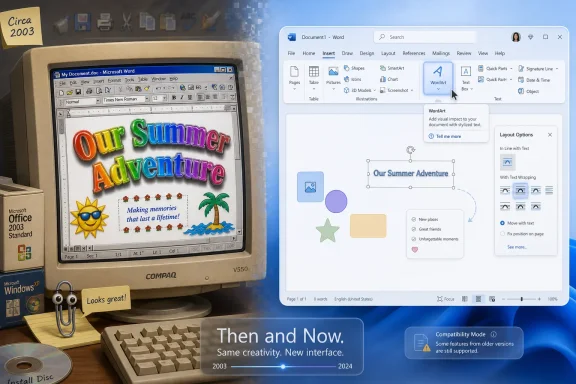 WordArt Survived by Becoming Less Important
The strange thing about WordArt is not that people stopped using it. The strange thing is that Microsoft never really killed it.In a software industry that routinely buries features under the language of “modernization,” WordArt has lingered. It still appears in Microsoft’s own instructions for current Word versions, tucked into the Insert tab, ready to turn ordinary text into arched, shadowed, glowing display type. It is no longer the star attraction of a school report, a birthday invitation, or a homemade flyer, but it remains available to anyone who remembers where to look.
That endurance matters because WordArt belongs to a class of Office features that shaped how many users first understood computers. Before Canva templates, web-based design tools, mobile editing apps, and AI-generated graphics, the family PC’s productivity suite was the creative suite. If you wanted a title that looked special, you did not open a dedicated typography tool. You clicked WordArt.
Microsoft has not deprecated WordArt so much as domesticated it. The feature has been absorbed into the broader Office drawing and text-effects system, where it now functions as one more formatting option rather than a cultural object. That is how old software survives in Microsoft’s ecosystem: not by remaining beloved, but by becoming harmless.
The Office Suite Was Once the Whole Computer
To understand why WordArt mattered, you have to remember the role Microsoft Office played in the late 1990s and early 2000s. For many households, schools, and small offices, Word was not just a word processor. It was the default place where text, images, tables, clip art, borders, and badly aligned graphics all came together.That made Word a kind of accidental design environment. The page was visible, printable, and forgiving enough for experimentation. A child making a school project, a church volunteer making a bulletin, or a parent making a yard-sale sign all worked in the same interface because that was the software already installed.
WordArt fit that world perfectly. It offered instant spectacle without requiring design knowledge. A plain heading could become metallic, warped, tilted, shadowed, or inflated with only a few clicks, and the result looked unmistakably “computer-made” in a period when that still had novelty value.
The feature’s excess was the point. Nobody chose WordArt because it was subtle. They chose it because it announced that a document had been touched by software, and in that era the visible mark of software felt modern.
That is why nostalgia around WordArt tends to be so vivid. It is not merely nostalgia for a formatting feature; it is nostalgia for a period when discovering a menu item could feel like unlocking a new machine. Office had hidden rooms, and WordArt was one of the brightest.
Microsoft’s Greatest Design Feature Was Permission
The Microsoft Office of that period gave users permission to make ugly things. That sounds like an insult, but it was one of the suite’s most democratic qualities.WordArt did not ask users to understand kerning, hierarchy, print resolution, accessibility, or brand consistency. It invited them to play. The results were often garish, but the interaction was empowering: select the text, choose the style, watch the page transform.
That was an important step in the mainstreaming of digital creativity. A generation of users learned that text was not fixed. It could be stretched, colored, outlined, rotated, and treated as an object. Long before the phrase no-code creativity became fashionable, WordArt gave ordinary users a tiny piece of visual control.
The feature also worked because it was immediate. Office’s older design tools may look clumsy now, but they were tactile in a way that modern productivity interfaces often are not. You clicked a gallery, dragged a handle, and saw the result. It was not professional layout, but it was direct manipulation, and that made it memorable.
The modern critique of WordArt is easy: it encouraged visual excess. The more interesting observation is that Microsoft created a feature that taught users to expect creative agency inside productivity software. That expectation never went away. It migrated.
The Ribbon Moved the Furniture and Changed the Culture
WordArt’s decline was not caused by one decision, but the Office ribbon era marked a visible change. Office 2007 reorganized the suite around tabs, contextual controls, and galleries. The ribbon made many features more discoverable, but it also changed the hierarchy of what Office wanted users to see first.In today’s Word, WordArt sits under Insert, alongside other objects that can be added to a document. That placement is logical. It is also revealing. WordArt is treated less as a core writing tool and more as an inserted decorative object.
This is the kind of interface decision that quietly changes behavior. Users do not need Microsoft to remove a feature for that feature to fade from daily life. Moving it out of the main path is enough. Software culture is shaped by defaults, proximity, and what the interface implies is normal.
The Home tab tells users what Microsoft thinks they will do constantly: choose styles, adjust fonts, align paragraphs, apply headings, manage spacing. The Insert tab tells users what they may occasionally add. WordArt’s relocation to that neighborhood sends a message: this is available, but it is no longer part of the ordinary act of writing.
That message matches broader changes in document culture. Academic papers, professional reports, résumés, contracts, and business documents have all moved toward restraint. Templates, corporate branding, accessibility requirements, and digital distribution have reduced the appetite for decorative text effects. WordArt did not become impossible. It became socially inappropriate.
Professionalism Became a Template
WordArt declined because documents became more standardized. In schools, workplaces, and public institutions, formatting is now often governed by templates, learning management systems, brand kits, citation rules, and accessibility checkers. The free-form page still exists, but it is less central to how work moves.A Word document in 2001 might have been printed, stapled, and handed in. A Word document in 2026 may be uploaded to a portal, converted to PDF, scanned by plagiarism tools, reviewed in Teams, opened on mobile, or fed through an accessibility workflow. In that chain, flashy text effects are not merely unnecessary. They can be friction.
The rise of digital-first reading also hurt WordArt. A shadowed, arched title may look amusing on a printed cover sheet, but it does little for a document that will be read in a browser pane or previewed in a file list. Modern document design values legibility, structure, and semantic meaning. A heading should be a heading, not just a stylized text object that looks like one.
That is a practical shift, not just an aesthetic one. Screen readers, reflowable layouts, search indexing, and collaboration tools all reward clean structure. WordArt belongs to a visual-first model of documents, where the page is primarily a canvas. Modern Office has had to serve a world where the document is also data.
This is one reason WordArt can remain in the product without reclaiming its old status. It still has use cases, especially for casual signs, labels, invitations, classroom materials, and playful presentations. But it no longer aligns with the mainstream definition of a well-made document.
The Internet Took Over the Fun Part
The other force that pushed WordArt aside was not Microsoft’s interface design. It was the web.In the 1990s and early 2000s, Office was where many users went to make things that looked designed. Today, that work has splintered across specialized tools. Canva, Adobe Express, Figma, browser-based meme generators, social media editors, and mobile layout apps all compete for the casual creativity that once happened in Word.
Those tools are not merely prettier versions of WordArt. They begin from a different assumption. Instead of asking users to decorate a blank page, they offer templates, asset libraries, stock photography, social-media dimensions, brand palettes, and export formats tuned to online distribution. They meet users where modern visual work actually goes.
WordArt was built for a paper-and-printer culture. Its natural output was a page. The modern amateur designer often needs an Instagram tile, a slide, a banner, a thumbnail, a Discord graphic, or a short video title card. Word’s page metaphor is still powerful for documents, but it is no longer the center of everyday visual communication.
That helps explain why younger users may not know WordArt exists. They have not stopped decorating text. They are doing it elsewhere, inside apps that make Microsoft’s old effects look both nostalgic and constrained. The impulse survived; the venue changed.
In that sense, WordArt did not lose because people became more tasteful. It lost because the creative job it once performed moved into software designed specifically for that job.
PowerPoint Inherited the Spectacle, Then Learned Restraint
If WordArt had a natural successor inside Office, it was PowerPoint. Presentation software remained a place where big display text, animation, gradients, shadows, and visual emphasis had a role. Yet even there, the old WordArt spirit has been moderated by modern design expectations.PowerPoint now leans heavily on themes, designer suggestions, stock assets, icons, layouts, and presentation coherence. The goal is less “make this title explode” and more “make this deck look like it was not assembled at midnight.” Microsoft has pushed users toward consistency because the professional cost of bad slides is higher than the cost of a bad school cover page.
That does not mean PowerPoint became visually conservative. It means spectacle has been systematized. Effects are now wrapped in themes and templates, and the user is nudged toward visual choices that fit a broader design language.
WordArt’s old appeal was the opposite. It was individualistic and unruly. It let a single line of text ignore the rest of the page. That made it fun, but it also made it hard to reconcile with modern Office’s template-driven professionalism.
The same tension runs through Microsoft 365 as a whole. Microsoft sells Office as a productivity platform for collaboration, compliance, cloud storage, and AI assistance. WordArt belongs to an earlier promise: that productivity software could also be a toy box.
The Feature Microsoft Forgot Is Also the Feature Microsoft Preserved
It is tempting to frame WordArt as abandoned, but that is not quite right. Microsoft has preserved it in the way a long-lived platform preserves many things: by keeping enough compatibility and interface affordance that old documents and old habits do not break.That matters in Office, perhaps more than in any other consumer software suite. Word documents are not disposable. They live in archives, shared drives, school districts, small businesses, and family folders for decades. A company that breaks old Office objects risks breaking institutional memory.
WordArt’s continued presence is therefore partly about compatibility. Documents created years ago may contain WordArt objects, and users need to open, edit, or at least view them. Microsoft’s support materials still describe how to insert and work with WordArt in current desktop apps, while the web versions have more limited capabilities around existing WordArt objects. That split is characteristic of modern Microsoft 365: the desktop apps remain the full-fidelity environment, while the web apps cover a growing but not identical subset.
This persistence is one of Microsoft Office’s underrated strengths and one of its burdens. The suite carries decades of decisions forward. Some are essential; others are odd. Together they make Office feel both powerful and crowded.
WordArt is a perfect example. It is too familiar to remove casually, too marginal to promote aggressively, and too deeply tied to Office’s visual history to disappear without someone noticing.
Nostalgia Is Not a Product Strategy, but It Is a User Interface Signal
The renewed attention to WordArt is part of a broader wave of computing nostalgia. Users who grew up with Windows 95, Windows 98, Office 97, Windows XP, Clippy, clip art, desktop themes, and early web graphics now occupy positions of professional and cultural influence. They remember these artifacts not because they were efficient, but because they were formative.That nostalgia can be easy to dismiss. Tech culture often treats old interfaces as embarrassing, especially when they violate contemporary design minimalism. But nostalgia points to real user needs. WordArt was discoverable, playful, and low-stakes. It made a complex program feel approachable.
Modern Microsoft 365 is far more capable, but it is also more abstract. Files live in OneDrive, comments sync across devices, Copilot drafts text, sensitivity labels classify documents, and sharing settings determine access. These are powerful systems, but they do not produce the same small thrill as making a school-project title bend into a rainbow arch.
That contrast matters for product design. As software becomes more cloud-connected and AI-assisted, the user’s sense of direct control can weaken. WordArt was crude, but it was unquestionably yours. You chose the style; you saw the result; you owned the mistake.
The best modern tools do not need to revive WordArt’s exact look. They do need to remember the pleasure of immediate, visible, reversible experimentation.
AI Is the New WordArt, and That Should Make Microsoft Nervous
There is a provocative way to read WordArt’s history: it was an early mass-market generative feature. The user supplied a small prompt — a word or phrase — and the software generated a stylized output. It was not intelligent, but it transformed plain input into something visually expressive.Today, Microsoft is making a much larger bet on generative AI across Microsoft 365. Copilot can draft, summarize, rewrite, analyze, and assist across Office apps. The pitch is productivity, not novelty, but the psychological hook is familiar: give the machine a small instruction and watch it produce something that feels beyond what you could have made manually.
That parallel should be humbling. WordArt was once magical, then ordinary, then tacky, then nostalgic. Many AI features will follow a similar arc. The first time software drafts a memo or creates a slide outline, it feels astonishing. The hundredth time, users begin to judge whether the output is actually useful, appropriate, and worth trusting.
WordArt’s decline shows that novelty does not guarantee permanence. A feature survives at the center of workflow only if it keeps matching the surrounding culture. Decorative text stopped matching the culture of documents. Some AI features may find the same fate if they remain impressive demos rather than dependable tools.
Microsoft seems aware of this, at least strategically. The company is embedding Copilot into everyday workflows rather than treating it as a novelty gallery. But the WordArt lesson still applies: the feature that dazzles at launch can become the feature users ignore if it does not mature into a habit.
The Hidden Cost of Making Everything Tasteful
There is also a cultural loss in WordArt’s disappearance from ordinary documents. Professionalization has benefits, but it can flatten expression. Templates make work cleaner, but they also make it more similar.The old WordArt-heavy school assignment may have been visually chaotic, but it carried evidence of the author’s choices. The student picked the style, the color, the distortion, the placement. It was a small act of ownership, even when the outcome was objectively terrible.
Modern tools often route users toward polished sameness. Templates are efficient because they reduce decisions. AI drafting tools may go further, generating not just the layout but the language, tone, and structure. The risk is not that documents will become ugly. The risk is that they will become frictionlessly generic.
WordArt reminds us that bad taste can be a stage in learning. People become better makers by making things, not by having every decision pre-corrected. A software environment that never lets users create something ridiculous may also be an environment that limits creative confidence.
This does not mean Word should put WordArt back on the Home tab. It does mean productivity software should leave room for playful misuse. Many of the most meaningful user discoveries begin as misuse before they become skill.
Accessibility and Restraint Won the Argument
For IT pros and administrators, WordArt’s decline is not merely aesthetic. It aligns with the long shift toward accessible, maintainable, policy-compliant documents.Decorative text can create real issues when it substitutes for structured headings or meaningful content. If a title is treated as an object rather than text with document semantics, it may be harder to navigate, search, or interpret through assistive technologies. Even when modern Office preserves the text content, the visual treatment may not communicate well across devices, export paths, or accessibility contexts.
This is where the nostalgia has to meet reality. The old classroom WordArt cover page was charming because the stakes were low. In a public-sector form, a legal document, a corporate policy, or a training manual, the same design impulse becomes a liability.
Enterprise IT has spent years pushing users toward managed templates, approved fonts, accessible headings, PDF standards, and consistent branding. WordArt is not the villain in that story, but it represents the kind of uncontrolled formatting those programs try to reduce.
That is another reason Microsoft’s current placement makes sense. WordArt remains there for users who need it, but the mainstream path through Word favors styles, headings, and structured formatting. The interface is quietly teaching users that decoration is optional while structure is central.
The Desktop App Still Carries the Old World
One of the more interesting details in Microsoft’s current Office landscape is the difference between desktop and web capabilities. The desktop applications remain the place where legacy richness lives. The web apps prioritize reach, collaboration, and convenience, but they do not always match every mature desktop feature.WordArt sits squarely in that divide. It is a reminder that Microsoft 365 is not one thing. It is a subscription, a cloud service, a set of desktop binaries, a browser experience, a mobile suite, and a compatibility promise all at once.
That complexity is familiar to administrators. A feature can exist in Word for Windows, behave differently in Word for the web, render acceptably in one context, and become awkward in another. The more organizations lean into browser-based workflows, the more these old desktop-era features become edge cases.
But edge cases matter in Office because Office is full of edge cases. A small business may have a 20-year-old flyer template. A school may have archived documents with old embedded objects. A nonprofit may reuse a Word file created by someone who left years ago. The fact that WordArt still works in the desktop app is part of the larger promise that Office will not casually strand old work.
That promise is expensive. It also explains why Microsoft’s productivity suite retains a texture that newer tools lack. Office is not clean because history is not clean.
The Real Story Is Not WordArt’s Death but Office’s Maturity
WordArt is easy to mock because its visual vocabulary is so tied to a particular era. The gradients, shadows, bevels, and warped text feel like a time capsule from the beige-PC age. But focusing only on the look misses the bigger story.Office matured from a box of powerful local applications into a managed productivity platform. Its center of gravity shifted from individual authorship to collaboration, compliance, cloud storage, and now AI assistance. In that transition, a feature like WordArt was bound to shrink.
The early Office user often asked, “What can I make this page do?” The modern Office user more often asks, “Can this document be shared, reviewed, found, governed, and understood?” Those are very different questions, and they produce very different interfaces.
Microsoft did not have to kill WordArt for that shift to happen. It only had to surround WordArt with a new set of priorities. The feature remains, but the world that made it feel essential has largely vanished.
That is why the Neowin reflection lands with many longtime users. WordArt is still present, but its cultural role is gone. It survives like an old amusement park ride inside a city that has grown around it.
The Rainbow Heading Still Has a Job to Do
WordArt’s modern relevance is modest, but not zero. Its value is clearest when we stop pretending it belongs in every document and recognize the narrow places where it still makes sense.For casual users, it remains a fast way to create an eye-catching label or title without leaving Office. For teachers, it can still serve as a playful entry point into formatting and layout. For parents, clubs, and small community groups, it may be enough for a flyer that does not justify opening a design app.
For Microsoft, WordArt is also a low-cost reminder that Office can still be fun. That matters more than it sounds. Productivity software has become heavy with accounts, policies, subscriptions, telemetry, cloud sync, and AI prompts. A silly text effect is a tiny counterweight to that seriousness.
The danger is not that Microsoft will remove WordArt tomorrow. The danger is that modern productivity software forgets why features like WordArt mattered in the first place. They lowered the barrier between using a computer and making something with one.
That distinction is still important. A user who feels capable of experimenting is more likely to become a power user. A child who learns that text can be manipulated may later learn layout, design, coding, or accessibility. The path from playful misuse to real skill is not always obvious at the time.
The Office Relic That Explains the Next Office
WordArt’s journey leaves a few concrete lessons for the Microsoft 365 era. The feature may be old, but the pattern is current: novelty becomes normal, interface placement shapes behavior, and the culture around a tool determines whether a capability feels useful or embarrassing.- WordArt is still present in modern Office desktop apps, but its placement under Insert reflects its reduced role in everyday document work.
- Its decline tracks the move from printed, visually decorated documents toward structured, accessible, collaborative files.
- The creative energy that once lived in Word has largely moved to dedicated web and mobile design tools.
- Microsoft’s decision to preserve WordArt reflects Office’s broader compatibility burden and its value as a decades-long document platform.
- The feature’s rise and retreat offer a useful warning for today’s AI tools: impressive transformations become durable only when they become dependable habits.
The next generation of forgotten Office features is already being born inside Microsoft 365, probably with more cloud sync and fewer rainbow gradients. Some will become indispensable infrastructure; others will become tomorrow’s nostalgia, remembered not because they made work more efficient, but because they made the computer feel briefly more personal.
References
- Primary source: Neowin
Published: Sat, 20 Jun 2026 15:01:41 GMT
The Microsoft Office feature that time forgot - Neowin
Buried a few clicks inside modern Microsoft Office apps is a blast from the past that defined creativity for an entire generation. www.neowin.net
- Official source: support.microsoft.com
Insert WordArt | Microsoft Support
Create decorative effects using WordArt or convert existing text to WordArt and customize with fill color, outline color, and effects.support.microsoft.com - Related coverage: makewordart.com
The History of Microsoft WordArt: From Windows 95 to Today - WordArt Blog
The evolution of a decorative text tool that defined a generation of Office users www.makewordart.com
- Related coverage: addintools.com
- Related coverage: office-watch.com
How to Get Old-School WordArt Back in Modern Microsoft Word
Miss the classic WordArt from Word's glory days — the arched text, the rainbow slopes, the wavy headlines that screamed "1990s"? Those old gallery styles areoffice-watch.com
- Related coverage: pctipp.ch
- Related coverage: howtogeek.com
How to Use the Ink Features in Microsoft Office
Turn your scribbles and drawings into usable elements for documents, spreadsheets, and slideshows. www.howtogeek.com
