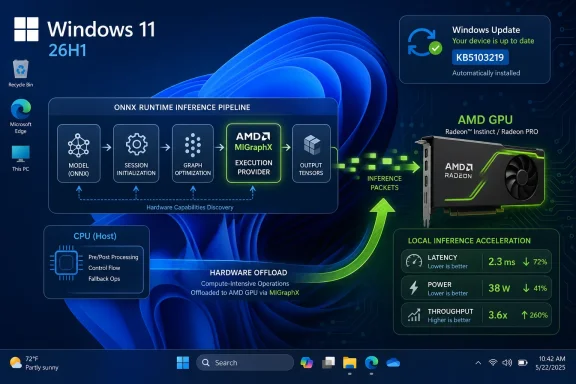
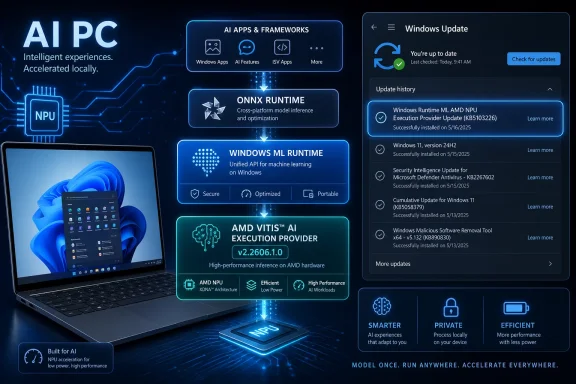
Microsoft has published KB5103220, an automatic Windows Update package for Windows 11 version 26H1 that updates the AMD Vitis AI Execution Provider to version 2.2606.1.0 on eligible devices with the latest 26H1 cumulative update installed. The update is small in description but large in implication: Microsoft is now servicing local AI plumbing with the same quiet regularity it uses for drivers, firmware, and security fixes. For most users, it will appear only as “Windows Runtime ML AMD NPU Execution Provider Update” in Update history. For IT pros, developers, and anyone watching the Copilot+ PC transition, it is another sign that Windows AI is becoming a stack of independently serviced parts rather than a feature you install once and forget.
KB5103220 is not a headline-grabbing Windows feature update. It does not promise a new Copilot interface, a redesigned Settings page, or a user-facing application that can be demonstrated in a keynote. Instead, it updates an execution provider, the translation layer that helps Windows machine-learning workloads find and use the right acceleration hardware.
That distinction matters because Microsoft’s AI PC strategy increasingly depends on components most users never see. The visible layer is Copilot, Recall-style experiences, image tools, search improvements, and app-level inference. The less visible layer is Windows Runtime ML, ONNX Runtime integration, execution providers, NPU drivers, model packages, and silicon-specific optimizations.
The AMD Vitis AI Execution Provider sits squarely in that second layer. It helps ONNX Runtime and Windows machine-learning workloads route inference to AMD platforms, including Ryzen AI systems and AMD’s broader acceleration portfolio. When Microsoft ships an update like KB5103220, it is not merely patching an app; it is keeping the AI runtime contract between Windows, AMD hardware, and local AI software intact.
That is the real story. Windows is no longer updated as one monolithic operating system plus optional drivers. It is becoming a serviced platform where AI capability arrives through a mesh of components, some tied to Windows builds, some tied to hardware vendors, and some tied to models and frameworks.
Microsoft has positioned 26H1 as a specialized release for next-generation silicon developed with device makers and chip partners. It is not meant to roll out through Windows Update to ordinary 24H2 or 25H2 systems. For enterprise administrators, Microsoft’s recommended mainstream deployment targets remain Windows 11 versions 24H2 and 25H2, not 26H1.
That makes KB5103220 narrower than the KB number alone suggests. If a user is running a conventional Windows 11 24H2 or 25H2 laptop, KB5103220 is not a signal that 26H1 is about to arrive. It is a component update for systems already on the 26H1 branch and eligible for this AMD AI execution-provider servicing path.
This is where Microsoft’s versioning becomes both technically defensible and communicatively awkward. On one hand, it makes sense to create a platform-specific release when the hardware beneath Windows is changing quickly. On the other hand, Windows users have been trained to interpret H1 and H2 labels as broad seasonal milestones. KB5103220 sits inside that confusion: mundane for the devices it targets, potentially misleading for everyone else.
An execution provider is not quite a traditional driver and not quite an application runtime. It is a bridge between machine-learning frameworks and acceleration hardware. In practical terms, it helps a model run on the most appropriate compute engine, whether that means CPU, GPU, NPU, or another accelerator.
That abstraction is essential because AI workloads are not uniform. A small image model, a speech model, a transformer-based summarizer, and an on-device classification task can have very different performance, memory, and latency characteristics. The operating system needs a way to direct those workloads without forcing every app developer to write vendor-specific hardware code.
AMD’s Vitis AI stack brings the vendor-specific side of that equation. Vitis AI is AMD’s development and deployment stack for hardware-accelerated inference across platforms such as Ryzen AI, AMD adaptive SoCs, and Alveo data-center accelerator cards. The Windows execution provider packages part of that capability into the Windows AI servicing model.
The result is a layered bargain. Developers can target ONNX Runtime and Windows ML abstractions. Microsoft can service the Windows-side integration. AMD can continue tuning its acceleration stack for its silicon. Users get local inference that should, in theory, become faster, more efficient, and more reliable without every application reinventing the wheel.
That brevity is familiar to anyone who has read driver-class support notes. Microsoft often does not expose a granular changelog for low-level platform components, especially when the details involve vendor-specific behavior, firmware dependencies, or compatibility work. The update history entry is therefore more useful as an audit marker than as a technical explanation.
For admins, the replacement relationship is the most concrete clue. KB5103220 supersedes KB5096134, a prior AMD Vitis AI Execution Provider package in the 2.2605.2.0 line. The new package moves the component to version 2.2606.1.0, which strongly suggests a monthly servicing cadence aligned with the broader Windows AI component release train.
This is how much of the AI PC stack will be maintained. Not with splashy feature drops, but with automatic component updates that inch execution providers, model infrastructure, and runtime pieces forward. The machine-learning layer will become part of the normal Windows hygiene cycle.
That is probably the right engineering answer. It is also a support challenge. When a local AI feature behaves differently after Patch Tuesday, the culprit may not be the Windows cumulative update itself. It may be an AI component update, an execution provider, a model package, a GPU or NPU driver, or an interaction among all of them.
AMD’s challenge is that Windows AI acceleration must span multiple product realities. Ryzen AI brings NPUs to client PCs. AMD GPUs remain relevant for many AI workloads. Adaptive SoCs and Alveo cards sit in more specialized embedded and data-center contexts. Vitis AI is the vendor stack that tries to connect those worlds.
Microsoft’s execution-provider model gives AMD a route into Windows machine learning without forcing every Windows developer to care about the details of XDNA, NPU driver versions, or low-level acceleration APIs. That is good for developers, but it also raises the bar for AMD. If the execution provider is unreliable, slow to update, or mismatched with drivers, the abstraction leaks.
KB5103220 is therefore a confidence-building update as much as a technical one. The mere existence of a monthly AMD execution-provider package tells customers that the AMD path is not a one-off enablement exercise. It is a serviced platform component with a version number, a Windows Update delivery path, and a place in Update history.
For buyers comparing Qualcomm, Intel, and AMD AI PCs, that servicing story is becoming part of the product. Raw TOPS numbers are easy to market. Runtime consistency over three years of Windows updates is harder, and arguably more important.
The real world is messier. Qualcomm has its own AI runtime stack. Intel has OpenVINO and its NPU software. AMD has Vitis AI and Ryzen AI tooling. NVIDIA remains a major force for GPU inference. Microsoft is trying to hide much of that complexity behind execution providers and Windows components, but the complexity does not disappear. It moves downward.
KB5103220 is a good example of that tradeoff. From the user’s perspective, the update is a simple Windows Update item. From the platform perspective, it represents a vendor-specific execution path that must remain synchronized with Windows 11 26H1, AMD driver requirements, ONNX Runtime behavior, and app expectations.
This is not necessarily a flaw. Hardware acceleration has always involved vendor-specific tuning. The difference is that AI acceleration is being presented as a general-purpose Windows capability, not just a specialist feature for gaming, CAD, or workstation workloads.
That raises the stakes for consistency. If a GPU driver update breaks a game, the support path is annoying but familiar. If an execution provider update changes the behavior of enterprise transcription, document classification, image redaction, or accessibility tooling, the impact may be harder to diagnose and harder to explain to users.
That makes sense for consumer devices. AI components need to stay current, and most users will not know what an execution provider is, let alone when to update one. The Windows Update route reduces fragmentation and gives Microsoft a central mechanism for rolling out improvements.
For managed environments, automatic delivery is more complicated. Enterprises want predictable servicing, test rings, rollback plans, and clear inventory. AI execution providers are low-level enough to matter, but new enough that many organizations have not yet built them into their endpoint-management mental model.
The obvious administrative response is to treat AI component updates as part of the platform baseline. If an organization is buying 26H1 systems with AMD AI acceleration, it should track execution-provider versions alongside firmware, chipset packages, graphics drivers, and cumulative updates. The update history entry gives admins a user-facing verification method, but fleet-scale visibility will need to come through management tooling and inventory queries.
Microsoft is also nudging customers toward a world where AI component history has its own release information. That is an admission that these pieces are no longer incidental. They are serviced assets with their own cadence and their own compatibility implications.
For a home user, that may be acceptable. If the update installs successfully and the device keeps working, the details are academic. For developers and enterprise IT teams, the lack of specificity creates friction. If an app’s local inference pipeline improves or regresses after KB5103220, there is little public detail to correlate with observed behavior.
This is not a problem unique to Microsoft. Silicon vendors often avoid publishing exhaustive low-level changelogs for acceleration stacks, particularly when changes involve proprietary optimizations. But Windows is the distribution channel here, and Windows admins reasonably expect Windows Update items to be explainable.
Microsoft does not need to publish every implementation detail. It should, however, move toward more descriptive categories for AI component updates. Reliability, performance, compatibility, security, and driver alignment would be a start. Even a short classification would help admins decide how aggressively to test and deploy.
The AI PC era will make vague changelogs feel increasingly outdated. When local AI becomes part of business workflows, accessibility features, developer tools, and creative applications, the runtime layer cannot remain a black box forever.
The harder part is understanding what that entry means. It does not mean a user has received a new Windows feature. It does not mean every AI application will suddenly use the NPU. It does not mean a non-26H1 AMD laptop is missing an urgent patch. It means a particular Windows Runtime ML execution-provider component has been updated on a supported 26H1 system.
That distinction is important because AI branding has encouraged a lot of loose assumptions. Users see “AMD,” “NPU,” “Windows ML,” and “AI” and reasonably expect a visible improvement. Often, the benefit of these updates will be invisible unless a workload depends on the affected execution path.
The best analogy is a graphics runtime update that improves shader compilation or application compatibility. You may not notice anything immediately, but the update can matter greatly to specific workloads. Execution-provider updates occupy that same quiet but consequential territory.
For Windows enthusiasts, Update history is becoming more interesting and more opaque at the same time. It reveals the names of components that did not exist in mainstream Windows servicing a few years ago. It does not yet explain them in the language power users want.
ONNX Runtime is central to that plan because it gives developers a model-execution framework that can map to different back ends. Execution providers are the mechanism that makes those back ends useful. If Microsoft and AMD can keep the Vitis AI provider current through Windows Update, developers have one less reason to avoid local acceleration on AMD systems.
That does not mean development becomes effortless. Developers still need to test performance, memory behavior, precision, supported operators, fallback paths, and behavior across hardware generations. But a serviced execution provider reduces the risk that every app must package or manage its own vendor-specific runtime.
The more mature this layer becomes, the more Windows apps can treat local AI acceleration as a capability to query rather than a platform gamble. That is where Microsoft wants to go: apps ask what the device can do, Windows routes the workload, and silicon-specific software handles the acceleration details.
KB5103220 is a small brick in that wall. The interesting question is how quickly the wall becomes stable enough for mainstream developers to build against without constantly peering behind it.
Organizations already track Windows builds, quality updates, firmware, BIOS revisions, endpoint security agents, and driver baselines. AI components add another layer. If a business app uses local inference for document processing, call summaries, image inspection, or regulated data handling, the execution provider becomes part of the reliability and compliance surface.
That does not necessarily mean admins should block these updates. In fact, blocking them indiscriminately may leave devices with older acceleration behavior and poorer compatibility. The better approach is controlled awareness: know which devices have AMD NPUs, know which Windows versions they run, know which AI components are present, and include AI workloads in pilot-ring testing.
The 26H1 limitation makes this easier for now because the affected fleet is likely small and hardware-specific. But that will not remain true forever. As AI PCs spread across refresh cycles, the number of endpoints with vendor-specific acceleration stacks will grow.
Today, KB5103220 is an edge case. Tomorrow, this class of update may be as ordinary as display drivers and cumulative updates. The organizations that prepare early will have fewer mysteries when “the AI feature is slow today” becomes a help-desk ticket.
26H1 is part of that balancing act. It gives Microsoft and partners room to support new hardware platforms with tailored OS work. At the same time, Microsoft insists that 24H2 and 25H2 remain the mainstream enterprise releases and that 26H1 is not a general upgrade path.
AI component updates are another part of the same strategy. Instead of waiting for annual Windows feature updates to improve local inference plumbing, Microsoft can service execution providers independently. That should let the platform respond more quickly to vendor driver changes, model requirements, and application compatibility issues.
The danger is opacity. If Microsoft hides too much of this machinery, users and admins will perceive AI updates as mysterious background churn. If it exposes too much raw complexity, Windows AI begins to look like a driver-management maze. The right middle ground is not easy, but KB5103220 shows why Microsoft needs to find it.
A serviced AI platform can be a strength only if customers understand enough to trust it. Otherwise, every unexplained execution-provider update becomes another reminder that the PC is doing more below the surface than its owner can easily inspect.
Microsoft and AMD are betting that users will not need to understand most of this. That may be true for consumers, but WindowsForum readers know better: the invisible layers are often where the platform’s future is decided. If Windows AI becomes reliable, efficient, and boring, updates like KB5103220 will be part of the reason. If it becomes fragmented and difficult to troubleshoot, these same quiet packages will be where admins start digging.
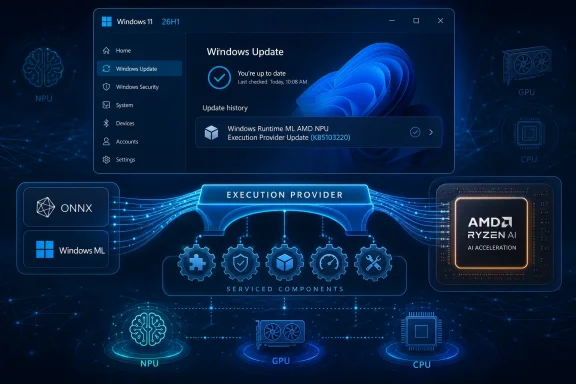 Microsoft’s AI PC Strategy Is Moving Below the Waterline
KB5103220 is not a headline-grabbing Windows feature update. It does not promise a new Copilot interface, a redesigned Settings page, or a user-facing application that can be demonstrated in a keynote. Instead, it updates an execution provider, the translation layer that helps Windows machine-learning workloads find and use the right acceleration hardware.That distinction matters because Microsoft’s AI PC strategy increasingly depends on components most users never see. The visible layer is Copilot, Recall-style experiences, image tools, search improvements, and app-level inference. The less visible layer is Windows Runtime ML, ONNX Runtime integration, execution providers, NPU drivers, model packages, and silicon-specific optimizations.
The AMD Vitis AI Execution Provider sits squarely in that second layer. It helps ONNX Runtime and Windows machine-learning workloads route inference to AMD platforms, including Ryzen AI systems and AMD’s broader acceleration portfolio. When Microsoft ships an update like KB5103220, it is not merely patching an app; it is keeping the AI runtime contract between Windows, AMD hardware, and local AI software intact.
That is the real story. Windows is no longer updated as one monolithic operating system plus optional drivers. It is becoming a serviced platform where AI capability arrives through a mesh of components, some tied to Windows builds, some tied to hardware vendors, and some tied to models and frameworks.
26H1 Is Not the Windows Upgrade Most People Are Waiting For
The “Windows 11, version 26H1” label is easy to misread. In the old Windows rhythm, a version number looked like a broad feature update for everyone. In 2026, 26H1 is something different: a hardware-optimized Windows release intended for select new devices, not an in-place upgrade for the existing Windows 11 installed base.Microsoft has positioned 26H1 as a specialized release for next-generation silicon developed with device makers and chip partners. It is not meant to roll out through Windows Update to ordinary 24H2 or 25H2 systems. For enterprise administrators, Microsoft’s recommended mainstream deployment targets remain Windows 11 versions 24H2 and 25H2, not 26H1.
That makes KB5103220 narrower than the KB number alone suggests. If a user is running a conventional Windows 11 24H2 or 25H2 laptop, KB5103220 is not a signal that 26H1 is about to arrive. It is a component update for systems already on the 26H1 branch and eligible for this AMD AI execution-provider servicing path.
This is where Microsoft’s versioning becomes both technically defensible and communicatively awkward. On one hand, it makes sense to create a platform-specific release when the hardware beneath Windows is changing quickly. On the other hand, Windows users have been trained to interpret H1 and H2 labels as broad seasonal milestones. KB5103220 sits inside that confusion: mundane for the devices it targets, potentially misleading for everyone else.
The Execution Provider Is the New Driver Layer
For decades, Windows users understood hardware support through drivers. A graphics driver made the GPU work. A chipset driver exposed platform features. A storage driver determined how Windows spoke to a controller. AI PCs add another class of dependency: the execution provider.An execution provider is not quite a traditional driver and not quite an application runtime. It is a bridge between machine-learning frameworks and acceleration hardware. In practical terms, it helps a model run on the most appropriate compute engine, whether that means CPU, GPU, NPU, or another accelerator.
That abstraction is essential because AI workloads are not uniform. A small image model, a speech model, a transformer-based summarizer, and an on-device classification task can have very different performance, memory, and latency characteristics. The operating system needs a way to direct those workloads without forcing every app developer to write vendor-specific hardware code.
AMD’s Vitis AI stack brings the vendor-specific side of that equation. Vitis AI is AMD’s development and deployment stack for hardware-accelerated inference across platforms such as Ryzen AI, AMD adaptive SoCs, and Alveo data-center accelerator cards. The Windows execution provider packages part of that capability into the Windows AI servicing model.
The result is a layered bargain. Developers can target ONNX Runtime and Windows ML abstractions. Microsoft can service the Windows-side integration. AMD can continue tuning its acceleration stack for its silicon. Users get local inference that should, in theory, become faster, more efficient, and more reliable without every application reinventing the wheel.
KB5103220 Shows How AI Fixes Will Arrive Quietly
The KB article for this update is spare. It says the package includes improvements to the AMD Vitis AI Execution Provider AI component for Windows 11 version 26H1. It says the update downloads and installs automatically from Windows Update. It says the latest cumulative update for Windows 11 version 26H1 is required. It says KB5103220 replaces KB5096134.That brevity is familiar to anyone who has read driver-class support notes. Microsoft often does not expose a granular changelog for low-level platform components, especially when the details involve vendor-specific behavior, firmware dependencies, or compatibility work. The update history entry is therefore more useful as an audit marker than as a technical explanation.
For admins, the replacement relationship is the most concrete clue. KB5103220 supersedes KB5096134, a prior AMD Vitis AI Execution Provider package in the 2.2605.2.0 line. The new package moves the component to version 2.2606.1.0, which strongly suggests a monthly servicing cadence aligned with the broader Windows AI component release train.
This is how much of the AI PC stack will be maintained. Not with splashy feature drops, but with automatic component updates that inch execution providers, model infrastructure, and runtime pieces forward. The machine-learning layer will become part of the normal Windows hygiene cycle.
That is probably the right engineering answer. It is also a support challenge. When a local AI feature behaves differently after Patch Tuesday, the culprit may not be the Windows cumulative update itself. It may be an AI component update, an execution provider, a model package, a GPU or NPU driver, or an interaction among all of them.
AMD’s Role Is Bigger Than a Single Ryzen AI Checkbox
It would be easy to treat KB5103220 as a minor AMD laptop update. That undersells what AMD is trying to do with Vitis AI and what Microsoft needs from every silicon partner. The AI PC market is not simply a race to put an NPU badge on a spec sheet. It is a race to make local inference dependable enough that developers can assume it exists.AMD’s challenge is that Windows AI acceleration must span multiple product realities. Ryzen AI brings NPUs to client PCs. AMD GPUs remain relevant for many AI workloads. Adaptive SoCs and Alveo cards sit in more specialized embedded and data-center contexts. Vitis AI is the vendor stack that tries to connect those worlds.
Microsoft’s execution-provider model gives AMD a route into Windows machine learning without forcing every Windows developer to care about the details of XDNA, NPU driver versions, or low-level acceleration APIs. That is good for developers, but it also raises the bar for AMD. If the execution provider is unreliable, slow to update, or mismatched with drivers, the abstraction leaks.
KB5103220 is therefore a confidence-building update as much as a technical one. The mere existence of a monthly AMD execution-provider package tells customers that the AMD path is not a one-off enablement exercise. It is a serviced platform component with a version number, a Windows Update delivery path, and a place in Update history.
For buyers comparing Qualcomm, Intel, and AMD AI PCs, that servicing story is becoming part of the product. Raw TOPS numbers are easy to market. Runtime consistency over three years of Windows updates is harder, and arguably more important.
The Local AI Stack Is Fragmenting Even as Microsoft Tries to Standardize It
Microsoft’s public message around Windows AI emphasizes abstraction. Developers should be able to use Windows ML and ONNX Runtime, and Windows should handle acceleration details across supported hardware. That is the clean story.The real world is messier. Qualcomm has its own AI runtime stack. Intel has OpenVINO and its NPU software. AMD has Vitis AI and Ryzen AI tooling. NVIDIA remains a major force for GPU inference. Microsoft is trying to hide much of that complexity behind execution providers and Windows components, but the complexity does not disappear. It moves downward.
KB5103220 is a good example of that tradeoff. From the user’s perspective, the update is a simple Windows Update item. From the platform perspective, it represents a vendor-specific execution path that must remain synchronized with Windows 11 26H1, AMD driver requirements, ONNX Runtime behavior, and app expectations.
This is not necessarily a flaw. Hardware acceleration has always involved vendor-specific tuning. The difference is that AI acceleration is being presented as a general-purpose Windows capability, not just a specialist feature for gaming, CAD, or workstation workloads.
That raises the stakes for consistency. If a GPU driver update breaks a game, the support path is annoying but familiar. If an execution provider update changes the behavior of enterprise transcription, document classification, image redaction, or accessibility tooling, the impact may be harder to diagnose and harder to explain to users.
Windows Update Becomes the AI Supply Chain
Automatic delivery is the most important operational fact in KB5103220. This update is not presented as an optional developer download or a manual AMD package. It arrives through Windows Update, provided the device meets the prerequisite of having the latest cumulative update for Windows 11 version 26H1 installed.That makes sense for consumer devices. AI components need to stay current, and most users will not know what an execution provider is, let alone when to update one. The Windows Update route reduces fragmentation and gives Microsoft a central mechanism for rolling out improvements.
For managed environments, automatic delivery is more complicated. Enterprises want predictable servicing, test rings, rollback plans, and clear inventory. AI execution providers are low-level enough to matter, but new enough that many organizations have not yet built them into their endpoint-management mental model.
The obvious administrative response is to treat AI component updates as part of the platform baseline. If an organization is buying 26H1 systems with AMD AI acceleration, it should track execution-provider versions alongside firmware, chipset packages, graphics drivers, and cumulative updates. The update history entry gives admins a user-facing verification method, but fleet-scale visibility will need to come through management tooling and inventory queries.
Microsoft is also nudging customers toward a world where AI component history has its own release information. That is an admission that these pieces are no longer incidental. They are serviced assets with their own cadence and their own compatibility implications.
The Changelog Gap Will Frustrate the People Who Need Details Most
The sparse KB text leaves a familiar hole. “Includes improvements” may be accurate, but it is not operationally rich. It does not say whether the update improves performance, reliability, model compatibility, power behavior, crash handling, driver matching, or security hardening.For a home user, that may be acceptable. If the update installs successfully and the device keeps working, the details are academic. For developers and enterprise IT teams, the lack of specificity creates friction. If an app’s local inference pipeline improves or regresses after KB5103220, there is little public detail to correlate with observed behavior.
This is not a problem unique to Microsoft. Silicon vendors often avoid publishing exhaustive low-level changelogs for acceleration stacks, particularly when changes involve proprietary optimizations. But Windows is the distribution channel here, and Windows admins reasonably expect Windows Update items to be explainable.
Microsoft does not need to publish every implementation detail. It should, however, move toward more descriptive categories for AI component updates. Reliability, performance, compatibility, security, and driver alignment would be a start. Even a short classification would help admins decide how aggressively to test and deploy.
The AI PC era will make vague changelogs feel increasingly outdated. When local AI becomes part of business workflows, accessibility features, developer tools, and creative applications, the runtime layer cannot remain a black box forever.
The User-Facing Check Is Simple, but the Meaning Is Not
Microsoft’s verification instruction is straightforward: open Settings, go to Windows Update, then Update history, and look for “Windows Runtime ML AMD NPU Execution Provider Update (KB5103220).” That is enough to confirm the package landed on an individual device.The harder part is understanding what that entry means. It does not mean a user has received a new Windows feature. It does not mean every AI application will suddenly use the NPU. It does not mean a non-26H1 AMD laptop is missing an urgent patch. It means a particular Windows Runtime ML execution-provider component has been updated on a supported 26H1 system.
That distinction is important because AI branding has encouraged a lot of loose assumptions. Users see “AMD,” “NPU,” “Windows ML,” and “AI” and reasonably expect a visible improvement. Often, the benefit of these updates will be invisible unless a workload depends on the affected execution path.
The best analogy is a graphics runtime update that improves shader compilation or application compatibility. You may not notice anything immediately, but the update can matter greatly to specific workloads. Execution-provider updates occupy that same quiet but consequential territory.
For Windows enthusiasts, Update history is becoming more interesting and more opaque at the same time. It reveals the names of components that did not exist in mainstream Windows servicing a few years ago. It does not yet explain them in the language power users want.
Developers Should Read This as a Platform Signal
The immediate audience for KB5103220 may be device owners, but the longer-term audience is developers. Microsoft wants Windows to be a credible local AI target, and that requires more than shipping NPUs. It requires a runtime path that app developers can trust across hardware vendors.ONNX Runtime is central to that plan because it gives developers a model-execution framework that can map to different back ends. Execution providers are the mechanism that makes those back ends useful. If Microsoft and AMD can keep the Vitis AI provider current through Windows Update, developers have one less reason to avoid local acceleration on AMD systems.
That does not mean development becomes effortless. Developers still need to test performance, memory behavior, precision, supported operators, fallback paths, and behavior across hardware generations. But a serviced execution provider reduces the risk that every app must package or manage its own vendor-specific runtime.
The more mature this layer becomes, the more Windows apps can treat local AI acceleration as a capability to query rather than a platform gamble. That is where Microsoft wants to go: apps ask what the device can do, Windows routes the workload, and silicon-specific software handles the acceleration details.
KB5103220 is a small brick in that wall. The interesting question is how quickly the wall becomes stable enough for mainstream developers to build against without constantly peering behind it.
Enterprise IT Should Care Before Users Complain
The practical risk for enterprise IT is not that KB5103220 will suddenly break every AMD AI PC. There is no evidence of that from the support note alone. The risk is that AI component servicing will mature faster than enterprise processes for observing it.Organizations already track Windows builds, quality updates, firmware, BIOS revisions, endpoint security agents, and driver baselines. AI components add another layer. If a business app uses local inference for document processing, call summaries, image inspection, or regulated data handling, the execution provider becomes part of the reliability and compliance surface.
That does not necessarily mean admins should block these updates. In fact, blocking them indiscriminately may leave devices with older acceleration behavior and poorer compatibility. The better approach is controlled awareness: know which devices have AMD NPUs, know which Windows versions they run, know which AI components are present, and include AI workloads in pilot-ring testing.
The 26H1 limitation makes this easier for now because the affected fleet is likely small and hardware-specific. But that will not remain true forever. As AI PCs spread across refresh cycles, the number of endpoints with vendor-specific acceleration stacks will grow.
Today, KB5103220 is an edge case. Tomorrow, this class of update may be as ordinary as display drivers and cumulative updates. The organizations that prepare early will have fewer mysteries when “the AI feature is slow today” becomes a help-desk ticket.
Microsoft Is Building a Servicing Model for a Market That Has Not Settled Yet
The awkwardness of KB5103220 reflects a broader market reality. AI PCs are still in the phase where hardware capability, software demand, and platform abstractions are developing at the same time. Microsoft must support silicon-specific innovation without fragmenting Windows into incompatible islands.26H1 is part of that balancing act. It gives Microsoft and partners room to support new hardware platforms with tailored OS work. At the same time, Microsoft insists that 24H2 and 25H2 remain the mainstream enterprise releases and that 26H1 is not a general upgrade path.
AI component updates are another part of the same strategy. Instead of waiting for annual Windows feature updates to improve local inference plumbing, Microsoft can service execution providers independently. That should let the platform respond more quickly to vendor driver changes, model requirements, and application compatibility issues.
The danger is opacity. If Microsoft hides too much of this machinery, users and admins will perceive AI updates as mysterious background churn. If it exposes too much raw complexity, Windows AI begins to look like a driver-management maze. The right middle ground is not easy, but KB5103220 shows why Microsoft needs to find it.
A serviced AI platform can be a strength only if customers understand enough to trust it. Otherwise, every unexplained execution-provider update becomes another reminder that the PC is doing more below the surface than its owner can easily inspect.
The Quiet KB That Explains the AI PC Future
KB5103220 is worth more attention than its modest support page suggests because it captures the emerging shape of Windows AI servicing. It is narrow, automatic, hardware-aware, and mostly invisible until something depends on it.- KB5103220 updates the AMD Vitis AI Execution Provider to version 2.2606.1.0 for eligible Windows 11 version 26H1 devices.
- The update is delivered automatically through Windows Update and requires the latest cumulative update for Windows 11 version 26H1.
- The package replaces KB5096134, which indicates an ongoing servicing cadence for AMD’s Windows AI execution-provider path.
- Users can verify installation in Windows Update history under the Windows Runtime ML AMD NPU Execution Provider entry.
- The update does not turn Windows 11 26H1 into a broad upgrade for existing 24H2 or 25H2 PCs.
- Administrators should begin treating AI execution providers as part of the endpoint baseline, especially on fleets that rely on local inference workloads.
Microsoft and AMD are betting that users will not need to understand most of this. That may be true for consumers, but WindowsForum readers know better: the invisible layers are often where the platform’s future is decided. If Windows AI becomes reliable, efficient, and boring, updates like KB5103220 will be part of the reason. If it becomes fragmented and difficult to troubleshoot, these same quiet packages will be where admins start digging.
References
- Primary source: Microsoft Support
Published: Tue, 23 Jun 2026 17:02:54 Z
- Official source: learn.microsoft.com
Windows 11 - release information | Microsoft Learn
Learn release information for Windows 11 releaseslearn.microsoft.com - Related coverage: windowsforum.com
KB5096136 Updates AMD Vitis AI Execution Provider for Windows 11 26H1 | Windows Forum
Microsoft has published KB5096136, an automatic Windows Update package for Windows 11 version 26H1 devices that updates the AMD Vitis AI Execution Provider...windowsforum.com - Official source: microsoft.com