
Apple released iOS 27 developer beta 2 on June 22, 2026, adding a more visible Write with Siri control above the keyboard, improved RCS replies with Android users, early Wallet Insights work, Home app fixes, and signs of new iCloud backup alerts. The beta is not just a bag of interface tweaks. It is Apple moving its AI pitch into the places where employees actually create business records: email, notes, messages, and documents. For WindowsForum readers, the important story is not that Siri has a new button; it is that the iPhone is becoming another AI writing endpoint IT departments will have to govern.
The most consequential change in iOS 27 beta 2 is also the easiest to dismiss. A new Write with Siri prompt now appears above the keyboard in apps such as Mail, Notes, and Messages, where the first developer beta reportedly exposed the feature mainly after selecting existing text. That is a small interface shift with a large behavioral consequence: Apple is no longer waiting for users to discover AI writing by accident.
This is the right place for Apple to make its move. The keyboard is where workplace intent turns into company data. It is where support tickets are drafted, HR messages are softened, sales notes are summarized, and executives ask for language that sounds decisive without sounding legally reckless.
Apple’s public framing is predictable: Siri AI can help users generate drafts, refine what they have written, and match tone in Mail and Messages. That pitch is not exotic anymore. Microsoft has Copilot, Google has Gemini, and every enterprise SaaS vendor now seems to believe the future of productivity is a blinking cursor attached to a model.
What is different is Apple’s distribution advantage. On iPhone, the keyboard is not another app. It is system territory. If Write with Siri becomes a normal part of typing, Apple will have turned AI assistance from a destination into muscle memory.
That matters because policy usually depends on recognition. A worker might understand that uploading a contract to an unfamiliar website is risky. The same worker may not think twice about asking a phone-native writing tool to “make this customer escalation sound calmer” while the original escalation contains names, account details, incident history, and internal remediation notes.
Apple will argue, as it often does, from privacy architecture. The company has spent years positioning on-device processing and controlled private cloud workflows as alternatives to the data-hungry AI strategies of rivals. That distinction matters, and administrators should not flatten every AI feature into the same threat model.
But governance does not end at architecture. Even if the model invocation is well-contained, the output still becomes part of the business process. A generated email can introduce inaccurate commitments. A rewritten message can erase necessary caveats. A tone-matched reply can make a junior employee sound as though they have authority they do not possess.
This is the uncomfortable lesson for IT: AI writing controls are no longer only a data-loss-prevention issue. They are also a records-management issue, a compliance issue, and a delegation-of-authority issue.
This is not the end of the blue-bubble war. Apple’s Messages experience still privileges iMessage, and cross-platform messaging remains shaped by years of strategic reluctance. But the iOS 27 beta makes RCS feel a little less like a diplomatic compromise and more like a feature Apple intends to polish.
For businesses, the change has practical value. Field teams, contractors, regional offices, and mixed-device groups frequently communicate across iPhone and Android whether corporate policy blesses that behavior or not. Cleaner replies reduce ambiguity in fast-moving threads, especially when a conversation contains instructions, photos, location details, or incident updates.
No serious administrator should interpret better RCS as a reason to move regulated workflows into consumer messaging. Teams, Slack, email, ticketing systems, and industry-specific tools exist for a reason. But IT departments also live in the real world, where employees text screenshots from a warehouse floor and coordinate urgent logistics from the back seat of a taxi.
In that world, reducing confusion is not trivial. Better RCS does not solve compliance, but it does reduce one class of everyday communication failure.
Still, scaffolding is strategy. Wallet has already grown far beyond payment cards and boarding passes. It now sits at the intersection of identity, transit, access, payments, loyalty, and increasingly financial context. If Apple adds account-level insights, Wallet becomes less of a container and more of a personal finance dashboard.
That could create new support questions for managed devices. Many organizations allow personal use on corporate phones; many others manage personally owned phones through mobile device management. Wallet is one of those spaces where personal and professional identities can sit uncomfortably close together.
The immediate enterprise impact may be modest, but administrators should watch the direction of travel. If users begin linking more financial data to Wallet, questions about backups, device replacement, remote wipe, account recovery, and offboarding become more sensitive. A phone is already a security token, a communications endpoint, and an identity wallet. Apple appears interested in making it a financial context engine as well.
For large enterprises, this may sound like someone else’s problem. For small businesses, clinics, studios, classrooms, conference rooms, and retail environments, it is very much today’s problem. Apple TVs drive displays. Smart lights appear in offices. HomeKit-style devices end up in shared spaces because they are cheap, easy to buy, and familiar to employees.
That creates a support gray zone. The device may have been purchased with a corporate card, configured by an office manager, signed into with a personal Apple ID, and then expected to behave like infrastructure. When it fails, IT gets the ticket.
The iOS 27 beta does not radically change that picture. It does, however, show Apple continuing to make Home a management surface for devices that increasingly live outside the living room. If the company wants Apple TV, HomeKit, and Matter-adjacent hardware to be credible in shared workspaces, reliability after platform updates is not optional.
Backup failures are rarely interesting until a device is lost, damaged, stolen, traded in, wiped, or replaced under pressure. At that point, the difference between a clear user-facing warning and a vague sync failure can become hours of support work. When the device is a corporate iPhone in the hands of an executive, salesperson, clinician, or field technician, restore reliability becomes operational continuity.
Apple’s backup story is also complicated by the mixture of personal and managed data on many devices. Some organizations rely on MDM enrollment, managed Apple Accounts, app-level cloud sync, or third-party backup assumptions rather than iCloud device backup alone. Others simply inherit whatever users have configured.
A clearer backup warning will not fix weak policy. But it can surface failure earlier, and earlier is almost always cheaper. If beta 2’s alert survives into release, it should be read as another sign that Apple is trying to make system recovery more legible to ordinary users.
But avoiding deployment is not the same as ignoring the beta. Organizations that manage iPhones should already have a small test pool for iOS 27, especially if they depend on custom apps, VPN clients, certificate workflows, identity providers, compliance agents, device attestation, or specialized peripherals. The best time to discover that an internal app mishandles the new OS is before the public release train starts moving.
The Siri angle deserves its own test plan. Administrators should evaluate whether Apple Intelligence and Siri AI features are available on the organization’s supported hardware, how they appear in managed contexts, what restrictions are exposed through MDM, and whether existing data-loss-prevention guidance covers system-level writing tools. The answer may differ by device generation, region, language, account type, and management state.
There is also a communications task. Employees do not need a white paper on model architecture. They need clear examples: do not paste unreleased financials into AI writing prompts; do not ask AI to draft legal commitments without review; do not use tone-matching to impersonate approval; do not summarize regulated records into consumer messaging threads. Policy that cannot be remembered at the keyboard will fail at the keyboard.
iOS 27 beta 2 suggests Apple understands that the fight will not be won only by making Siri smarter in demonstrations. It will be won by putting Siri where users repeatedly make small decisions. Draft this reply. Clean up this sentence. Explain this tone. Turn this thought into something sendable.
That strategy is powerful because defaults shape behavior. Users rarely hold a philosophical debate with themselves before tapping a button above the keyboard. If the button is present, useful, and fast enough, it becomes part of the workflow.
For Microsoft shops, this should sound familiar. Copilot’s enterprise importance does not come only from chat. It comes from showing up inside Word, Outlook, Teams, Excel, Windows, Edge, and the admin stack. Apple is pursuing a version of that same ambient strategy, but with the iPhone keyboard as the beachhead.
A modern iPhone is now an identity broker, payment instrument, passkey container, health sensor, camera, authenticator, messaging hub, and AI-assisted writing surface. Each role changes the risk profile. Each role also changes what users expect from IT.
That is why beta 2’s small features belong in the same conversation. Write with Siri affects content creation. RCS affects informal collaboration. Wallet affects financial and identity context. Home affects shared-space infrastructure. Backup alerts affect recovery. None of these is the whole iOS 27 story, but together they show the iPhone expanding into more corners of daily work.
The management challenge is not simply to block or allow features. It is to decide where the organization accepts Apple’s defaults, where it overrides them, and where it needs user training because no technical control will be perfect.
Apple’s iOS 27 beta 2 is best understood as an early warning that the next iPhone upgrade will not be defined only by a smarter Siri, cleaner RCS, or a few redesigned system apps. It will be defined by Apple’s effort to make AI assistance, cross-platform messaging, financial context, smart-device control, and recovery prompts feel ordinary. That is good product strategy, and it may be good user experience. But for IT, ordinary is exactly what makes it consequential: once a feature becomes part of the keyboard, the message thread, the wallet, or the restore flow, it has already crossed from novelty into infrastructure.
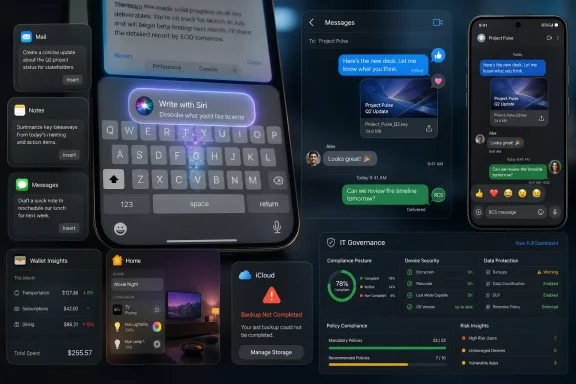 Apple Moves Siri From the Stage Demo to the Text Box
The most consequential change in iOS 27 beta 2 is also the easiest to dismiss. A new Write with Siri prompt now appears above the keyboard in apps such as Mail, Notes, and Messages, where the first developer beta reportedly exposed the feature mainly after selecting existing text. That is a small interface shift with a large behavioral consequence: Apple is no longer waiting for users to discover AI writing by accident.This is the right place for Apple to make its move. The keyboard is where workplace intent turns into company data. It is where support tickets are drafted, HR messages are softened, sales notes are summarized, and executives ask for language that sounds decisive without sounding legally reckless.
Apple’s public framing is predictable: Siri AI can help users generate drafts, refine what they have written, and match tone in Mail and Messages. That pitch is not exotic anymore. Microsoft has Copilot, Google has Gemini, and every enterprise SaaS vendor now seems to believe the future of productivity is a blinking cursor attached to a model.
What is different is Apple’s distribution advantage. On iPhone, the keyboard is not another app. It is system territory. If Write with Siri becomes a normal part of typing, Apple will have turned AI assistance from a destination into muscle memory.
The New AI Risk Is Not Shadow IT, but Ambient IT
Enterprise security teams have spent the past two years worrying about employees pasting confidential data into public chatbots. That risk still exists, but iOS 27 points to a subtler problem. AI assistance is being embedded into ordinary device workflows so deeply that employees may stop seeing it as a separate tool at all.That matters because policy usually depends on recognition. A worker might understand that uploading a contract to an unfamiliar website is risky. The same worker may not think twice about asking a phone-native writing tool to “make this customer escalation sound calmer” while the original escalation contains names, account details, incident history, and internal remediation notes.
Apple will argue, as it often does, from privacy architecture. The company has spent years positioning on-device processing and controlled private cloud workflows as alternatives to the data-hungry AI strategies of rivals. That distinction matters, and administrators should not flatten every AI feature into the same threat model.
But governance does not end at architecture. Even if the model invocation is well-contained, the output still becomes part of the business process. A generated email can introduce inaccurate commitments. A rewritten message can erase necessary caveats. A tone-matched reply can make a junior employee sound as though they have authority they do not possess.
This is the uncomfortable lesson for IT: AI writing controls are no longer only a data-loss-prevention issue. They are also a records-management issue, a compliance issue, and a delegation-of-authority issue.
RCS Becomes Boring, Which Is Exactly the Point
The RCS improvements in iOS 27 beta 2 are less flashy than Siri AI, but they may be more immediately useful. The beta adds support for replying to a specific message in an RCS conversation with an Android user, and it improves the way reactions appear on images and videos. Instead of a clumsy text description of a reaction, the emoji can appear where users expect it.This is not the end of the blue-bubble war. Apple’s Messages experience still privileges iMessage, and cross-platform messaging remains shaped by years of strategic reluctance. But the iOS 27 beta makes RCS feel a little less like a diplomatic compromise and more like a feature Apple intends to polish.
For businesses, the change has practical value. Field teams, contractors, regional offices, and mixed-device groups frequently communicate across iPhone and Android whether corporate policy blesses that behavior or not. Cleaner replies reduce ambiguity in fast-moving threads, especially when a conversation contains instructions, photos, location details, or incident updates.
No serious administrator should interpret better RCS as a reason to move regulated workflows into consumer messaging. Teams, Slack, email, ticketing systems, and industry-specific tools exist for a reason. But IT departments also live in the real world, where employees text screenshots from a warehouse floor and coordinate urgent logistics from the back seat of a taxi.
In that world, reducing confusion is not trivial. Better RCS does not solve compliance, but it does reduce one class of everyday communication failure.
Wallet Hints at a Broader Personal Finance Surface
Wallet’s unfinished Insights feature is another beta breadcrumb worth watching. The reported splash screen suggests Apple wants users to connect accounts and view spending insights, recurring transactions, balances, and related financial information inside Wallet. In beta 2, that appears to be more scaffolding than finished product.Still, scaffolding is strategy. Wallet has already grown far beyond payment cards and boarding passes. It now sits at the intersection of identity, transit, access, payments, loyalty, and increasingly financial context. If Apple adds account-level insights, Wallet becomes less of a container and more of a personal finance dashboard.
That could create new support questions for managed devices. Many organizations allow personal use on corporate phones; many others manage personally owned phones through mobile device management. Wallet is one of those spaces where personal and professional identities can sit uncomfortably close together.
The immediate enterprise impact may be modest, but administrators should watch the direction of travel. If users begin linking more financial data to Wallet, questions about backups, device replacement, remote wipe, account recovery, and offboarding become more sensitive. A phone is already a security token, a communications endpoint, and an identity wallet. Apple appears interested in making it a financial context engine as well.
Home and Apple TV Fixes Show the Office Is Now a Smart Home
The Home app updates in iOS 27 beta 2 are a reminder that consumer Apple infrastructure has quietly entered workplaces. The beta reportedly lets users remotely update Apple TV software from the Home app and fixes a problem that caused some HomeKit accessories, including Philips Hue lights, to become unresponsive after installing early iOS 27 and tvOS 27 betas.For large enterprises, this may sound like someone else’s problem. For small businesses, clinics, studios, classrooms, conference rooms, and retail environments, it is very much today’s problem. Apple TVs drive displays. Smart lights appear in offices. HomeKit-style devices end up in shared spaces because they are cheap, easy to buy, and familiar to employees.
That creates a support gray zone. The device may have been purchased with a corporate card, configured by an office manager, signed into with a personal Apple ID, and then expected to behave like infrastructure. When it fails, IT gets the ticket.
The iOS 27 beta does not radically change that picture. It does, however, show Apple continuing to make Home a management surface for devices that increasingly live outside the living room. If the company wants Apple TV, HomeKit, and Matter-adjacent hardware to be credible in shared workspaces, reliability after platform updates is not optional.
Backup Alerts Are the Kind of Boring Feature IT Actually Notices
The newly discovered iCloud backup alert may be unfinished, but it is the sort of plumbing that matters during real incidents. The reported message warns that a server problem may prevent backup or restore and asks the user to try again later. It is not glamorous, and that is precisely why administrators should pay attention.Backup failures are rarely interesting until a device is lost, damaged, stolen, traded in, wiped, or replaced under pressure. At that point, the difference between a clear user-facing warning and a vague sync failure can become hours of support work. When the device is a corporate iPhone in the hands of an executive, salesperson, clinician, or field technician, restore reliability becomes operational continuity.
Apple’s backup story is also complicated by the mixture of personal and managed data on many devices. Some organizations rely on MDM enrollment, managed Apple Accounts, app-level cloud sync, or third-party backup assumptions rather than iCloud device backup alone. Others simply inherit whatever users have configured.
A clearer backup warning will not fix weak policy. But it can surface failure earlier, and earlier is almost always cheaper. If beta 2’s alert survives into release, it should be read as another sign that Apple is trying to make system recovery more legible to ordinary users.
Beta Season Is the Only Cheap Time to Find the Breakage
The obvious advice is still correct: do not roll iOS 27 developer beta 2 onto production fleets. Developer betas are for testing, not proving one’s appetite for risk. They break apps, drain batteries, change APIs, and expose unfinished behavior that may never ship in the same form.But avoiding deployment is not the same as ignoring the beta. Organizations that manage iPhones should already have a small test pool for iOS 27, especially if they depend on custom apps, VPN clients, certificate workflows, identity providers, compliance agents, device attestation, or specialized peripherals. The best time to discover that an internal app mishandles the new OS is before the public release train starts moving.
The Siri angle deserves its own test plan. Administrators should evaluate whether Apple Intelligence and Siri AI features are available on the organization’s supported hardware, how they appear in managed contexts, what restrictions are exposed through MDM, and whether existing data-loss-prevention guidance covers system-level writing tools. The answer may differ by device generation, region, language, account type, and management state.
There is also a communications task. Employees do not need a white paper on model architecture. They need clear examples: do not paste unreleased financials into AI writing prompts; do not ask AI to draft legal commitments without review; do not use tone-matching to impersonate approval; do not summarize regulated records into consumer messaging threads. Policy that cannot be remembered at the keyboard will fail at the keyboard.
Apple’s AI Strategy Is Becoming Less About Magic and More About Defaults
Apple’s first wave of Apple Intelligence often felt caught between ambition and caution. The company wanted credit for privacy-preserving AI, but it also had to ship features that felt useful next to more aggressive rivals. Siri, in particular, has carried years of user disappointment, and a renamed or rebuilt assistant does not erase that history overnight.iOS 27 beta 2 suggests Apple understands that the fight will not be won only by making Siri smarter in demonstrations. It will be won by putting Siri where users repeatedly make small decisions. Draft this reply. Clean up this sentence. Explain this tone. Turn this thought into something sendable.
That strategy is powerful because defaults shape behavior. Users rarely hold a philosophical debate with themselves before tapping a button above the keyboard. If the button is present, useful, and fast enough, it becomes part of the workflow.
For Microsoft shops, this should sound familiar. Copilot’s enterprise importance does not come only from chat. It comes from showing up inside Word, Outlook, Teams, Excel, Windows, Edge, and the admin stack. Apple is pursuing a version of that same ambient strategy, but with the iPhone keyboard as the beachhead.
The iPhone Is Becoming a Managed AI Endpoint
The old mental model of mobile device management is too narrow for what iOS 27 is becoming. Administrators used to think about passcodes, app installation, Wi-Fi profiles, certificates, VPN, email configuration, and remote wipe. Those still matter, but they no longer describe the whole device.A modern iPhone is now an identity broker, payment instrument, passkey container, health sensor, camera, authenticator, messaging hub, and AI-assisted writing surface. Each role changes the risk profile. Each role also changes what users expect from IT.
That is why beta 2’s small features belong in the same conversation. Write with Siri affects content creation. RCS affects informal collaboration. Wallet affects financial and identity context. Home affects shared-space infrastructure. Backup alerts affect recovery. None of these is the whole iOS 27 story, but together they show the iPhone expanding into more corners of daily work.
The management challenge is not simply to block or allow features. It is to decide where the organization accepts Apple’s defaults, where it overrides them, and where it needs user training because no technical control will be perfect.
The Upgrade Checklist Hides in the Small Print
The most useful reading of iOS 27 beta 2 is not that Apple added a few features two weeks after WWDC. It is that Apple has revealed which seams it wants to smooth before the fall launch. Those seams tell administrators where to look.- Organizations should test Write with Siri as a system-level writing surface, not as a novelty inside one app.
- Mixed iPhone and Android teams should verify how RCS replies, reactions, media handling, and message history behave across carriers and regions.
- IT teams should review whether current AI acceptable-use policies cover prompts typed into operating-system features, not just third-party chatbot websites.
- Businesses using Apple TV, HomeKit, or smart-office accessories should validate update and reliability behavior before moving shared-space devices to iOS 27 and tvOS 27.
- Support teams should check backup, restore, and enrollment workflows on test devices because recovery failures are most painful when they are discovered during replacement.
- Security teams should treat Wallet’s direction of travel as another reason to clarify personal-versus-managed data boundaries on corporate and BYOD iPhones.
Apple’s iOS 27 beta 2 is best understood as an early warning that the next iPhone upgrade will not be defined only by a smarter Siri, cleaner RCS, or a few redesigned system apps. It will be defined by Apple’s effort to make AI assistance, cross-platform messaging, financial context, smart-device control, and recovery prompts feel ordinary. That is good product strategy, and it may be good user experience. But for IT, ordinary is exactly what makes it consequential: once a feature becomes part of the keyboard, the message thread, the wallet, or the restore flow, it has already crossed from novelty into infrastructure.
References
- Primary source: TechRepublic
Published: 2026-06-24T00:20:10.981072
Apple’s iOS 27 Beta 2: New Siri, RCS, and Wallet Changes Arrive
iOS 27 beta 2 adds Write with Siri, RCS replies, Wallet updates, and Home fixes, giving IT teams more to test before launch.www.techrepublic.com
- Independent coverage: 9to5Mac
Published: Mon, 22 Jun 2026 18:33:00 GMT
Here's what's new with iOS 27 beta 2 - 9to5Mac
Apple released iOS 27 beta 2 today, giving developers the first follow-up update since iOS 27 debuted at WWDC. The...9to5mac.com - Related coverage: macworld.com
Apple releases the second iOS 27 developer beta for testers | Macworld
Apple is getting its big new fall update in shape, but it's not ready for public beta testing just yet.www.macworld.com - Related coverage: newsbricks.com
Apple Releases iOS27 Developer Beta 2 With Siri & UI Upgrade - NewsBricks
Apple has rolled out iOS 27 Developer Beta 2, bringing a dedicated "Write with Siri" shortcut, Wallet app enhancements, RCS improvements, and updates to Apple www.newsbricks.com
- Related coverage: macrumors.com
Siri AI in iOS 27: Features, Requirements, and How It Works
The biggest change in iOS 27 is Apple's total overhaul of Siri, with Siri turning into Siri AI. Apple delivered on the features originally promised at WWDC 2024 and added new capabilities that turn Siri into a viable competitor to chatbots like Claude and ChatGPT. Siri AI is available in...www.macrumors.com - Related coverage: appleinsider.com
New in iOS 27 beta 2: Update an Apple TV from the Home app
The second developer beta of iOS 27 is here with added features for the Home and Apple Wallet apps. Here's what's new.appleinsider.com
- Related coverage: techtimes.com
iOS 27 Beta 2: Write with Siri Replaces Writing Tools as RCS Gets Inline Replies
iOS 27 beta 2 brings Write with Siri, a new on-device AI writing assistant that replaces the old Writing Tools panel, alongside inline reply support for RCS conversations with Android users — awww.techtimes.com - Related coverage: macobserver.com
iOS 27 Beta 2: 12 New Features Apple Just Added to Your iPhone
Apple releases iOS 27 beta 2 with new Siri features, Wallet Insights, RCS upgrades, Photos improvements, Home updates, and more.www.macobserver.com - Related coverage: tecmundo.com.br
iOS 27 Beta 2 é lançado com Siri AI mais responsiva; confira as novidades | Software
O iOS 27 Beta 2 introduz melhorias incrementais no sistema, incluindo refinamentos nas mensagens RCS e uma Siri AI aparentemente mais fluida.www.tecmundo.com.br - Related coverage: techradar.com
Here we go again: Apple's new iOS 27 Siri 2.0 may have a beta label attached, and a waitlist before you can actually try it | TechRadar
Launching soon... sort ofwww.techradar.com - Related coverage: cincodias.elpais.com
- Related coverage: tomshardware.com
Apple demonstrates cross-platform Siri upgrades in macOS 27 Golden Gate at WWDC — update brings Liquid Glass improvements and unifies AI strategy | Tom's Hardware
macOS 27 brings new AI features and, finally, matching corner radii.www.tomshardware.com - Related coverage: tomsguide.com
How to bypass the iOS 27 Siri AI waiting list right now | Tom's Guide
A simple iOS 27 workaround shared by a user on X lets you bypass the Siri AI waiting list and access Apple's revamped assistant immediately.www.tomsguide.com - Related coverage: creativebloq.com
Apple has finally caught up on AI with the new Siri for iPhone, iPad and Mac – but there's one problem | Creative Bloq
Every Apple WWDC 2026 update live as it happened.www.creativebloq.com - Related coverage: androidcentral.com
Siri's biggest upgrade in years comes with help from Gemini | Android Central
Apple is using Gemini-powered models to help deliver next-generation Siri.www.androidcentral.com - Official source: apple.com
- Official source: support.apple.com
Call, text, and email with Siri on iPhone - Apple Support
On your iPhone, use Siri to call, text, and email so you can stay connected with friends and family.support.apple.com
- Official source: apps.apple.com
See What’s New in iOS 27 - App Store
The next generation of Apple Intelligence and Siri. New features to help parents create safe digital… Learn more tips and how-tos on the App Store. apps.apple.com
- Official source: images.apple.com
Apple introduces Siri AI, a profoundly more capable and personal assistant - Apple (UK)
Apple introduces Siri AI, a profoundly more capable and personal assistant powered by Apple Intelligence, with personal context, world knowledge, and on-screen awareness.images.apple.com
