
GitHub made the redesigned GitHub Copilot CLI terminal interface generally available on June 23, 2026, after previewing it at Microsoft Build 2026 with tabs for Issues, Pull Requests, and Gists, guided configuration commands, accessibility improvements, and new terminal customization options. The release is not just a prettier command-line wrapper around an AI chatbot. It is GitHub’s clearest statement yet that the developer terminal is becoming a managed, agent-aware workspace rather than a neutral pane of text. For Windows developers, enterprise admins, and anyone already watching Copilot creep from editor sidebar to operating environment, the important story is where the interface now wants to live: everywhere work is coordinated.
The old sales pitch for AI coding tools was modest enough to sound harmless: autocomplete, but smarter. Copilot would sit in the editor, infer what you were about to write, and occasionally save you from looking up boilerplate. That era is now mostly gone. The redesigned Copilot CLI assumes the agent is no longer a helper at the edge of the workflow, but a participant in the center of it.
The new interface brings a tabbed layout into the terminal, with dedicated surfaces for Issues, Pull Requests, and Gists. That matters because those objects are not merely files; they are the coordination layer of modern software development. If a developer can browse an issue, select a pull request, drop a reference into a prompt, and ask Copilot to investigate or comment without leaving the terminal, GitHub has moved more of the project’s social and operational context into the agent’s reach.
This is the real product shift. GitHub is not trying to make the shell cute. It is trying to make the shell contextual.
That distinction will be familiar to WindowsForum readers who watched Microsoft spend the past several years repositioning the desktop around Copilot-branded surfaces. The company’s broad pattern is recognizable: take a familiar interface, add an AI layer, then gradually widen the AI layer’s permissions and context. In Windows, that has meant taskbar buttons, Recall controversies, Copilot keys, and new assistant panels. In GitHub, it means the terminal.
The terminal has always carried a kind of cultural authority among developers. It is where the abstraction drops away and work becomes explicit: commands, paths, processes, environment variables, logs, and failure messages. By giving Copilot a redesigned home there, GitHub is implicitly arguing that AI agents should not merely suggest work in the IDE; they should help orchestrate it at the command boundary where source control, build tooling, package managers, test runners, cloud CLIs, and deployment scripts all meet.
That is why the tabs matter. They give shape to work that used to be scattered across browser windows, issue pages, editor tabs, terminal panes, chat messages, and documentation. A tab for Pull Requests is not just a shortcut; it is an invitation to let Copilot reason about review context. A tab for Issues turns backlog grooming into prompt material. A tab for Gists gives snippets and shared notes a place inside the same AI-assisted flow.
This is the kind of product design that changes behavior by reducing friction. If a developer has to copy an issue URL from a browser into a terminal prompt, the agent remains an optional add-on. If the issue is already in the terminal and can be referenced by selection, the agent becomes part of the natural path. Good platform companies know that defaults beat declarations.
The redesigned CLI also adds quick commands such as
For admins, that is both useful and concerning. Standardized commands are easier to document, train, and potentially govern. But they also deepen dependency on GitHub’s chosen abstractions. Once teams build habits around
That will be welcome news to anyone who has watched AI tooling proliferate into a tangle of JSON files, tokens, local servers, permissions, and half-documented integrations. The agent ecosystem is moving fast, and the configuration experience often feels like it was designed by people who assume every developer wants to be a part-time systems integrator. Guided setup lowers the activation energy.
It also gives GitHub more influence over what a “normal” AI development environment looks like. MCP support is especially important here because it provides a structured way to connect tools, data sources, and services to the agent. In theory, that is a win for interoperability. In practice, the platform that makes MCP painless for developers gains a privileged position in deciding which integrations are easy, visible, and trusted.
This is where enterprise IT should pay attention. A guided
Microsoft and GitHub have been here before in other forms. Visual Studio Code became powerful partly because extensions were effortless. That same ease created security and compliance questions for organizations that needed to know which extensions had access to which codebases. Copilot CLI’s plugin and MCP paths raise a similar issue, but with higher stakes because agents can interpret, generate, and potentially act across tool boundaries.
The right enterprise response is not panic. It is policy catching up with product reality. Teams that already govern IDE extensions, GitHub Apps, OAuth grants, secrets, and CI/CD permissions will need to extend that thinking into agent-connected terminal workflows.
That is not the kind of work vendors usually do for a throwaway developer preview. It is the kind of work they do when they expect an interface to become a daily home.
The command line has historically been accessible in some ways and punishing in others. Text-based interfaces can work well with assistive technologies, but terminal applications that use animations, icons, color states, pseudo-graphical layouts, and keyboard-driven navigation can easily become hostile if accessibility is added late. GitHub appears to be acknowledging that a modern terminal UI is not automatically accessible just because it renders characters.
The responsive layout work is also important for mundane reasons. Developers live inside split panes, remote shells, WSL sessions, SSH windows, small laptop screens, ultrawide monitors, and docked terminals embedded in IDEs. If Copilot CLI expects to be a persistent workspace, it has to survive all of those contexts. A terminal agent that only looks good in a full-width marketing screenshot is not a serious tool.
For Windows users, this matters because the command-line environment is no longer one thing. A developer may move between Windows Terminal, PowerShell, WSL, VS Code’s integrated terminal, SSH sessions, and cloud-hosted development environments in a single day. GitHub’s accessibility and layout changes suggest it understands that Copilot CLI must behave less like a one-off command and more like a portable application surface.
That is precisely why it matters to the Windows ecosystem. Microsoft does not need to bake every AI workflow directly into Windows if its developer platforms already carry those workflows across Windows, macOS, Linux, cloud workstations, and IDE terminals. GitHub gives Microsoft a cross-platform developer beachhead that Windows alone cannot provide.
For Windows developers, Copilot CLI may become most useful in hybrid environments: PowerShell for local automation, WSL for Linux-native tooling, GitHub for repositories and issues, Azure or other cloud CLIs for infrastructure, and VS Code or JetBrains for editing. The terminal is the seam between those worlds. GitHub is trying to place Copilot exactly at that seam.
That makes the redesigned CLI part of a larger Microsoft pattern: Copilot in the IDE, Copilot in GitHub, Copilot in Windows, Copilot in Microsoft 365, Copilot in security tooling, and now Copilot in the terminal as a more structured interface. The company is not merely selling individual assistants. It is building a mesh of AI surfaces that share identity, subscription entitlements, enterprise controls, and developer habits.
Whether that mesh feels empowering or smothering depends on the organization. A solo developer may see a faster route from issue to pull request. A regulated enterprise may see another endpoint where proprietary code, operational metadata, and prompt history require scrutiny. Both reactions are rational.
That is not necessarily bad. Compute-intensive AI features cost real money, and platform vendors have to align usage with revenue. But pricing changes the psychology of workflow adoption. If the terminal becomes a place where Copilot can inspect issues, reason about pull requests, run tools, and coordinate multi-step tasks, developers and managers will ask not only “does this work?” but “what did that interaction cost?”
The redesigned terminal interface can make Copilot feel more tangible and therefore more valuable. A tabbed UI with guided workflows is easier to justify than a vague chat box. It lets GitHub present Copilot as operational software rather than magic autocomplete. That matters when selling to enterprises that want measurable productivity gains, auditable controls, and predictable procurement categories.
At the same time, the more Copilot becomes an always-available terminal companion, the easier it is for costs to become ambient. Developers may not think of each investigation, review comment, or context expansion as a billable event. Organizations will need clearer reporting and policy controls if they want adoption without surprise.
This is the uncomfortable middle period of AI developer tooling. Vendors are racing to make agents feel natural enough to disappear into the workflow, while customers are trying to make the same agents visible enough to govern and budget. Copilot CLI’s redesign pushes both forces forward.
This is not a reason to reject the tool. It is a reason to treat the terminal agent as a new class of privileged software.
A traditional CLI does what the user commands. An agentic CLI interprets intent, selects tools, proposes or performs actions, and may summarize or transform information along the way. That difference complicates mental models. When a developer asks Copilot to investigate a pull request, what exactly enters the context window? Which files are read? Which comments are considered? Which tools are invoked? Which outputs are retained? Which policies apply?
GitHub and Microsoft have been steadily adding enterprise controls around Copilot, but the user experience is advancing faster than many organizations’ internal guidance. Developers are already comfortable pasting logs into chat, asking agents to explain failures, and letting assistants draft code. The redesigned CLI makes it easier to do those things in the same environment where secrets, credentials, deployment commands, and production logs may also be nearby.
The obvious answer is better guardrails. The harder answer is cultural. Teams need to teach developers that an AI-enabled terminal session is not just a smarter shell. It is a session with a reasoning service attached. That distinction should affect how people handle secrets, incident data, customer information, and unreleased code.
The terminal is attractive because it cuts across language, framework, editor, and operating system. IDE plugins can be powerful, but they are constrained by editor boundaries. Browser-based agents can manage repository tasks, but they often feel detached from the local environment. A terminal agent can sit next to the actual commands developers already trust.
GitHub’s advantage is that it owns the repository collaboration layer for a huge portion of the software industry. Issues and pull requests are not generic data sources; they are GitHub-native objects with social meaning. By pulling them into Copilot CLI tabs, GitHub turns its platform gravity into interface gravity.
The risk for users is lock-in by convenience rather than contract. Nobody has to force a team to use Copilot CLI if it becomes the fastest way to move from issue triage to branch creation to code change to pull request. The workflow itself becomes the moat.
That is why open standards such as MCP are so important, but standards alone do not eliminate platform power. A protocol can be open while the best implementation, best defaults, best documentation, and best enterprise packaging remain concentrated in one vendor’s product. GitHub’s redesigned CLI is a reminder that interoperability battles are often won in the setup wizard, not the standards committee.
That may sound heavy-handed for a developer tool, but modern developer tools are no longer isolated productivity apps. They are identity-bearing clients with access to source code, issue metadata, CI/CD systems, package registries, cloud environments, and sometimes production-adjacent secrets. Copilot CLI sits directly in that zone.
Windows-heavy organizations should think about deployment and governance through the same lens they use for Git, package managers, terminal profiles, shell execution policies, and IDE extensions. If Copilot CLI becomes common on developer workstations, it belongs in asset inventory. If plugins and MCP servers are permitted, they belong in security review. If usage-based billing applies, it belongs in cost monitoring.
There is also a training burden. Developers need to know when Copilot CLI is appropriate and when it is not. Asking the agent to summarize a public issue is different from asking it to interpret a customer incident log. Asking it to draft a unit test is different from letting it modify deployment scripts. The interface may make those actions feel adjacent, but policy should not.
The best organizations will not ban the tool reflexively. They will define safe defaults, publish examples, create approved integration paths, and monitor the edge cases. The worst organizations will either block it without offering alternatives or allow it informally until an incident forces a rushed crackdown.
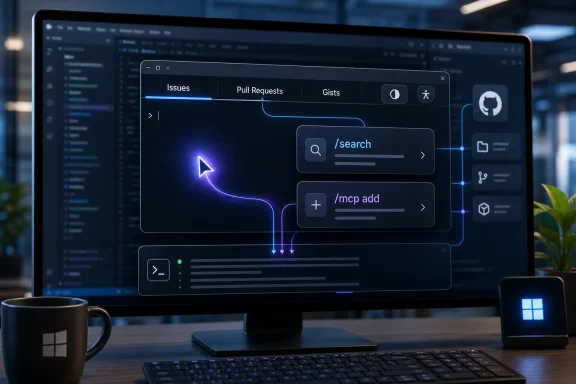 GitHub Turns the Terminal Into a Copilot Workbench
The old sales pitch for AI coding tools was modest enough to sound harmless: autocomplete, but smarter. Copilot would sit in the editor, infer what you were about to write, and occasionally save you from looking up boilerplate. That era is now mostly gone. The redesigned Copilot CLI assumes the agent is no longer a helper at the edge of the workflow, but a participant in the center of it.The new interface brings a tabbed layout into the terminal, with dedicated surfaces for Issues, Pull Requests, and Gists. That matters because those objects are not merely files; they are the coordination layer of modern software development. If a developer can browse an issue, select a pull request, drop a reference into a prompt, and ask Copilot to investigate or comment without leaving the terminal, GitHub has moved more of the project’s social and operational context into the agent’s reach.
This is the real product shift. GitHub is not trying to make the shell cute. It is trying to make the shell contextual.
That distinction will be familiar to WindowsForum readers who watched Microsoft spend the past several years repositioning the desktop around Copilot-branded surfaces. The company’s broad pattern is recognizable: take a familiar interface, add an AI layer, then gradually widen the AI layer’s permissions and context. In Windows, that has meant taskbar buttons, Recall controversies, Copilot keys, and new assistant panels. In GitHub, it means the terminal.
The terminal has always carried a kind of cultural authority among developers. It is where the abstraction drops away and work becomes explicit: commands, paths, processes, environment variables, logs, and failure messages. By giving Copilot a redesigned home there, GitHub is implicitly arguing that AI agents should not merely suggest work in the IDE; they should help orchestrate it at the command boundary where source control, build tooling, package managers, test runners, cloud CLIs, and deployment scripts all meet.
The Interface Is the Strategy
Tabbed navigation may sound like a small quality-of-life feature, but it reveals GitHub’s broader strategy. Traditional command-line tools are stateless in the way users experience them: you invoke a command, inspect output, then decide what comes next. Copilot CLI is moving toward a persistent session model, where context accumulates and the interface encourages you to keep the agent engaged across tasks.That is why the tabs matter. They give shape to work that used to be scattered across browser windows, issue pages, editor tabs, terminal panes, chat messages, and documentation. A tab for Pull Requests is not just a shortcut; it is an invitation to let Copilot reason about review context. A tab for Issues turns backlog grooming into prompt material. A tab for Gists gives snippets and shared notes a place inside the same AI-assisted flow.
This is the kind of product design that changes behavior by reducing friction. If a developer has to copy an issue URL from a browser into a terminal prompt, the agent remains an optional add-on. If the issue is already in the terminal and can be referenced by selection, the agent becomes part of the natural path. Good platform companies know that defaults beat declarations.
The redesigned CLI also adds quick commands such as
/search and /feedback, and it continues GitHub’s slash-command pattern across Copilot surfaces. Slash commands are a subtle but important compromise between natural language and deterministic tooling. They reassure power users that the agentic interface still has handles, while giving GitHub a way to standardize workflows that would otherwise dissolve into unpredictable prompts.For admins, that is both useful and concerning. Standardized commands are easier to document, train, and potentially govern. But they also deepen dependency on GitHub’s chosen abstractions. Once teams build habits around
/mcp, /plugin, /theme, /search, and whatever comes next, the CLI stops being just another executable and starts looking like a development control plane.Guided Configuration Is a Bet Against the Config File
One of the most practical changes in the new interface is guided configuration. GitHub says developers can configure Copilot CLI tools through interactive in-session commands, including/mcp add for Model Context Protocol server setup and /plugin for plugin management. In plain English, GitHub wants developers to stop hand-editing configuration files for common Copilot extensions and let the CLI walk them through the process.That will be welcome news to anyone who has watched AI tooling proliferate into a tangle of JSON files, tokens, local servers, permissions, and half-documented integrations. The agent ecosystem is moving fast, and the configuration experience often feels like it was designed by people who assume every developer wants to be a part-time systems integrator. Guided setup lowers the activation energy.
It also gives GitHub more influence over what a “normal” AI development environment looks like. MCP support is especially important here because it provides a structured way to connect tools, data sources, and services to the agent. In theory, that is a win for interoperability. In practice, the platform that makes MCP painless for developers gains a privileged position in deciding which integrations are easy, visible, and trusted.
This is where enterprise IT should pay attention. A guided
/mcp add flow can be safer than copying configuration snippets from a blog post, but it can also make it easier for developers to attach sensitive systems to an agent session. The risk is not that Copilot suddenly becomes malicious. The risk is that convenience outruns governance.Microsoft and GitHub have been here before in other forms. Visual Studio Code became powerful partly because extensions were effortless. That same ease created security and compliance questions for organizations that needed to know which extensions had access to which codebases. Copilot CLI’s plugin and MCP paths raise a similar issue, but with higher stakes because agents can interpret, generate, and potentially act across tool boundaries.
The right enterprise response is not panic. It is policy catching up with product reality. Teams that already govern IDE extensions, GitHub Apps, OAuth grants, secrets, and CI/CD permissions will need to extend that thinking into agent-connected terminal workflows.
Accessibility Is Not Cosmetic When the Terminal Becomes an App
GitHub’s accessibility improvements deserve more than a passing mention because they underscore how much the terminal interface has changed. The new Copilot CLI adds theme-aware semantic colors, responsive layouts for narrow terminal windows, labeled icons, screen reader support, and a/theme command with modes including dim, high-contrast, and colorblind options.That is not the kind of work vendors usually do for a throwaway developer preview. It is the kind of work they do when they expect an interface to become a daily home.
The command line has historically been accessible in some ways and punishing in others. Text-based interfaces can work well with assistive technologies, but terminal applications that use animations, icons, color states, pseudo-graphical layouts, and keyboard-driven navigation can easily become hostile if accessibility is added late. GitHub appears to be acknowledging that a modern terminal UI is not automatically accessible just because it renders characters.
The responsive layout work is also important for mundane reasons. Developers live inside split panes, remote shells, WSL sessions, SSH windows, small laptop screens, ultrawide monitors, and docked terminals embedded in IDEs. If Copilot CLI expects to be a persistent workspace, it has to survive all of those contexts. A terminal agent that only looks good in a full-width marketing screenshot is not a serious tool.
For Windows users, this matters because the command-line environment is no longer one thing. A developer may move between Windows Terminal, PowerShell, WSL, VS Code’s integrated terminal, SSH sessions, and cloud-hosted development environments in a single day. GitHub’s accessibility and layout changes suggest it understands that Copilot CLI must behave less like a one-off command and more like a portable application surface.
The Windows Angle Is Bigger Than Windows Terminal
It would be tempting to frame this as a Windows Terminal story, especially after Microsoft’s recent interest in AI-assisted terminal experiences. But Copilot CLI is broader than any single terminal emulator. It is a GitHub product designed to live wherever developers run commands.That is precisely why it matters to the Windows ecosystem. Microsoft does not need to bake every AI workflow directly into Windows if its developer platforms already carry those workflows across Windows, macOS, Linux, cloud workstations, and IDE terminals. GitHub gives Microsoft a cross-platform developer beachhead that Windows alone cannot provide.
For Windows developers, Copilot CLI may become most useful in hybrid environments: PowerShell for local automation, WSL for Linux-native tooling, GitHub for repositories and issues, Azure or other cloud CLIs for infrastructure, and VS Code or JetBrains for editing. The terminal is the seam between those worlds. GitHub is trying to place Copilot exactly at that seam.
That makes the redesigned CLI part of a larger Microsoft pattern: Copilot in the IDE, Copilot in GitHub, Copilot in Windows, Copilot in Microsoft 365, Copilot in security tooling, and now Copilot in the terminal as a more structured interface. The company is not merely selling individual assistants. It is building a mesh of AI surfaces that share identity, subscription entitlements, enterprise controls, and developer habits.
Whether that mesh feels empowering or smothering depends on the organization. A solo developer may see a faster route from issue to pull request. A regulated enterprise may see another endpoint where proprietary code, operational metadata, and prompt history require scrutiny. Both reactions are rational.
Usage-Based Billing Changes the Psychology of the Prompt
The timing of the release matters because GitHub’s Copilot ecosystem has also been shifting commercially. The move toward usage-based billing changes the user’s relationship with the tool. When an AI assistant feels unlimited, developers experiment freely. When usage is metered or tiered, every agentic detour starts to feel like it might show up somewhere on an invoice or quota dashboard.That is not necessarily bad. Compute-intensive AI features cost real money, and platform vendors have to align usage with revenue. But pricing changes the psychology of workflow adoption. If the terminal becomes a place where Copilot can inspect issues, reason about pull requests, run tools, and coordinate multi-step tasks, developers and managers will ask not only “does this work?” but “what did that interaction cost?”
The redesigned terminal interface can make Copilot feel more tangible and therefore more valuable. A tabbed UI with guided workflows is easier to justify than a vague chat box. It lets GitHub present Copilot as operational software rather than magic autocomplete. That matters when selling to enterprises that want measurable productivity gains, auditable controls, and predictable procurement categories.
At the same time, the more Copilot becomes an always-available terminal companion, the easier it is for costs to become ambient. Developers may not think of each investigation, review comment, or context expansion as a billable event. Organizations will need clearer reporting and policy controls if they want adoption without surprise.
This is the uncomfortable middle period of AI developer tooling. Vendors are racing to make agents feel natural enough to disappear into the workflow, while customers are trying to make the same agents visible enough to govern and budget. Copilot CLI’s redesign pushes both forces forward.
The Agent Wants More Context Than Developers Used to Share
The most valuable thing Copilot CLI can consume is not a clever prompt. It is context. Issues, pull requests, gists, local files, diagnostics, build output, repository history, plugin data, and MCP-connected services all make the agent more useful. They also expand the blast radius of mistakes.This is not a reason to reject the tool. It is a reason to treat the terminal agent as a new class of privileged software.
A traditional CLI does what the user commands. An agentic CLI interprets intent, selects tools, proposes or performs actions, and may summarize or transform information along the way. That difference complicates mental models. When a developer asks Copilot to investigate a pull request, what exactly enters the context window? Which files are read? Which comments are considered? Which tools are invoked? Which outputs are retained? Which policies apply?
GitHub and Microsoft have been steadily adding enterprise controls around Copilot, but the user experience is advancing faster than many organizations’ internal guidance. Developers are already comfortable pasting logs into chat, asking agents to explain failures, and letting assistants draft code. The redesigned CLI makes it easier to do those things in the same environment where secrets, credentials, deployment commands, and production logs may also be nearby.
The obvious answer is better guardrails. The harder answer is cultural. Teams need to teach developers that an AI-enabled terminal session is not just a smarter shell. It is a session with a reasoning service attached. That distinction should affect how people handle secrets, incident data, customer information, and unreleased code.
The Competition Is Really Over Workflow Ownership
GitHub is hardly alone in chasing the command line. AI coding agents have multiplied across editors, terminals, cloud development platforms, and standalone apps. OpenAI, Google, Anthropic-backed tools, JetBrains integrations, and a growing field of startups all understand the same thing: the coding assistant that owns the workflow owns the developer relationship.The terminal is attractive because it cuts across language, framework, editor, and operating system. IDE plugins can be powerful, but they are constrained by editor boundaries. Browser-based agents can manage repository tasks, but they often feel detached from the local environment. A terminal agent can sit next to the actual commands developers already trust.
GitHub’s advantage is that it owns the repository collaboration layer for a huge portion of the software industry. Issues and pull requests are not generic data sources; they are GitHub-native objects with social meaning. By pulling them into Copilot CLI tabs, GitHub turns its platform gravity into interface gravity.
The risk for users is lock-in by convenience rather than contract. Nobody has to force a team to use Copilot CLI if it becomes the fastest way to move from issue triage to branch creation to code change to pull request. The workflow itself becomes the moat.
That is why open standards such as MCP are so important, but standards alone do not eliminate platform power. A protocol can be open while the best implementation, best defaults, best documentation, and best enterprise packaging remain concentrated in one vendor’s product. GitHub’s redesigned CLI is a reminder that interoperability battles are often won in the setup wizard, not the standards committee.
Admins Should Treat the New CLI Like a Managed Development Surface
For sysadmins and endpoint managers, the immediate question is not whether Copilot CLI has tabs. It is whether the organization knows where the CLI is installed, which accounts are authenticated, which repositories it can access, which plugins are enabled, which MCP servers are connected, and which policies apply to agent actions.That may sound heavy-handed for a developer tool, but modern developer tools are no longer isolated productivity apps. They are identity-bearing clients with access to source code, issue metadata, CI/CD systems, package registries, cloud environments, and sometimes production-adjacent secrets. Copilot CLI sits directly in that zone.
Windows-heavy organizations should think about deployment and governance through the same lens they use for Git, package managers, terminal profiles, shell execution policies, and IDE extensions. If Copilot CLI becomes common on developer workstations, it belongs in asset inventory. If plugins and MCP servers are permitted, they belong in security review. If usage-based billing applies, it belongs in cost monitoring.
There is also a training burden. Developers need to know when Copilot CLI is appropriate and when it is not. Asking the agent to summarize a public issue is different from asking it to interpret a customer incident log. Asking it to draft a unit test is different from letting it modify deployment scripts. The interface may make those actions feel adjacent, but policy should not.
The best organizations will not ban the tool reflexively. They will define safe defaults, publish examples, create approved integration paths, and monitor the edge cases. The worst organizations will either block it without offering alternatives or allow it informally until an incident forces a rushed crackdown.
The New Terminal Interface Makes Copilot Harder to Ignore
The concrete changes in the June 23 release are easy to summarize, but their implications are larger than the changelog suggests. GitHub has made Copilot CLI more navigable, more configurable, more accessible, and more deeply tied to GitHub’s collaboration objects. That combination moves Copilot from a command you run to a place where development work can happen.- Developers can now use a redesigned terminal interface with tabs for Issues, Pull Requests, and Gists, reducing the need to bounce between browser, editor, and shell.
- The interface supports guided configuration through commands such as
/mcp addand/plugin, which lowers setup friction while increasing the need for enterprise governance. - Accessibility improvements including semantic colors, responsive layouts, screen reader support, and selectable theme modes signal that GitHub expects the CLI to be a daily-use surface.
- The release fits a broader 2026 Copilot push that includes more agentic workflows, expanded app experiences, and commercial changes around usage-based billing.
- IT teams should evaluate Copilot CLI as a managed, identity-bearing development client rather than a harmless command-line novelty.
- The biggest strategic shift is not the tab bar itself, but GitHub’s effort to make the terminal a context-rich home for AI-assisted software work.
References
- Primary source: blockchain.news
Published: 2026-06-24T04:03:44.891176
GitHub Copilot CLI Launches Redesigned Terminal Interface
GitHub Copilot CLI's new terminal interface is now live, offering tabbed navigation, improved accessibility, and guided configurations for developers.blockchain.news - Independent coverage: The GitHub Blog
Published: Tue, 23 Jun 2026 16:35:45 GMT
Copilot CLI: New terminal interface is generally available - GitHub Changelog
The redesigned terminal interface for GitHub Copilot CLI that we previewed at Microsoft Build 2026 is now generally available. You get a tabbed layout for working with GitHub directly from…github.blog
- Official source: github.com
GitHub Copilot CLI · GitHub
GitHub is where people build software. More than 150 million people use GitHub to discover, fork, and contribute to over 420 million projects. github.com
- Official source: docs.github.com
- Related coverage: linkloot.io
GitHub Copilot app opens wider as Copilot CLI adds scheduled prompts – Blog | LinkLoot
GitHub widened the Copilot app technical preview to existing paid Copilot customers and updated Copilot CLI with experimental scheduled prompts, voice input,...linkloot.io - Related coverage: windowscentral.com
I tried Microsoft’s new AI-powered Terminal, and it is a surprisingly different experience | Windows Central
Microsoft's new Intelligent Terminal brings AI agents to the command line without changing the Windows Terminal experience developers already know.www.windowscentral.com

