

Microsoft used Build 2026 in San Francisco on June 2 to unveil a broad Windows developer push built around local AI models, agent containment, one-command setup, WSL improvements, AI-assisted terminals, and new hardware for running agentic workloads on Windows PCs and workstations. The announcement is not just another Copilot garnish on top of Windows 11. It is Microsoft’s clearest attempt yet to make Windows the default operating system for building, testing, containing, and eventually trusting AI agents.
That matters because the center of gravity in developer tooling is moving from editors and SDKs toward runtimes with judgment. If agents are going to read files, call tools, change code, and interact with enterprise systems, the operating system becomes part of the security model again. Microsoft’s bet is that Windows can become the place where that trust boundary is defined.
For years, Microsoft’s developer pitch for Windows has been defensive: Windows could be made tolerable for people who preferred Linux workflows, cloud shells, containers, and cross-platform toolchains. WSL was the peace treaty. Windows Terminal was the apology. WinGet was the missing package manager that should have existed earlier.
The Build 2026 message is more ambitious. Microsoft is no longer merely saying Windows can accommodate modern development habits. It is saying Windows can host the next abstraction layer above them: AI agents that understand developer intent, invoke local tools, generate app scaffolding, and operate inside boundaries enforced by the OS.
That is a meaningful change in posture. The old Windows developer story was about removing friction between Windows and everything else. The new one is about making Windows the control plane for local and hybrid AI work.
The practical announcements support that thesis. Windows Developer Configurations use WinGet to provision a machine with common tools such as Git, PowerShell 7, WSL, Visual Studio Code, and GitHub CLI. Coreutils for Windows brings familiar Unix-style command-line utilities to Windows without requiring a Linux environment. WSL containers promise a native path for Linux containers on Windows. None of these ideas is individually revolutionary, but together they reveal Microsoft’s real goal: make Windows less like a special case.
That is what developers have been asking for since the first wave of modern web and cloud work shifted daily muscle memory toward Linux and macOS. The novelty in 2026 is that Microsoft can now wrap that old argument in the language of agents. A machine that can be configured predictably is not just nicer for humans; it is safer and more legible for software that will act on a human’s behalf.
Windows Developer Configurations attack that problem with the least surprising mechanism available: WinGet. That is a virtue. Developers do not need a mystical new provisioning model for ordinary setup; they need repeatability, inspectability, and a path that works inside existing automation.
Microsoft’s decision to bundle tools and developer-oriented settings into a one-command path also acknowledges a quiet truth about Windows: the operating system has historically required too much post-install negotiation. Disable this distraction. Install that runtime. Fix execution policy. Add Linux tooling. Configure terminal behavior. Reconcile Store apps, MSI installers, PowerShell modules, and package managers. Every step is small; the stack of steps is not.
If Microsoft gets this right, the gain will not be measured only in saved minutes. It will show up in fewer snowflake developer machines, cleaner onboarding, more reproducible internal documentation, and less ritualized “works on my machine” archaeology.
There is a security angle as well. Standardized setup gives IT teams a better baseline to audit. It also gives agentic tooling a clearer picture of the environment it is operating inside. A developer workstation full of unknown manual modifications is inconvenient for a person. For an autonomous agent with tool access, it is a risk surface.
This does not make WSL less important. It makes the Windows command line less alien. There is a difference between providing a Linux subsystem and making Windows itself more fluent in the vocabulary developers already use.
WSL containers push the same argument further. Developers increasingly expect container workflows to be boring, local, and scriptable. If Microsoft can make Linux containers run directly through a native Windows CLI and API without the usual layers of cognitive overhead, it removes another reason for developers to avoid Windows when doing cloud-native work.
The risk is that Microsoft overpromises seamlessness. Container behavior, filesystem performance, networking quirks, path translation, and permissions have historically been where cross-platform dreams go to get humbled. The value of WSL has always depended on Microsoft doing the unglamorous compatibility work release after release. WSL containers will be judged by that same standard, not by keynote phrasing.
It is also a boundary shift. The terminal is not a document editor. It is where credentials, production tools, destructive commands, package installs, deployment scripts, and local secrets often coexist. An assistant that can reason about context in that environment must be designed with restraint, not just cleverness.
Microsoft’s framing is about reducing context switching. That is fair. A terminal that can explain why a command failed, suggest a fix, or chain routine steps without sending the developer into a browser tab can preserve flow. But “flow” is not the highest value in systems administration. Sometimes friction is the safety mechanism.
The serious version of this feature needs visible intent, reversible actions where possible, command previews, policy controls, logging, and administrator knobs. It should be easy for an individual developer to accept help and equally easy for an enterprise to say: not in this repository, not on this machine, not with these credentials, not without approval.
That is the broader theme of Build 2026. Microsoft is trying to sell convenience and containment in the same breath. The Intelligent Terminal will be one of the places where users decide whether that balance feels credible.
This is a real problem. AI coding assistants can be impressive when generating common web patterns or well-documented library usage. They are less reliable when the target is a platform with historical baggage, evolving APIs, and multiple generations of documentation floating around the internet. Windows desktop development is exactly that kind of terrain.
By packaging Windows-specific development knowledge into agent-consumable skills, Microsoft is trying to solve two problems at once. It wants to make native Windows app development easier for newcomers, and it wants to keep AI assistants aligned with the platform Microsoft wants developers to use now rather than the one Stack Overflow remembers from a decade ago.
That is smart platform stewardship. It is also an admission that documentation alone is no longer the primary interface between developers and platforms. If agents become a routine part of app creation, then platform owners will compete not just on SDK quality but on how well their ecosystem can be represented to machines.
That is the right layer for the problem. If an AI agent is going to act autonomously, application-level promises are not enough. The operating system needs to know what the agent is allowed to read, write, call, and communicate with. Otherwise, every agent becomes a bundle of trust-me code with a charming natural-language interface.
MXC is Microsoft’s attempt to give agents a sandbox that fits their peculiar risk profile. Traditional containers isolate workloads, but agentic software behaves differently from a typical service. It may need to browse files, invoke tools, interact with applications, call network resources, and change plans based on intermediate results. The containment model therefore has to be flexible without becoming vague.
That is a hard engineering and policy problem. Too much isolation and the agent becomes useless. Too little isolation and it becomes a well-spoken macro virus with cloud credentials.
Microsoft’s pitch is that MXC can offer policy-driven isolation tuned to workload risk and intent. The phrase sounds corporate, but the need is real. An agent summarizing local documents should not have the same privileges as an agent modifying source code. An agent triaging tickets should not inherit broad access to finance records. An agent testing a build should not quietly obtain the ability to exfiltrate secrets.
That is exactly what enterprise IT will demand. The first generation of consumer AI tools spread through organizations like browser tabs with expense receipts. The next generation cannot work that way if agents are going to perform actions, not just answer questions.
For administrators, the promise is a managed agent estate: identity-bound, policy-scoped, auditable, and subject to compliance controls. For developers, the danger is that the environment becomes another maze of approvals and tenant settings. Microsoft’s challenge is to make governance feel like guardrails rather than concrete.
There is also a competitive angle. Microsoft has spent years integrating security, identity, endpoint management, and productivity into one enterprise stack. Agent governance gives that stack a new justification. If the agent era turns every endpoint into a semi-autonomous worker, Microsoft can argue that Windows, Entra, Defender, Intune, and Purview are no longer adjacent products. They are the nervous system.
That is compelling if it works. It is suffocating if it becomes another licensing labyrinth.
This is the part of the announcement that will resonate with anyone who has watched AI features collide with latency, privacy, and cost. Cloud inference is powerful, but it is not free, instant, or always appropriate. Local models can make mundane AI features feel more like operating-system capabilities and less like remote service calls.
On-device AI also changes the privacy conversation. If a transcript, draft, code snippet, screenshot, or accessibility task can be processed locally, fewer sensitive artifacts need to leave the machine. That does not automatically make the system private; telemetry, model updates, app permissions, and policy settings still matter. But local execution gives Microsoft a stronger answer to one of the central objections to AI everywhere.
The catch is hardware fragmentation. Windows runs on an enormous range of machines, from aging business laptops to Copilot+ PCs with NPUs to high-end developer workstations. Microsoft says Windows AI APIs can run across CPUs, GPUs, and NPUs, which is the right abstraction. But developers will care about performance cliffs, availability, fallbacks, and whether “runs locally” means pleasant, tolerable, or technically possible.
Local AI succeeds only when users stop noticing the architecture. If a feature is fast, private, and reliable, no one will care which processor did the work. If it drains battery, spins fans, or behaves differently across devices, the abstraction will leak.
That is the platform owner’s dream. Developers get capabilities. Microsoft controls the runtime. Users receive features that can be governed, updated, and accelerated consistently. Enterprises get a more manageable story than dozens of applications each shipping their own opaque AI stack.
The danger is lock-in by convenience. If Windows AI APIs become the easiest way to access local language, speech, vision, and planning capabilities, developers building cross-platform apps will face a familiar trade-off. Use the native feature and get better Windows integration, or build against a more portable abstraction and accept less polish.
That tension is not new. It is the story of every operating-system API. What is new is the scope of the runtime. AI APIs are not merely drawing buttons or sending notifications. They may interpret user intent, transform content, and decide which tools to call. Platform dependence at that layer is much stickier.
That makes sense. Many AI workflows are too heavy for a thin notebook but too iterative for remote-only development. Local machines with serious GPU resources can shorten the loop for testing models, building agents, experimenting with tool calls, and validating privacy-sensitive workflows before deployment.
The DGX Station for Windows is the most dramatic version of that idea, with Microsoft and Nvidia pitching workstation-class local capability for very large models. Most Windows developers will never own one. But halo hardware matters because it tells the ecosystem where Microsoft wants the top end to go.
The more interesting question is whether the middle of the market follows. If AI PCs remain a branding exercise with uneven software support, developers will keep renting GPUs and treating local AI as a demo. If Microsoft’s APIs, Nvidia’s stack, and Windows hardware partners produce a predictable developer target, local AI could become a normal part of Windows software design.
That is a big “if.” Windows hardware diversity is both a strength and a tax. Microsoft can announce a platform; OEMs, silicon vendors, driver teams, and developers have to make it feel coherent.
That is why OS-level identity controls, runtime containment, stricter driver standards, stronger app control, and post-quantum cryptography work all belong in the same conversation as AI agents. They are not separate tracks. They are prerequisites.
The driver-signing and app-control pieces may sound distant from agent workflows, but they matter to the trustworthiness of the endpoint. If Windows is going to host autonomous tools, Microsoft has to keep tightening the lower layers. A compromised kernel driver or unmanaged executable does not become less dangerous because the keynote is about AI.
Smart App Control and App Control for Business also fit the agent moment. If agents can invoke tools, scripts, and applications, administrators need stronger guarantees about what is allowed to run in the first place. Execution policy becomes part of agent policy.
Microsoft’s biggest credibility problem is its own history. Windows is powerful, ubiquitous, and heavily managed in enterprises, but it is also the platform where decades of compatibility expectations slow security reform. The agent era rewards clean boundaries. Windows has many boundaries, but not all of them are clean.
For administrators, the same announcements read differently. Every new agent, model, API, and local runtime is another object to inventory, restrict, update, monitor, and explain to auditors. The promise of productivity arrives attached to a governance burden.
That is not a reason to reject the platform. It is a reason to treat these features as infrastructure rather than novelty. Organizations should decide which developer machines are eligible for local AI features, which repositories can be touched by agentic tools, where logs are retained, what data classifications block model access, and how human approval is enforced.
The most mature shops will not ask whether AI agents are allowed. They will ask where they are allowed, under whose identity, with which tools, inside which container, against which data, and with what evidence trail. Microsoft is clearly building toward that world.
The less mature shops will discover it by incident.
That integration is the opportunity. It is also the concern. A Windows agent platform deeply wired into Microsoft’s cloud and management stack could be genuinely safer than a patchwork of browser extensions, local scripts, and unmanaged desktop assistants. It could also become another mechanism that nudges organizations deeper into Microsoft’s commercial gravity.
Developers should welcome the technical direction while staying clear-eyed about the incentives. Microsoft wants Windows to be the trusted platform for AI agents because trust is valuable. Once a platform becomes the place where agents are authorized, monitored, and contained, switching costs rise.
The best outcome is an agent runtime that uses open interfaces, supports third-party tools, exposes understandable policies, and gives administrators real control without forcing every workflow through a Microsoft-only tunnel. The worst outcome is a glossy agent layer that obscures permissions, hides complexity, and treats governance as an upsell.
Microsoft’s Build 2026 announcements suggest the company understands the shape of the problem. They do not yet prove that it has solved it.
The direction is unmistakable: Windows is being rebuilt around a future in which developers describe more, agents do more, and the operating system is expected to decide what those agents may safely touch. That is a larger role for Windows than Microsoft has claimed in years, and a riskier one. The next phase will not be won by demos of autonomous helpers; it will be won by boring proof that the helpers can be contained, audited, accelerated, and trusted on the messy PCs people actually use.
That matters because the center of gravity in developer tooling is moving from editors and SDKs toward runtimes with judgment. If agents are going to read files, call tools, change code, and interact with enterprise systems, the operating system becomes part of the security model again. Microsoft’s bet is that Windows can become the place where that trust boundary is defined.
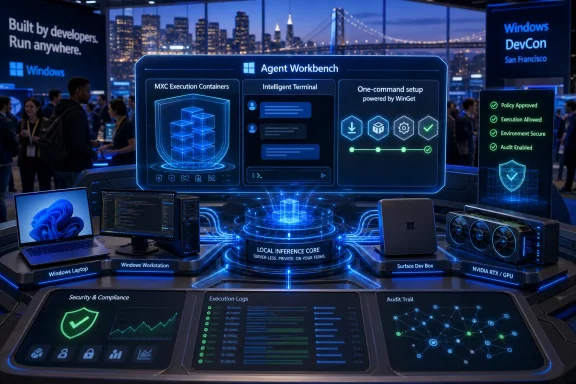 Microsoft Is Recasting Windows as the Agent Workbench
For years, Microsoft’s developer pitch for Windows has been defensive: Windows could be made tolerable for people who preferred Linux workflows, cloud shells, containers, and cross-platform toolchains. WSL was the peace treaty. Windows Terminal was the apology. WinGet was the missing package manager that should have existed earlier.The Build 2026 message is more ambitious. Microsoft is no longer merely saying Windows can accommodate modern development habits. It is saying Windows can host the next abstraction layer above them: AI agents that understand developer intent, invoke local tools, generate app scaffolding, and operate inside boundaries enforced by the OS.
That is a meaningful change in posture. The old Windows developer story was about removing friction between Windows and everything else. The new one is about making Windows the control plane for local and hybrid AI work.
The practical announcements support that thesis. Windows Developer Configurations use WinGet to provision a machine with common tools such as Git, PowerShell 7, WSL, Visual Studio Code, and GitHub CLI. Coreutils for Windows brings familiar Unix-style command-line utilities to Windows without requiring a Linux environment. WSL containers promise a native path for Linux containers on Windows. None of these ideas is individually revolutionary, but together they reveal Microsoft’s real goal: make Windows less like a special case.
That is what developers have been asking for since the first wave of modern web and cloud work shifted daily muscle memory toward Linux and macOS. The novelty in 2026 is that Microsoft can now wrap that old argument in the language of agents. A machine that can be configured predictably is not just nicer for humans; it is safer and more legible for software that will act on a human’s behalf.
The One-Command Setup Is Boring in Exactly the Right Way
The least glamorous part of the announcement may be the most useful. Developer setup is a tax everyone pays and almost no one budgets honestly. A new laptop, a clean VM, a temporary test box, or a contractor’s machine can consume hours before useful work starts.Windows Developer Configurations attack that problem with the least surprising mechanism available: WinGet. That is a virtue. Developers do not need a mystical new provisioning model for ordinary setup; they need repeatability, inspectability, and a path that works inside existing automation.
Microsoft’s decision to bundle tools and developer-oriented settings into a one-command path also acknowledges a quiet truth about Windows: the operating system has historically required too much post-install negotiation. Disable this distraction. Install that runtime. Fix execution policy. Add Linux tooling. Configure terminal behavior. Reconcile Store apps, MSI installers, PowerShell modules, and package managers. Every step is small; the stack of steps is not.
If Microsoft gets this right, the gain will not be measured only in saved minutes. It will show up in fewer snowflake developer machines, cleaner onboarding, more reproducible internal documentation, and less ritualized “works on my machine” archaeology.
There is a security angle as well. Standardized setup gives IT teams a better baseline to audit. It also gives agentic tooling a clearer picture of the environment it is operating inside. A developer workstation full of unknown manual modifications is inconvenient for a person. For an autonomous agent with tool access, it is a risk surface.
Linux Compatibility Has Become a Windows Feature, Not a Concession
Coreutils for Windows is a small announcement with a long shadow. Native availability of Linux-style command-line utilities means developers can carry more habits across systems without treating WSL as the only bridge. The Rust-based uutils implementation also fits a broader industry pattern: reimplement the Unix toolbox in memory-safe, cross-platform components and let developers stop caring which side of the OS boundary they are on.This does not make WSL less important. It makes the Windows command line less alien. There is a difference between providing a Linux subsystem and making Windows itself more fluent in the vocabulary developers already use.
WSL containers push the same argument further. Developers increasingly expect container workflows to be boring, local, and scriptable. If Microsoft can make Linux containers run directly through a native Windows CLI and API without the usual layers of cognitive overhead, it removes another reason for developers to avoid Windows when doing cloud-native work.
The risk is that Microsoft overpromises seamlessness. Container behavior, filesystem performance, networking quirks, path translation, and permissions have historically been where cross-platform dreams go to get humbled. The value of WSL has always depended on Microsoft doing the unglamorous compatibility work release after release. WSL containers will be judged by that same standard, not by keynote phrasing.
The Intelligent Terminal Is Where Convenience Starts to Touch Control
The new Intelligent Terminal is exactly the kind of feature that will split the room. Developers already paste errors into chatbots, ask assistants to explain build failures, and use AI coding tools to generate shell commands. Putting that behavior inside Windows Terminal is a natural progression.It is also a boundary shift. The terminal is not a document editor. It is where credentials, production tools, destructive commands, package installs, deployment scripts, and local secrets often coexist. An assistant that can reason about context in that environment must be designed with restraint, not just cleverness.
Microsoft’s framing is about reducing context switching. That is fair. A terminal that can explain why a command failed, suggest a fix, or chain routine steps without sending the developer into a browser tab can preserve flow. But “flow” is not the highest value in systems administration. Sometimes friction is the safety mechanism.
The serious version of this feature needs visible intent, reversible actions where possible, command previews, policy controls, logging, and administrator knobs. It should be easy for an individual developer to accept help and equally easy for an enterprise to say: not in this repository, not on this machine, not with these credentials, not without approval.
That is the broader theme of Build 2026. Microsoft is trying to sell convenience and containment in the same breath. The Intelligent Terminal will be one of the places where users decide whether that balance feels credible.
Windows Development Skills Are Microsoft’s Bid to Teach Agents the Native Stack
Windows Development Skills, now generally available, are less flashy than a chatbot in the terminal but may be more strategically important. The idea is to give AI agents structured knowledge for building native Windows apps using WinUI 3 and WinApp CLI. In plain English, Microsoft wants agents to stop producing generic code that merely resembles Windows software and start generating code that understands Microsoft’s current application stack.This is a real problem. AI coding assistants can be impressive when generating common web patterns or well-documented library usage. They are less reliable when the target is a platform with historical baggage, evolving APIs, and multiple generations of documentation floating around the internet. Windows desktop development is exactly that kind of terrain.
By packaging Windows-specific development knowledge into agent-consumable skills, Microsoft is trying to solve two problems at once. It wants to make native Windows app development easier for newcomers, and it wants to keep AI assistants aligned with the platform Microsoft wants developers to use now rather than the one Stack Overflow remembers from a decade ago.
That is smart platform stewardship. It is also an admission that documentation alone is no longer the primary interface between developers and platforms. If agents become a routine part of app creation, then platform owners will compete not just on SDK quality but on how well their ecosystem can be represented to machines.
Microsoft Execution Containers Are the Real Announcement
The most important Build 2026 Windows feature is not a model, a terminal trick, or a developer image. It is Microsoft Execution Containers, or MXC. The concept is simple enough: define what an agent can access, then have Windows enforce those boundaries at runtime.That is the right layer for the problem. If an AI agent is going to act autonomously, application-level promises are not enough. The operating system needs to know what the agent is allowed to read, write, call, and communicate with. Otherwise, every agent becomes a bundle of trust-me code with a charming natural-language interface.
MXC is Microsoft’s attempt to give agents a sandbox that fits their peculiar risk profile. Traditional containers isolate workloads, but agentic software behaves differently from a typical service. It may need to browse files, invoke tools, interact with applications, call network resources, and change plans based on intermediate results. The containment model therefore has to be flexible without becoming vague.
That is a hard engineering and policy problem. Too much isolation and the agent becomes useless. Too little isolation and it becomes a well-spoken macro virus with cloud credentials.
Microsoft’s pitch is that MXC can offer policy-driven isolation tuned to workload risk and intent. The phrase sounds corporate, but the need is real. An agent summarizing local documents should not have the same privileges as an agent modifying source code. An agent triaging tickets should not inherit broad access to finance records. An agent testing a build should not quietly obtain the ability to exfiltrate secrets.
Agent 365 Turns Local Autonomy Into an Enterprise Governance Problem
The related Agent 365 integration is where Microsoft’s enterprise instincts show. By connecting MXC-protected agents to Defender, Entra, Intune, and Purview, Microsoft is trying to make local agents visible to the same governance machinery that already manages users, devices, apps, identities, and data loss controls.That is exactly what enterprise IT will demand. The first generation of consumer AI tools spread through organizations like browser tabs with expense receipts. The next generation cannot work that way if agents are going to perform actions, not just answer questions.
For administrators, the promise is a managed agent estate: identity-bound, policy-scoped, auditable, and subject to compliance controls. For developers, the danger is that the environment becomes another maze of approvals and tenant settings. Microsoft’s challenge is to make governance feel like guardrails rather than concrete.
There is also a competitive angle. Microsoft has spent years integrating security, identity, endpoint management, and productivity into one enterprise stack. Agent governance gives that stack a new justification. If the agent era turns every endpoint into a semi-autonomous worker, Microsoft can argue that Windows, Entra, Defender, Intune, and Purview are no longer adjacent products. They are the nervous system.
That is compelling if it works. It is suffocating if it becomes another licensing labyrinth.
Local AI Is Back Because Cloud AI Is Too Expensive, Too Slow, and Too Leaky for Everything
The new Aion 1.0 Instruct and Aion 1.0 Plan models are Microsoft’s clearest statement that not all AI should live in the cloud. Aion 1.0 Instruct is aimed at everyday text intelligence such as summarization, rewriting, intent detection, and accessibility tasks. Aion 1.0 Plan is aimed at more advanced reasoning and tool use for agentic workflows.This is the part of the announcement that will resonate with anyone who has watched AI features collide with latency, privacy, and cost. Cloud inference is powerful, but it is not free, instant, or always appropriate. Local models can make mundane AI features feel more like operating-system capabilities and less like remote service calls.
On-device AI also changes the privacy conversation. If a transcript, draft, code snippet, screenshot, or accessibility task can be processed locally, fewer sensitive artifacts need to leave the machine. That does not automatically make the system private; telemetry, model updates, app permissions, and policy settings still matter. But local execution gives Microsoft a stronger answer to one of the central objections to AI everywhere.
The catch is hardware fragmentation. Windows runs on an enormous range of machines, from aging business laptops to Copilot+ PCs with NPUs to high-end developer workstations. Microsoft says Windows AI APIs can run across CPUs, GPUs, and NPUs, which is the right abstraction. But developers will care about performance cliffs, availability, fallbacks, and whether “runs locally” means pleasant, tolerable, or technically possible.
Local AI succeeds only when users stop noticing the architecture. If a feature is fast, private, and reliable, no one will care which processor did the work. If it drains battery, spins fans, or behaves differently across devices, the abstraction will leak.
Edge, Windows APIs, and the Return of the Platform Runtime
Microsoft’s on-device AI push is not limited to Windows app developers. Edge is also gaining models and APIs for web experiences, which points toward a broader strategy: make Microsoft’s client platforms expose AI primitives that app developers can call instead of every app bundling its own model logic.That is the platform owner’s dream. Developers get capabilities. Microsoft controls the runtime. Users receive features that can be governed, updated, and accelerated consistently. Enterprises get a more manageable story than dozens of applications each shipping their own opaque AI stack.
The danger is lock-in by convenience. If Windows AI APIs become the easiest way to access local language, speech, vision, and planning capabilities, developers building cross-platform apps will face a familiar trade-off. Use the native feature and get better Windows integration, or build against a more portable abstraction and accept less polish.
That tension is not new. It is the story of every operating-system API. What is new is the scope of the runtime. AI APIs are not merely drawing buttons or sending notifications. They may interpret user intent, transform content, and decide which tools to call. Platform dependence at that layer is much stickier.
The Hardware Story Is Really About Bringing the Lab Back to the Desk
The Surface RTX Spark Dev Box, RTX Spark PCs, and DGX Station for Windows point to a practical problem behind the AI boom: developers need somewhere to run this stuff without turning every experiment into a cloud bill. Microsoft and Nvidia are positioning Windows hardware as a local AI development tier between ordinary laptops and full-scale datacenter infrastructure.That makes sense. Many AI workflows are too heavy for a thin notebook but too iterative for remote-only development. Local machines with serious GPU resources can shorten the loop for testing models, building agents, experimenting with tool calls, and validating privacy-sensitive workflows before deployment.
The DGX Station for Windows is the most dramatic version of that idea, with Microsoft and Nvidia pitching workstation-class local capability for very large models. Most Windows developers will never own one. But halo hardware matters because it tells the ecosystem where Microsoft wants the top end to go.
The more interesting question is whether the middle of the market follows. If AI PCs remain a branding exercise with uneven software support, developers will keep renting GPUs and treating local AI as a demo. If Microsoft’s APIs, Nvidia’s stack, and Windows hardware partners produce a predictable developer target, local AI could become a normal part of Windows software design.
That is a big “if.” Windows hardware diversity is both a strength and a tax. Microsoft can announce a platform; OEMs, silicon vendors, driver teams, and developers have to make it feel coherent.
Security Is the Necessary Counterweight to the Agent Hype
Microsoft’s security framing at Build 2026 is unusually important because agentic computing magnifies old problems. A buggy app can mishandle data. A compromised app can steal data. An over-permissioned agent can misunderstand a request, follow a malicious instruction, call the wrong tool, leak sensitive content, and leave behind a plausible explanation.That is why OS-level identity controls, runtime containment, stricter driver standards, stronger app control, and post-quantum cryptography work all belong in the same conversation as AI agents. They are not separate tracks. They are prerequisites.
The driver-signing and app-control pieces may sound distant from agent workflows, but they matter to the trustworthiness of the endpoint. If Windows is going to host autonomous tools, Microsoft has to keep tightening the lower layers. A compromised kernel driver or unmanaged executable does not become less dangerous because the keynote is about AI.
Smart App Control and App Control for Business also fit the agent moment. If agents can invoke tools, scripts, and applications, administrators need stronger guarantees about what is allowed to run in the first place. Execution policy becomes part of agent policy.
Microsoft’s biggest credibility problem is its own history. Windows is powerful, ubiquitous, and heavily managed in enterprises, but it is also the platform where decades of compatibility expectations slow security reform. The agent era rewards clean boundaries. Windows has many boundaries, but not all of them are clean.
Developers Get Power, Administrators Get Another Surface to Govern
For developers, the Build 2026 announcements are mostly welcome. Faster setup, better terminal assistance, local models, native Linux-adjacent tooling, and Windows-aware agents all reduce friction. The platform is plainly moving toward the way developers already work: mixed environments, local/cloud hybrids, AI copilots, containers, and automation.For administrators, the same announcements read differently. Every new agent, model, API, and local runtime is another object to inventory, restrict, update, monitor, and explain to auditors. The promise of productivity arrives attached to a governance burden.
That is not a reason to reject the platform. It is a reason to treat these features as infrastructure rather than novelty. Organizations should decide which developer machines are eligible for local AI features, which repositories can be touched by agentic tools, where logs are retained, what data classifications block model access, and how human approval is enforced.
The most mature shops will not ask whether AI agents are allowed. They will ask where they are allowed, under whose identity, with which tools, inside which container, against which data, and with what evidence trail. Microsoft is clearly building toward that world.
The less mature shops will discover it by incident.
The Windows Opportunity Is Real, but the Trust Gap Remains
There is a reason Microsoft is pushing this hard now. The company owns the developer toolchain through Visual Studio Code and GitHub, the enterprise identity layer through Entra, the endpoint management channel through Intune, the productivity surface through Microsoft 365, the security stack through Defender and Purview, and the operating system through Windows. Few companies can connect agent development, deployment, governance, and endpoint execution this tightly.That integration is the opportunity. It is also the concern. A Windows agent platform deeply wired into Microsoft’s cloud and management stack could be genuinely safer than a patchwork of browser extensions, local scripts, and unmanaged desktop assistants. It could also become another mechanism that nudges organizations deeper into Microsoft’s commercial gravity.
Developers should welcome the technical direction while staying clear-eyed about the incentives. Microsoft wants Windows to be the trusted platform for AI agents because trust is valuable. Once a platform becomes the place where agents are authorized, monitored, and contained, switching costs rise.
The best outcome is an agent runtime that uses open interfaces, supports third-party tools, exposes understandable policies, and gives administrators real control without forcing every workflow through a Microsoft-only tunnel. The worst outcome is a glossy agent layer that obscures permissions, hides complexity, and treats governance as an upsell.
Microsoft’s Build 2026 announcements suggest the company understands the shape of the problem. They do not yet prove that it has solved it.
The Build 2026 Windows Bet Comes Down to Six Concrete Tests
The headline is that Windows is becoming an AI agent platform, but the success or failure of that strategy will be decided in ordinary developer and administrator workflows. The useful way to read these announcements is not as a single launch, but as a checklist of promises Microsoft now has to keep.- Windows Developer Configurations need to make clean machine setup repeatable enough that teams can trust them in onboarding, labs, and enterprise images.
- Coreutils for Windows and WSL containers need to reduce cross-platform friction without creating a new layer of path, networking, and permissions surprises.
- The Intelligent Terminal needs to help developers without normalizing unsafe command execution or hiding what an AI assistant is about to do.
- Microsoft Execution Containers need to provide practical agent isolation that administrators can understand, enforce, and audit.
- Aion models and Windows AI APIs need to make local AI fast and predictable across real Windows hardware, not just showcase devices.
- Agent 365 needs to turn governance into usable policy rather than another complicated licensing and configuration maze.
The direction is unmistakable: Windows is being rebuilt around a future in which developers describe more, agents do more, and the operating system is expected to decide what those agents may safely touch. That is a larger role for Windows than Microsoft has claimed in years, and a riskier one. The next phase will not be won by demos of autonomous helpers; it will be won by boring proof that the helpers can be contained, audited, accelerated, and trusted on the messy PCs people actually use.
References
- Primary source: TechRepublic
Published: Wed, 03 Jun 2026 14:25:52 GMT
Microsoft Unveils AI-Powered Windows Features for Developers
Microsoft’s Build 2026 Windows updates add developer setup tools, local AI models, Linux workflows, and agent security controls.www.techrepublic.com
- Related coverage: techradar.com
From code-first to intent-first: Microsoft Build 2026 could be the end of programming as we know it | TechRadar
Redefining what it means to be a developer with agentic AIwww.techradar.com - Official source: blogs.windows.com
Build 2026: Furthering Windows as the trusted platform for development
Build is one of our favorite moments each year - a chance to connect with the global developer community and share what we’ve been building. Over the past year, we have connected with many developers pushing the boundaries of what’s possible onblogs.windows.com - Official source: blogs.microsoft.com
Microsoft Build 2026: Be yourself at work - The Official Microsoft Blog
Platforms shift when developers build. We explore, choose tools, dream, create. This platform shift comes with more information than ever, ready at your fingertips. This shift, it’s about building fast AND THEN: it’s about building, operating, optimizing and observing. Securing your...blogs.microsoft.com - Related coverage: windowslatest.com
Microsoft pledges to make Windows 11 the OS for building AI, after years of Copilot backlash
Microsoft is turning Windows 11 into agent-native at Build 2026, adding local AI models and OS-level security to fix its developer platform. www.windowslatest.com
- Related coverage: ebisuda.net
Microsoft Build 2026:WindowsがAIエージェント実行基盤に進化、Azure Agent Meshでオンプレ・クラウド横断の分散エージェント管理を実現 | ebisuda.net
Build 2026でMicrosoftがWindows Agent RuntimeとAzure Agent Meshを発表。WindowsをAIエージェントのOSレベル実行プラットフォームとして正式に位置づけた。www.ebisuda.net
- Official source: learn.microsoft.com
AI-assisted Windows development - Windows apps | Microsoft Learn
Build Windows apps faster using AI agents, GitHub Copilot, Claude Code, and the Windows AI development toolkit — free tools that work in VS Code.learn.microsoft.com - Official source: news.microsoft.com
Microsoft Build 2026: Be yourself at work - Source Asia
Build 2026: Tools, models, and AI agents to build securely with intelligence you own.news.microsoft.com - Related coverage: smhn.info
Microsoft、Windows向けオンデバイスAI「Aion 1.0」発表。クラウドに頼らず端末内でAI処理 - すまほん!!
AIがクラウドを離れ手元のPCへ。Microsoftが開催したBuild 2026で、Windows向けのオンデバイスAIモデル「Aion 1.0 Instruct」と「Aion 1.0 Plan」がプレビューとして発表されました。これまでクラウドに丸投げしていたAI処理の一部を... smhn.info
- Official source: cdn-dynmedia-1.microsoft.com
- Official source: microsoft.com
YES AND: A Generative AI Multi-Agent Framework for Enhancing Diversity of Thought in Individual Ideation for Problem-Solving Through Confidence-Based Agent Turn-Taking
- Human-centred computing -> Interactive systems and tools.www.microsoft.com
- Official source: cdn.techcommunity.microsoft.com
