

Microsoft used Build 2026 in San Francisco on June 2 to frame Windows 11 not as a finished desktop operating system awaiting replacement, but as the foundation for persistent AI agents, Microsoft-built reasoning models, new agent-oriented devices, and security boundaries meant to make autonomous software acceptable inside real workplaces. The absence of a Windows 12 reveal was not a pause in ambition. It was the point. Microsoft is trying to make the next version of Windows arrive inside Windows 11, one agent runtime, Copilot surface, and enterprise control plane at a time.
That matters because Windows has usually evolved through visible rituals: a new Start menu, a new taskbar, a new version number, a new round of compatibility anxiety. Build 2026 suggested a different kind of transition, one less interested in the operating system as a place users visit and more interested in Windows as the substrate where AI systems act. If Microsoft gets its way, the next Windows upgrade will not be remembered for the shape of its icons. It will be remembered for the moment the PC stopped waiting for commands.
For years, Windows watchers have treated “Windows 12” as both rumor and release valve. Every controversial change in Windows 11, from hardware requirements to Copilot placement, has been accompanied by speculation that Microsoft’s real reset would come later. Build 2026 made that theory harder to sustain. Microsoft did not need a new brand name to show where the platform is going; it used Windows 11 as the stage for the shift.
The strategic choice is obvious enough. Windows 11 already gives Microsoft a massive installed base, a security baseline it has spent years defending, and a marketing bridge to Copilot+ PCs. A Windows 12 launch would invite every enterprise to ask the old questions about migration timing, hardware compatibility, application testing, imaging, and support windows. By contrast, an AI-first Windows 11 lets Microsoft move faster while making the change feel incremental.
That does not mean the change is small. The company’s Build message was that Windows is becoming a host environment for agents that understand work context, reason through multi-step tasks, and operate across apps. In other words, Microsoft is trying to shift Windows from a user-driven shell into an agent-aware platform. The old desktop metaphor is still there, but Microsoft’s center of gravity has moved above it.
There is a kind of clever conservatism in that approach. Consumers can keep using Windows 11 as the place where Steam, Chrome, Office, Discord, and File Explorer live. Businesses can keep treating it as the endpoint operating system they know how to manage. Underneath that familiar surface, Microsoft is attempting to build the next abstraction layer: not another desktop, but a managed environment where AI systems can act on behalf of users without turning corporate data into a compliance bonfire.
That is why Build 2026 felt less like a Windows keynote and more like a redefinition of what Windows is for. The future of Windows 11 is not only the Start menu, the Settings app, or the cadence of annual feature updates. It is the question of whether Microsoft can make autonomous agents feel native, secure, useful, and governable enough that users stop thinking of them as separate tools.
That is a meaningful break from the first generation of Copilot branding. The original Copilot experience was often reactive. Ask it to draft an email, summarize a document, explain a spreadsheet, or generate a presentation, and it might help. But the user remained the project manager, the system integrator, and the traffic controller. Scout points toward a model where the assistant is supposed to notice the calendar conflict, prepare the meeting context, track the unanswered request, and coordinate the low-value work that normally eats the day in five-minute increments.
The pitch is powerful because modern office work is less a single task than a swarm of partially connected obligations. A user might have a Teams thread about a delayed project, an Outlook message from a vendor, a OneDrive document with comments, a SharePoint file no one has opened, and a meeting invite that silently conflicts with a deadline. Microsoft’s bet is that an agent grounded in those signals can do more than answer questions. It can become the layer that notices the relationship among the signals.
This is also where the risks begin. A helpful assistant that monitors work patterns must see enough to be useful. In enterprise settings, that means access to communications, files, schedules, identities, and organizational relationships. Microsoft’s language around Work IQ is designed to make that sound like a structured intelligence layer rather than indiscriminate surveillance, but IT departments will still have to ask familiar questions in a more urgent form: What can the agent see, what can it infer, what can it do, and who audits the trail when it gets something wrong?
Scout’s first audience is clearly not the casual Windows user idly browsing the web from a couch. It is the overloaded knowledge worker, the manager with too many meetings, the developer juggling pull requests and planning docs, and the administrator asked to keep more systems running with fewer people. The consumer upside may arrive later, but the early value proposition is enterprise productivity. Microsoft is building the future of Windows through the place it still has enormous leverage: the workplace.
That matters because agents are only as useful as the context they can safely use. A generic AI model can draft plausible text. A workplace agent needs to know which quarterly planning document is authoritative, which meeting changed the deadline, which colleague owns the blocker, and which file the user is allowed to access. Microsoft’s pitch is that Work IQ can provide that context without requiring every company to rebuild its knowledge graph from scratch.
This is the strongest version of Microsoft’s AI strategy. The company is not trying to win only by having the largest model or the flashiest chatbot. It is trying to make its productivity cloud the memory system for enterprise agents. Windows then becomes the local execution environment, Microsoft 365 becomes the work context, and Copilot becomes the interface through which users and agents negotiate tasks.
The weaker version of the strategy is familiar to anyone who has watched Microsoft bundle its way into a market. If every useful AI workflow assumes Microsoft 365, Copilot licensing, GitHub identity, or Azure-hosted services, customers may eventually feel less assisted than enclosed. The same integration that makes Scout powerful could make it hard for organizations to evaluate alternatives. Microsoft’s historic platform playbook has always mixed convenience with gravity.
That tension will define the next phase of Windows 11. Users want the magic of an assistant that already knows the relevant context. Administrators want that context bounded by policy. Regulators and security teams want evidence that the agent is not leaking sensitive data through inference, overbroad permissions, or careless automation. Microsoft’s job is to make all three groups believe the same system can serve them.
This does not mean Microsoft is walking away from OpenAI. The relationship remains central to the company’s recent AI identity and product acceleration. But a platform owner as large as Microsoft does not want its most important software interfaces permanently dependent on a single outside model supplier. Build’s MAI announcements were a signal to developers, investors, and enterprise customers that Microsoft intends to own more of the stack.
MAI-Thinking-1 is especially important because “reasoning” is the label the industry now uses for models expected to plan, break tasks into steps, inspect intermediate results, and handle more complex chains of work. That is precisely the territory agentic Windows is moving into. If Scout and future Windows agents are going to coordinate schedules, prepare meetings, triage messages, and act across applications, they need models tuned for planning rather than only text generation.
The same logic applies to MAI-Code-1-Flash and GitHub Copilot. Coding assistants are among the clearest examples of agents moving from suggestion to action. A model that can understand a repository, propose a fix, run tests, and prepare a change is no longer just autocomplete with marketing polish. It becomes a junior automation layer inside the software development process.
Microsoft’s in-house models also give it more room to optimize for Windows and Microsoft 365 scenarios. A general frontier model may be brilliant, but expensive and slow for routine tasks. A smaller or more specialized Microsoft model can be tuned for the workflows Microsoft controls: Outlook triage, Teams context, Visual Studio Code, GitHub issues, Copilot actions, and local Windows constraints. The future may not be one omniscient model. It may be a routed mesh of models, each chosen because it is good enough, fast enough, cheap enough, and governable enough for the job.
The native desktop angle matters. A Copilot experience that lives as a real app on Windows points toward agents as operating-system citizens rather than browser tabs. Developers may begin a task in VS Code, hand off part of the work to Copilot, inspect changes in GitHub, and continue with local tools. Windows becomes the environment in which agentic development is coordinated, not merely the place where a coding editor happens to run.
This is not science fiction; it is a continuation of where developer tools have been heading. Continuous integration already runs tests automatically. Static analysis already flags issues before code ships. Package managers already resolve dependencies. The difference is that an agent can begin to connect these steps, reason about the intent of a change, and propose or execute a plan. That is why Copilot’s evolution is a useful preview of Windows’ broader AI direction.
It also explains why Microsoft is being careful to talk about developer control. No serious engineering organization wants an unfettered agent committing production code without review. The useful version of agentic development is supervised autonomy: the agent does the tedious work, the human remains accountable for intent, architecture, and approval. That same pattern will have to carry into Windows and Microsoft 365 more broadly.
For WindowsForum readers, the developer story is not separate from the desktop story. Many features that begin with developers eventually shape the platform expectations of everyone else. If developers learn to trust agents that can inspect context, perform bounded actions, and produce auditable work, Microsoft will have a template for selling similar behavior to finance teams, legal departments, help desks, and operations groups.
This is the kind of thing that can sound like a concept video until you put it in the longer history of Windows. Microsoft has repeatedly tried to stretch Windows beyond the desktop: Tablet PC, Windows Mobile, Windows Phone, Surface, HoloLens, Windows on Arm, dual-screen experiments, and cloud PCs. Some efforts worked, some failed, and some were simply too early or too compromised. Solara differs because it is not trying to make every device run a conventional Windows desktop. It is trying to make agent interaction the primary interface.
That distinction is important. A badge that records a voice note, cleans up audio, and routes an action to colleagues does not need the full Windows shell. A desk device that summons Microsoft 365 Copilot by voice does not need to expose a taskbar. These devices need identity, security, manageability, low-latency interaction, cloud context, and agent orchestration. Those are Microsoft platform problems, even if the result does not look like a Windows PC.
Solara is also an answer to a competitive threat. If AI assistants become ambient and multimodal, then the operating system battle moves into microphones, cameras, wearables, meeting rooms, and edge devices. Apple has the phone and wearable ecosystem. Google has Android and the web. Amazon has ambient devices but weaker workplace software. Microsoft’s strongest path is to make enterprise agents work across the hardware a company can deploy, manage, secure, and justify.
There will be skepticism, and there should be. The tech industry is littered with AI gadgets that confuse novelty with utility. A badge with a camera can be useful in field work, healthcare, logistics, or frontline operations, but it can also trigger privacy and labor concerns. A desk assistant can be convenient, but it can also become another expensive endpoint to patch, inventory, and explain to employees. Solara’s success will depend less on form-factor imagination than on whether Microsoft can make these devices boringly manageable.
The danger is not only malicious AI. The more realistic danger is an agent with too much permission, too little context, or a poorly defined boundary. It might surface confidential information to the wrong place. It might take an action based on a misunderstood instruction. It might combine data in ways policy never anticipated. It might become the most efficient insider threat an organization never intended to create.
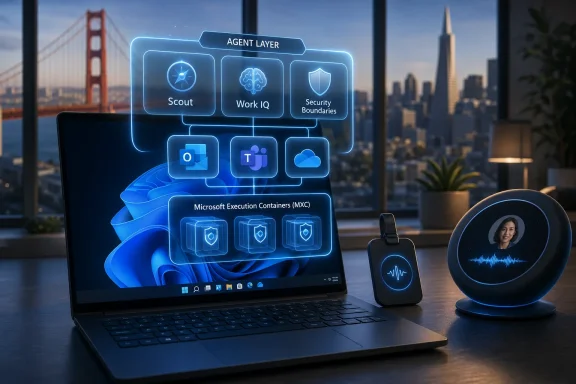
MXC is Microsoft’s attempt to make agent execution enforceable by the operating system. Developers define security parameters, and Windows enforces containment boundaries around where and how agents run. That framing is important because agent security cannot rely entirely on model behavior. Asking an AI system to “please respect policy” is not a control. Enforcing boundaries below the agent is.
This is where Windows still matters deeply. In a world of browser apps and cloud services, it is fashionable to treat the local OS as less important. But endpoint control, identity integration, sandboxing, device posture, local data access, and hardware-backed security remain central to enterprise trust. If agents are going to act on Windows, Windows has to become an agent security boundary as much as a user interface.
Microsoft’s challenge is credibility. The company has spent years improving Windows security while also weathering criticism over update reliability, identity attacks, cloud breaches, and confusing administrative surfaces. IT pros will not accept agentic security as a slideware promise. They will want logs, policy controls, rollback, least-privilege defaults, tenant isolation, data-loss prevention integration, and a way to say no without breaking productivity.
Still, consumers should not ignore the shift. Enterprise features have a way of filtering into mainstream Windows, especially when Microsoft wants to normalize a behavior. Copilot began as a productivity and developer story before becoming a Windows surface. Passkeys, virtualization-based security, Windows Hello, and cloud identity all moved between business and consumer contexts over time. Agentic AI will likely do the same.
The likely consumer version will be less about complex corporate workflows and more about personal coordination. A future Windows agent may summarize local files, manage reminders, coordinate travel planning, help configure settings, troubleshoot device problems, or bridge apps that currently do not talk to one another. The everyday user may not care about Work IQ, but they might care if Windows can finally understand “find that PDF I downloaded last month and send it to the printer in the office.”
The risk is that Microsoft overbuilds for the enterprise and underdelivers for the person sitting at a home PC. Windows has a giant audience of gamers, students, hobbyists, retirees, creators, and small-business owners who do not live entirely inside Microsoft 365. If the future of Windows 11 feels like it assumes every user is a Teams-bound project manager with a corporate tenant, Microsoft will leave a lot of goodwill on the table.
There is also the trust issue. Windows users have been wary of AI features that appear suddenly, collect unclear signals, or feel difficult to remove. Recall remains the cautionary example in the background of any conversation about local AI memory and context. Microsoft can say that Scout and Work IQ are enterprise-governed systems, but the broader lesson is the same: users need clear controls before they will accept software that watches, remembers, and acts.
Microsoft has a strong hand because it owns so much of the work graph. Outlook knows who emailed whom. Teams knows who met and what was discussed. OneDrive and SharePoint know where the documents live. Entra knows identity. Purview knows compliance policy. GitHub knows code and collaboration. Windows knows the endpoint. Azure knows the infrastructure. An agent built across those layers can do things a standalone chatbot cannot.
That is also why competitors will attack the strategy from every angle. Google will argue that the browser, Workspace, Android, and Gemini are the more natural ambient AI stack. Apple will argue for privacy, on-device intelligence, and tightly integrated personal hardware. OpenAI and Anthropic will push model quality and cross-platform independence. Smaller startups will argue that Microsoft’s stack is too heavy, too bundled, and too slow for the best AI-native workflows.
For customers, the best outcome would be interoperability. Agents should be able to use context without trapping it. Windows should enforce boundaries without requiring every workflow to stay inside Microsoft’s commercial universe. Developers should be able to build agentic apps that respect enterprise policy without surrendering every choice to one vendor. That is the optimistic version of Microsoft’s platform play.
The less optimistic version is a return to old habits under new branding. If “agentic Windows” becomes another way to privilege Microsoft services, bury defaults, and make competing tools feel second-class, regulators and customers will notice. Microsoft has earned its platform power, but it has also inherited platform scrutiny. The company cannot pretend those histories do not travel with Copilot.
That is a bigger leap than it sounds. Delegation requires trust, and trust requires more than impressive demos. A user must believe the agent understands the goal, has the right context, knows its boundaries, can explain itself, and will stop when asked. An administrator must believe the agent can be governed. A security team must believe the agent cannot casually become a data-exfiltration mechanism with a friendly name.
Windows 11 is becoming the test bed for that bargain. Microsoft is not asking users to abandon the desktop tomorrow. It is adding an agent layer around the desktop, above the apps, beside the cloud, and increasingly inside the development workflow. The operating system remains visible, but the action is moving into the invisible coordination layer.
That may be why there was no Windows 12. A new version number would have told the old story: install this operating system and see what changed. Microsoft is telling a different story: keep the operating system, and watch what it becomes. It is a subtler move, but potentially a more disruptive one.
That matters because Windows has usually evolved through visible rituals: a new Start menu, a new taskbar, a new version number, a new round of compatibility anxiety. Build 2026 suggested a different kind of transition, one less interested in the operating system as a place users visit and more interested in Windows as the substrate where AI systems act. If Microsoft gets its way, the next Windows upgrade will not be remembered for the shape of its icons. It will be remembered for the moment the PC stopped waiting for commands.
 Microsoft Is Not Waiting for Windows 12 to Rewrite Windows
For years, Windows watchers have treated “Windows 12” as both rumor and release valve. Every controversial change in Windows 11, from hardware requirements to Copilot placement, has been accompanied by speculation that Microsoft’s real reset would come later. Build 2026 made that theory harder to sustain. Microsoft did not need a new brand name to show where the platform is going; it used Windows 11 as the stage for the shift.The strategic choice is obvious enough. Windows 11 already gives Microsoft a massive installed base, a security baseline it has spent years defending, and a marketing bridge to Copilot+ PCs. A Windows 12 launch would invite every enterprise to ask the old questions about migration timing, hardware compatibility, application testing, imaging, and support windows. By contrast, an AI-first Windows 11 lets Microsoft move faster while making the change feel incremental.
That does not mean the change is small. The company’s Build message was that Windows is becoming a host environment for agents that understand work context, reason through multi-step tasks, and operate across apps. In other words, Microsoft is trying to shift Windows from a user-driven shell into an agent-aware platform. The old desktop metaphor is still there, but Microsoft’s center of gravity has moved above it.
There is a kind of clever conservatism in that approach. Consumers can keep using Windows 11 as the place where Steam, Chrome, Office, Discord, and File Explorer live. Businesses can keep treating it as the endpoint operating system they know how to manage. Underneath that familiar surface, Microsoft is attempting to build the next abstraction layer: not another desktop, but a managed environment where AI systems can act on behalf of users without turning corporate data into a compliance bonfire.
That is why Build 2026 felt less like a Windows keynote and more like a redefinition of what Windows is for. The future of Windows 11 is not only the Start menu, the Settings app, or the cadence of annual feature updates. It is the question of whether Microsoft can make autonomous agents feel native, secure, useful, and governable enough that users stop thinking of them as separate tools.
Scout Turns Copilot From a Chat Box Into a Coworker
The most important Windows-adjacent announcement was Microsoft Scout, an “Autopilot” agent designed to work across Microsoft 365, including Outlook, Teams, OneDrive, and the broader fabric of workplace context Microsoft calls Work IQ. Scout is not pitched as another prompt window waiting for a user to ask it to summarize a meeting. It is pitched as something more persistent: an agent that watches the shape of work and helps manage it before the user explicitly asks.That is a meaningful break from the first generation of Copilot branding. The original Copilot experience was often reactive. Ask it to draft an email, summarize a document, explain a spreadsheet, or generate a presentation, and it might help. But the user remained the project manager, the system integrator, and the traffic controller. Scout points toward a model where the assistant is supposed to notice the calendar conflict, prepare the meeting context, track the unanswered request, and coordinate the low-value work that normally eats the day in five-minute increments.
The pitch is powerful because modern office work is less a single task than a swarm of partially connected obligations. A user might have a Teams thread about a delayed project, an Outlook message from a vendor, a OneDrive document with comments, a SharePoint file no one has opened, and a meeting invite that silently conflicts with a deadline. Microsoft’s bet is that an agent grounded in those signals can do more than answer questions. It can become the layer that notices the relationship among the signals.
This is also where the risks begin. A helpful assistant that monitors work patterns must see enough to be useful. In enterprise settings, that means access to communications, files, schedules, identities, and organizational relationships. Microsoft’s language around Work IQ is designed to make that sound like a structured intelligence layer rather than indiscriminate surveillance, but IT departments will still have to ask familiar questions in a more urgent form: What can the agent see, what can it infer, what can it do, and who audits the trail when it gets something wrong?
Scout’s first audience is clearly not the casual Windows user idly browsing the web from a couch. It is the overloaded knowledge worker, the manager with too many meetings, the developer juggling pull requests and planning docs, and the administrator asked to keep more systems running with fewer people. The consumer upside may arrive later, but the early value proposition is enterprise productivity. Microsoft is building the future of Windows through the place it still has enormous leverage: the workplace.
Work IQ Is the Real Product Hiding Behind the Assistant
Scout is the friendly name. Work IQ is the strategic machinery. Microsoft has been building toward this for years through Graph, Microsoft 365, Teams, SharePoint, OneDrive, Entra, Purview, and Copilot. The company’s advantage is not merely that it can put a chatbot in Windows. It is that it already sits inside the communications, documents, calendars, identities, and permission structures of millions of organizations.That matters because agents are only as useful as the context they can safely use. A generic AI model can draft plausible text. A workplace agent needs to know which quarterly planning document is authoritative, which meeting changed the deadline, which colleague owns the blocker, and which file the user is allowed to access. Microsoft’s pitch is that Work IQ can provide that context without requiring every company to rebuild its knowledge graph from scratch.
This is the strongest version of Microsoft’s AI strategy. The company is not trying to win only by having the largest model or the flashiest chatbot. It is trying to make its productivity cloud the memory system for enterprise agents. Windows then becomes the local execution environment, Microsoft 365 becomes the work context, and Copilot becomes the interface through which users and agents negotiate tasks.
The weaker version of the strategy is familiar to anyone who has watched Microsoft bundle its way into a market. If every useful AI workflow assumes Microsoft 365, Copilot licensing, GitHub identity, or Azure-hosted services, customers may eventually feel less assisted than enclosed. The same integration that makes Scout powerful could make it hard for organizations to evaluate alternatives. Microsoft’s historic platform playbook has always mixed convenience with gravity.
That tension will define the next phase of Windows 11. Users want the magic of an assistant that already knows the relevant context. Administrators want that context bounded by policy. Regulators and security teams want evidence that the agent is not leaking sensitive data through inference, overbroad permissions, or careless automation. Microsoft’s job is to make all three groups believe the same system can serve them.
Microsoft’s In-House Models Signal a More Independent AI Stack
Build 2026 also mattered because Microsoft pushed its own MAI model family into the spotlight. MAI-Thinking-1, the company’s first in-house reasoning model, gives Microsoft a public answer to a question that has shadowed its AI surge: how much of the Copilot future depends on OpenAI? The answer is no longer simply “a lot.” It is becoming “less than before, where Microsoft thinks it can control cost, latency, specialization, or product fit.”This does not mean Microsoft is walking away from OpenAI. The relationship remains central to the company’s recent AI identity and product acceleration. But a platform owner as large as Microsoft does not want its most important software interfaces permanently dependent on a single outside model supplier. Build’s MAI announcements were a signal to developers, investors, and enterprise customers that Microsoft intends to own more of the stack.
MAI-Thinking-1 is especially important because “reasoning” is the label the industry now uses for models expected to plan, break tasks into steps, inspect intermediate results, and handle more complex chains of work. That is precisely the territory agentic Windows is moving into. If Scout and future Windows agents are going to coordinate schedules, prepare meetings, triage messages, and act across applications, they need models tuned for planning rather than only text generation.
The same logic applies to MAI-Code-1-Flash and GitHub Copilot. Coding assistants are among the clearest examples of agents moving from suggestion to action. A model that can understand a repository, propose a fix, run tests, and prepare a change is no longer just autocomplete with marketing polish. It becomes a junior automation layer inside the software development process.
Microsoft’s in-house models also give it more room to optimize for Windows and Microsoft 365 scenarios. A general frontier model may be brilliant, but expensive and slow for routine tasks. A smaller or more specialized Microsoft model can be tuned for the workflows Microsoft controls: Outlook triage, Teams context, Visual Studio Code, GitHub issues, Copilot actions, and local Windows constraints. The future may not be one omniscient model. It may be a routed mesh of models, each chosen because it is good enough, fast enough, cheap enough, and governable enough for the job.
The GitHub Copilot App Shows Developers the Future First
Developers often get the future before everyone else, and the GitHub Copilot app preview fits that pattern. Microsoft is using software development as the proving ground for agentic workflows because coding contains the right mix of structure, complexity, and measurable outcomes. There is a repository. There are tests. There are issues. There are diffs. There are review trails. If an agent does something useful or dangerous, the evidence is easier to inspect than in a messy human inbox.The native desktop angle matters. A Copilot experience that lives as a real app on Windows points toward agents as operating-system citizens rather than browser tabs. Developers may begin a task in VS Code, hand off part of the work to Copilot, inspect changes in GitHub, and continue with local tools. Windows becomes the environment in which agentic development is coordinated, not merely the place where a coding editor happens to run.
This is not science fiction; it is a continuation of where developer tools have been heading. Continuous integration already runs tests automatically. Static analysis already flags issues before code ships. Package managers already resolve dependencies. The difference is that an agent can begin to connect these steps, reason about the intent of a change, and propose or execute a plan. That is why Copilot’s evolution is a useful preview of Windows’ broader AI direction.
It also explains why Microsoft is being careful to talk about developer control. No serious engineering organization wants an unfettered agent committing production code without review. The useful version of agentic development is supervised autonomy: the agent does the tedious work, the human remains accountable for intent, architecture, and approval. That same pattern will have to carry into Windows and Microsoft 365 more broadly.
For WindowsForum readers, the developer story is not separate from the desktop story. Many features that begin with developers eventually shape the platform expectations of everyone else. If developers learn to trust agents that can inspect context, perform bounded actions, and produce auditable work, Microsoft will have a template for selling similar behavior to finance teams, legal departments, help desks, and operations groups.
Project Solara Is Microsoft Admitting the PC Is No Longer One Shape
Project Solara may be the most provocative Build announcement because it points beyond the traditional PC without declaring the PC dead. Microsoft described Solara as a chip-to-cloud platform for agent-first devices, including compact form factors that look less like laptops and more like ambient workplace companions. The examples discussed around Build included a stationary clock-like device and a wearable badge-style device designed for voice, video, and on-the-go interaction.This is the kind of thing that can sound like a concept video until you put it in the longer history of Windows. Microsoft has repeatedly tried to stretch Windows beyond the desktop: Tablet PC, Windows Mobile, Windows Phone, Surface, HoloLens, Windows on Arm, dual-screen experiments, and cloud PCs. Some efforts worked, some failed, and some were simply too early or too compromised. Solara differs because it is not trying to make every device run a conventional Windows desktop. It is trying to make agent interaction the primary interface.
That distinction is important. A badge that records a voice note, cleans up audio, and routes an action to colleagues does not need the full Windows shell. A desk device that summons Microsoft 365 Copilot by voice does not need to expose a taskbar. These devices need identity, security, manageability, low-latency interaction, cloud context, and agent orchestration. Those are Microsoft platform problems, even if the result does not look like a Windows PC.
Solara is also an answer to a competitive threat. If AI assistants become ambient and multimodal, then the operating system battle moves into microphones, cameras, wearables, meeting rooms, and edge devices. Apple has the phone and wearable ecosystem. Google has Android and the web. Amazon has ambient devices but weaker workplace software. Microsoft’s strongest path is to make enterprise agents work across the hardware a company can deploy, manage, secure, and justify.
There will be skepticism, and there should be. The tech industry is littered with AI gadgets that confuse novelty with utility. A badge with a camera can be useful in field work, healthcare, logistics, or frontline operations, but it can also trigger privacy and labor concerns. A desk assistant can be convenient, but it can also become another expensive endpoint to patch, inventory, and explain to employees. Solara’s success will depend less on form-factor imagination than on whether Microsoft can make these devices boringly manageable.
Agent Security Is the Part Microsoft Cannot Afford to Hand-Wave
Microsoft Execution Containers, or MXC, may not draw the same attention as Scout or Solara, but it is one of the most consequential pieces of the story. Autonomous agents create a security problem that traditional desktop software only partially prepared us for. A user launches an app and expects it to do what the user commands. An agent may observe, infer, plan, and act across services. That makes containment not a feature but a prerequisite.The danger is not only malicious AI. The more realistic danger is an agent with too much permission, too little context, or a poorly defined boundary. It might surface confidential information to the wrong place. It might take an action based on a misunderstood instruction. It might combine data in ways policy never anticipated. It might become the most efficient insider threat an organization never intended to create.
MXC is Microsoft’s attempt to make agent execution enforceable by the operating system. Developers define security parameters, and Windows enforces containment boundaries around where and how agents run. That framing is important because agent security cannot rely entirely on model behavior. Asking an AI system to “please respect policy” is not a control. Enforcing boundaries below the agent is.
This is where Windows still matters deeply. In a world of browser apps and cloud services, it is fashionable to treat the local OS as less important. But endpoint control, identity integration, sandboxing, device posture, local data access, and hardware-backed security remain central to enterprise trust. If agents are going to act on Windows, Windows has to become an agent security boundary as much as a user interface.
Microsoft’s challenge is credibility. The company has spent years improving Windows security while also weathering criticism over update reliability, identity attacks, cloud breaches, and confusing administrative surfaces. IT pros will not accept agentic security as a slideware promise. They will want logs, policy controls, rollback, least-privilege defaults, tenant isolation, data-loss prevention integration, and a way to say no without breaking productivity.
The Consumer Windows Story Is Quieter, but Not Absent
One reason Build 2026 may have felt underwhelming to ordinary Windows users is that the most significant announcements were aimed at developers and enterprises. There was no sweeping gamer-focused Windows reveal, no consumer shell redesign, and no obvious “here is the feature your parents will notice tomorrow” moment. That is normal for Build, but it also reflects Microsoft’s priorities. The company sees the fastest path to AI monetization through work.Still, consumers should not ignore the shift. Enterprise features have a way of filtering into mainstream Windows, especially when Microsoft wants to normalize a behavior. Copilot began as a productivity and developer story before becoming a Windows surface. Passkeys, virtualization-based security, Windows Hello, and cloud identity all moved between business and consumer contexts over time. Agentic AI will likely do the same.
The likely consumer version will be less about complex corporate workflows and more about personal coordination. A future Windows agent may summarize local files, manage reminders, coordinate travel planning, help configure settings, troubleshoot device problems, or bridge apps that currently do not talk to one another. The everyday user may not care about Work IQ, but they might care if Windows can finally understand “find that PDF I downloaded last month and send it to the printer in the office.”
The risk is that Microsoft overbuilds for the enterprise and underdelivers for the person sitting at a home PC. Windows has a giant audience of gamers, students, hobbyists, retirees, creators, and small-business owners who do not live entirely inside Microsoft 365. If the future of Windows 11 feels like it assumes every user is a Teams-bound project manager with a corporate tenant, Microsoft will leave a lot of goodwill on the table.
There is also the trust issue. Windows users have been wary of AI features that appear suddenly, collect unclear signals, or feel difficult to remove. Recall remains the cautionary example in the background of any conversation about local AI memory and context. Microsoft can say that Scout and Work IQ are enterprise-governed systems, but the broader lesson is the same: users need clear controls before they will accept software that watches, remembers, and acts.
The Real Platform War Is Over Permissioned Context
The AI race is often described as a model race, but Build 2026 showed why that is only partly true. Models matter, and Microsoft’s MAI push proves the company knows it. But the deeper competition is over permissioned context: the data, relationships, workflows, and policy boundaries that make an AI agent useful without making it reckless.Microsoft has a strong hand because it owns so much of the work graph. Outlook knows who emailed whom. Teams knows who met and what was discussed. OneDrive and SharePoint know where the documents live. Entra knows identity. Purview knows compliance policy. GitHub knows code and collaboration. Windows knows the endpoint. Azure knows the infrastructure. An agent built across those layers can do things a standalone chatbot cannot.
That is also why competitors will attack the strategy from every angle. Google will argue that the browser, Workspace, Android, and Gemini are the more natural ambient AI stack. Apple will argue for privacy, on-device intelligence, and tightly integrated personal hardware. OpenAI and Anthropic will push model quality and cross-platform independence. Smaller startups will argue that Microsoft’s stack is too heavy, too bundled, and too slow for the best AI-native workflows.
For customers, the best outcome would be interoperability. Agents should be able to use context without trapping it. Windows should enforce boundaries without requiring every workflow to stay inside Microsoft’s commercial universe. Developers should be able to build agentic apps that respect enterprise policy without surrendering every choice to one vendor. That is the optimistic version of Microsoft’s platform play.
The less optimistic version is a return to old habits under new branding. If “agentic Windows” becomes another way to privilege Microsoft services, bury defaults, and make competing tools feel second-class, regulators and customers will notice. Microsoft has earned its platform power, but it has also inherited platform scrutiny. The company cannot pretend those histories do not travel with Copilot.
The Next Windows Upgrade Will Be Measured in Autonomy
The most concrete lesson from Build 2026 is that Microsoft sees autonomy as the next user-interface breakthrough. The command line made users precise. The graphical desktop made computing visual. Search made information retrievable. Chat made software conversational. Agents are supposed to make software delegable.That is a bigger leap than it sounds. Delegation requires trust, and trust requires more than impressive demos. A user must believe the agent understands the goal, has the right context, knows its boundaries, can explain itself, and will stop when asked. An administrator must believe the agent can be governed. A security team must believe the agent cannot casually become a data-exfiltration mechanism with a friendly name.
Windows 11 is becoming the test bed for that bargain. Microsoft is not asking users to abandon the desktop tomorrow. It is adding an agent layer around the desktop, above the apps, beside the cloud, and increasingly inside the development workflow. The operating system remains visible, but the action is moving into the invisible coordination layer.
That may be why there was no Windows 12. A new version number would have told the old story: install this operating system and see what changed. Microsoft is telling a different story: keep the operating system, and watch what it becomes. It is a subtler move, but potentially a more disruptive one.
The Build 2026 Windows Message in Plain English
For Windows users and IT pros, the practical reading of Build 2026 is not that tomorrow’s PC will suddenly become unrecognizable. It is that Microsoft is laying the rails for Windows 11 to become an agent-hosting platform, with Microsoft 365 context, Microsoft-built models, new device categories, and OS-enforced security boundaries all moving in the same direction.- Microsoft is treating Windows 11 as the active foundation for its next platform shift rather than clearing the stage for a Windows 12 reveal.
- Scout shows Microsoft moving Copilot from a prompt-and-response assistant toward a persistent workplace agent that can coordinate tasks across Microsoft 365.
- MAI-Thinking-1 and MAI-Code-1-Flash show Microsoft reducing its dependence on outside models where specialized, lower-latency, or more controllable AI can serve its own products.
- Project Solara suggests Microsoft believes some future Windows-adjacent experiences will live on agent-first devices that do not resemble conventional PCs.
- Microsoft Execution Containers are a sign that agent security is becoming an operating-system responsibility, not merely an application feature.
- The biggest open question is whether Microsoft can make these agents transparent and governable enough for enterprises while still making them useful and humane for ordinary Windows users.
References
- Primary source: Tom's Guide
Published: Wed, 03 Jun 2026 15:46:18 GMT
The future of Windows 11 — what is Microsoft building next? | Tom's Guide
The latest Microsoft Build keynote pointed to a future for Windows 11 where the focus is on deeply baked in agentic systems that could transform the way you work.www.tomsguide.com - Related coverage: axios.com
Microsoft debuts Scout agent, homegrown reasoning model
Microsoft is seeking to show it is a serious player in AI.www.axios.com
- Official source: blogs.microsoft.com
Microsoft Build 2026: Be yourself at work - The Official Microsoft Blog
Platforms shift when developers build. We explore, choose tools, dream, create. This platform shift comes with more information than ever, ready at your fingertips. This shift, it’s about building fast AND THEN: it’s about building, operating, optimizing and observing. Securing your...blogs.microsoft.com - Official source: microsoft.ai
Introducing MAI-Code-1-Flash | Microsoft AI
 microsoft.ai
- Related coverage: techtimes.com
Microsoft Build 2026: MAI-Thinking-1 Is First In-House Reasoning Model, Trained Without OpenAI Data
Microsoft Build 2026 launched MAI-Thinking-1, the company’s first in-house reasoning model, trained without OpenAI data. MAI-Code-1-Flash rolls out to all GitHub Copilot plans today. Independentwww.techtimes.com - Related coverage: techcrunch.com
Microsoft launches Scout, an OpenClaw-inspired personal assistant | TechCrunch
Launched at Build, Microsoft Scout is a new AI assistant meant to bring the power and flexibility of OpenClaw into the Microsoft 365 system.techcrunch.com
- Official source: commandline.microsoft.com
Composing a new platform for agent-first devices - Command Line
New interaction technology enables new types of computers. Learn more about Microsoft’s Project Solara.commandline.microsoft.com - Related coverage: thetechportal.com
Microsoft introduces Surface RTX Spark Dev Box, GitHub Copilot app, Project Solara, and new AI models at Build 2026 - The Tech Portal
Microsoft unveiled a series of major AI-focused announcements at its Build 2026 developer conference, including the new Surface thetechportal.com
- Official source: news.microsoft.com
Microsoft Build 2026: Sé tú mismo en el trabajo - Source EMEA
 news.microsoft.com
- Related coverage: implicator.ai
Microsoft Starts MAI-Code-1-Flash Rollout
Microsoft is rolling out MAI-Code-1-Flash to a fraction of GitHub Copilot users in Visual Studio Code, while its model card lists a 137B sparse MoE design, a 256,000-token context window and delayed CLI and API availability. The launch raises a sharper question for developers: whether Microsoft... www.implicator.ai
- Related coverage: rcpmag.com
Microsoft Puts Scout at the Center of Its Agentic AI Strategy at Build 2026 -- Redmond Channel Partner
Microsoft Scout announced as a key piece of the company's vision for software driven by autonomous agents at Build 2026.rcpmag.com - Official source: microsoft.com
</rdf:Alt> </dc:title> <dc:description> <rdf:Alt> <rdf:li xml:lang="x-default"/> </rdf:Alt> </dc:description> <dc:creator> <rdf:Seq> <rdf:li>Lukas V
</rdf:Alt> </dc:description> <dc:creator> <rdf:Seq> <rdf:li>Lukas Velushwww.microsoft.com
- Official source: info.microsoft.com
- Official source: cdn.techcommunity.microsoft.com
