
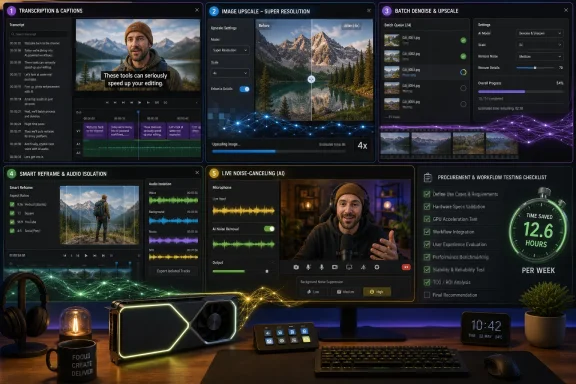
Creative Bloq’s sponsored NVIDIA feature argues that GeForce RTX hardware materially improves five creative AI workflows—Premiere Pro transcription, Photoshop Super Resolution, Topaz Photo AI, DaVinci Resolve AI tools, and NVIDIA Broadcast—by moving demanding inference work onto dedicated GPU silicon. The pitch is not subtle, but it lands because the software examples are real. The more interesting story for Windows users is that “AI PC” is becoming less a sticker on a laptop box and more a test of where your everyday creative tools actually run.
For years, the easy RTX sales pitch was frames per second. Ray tracing, DLSS, high-refresh monitors, and the giant cultural gravity of PC gaming gave NVIDIA a clean consumer message: buy the bigger GPU, get better games. The AI era has complicated that message, but it has also broadened it.
Creative Bloq’s paid-partnership article is a useful snapshot of that shift. It is not selling a single benchmark chart or a single flagship card. It is selling a workflow: import video, transcribe dialogue, clean up audio, upscale images, remove noise, reframe footage, and present yourself on camera without turning a spare bedroom into a studio.
That matters because most PC buyers do not think in TOPS, Tensor Cores, CUDA paths, or inference runtimes. They think in time saved. If captions appear faster, if an image enhancement finishes while the idea is still alive, if a noisy recording becomes usable without a trip to a specialist, the silicon has won an argument the spec sheet never could.
The danger, of course, is that “AI acceleration” can become another fog machine in PC marketing. Microsoft, Intel, AMD, Qualcomm, and NVIDIA all want to define the AI PC in ways that favor their own hardware. The user’s question is simpler: when I open the tools I already use on Windows, does the expensive part of my machine make the job meaningfully better?
A few years ago, accelerated creative software meant obvious GPU jobs: rendering, timeline playback, effects previews, 3D viewports, and export encoding. Today, the useful work is increasingly split across traditional graphics, video encode blocks, CPU threads, neural processors, and GPU-based AI inference. The winning machine is not the one that can merely run AI; it is the one that can run AI without interrupting the work.
That is why the five tools in the article are well chosen, even if the presentation is promotional. Adobe Premiere Pro, Photoshop, Topaz Photo AI, DaVinci Resolve, and NVIDIA Broadcast sit close to the daily grind of creators and streamers. They are not speculative chatbot demos. They are places where users can point to a before-and-after result.
The article’s weakness is that it sometimes collapses different kinds of acceleration into one NVIDIA-shaped bucket. Not every AI feature is equally dependent on RTX hardware, and not every benefit belongs exclusively to NVIDIA. Some workflows benefit from any competent discrete GPU. Some are accelerated through CUDA or NVIDIA-specific optimizations. Some depend on whether you are using the free or Studio version of an application. Some features are cloud-connected, CPU-assisted, or simply not as GPU-bound as marketing implies.
But that caveat does not undo the central point. On Windows, the AI tools that feel most transformative are often the ones that chew through pixels, frames, or audio samples at scale. That is exactly where a discrete GPU remains a formidable advantage.
Text-based editing is one of those features that sounds minor until it lands in a real project. Anyone who has scrubbed through an hour of talking-head footage to find one sentence understands the old pain. The transcript becomes a map, and the editor can work from meaning before returning to timing, pacing, and picture.
The article also notes caption generation and translation into 27 languages. That belongs in the same bucket of practical AI: not science fiction, not a personality in a sidebar, but a reduction in drudgery. Accessibility and distribution used to be separate post-production tasks. Now they are increasingly part of the edit itself.
The RTX angle here is less clean than a simple “GPU makes captions happen” claim. Adobe’s AI stack spans cloud services, local processing, and features whose acceleration story varies by version and configuration. Premiere Pro also uses GPUs for many non-AI tasks, from effects to playback to encoding assistance, and those gains can matter as much as transcription.
Still, Premiere Pro illustrates the larger direction. AI is not just adding filters to creative apps. It is becoming a second interface for media. The editor is no longer only pushing clips around a track; the editor is manipulating a machine-readable version of the content.
This is also where users should keep their skepticism calibrated. Super Resolution is not recovering lost truth from the ether. It is using a model to infer detail based on patterns learned from other images. Sometimes the result is excellent. Sometimes it is merely acceptable. Sometimes it can invent a texture that looks convincing until you inspect it closely.
That distinction matters for WindowsForum readers because AI image tools have moved from novelty to production. Upscaling a family photo, a web image, or a client proof is one thing. Upscaling evidence, product imagery, medical material, or anything where fidelity is legally or professionally important is another. The machine can improve the appearance of an image without improving its factual reliability.
Where RTX-class hardware earns its place is responsiveness. Image enhancement is tolerable when it feels interactive and punishing when every experiment becomes a coffee break. A fast GPU does not make every upscale better, but it can make iteration cheap enough that the creator tries three approaches instead of settling for the first one.
Adobe’s implementation also shows why “AI PC” cannot be reduced to a single coprocessor. Photoshop and Camera Raw care about GPU support, driver stability, VRAM, CPU performance, RAM, storage, display color, and the application’s own acceleration paths. The modern creative PC is a system, not a sticker.
Topaz is also where the value of a powerful GPU becomes easier to feel. Batch processing a folder of noisy high-ISO images or upscaling a large export set is not a theoretical benchmark. It is a queue. The difference between a machine that crawls and a machine that clears the job quickly is visible in the user’s day.
This is the kind of workload that exposes the inadequacy of vague AI PC branding. A small neural processing unit in a thin laptop may be efficient for background effects, camera framing, or light local inference. That does not mean it is the right engine for heavy image restoration. For tools that push large images through neural models, discrete GPUs still occupy a different performance class.
The caveat is that Topaz-style tools also reveal the messy side of acceleration. Users can run into driver issues, VRAM limits, CPU bottlenecks, thermal throttling, and version-specific regressions. Owning an RTX card is not a magical guarantee that every job will run at full utilization. Creative professionals know this better than anyone: the hardware matters, but the pipeline decides how much of the hardware you actually get to use.
For buyers, that means the right comparison is not “RTX versus no RTX” in the abstract. It is “this card, this VRAM capacity, this app version, this workload, this export size.” NVIDIA’s broad claim works best when it is translated into that narrower and more useful question.
Creative Bloq mentions AI Colour, Smart Reframe, and Audio Isolation. Those are not party tricks. Color balancing, reframing for different aspect ratios, and separating speech from background noise are exactly the repetitive jobs that eat time in modern video production. Social platforms multiplied deliverables; AI is now being used to keep those deliverables from multiplying labor at the same rate.
Smart Reframe is a particularly revealing example. A horizontal video often has to become vertical, square, or otherwise platform-shaped. The old workflow is manual keyframing and judgment. An AI-assisted pass can track the subject and build a usable first draft, leaving the editor to correct taste rather than start from nothing.
Audio Isolation is just as important for the Windows creator class. Many small teams and solo creators shoot in imperfect rooms, streets, offices, and event halls. If AI can rescue dialogue from fan noise, traffic, room echo, or background chatter, it changes what footage is usable. It does not replace good microphones or proper recording discipline, but it can reduce the penalty for reality.
The catch is licensing and editioning. DaVinci Resolve’s most advanced neural features often live in the Studio version, and GPU acceleration can vary by effect, codec, driver, and platform. The Creative Bloq article is directionally right, but a buyer should still check whether the exact Resolve feature they care about is available in their edition and accelerated on their hardware.
This is where NVIDIA’s local-AI argument becomes easiest for ordinary users to understand. A better microphone is still better than a bad microphone processed by software. A real light is still better than fake relighting. But millions of people are not going to buy a lighting kit, acoustic treatment, a camera arm, and a proper studio mic. They will, however, toggle a feature if it makes them look and sound more professional before a meeting.
Broadcast also gives NVIDIA a distribution advantage. It is a free tool for RTX users, and it feeds into other applications as a virtual camera or microphone source. That means the benefit can show up in Zoom, Teams, Discord, OBS, or a browser-based call without each application needing to build the same AI stack from scratch.
For Windows users, this is the clearest example of GPU acceleration becoming ambient. You do not open “an AI app.” You join a meeting, start a stream, or record a segment, and the AI layer is already in the signal chain. The PC becomes a small real-time production appliance.
There is a privacy and trust angle here, too. Local processing can be preferable to sending media to cloud services, especially for corporate calls, unreleased products, confidential interviews, or sensitive environments. The more these features run on-device, the easier it is for administrators and users to reason about where data is processed. That will become a larger selling point as AI moves deeper into regulated work.
The answer is workload scale. NPUs are designed for efficient, always-available inference under tight power budgets. They make sense for background effects, camera enhancements, live captions, small models, and operating-system features that should not destroy battery life. That is a legitimate and useful role.
But creative workloads often involve larger tensors, larger images, longer timelines, heavier models, and a user who is plugged into wall power because the job matters more than sipping battery. A GPU with substantial VRAM and mature software support remains a different beast. It can be loud, hot, expensive, and power-hungry, but it can also finish work that an efficiency-focused NPU was never meant to dominate.
The deeper point is that future Windows PCs will not have one AI engine. They will have several. The CPU will orchestrate, the NPU will handle persistent low-power inference, the GPU will attack heavy media and model workloads, and the cloud will still appear when the local machine is not enough. The winners will be the systems and applications that route work intelligently rather than forcing the user to understand the plumbing.
NVIDIA’s marketing understandably wants RTX to be the answer. The reality is more layered: RTX is one answer for a large and lucrative category of AI work. It is not the only answer, and it is not always the most efficient answer. But for creators pushing video, images, audio, and local generative features, it is often the answer that changes the feel of the machine.
That does not mean every employee needs an RTX laptop. It means procurement has to map users to workloads more carefully than before. The person who occasionally blurs a background in Teams is not the same as the person exporting multilingual training videos every week. The person cropping a headshot is not the same as the person batch-processing thousands of product images.
Driver management also comes back into focus. NVIDIA Studio drivers exist for a reason: creative stability matters differently from day-one game support. In an organization standardizing on Adobe, Blackmagic, Topaz, OBS, or related tools, driver cadence, application certification, and rollback procedures become part of the AI-readiness plan.
Security teams should care as well. Local AI tools can reduce dependence on cloud uploads, but they also introduce new software, plug-ins, model files, capture paths, and virtual devices. NVIDIA Broadcast as a virtual camera and microphone is convenient; in a locked-down environment, it is also another component that needs policy, inventory, and support ownership.
The practical procurement lesson is simple: do not buy “AI PCs” by slogan. Buy them by workflow. If the user’s job is media-heavy and deadline-driven, RTX hardware may be a justified productivity expense. If the workload is light, intermittent, or tied to cloud services, the same money may be better spent on RAM, storage, display quality, or support.
That framing is visible in the upgrade logic. The article moves from “these tools benefit from RTX” to “there are reasons to consider upgrading.” That is not unreasonable, but it leaves out the hard questions: which RTX card, how much VRAM, desktop or laptop, new or used, Studio or Game Ready drivers, and whether the user’s actual bottleneck is the GPU at all.
There is also a subtle conflation between owning an RTX GPU and receiving the best version of every AI feature. Some features are broadly GPU-accelerated. Some are specifically tuned for NVIDIA. Some depend on application editions. Some may perform well on Apple silicon, AMD GPUs, Intel accelerators, or cloud back ends depending on the software. The honest buying advice starts where the sponsor copy ends.
Still, the sponsored article succeeds because it avoids the worst kind of AI marketing: abstract futurism. It names recognizable tools and describes visible outcomes. That makes it more useful than another keynote claim about trillion-parameter destiny. It gives users a way to ask whether the hardware in their PC is helping with the work they actually do.
For WindowsForum’s audience, that is the right posture. Be skeptical of the ad. Do not dismiss the workload. A sponsored NVIDIA article can still point to a genuine market shift: local AI acceleration is becoming part of the creative baseline.
The most expensive mistake is buying for a hypothetical future rather than a present bottleneck. If your creative work is occasional, cloud-based, or limited to lightweight edits, a modern laptop with good integrated graphics and a decent NPU may be more than enough. If you are staring at progress bars every day, the cost calculation changes quickly.
VRAM deserves more attention than it usually gets in these conversations. AI media workloads can be memory-hungry, and a lower-end RTX card may have the right branding but too little headroom for ambitious projects. The badge says “RTX,” but the experience can differ dramatically between entry-level mobile GPUs and high-end desktop cards.
Laptop buyers face another trap: the same GPU name can behave differently depending on power limits and cooling. A thin machine with an RTX chip may be a useful accelerator, but it is not automatically equivalent to a larger workstation-class laptop or desktop. Sustained AI workloads expose thermals. Marketing specs rarely dwell on that.
The sane upgrade path is therefore empirical. Identify the application, the feature, the project size, and the pain point. Check whether the tool is GPU-accelerated in the way you need. Then buy enough GPU, VRAM, cooling, RAM, and storage to make the workflow smoother rather than merely more fashionable.
The next round of Windows PC buying will be messier than the last because “AI” is not one workload and “AI PC” is not one architecture. Creative Bloq’s NVIDIA-backed list is marketing, but it is marketing wrapped around a real change: the GPU is moving from a gaming luxury to a local inference engine for work people can see, hear, and bill for. The best buyers will not ask whether RTX is magic; they will ask whether their own software stack is finally demanding the kind of machine NVIDIA has been trying to sell them all along.
 NVIDIA’s Best Argument Is No Longer Gaming
For years, the easy RTX sales pitch was frames per second. Ray tracing, DLSS, high-refresh monitors, and the giant cultural gravity of PC gaming gave NVIDIA a clean consumer message: buy the bigger GPU, get better games. The AI era has complicated that message, but it has also broadened it.Creative Bloq’s paid-partnership article is a useful snapshot of that shift. It is not selling a single benchmark chart or a single flagship card. It is selling a workflow: import video, transcribe dialogue, clean up audio, upscale images, remove noise, reframe footage, and present yourself on camera without turning a spare bedroom into a studio.
That matters because most PC buyers do not think in TOPS, Tensor Cores, CUDA paths, or inference runtimes. They think in time saved. If captions appear faster, if an image enhancement finishes while the idea is still alive, if a noisy recording becomes usable without a trip to a specialist, the silicon has won an argument the spec sheet never could.
The danger, of course, is that “AI acceleration” can become another fog machine in PC marketing. Microsoft, Intel, AMD, Qualcomm, and NVIDIA all want to define the AI PC in ways that favor their own hardware. The user’s question is simpler: when I open the tools I already use on Windows, does the expensive part of my machine make the job meaningfully better?
The Sponsored Article Accidentally Reveals the Real AI PC Test
The most important line in the Creative Bloq piece is not NVIDIA’s claim that the best AI PCs have GeForce RTX GPUs inside. It is the author’s framing that AI has entered “almost every piece of software, application, and workflow.” That is the real battleground.A few years ago, accelerated creative software meant obvious GPU jobs: rendering, timeline playback, effects previews, 3D viewports, and export encoding. Today, the useful work is increasingly split across traditional graphics, video encode blocks, CPU threads, neural processors, and GPU-based AI inference. The winning machine is not the one that can merely run AI; it is the one that can run AI without interrupting the work.
That is why the five tools in the article are well chosen, even if the presentation is promotional. Adobe Premiere Pro, Photoshop, Topaz Photo AI, DaVinci Resolve, and NVIDIA Broadcast sit close to the daily grind of creators and streamers. They are not speculative chatbot demos. They are places where users can point to a before-and-after result.
The article’s weakness is that it sometimes collapses different kinds of acceleration into one NVIDIA-shaped bucket. Not every AI feature is equally dependent on RTX hardware, and not every benefit belongs exclusively to NVIDIA. Some workflows benefit from any competent discrete GPU. Some are accelerated through CUDA or NVIDIA-specific optimizations. Some depend on whether you are using the free or Studio version of an application. Some features are cloud-connected, CPU-assisted, or simply not as GPU-bound as marketing implies.
But that caveat does not undo the central point. On Windows, the AI tools that feel most transformative are often the ones that chew through pixels, frames, or audio samples at scale. That is exactly where a discrete GPU remains a formidable advantage.
Premiere Pro Shows AI Becoming an Editing Interface
Creative Bloq starts with Adobe Premiere Pro’s Speech to Text feature, and that is a smart place to begin because transcription changes the shape of editing. It is not merely a convenience layer. Once dialogue becomes searchable text, a video editor can navigate an interview, assemble a rough cut, and generate captions without treating the timeline as the only source of truth.Text-based editing is one of those features that sounds minor until it lands in a real project. Anyone who has scrubbed through an hour of talking-head footage to find one sentence understands the old pain. The transcript becomes a map, and the editor can work from meaning before returning to timing, pacing, and picture.
The article also notes caption generation and translation into 27 languages. That belongs in the same bucket of practical AI: not science fiction, not a personality in a sidebar, but a reduction in drudgery. Accessibility and distribution used to be separate post-production tasks. Now they are increasingly part of the edit itself.
The RTX angle here is less clean than a simple “GPU makes captions happen” claim. Adobe’s AI stack spans cloud services, local processing, and features whose acceleration story varies by version and configuration. Premiere Pro also uses GPUs for many non-AI tasks, from effects to playback to encoding assistance, and those gains can matter as much as transcription.
Still, Premiere Pro illustrates the larger direction. AI is not just adding filters to creative apps. It is becoming a second interface for media. The editor is no longer only pushing clips around a track; the editor is manipulating a machine-readable version of the content.
Photoshop’s Super Resolution Is a Quiet Lesson in Local Compute
Photoshop’s Super Resolution is the most familiar kind of AI magic: take a low-resolution or cropped image and make it bigger while preserving plausible detail. Creative Bloq describes the workflow through Camera Raw, smart objects, and the Enhance command, which is broadly the right mental model. It is an AI-assisted upscale wrapped in a photographer-friendly interface.This is also where users should keep their skepticism calibrated. Super Resolution is not recovering lost truth from the ether. It is using a model to infer detail based on patterns learned from other images. Sometimes the result is excellent. Sometimes it is merely acceptable. Sometimes it can invent a texture that looks convincing until you inspect it closely.
That distinction matters for WindowsForum readers because AI image tools have moved from novelty to production. Upscaling a family photo, a web image, or a client proof is one thing. Upscaling evidence, product imagery, medical material, or anything where fidelity is legally or professionally important is another. The machine can improve the appearance of an image without improving its factual reliability.
Where RTX-class hardware earns its place is responsiveness. Image enhancement is tolerable when it feels interactive and punishing when every experiment becomes a coffee break. A fast GPU does not make every upscale better, but it can make iteration cheap enough that the creator tries three approaches instead of settling for the first one.
Adobe’s implementation also shows why “AI PC” cannot be reduced to a single coprocessor. Photoshop and Camera Raw care about GPU support, driver stability, VRAM, CPU performance, RAM, storage, display color, and the application’s own acceleration paths. The modern creative PC is a system, not a sticker.
Topaz Photo AI Is the Purest Version of the Pitch
If Premiere Pro and Photoshop are legacy creative giants absorbing AI, Topaz Photo AI is closer to the native species. Its core promise is direct and computationally hungry: sharpen, denoise, and upscale images with models built for exactly those tasks. Creative Bloq praises its results and interface, and that praise fits the wider reputation of the tool among photographers who routinely rescue difficult images.Topaz is also where the value of a powerful GPU becomes easier to feel. Batch processing a folder of noisy high-ISO images or upscaling a large export set is not a theoretical benchmark. It is a queue. The difference between a machine that crawls and a machine that clears the job quickly is visible in the user’s day.
This is the kind of workload that exposes the inadequacy of vague AI PC branding. A small neural processing unit in a thin laptop may be efficient for background effects, camera framing, or light local inference. That does not mean it is the right engine for heavy image restoration. For tools that push large images through neural models, discrete GPUs still occupy a different performance class.
The caveat is that Topaz-style tools also reveal the messy side of acceleration. Users can run into driver issues, VRAM limits, CPU bottlenecks, thermal throttling, and version-specific regressions. Owning an RTX card is not a magical guarantee that every job will run at full utilization. Creative professionals know this better than anyone: the hardware matters, but the pipeline decides how much of the hardware you actually get to use.
For buyers, that means the right comparison is not “RTX versus no RTX” in the abstract. It is “this card, this VRAM capacity, this app version, this workload, this export size.” NVIDIA’s broad claim works best when it is translated into that narrower and more useful question.
DaVinci Resolve Turns AI Into an Assistant Editor
DaVinci Resolve is perhaps the most interesting inclusion because it already had a reputation for being unusually GPU-aware. Blackmagic Design’s editor is widely loved because the free version is powerful and the Studio version adds a deep stack of professional tools. Its AI features sit on top of an application that already treats graphics hardware as central to the experience.Creative Bloq mentions AI Colour, Smart Reframe, and Audio Isolation. Those are not party tricks. Color balancing, reframing for different aspect ratios, and separating speech from background noise are exactly the repetitive jobs that eat time in modern video production. Social platforms multiplied deliverables; AI is now being used to keep those deliverables from multiplying labor at the same rate.
Smart Reframe is a particularly revealing example. A horizontal video often has to become vertical, square, or otherwise platform-shaped. The old workflow is manual keyframing and judgment. An AI-assisted pass can track the subject and build a usable first draft, leaving the editor to correct taste rather than start from nothing.
Audio Isolation is just as important for the Windows creator class. Many small teams and solo creators shoot in imperfect rooms, streets, offices, and event halls. If AI can rescue dialogue from fan noise, traffic, room echo, or background chatter, it changes what footage is usable. It does not replace good microphones or proper recording discipline, but it can reduce the penalty for reality.
The catch is licensing and editioning. DaVinci Resolve’s most advanced neural features often live in the Studio version, and GPU acceleration can vary by effect, codec, driver, and platform. The Creative Bloq article is directionally right, but a buyer should still check whether the exact Resolve feature they care about is available in their edition and accelerated on their hardware.
Broadcast Is NVIDIA’s Most Consumer-Friendly AI Trojan Horse
NVIDIA Broadcast may be the least glamorous tool on the list, but it is arguably the most strategic. It takes RTX AI acceleration out of specialist creative software and drops it into everyday video calls, streams, podcasts, webinars, and remote work. Noise removal, echo reduction, background replacement, eye contact-style framing, lighting effects, and auto-framing are not just creator tools anymore. They are workplace polish.This is where NVIDIA’s local-AI argument becomes easiest for ordinary users to understand. A better microphone is still better than a bad microphone processed by software. A real light is still better than fake relighting. But millions of people are not going to buy a lighting kit, acoustic treatment, a camera arm, and a proper studio mic. They will, however, toggle a feature if it makes them look and sound more professional before a meeting.
Broadcast also gives NVIDIA a distribution advantage. It is a free tool for RTX users, and it feeds into other applications as a virtual camera or microphone source. That means the benefit can show up in Zoom, Teams, Discord, OBS, or a browser-based call without each application needing to build the same AI stack from scratch.
For Windows users, this is the clearest example of GPU acceleration becoming ambient. You do not open “an AI app.” You join a meeting, start a stream, or record a segment, and the AI layer is already in the signal chain. The PC becomes a small real-time production appliance.
There is a privacy and trust angle here, too. Local processing can be preferable to sending media to cloud services, especially for corporate calls, unreleased products, confidential interviews, or sensitive environments. The more these features run on-device, the easier it is for administrators and users to reason about where data is processed. That will become a larger selling point as AI moves deeper into regulated work.
The NPU Hype Does Not Kill the GPU Story
The obvious counterargument is that the AI PC has moved on from the GPU. Microsoft’s Copilot+ PC push put neural processing units into the center of the conversation, and chipmakers now compete loudly over NPU throughput. If every new laptop has local AI hardware, why should a creator care whether an RTX GPU is inside?The answer is workload scale. NPUs are designed for efficient, always-available inference under tight power budgets. They make sense for background effects, camera enhancements, live captions, small models, and operating-system features that should not destroy battery life. That is a legitimate and useful role.
But creative workloads often involve larger tensors, larger images, longer timelines, heavier models, and a user who is plugged into wall power because the job matters more than sipping battery. A GPU with substantial VRAM and mature software support remains a different beast. It can be loud, hot, expensive, and power-hungry, but it can also finish work that an efficiency-focused NPU was never meant to dominate.
The deeper point is that future Windows PCs will not have one AI engine. They will have several. The CPU will orchestrate, the NPU will handle persistent low-power inference, the GPU will attack heavy media and model workloads, and the cloud will still appear when the local machine is not enough. The winners will be the systems and applications that route work intelligently rather than forcing the user to understand the plumbing.
NVIDIA’s marketing understandably wants RTX to be the answer. The reality is more layered: RTX is one answer for a large and lucrative category of AI work. It is not the only answer, and it is not always the most efficient answer. But for creators pushing video, images, audio, and local generative features, it is often the answer that changes the feel of the machine.
Windows Admins Should Read This as a Procurement Story
For IT departments, the Creative Bloq article is less a shopping guide than a warning about fleet assumptions. The old split between “office PCs” and “workstations” is becoming harder to maintain when ordinary departments start using AI-heavy media tools. Marketing wants captions. Training teams want video cleanup. Sales wants polished webinars. HR wants searchable interview footage. Support wants screen recordings that do not sound like they were captured inside an air conditioner.That does not mean every employee needs an RTX laptop. It means procurement has to map users to workloads more carefully than before. The person who occasionally blurs a background in Teams is not the same as the person exporting multilingual training videos every week. The person cropping a headshot is not the same as the person batch-processing thousands of product images.
Driver management also comes back into focus. NVIDIA Studio drivers exist for a reason: creative stability matters differently from day-one game support. In an organization standardizing on Adobe, Blackmagic, Topaz, OBS, or related tools, driver cadence, application certification, and rollback procedures become part of the AI-readiness plan.
Security teams should care as well. Local AI tools can reduce dependence on cloud uploads, but they also introduce new software, plug-ins, model files, capture paths, and virtual devices. NVIDIA Broadcast as a virtual camera and microphone is convenient; in a locked-down environment, it is also another component that needs policy, inventory, and support ownership.
The practical procurement lesson is simple: do not buy “AI PCs” by slogan. Buy them by workflow. If the user’s job is media-heavy and deadline-driven, RTX hardware may be a justified productivity expense. If the workload is light, intermittent, or tied to cloud services, the same money may be better spent on RAM, storage, display quality, or support.
The Sponsored Nature Is the Point, Not a Footnote
Creative Bloq discloses that the article was produced as part of a paid partnership with NVIDIA while saying the editorial opinion is independent. Readers should take both halves seriously. Sponsored content can still be accurate, useful, and based on real experience. It is also designed to frame the conversation in the sponsor’s preferred terms.That framing is visible in the upgrade logic. The article moves from “these tools benefit from RTX” to “there are reasons to consider upgrading.” That is not unreasonable, but it leaves out the hard questions: which RTX card, how much VRAM, desktop or laptop, new or used, Studio or Game Ready drivers, and whether the user’s actual bottleneck is the GPU at all.
There is also a subtle conflation between owning an RTX GPU and receiving the best version of every AI feature. Some features are broadly GPU-accelerated. Some are specifically tuned for NVIDIA. Some depend on application editions. Some may perform well on Apple silicon, AMD GPUs, Intel accelerators, or cloud back ends depending on the software. The honest buying advice starts where the sponsor copy ends.
Still, the sponsored article succeeds because it avoids the worst kind of AI marketing: abstract futurism. It names recognizable tools and describes visible outcomes. That makes it more useful than another keynote claim about trillion-parameter destiny. It gives users a way to ask whether the hardware in their PC is helping with the work they actually do.
For WindowsForum’s audience, that is the right posture. Be skeptical of the ad. Do not dismiss the workload. A sponsored NVIDIA article can still point to a genuine market shift: local AI acceleration is becoming part of the creative baseline.
The RTX Upgrade Case Is Strongest When Time Has a Price
The case for RTX hardware is not that everyone needs it. It is that certain users can convert GPU acceleration directly into time, quality, or both. A freelancer who delivers five videos a week experiences slow transcription, denoising, reframing, and export as lost billable capacity. A hobbyist may experience the same delay as mild annoyance. The hardware decision depends on which one you are.The most expensive mistake is buying for a hypothetical future rather than a present bottleneck. If your creative work is occasional, cloud-based, or limited to lightweight edits, a modern laptop with good integrated graphics and a decent NPU may be more than enough. If you are staring at progress bars every day, the cost calculation changes quickly.
VRAM deserves more attention than it usually gets in these conversations. AI media workloads can be memory-hungry, and a lower-end RTX card may have the right branding but too little headroom for ambitious projects. The badge says “RTX,” but the experience can differ dramatically between entry-level mobile GPUs and high-end desktop cards.
Laptop buyers face another trap: the same GPU name can behave differently depending on power limits and cooling. A thin machine with an RTX chip may be a useful accelerator, but it is not automatically equivalent to a larger workstation-class laptop or desktop. Sustained AI workloads expose thermals. Marketing specs rarely dwell on that.
The sane upgrade path is therefore empirical. Identify the application, the feature, the project size, and the pain point. Check whether the tool is GPU-accelerated in the way you need. Then buy enough GPU, VRAM, cooling, RAM, and storage to make the workflow smoother rather than merely more fashionable.
Five RTX-Friendly Tools Mark the Shape of the Next Creative PC
The Creative Bloq list is persuasive precisely because it is ordinary. These are not exotic research demos; they are tools many Windows creators already know. The pattern is the story: AI is being embedded into the dull, repetitive, high-friction parts of creative work.- Premiere Pro’s transcription and caption tools show how AI can turn spoken video into editable, searchable structure.
- Photoshop’s Super Resolution shows why local image enhancement depends as much on fast iteration as on final output quality.
- Topaz Photo AI shows the clearest link between neural image processing, batch workloads, and the value of a powerful discrete GPU.
- DaVinci Resolve shows AI becoming an assistant for reframing, color work, object-aware effects, and audio cleanup rather than a replacement for editorial judgment.
- NVIDIA Broadcast shows that RTX acceleration is no longer confined to specialist software; it is becoming part of everyday communication on Windows PCs.
The next round of Windows PC buying will be messier than the last because “AI” is not one workload and “AI PC” is not one architecture. Creative Bloq’s NVIDIA-backed list is marketing, but it is marketing wrapped around a real change: the GPU is moving from a gaming luxury to a local inference engine for work people can see, hear, and bill for. The best buyers will not ask whether RTX is magic; they will ask whether their own software stack is finally demanding the kind of machine NVIDIA has been trying to sell them all along.
References
- Primary source: Creative Bloq
Published: Wed, 24 Jun 2026 11:46:35 GMT
Our top 5 tools that benefit from NVIDIA RTX hardware | Creative Bloq
A whole lot of reasons why you might consider upgrading your hardwarewww.creativebloq.com - Related coverage: blogs.nvidia.com
AI Decoded: New DaVinci Resolve AI Powered Tools | NVIDIA Blog
Latest updates in DaVinci Resolve 19 include two AI-assisted tools that perform best on NVIDIA RTX GPUs.blogs.nvidia.com - Related coverage: nvidia.com
studio-rtx-ai-garage-davinci-resolve-flux1-nim
studio-rtx-ai-garage-davinci-resolve-flux1-nimwww.nvidia.com - Related coverage: tomshardware.com
Benchmarking Nvidia's RTX Neural Texture Compression tech that can reduce VRAM usage by over 80% | Tom's Hardware
We put RTX Neural Texture Compression to the test with multiple GPUs and on a laptop.www.tomshardware.com - Related coverage: pugetsystems.com
Topaz AI Suite: NVIDIA RTX 6000 Ada Performance | Puget Systems
With the RTX 6000 Ada, NVIDIA has launched the first of their Ada Lovelace professional GPUs. How does this card compare in the Topaz AI Suite versus the previous generation RTX cards, and their competition from AMD?www.pugetsystems.com - Related coverage: localai.computer
Topaz Photo AI GPU Requirements: How Much VRAM Do You Need?
Topaz Photo AI GPU requirements: 4GB minimum, 6GB recommended, 8GB for professional use. Topaz Labs. Find the best GPU for Topaz Photo AI at every budget.localai.computer
- Related coverage: windowscentral.com
RTX laptops get NVIDIA AI game assistant | Windows Central
NVIDIA’s Project G‑Assist now runs on more RTX GPUs, including laptops.www.windowscentral.com - Related coverage: nvidianews.nvidia.com
