
SAP Crystal Reports remains supported in 2026, with SAP’s public maintenance roadmap showing Crystal Reports 2025 in mainstream maintenance through December 31, 2027, planned Crystal releases in 2027 and 2029, and guaranteed mainstream maintenance for the Crystal line into 2031. That is the fact that should kill the lazy “Crystal is dead” headline. The more interesting truth is harsher: Crystal is alive, but the application architectures around it have moved on. The migration story is no longer about replacing a dead product; it is about escaping a design center built for Windows servers, thick-client designers, and an era before cloud-native deployment became the default expectation.
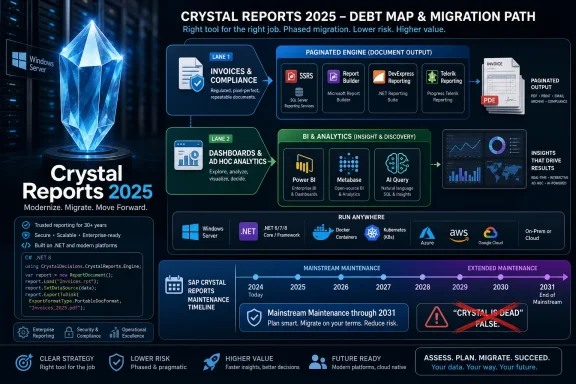
The result is a market full of misleading advice. Many lists of Crystal Reports alternatives put Power BI, Tableau, embedded .NET report engines, open-source BI tools, and PDF libraries in the same bucket, as if they were interchangeable. They are not. Crystal survived this long precisely because it did two very different jobs under one familiar banner: it generated controlled, paginated business documents, and it gave organizations a way to extract answers from operational databases.
That distinction matters more than any vendor logo. If Crystal Reports is producing invoices, statements, labels, tax forms, compliance packets, or patient charts, you need a paginated reporting engine. If it is feeding managers weekly sales numbers or answering ad hoc questions from SQL data, you may need BI, self-service analytics, or an AI query layer. The worst migration is the one that buys a beautiful dashboard platform and then discovers, six months later, that nobody can reproduce the invoice footer.
Crystal Reports’ staying power is not a mystery. It became embedded in line-of-business software because it solved an unglamorous problem with discipline: take messy operational data and turn it into a report that looked exactly right on paper or as a PDF. In finance, manufacturing, healthcare, logistics, government, and insurance, “exactly right” is not a cosmetic preference. It is the difference between a usable document and a support ticket.
SAP’s roadmap reinforces that Crystal is not vanishing tomorrow. Crystal Reports 2025 shipped in March 2025, Crystal Reports 2027 is planned for the first quarter of 2027, and Crystal Reports 2029 is planned for the first quarter of 2029. SAP’s maintenance table also says the broader Crystal product line is planned for mainstream maintenance at least through the end of 2031.
That should give IT leaders room to breathe, not permission to do nothing. The real pressure comes from the gap between Crystal’s operating model and modern development practice. The developer version for Microsoft Visual Studio remains tied to the world of .NET Framework, Windows runtimes, IIS-era hosting assumptions, and thick-client report design. For teams trying to move workloads to Linux containers, Kubernetes, serverless platforms, or modern .NET, that gap is not theoretical.
The 32-bit runtime cutoff sharpens the issue. SAP’s own maintenance notes say the 32-bit Crystal Reports .NET runtime is discontinued after December 2025 and recommends moving to the 64-bit runtime as soon as possible. For shops with old WinForms apps, vendor packages, 32-bit COM dependencies, or ancient ODBC drivers, that is not a simple checkbox. It is a reminder that the platform under many Crystal deployments is aging faster than the reports themselves.
This is why “replace Crystal” is too blunt. The smarter framing is “retire the dependencies Crystal forced us to keep.” In some environments, that means rebuilding reports. In others, it means containing Crystal for a few more years while the surrounding application is modernized. Either way, the question is not whether Crystal works; it is whether your future architecture should still orbit it.
Crystal’s greatest trick was hiding multiple workloads behind one file extension. A
A pixel-perfect report is obsessed with paper logic. It cares about page breaks, repeating headers, group footers, conditional suppression, line wrapping, margins, barcode placement, signature blocks, and whether a total appears on the same page as its detail rows. A BI report is obsessed with exploration. It cares about filtering, drill-down, semantic models, measures, sharing, governance, and how quickly a business user can ask a follow-up question.
Forcing these into one replacement product is usually how migrations become expensive. Power BI may be excellent for interactive analytics, but standard dashboards are not a substitute for a controlled multi-page invoice. A code-first PDF library may be perfect for generating statements from a microservice, but it is not a self-service reporting portal for accounting users. An SSRS-style engine may reproduce Crystal layouts well, but it will not magically create a modern analytics culture.
The practical answer is often unbundling. Keep document generation in a paginated reporting tool. Move dashboards and ad hoc analysis to BI or AI-assisted analytics. Use scheduling middleware only where the goal is to buy time. Treat the Crystal estate as a portfolio of use cases, not a monolith.
The biggest advantage is economic gravity. Organizations already licensed for SQL Server Standard or Enterprise often have access to SSRS without buying an entirely separate reporting platform. For IT teams with conservative budgets and on-premises workloads, that makes SSRS hard to ignore. It also fits the Microsoft administrative model: Windows Server, Active Directory, SQL Server, scheduled delivery, and familiar enterprise controls.
The weakness is that SSRS is not an escape from old assumptions so much as a move to a different Microsoft legacy lane. It is still a Windows-centric reporting server. Its expression language and designer experience feel dated compared with modern web tooling. Embedding SSRS cleanly into a React, Angular, or Blazor application can be done, but it rarely feels like a first-class modern developer experience.
Power BI Report Builder complicates the picture in a useful way. It uses the RDL paginated report format and brings SSRS-style documents into the Power BI and Microsoft Fabric world. If the organization is already standardizing on Power BI for analytics, publishing paginated reports into the same cloud service can simplify distribution, permissions, and user access.
But the licensing and capacity model deserves scrutiny. Paginated reports in the Power BI ecosystem can be attractive, yet enterprise-scale distribution often pushes organizations toward Premium Per User or Fabric capacity planning. That is not inherently bad; it may be the right strategic move. It is simply not the “free SSRS in the cloud” story some teams imagine when they first open Report Builder.
The migration labor is also real. There is no magic button that takes years of Crystal logic and turns it into clean RDL with perfect fidelity. Simple tabular reports can be rebuilt quickly. Complex Crystal reports with subreports, shared variables, custom formulas, dynamic formatting, and driver quirks demand manual work. Microsoft’s stack may reduce platform risk, but it does not repeal the laws of reporting debt.
DevExpress has a strong pitch for teams trapped between old Crystal runtimes and modern .NET. It supports current .NET versions, offers polished design tooling, and can generate PDFs without dragging a Crystal runtime into the deployment. For organizations moving from .NET Framework to .NET 8 or .NET 9, that matters. It means reporting can become part of the application modernization plan instead of the anchor that prevents it.
Its Crystal import wizard is a useful accelerant, not a guarantee. Basic reports may come across with decent fidelity, especially when they use common layouts and straightforward data binding. The trouble begins where Crystal’s proprietary behaviors shine: subreports, formulas, custom connections, and edge-case formatting. Those reports still need developer attention, testing, and user validation.
Telerik Reporting, now under Progress, occupies similar territory. It offers a visual designer, web viewers, export options, and an optional Telerik Report Server for teams that want more than embedded components. Telerik is also unusually explicit in its messaging about the difference between paginated reporting and BI dashboards, which is refreshing in a market that too often blurs the categories.
The choice between DevExpress and Telerik is rarely about a single feature. It is about the ecosystem your developers already know, the licensing model your procurement team can live with, and whether you need an integrated report server or just application-embedded output. Both are commercial tools. Both require .NET competence. Both are better understood as developer platforms than as turnkey replacements for a business-user-run Crystal Server estate.
That last point is important. A DevExpress or Telerik migration may be excellent if reports are part of an application product. It may be frustrating if the real requirement is that non-developers maintain report definitions independently. Visual designers reduce friction, but they do not remove the need for engineering governance when reporting becomes part of the application codebase.
QuestPDF is the purist’s .NET option. It uses C# and a fluent layout API inspired by modern layout concepts rather than banded report sections. Developers define the document structure in code, including rows, columns, padding, tables, headers, footers, and conditional content. For invoices, statements, certificates, labels, and operational PDFs produced by a modern .NET service, this can be liberating.
The tradeoff is obvious and intentional. There is no business-user designer. There is no Crystal import. There is no illusion that an accounting analyst will tweak a footer at 4:45 p.m. without a developer. QuestPDF is best when the organization is comfortable saying that certain documents are software artifacts, not user-authored reports.
jsreport makes a similar argument from the web side. Instead of teaching developers a proprietary report language, it lets them use HTML, CSS, JavaScript, and templating to generate PDFs and other outputs. For Node.js teams or front-end-heavy organizations, that is a powerful mental shift: a report becomes a rendered page with data binding and print-oriented CSS.
HTML-to-PDF generation is not magic, and it can suffer when documents become huge, deeply nested, or dependent on exact pagination across browsers and rendering engines. But it is often good enough for a broad class of business documents, especially when the development team already has strong web layout skills. It also avoids the cultural problem of asking modern developers to adopt a 1990s-style report designer.
The larger point is that code-first reporting changes ownership. It moves reporting from a semi-independent artifact maintained by specialists to a software module maintained by developers. That can improve reliability and deployment hygiene. It can also bottleneck business changes unless the team builds the right abstractions around templates, data models, and approval workflows.
JasperReports remains the default name in Java reporting. It has been around long enough to carry its own legacy weight, but that longevity is also why enterprises trust it. The JasperReports ecosystem includes report design tooling, server-side scheduling and distribution options, Java APIs, and a long history in applications that need paginated PDF and document output.
For Java-heavy organizations, JasperReports is a more natural fit than forcing a .NET reporting component into the architecture. It is also attractive to teams that want an open-source core with commercial support options. The learning curve is real, and Crystal migration is not automatic, but it aligns with the runtime and deployment assumptions of Java applications.
Stimulsoft is a more polyglot contender. It spans .NET, Java, JavaScript, PHP, and Python, which can be valuable in organizations that no longer have a single blessed application stack. Its visual designer and Crystal import tooling make it worth testing when the reporting estate is broad and the development environment is mixed.
The smaller-community risk should not be dismissed. DevExpress, Telerik, Microsoft, and JasperReports have larger ecosystems, more forum answers, more consultants, and more institutional memory. Stimulsoft may fit the architecture beautifully, but teams should validate support responsiveness, documentation depth, and the likelihood of finding help for obscure migration bugs.
The lesson is not that one of these tools is universally better. It is that reporting engines become infrastructure. Once a company rewrites hundreds of reports, the chosen tool becomes part of the application architecture for a decade. That decision should follow the dominant engineering platform, not nostalgia for the old designer.
Power BI is the obvious analytics choice for Microsoft-aligned organizations. It is strong at interactive dashboards, semantic models, DAX-based measures, filtering, sharing, and integration with the Microsoft 365 and Fabric ecosystem. If Crystal is being used to distribute sales summaries, performance dashboards, operational trends, or executive metrics, Power BI may be a better home for that work.
But Power BI dashboards are not the same thing as paginated reports. Microsoft has separate tooling for paginated documents precisely because dashboards and print-perfect reports are different products with different engines. Any migration plan that says “we’ll move Crystal to Power BI” needs to specify whether it means Power BI dashboards, Power BI Report Builder, or both.
Metabase serves a different audience. It is a low-friction, open-source-friendly BI platform that lets teams connect databases and build questions, charts, and dashboards without the ceremony of a heavyweight enterprise BI rollout. For startups, mid-market companies, and internal teams that simply want fewer static reports and more self-service exploration, Metabase can replace a surprising amount of Crystal-driven management reporting.
BlazeSQL and similar AI-native analytics products push the argument further. Instead of rebuilding every static report, they try to let users ask questions in plain English and receive SQL-backed tables, charts, dashboards, or recurring summaries. This is not a replacement for a packing slip. It is a replacement for the endless queue of “can you pull me this number?” requests that turned Crystal into an analyst bottleneck.
The danger is overpromising. Natural-language analytics depends on metadata, governed definitions, database access controls, and a well-curated semantic understanding of the business. Without that discipline, AI can produce confident nonsense. With it, these tools can reduce the number of reports that need to exist at all.
That is the most radical possibility in a Crystal migration. Some reports should not be migrated. They should be deleted, replaced by dashboards, or turned into governed self-service queries. The goal is not to recreate the old report catalog in a shinier tool; it is to reduce the need for static reporting where static reporting was only a workaround for poor data access.
Visual CUT is essentially automation middleware for existing Crystal Reports. It can run
rePORTAL takes a web-portal approach. It gives users a browser-based place to run existing Crystal reports, enter parameters, schedule output, and access reports without giving everyone the full Crystal designer or a more expensive server product. For IT teams that need to centralize access to existing reports, it can be a useful bridge.
The key is honesty. These tools do not remove the Crystal runtime dependency. They do not solve Windows hosting constraints. They do not convert old formulas into modern code. They extend the useful life of the estate while the organization plans something more durable.
That may be exactly the right decision. A rushed reporting migration can damage trust quickly, especially when customer-facing documents or financial numbers change unexpectedly. Buying one to three years of breathing room is defensible if it comes with an audit, a target architecture, and a decommissioning plan. It is dangerous only when the temporary bridge becomes the new permanent platform by neglect.
Server logs, file timestamps, scheduler histories, network shares, application menus, and user interviews all matter. The goal is to identify which reports are used, who uses them, how often they run, what data sources they touch, and whether their output drives a business process. Reports with no owner and no usage should have to earn their survival.
The next step is classification. Simple list reports, parameterized extracts, and basic grouped summaries can often be rebuilt quickly or moved to BI. Medium-complexity reports may require designer work but not major redesign. High-complexity reports with subreports, shared variables, embedded business logic, custom SQL, and fragile formatting should be treated as mini-projects.
This is where teams discover that Crystal was often used as an application layer. Business rules live in formulas. Data joins live in report queries. Formatting logic doubles as workflow logic. A report that looked like a document may actually contain years of undocumented business behavior.
Parallel running is non-negotiable for sensitive output. If a report affects billing, payroll, compliance, customers, or audited financials, run the Crystal version and the replacement side by side for 30 to 90 days. Compare totals, rounding, missing rows, page breaks, export behavior, and edge cases. The migration is not done when the report looks right once; it is done when users trust it under real data.
The hardest part is not technical. It is governance. Someone must decide which reports die, which move to BI, which become code-generated documents, which stay paginated, and which remain temporarily on Crystal. Without that decision-making structure, the migration becomes a series of local compromises that recreate the same sprawl in a new platform.
If the organization needs on-premises paginated reporting and already lives in the Microsoft stack, SSRS remains the conservative default. It is familiar, capable, and budget-friendly, but it keeps you in a Windows-server reporting model. If the organization wants paginated reports inside the Power BI or Fabric ecosystem, Power BI Report Builder is the more cloud-aligned path, with licensing and capacity planning attached.
If the need is embedded reporting in a modern .NET application, DevExpress and Telerik are stronger candidates than SSRS. They fit developer workflows better, support modern .NET deployment models, and offer richer integration inside custom applications. They also require developers to own the solution, which is a feature or a drawback depending on your operating model.
If the team wants reports as code, QuestPDF and jsreport are the cleanest conceptual break from Crystal. They are especially compelling when documents are generated by services and maintained by software teams. They are poor fits when business users expect to design and modify reports independently.
If the problem is analytics, do not buy a paginated reporting engine simply because Crystal used to produce the report. Power BI, Metabase, and AI-native tools such as BlazeSQL can reduce the static report backlog by giving users interactive dashboards or governed natural-language access to data. That is a different kind of migration: not Crystal-to-reporting-tool, but Crystal-to-better-data-access.
If the problem is time, Visual CUT and rePORTAL are valid tactical options. They keep existing
A credible plan will usually split the estate. Invoices and compliance documents move to SSRS, Power BI Report Builder, DevExpress, Telerik, JasperReports, QuestPDF, or jsreport. Dashboards and exploratory reporting move to Power BI, Metabase, or an AI-native analytics layer. Remaining legacy reports stay on Crystal behind Visual CUT or rePORTAL until they can be retired or rebuilt.
That hybrid approach sounds messy only if you believe Crystal’s old consolidation was inherently healthy. It often was not. It was convenient. Over time, convenience became dependency, and dependency became fear.
The migration is a chance to restore boundaries. Documents should be documents. Analytics should be analytics. Application-generated PDFs should be treated like application code. Temporary legacy access should be labeled temporary. That clarity is more valuable than any one vendor’s import wizard.
The result is a market full of misleading advice. Many lists of Crystal Reports alternatives put Power BI, Tableau, embedded .NET report engines, open-source BI tools, and PDF libraries in the same bucket, as if they were interchangeable. They are not. Crystal survived this long precisely because it did two very different jobs under one familiar banner: it generated controlled, paginated business documents, and it gave organizations a way to extract answers from operational databases.
That distinction matters more than any vendor logo. If Crystal Reports is producing invoices, statements, labels, tax forms, compliance packets, or patient charts, you need a paginated reporting engine. If it is feeding managers weekly sales numbers or answering ad hoc questions from SQL data, you may need BI, self-service analytics, or an AI query layer. The worst migration is the one that buys a beautiful dashboard platform and then discovers, six months later, that nobody can reproduce the invoice footer.
 Crystal Reports Is Not Dead, but Its Assumptions Are Showing Their Age
Crystal Reports’ staying power is not a mystery. It became embedded in line-of-business software because it solved an unglamorous problem with discipline: take messy operational data and turn it into a report that looked exactly right on paper or as a PDF. In finance, manufacturing, healthcare, logistics, government, and insurance, “exactly right” is not a cosmetic preference. It is the difference between a usable document and a support ticket.SAP’s roadmap reinforces that Crystal is not vanishing tomorrow. Crystal Reports 2025 shipped in March 2025, Crystal Reports 2027 is planned for the first quarter of 2027, and Crystal Reports 2029 is planned for the first quarter of 2029. SAP’s maintenance table also says the broader Crystal product line is planned for mainstream maintenance at least through the end of 2031.
That should give IT leaders room to breathe, not permission to do nothing. The real pressure comes from the gap between Crystal’s operating model and modern development practice. The developer version for Microsoft Visual Studio remains tied to the world of .NET Framework, Windows runtimes, IIS-era hosting assumptions, and thick-client report design. For teams trying to move workloads to Linux containers, Kubernetes, serverless platforms, or modern .NET, that gap is not theoretical.
The 32-bit runtime cutoff sharpens the issue. SAP’s own maintenance notes say the 32-bit Crystal Reports .NET runtime is discontinued after December 2025 and recommends moving to the 64-bit runtime as soon as possible. For shops with old WinForms apps, vendor packages, 32-bit COM dependencies, or ancient ODBC drivers, that is not a simple checkbox. It is a reminder that the platform under many Crystal deployments is aging faster than the reports themselves.
This is why “replace Crystal” is too blunt. The smarter framing is “retire the dependencies Crystal forced us to keep.” In some environments, that means rebuilding reports. In others, it means containing Crystal for a few more years while the surrounding application is modernized. Either way, the question is not whether Crystal works; it is whether your future architecture should still orbit it.
The First Migration Decision Is Not Vendor Selection
The common mistake is to start with a procurement spreadsheet. Someone asks for “Crystal alternatives,” a dozen products appear, and the evaluation becomes a feature bingo exercise: designer, scheduler, export formats, web viewer, subreports, parameters, charts. That feels rigorous until the team realizes it has compared BI tools against document engines and PDF libraries against report servers.Crystal’s greatest trick was hiding multiple workloads behind one file extension. A
.rpt file might be a one-page label, a 70-page invoice batch, a regulatory packet, a management summary, a dashboard-like sales report, or a glorified SQL export. Those workloads have different failure modes and different replacement paths.A pixel-perfect report is obsessed with paper logic. It cares about page breaks, repeating headers, group footers, conditional suppression, line wrapping, margins, barcode placement, signature blocks, and whether a total appears on the same page as its detail rows. A BI report is obsessed with exploration. It cares about filtering, drill-down, semantic models, measures, sharing, governance, and how quickly a business user can ask a follow-up question.
Forcing these into one replacement product is usually how migrations become expensive. Power BI may be excellent for interactive analytics, but standard dashboards are not a substitute for a controlled multi-page invoice. A code-first PDF library may be perfect for generating statements from a microservice, but it is not a self-service reporting portal for accounting users. An SSRS-style engine may reproduce Crystal layouts well, but it will not magically create a modern analytics culture.
The practical answer is often unbundling. Keep document generation in a paginated reporting tool. Move dashboards and ad hoc analysis to BI or AI-assisted analytics. Use scheduling middleware only where the goal is to buy time. Treat the Crystal estate as a portfolio of use cases, not a monolith.
Microsoft’s Default Path Is Familiar, Not Frictionless
For Microsoft-heavy organizations, SQL Server Reporting Services remains the most obvious like-for-like replacement. SSRS understands the same basic mental model Crystal veterans recognize: datasets, parameters, grouped tables, page headers, page footers, expressions, subscriptions, exports, and controlled pagination. It is not glamorous, but it is sturdy, and sturdy still matters when the output is a financial statement.The biggest advantage is economic gravity. Organizations already licensed for SQL Server Standard or Enterprise often have access to SSRS without buying an entirely separate reporting platform. For IT teams with conservative budgets and on-premises workloads, that makes SSRS hard to ignore. It also fits the Microsoft administrative model: Windows Server, Active Directory, SQL Server, scheduled delivery, and familiar enterprise controls.
The weakness is that SSRS is not an escape from old assumptions so much as a move to a different Microsoft legacy lane. It is still a Windows-centric reporting server. Its expression language and designer experience feel dated compared with modern web tooling. Embedding SSRS cleanly into a React, Angular, or Blazor application can be done, but it rarely feels like a first-class modern developer experience.
Power BI Report Builder complicates the picture in a useful way. It uses the RDL paginated report format and brings SSRS-style documents into the Power BI and Microsoft Fabric world. If the organization is already standardizing on Power BI for analytics, publishing paginated reports into the same cloud service can simplify distribution, permissions, and user access.
But the licensing and capacity model deserves scrutiny. Paginated reports in the Power BI ecosystem can be attractive, yet enterprise-scale distribution often pushes organizations toward Premium Per User or Fabric capacity planning. That is not inherently bad; it may be the right strategic move. It is simply not the “free SSRS in the cloud” story some teams imagine when they first open Report Builder.
The migration labor is also real. There is no magic button that takes years of Crystal logic and turns it into clean RDL with perfect fidelity. Simple tabular reports can be rebuilt quickly. Complex Crystal reports with subreports, shared variables, custom formulas, dynamic formatting, and driver quirks demand manual work. Microsoft’s stack may reduce platform risk, but it does not repeal the laws of reporting debt.
DevExpress and Telerik Sell the Modern .NET Escape Hatch
If the reporting problem lives inside a custom .NET application, DevExpress Reporting and Telerik Reporting deserve serious evaluation. These tools are not merely “report writers.” They are component ecosystems designed for developers who need to embed report design, viewing, export, and generation into applications they control.DevExpress has a strong pitch for teams trapped between old Crystal runtimes and modern .NET. It supports current .NET versions, offers polished design tooling, and can generate PDFs without dragging a Crystal runtime into the deployment. For organizations moving from .NET Framework to .NET 8 or .NET 9, that matters. It means reporting can become part of the application modernization plan instead of the anchor that prevents it.
Its Crystal import wizard is a useful accelerant, not a guarantee. Basic reports may come across with decent fidelity, especially when they use common layouts and straightforward data binding. The trouble begins where Crystal’s proprietary behaviors shine: subreports, formulas, custom connections, and edge-case formatting. Those reports still need developer attention, testing, and user validation.
Telerik Reporting, now under Progress, occupies similar territory. It offers a visual designer, web viewers, export options, and an optional Telerik Report Server for teams that want more than embedded components. Telerik is also unusually explicit in its messaging about the difference between paginated reporting and BI dashboards, which is refreshing in a market that too often blurs the categories.
The choice between DevExpress and Telerik is rarely about a single feature. It is about the ecosystem your developers already know, the licensing model your procurement team can live with, and whether you need an integrated report server or just application-embedded output. Both are commercial tools. Both require .NET competence. Both are better understood as developer platforms than as turnkey replacements for a business-user-run Crystal Server estate.
That last point is important. A DevExpress or Telerik migration may be excellent if reports are part of an application product. It may be frustrating if the real requirement is that non-developers maintain report definitions independently. Visual designers reduce friction, but they do not remove the need for engineering governance when reporting becomes part of the application codebase.
QuestPDF and jsreport Make Reporting Feel Like Software Again
Some teams do not want another visual report designer at all. They want reports to behave like the rest of the codebase: versioned in Git, reviewed in pull requests, tested in CI, deployed through pipelines, and generated by services without a desktop design tool anywhere in sight. That is where QuestPDF and jsreport become interesting.QuestPDF is the purist’s .NET option. It uses C# and a fluent layout API inspired by modern layout concepts rather than banded report sections. Developers define the document structure in code, including rows, columns, padding, tables, headers, footers, and conditional content. For invoices, statements, certificates, labels, and operational PDFs produced by a modern .NET service, this can be liberating.
The tradeoff is obvious and intentional. There is no business-user designer. There is no Crystal import. There is no illusion that an accounting analyst will tweak a footer at 4:45 p.m. without a developer. QuestPDF is best when the organization is comfortable saying that certain documents are software artifacts, not user-authored reports.
jsreport makes a similar argument from the web side. Instead of teaching developers a proprietary report language, it lets them use HTML, CSS, JavaScript, and templating to generate PDFs and other outputs. For Node.js teams or front-end-heavy organizations, that is a powerful mental shift: a report becomes a rendered page with data binding and print-oriented CSS.
HTML-to-PDF generation is not magic, and it can suffer when documents become huge, deeply nested, or dependent on exact pagination across browsers and rendering engines. But it is often good enough for a broad class of business documents, especially when the development team already has strong web layout skills. It also avoids the cultural problem of asking modern developers to adopt a 1990s-style report designer.
The larger point is that code-first reporting changes ownership. It moves reporting from a semi-independent artifact maintained by specialists to a software module maintained by developers. That can improve reliability and deployment hygiene. It can also bottleneck business changes unless the team builds the right abstractions around templates, data models, and approval workflows.
Java and Polyglot Shops Have Their Own Gravity Wells
Not every Crystal estate lives in a Microsoft shop. Some organizations adopted Crystal through packaged software, but their custom development has since moved to Java, JavaScript, Python, or a mix of platforms. For them, the best replacement may be the one that aligns with the application stack rather than the one that most closely resembles Crystal’s interface.JasperReports remains the default name in Java reporting. It has been around long enough to carry its own legacy weight, but that longevity is also why enterprises trust it. The JasperReports ecosystem includes report design tooling, server-side scheduling and distribution options, Java APIs, and a long history in applications that need paginated PDF and document output.
For Java-heavy organizations, JasperReports is a more natural fit than forcing a .NET reporting component into the architecture. It is also attractive to teams that want an open-source core with commercial support options. The learning curve is real, and Crystal migration is not automatic, but it aligns with the runtime and deployment assumptions of Java applications.
Stimulsoft is a more polyglot contender. It spans .NET, Java, JavaScript, PHP, and Python, which can be valuable in organizations that no longer have a single blessed application stack. Its visual designer and Crystal import tooling make it worth testing when the reporting estate is broad and the development environment is mixed.
The smaller-community risk should not be dismissed. DevExpress, Telerik, Microsoft, and JasperReports have larger ecosystems, more forum answers, more consultants, and more institutional memory. Stimulsoft may fit the architecture beautifully, but teams should validate support responsiveness, documentation depth, and the likelihood of finding help for obscure migration bugs.
The lesson is not that one of these tools is universally better. It is that reporting engines become infrastructure. Once a company rewrites hundreds of reports, the chosen tool becomes part of the application architecture for a decade. That decision should follow the dominant engineering platform, not nostalgia for the old designer.
BI Tools Solve the Reporting Bottleneck, Not the Invoice Problem
Power BI, Metabase, and AI-native analytics tools such as BlazeSQL belong in the Crystal replacement conversation only if the Crystal workload is actually analytical. That caveat is not a footnote. It is the dividing line between a successful modernization and an expensive category error.Power BI is the obvious analytics choice for Microsoft-aligned organizations. It is strong at interactive dashboards, semantic models, DAX-based measures, filtering, sharing, and integration with the Microsoft 365 and Fabric ecosystem. If Crystal is being used to distribute sales summaries, performance dashboards, operational trends, or executive metrics, Power BI may be a better home for that work.
But Power BI dashboards are not the same thing as paginated reports. Microsoft has separate tooling for paginated documents precisely because dashboards and print-perfect reports are different products with different engines. Any migration plan that says “we’ll move Crystal to Power BI” needs to specify whether it means Power BI dashboards, Power BI Report Builder, or both.
Metabase serves a different audience. It is a low-friction, open-source-friendly BI platform that lets teams connect databases and build questions, charts, and dashboards without the ceremony of a heavyweight enterprise BI rollout. For startups, mid-market companies, and internal teams that simply want fewer static reports and more self-service exploration, Metabase can replace a surprising amount of Crystal-driven management reporting.
BlazeSQL and similar AI-native analytics products push the argument further. Instead of rebuilding every static report, they try to let users ask questions in plain English and receive SQL-backed tables, charts, dashboards, or recurring summaries. This is not a replacement for a packing slip. It is a replacement for the endless queue of “can you pull me this number?” requests that turned Crystal into an analyst bottleneck.
The danger is overpromising. Natural-language analytics depends on metadata, governed definitions, database access controls, and a well-curated semantic understanding of the business. Without that discipline, AI can produce confident nonsense. With it, these tools can reduce the number of reports that need to exist at all.
That is the most radical possibility in a Crystal migration. Some reports should not be migrated. They should be deleted, replaced by dashboards, or turned into governed self-service queries. The goal is not to recreate the old report catalog in a shinier tool; it is to reduce the need for static reporting where static reporting was only a workaround for poor data access.
Visual CUT and rePORTAL Are Delay Tactics, and That Can Be Sensible
Not every organization is ready for a rebuild. Some are running hundreds or thousands of.rpt files, many tied to old applications, old drivers, and business processes nobody wants to touch during budget season. For those teams, tools like Visual CUT and rePORTAL offer a pragmatic middle path: keep Crystal running, but make distribution and scheduling less painful.Visual CUT is essentially automation middleware for existing Crystal Reports. It can run
.rpt files, pass parameters, export to formats such as PDF or Excel, and deliver output by email or file drop. That is not modernization in the architectural sense, but it can remove manual effort quickly and cheaply.rePORTAL takes a web-portal approach. It gives users a browser-based place to run existing Crystal reports, enter parameters, schedule output, and access reports without giving everyone the full Crystal designer or a more expensive server product. For IT teams that need to centralize access to existing reports, it can be a useful bridge.
The key is honesty. These tools do not remove the Crystal runtime dependency. They do not solve Windows hosting constraints. They do not convert old formulas into modern code. They extend the useful life of the estate while the organization plans something more durable.
That may be exactly the right decision. A rushed reporting migration can damage trust quickly, especially when customer-facing documents or financial numbers change unexpectedly. Buying one to three years of breathing room is defensible if it comes with an audit, a target architecture, and a decommissioning plan. It is dangerous only when the temporary bridge becomes the new permanent platform by neglect.
The Migration Starts With Deleting Reports, Not Rebuilding Them
Every Crystal migration should begin with a brutal inventory. The hidden scandal of legacy reporting is that many reports are dead, duplicated, or used only because nobody knows where the better version lives. Rebuilding them all is not modernization. It is archeology with a purchase order.Server logs, file timestamps, scheduler histories, network shares, application menus, and user interviews all matter. The goal is to identify which reports are used, who uses them, how often they run, what data sources they touch, and whether their output drives a business process. Reports with no owner and no usage should have to earn their survival.
The next step is classification. Simple list reports, parameterized extracts, and basic grouped summaries can often be rebuilt quickly or moved to BI. Medium-complexity reports may require designer work but not major redesign. High-complexity reports with subreports, shared variables, embedded business logic, custom SQL, and fragile formatting should be treated as mini-projects.
This is where teams discover that Crystal was often used as an application layer. Business rules live in formulas. Data joins live in report queries. Formatting logic doubles as workflow logic. A report that looked like a document may actually contain years of undocumented business behavior.
Parallel running is non-negotiable for sensitive output. If a report affects billing, payroll, compliance, customers, or audited financials, run the Crystal version and the replacement side by side for 30 to 90 days. Compare totals, rounding, missing rows, page breaks, export behavior, and edge cases. The migration is not done when the report looks right once; it is done when users trust it under real data.
The hardest part is not technical. It is governance. Someone must decide which reports die, which move to BI, which become code-generated documents, which stay paginated, and which remain temporarily on Crystal. Without that decision-making structure, the migration becomes a series of local compromises that recreate the same sprawl in a new platform.
The Best Replacement Depends on the Job Crystal Was Quietly Doing
There is no single “best Crystal Reports alternative” in 2026 because Crystal was never doing a single job. It was a document engine, a report designer, a scheduler, a database query surface, a PDF generator, an application component, and sometimes an entire shadow BI layer. The right replacement depends on which of those roles matters in your environment.If the organization needs on-premises paginated reporting and already lives in the Microsoft stack, SSRS remains the conservative default. It is familiar, capable, and budget-friendly, but it keeps you in a Windows-server reporting model. If the organization wants paginated reports inside the Power BI or Fabric ecosystem, Power BI Report Builder is the more cloud-aligned path, with licensing and capacity planning attached.
If the need is embedded reporting in a modern .NET application, DevExpress and Telerik are stronger candidates than SSRS. They fit developer workflows better, support modern .NET deployment models, and offer richer integration inside custom applications. They also require developers to own the solution, which is a feature or a drawback depending on your operating model.
If the team wants reports as code, QuestPDF and jsreport are the cleanest conceptual break from Crystal. They are especially compelling when documents are generated by services and maintained by software teams. They are poor fits when business users expect to design and modify reports independently.
If the problem is analytics, do not buy a paginated reporting engine simply because Crystal used to produce the report. Power BI, Metabase, and AI-native tools such as BlazeSQL can reduce the static report backlog by giving users interactive dashboards or governed natural-language access to data. That is a different kind of migration: not Crystal-to-reporting-tool, but Crystal-to-better-data-access.
If the problem is time, Visual CUT and rePORTAL are valid tactical options. They keep existing
.rpt files useful while the organization audits, prioritizes, and rebuilds. The danger is pretending that tactical containment is modernization.The 2026 Crystal Decision Tree Is Really a Debt Map
The useful way to evaluate these 13 products is to map them against your technical debt, not just your feature requirements. Crystal’s pain points usually reveal deeper architectural facts: old database drivers, 32-bit dependencies, Windows-only services, undocumented business formulas, weak semantic models, and business users who rely on static reports because no better data interface exists.A credible plan will usually split the estate. Invoices and compliance documents move to SSRS, Power BI Report Builder, DevExpress, Telerik, JasperReports, QuestPDF, or jsreport. Dashboards and exploratory reporting move to Power BI, Metabase, or an AI-native analytics layer. Remaining legacy reports stay on Crystal behind Visual CUT or rePORTAL until they can be retired or rebuilt.
That hybrid approach sounds messy only if you believe Crystal’s old consolidation was inherently healthy. It often was not. It was convenient. Over time, convenience became dependency, and dependency became fear.
The migration is a chance to restore boundaries. Documents should be documents. Analytics should be analytics. Application-generated PDFs should be treated like application code. Temporary legacy access should be labeled temporary. That clarity is more valuable than any one vendor’s import wizard.
Where the Real Shortlist Lands
Before signing a purchase order, IT teams should narrow the field by workload rather than brand preference. A short evaluation with real reports will reveal more than a month of slideware.- Organizations that need a conservative Microsoft paginated-report replacement should evaluate SSRS first, then Power BI Report Builder if cloud distribution through Power BI or Fabric is already strategic.
- .NET application teams that need embedded reporting should test DevExpress and Telerik against their most complex Crystal files, especially subreports, formulas, and custom data connections.
- Developer-led teams that want report definitions in source control should prototype QuestPDF for C# document generation or jsreport for HTML/CSS-based PDF output.
- Java and mixed-platform organizations should include JasperReports and Stimulsoft, especially when the future application estate is not centered on Microsoft.
- Teams using Crystal for management reporting, KPIs, and ad hoc SQL pulls should evaluate Power BI, Metabase, or BlazeSQL instead of recreating every static report.
- Organizations that cannot migrate immediately should use Visual CUT or rePORTAL only as a containment layer with a dated exit plan.
References
- Primary source: technology.org
Published: 2026-06-25T07:40:08.039297
13 Crystal Reports Alternatives You Should Actually Evaluate in 2026 - Technology Org
SAP Crystal Reports has been an enterprise staple since the early 90s. And despite what the internet tellswww.technology.org
- Related coverage: helicalinsight.com
Top 10 Crystal Reports Alternatives in 2026 - Helical Insight
Discover the top 10 Crystal Reports alternatives in 2026 including Helical Insight, Tableau, Power BI, Jaspersoft, and more for modern reporting and BI.www.helicalinsight.com - Related coverage: pages.community.sap.com
SAP Crystal Solutions | SAP Community
Community homepage for SAP Crystal Reports. Find the latest white papers, tutorials, free trial downloads, blogs, sample reports, and service packs.pages.community.sap.com
- Related coverage: gartner.com
Top SAP Crystal Reports Alternatives & Competitors 2026 | Gartner Peer Insights
Learn more about the top SAP Crystal Reports alternatives. Easily compare competitors and read verified real user reviews on Gartner Peer Insights.www.gartner.com - Related coverage: blazesql.com
5 Best Crystal Reports Alternatives for 2026 (End of Life Guide)
SAP Crystal Reports 32-bit runtime ended in Dec 2025. Discover the top 5 alternatives—from AI-powered analytics like BlazeSQL to legacy replacements like SSRS. www.blazesql.com
- Related coverage: sarfaraz.pro
SAP Crystal Reports Support Timeline — What ICM Teams Need to Do | sarfaraz.pro
Verified support dates for SAP Crystal Reports 2016, 2020, and 2025. What the timeline means for ICM teams running compensation statements on Crystal, and what to do before the deadlines hit.sarfaraz.pro
- Related coverage: reportviewers.com
Open-Source Crystal Reports Alternatives: 2026 Guide
Free and open-source alternatives to Crystal Reports: JasperReports, Eclipse BIRT, Pentaho, KNIME, Metabase. License terms, RDL compatibility, 2026 fit.www.reportviewers.com - Related coverage: scoutedtools.com
Best Crystal Reports Alternatives 2026 — Migration Guide
The best Crystal Reports alternatives 2026 — tested by someone with a live June 2026 migration deadline. Power BI, Tableau, Sigma & more compared.scoutedtools.com - Related coverage: getapp.com
SAP Crystal Reports Alternatives, Competitors & Similar Software | GetApp 2026
View a list of 20 apps like SAP Crystal Reports and compare alternatives on GetApp. See if the competition offers the features you need, at the price you want in 2026.www.getapp.com
