

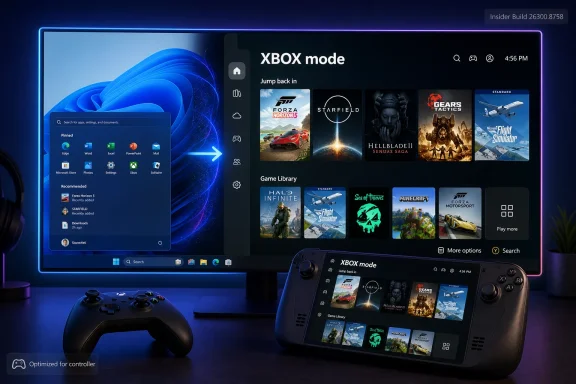
Microsoft is preparing to rename Windows 11’s “Xbox mode” to “XBOX mode” in Experimental Build 26300.8758, a June 26, 2026 Insider release, after the feature began rolling out to PCs through spring Windows updates. The change appears cosmetic rather than functional, but cosmetic does not mean meaningless. In Windows, names are product strategy compressed into a menu label. This one says Microsoft wants the PC to look less like a tolerated edge case in gaming and more like another front door to XBOX.
On paper, the change from “Xbox mode” to “XBOX mode” is almost comically small. It is not a new scheduler, not a new graphics stack, not a new Game Pass entitlement, and not a new compatibility layer. It is four letters shouting where one capital letter used to speak.
But Windows has always carried Microsoft’s internal politics in plain sight. “Internet Explorer,” “Windows Store,” “Microsoft Store,” “Phone Link,” “Copilot,” “Game Bar,” and now “XBOX mode” are not neutral labels. They tell users which business unit is ascendant, which experience is being bundled into the operating system, and which brand Microsoft wants people to see before they see the underlying machinery.
That is why the rename matters more than the diff suggests. Xbox mode was a Windows feature with an Xbox flavor. XBOX mode reads like a brand surface dropped into Windows, a console identity asserting itself inside the desktop OS.
The timing is also revealing. Microsoft only recently pushed Xbox mode into general Windows 11 availability through the 2026 update cadence, after months of testing under names such as the Windows gaming full screen experience. To rename it almost immediately suggests that the original shipping name was not the final strategic name. It was a waypoint.
That matters because Xbox mode itself is more than a shortcut to the Xbox app. Microsoft describes the experience as a controller-friendly, full-screen gaming environment for Windows 11 PCs, including desktops, laptops, tablets, and handheld-style devices. It is meant to reduce desktop noise, foreground the game library, and make a PC feel less like a taskbar-and-window-manager machine when the user is sitting back with a controller.
The experience grew out of the same problem that has stalked Windows handhelds since the Steam Deck made the category impossible to ignore: Windows is powerful, compatible, and deeply flexible, but it is not naturally graceful on a small screen with thumbsticks. A console-style shell is Microsoft’s attempt to paper over that mismatch without giving up the Windows software universe underneath.
That is the key compromise. XBOX mode does not turn a PC into an Xbox console. It turns Windows into a more console-like host for PC games and storefronts, with the Xbox app acting as the living room interface. Underneath, the operating system remains Windows, with all the advantages and irritations that entails.
Microsoft has been moving more of its gaming presentation toward all-caps XBOX branding, echoing earlier eras of the console brand while giving the current cross-device strategy a louder visual identity. That strategy is no longer confined to the plastic box under the television. Microsoft’s gaming business now spans Windows PCs, cloud streaming, Game Pass, consoles, handheld partnerships, store distribution, and first-party studios whose games increasingly appear across platforms.
In that context, the old “Xbox” casing carried baggage. It suggested a product family most users still associate with consoles. “XBOX,” by contrast, functions more like a master brand: a badge Microsoft can stamp onto a Windows mode, a storefront, a handheld, a subscription, or a social channel without necessarily pointing to one device.
That may sound like branding consultancy vapor, but it has practical consequences. If Microsoft wants users to understand XBOX as an ecosystem rather than a console, then Windows cannot treat Xbox-branded features as bolt-ons. They need to appear as native experiences, named consistently and surfaced predictably.
The rename therefore feels less like a designer adjusting typography and more like a product organization aligning the operating system with a broader gaming identity. The question is whether Windows users will experience that alignment as convenience or as more branding pasted onto an already crowded OS.
XBOX mode is the attempt to make Windows serve as the glue. It gives Microsoft a way to say that a PC can be part of the same gaming experience as a console, not merely a place where the Xbox app happens to be installed. That is especially important as handheld PCs blur the line between console and computer.
The PC handheld market has exposed Microsoft’s biggest weakness in gaming UX. Devices from ASUS, Lenovo, MSI, and others can run huge Windows game libraries, but they inherit Windows’ desktop assumptions: pop-ups, launchers, updates, authentication prompts, background processes, small touch targets, and inconsistent controller behavior. SteamOS succeeded not because Linux became magically more compatible overnight, but because Valve built a coherent gaming shell around the system.
Microsoft cannot ignore that lesson. If Windows remains the default OS for handheld gaming PCs, it has to become less visibly Windows during the moments when users only want to play. XBOX mode is a partial answer: not a new operating system, but a mode that suppresses enough of the desktop to make the machine feel purpose-built.
The all-caps rename sharpens that ambition. Microsoft is not merely improving “gaming on Windows.” It is trying to make Windows one of the places where XBOX lives.
That pattern is familiar. Microsoft often uses Insider builds as both engineering test bed and messaging filter. Some changes arrive with blog-post fanfare; others slip in as strings, flags, policy names, app updates, or hidden feature IDs. By the time a user sees the polished public version, the debate has already moved from “should this exist?” to “why did this change on my PC?”
For enthusiasts, that quietness is part of the sport. Windows watchers track build numbers, hidden toggles, resource strings, and early UI shifts because Microsoft’s public roadmap often lags behind its internal direction. The rename to XBOX mode is exactly the kind of tiny signal that becomes meaningful because it was not loudly announced.
For administrators, however, quiet branding changes are less charming. They can complicate documentation, training, support scripts, and user guidance. A help desk article that says “open Xbox mode” may remain understandable, but inconsistency in naming is how small support friction accumulates.
The practical issue is not whether users can infer that Xbox mode and XBOX mode are the same thing. Most can. The issue is that Microsoft is changing Windows at a pace where labels, policies, settings pages, and support pages do not always move in lockstep.
That tells us Microsoft sees the experience as part of the platform, not merely an app-layer experiment. A full-screen gaming mode needs cooperation from the shell, startup behavior, input handling, Game Bar, policy controls, and background activity management. Those are Windows concerns.
It also means the rollout inherits Windows’ usual complexity. Microsoft has used controlled feature rollouts for years, enabling features gradually even after the relevant update is installed. Users can be on the right build and still not see the new feature because the server-side switch has not flipped for their device, region, account type, or configuration.
That has already created confusion around Xbox mode. Some users installed the relevant updates and could not find the setting. Others saw it appear in the Xbox app or gaming settings. Some relied on third-party tools to force hidden feature IDs, which is the kind of enthusiast workaround that proves both demand and disorder.
The rename does not fix that confusion. In the short term, it may add another layer to it. A user searching for “Xbox mode missing” and another searching for “XBOX mode missing” are describing the same problem, but Microsoft’s support ecosystem must catch up.
Windows gaming remains a federation of launchers, overlays, anti-cheat systems, driver stacks, storefront entitlements, cloud saves, controller mappings, and update mechanisms. The Xbox app can aggregate parts of that world, but it cannot erase it. A game bought on Steam, a mod installed through Nexus, a title launched through Battle.net, and a Game Pass download do not become a single console-like experience just because Windows enters a full-screen mode.
Microsoft knows this, which is why the full-screen experience is framed around streamlining rather than enclosing. The company cannot wall off PC gaming without destroying what makes PC gaming valuable. It has to make the messy ecosystem feel less messy while leaving it open enough for users, developers, and storefronts to accept.
That is a much harder problem than branding. All-caps XBOX can make the surface more coherent, but it cannot by itself solve authentication failures, launcher chains, update prompts, shader compilation delays, or games that were never designed for controller-first navigation outside the game itself.
The danger for Microsoft is that the name promises a console experience before the product can fully deliver one. A mode called XBOX invites comparison with an Xbox console. Windows will win on library breadth and hardware variety, but it will still lose on predictability unless Microsoft keeps sanding down the edges.
Steam Deck showed that a handheld gaming PC could feel like a console without pretending to be one. Valve’s advantage was not only hardware or price; it was the operating experience. SteamOS boots into the thing the user bought the device to do. Windows handhelds often boot into a general-purpose computer and ask the user to negotiate their way back to play.
XBOX mode is Microsoft’s answer, and the all-caps branding is part of making that answer legible. If an ASUS or Lenovo handheld launches into XBOX mode, the user instantly understands the pitch. This is not merely Windows with a skin. This is Microsoft’s gaming environment on PC hardware.
OEMs also matter here. Microsoft needs hardware partners to believe Windows can compete with purpose-built gaming shells. A clearly branded mode gives partners something to market, configure, and support. It also gives Microsoft a way to keep the Xbox identity present even when the device is not an Xbox console.
That does not guarantee success. A mode is not an operating system strategy by itself. But it is the visible edge of one.
Microsoft’s gaming full-screen experience is the kind of feature that may be welcome on a personal gaming laptop and unwelcome on a classroom device, point-of-sale-adjacent workstation, lab PC, or enterprise endpoint. Administrators will want to know whether it can be disabled, whether it appears for standard users, whether it interacts with startup policies, and whether it creates support tickets when a machine enters an unfamiliar shell.
Microsoft has already exposed policy surfaces around the gaming full-screen experience, which is a good sign. It suggests the company understands that gaming features inside Windows cannot be treated as purely consumer-facing when the same operating system image runs across unmanaged home PCs and tightly governed business environments.
The naming shift could still create documentation lag. Policy names may continue to refer to “gaming full screen experience” even as consumer UI says XBOX mode. Support pages may say Xbox mode. Insider strings may say XBOX mode. This is manageable, but it is also typical Microsoft: the underlying platform term, the marketing term, and the settings label may not fully converge.
For sysadmins, the practical recommendation is simple even if the branding is not. Treat XBOX mode as the consumer-facing name for a Windows gaming full-screen experience, then manage the capability through Windows policy rather than through whatever label happens to appear in Settings this month.
That tension is not unique to Microsoft. The entire games industry has spent the past few years oscillating between record ambition and painful retrenchment. Subscriptions are expensive to feed. First-party studios are expensive to run. Hardware margins are unforgiving. Cloud gaming remains strategically important but commercially uneven.
Against that backdrop, all-caps XBOX branding can look either confident or compensatory, depending on the reader’s mood. It says Microsoft wants one gaming identity across platforms. It also risks looking like surface-level tidying while deeper questions about content strategy, developer economics, and platform priorities remain unsettled.
Windows users should not overread the rename as evidence of a major functional shift. But they also should not dismiss it as nothing. Companies do not usually standardize brand language across operating system surfaces unless they are preparing users to think differently about what the brand covers.
In that sense, XBOX mode is small news attached to a larger story: Microsoft is still trying to make gaming feel unified across devices even as the business behind that unity gets more complicated.
We saw variations of this with Windows Store becoming Microsoft Store, with Office becoming Microsoft 365, with Bing Chat becoming Copilot, and with Teams moving between consumer and work identities. Microsoft is at its most powerful when it integrates; it is at its most confusing when every integration also becomes a branding exercise.
The XBOX mode rename is far smaller than those examples, but the pattern rhymes. Windows is not merely a platform where Microsoft features appear. It is a canvas where Microsoft repositions its businesses.
For enthusiasts, that makes every small label worth watching. Today it is a capitalization change. Tomorrow it may be a new default entry point, a hardware partner requirement, a Game Bar behavior change, or a deeper tie between Windows setup and gaming identity.
The best reading is not alarmist. It is observational. Microsoft is teaching Windows users to see XBOX as a Windows-native experience, not a console-adjacent app.
A full-screen gaming shell is only as good as the interruptions it prevents. If Windows Update reboots at the wrong time, if a launcher steals focus, if a driver utility opens behind the shell, if a sign-in prompt requires keyboard input, or if a game exits to a tiny desktop dialog, the illusion breaks. Console-like experiences are built on ruthless control of edge cases.
That is where Microsoft faces a structural disadvantage. Windows supports decades of software assumptions, hardware permutations, and third-party services. Its openness is the point, but openness is hostile to seamlessness.
The opportunity is that Microsoft does not need perfection to improve the experience meaningfully. Reducing background distractions, making controller navigation reliable, returning users to the gaming home after sleep, and integrating Game Bar sensibly can make a Windows handheld or living-room PC feel dramatically less awkward.
But the name raises the bar. If it is XBOX mode, users will expect XBOX-like polish. If Microsoft cannot deliver that, the all-caps styling will become a punchline.
The rename from Xbox mode to XBOX mode will not make games faster, handhelds smoother, or Windows less Windows by itself. But it does show Microsoft tightening the language around one of its most important bets: that the future of Xbox is not a box, and that the future of Windows gaming must sometimes look less like a desktop and more like a console. If Microsoft follows the typography with real polish, XBOX mode could become a meaningful bridge between PC freedom and console focus; if it stops at the letters, Windows users will notice that too.
 Microsoft Turns a Capital Letter Into a Platform Signal
On paper, the change from “Xbox mode” to “XBOX mode” is almost comically small. It is not a new scheduler, not a new graphics stack, not a new Game Pass entitlement, and not a new compatibility layer. It is four letters shouting where one capital letter used to speak.But Windows has always carried Microsoft’s internal politics in plain sight. “Internet Explorer,” “Windows Store,” “Microsoft Store,” “Phone Link,” “Copilot,” “Game Bar,” and now “XBOX mode” are not neutral labels. They tell users which business unit is ascendant, which experience is being bundled into the operating system, and which brand Microsoft wants people to see before they see the underlying machinery.
That is why the rename matters more than the diff suggests. Xbox mode was a Windows feature with an Xbox flavor. XBOX mode reads like a brand surface dropped into Windows, a console identity asserting itself inside the desktop OS.
The timing is also revealing. Microsoft only recently pushed Xbox mode into general Windows 11 availability through the 2026 update cadence, after months of testing under names such as the Windows gaming full screen experience. To rename it almost immediately suggests that the original shipping name was not the final strategic name. It was a waypoint.
The Feature Is Still the Same Full-Screen Bet
The available evidence points to a naming update, not a behavioral one. Microsoft’s official notes for the June 26 Insider build reportedly do not call out the rename, and there is no public indication that XBOX mode changes how games launch, how the Xbox app behaves, or how Windows allocates resources.That matters because Xbox mode itself is more than a shortcut to the Xbox app. Microsoft describes the experience as a controller-friendly, full-screen gaming environment for Windows 11 PCs, including desktops, laptops, tablets, and handheld-style devices. It is meant to reduce desktop noise, foreground the game library, and make a PC feel less like a taskbar-and-window-manager machine when the user is sitting back with a controller.
The experience grew out of the same problem that has stalked Windows handhelds since the Steam Deck made the category impossible to ignore: Windows is powerful, compatible, and deeply flexible, but it is not naturally graceful on a small screen with thumbsticks. A console-style shell is Microsoft’s attempt to paper over that mismatch without giving up the Windows software universe underneath.
That is the key compromise. XBOX mode does not turn a PC into an Xbox console. It turns Windows into a more console-like host for PC games and storefronts, with the Xbox app acting as the living room interface. Underneath, the operating system remains Windows, with all the advantages and irritations that entails.
The Old Name Was a Feature; the New Name Is a Campaign
“Xbox mode” sounded descriptive. “XBOX mode” sounds directed. The difference is not grammar; it is governance.Microsoft has been moving more of its gaming presentation toward all-caps XBOX branding, echoing earlier eras of the console brand while giving the current cross-device strategy a louder visual identity. That strategy is no longer confined to the plastic box under the television. Microsoft’s gaming business now spans Windows PCs, cloud streaming, Game Pass, consoles, handheld partnerships, store distribution, and first-party studios whose games increasingly appear across platforms.
In that context, the old “Xbox” casing carried baggage. It suggested a product family most users still associate with consoles. “XBOX,” by contrast, functions more like a master brand: a badge Microsoft can stamp onto a Windows mode, a storefront, a handheld, a subscription, or a social channel without necessarily pointing to one device.
That may sound like branding consultancy vapor, but it has practical consequences. If Microsoft wants users to understand XBOX as an ecosystem rather than a console, then Windows cannot treat Xbox-branded features as bolt-ons. They need to appear as native experiences, named consistently and surfaced predictably.
The rename therefore feels less like a designer adjusting typography and more like a product organization aligning the operating system with a broader gaming identity. The question is whether Windows users will experience that alignment as convenience or as more branding pasted onto an already crowded OS.
Windows Is Becoming the Console Microsoft Cannot Ship
Microsoft’s gaming challenge is not that it lacks reach. It is that its reach is fragmented. Consoles offer simplicity but limited flexibility. Windows offers flexibility but inconsistent polish. Cloud gaming offers access but depends on network conditions, licensing, and user tolerance for latency. Game Pass offers a subscription wrapper, but it still needs compelling surfaces where people actually play.XBOX mode is the attempt to make Windows serve as the glue. It gives Microsoft a way to say that a PC can be part of the same gaming experience as a console, not merely a place where the Xbox app happens to be installed. That is especially important as handheld PCs blur the line between console and computer.
The PC handheld market has exposed Microsoft’s biggest weakness in gaming UX. Devices from ASUS, Lenovo, MSI, and others can run huge Windows game libraries, but they inherit Windows’ desktop assumptions: pop-ups, launchers, updates, authentication prompts, background processes, small touch targets, and inconsistent controller behavior. SteamOS succeeded not because Linux became magically more compatible overnight, but because Valve built a coherent gaming shell around the system.
Microsoft cannot ignore that lesson. If Windows remains the default OS for handheld gaming PCs, it has to become less visibly Windows during the moments when users only want to play. XBOX mode is a partial answer: not a new operating system, but a mode that suppresses enough of the desktop to make the machine feel purpose-built.
The all-caps rename sharpens that ambition. Microsoft is not merely improving “gaming on Windows.” It is trying to make Windows one of the places where XBOX lives.
The Quiet Rename Is Classic Microsoft
The strange part is not that Microsoft would rename a feature. The strange part is how quietly the change appears to have landed. A visible label in Windows changes in an Insider build, a well-known Windows watcher spots it, and the official notes say little or nothing about it.That pattern is familiar. Microsoft often uses Insider builds as both engineering test bed and messaging filter. Some changes arrive with blog-post fanfare; others slip in as strings, flags, policy names, app updates, or hidden feature IDs. By the time a user sees the polished public version, the debate has already moved from “should this exist?” to “why did this change on my PC?”
For enthusiasts, that quietness is part of the sport. Windows watchers track build numbers, hidden toggles, resource strings, and early UI shifts because Microsoft’s public roadmap often lags behind its internal direction. The rename to XBOX mode is exactly the kind of tiny signal that becomes meaningful because it was not loudly announced.
For administrators, however, quiet branding changes are less charming. They can complicate documentation, training, support scripts, and user guidance. A help desk article that says “open Xbox mode” may remain understandable, but inconsistency in naming is how small support friction accumulates.
The practical issue is not whether users can infer that Xbox mode and XBOX mode are the same thing. Most can. The issue is that Microsoft is changing Windows at a pace where labels, policies, settings pages, and support pages do not always move in lockstep.
The May Rollout Made Gaming a Windows Update Story
The feature’s arrival through Windows Update is worth dwelling on. Xbox mode was not simply an Xbox app update. It came tied to Windows 11’s monthly servicing machinery, including the spring 2026 optional and security update cycle.That tells us Microsoft sees the experience as part of the platform, not merely an app-layer experiment. A full-screen gaming mode needs cooperation from the shell, startup behavior, input handling, Game Bar, policy controls, and background activity management. Those are Windows concerns.
It also means the rollout inherits Windows’ usual complexity. Microsoft has used controlled feature rollouts for years, enabling features gradually even after the relevant update is installed. Users can be on the right build and still not see the new feature because the server-side switch has not flipped for their device, region, account type, or configuration.
That has already created confusion around Xbox mode. Some users installed the relevant updates and could not find the setting. Others saw it appear in the Xbox app or gaming settings. Some relied on third-party tools to force hidden feature IDs, which is the kind of enthusiast workaround that proves both demand and disorder.
The rename does not fix that confusion. In the short term, it may add another layer to it. A user searching for “Xbox mode missing” and another searching for “XBOX mode missing” are describing the same problem, but Microsoft’s support ecosystem must catch up.
The Branding Is Cleaner Than the Product Reality
The promise of XBOX as a unified brand is simple: your games, your friends, your subscription, your identity, wherever you play. The reality is messier.Windows gaming remains a federation of launchers, overlays, anti-cheat systems, driver stacks, storefront entitlements, cloud saves, controller mappings, and update mechanisms. The Xbox app can aggregate parts of that world, but it cannot erase it. A game bought on Steam, a mod installed through Nexus, a title launched through Battle.net, and a Game Pass download do not become a single console-like experience just because Windows enters a full-screen mode.
Microsoft knows this, which is why the full-screen experience is framed around streamlining rather than enclosing. The company cannot wall off PC gaming without destroying what makes PC gaming valuable. It has to make the messy ecosystem feel less messy while leaving it open enough for users, developers, and storefronts to accept.
That is a much harder problem than branding. All-caps XBOX can make the surface more coherent, but it cannot by itself solve authentication failures, launcher chains, update prompts, shader compilation delays, or games that were never designed for controller-first navigation outside the game itself.
The danger for Microsoft is that the name promises a console experience before the product can fully deliver one. A mode called XBOX invites comparison with an Xbox console. Windows will win on library breadth and hardware variety, but it will still lose on predictability unless Microsoft keeps sanding down the edges.
The Handheld Fight Explains the Urgency
The rename lands at a moment when handheld PCs are no longer novelty devices. They are a real battleground for the future of PC gaming, and Microsoft cannot afford to let Windows look like the least elegant part of the package.Steam Deck showed that a handheld gaming PC could feel like a console without pretending to be one. Valve’s advantage was not only hardware or price; it was the operating experience. SteamOS boots into the thing the user bought the device to do. Windows handhelds often boot into a general-purpose computer and ask the user to negotiate their way back to play.
XBOX mode is Microsoft’s answer, and the all-caps branding is part of making that answer legible. If an ASUS or Lenovo handheld launches into XBOX mode, the user instantly understands the pitch. This is not merely Windows with a skin. This is Microsoft’s gaming environment on PC hardware.
OEMs also matter here. Microsoft needs hardware partners to believe Windows can compete with purpose-built gaming shells. A clearly branded mode gives partners something to market, configure, and support. It also gives Microsoft a way to keep the Xbox identity present even when the device is not an Xbox console.
That does not guarantee success. A mode is not an operating system strategy by itself. But it is the visible edge of one.
Administrators Will Ask the Boring Questions First
For home users, the rename is mostly an aesthetic oddity. For IT departments, education environments, shared devices, and managed fleets, the interesting part is not the capitalization. It is control.Microsoft’s gaming full-screen experience is the kind of feature that may be welcome on a personal gaming laptop and unwelcome on a classroom device, point-of-sale-adjacent workstation, lab PC, or enterprise endpoint. Administrators will want to know whether it can be disabled, whether it appears for standard users, whether it interacts with startup policies, and whether it creates support tickets when a machine enters an unfamiliar shell.
Microsoft has already exposed policy surfaces around the gaming full-screen experience, which is a good sign. It suggests the company understands that gaming features inside Windows cannot be treated as purely consumer-facing when the same operating system image runs across unmanaged home PCs and tightly governed business environments.
The naming shift could still create documentation lag. Policy names may continue to refer to “gaming full screen experience” even as consumer UI says XBOX mode. Support pages may say Xbox mode. Insider strings may say XBOX mode. This is manageable, but it is also typical Microsoft: the underlying platform term, the marketing term, and the settings label may not fully converge.
For sysadmins, the practical recommendation is simple even if the branding is not. Treat XBOX mode as the consumer-facing name for a Windows gaming full-screen experience, then manage the capability through Windows policy rather than through whatever label happens to appear in Settings this month.
The Rename Lands During a Messy XBOX News Cycle
The branding move also arrives while Microsoft’s gaming business is under scrutiny for reasons that have little to do with Windows UI. Reports around third-party publishing deals, internal restructuring, studio uncertainty, and the shape of Game Pass have kept Microsoft Gaming in the headlines. The company is trying to project ecosystem confidence while the business mechanics behind that ecosystem remain under pressure.That tension is not unique to Microsoft. The entire games industry has spent the past few years oscillating between record ambition and painful retrenchment. Subscriptions are expensive to feed. First-party studios are expensive to run. Hardware margins are unforgiving. Cloud gaming remains strategically important but commercially uneven.
Against that backdrop, all-caps XBOX branding can look either confident or compensatory, depending on the reader’s mood. It says Microsoft wants one gaming identity across platforms. It also risks looking like surface-level tidying while deeper questions about content strategy, developer economics, and platform priorities remain unsettled.
Windows users should not overread the rename as evidence of a major functional shift. But they also should not dismiss it as nothing. Companies do not usually standardize brand language across operating system surfaces unless they are preparing users to think differently about what the brand covers.
In that sense, XBOX mode is small news attached to a larger story: Microsoft is still trying to make gaming feel unified across devices even as the business behind that unity gets more complicated.
Windows Enthusiasts Have Seen This Movie Before
There is an old Microsoft rhythm here. A capability begins life under a technical name. It ships experimentally. It receives a friendlier label. Then the label is pulled toward a larger brand campaign. Eventually, users and administrators are left to reconcile the marketing layer with the underlying system components.We saw variations of this with Windows Store becoming Microsoft Store, with Office becoming Microsoft 365, with Bing Chat becoming Copilot, and with Teams moving between consumer and work identities. Microsoft is at its most powerful when it integrates; it is at its most confusing when every integration also becomes a branding exercise.
The XBOX mode rename is far smaller than those examples, but the pattern rhymes. Windows is not merely a platform where Microsoft features appear. It is a canvas where Microsoft repositions its businesses.
For enthusiasts, that makes every small label worth watching. Today it is a capitalization change. Tomorrow it may be a new default entry point, a hardware partner requirement, a Game Bar behavior change, or a deeper tie between Windows setup and gaming identity.
The best reading is not alarmist. It is observational. Microsoft is teaching Windows users to see XBOX as a Windows-native experience, not a console-adjacent app.
A Console Shell Cannot Hide Every Windows Edge
If Microsoft wants XBOX mode to matter, the next phase cannot be branding. It has to be quality.A full-screen gaming shell is only as good as the interruptions it prevents. If Windows Update reboots at the wrong time, if a launcher steals focus, if a driver utility opens behind the shell, if a sign-in prompt requires keyboard input, or if a game exits to a tiny desktop dialog, the illusion breaks. Console-like experiences are built on ruthless control of edge cases.
That is where Microsoft faces a structural disadvantage. Windows supports decades of software assumptions, hardware permutations, and third-party services. Its openness is the point, but openness is hostile to seamlessness.
The opportunity is that Microsoft does not need perfection to improve the experience meaningfully. Reducing background distractions, making controller navigation reliable, returning users to the gaming home after sleep, and integrating Game Bar sensibly can make a Windows handheld or living-room PC feel dramatically less awkward.
But the name raises the bar. If it is XBOX mode, users will expect XBOX-like polish. If Microsoft cannot deliver that, the all-caps styling will become a punchline.
The Capital Letters Tell Users Where Microsoft Is Going
For now, the concrete readout is straightforward.- Microsoft is preparing to change the visible Windows 11 label from “Xbox mode” to “XBOX mode” in the Experimental channel.
- The change was spotted in Build 26300.8758, released to Insiders on June 26, 2026.
- There is no public evidence that the rename changes how the mode works, launches games, manages resources, or interacts with the Xbox app.
- The feature remains part of Microsoft’s broader gaming full-screen experience for Windows 11 PCs, especially relevant to controller-first and handheld-style gaming.
- The all-caps styling fits Microsoft’s wider push to treat XBOX as a cross-device ecosystem brand rather than only a console name.
- Users and administrators should expect some naming inconsistency while Microsoft’s support pages, policies, Insider builds, and public branding converge.
The rename from Xbox mode to XBOX mode will not make games faster, handhelds smoother, or Windows less Windows by itself. But it does show Microsoft tightening the language around one of its most important bets: that the future of Xbox is not a box, and that the future of Windows gaming must sometimes look less like a desktop and more like a console. If Microsoft follows the typography with real polish, XBOX mode could become a meaningful bridge between PC freedom and console focus; if it stops at the letters, Windows users will notice that too.
References
- Primary source: Windows Report
Published: 2026-06-30T06:53:27.614698
Loading…
windowsreport.com - Related coverage: windowscentral.com
Windows 11’s huge July 14 update is loaded with new features — these are the 13 that matter most | Windows Central
Windows 11's July 2026 update is bigger than expected, bringing a new recovery feature, long-requested update controls, and many improvements.www.windowscentral.com - Related coverage: windowslatest.com
Loading…
www.windowslatest.com - Related coverage: technave.com
Loading…
technave.com - Related coverage: talkesport.com
Loading…
www.talkesport.com - Related coverage: techradar.com
If you're wondering why Microsoft's Xbox mode is still missing after installing the latest Windows 11 update, here's why | TechRadar
Hopefully, the rollout will be completed soonwww.techradar.com
- Official source: blogs.windows.com
Announcing new builds for 26 June 2026, retail launch of new WIP improvements
Hello Windows Insiders, We have new releases today with builds across Beta and Experimental, and are excited to begin rolling out the new Windows Insider experience to retail Windows 11 builds this week! New Windows Insider Program changesblogs.windows.com - Related coverage: notebookcheck.net
Loading…
www.notebookcheck.net - Official source: learn.microsoft.com
Windows 11 - release information | Microsoft Learn
Learn release information for Windows 11 releaseslearn.microsoft.com - Related coverage: computerbase.de
Loading…
www.computerbase.de - Related coverage: windowsnews.ai
Loading…
windowsnews.ai - Related coverage: tomshardware.com
Microsoft begins rolling out Xbox Mode to Windows 11 desktops and laptops — consolidated storefronts and console-style interface come to PC | Tom's Hardware
The console-style interface, previously limited to handhelds, now works across all Windows 11 PCs.www.tomshardware.com - Related coverage: news.xbox.com
Xbox Mode Begins Rolling Out to Players on Windows 11 PCs Today - XBOX Wire
Beginning today, we’re excited to share that Xbox mode will begin rolling out to Windows 11 PCs, bringing a console-inspired Xbox experience to more players than ever.news.xbox.com - Official source: support.microsoft.com
Windows Gaming: Full screen experience - Microsoft Support
 support.microsoft.com
- Related coverage: pcgamer.com
The new 'Xbox mode' for Windows 11 has arrived, but don't get your hopes up for performance improvements: it's just a new UI | PC Gamer
The "dedicated gaming experience" for WIndows 11 is now rolling out in "select markets."www.pcgamer.com - Related coverage: creativebloq.com
Loading…
www.creativebloq.com - Official source: download.microsoft.com
- Related coverage: techrounder.com
windows 11 24h2 kb5058411 build 26100 4061 everything you need to know
PDF documentwww.techrounder.com
- Related coverage: retrocdn.net
Loading…
retrocdn.net
