

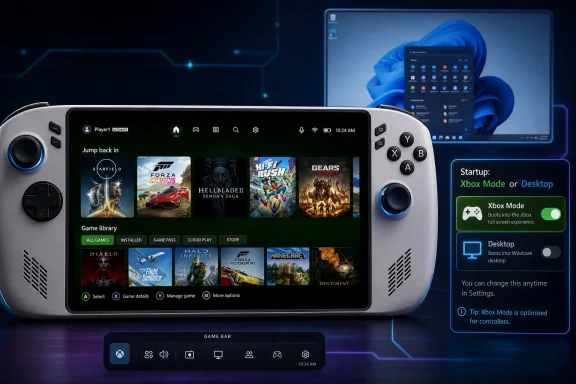
On June 28, 2026, Paul Thurrott surfaced a Windows 11 Field Guide entry showing Xbox Mode settings that let supported PCs boot into a controller-first Xbox interface instead of the traditional desktop. The screenshot is small news, but the implication is not: Microsoft is turning the Windows shell into a choice rather than a given. For PC gamers, handheld owners, and administrators, Xbox Mode is less a new app than a signal that Windows is becoming a multi-personality operating system.
For decades, Windows has carried an assumption so basic that it rarely needed saying: the desktop is home. You boot, Explorer loads, the taskbar appears, and everything else is an application living under that familiar regime. Xbox Mode challenges that assumption by treating the desktop as one possible destination, not the natural center of gravity.
That matters because gaming handhelds exposed a truth Microsoft could avoid on laptops and desktops. Windows is powerful, compatible, and familiar, but it is awkward when the primary input is a controller and the screen is held two feet from your face. The Steam Deck did not beat Windows handhelds because Linux is inherently friendlier to consumers; it beat them because Valve hid the operating system until the user actually needed it.
Microsoft’s answer is not to abandon Windows. It is to bury the parts of Windows that feel like Windows when they get in the way. Xbox Mode is the company’s attempt to create a console-like front door while preserving the messy, valuable, backward-compatible PC underneath.
That tension is the whole story. A true console is curated, locked down, and predictable. A Windows PC is open, configurable, and occasionally maddening. Xbox Mode tries to make the second thing feel like the first without sacrificing the reasons people buy gaming PCs in the first place.
That distinction is especially important for devices like the ROG Xbox Ally and similar Windows handhelds. These machines are sold in the emotional category of consoles, but they inherit the operational baggage of PCs. They need firmware updates, graphics drivers, storefronts, launchers, overlays, background services, account sign-ins, and occasional troubleshooting rituals that no console buyer expects to perform.
The home app setting is Microsoft admitting that the first thing a player sees is part of the product. If the first experience is the Windows desktop at 7 inches, with taskbar icons, pop-ups, and tiny hit targets, the device feels compromised before a game ever launches. If the first experience is a full-screen Xbox interface, Microsoft at least gets to frame the device on its own terms.
This is also why the feature should not be dismissed as “just Big Picture mode.” Steam Big Picture is an app-level interface. Xbox Mode is closer to a shell-level preference, even if it remains inseparable from Windows. The difference is subtle on a desktop monitor, but on a handheld it changes whether Windows feels like the host or the intruder.
Xbox Mode gives Microsoft a chance to standardize the part of the experience OEMs could never fix alone. A handheld should wake, present games, respect controller input, and get out of the way. That sounds simple until Windows Update, third-party launchers, cloud sync tools, GPU utilities, notification systems, and anti-cheat software all insist on having their say.
Microsoft’s genius and curse is compatibility. The same openness that lets a Windows handheld run Steam, Epic, Battle.net, GOG, emulators, mods, productivity apps, and niche utilities also makes it harder to deliver the clean appliance feeling of a Nintendo Switch or Xbox Series X. Xbox Mode is a managed compromise, not a magic eraser.
The best version of this idea does not pretend the underlying PC is gone. It simply delays the confrontation. Let the player browse a unified library, launch a game, use Game Bar, and return to the couch interface without seeing the desktop unless something actually requires it.
That is a sensible strategy because Windows does not need to become SteamOS to compete with it. Windows needs to stop forcing every gaming session to begin as a miniature sysadmin exercise.
An aggregated library is only as good as its ability to launch the game and keep the user in flow. If opening a title summons another launcher, another login prompt, another update dialog, or a desktop-only configuration tool, the console illusion breaks. Xbox Mode can reduce friction at the front end, but it cannot force every PC game to behave like an Xbox title.
That is why Microsoft’s long-term bet has to involve developers as much as users. The company has been pairing Xbox Mode with broader Windows gaming work: DirectStorage improvements, shader delivery work, Xbox Play Anywhere expansion, Arm compatibility efforts, and developer tooling. The interface is the visible layer. The harder project is making the ecosystem predictable enough that the interface does not constantly apologize for what sits beneath it.
There is a familiar Microsoft pattern here. The company often begins with a user-facing surface and then slowly tries to align the platform beneath it. Sometimes that works, as with Windows security baselines becoming less optional over time. Sometimes it produces a confusing middle state, where the new experience exists but the old assumptions keep leaking through.
Xbox Mode currently lives in that middle state. It is promising because it recognizes the problem. It is limited because recognition is not the same thing as control.
In consumer gaming, a full-screen shell is a feature. In shared environments, education labs, esports venues, kiosks, and enterprise-adjacent devices, it becomes a policy surface. Who can enable it? Can it be disabled through management tools? Does it alter startup behavior in ways that affect support workflows? How cleanly can a technician get back to the desktop when something breaks?
Those questions do not make Xbox Mode a bad idea. They make it a Windows idea. Every consumer convenience eventually becomes an administrative consideration because Windows lives everywhere from bedrooms to boardrooms. Microsoft can pitch Xbox Mode to players, but IT pros will still evaluate it as another layer that might need governance.
There is also the question of identity. Windows 11 has spent years trying to simplify itself, then complicating itself again through widgets, Copilot entry points, account nudges, Teams integrations, Edge promotions, and shifting settings panels. Xbox Mode moves in the opposite direction by removing noise for a specific context. Ironically, it may be one of the more disciplined Windows experiences Microsoft has shipped lately.
The risk is that Microsoft cannot resist turning it into another promotional surface. A console-like interface that prioritizes the user’s library is useful. A console-like interface crowded with subscriptions, ads, quests, reward prompts, and storefront merchandising will feel like the living-room version of the very Windows clutter it was meant to escape.
This is not the same as the Surface model, where Microsoft built reference hardware to shame or inspire OEMs. The handheld gaming PC market already existed, and it was already proving that Windows compatibility could sell devices despite Windows usability. Microsoft’s intervention is less about inventing the category than preventing another company from defining the category around a non-Windows experience.
Valve already demonstrated the danger. SteamOS makes the Steam Deck feel like a console while retaining enough PC flexibility for enthusiasts. It also gives Valve a platform position Microsoft cannot fully control. Every Windows handheld that ships with a clumsy desktop-first experience strengthens the argument for SteamOS or another Linux-based gaming shell.
Xbox Mode is therefore defensive and offensive at the same time. It defends Windows’ role in PC gaming by making Windows less visible when appropriate. It also advances Xbox as a cross-device identity that is no longer confined to a console under the television.
The interesting part is that Microsoft’s most credible Xbox handheld strategy may not be an Xbox handheld at all. It may be Windows devices that can behave enough like Xbox devices to make the distinction less important.
A closed console can guarantee far more about the experience because the platform holder controls the hardware target, storefront, certification process, suspend behavior, update cadence, and input expectations. A Windows gaming handheld can install almost anything. That makes it more capable, but it also means the user can create combinations no platform team has fully tested.
This is where Xbox Mode needs to be honest. It should not promise that Windows handhelds are consoles. It should promise that Windows handhelds are becoming less hostile to console-like use. That is a meaningful improvement, and it avoids setting expectations Microsoft cannot meet.
For power users, the value is obvious. They can keep the desktop, install whatever they want, tweak drivers, run utilities, and still boot into a controller-friendly environment when it is time to play. For casual buyers, the value depends on whether Microsoft can keep the rough edges out of sight most of the time.
That “most of the time” is doing a lot of work. A single broken launcher, modal dialog, or controller-hostile installer can puncture the whole experience. Microsoft does not need perfection, but it does need the failure cases to feel exceptional rather than routine.
That shift could make Game Bar far more important than its reputation suggests. It can become the place where performance modes, audio routing, captures, notifications, input settings, app switching, and device-specific controls converge. On a handheld, that is not garnish. It is the difference between a usable gaming appliance and a Windows PC wearing a costume.
The challenge is restraint. Game Bar has historically felt like a collection of widgets rather than a coherent control plane. If Xbox Mode depends on it, Microsoft needs to make it fast, predictable, controller-native, and resistant to clutter. The overlay should feel like part of the device, not a floating web of optional panels.
There is also an opportunity here for OEMs. Handheld makers have built their own command centers because Windows did not provide one. A better Game Bar could give them a shared foundation while still allowing device-specific controls for TDP, fan curves, display modes, and button mapping. That would reduce duplication and make switching between Windows handhelds less disorienting.
If Microsoft gets this right, Xbox Mode will not just be a launcher. It will be the visible top of a gaming control architecture Windows has needed for years.
This gap matters because Xbox Mode is supposed to reduce friction. If enthusiasts need to check build numbers, optional update toggles, Insider rings, regional availability, and hidden feature flags, the story gets muddy fast. The people most eager to try the feature will tolerate that. The broader audience will not.
Microsoft has reasons for staged deployment. A shell-adjacent gaming mode touches enough pieces of the experience that a cautious rollout is prudent. But the company should recognize that the delivery model itself shapes perception. A console-like mode that arrives through the usual Windows fog inherits some of the frustration it is trying to solve.
Clear messaging will be as important as technical polish. Users need to know whether their device supports Xbox Mode, whether startup options are handheld-specific, whether desktops and laptops get a different experience, and what settings are expected to appear. Ambiguity invites registry hacks, third-party tools, and forum folklore.
That is not just a support problem. It is a branding problem. If Xbox Mode becomes known first as something users have to force-enable, Microsoft loses control of the story.
That does not mean the console disappears. It means the console has to coexist with devices that run PC games, console-like shells, and Windows workloads. Microsoft’s strategic problem is that it owns both Xbox and Windows, but those two worlds historically solved different problems. Xbox prioritized consistency. Windows prioritized breadth.
Xbox Mode is one of the first visible attempts to reconcile those instincts on the same device. It says the player can have a full-screen Xbox home and still drop to Windows when needed. That is not as clean as a console, but it is more flexible than one.
The payoff could be substantial. If Microsoft can persuade developers that Xbox increasingly means console plus Windows plus handhelds, Xbox Play Anywhere becomes more than a nice entitlement. It becomes the glue for a hardware ecosystem that includes living-room consoles, gaming laptops, handheld PCs, and maybe future hybrid devices.
But the danger is equally clear. If Xbox becomes too diffuse, it risks meaning everything and nothing. The brand needs a coherent experience across screens, not just a logo applied to any device that can launch the Xbox app.
On a Steam Deck, that path is usually short. Wake the device, pick a game, play. On a Windows handheld, the path can include updates, focus problems, launcher prompts, scaling weirdness, controller mismatches, and background noise. Every interruption reminds the user that they are operating a PC rather than playing a game.
Xbox Mode is designed to compress that pre-game ritual. It cannot eliminate every interruption, but it can create a default path that is calmer and more legible. That is not cosmetic. User interface is infrastructure when it determines whether people actually use the hardware as intended.
This is why the startup toggle is more important than it looks. Launching Xbox Mode manually is useful. Booting into it changes the device’s posture. It tells the user that play is the default and desktop administration is the exception.
For handhelds especially, that inversion is overdue. These devices are not tiny laptops. They are gaming systems with PC escape hatches.
That does not mean the implementation will remain clean. The Xbox app has its own commercial incentives, and Game Pass is central to Microsoft’s gaming strategy. A full-screen Xbox home will inevitably merchandise content. The question is whether it does so like a useful storefront or like a captive portal.
Users will forgive promotion if the experience is fast, stable, and respectful. They will not forgive a mode meant to reduce distractions if it becomes another surface for engagement metrics. Microsoft should be especially careful because Windows users are already sensitive to perceived encroachment in Start, Search, Edge, Widgets, and Copilot surfaces.
The company has a rare chance to make Xbox Mode feel like a subtraction rather than an addition. Less desktop friction. Fewer irrelevant notifications. Less pointer dependence. Less sense that the operating system is competing with the game for attention.
In modern Windows, subtraction is almost radical. Xbox Mode may succeed precisely to the extent that Microsoft lets it stay boring.
For enthusiasts, the immediate question is whether their device gets the full handheld-oriented behavior or only the broader PC full-screen experience. For administrators, the question is whether this becomes another consumer feature that needs policy controls. For developers, the question is whether controller-first Windows sessions become common enough to influence launcher design, input handling, and first-run flows.
The concrete implications are already visible:
Xbox Mode will not make Windows a console, and Microsoft should not pretend otherwise. Its importance is more pragmatic: it gives Windows a way to meet players in the posture they are actually using, whether that is a handheld on a couch, a laptop connected to a TV, or a desktop temporarily turned into a living-room machine. If Microsoft can keep the experience fast, quiet, and genuinely controller-first, the desktop may finally become what it should have been on gaming handhelds all along: available when needed, invisible when not.
 Microsoft Is No Longer Pretending the Desktop Fits Every Screen
For decades, Windows has carried an assumption so basic that it rarely needed saying: the desktop is home. You boot, Explorer loads, the taskbar appears, and everything else is an application living under that familiar regime. Xbox Mode challenges that assumption by treating the desktop as one possible destination, not the natural center of gravity.That matters because gaming handhelds exposed a truth Microsoft could avoid on laptops and desktops. Windows is powerful, compatible, and familiar, but it is awkward when the primary input is a controller and the screen is held two feet from your face. The Steam Deck did not beat Windows handhelds because Linux is inherently friendlier to consumers; it beat them because Valve hid the operating system until the user actually needed it.
Microsoft’s answer is not to abandon Windows. It is to bury the parts of Windows that feel like Windows when they get in the way. Xbox Mode is the company’s attempt to create a console-like front door while preserving the messy, valuable, backward-compatible PC underneath.
That tension is the whole story. A true console is curated, locked down, and predictable. A Windows PC is open, configurable, and occasionally maddening. Xbox Mode tries to make the second thing feel like the first without sacrificing the reasons people buy gaming PCs in the first place.
The Setting Is Small Because the Strategy Is Big
The settings Thurrott highlighted are straightforward: supported Xbox gaming handhelds can enter Xbox Mode on startup and choose a home app, with Xbox and Desktop presented as competing destinations. That sounds like a convenience toggle, but it represents a deeper architectural and product decision. Microsoft is giving users a first-run identity choice: is this machine a PC that plays games, or a gaming device that can become a PC?That distinction is especially important for devices like the ROG Xbox Ally and similar Windows handhelds. These machines are sold in the emotional category of consoles, but they inherit the operational baggage of PCs. They need firmware updates, graphics drivers, storefronts, launchers, overlays, background services, account sign-ins, and occasional troubleshooting rituals that no console buyer expects to perform.
The home app setting is Microsoft admitting that the first thing a player sees is part of the product. If the first experience is the Windows desktop at 7 inches, with taskbar icons, pop-ups, and tiny hit targets, the device feels compromised before a game ever launches. If the first experience is a full-screen Xbox interface, Microsoft at least gets to frame the device on its own terms.
This is also why the feature should not be dismissed as “just Big Picture mode.” Steam Big Picture is an app-level interface. Xbox Mode is closer to a shell-level preference, even if it remains inseparable from Windows. The difference is subtle on a desktop monitor, but on a handheld it changes whether Windows feels like the host or the intruder.
Windows Handhelds Needed a Front Door, Not Another Launcher
The Windows handheld market has been full of good hardware trapped behind bad first impressions. ASUS, Lenovo, MSI, and others have built capable devices, but each has had to bolt its own launcher, control panel, and performance overlay onto an operating system designed primarily for keyboard, mouse, and touch. The result is a stack of partial solutions, none of which owns the experience completely.Xbox Mode gives Microsoft a chance to standardize the part of the experience OEMs could never fix alone. A handheld should wake, present games, respect controller input, and get out of the way. That sounds simple until Windows Update, third-party launchers, cloud sync tools, GPU utilities, notification systems, and anti-cheat software all insist on having their say.
Microsoft’s genius and curse is compatibility. The same openness that lets a Windows handheld run Steam, Epic, Battle.net, GOG, emulators, mods, productivity apps, and niche utilities also makes it harder to deliver the clean appliance feeling of a Nintendo Switch or Xbox Series X. Xbox Mode is a managed compromise, not a magic eraser.
The best version of this idea does not pretend the underlying PC is gone. It simply delays the confrontation. Let the player browse a unified library, launch a game, use Game Bar, and return to the couch interface without seeing the desktop unless something actually requires it.
That is a sensible strategy because Windows does not need to become SteamOS to compete with it. Windows needs to stop forcing every gaming session to begin as a miniature sysadmin exercise.
The Console Dream Still Runs Into PC Reality
Microsoft’s marketing around Xbox Mode emphasizes immersion, controller navigation, aggregated libraries, and fewer background distractions. Those are all real benefits, but they also invite an obvious caveat: the PC gaming ecosystem is not a single ecosystem. It is a federation of stores, launchers, anti-cheat systems, cloud saves, overlays, DRM models, and update mechanisms that do not always behave politely.An aggregated library is only as good as its ability to launch the game and keep the user in flow. If opening a title summons another launcher, another login prompt, another update dialog, or a desktop-only configuration tool, the console illusion breaks. Xbox Mode can reduce friction at the front end, but it cannot force every PC game to behave like an Xbox title.
That is why Microsoft’s long-term bet has to involve developers as much as users. The company has been pairing Xbox Mode with broader Windows gaming work: DirectStorage improvements, shader delivery work, Xbox Play Anywhere expansion, Arm compatibility efforts, and developer tooling. The interface is the visible layer. The harder project is making the ecosystem predictable enough that the interface does not constantly apologize for what sits beneath it.
There is a familiar Microsoft pattern here. The company often begins with a user-facing surface and then slowly tries to align the platform beneath it. Sometimes that works, as with Windows security baselines becoming less optional over time. Sometimes it produces a confusing middle state, where the new experience exists but the old assumptions keep leaking through.
Xbox Mode currently lives in that middle state. It is promising because it recognizes the problem. It is limited because recognition is not the same thing as control.
The Desktop Becomes a Mode, and That Will Make Some People Nervous
For enthusiasts, the idea of choosing between Xbox and Desktop as the home experience can feel liberating. For administrators and security teams, it raises a different set of questions. If Windows supports multiple shell-like environments aimed at different usage patterns, organizations will want to know how those modes are managed, audited, restricted, and updated.In consumer gaming, a full-screen shell is a feature. In shared environments, education labs, esports venues, kiosks, and enterprise-adjacent devices, it becomes a policy surface. Who can enable it? Can it be disabled through management tools? Does it alter startup behavior in ways that affect support workflows? How cleanly can a technician get back to the desktop when something breaks?
Those questions do not make Xbox Mode a bad idea. They make it a Windows idea. Every consumer convenience eventually becomes an administrative consideration because Windows lives everywhere from bedrooms to boardrooms. Microsoft can pitch Xbox Mode to players, but IT pros will still evaluate it as another layer that might need governance.
There is also the question of identity. Windows 11 has spent years trying to simplify itself, then complicating itself again through widgets, Copilot entry points, account nudges, Teams integrations, Edge promotions, and shifting settings panels. Xbox Mode moves in the opposite direction by removing noise for a specific context. Ironically, it may be one of the more disciplined Windows experiences Microsoft has shipped lately.
The risk is that Microsoft cannot resist turning it into another promotional surface. A console-like interface that prioritizes the user’s library is useful. A console-like interface crowded with subscriptions, ads, quests, reward prompts, and storefront merchandising will feel like the living-room version of the very Windows clutter it was meant to escape.
The ROG Xbox Ally Is the Test Case Microsoft Could Not Build Alone
The ROG Xbox Ally line gave Microsoft something it has lacked since the early Surface experiments: a hardware story that justifies operating system change. Microsoft did not need to manufacture the handheld itself to use it as a forcing function. By partnering with ASUS, it gained a real device category where Windows’ weaknesses were obvious and the payoff for fixing them was immediate.This is not the same as the Surface model, where Microsoft built reference hardware to shame or inspire OEMs. The handheld gaming PC market already existed, and it was already proving that Windows compatibility could sell devices despite Windows usability. Microsoft’s intervention is less about inventing the category than preventing another company from defining the category around a non-Windows experience.
Valve already demonstrated the danger. SteamOS makes the Steam Deck feel like a console while retaining enough PC flexibility for enthusiasts. It also gives Valve a platform position Microsoft cannot fully control. Every Windows handheld that ships with a clumsy desktop-first experience strengthens the argument for SteamOS or another Linux-based gaming shell.
Xbox Mode is therefore defensive and offensive at the same time. It defends Windows’ role in PC gaming by making Windows less visible when appropriate. It also advances Xbox as a cross-device identity that is no longer confined to a console under the television.
The interesting part is that Microsoft’s most credible Xbox handheld strategy may not be an Xbox handheld at all. It may be Windows devices that can behave enough like Xbox devices to make the distinction less important.
Openness Is the Selling Point and the Support Burden
Microsoft repeatedly frames Xbox Mode as combining a console-inspired interface with the openness of Windows. That is the correct pitch, but it is also the product’s central contradiction. Openness gives players choice; choice gives them failure modes.A closed console can guarantee far more about the experience because the platform holder controls the hardware target, storefront, certification process, suspend behavior, update cadence, and input expectations. A Windows gaming handheld can install almost anything. That makes it more capable, but it also means the user can create combinations no platform team has fully tested.
This is where Xbox Mode needs to be honest. It should not promise that Windows handhelds are consoles. It should promise that Windows handhelds are becoming less hostile to console-like use. That is a meaningful improvement, and it avoids setting expectations Microsoft cannot meet.
For power users, the value is obvious. They can keep the desktop, install whatever they want, tweak drivers, run utilities, and still boot into a controller-friendly environment when it is time to play. For casual buyers, the value depends on whether Microsoft can keep the rough edges out of sight most of the time.
That “most of the time” is doing a lot of work. A single broken launcher, modal dialog, or controller-hostile installer can puncture the whole experience. Microsoft does not need perfection, but it does need the failure cases to feel exceptional rather than routine.
Game Bar Is Becoming the Control Room Windows Never Had
One understated piece of the Xbox Mode story is Game Bar. Long treated as a capture overlay and social widget container, Game Bar is becoming the bridge between Windows and the gaming shell. In a controller-first environment, the system overlay matters because users cannot be expected to alt-tab through desktop utilities to change basic settings.That shift could make Game Bar far more important than its reputation suggests. It can become the place where performance modes, audio routing, captures, notifications, input settings, app switching, and device-specific controls converge. On a handheld, that is not garnish. It is the difference between a usable gaming appliance and a Windows PC wearing a costume.
The challenge is restraint. Game Bar has historically felt like a collection of widgets rather than a coherent control plane. If Xbox Mode depends on it, Microsoft needs to make it fast, predictable, controller-native, and resistant to clutter. The overlay should feel like part of the device, not a floating web of optional panels.
There is also an opportunity here for OEMs. Handheld makers have built their own command centers because Windows did not provide one. A better Game Bar could give them a shared foundation while still allowing device-specific controls for TDP, fan curves, display modes, and button mapping. That would reduce duplication and make switching between Windows handhelds less disorienting.
If Microsoft gets this right, Xbox Mode will not just be a launcher. It will be the visible top of a gaming control architecture Windows has needed for years.
The Feature Rollout Shows Microsoft Still Thinks Like Windows
The rollout pattern for Xbox Mode has been very Microsoft: preview channels, select markets, gradual availability, feature gates, and settings that appear for some users before others. That is normal for Windows, but it sits awkwardly against the console-like promise. Console users expect features to arrive clearly. Windows users have been trained to wonder whether a missing feature is a region issue, update issue, hardware issue, account issue, or staged rollout.This gap matters because Xbox Mode is supposed to reduce friction. If enthusiasts need to check build numbers, optional update toggles, Insider rings, regional availability, and hidden feature flags, the story gets muddy fast. The people most eager to try the feature will tolerate that. The broader audience will not.
Microsoft has reasons for staged deployment. A shell-adjacent gaming mode touches enough pieces of the experience that a cautious rollout is prudent. But the company should recognize that the delivery model itself shapes perception. A console-like mode that arrives through the usual Windows fog inherits some of the frustration it is trying to solve.
Clear messaging will be as important as technical polish. Users need to know whether their device supports Xbox Mode, whether startup options are handheld-specific, whether desktops and laptops get a different experience, and what settings are expected to appear. Ambiguity invites registry hacks, third-party tools, and forum folklore.
That is not just a support problem. It is a branding problem. If Xbox Mode becomes known first as something users have to force-enable, Microsoft loses control of the story.
This Is Also About the Next Xbox
Xbox Mode should be read alongside Microsoft’s broader next-generation Xbox strategy. The company has been increasingly explicit that the boundary between console and PC is becoming porous. Project Helix, Xbox Play Anywhere expansion, PC Game Pass, cloud streaming, and Windows gaming improvements all point in the same direction: Xbox is becoming an experience layer across hardware rather than a single box.That does not mean the console disappears. It means the console has to coexist with devices that run PC games, console-like shells, and Windows workloads. Microsoft’s strategic problem is that it owns both Xbox and Windows, but those two worlds historically solved different problems. Xbox prioritized consistency. Windows prioritized breadth.
Xbox Mode is one of the first visible attempts to reconcile those instincts on the same device. It says the player can have a full-screen Xbox home and still drop to Windows when needed. That is not as clean as a console, but it is more flexible than one.
The payoff could be substantial. If Microsoft can persuade developers that Xbox increasingly means console plus Windows plus handhelds, Xbox Play Anywhere becomes more than a nice entitlement. It becomes the glue for a hardware ecosystem that includes living-room consoles, gaming laptops, handheld PCs, and maybe future hybrid devices.
But the danger is equally clear. If Xbox becomes too diffuse, it risks meaning everything and nothing. The brand needs a coherent experience across screens, not just a logo applied to any device that can launch the Xbox app.
The Real Competition Is the Five Minutes Before the Game Starts
Platform debates often obsess over frame rates, teraflops, GPU architectures, and store policies. Those matter, but Xbox Mode is fighting a more mundane battle: the first five minutes before the game starts. That is where users decide whether a device feels delightful or exhausting.On a Steam Deck, that path is usually short. Wake the device, pick a game, play. On a Windows handheld, the path can include updates, focus problems, launcher prompts, scaling weirdness, controller mismatches, and background noise. Every interruption reminds the user that they are operating a PC rather than playing a game.
Xbox Mode is designed to compress that pre-game ritual. It cannot eliminate every interruption, but it can create a default path that is calmer and more legible. That is not cosmetic. User interface is infrastructure when it determines whether people actually use the hardware as intended.
This is why the startup toggle is more important than it looks. Launching Xbox Mode manually is useful. Booting into it changes the device’s posture. It tells the user that play is the default and desktop administration is the exception.
For handhelds especially, that inversion is overdue. These devices are not tiny laptops. They are gaming systems with PC escape hatches.
The Settings Screenshot Says the Quiet Part Out Loud
The most revealing part of the Xbox Mode settings is the plainness of the choice. Xbox or Desktop. Startup into Xbox Mode or do not. Microsoft has spent years layering Windows with experiences that appear opportunistically, promote services, or blur the line between feature and advertisement. Here, at least, the decision is concrete.That does not mean the implementation will remain clean. The Xbox app has its own commercial incentives, and Game Pass is central to Microsoft’s gaming strategy. A full-screen Xbox home will inevitably merchandise content. The question is whether it does so like a useful storefront or like a captive portal.
Users will forgive promotion if the experience is fast, stable, and respectful. They will not forgive a mode meant to reduce distractions if it becomes another surface for engagement metrics. Microsoft should be especially careful because Windows users are already sensitive to perceived encroachment in Start, Search, Edge, Widgets, and Copilot surfaces.
The company has a rare chance to make Xbox Mode feel like a subtraction rather than an addition. Less desktop friction. Fewer irrelevant notifications. Less pointer dependence. Less sense that the operating system is competing with the game for attention.
In modern Windows, subtraction is almost radical. Xbox Mode may succeed precisely to the extent that Microsoft lets it stay boring.
The Practical Read for Windows Enthusiasts and IT Pros
The useful way to think about Xbox Mode is not as a single feature but as a new boot posture for Windows gaming devices. It changes expectations about input, shell, startup behavior, and support. It also creates a cleaner dividing line between leisure-first and productivity-first use on the same hardware.For enthusiasts, the immediate question is whether their device gets the full handheld-oriented behavior or only the broader PC full-screen experience. For administrators, the question is whether this becomes another consumer feature that needs policy controls. For developers, the question is whether controller-first Windows sessions become common enough to influence launcher design, input handling, and first-run flows.
The concrete implications are already visible:
- Windows 11 gaming handhelds are becoming more credible as console-like devices because they can start in a controller-first Xbox environment rather than the desktop.
- Desktop and laptop users should treat Xbox Mode as an optional lean-back interface, not as a performance cure-all or a replacement for normal Windows gaming workflows.
- Microsoft’s biggest challenge is not launching the Xbox app full screen, but keeping third-party launchers, updates, dialogs, and overlays from breaking the illusion.
- IT teams should expect startup shell choices and gaming-focused full-screen modes to become management questions wherever Windows gaming devices are shared or supported.
- Developers and storefront owners should assume controller-first PC sessions will become more common and make their launchers, sign-in flows, and error dialogs usable without a mouse.
- Microsoft needs to keep Xbox Mode disciplined, because a cluttered, promotional full-screen home would undermine the very reason the mode exists.
Xbox Mode will not make Windows a console, and Microsoft should not pretend otherwise. Its importance is more pragmatic: it gives Windows a way to meet players in the posture they are actually using, whether that is a handheld on a couch, a laptop connected to a TV, or a desktop temporarily turned into a living-room machine. If Microsoft can keep the experience fast, quiet, and genuinely controller-first, the desktop may finally become what it should have been on gaming handhelds all along: available when needed, invisible when not.
References
- Primary source: thurrott.com
Published: 2026-06-29T02:10:14.245466
xbox-mode-settings - Thurrott.com
 www.thurrott.com
- Related coverage: windowslatest.com
Tested: First look at the new Xbox Mode for Windows 11 PCs with console-style gaming UI
Microsoft confirms Xbox Mode for Windows 11 PCs coming in 2026, and I tested the new console-style gaming interface on a Windows PC www.windowslatest.com
- Related coverage: notebookcheck.net
Xbox mode is now live on Windows 11 - Notebookcheck News
Xbox mode is now live on Windows 11 via optional update KB5083631, bringing a controller-first full-screen gaming interface to desktops, laptops, and handhelds. www.notebookcheck.net
- Related coverage: tomshardware.com
Microsoft's new handheld gaming mode, exclusive to ROG Xbox Ally, has just leaked for every handheld running Windows 11 — all you need is the 25H2 update and a few registry tweaks | Tom's Hardware
The full-screen Xbox experience is no longer exclusive.www.tomshardware.com - Related coverage: windowscentral.com
We ran the new Windows 11 Xbox Mode on the old ROG Ally | Windows Central
Microsoft's new handheld gaming mode for Windows 11 is launching first on the upcoming Xbox Ally and Xbox Ally X, but it will be coming to all gaming handhelds eventually. Here's a first look at the experience running on an original ROG Ally.www.windowscentral.com - Related coverage: arstechnica.com
Windows 11's Steam Deck-ish, streamlined Xbox gaming UI comes to all PCs in April - Ars Technica
Running Windows on gaming handhelds is currently a blessing and a curse.arstechnica.com
- Related coverage: news.xbox.com
Welcome to Your New ROG Xbox Ally: Essential Tips for Getting Started - XBOX Wire
Picking up a new ROG Xbox Ally or ROG Xbox Ally X? To help you hit the ground running, we’ve pulled together some must-know tips to make the most out of your new handheld.news.xbox.com - Related coverage: fdaytalk.com
How to Enable Xbox Mode in Windows 11
Learn how to enable Xbox Mode in Windows 11 by installing KB5083631 or using ViVeTool to force-enable the feature flag and get full controller gaming experiencewww.fdaytalk.com - Related coverage: xboxera.com
Xbox's 'Handheld Mode' Available to install on any Current Windows Handheld | DayOne
One little bit of 3rd party program assistance and some 'regedit' later, Microsoft's Xbox Handheld Mode - or the 'Xbox Full Screen Experience' was ready to go.xboxera.com - Related coverage: digitaltrends.com
Xbox-style handheld mode is rolling out on Windows 11, and you can try it now - Digital Trends
Microsoft is expanding Windows 11’s full screen experience for handhelds, starting with ASUS ROG Ally models and rolling to MSI Claw. Paired with the Xbox app, it brings a cleaner, console-style launcher to portable PCs.www.digitaltrends.com - Related coverage: techradar.com
If you're wondering why Microsoft's Xbox mode is still missing after installing the latest Windows 11 update, here's why | TechRadar
Hopefully, the rollout will be completed soonwww.techradar.com - Related coverage: hothardware.com
Xbox Mode Arrives on Windows 11 PCs for Console-Style Gaming | HotHardware
Xbox Mode is rolling out to Windows 11 PCs, bringing a full console-style home screen, unified game library, and controller-first navigation to desktops.hothardware.com
- Related coverage: pcgamer.com
The new 'Xbox mode' for Windows 11 has arrived, but don't get your hopes up for performance improvements: it's just a new UI | PC Gamer
The "dedicated gaming experience" for WIndows 11 is now rolling out in "select markets."www.pcgamer.com - Related coverage: tomsguide.com
The Xbox Full Screen Experience just arrived on all Windows handhelds — here's how to enable it | Tom's Guide
Microsoft quietly announced that all Windows-based handheld consoles will get the Xbox Full Screen Experience starting November 21.www.tomsguide.com - Official source: blogs.windows.com
GDC 2026: Announcing new tools and platform updates for Windows PC game developers
Our focus is clear: making Windows 11 the best place for game developers to create, experiment, ship and scale. Windows is an open, flexible platform that supports choice across engines, tools, hardware and distribution models. That commitment is rooblogs.windows.com
