

Microsoft began rolling out Xbox Mode for Windows 11 PCs on April 30, 2026, bringing a controller-optimized, full-screen Xbox-style interface to laptops, desktops, tablets, and handhelds in select markets before a wider staged expansion over the next several weeks. The feature is not Windows becoming an Xbox, and it is not PC gaming being shoved into a console box. It is something more strategically interesting: Microsoft is trying to make the Windows gaming layer feel like a product in its own right. For a company that has spent decades treating the desktop as the inevitable starting point for everything, that is a meaningful shift.
The Windows desktop is extraordinarily good at being a computer interface. It is also, in the living room, a spectacularly awkward way to start a game.
That contradiction has haunted PC gaming for years. A high-end Windows machine can outperform a console, run a wider range of games, support more input devices, accept mods, juggle multiple storefronts, and remain useful for work after the match ends. But the moment it is connected to a TV and controlled from a sofa, its advantages often disappear behind tiny text, launcher pop-ups, login boxes, update prompts, mouse-only dialogs, and the eternal indignity of reaching for a wireless keyboard just to click “Play.”
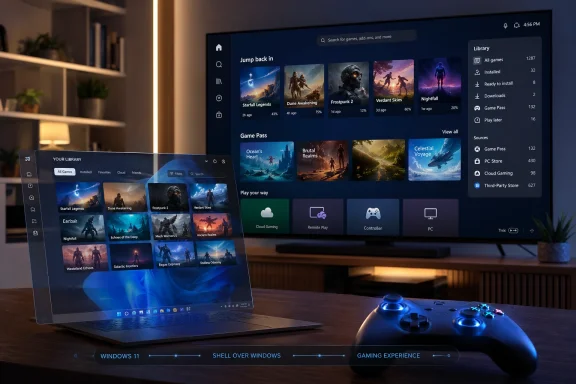
Xbox Mode is Microsoft’s latest attempt to paper over that mismatch. It gives Windows 11 a full-screen, controller-first gaming interface inspired by the Xbox console dashboard, with recently played titles, library browsing, Game Pass access, installed games from other PC storefronts, Game Bar integration, and a route back to the normal desktop when needed.
That sounds straightforward because, conceptually, it is. Steam’s Big Picture Mode has existed for years. Handheld vendors have shipped their own overlays. Console dashboards solved this category of interface problem long ago. The importance of Xbox Mode is not that Microsoft has invented a new idea, but that it is now trying to make that idea a native, branded, system-level part of the Windows gaming story.
This is Microsoft conceding that “Windows can do anything” is not enough. Sometimes a platform needs to know what the user is trying to do and get everything else out of the way.
It is better understood as a gaming shell layered over Windows 11. The normal operating system remains underneath, but the user is presented with an Xbox-like environment designed around a controller rather than a mouse and keyboard. Microsoft says players can browse and launch games, switch between Xbox Mode and the desktop, use Game Bar, and access an aggregated library that includes Game Pass titles and installed games from major PC storefronts.
That distinction matters because much of the early reaction to the rollout has treated Xbox Mode as either a miracle or a disappointment. It is neither. It is not a console OS transplanted onto commodity PC hardware. It is the Xbox app, Game Bar, Windows update plumbing, and Microsoft’s PC gaming services moving toward a more coherent front end.
The branding is doing a lot of work here. The earlier name, “full screen experience,” sounded like a settings panel escaped from a Windows Insider build. “Xbox Mode” is clearer, more marketable, and more revealing. Microsoft wants users to think of Xbox less as a plastic box under the TV and more as a software experience that can appear on a console, a handheld, a Windows laptop, a desktop tower, a cloud session, or a TV app.
That is the real strategic bet. Xbox Mode is not the death of the console. It is the dilution of the console into a service layer.
That staged rollout is not just corporate caution. It reflects the scale of the problem Microsoft is trying to solve. Windows 11 PCs are not consoles. They vary wildly in CPU, GPU, display configuration, controller setup, storefront mix, driver state, firmware quality, power profile, and user expectations.
On an Xbox console, Microsoft controls the hardware, the dashboard, the store, the input model, the update cadence, the certification pipeline, and the basic performance envelope. On Windows, Microsoft controls the operating system and a few major services, but the actual gaming environment is an unruly federation of Steam, Epic Games Store, Battle.net, GOG, Ubisoft Connect, EA’s app, vendor utilities, GPU control panels, RGB software, anti-cheat drivers, Discord overlays, capture tools, and whatever the motherboard vendor decided needed to launch at startup.
That is why the promise of “minimizing background distractions” is more complicated than it sounds. A full-screen interface can hide the desktop, but it cannot magically make every launcher controller-friendly or every update prompt behave like a console notification. It can reduce friction, but it cannot repeal the nature of the PC.
Still, even reducing friction is valuable. Most living-room PC failures are not catastrophic; they are cumulative. One login dialog here, one launcher update there, one game that opens on the wrong monitor, one controller that works in the shell but not in the installer, and suddenly the theoretically superior PC feels less convenient than a $500 console.
Xbox Mode is Microsoft trying to make the first five minutes of PC gaming less embarrassing.
Devices such as the ROG Ally, Lenovo Legion Go, MSI Claw, and later Xbox-branded handheld efforts have made one thing painfully clear: Windows has the game compatibility handheld makers want, but not the handheld interface users expect. A desktop operating system on a seven-inch screen is survivable for enthusiasts and exhausting for everyone else.
Microsoft’s own Xbox Wire post points back to lessons from Windows handhelds, where the full-screen experience first appeared before being expanded to more Windows 11 devices. That history matters. Xbox Mode is not being designed first for the traditional desk-bound PC gamer with a keyboard, mouse, and 27-inch monitor. It is being designed for the emerging category of Windows devices that want to behave more like consoles without giving up PC compatibility.
Handhelds are the stress test because they remove the desktop’s usual excuses. On a laptop, awkward Windows interactions can be solved by reaching for the trackpad. On a desktop, a keyboard is always nearby. On a handheld, every non-controller-optimized moment feels like a design failure.
That same lesson applies to the living room. Once a Windows PC is connected to a TV, the user’s tolerance changes. They are no longer “using a PC”; they are trying to play a game. The OS is no longer the environment. It is an obstacle.
Xbox Mode is the handheld lesson scaled up to laptops, desktops, tablets, and TV-connected PCs. Microsoft is not merely adding a convenience feature. It is responding to a hardware category that made the old Windows gaming model look unfinished.
Valve then went further with SteamOS and the Steam Deck. The Deck’s success was not just about price, performance, or Proton compatibility. It was about the feeling that the system had a default gaming posture. You press the button, see your library, resume your game, adjust performance, sleep the device, wake it again, and rarely remember that a PC-like stack is underneath.
Windows handhelds have often had stronger raw compatibility, especially for games with anti-cheat systems or launchers that do not play nicely with Linux. But compatibility is only one dimension of usability. The Steam Deck proved that a coherent console-like experience could outweigh some of the messiness PC gamers have historically accepted as the cost of freedom.
Microsoft is now trying to close that experience gap without abandoning Windows. That is harder than Valve’s problem in some ways and easier in others. Microsoft has the dominant PC gaming OS, a major subscription service, the Xbox brand, first-party studios, DirectX, Game Bar, and deep relationships with OEMs. It also has decades of legacy behavior, system complexity, enterprise constraints, and user distrust around Windows updates.
Xbox Mode is therefore less elegant than SteamOS by design. It must coexist with the full Windows desktop, third-party stores, vendor control panels, and every bizarre configuration PC users have assembled. The prize, if Microsoft can make it work, is enormous: a console-style UX without asking players to leave the Windows software universe.
That is why this rollout matters even if the first version feels modest. Microsoft is not just competing with Sony and Nintendo here. It is competing with Valve for the default interface of PC gaming.
That is important because the PC gaming library is no longer a library. It is an archaeological dig.
A typical Windows gamer may have games scattered across Steam, Epic, GOG, Battle.net, Ubisoft Connect, EA, the Microsoft Store, itch.io, standalone installers, emulators, and launchers they installed for one game and forgot. The friction is not only launching those games. It is remembering where they live.
Microsoft’s pitch is that Xbox Mode can be the front door. Not the only store, not the only entitlement system, not the only launcher, but the place where the player begins. That is a subtler and potentially more powerful strategy than trying to force every game into the Microsoft Store.
If Microsoft can make the Xbox interface the most convenient way to start PC games, it gains influence without requiring full ownership. It can present Game Pass alongside Steam purchases. It can make Xbox social features more visible. It can turn Game Bar into an expected part of the play session. It can make “Xbox on PC” feel less like an app and more like the default gaming surface of Windows.
The danger is obvious. If the aggregated library is incomplete, slow, ugly, or too eager to promote Microsoft’s own services, users will route around it. PC gamers have a finely tuned intolerance for front ends that feel like advertising panels. A library hub succeeds only if it respects the user’s actual library, not the library Microsoft wishes they had.
Xbox Mode is aimed at controller-first scenarios, not at replacing desktop gaming. Microsoft is explicitly preserving the ability to jump back to the Windows desktop. For a user sitting at a desk with a mouse, keyboard, ultrawide monitor, Discord window, browser tabs, mod manager, and hardware monitoring overlay, Xbox Mode may be irrelevant most of the time.
That is fine. Not every Windows feature needs to serve every Windows user equally. The operating system is mature enough to support multiple postures: productivity workstation, gaming handheld, couch console, creator rig, school laptop, enterprise endpoint, and experimental mess.
The better critique is not that Xbox Mode exists, but that Microsoft must avoid letting its assumptions bleed into places they do not belong. PC gaming thrives because it supports multiple control schemes and workflows. A controller-first shell should make controller play better without making the desktop feel like an afterthought.
There is also a cultural distinction. Console interfaces generally assume the user wants fewer choices presented more cleanly. PC interfaces assume the user may want every option, including the dangerous ones. Xbox Mode will need to balance those instincts carefully. Hide too much and enthusiasts will call it toy-like. Expose too much and the living-room promise collapses.
Microsoft’s best move is to treat Xbox Mode as an optional posture rather than a crusade. The feature will succeed if users feel they can enter and leave it naturally. It will fail if it feels like Windows is trying to herd gamers into a branded corral.
Microsoft and its partners have talked about reducing background activity and making the gaming experience more focused. In handheld contexts, vendors have also highlighted memory savings, better power behavior, and optimized profiles. On April 30, Microsoft’s ROG Xbox Ally update discussed related improvements such as docked display behavior, Game Bar display controls, automatic TV gaming features, Auto Super Resolution preview work, and more than 1,000 PC games tuned through handheld compatibility efforts.
That broader context is important because Xbox Mode alone cannot carry the weight of Windows gaming optimization. A prettier shell is welcome, but users will judge the feature by practical outcomes: Does the controller work everywhere it should? Does the game launch reliably? Does the system avoid random focus theft? Does the wrong monitor stop taking over? Does sleep and resume behave better? Does the device use fewer resources when in gaming mode? Does it feel less like Windows is muttering in the background?
The line between interface and operating system behavior is where Microsoft has the most work to do. A console dashboard is not only a menu. It is a set of expectations about latency, stability, update timing, input consistency, and recovery from errors.
Windows has historically failed many of those expectations because Windows is designed to be general-purpose. That generality is its strength, but gaming users increasingly expect more specialized behavior when the machine is clearly being used as a gaming device.
Xbox Mode can become meaningful if it is the visible tip of a deeper mode switch: fewer interruptions, smarter power profiles, better display handling, controller-first recovery paths, and tighter integration with hardware capabilities. If it remains mostly an Xbox app full-screen view, it will be useful but limited.
The PC gaming market does not belong to Microsoft in the way the Xbox console market does. Steam remains the default purchasing and library platform for many players. Epic has spent years buying its way into relevance. Publishers have their own launchers for commercial and data reasons. Microsoft cannot simply declare Xbox the one true PC gaming interface and expect users to comply.
So Xbox Mode takes a more pragmatic route. It offers aggregation rather than replacement. It tells users they can bring their existing library and still get a controller-friendly Xbox-like experience.
That is the right pitch. It is also one that will be judged by how neutral the interface feels. If Steam games appear cleanly, launch predictably, and can be managed without hassle, users may accept Xbox Mode as a convenience layer. If non-Microsoft games feel second-class, the whole thing will smell like a store strategy wearing a UX costume.
The issue becomes sharper with Game Pass. Microsoft has a strong incentive to keep subscription titles prominent, because Game Pass is central to Xbox’s future. But a living-room launcher that constantly nudges users toward a subscription can quickly become hostile. The best version of Xbox Mode is one where Game Pass is valuable because it is present and easy, not because everything else is buried.
This is where Microsoft’s Xbox and Windows instincts may collide. Xbox wants a curated, branded ecosystem. Windows succeeds when it enables the messy ecosystem that already exists. Xbox Mode has to satisfy both without being captured by either.
But any new Windows experience that arrives through updates, touches the Xbox app, interacts with Game Bar, and encourages users to enable early update availability deserves at least a passing glance from IT departments. The immediate concern is not that Xbox Mode will invade managed fleets overnight. The concern is policy clarity.
Many organizations already remove or restrict Xbox components, Game Bar, consumer Microsoft Store access, and gaming features. Others tolerate them on mixed-use devices. Schools, small businesses, BYOD environments, and creative studios may have a more ambiguous relationship with Windows gaming components than a locked-down enterprise tenant would.
Microsoft’s gradual rollout helps here, but communication matters. Admins need predictable controls, clear documentation, and no surprises. If Xbox Mode remains a consumer-facing feature that respects existing management policies, it will barely register. If it appears unexpectedly on shared devices or becomes another thing to suppress in golden images, it will join the long list of Windows consumer experiences that enterprise IT has to swat away.
There is a broader lesson, too. Windows 11 increasingly behaves less like a monolithic OS and more like a stack of experiences that can appear, update, and evolve semi-independently. That is good for consumer feature velocity. It is less comfortable for administrators who prize stability and repeatability.
Xbox Mode is unlikely to be a major enterprise problem. But it is another reminder that the Windows endpoint is no longer just the operating system image you deployed. It is a moving target of apps, services, cloud-delivered features, and staged rollouts.
For years, the console business was organized around boxes. You bought a PlayStation, Xbox, or Nintendo system, and that purchase determined the store, interface, services, accessories, and game compatibility you lived with. Microsoft still sells consoles, but its strategy has shifted toward making Xbox available across more screens: PC, cloud, mobile, TVs, handhelds, and traditional hardware.
Xbox Mode fits that shift perfectly. It is an Xbox experience on a non-Xbox device. It makes the Windows PC a little more console-like without sacrificing the PC’s broader capabilities. It also prepares users for a future in which “Xbox” may refer less to a specific machine and more to a unified gaming environment across different hardware classes.
That could be powerful. It could also make Xbox harder to define.
If everything is Xbox, then Xbox needs to mean something consistent. A console owner expects instant controller navigation, clean suspend and resume, predictable updates, a unified store, and games that work. A PC user expects flexibility, modding, multiple stores, adjustable settings, and hardware freedom. Xbox Mode sits between those worlds and inherits expectations from both.
This is why Microsoft’s language around choice is so important. The company is not saying Windows PCs are now consoles. It is saying players can choose a more Xbox-like way to play on Windows. That framing is smart because it avoids promising more than the feature can deliver.
But the long-term ambition is clear. Microsoft wants Xbox to be the interface layer that follows the player. The console may remain one endpoint, but not the only one and perhaps not even the primary one for every user.
But the more important advice is to calibrate expectations. Xbox Mode is a convenience and coherence play, not a magic compatibility layer. It will be most useful for controller players, Windows handheld owners, gaming laptops docked to TVs, and desktops used from the couch. It will be least compelling for traditional desk setups where Steam, Discord, a browser, and keyboard shortcuts already define the session.
The best early test is not whether Xbox Mode looks like an Xbox dashboard in screenshots. The test is whether it reduces the number of times a player has to break the illusion. Every time the user reaches for a mouse, squints at a launcher, fixes a display setting, or fights a background prompt, the console-like spell is broken.
Microsoft has enough pieces to make this work. It has the Xbox app, Game Bar, Game Pass, Windows Update, DirectX, Auto SR work, handheld compatibility programs, OEM partnerships, and an increasingly urgent reason to keep Windows relevant as gaming hardware diversifies.
The missing piece has always been discipline. Windows gaming has often felt like a pile of powerful components rather than a designed end-to-end experience. Xbox Mode is a sign Microsoft knows that is no longer good enough.
Those are the places where consoles win by being boring. They wake, pair, update, launch, and mostly stay out of the way. PC gaming wins by being powerful, open, and endlessly configurable. Xbox Mode is Microsoft’s attempt to borrow some of that console boredom without losing the PC’s unruly advantage.
That tension will define whether the feature becomes a default habit or another forgotten Windows gaming toggle. Users do not need another branded surface. They need a reliable path from controller to game.
Near-term, Xbox Mode is likely to be uneven. Some setups will feel transformed; others will reveal the same old Windows seams. But if Microsoft keeps connecting the interface to deeper platform behavior, this could become one of the more consequential Windows gaming changes in years.
Source: Tbreak Media Xbox Mode rolling out to Windows 11 PCs today | tbreak
 Microsoft Finally Admits the Desktop Is Bad at Being a Console
The Windows desktop is extraordinarily good at being a computer interface. It is also, in the living room, a spectacularly awkward way to start a game.That contradiction has haunted PC gaming for years. A high-end Windows machine can outperform a console, run a wider range of games, support more input devices, accept mods, juggle multiple storefronts, and remain useful for work after the match ends. But the moment it is connected to a TV and controlled from a sofa, its advantages often disappear behind tiny text, launcher pop-ups, login boxes, update prompts, mouse-only dialogs, and the eternal indignity of reaching for a wireless keyboard just to click “Play.”
Xbox Mode is Microsoft’s latest attempt to paper over that mismatch. It gives Windows 11 a full-screen, controller-first gaming interface inspired by the Xbox console dashboard, with recently played titles, library browsing, Game Pass access, installed games from other PC storefronts, Game Bar integration, and a route back to the normal desktop when needed.
That sounds straightforward because, conceptually, it is. Steam’s Big Picture Mode has existed for years. Handheld vendors have shipped their own overlays. Console dashboards solved this category of interface problem long ago. The importance of Xbox Mode is not that Microsoft has invented a new idea, but that it is now trying to make that idea a native, branded, system-level part of the Windows gaming story.
This is Microsoft conceding that “Windows can do anything” is not enough. Sometimes a platform needs to know what the user is trying to do and get everything else out of the way.
Xbox Mode Is a Shell, Not a Secret Console
The first thing to understand is what Xbox Mode does not do. It does not turn a Windows PC into an Xbox Series X. It does not make every Xbox console game natively playable on PC. It does not replace Windows, remove launchers, bypass DRM, or erase the compatibility mess that comes with PC gaming.It is better understood as a gaming shell layered over Windows 11. The normal operating system remains underneath, but the user is presented with an Xbox-like environment designed around a controller rather than a mouse and keyboard. Microsoft says players can browse and launch games, switch between Xbox Mode and the desktop, use Game Bar, and access an aggregated library that includes Game Pass titles and installed games from major PC storefronts.
That distinction matters because much of the early reaction to the rollout has treated Xbox Mode as either a miracle or a disappointment. It is neither. It is not a console OS transplanted onto commodity PC hardware. It is the Xbox app, Game Bar, Windows update plumbing, and Microsoft’s PC gaming services moving toward a more coherent front end.
The branding is doing a lot of work here. The earlier name, “full screen experience,” sounded like a settings panel escaped from a Windows Insider build. “Xbox Mode” is clearer, more marketable, and more revealing. Microsoft wants users to think of Xbox less as a plastic box under the TV and more as a software experience that can appear on a console, a handheld, a Windows laptop, a desktop tower, a cloud session, or a TV app.
That is the real strategic bet. Xbox Mode is not the death of the console. It is the dilution of the console into a service layer.
The Rollout Is Cautious Because the Target Is Messy
Microsoft says Xbox Mode is beginning in select markets, with availability expanding to more players in those markets over the next several weeks. Users who want the earliest access are being told to enable “Get the latest updates as soon as they are available” in Windows Update.That staged rollout is not just corporate caution. It reflects the scale of the problem Microsoft is trying to solve. Windows 11 PCs are not consoles. They vary wildly in CPU, GPU, display configuration, controller setup, storefront mix, driver state, firmware quality, power profile, and user expectations.
On an Xbox console, Microsoft controls the hardware, the dashboard, the store, the input model, the update cadence, the certification pipeline, and the basic performance envelope. On Windows, Microsoft controls the operating system and a few major services, but the actual gaming environment is an unruly federation of Steam, Epic Games Store, Battle.net, GOG, Ubisoft Connect, EA’s app, vendor utilities, GPU control panels, RGB software, anti-cheat drivers, Discord overlays, capture tools, and whatever the motherboard vendor decided needed to launch at startup.
That is why the promise of “minimizing background distractions” is more complicated than it sounds. A full-screen interface can hide the desktop, but it cannot magically make every launcher controller-friendly or every update prompt behave like a console notification. It can reduce friction, but it cannot repeal the nature of the PC.
Still, even reducing friction is valuable. Most living-room PC failures are not catastrophic; they are cumulative. One login dialog here, one launcher update there, one game that opens on the wrong monitor, one controller that works in the shell but not in the installer, and suddenly the theoretically superior PC feels less convenient than a $500 console.
Xbox Mode is Microsoft trying to make the first five minutes of PC gaming less embarrassing.
The Handheld PC Forced Microsoft’s Hand
The reason this is happening now is not hard to find. The Windows gaming handheld market exposed Windows at its weakest.Devices such as the ROG Ally, Lenovo Legion Go, MSI Claw, and later Xbox-branded handheld efforts have made one thing painfully clear: Windows has the game compatibility handheld makers want, but not the handheld interface users expect. A desktop operating system on a seven-inch screen is survivable for enthusiasts and exhausting for everyone else.
Microsoft’s own Xbox Wire post points back to lessons from Windows handhelds, where the full-screen experience first appeared before being expanded to more Windows 11 devices. That history matters. Xbox Mode is not being designed first for the traditional desk-bound PC gamer with a keyboard, mouse, and 27-inch monitor. It is being designed for the emerging category of Windows devices that want to behave more like consoles without giving up PC compatibility.
Handhelds are the stress test because they remove the desktop’s usual excuses. On a laptop, awkward Windows interactions can be solved by reaching for the trackpad. On a desktop, a keyboard is always nearby. On a handheld, every non-controller-optimized moment feels like a design failure.
That same lesson applies to the living room. Once a Windows PC is connected to a TV, the user’s tolerance changes. They are no longer “using a PC”; they are trying to play a game. The OS is no longer the environment. It is an obstacle.
Xbox Mode is the handheld lesson scaled up to laptops, desktops, tablets, and TV-connected PCs. Microsoft is not merely adding a convenience feature. It is responding to a hardware category that made the old Windows gaming model look unfinished.
Steam Big Picture Was the Warning Microsoft Ignored
It is impossible to discuss Xbox Mode without mentioning Steam Big Picture Mode. Valve identified the same problem years ago: PC gaming needed a controller-friendly, TV-first interface if it wanted to compete beyond the desk.Valve then went further with SteamOS and the Steam Deck. The Deck’s success was not just about price, performance, or Proton compatibility. It was about the feeling that the system had a default gaming posture. You press the button, see your library, resume your game, adjust performance, sleep the device, wake it again, and rarely remember that a PC-like stack is underneath.
Windows handhelds have often had stronger raw compatibility, especially for games with anti-cheat systems or launchers that do not play nicely with Linux. But compatibility is only one dimension of usability. The Steam Deck proved that a coherent console-like experience could outweigh some of the messiness PC gamers have historically accepted as the cost of freedom.
Microsoft is now trying to close that experience gap without abandoning Windows. That is harder than Valve’s problem in some ways and easier in others. Microsoft has the dominant PC gaming OS, a major subscription service, the Xbox brand, first-party studios, DirectX, Game Bar, and deep relationships with OEMs. It also has decades of legacy behavior, system complexity, enterprise constraints, and user distrust around Windows updates.
Xbox Mode is therefore less elegant than SteamOS by design. It must coexist with the full Windows desktop, third-party stores, vendor control panels, and every bizarre configuration PC users have assembled. The prize, if Microsoft can make it work, is enormous: a console-style UX without asking players to leave the Windows software universe.
That is why this rollout matters even if the first version feels modest. Microsoft is not just competing with Sony and Nintendo here. It is competing with Valve for the default interface of PC gaming.
The Aggregated Library Is the Sharpest Part of the Pitch
The most practical feature in Xbox Mode may be the aggregated library. Microsoft says the interface can surface the full Game Pass catalog alongside installed games from leading PC storefronts. Related Xbox app updates also allow users to add, remove, edit, and launch installed games and apps directly from the Xbox experience, including items from other launchers.That is important because the PC gaming library is no longer a library. It is an archaeological dig.
A typical Windows gamer may have games scattered across Steam, Epic, GOG, Battle.net, Ubisoft Connect, EA, the Microsoft Store, itch.io, standalone installers, emulators, and launchers they installed for one game and forgot. The friction is not only launching those games. It is remembering where they live.
Microsoft’s pitch is that Xbox Mode can be the front door. Not the only store, not the only entitlement system, not the only launcher, but the place where the player begins. That is a subtler and potentially more powerful strategy than trying to force every game into the Microsoft Store.
If Microsoft can make the Xbox interface the most convenient way to start PC games, it gains influence without requiring full ownership. It can present Game Pass alongside Steam purchases. It can make Xbox social features more visible. It can turn Game Bar into an expected part of the play session. It can make “Xbox on PC” feel less like an app and more like the default gaming surface of Windows.
The danger is obvious. If the aggregated library is incomplete, slow, ugly, or too eager to promote Microsoft’s own services, users will route around it. PC gamers have a finely tuned intolerance for front ends that feel like advertising panels. A library hub succeeds only if it respects the user’s actual library, not the library Microsoft wishes they had.
Controller-First Does Not Mean Keyboard-and-Mouse Is Dead
Some anxiety around Xbox Mode comes from a familiar PC gaming reflex: any simplification is suspected of being a console invasion. That fear is understandable but overblown.Xbox Mode is aimed at controller-first scenarios, not at replacing desktop gaming. Microsoft is explicitly preserving the ability to jump back to the Windows desktop. For a user sitting at a desk with a mouse, keyboard, ultrawide monitor, Discord window, browser tabs, mod manager, and hardware monitoring overlay, Xbox Mode may be irrelevant most of the time.
That is fine. Not every Windows feature needs to serve every Windows user equally. The operating system is mature enough to support multiple postures: productivity workstation, gaming handheld, couch console, creator rig, school laptop, enterprise endpoint, and experimental mess.
The better critique is not that Xbox Mode exists, but that Microsoft must avoid letting its assumptions bleed into places they do not belong. PC gaming thrives because it supports multiple control schemes and workflows. A controller-first shell should make controller play better without making the desktop feel like an afterthought.
There is also a cultural distinction. Console interfaces generally assume the user wants fewer choices presented more cleanly. PC interfaces assume the user may want every option, including the dangerous ones. Xbox Mode will need to balance those instincts carefully. Hide too much and enthusiasts will call it toy-like. Expose too much and the living-room promise collapses.
Microsoft’s best move is to treat Xbox Mode as an optional posture rather than a crusade. The feature will succeed if users feel they can enter and leave it naturally. It will fail if it feels like Windows is trying to herd gamers into a branded corral.
Performance Claims Need More Than Dashboard Polish
A controller-friendly interface solves one class of problem. Performance solves another.Microsoft and its partners have talked about reducing background activity and making the gaming experience more focused. In handheld contexts, vendors have also highlighted memory savings, better power behavior, and optimized profiles. On April 30, Microsoft’s ROG Xbox Ally update discussed related improvements such as docked display behavior, Game Bar display controls, automatic TV gaming features, Auto Super Resolution preview work, and more than 1,000 PC games tuned through handheld compatibility efforts.
That broader context is important because Xbox Mode alone cannot carry the weight of Windows gaming optimization. A prettier shell is welcome, but users will judge the feature by practical outcomes: Does the controller work everywhere it should? Does the game launch reliably? Does the system avoid random focus theft? Does the wrong monitor stop taking over? Does sleep and resume behave better? Does the device use fewer resources when in gaming mode? Does it feel less like Windows is muttering in the background?
The line between interface and operating system behavior is where Microsoft has the most work to do. A console dashboard is not only a menu. It is a set of expectations about latency, stability, update timing, input consistency, and recovery from errors.
Windows has historically failed many of those expectations because Windows is designed to be general-purpose. That generality is its strength, but gaming users increasingly expect more specialized behavior when the machine is clearly being used as a gaming device.
Xbox Mode can become meaningful if it is the visible tip of a deeper mode switch: fewer interruptions, smarter power profiles, better display handling, controller-first recovery paths, and tighter integration with hardware capabilities. If it remains mostly an Xbox app full-screen view, it will be useful but limited.
The Storefront Truce Will Be Fragile
Microsoft’s willingness to surface games from other PC storefronts is essential. It is also politically delicate.The PC gaming market does not belong to Microsoft in the way the Xbox console market does. Steam remains the default purchasing and library platform for many players. Epic has spent years buying its way into relevance. Publishers have their own launchers for commercial and data reasons. Microsoft cannot simply declare Xbox the one true PC gaming interface and expect users to comply.
So Xbox Mode takes a more pragmatic route. It offers aggregation rather than replacement. It tells users they can bring their existing library and still get a controller-friendly Xbox-like experience.
That is the right pitch. It is also one that will be judged by how neutral the interface feels. If Steam games appear cleanly, launch predictably, and can be managed without hassle, users may accept Xbox Mode as a convenience layer. If non-Microsoft games feel second-class, the whole thing will smell like a store strategy wearing a UX costume.
The issue becomes sharper with Game Pass. Microsoft has a strong incentive to keep subscription titles prominent, because Game Pass is central to Xbox’s future. But a living-room launcher that constantly nudges users toward a subscription can quickly become hostile. The best version of Xbox Mode is one where Game Pass is valuable because it is present and easy, not because everything else is buried.
This is where Microsoft’s Xbox and Windows instincts may collide. Xbox wants a curated, branded ecosystem. Windows succeeds when it enables the messy ecosystem that already exists. Xbox Mode has to satisfy both without being captured by either.
Enterprise IT Will Mostly Ignore It Until It Starts Appearing on Work Machines
For WindowsForum’s sysadmin crowd, Xbox Mode may sound like consumer fluff. In many environments, it will be. Business PCs are not suddenly becoming game consoles because Microsoft added a full-screen interface to consumer Windows gaming workflows.But any new Windows experience that arrives through updates, touches the Xbox app, interacts with Game Bar, and encourages users to enable early update availability deserves at least a passing glance from IT departments. The immediate concern is not that Xbox Mode will invade managed fleets overnight. The concern is policy clarity.
Many organizations already remove or restrict Xbox components, Game Bar, consumer Microsoft Store access, and gaming features. Others tolerate them on mixed-use devices. Schools, small businesses, BYOD environments, and creative studios may have a more ambiguous relationship with Windows gaming components than a locked-down enterprise tenant would.
Microsoft’s gradual rollout helps here, but communication matters. Admins need predictable controls, clear documentation, and no surprises. If Xbox Mode remains a consumer-facing feature that respects existing management policies, it will barely register. If it appears unexpectedly on shared devices or becomes another thing to suppress in golden images, it will join the long list of Windows consumer experiences that enterprise IT has to swat away.
There is a broader lesson, too. Windows 11 increasingly behaves less like a monolithic OS and more like a stack of experiences that can appear, update, and evolve semi-independently. That is good for consumer feature velocity. It is less comfortable for administrators who prize stability and repeatability.
Xbox Mode is unlikely to be a major enterprise problem. But it is another reminder that the Windows endpoint is no longer just the operating system image you deployed. It is a moving target of apps, services, cloud-delivered features, and staged rollouts.
The Console War Is Turning Into an Interface War
The most interesting thing about Xbox Mode is what it says about Microsoft’s view of Xbox hardware.For years, the console business was organized around boxes. You bought a PlayStation, Xbox, or Nintendo system, and that purchase determined the store, interface, services, accessories, and game compatibility you lived with. Microsoft still sells consoles, but its strategy has shifted toward making Xbox available across more screens: PC, cloud, mobile, TVs, handhelds, and traditional hardware.
Xbox Mode fits that shift perfectly. It is an Xbox experience on a non-Xbox device. It makes the Windows PC a little more console-like without sacrificing the PC’s broader capabilities. It also prepares users for a future in which “Xbox” may refer less to a specific machine and more to a unified gaming environment across different hardware classes.
That could be powerful. It could also make Xbox harder to define.
If everything is Xbox, then Xbox needs to mean something consistent. A console owner expects instant controller navigation, clean suspend and resume, predictable updates, a unified store, and games that work. A PC user expects flexibility, modding, multiple stores, adjustable settings, and hardware freedom. Xbox Mode sits between those worlds and inherits expectations from both.
This is why Microsoft’s language around choice is so important. The company is not saying Windows PCs are now consoles. It is saying players can choose a more Xbox-like way to play on Windows. That framing is smart because it avoids promising more than the feature can deliver.
But the long-term ambition is clear. Microsoft wants Xbox to be the interface layer that follows the player. The console may remain one endpoint, but not the only one and perhaps not even the primary one for every user.
The April 30 Rollout Is a Beginning, Not a Victory Lap
The practical advice for users is simple: if you want Xbox Mode as soon as your PC is eligible, keep Windows 11 current and enable the option to receive the latest updates early. If it does not appear immediately, that is expected. Microsoft is staging availability across select markets and expanding over several weeks.But the more important advice is to calibrate expectations. Xbox Mode is a convenience and coherence play, not a magic compatibility layer. It will be most useful for controller players, Windows handheld owners, gaming laptops docked to TVs, and desktops used from the couch. It will be least compelling for traditional desk setups where Steam, Discord, a browser, and keyboard shortcuts already define the session.
The best early test is not whether Xbox Mode looks like an Xbox dashboard in screenshots. The test is whether it reduces the number of times a player has to break the illusion. Every time the user reaches for a mouse, squints at a launcher, fixes a display setting, or fights a background prompt, the console-like spell is broken.
Microsoft has enough pieces to make this work. It has the Xbox app, Game Bar, Game Pass, Windows Update, DirectX, Auto SR work, handheld compatibility programs, OEM partnerships, and an increasingly urgent reason to keep Windows relevant as gaming hardware diversifies.
The missing piece has always been discipline. Windows gaming has often felt like a pile of powerful components rather than a designed end-to-end experience. Xbox Mode is a sign Microsoft knows that is no longer good enough.
The Real Test Will Happen on the Couch
Xbox Mode should not be judged only by enthusiasts installing it on day one. Its real test will happen in less forgiving places: a living room after dinner, a hotel room with a handheld and bad Wi-Fi, a docked device connected to a finicky TV, a family PC with three storefronts and six controllers, a gaming laptop that has not been updated in a month.Those are the places where consoles win by being boring. They wake, pair, update, launch, and mostly stay out of the way. PC gaming wins by being powerful, open, and endlessly configurable. Xbox Mode is Microsoft’s attempt to borrow some of that console boredom without losing the PC’s unruly advantage.
That tension will define whether the feature becomes a default habit or another forgotten Windows gaming toggle. Users do not need another branded surface. They need a reliable path from controller to game.
Near-term, Xbox Mode is likely to be uneven. Some setups will feel transformed; others will reveal the same old Windows seams. But if Microsoft keeps connecting the interface to deeper platform behavior, this could become one of the more consequential Windows gaming changes in years.
The Controller Finally Gets a Front Door
For users deciding whether to care, the early shape of Xbox Mode is concrete enough to summarize without overselling it.- Xbox Mode began rolling out on April 30, 2026, for Windows 11 PCs in select markets, with a wider staged expansion planned over the following weeks.
- The feature provides a full-screen, controller-optimized Xbox-style interface for browsing libraries, launching games, using Game Bar, and returning to the Windows desktop.
- The aggregated library is designed to include Game Pass titles and installed games from major PC storefronts, making Xbox Mode more of a front end than a replacement store.
- The feature is most relevant for handhelds, docked gaming laptops, living-room desktops, tablets, and users who prefer controllers over keyboard-and-mouse navigation.
- Xbox Mode does not make a Windows PC equivalent to an Xbox console, and it does not automatically grant access to every Xbox console game.
- The success of the feature will depend less on the dashboard’s appearance than on whether Microsoft can reduce interruptions, launcher friction, display weirdness, and controller dead ends.
Source: Tbreak Media Xbox Mode rolling out to Windows 11 PCs today | tbreak
