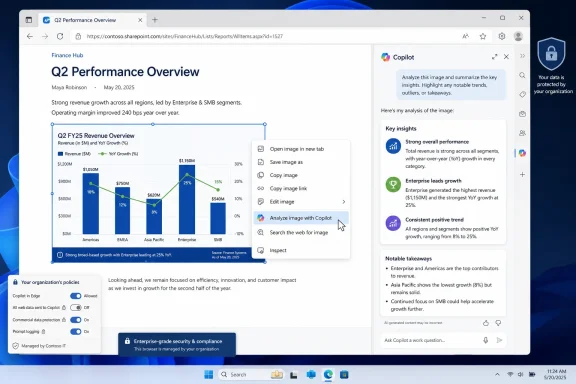
Microsoft added “Ask Copilot about an image” to the Microsoft 365 Roadmap on July 1, 2026, as an Edge feature in development that will let web users send an image from the browser context menu to Copilot for analysis, with general availability planned for August 2026. The feature is small in surface area but large in strategic meaning: Microsoft is turning the right-click menu into another front door for AI.
That matters because Edge has become Microsoft’s most persistent Copilot distribution channel. Windows has the operating system shell, Office has the document canvas, and Edge has the live web — messy, visual, constantly changing, and full of content that does not fit neatly into text prompts. “Ask Copilot about an image” is Microsoft’s bet that the browser should not merely display the web, but interpret it on demand.
The obvious pitch is convenience. A user sees an image on a page, right-clicks it, and asks Copilot what it means, what it shows, or what can be inferred from it without leaving the current browsing session. That sounds like a modest context-menu command, the kind of feature that might otherwise disappear into a release note.
But the deeper shift is interaction design. For years, browser AI has been framed around sidebars: summarize this page, answer a question, draft a post, compare a product. The user had to move attention from the page to a chat panel and then describe the thing they wanted the model to inspect.
This feature collapses that gap. The image itself becomes the prompt target. Microsoft is inching away from “open Copilot and explain your task” toward “select the artifact and ask from there.”
That may be the more durable model for AI in browsers. Most people do not want to architect prompts; they want help with the object in front of them. A chart, a product photo, a meme, a diagram, a screenshot, a map, or a warning banner is not just decorative web content. It is information, and increasingly Microsoft wants Edge to treat it as something Copilot can reason over.
The sidebar made Copilot present. The context menu makes Copilot situational. That is the difference between an assistant waiting in the corner and one embedded into ordinary browser gestures.
For Windows enthusiasts, this is familiar territory. Microsoft has spent decades using shell integration to normalize new behaviors: “Send to,” “Open with,” SmartScreen warnings, OneDrive sync status badges, Share menus, and Windows Search all trained users to see the operating system as an action layer over files and content. Edge is now getting a similar AI layer over the web.
The key question is whether users experience this as power or clutter. A right-click menu already carries copy, save, open, inspect, translate, search, and accessibility actions depending on the content and browser configuration. Adding Copilot can be helpful if it is predictable and quiet. It becomes another irritant if every visual element on the web starts to feel like a sales pitch for AI.
Microsoft’s recent Edge strategy has sometimes erred on the side of insistence. The company has repeatedly tried to make Copilot feel ambient in Edge, whether through toolbar placement, side-pane experiences, contextual summaries, or roadmap items that tie Copilot to page and link context. The image feature is less aggressive than auto-opening a pane, but it belongs to the same campaign: Copilot should be close enough that using it requires almost no deliberate navigation.
That is especially true for images because they often contain information that is hard to describe in words. A user may not know the name of a cable connector, the species of a plant, the meaning of a chart, the source of an error icon, or the significance of a symbol in a diagram. The value of multimodal AI is not that it makes browsers magical; it reduces the friction between recognition and explanation.
For consumers, the use cases are obvious. Ask whether a product photo appears to show the right part. Ask what a visual joke depends on. Ask for accessibility-oriented descriptions of a complex image. Ask whether a chart supports the headline attached to it.
For IT pros and sysadmins, the more interesting cases are less glamorous. Screenshots of configuration errors, network diagrams, vendor dashboards, error dialogs embedded in support pages, and visual instructions in documentation could become objects for immediate analysis. A browser that can send an image directly to Copilot is not a troubleshooting revolution by itself, but it is another step toward visual support workflows becoming normal.
Developers will see the same pattern. A diagram in documentation, a screenshot of a UI state, or an architecture image can be passed into a model without downloading it, copying it, or manually describing it. The browser becomes a capture surface for lightweight visual reasoning.
The risk is that image understanding can be persuasive even when it is wrong. Models can misread diagrams, invent details outside the frame, overstate certainty, or fail at domain-specific context. Microsoft’s challenge is to make the experience fast without making it feel authoritative beyond what the model can actually justify.
That is a very Microsoft sentence. It is also the difference between a consumer browser trick and an enterprise browser feature. If Copilot is going to analyze web images in managed environments, administrators need to know which content is shared, which profiles are eligible, how Entra identity changes behavior, and whether the browser is respecting data boundaries.
EdgeEntraCopilotPageContext is the more consequential of the two policies. It controls whether Copilot in the Edge side pane can access page content and browsing history for users signed in with Microsoft Entra accounts. Microsoft’s documentation frames that access as necessary for page summarization and other contextual queries, and it notes that the default behavior differs by region, with non-EU regions enabled by default and EU regions disabled by default when the policy is not configured.
That regional distinction is not incidental. It reflects the fact that “context” is a privacy and compliance object, not merely a convenience feature. Giving Copilot page context means allowing AI to reason over content a user is viewing and, depending on the scenario, signals related to browsing activity. For a personal user, that may be a settings decision. For an enterprise, it is a governance decision.
Microsoft365CopilotChatIconEnabled is more cosmetic but still operationally relevant. It controls whether the Microsoft 365 Copilot Chat icon appears in the Edge for Business toolbar for Entra ID profiles. That gives admins a way to reduce the visual prominence of Copilot even when the underlying services remain available elsewhere.
Together, the policies show Microsoft knows Edge AI cannot be treated as a free-floating consumer feature inside business profiles. The same browser that views HR portals, legal documents, customer systems, internal dashboards, and privileged admin consoles cannot casually spray context into AI tooling without controls.
The roadmap wording says users can send images directly to Copilot from the Edge context menu. That implies object-level transfer. But Microsoft’s reference to EdgeEntraCopilotPageContext suggests the surrounding Copilot-in-Edge machinery still matters, especially where contextual analysis depends on more than pixels.
There are good reasons for that. An image in isolation can be ambiguous. A chart may require the article headline, caption, axis labels, alt text, or surrounding text to answer well. A product photo may need the page title or SKU. A support diagram may need the documentation section it appears in. Context improves answers.
Context also expands risk. A visual from an internal web app may be harmless alone but sensitive when combined with a page title, URL, customer name, or adjacent text. Even if Microsoft’s enterprise data protections apply, admins still need to decide whether browser context should be available to Copilot by default.
Microsoft does note in its policy documentation that Copilot cannot access page content on pages protected by data loss prevention policies even if the page-context policy is enabled. That is an important guardrail. It also means organizations already using Microsoft Purview and DLP controls may have a more coherent path to enabling these features selectively than those with unmanaged data sprawl.
The practical lesson is simple: image analysis is not just image analysis once it lives inside a browser with identity, policy, history, and page context. It becomes part of the enterprise information perimeter.
That may be more compelling to CIOs than it is to browser enthusiasts. Consumers compare Edge against Chrome, Firefox, Brave, Arc, or Safari on feel, speed, clutter, and trust. Enterprises compare browsers on policy surface, identity integration, update cadence, logging, security posture, and supportability. If AI features are inevitable, the browser with the clearest admin model has an advantage.
This is why Microsoft keeps tying Copilot features to Entra profiles and Edge for Business. It lets the company say, implicitly, that the AI web experience should not be a random extension, a shadow SaaS tab, or an unmanaged consumer assistant. It should be embedded into the managed browser.
There is a catch. The more Edge becomes Microsoft’s AI policy test bed, the more it risks becoming visibly different from the browser users choose for themselves. If every new Edge capability arrives with Copilot branding, telemetry implications, and policy dependencies, some users will see innovation. Others will see bloat with an admin template.
That tension has defined Edge since the Chromium relaunch. Microsoft built a technically strong browser, then layered it with shopping tools, rewards prompts, sidebar apps, productivity integrations, and now Copilot surfaces. The product is powerful, but it is rarely quiet.
“Ask Copilot about an image” sits at the better end of that spectrum because it is user-initiated and object-specific. If Microsoft keeps it that way, it can feel like a tool. If it becomes another nudge machine, it will feed the fatigue that already surrounds AI in Windows and Edge.
Admins should treat August as the earliest serious checkpoint, not the day everyone should expect a uniform experience. Edge features often depend on browser version, profile type, tenant configuration, license state, policy refresh, and regional rollout. The roadmap’s “Worldwide Standard Multi-Tenant” designation is helpful, but it does not eliminate staged deployment realities.
There is also a version question. Microsoft’s policy documentation lists EdgeEntraCopilotPageContext as supported on Windows and macOS starting with Edge version 130, while Microsoft365CopilotChatIconEnabled is listed for Windows and macOS starting with Edge version 139. The feature itself may have its own version requirements by the time it ships.
That matters for managed fleets. A Windows shop with Extended Stable, frozen images, VDI pools, or strict update rings should not assume a roadmap item automatically maps to every endpoint. The policy exists, but client readiness still matters.
It also matters for communication. If users read about a new Copilot image command and cannot find it, the answer may be licensing, rollout, profile type, region, policy, or version. That is not unusual in Microsoft 365, but it is one more reason admins should test the feature in a ring before writing guidance.
The obvious first stop is policy inventory. If EdgeEntraCopilotPageContext is not configured today, an organization may already be relying on Microsoft’s regional default and user choice. That is not a strategy. It is an accident waiting to become a help desk ticket.
The second stop is user segmentation. Designers, marketers, analysts, support engineers, and accessibility teams may get real value from image analysis. Legal, finance, security operations, and regulated teams may need stricter boundaries or more explicit training. A single global enablement decision may be simple, but it is not always smart.
The third stop is documentation. Users need to understand that Copilot’s image answers are assistance, not verification. They should know not to submit confidential visuals unless policy permits it, not to rely on image analysis for safety-critical decisions, and not to assume the model can identify every object, person, or technical detail correctly.
The fourth stop is DLP. If the organization depends on Microsoft’s claim that DLP-protected pages block page-content access, security teams should test representative scenarios. Browser policy is only as reassuring as the controls that actually trigger on the pages and data types an organization cares about.
But incremental is how platform shifts become durable. A toolbar icon here, a context-menu command there, a side pane grounded in page content, a policy switch in Edge for Business, a Copilot Chat entry point for licensed and unlicensed users — each piece makes AI less like a destination and more like a browser capability.
That is Microsoft’s real play. It does not need every Edge user to open Copilot intentionally every morning. It needs Copilot to be present at enough moments of uncertainty that asking it becomes normal. Images are a natural next target because they are everywhere and often underexplained.
The competitive context is obvious even without naming every rival. Browsers are becoming AI clients, and the web is becoming multimodal input. Microsoft’s advantage is distribution through Windows, Microsoft 365, Entra, and Edge policy. Its disadvantage is trust: users and admins are already wary of AI features that appear faster than the governance narrative around them.
“Ask Copilot about an image” succeeds only if it feels like a user-controlled shortcut rather than a browser annexation. Microsoft has the technical and administrative pieces to make that possible. Whether it has the restraint is the question Edge keeps asking.
That matters because Edge has become Microsoft’s most persistent Copilot distribution channel. Windows has the operating system shell, Office has the document canvas, and Edge has the live web — messy, visual, constantly changing, and full of content that does not fit neatly into text prompts. “Ask Copilot about an image” is Microsoft’s bet that the browser should not merely display the web, but interpret it on demand.
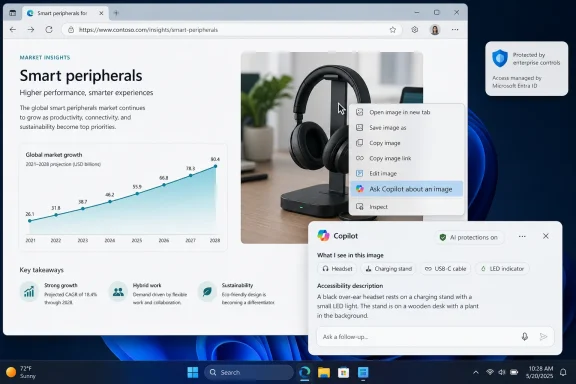 Microsoft Moves Copilot From the Sidebar to the Object Itself
The obvious pitch is convenience. A user sees an image on a page, right-clicks it, and asks Copilot what it means, what it shows, or what can be inferred from it without leaving the current browsing session. That sounds like a modest context-menu command, the kind of feature that might otherwise disappear into a release note.But the deeper shift is interaction design. For years, browser AI has been framed around sidebars: summarize this page, answer a question, draft a post, compare a product. The user had to move attention from the page to a chat panel and then describe the thing they wanted the model to inspect.
This feature collapses that gap. The image itself becomes the prompt target. Microsoft is inching away from “open Copilot and explain your task” toward “select the artifact and ask from there.”
That may be the more durable model for AI in browsers. Most people do not want to architect prompts; they want help with the object in front of them. A chart, a product photo, a meme, a diagram, a screenshot, a map, or a warning banner is not just decorative web content. It is information, and increasingly Microsoft wants Edge to treat it as something Copilot can reason over.
The Right-Click Menu Becomes an AI Launch Surface
The context menu is one of the oldest surviving browser interfaces because it is brutally efficient. It appears exactly where attention already is, and it implies action on the thing under the pointer. Microsoft’s choice to put image analysis there is therefore more important than another Copilot icon.The sidebar made Copilot present. The context menu makes Copilot situational. That is the difference between an assistant waiting in the corner and one embedded into ordinary browser gestures.
For Windows enthusiasts, this is familiar territory. Microsoft has spent decades using shell integration to normalize new behaviors: “Send to,” “Open with,” SmartScreen warnings, OneDrive sync status badges, Share menus, and Windows Search all trained users to see the operating system as an action layer over files and content. Edge is now getting a similar AI layer over the web.
The key question is whether users experience this as power or clutter. A right-click menu already carries copy, save, open, inspect, translate, search, and accessibility actions depending on the content and browser configuration. Adding Copilot can be helpful if it is predictable and quiet. It becomes another irritant if every visual element on the web starts to feel like a sales pitch for AI.
Microsoft’s recent Edge strategy has sometimes erred on the side of insistence. The company has repeatedly tried to make Copilot feel ambient in Edge, whether through toolbar placement, side-pane experiences, contextual summaries, or roadmap items that tie Copilot to page and link context. The image feature is less aggressive than auto-opening a pane, but it belongs to the same campaign: Copilot should be close enough that using it requires almost no deliberate navigation.
Image Understanding Is the Browser’s Next Search Box
Search used to begin with a text query. Then it became voice, image search, shopping search, and page summarization. Generative AI is pushing the browser toward a broader model: whatever the user is looking at can become the query.That is especially true for images because they often contain information that is hard to describe in words. A user may not know the name of a cable connector, the species of a plant, the meaning of a chart, the source of an error icon, or the significance of a symbol in a diagram. The value of multimodal AI is not that it makes browsers magical; it reduces the friction between recognition and explanation.
For consumers, the use cases are obvious. Ask whether a product photo appears to show the right part. Ask what a visual joke depends on. Ask for accessibility-oriented descriptions of a complex image. Ask whether a chart supports the headline attached to it.
For IT pros and sysadmins, the more interesting cases are less glamorous. Screenshots of configuration errors, network diagrams, vendor dashboards, error dialogs embedded in support pages, and visual instructions in documentation could become objects for immediate analysis. A browser that can send an image directly to Copilot is not a troubleshooting revolution by itself, but it is another step toward visual support workflows becoming normal.
Developers will see the same pattern. A diagram in documentation, a screenshot of a UI state, or an architecture image can be passed into a model without downloading it, copying it, or manually describing it. The browser becomes a capture surface for lightweight visual reasoning.
The risk is that image understanding can be persuasive even when it is wrong. Models can misread diagrams, invent details outside the frame, overstate certainty, or fail at domain-specific context. Microsoft’s challenge is to make the experience fast without making it feel authoritative beyond what the model can actually justify.
The Enterprise Control Plane Arrives Before the Feature
The most telling part of the roadmap entry is not the user-facing verb. It is the policy language. Microsoft says admins can control availability using EdgeEntraCopilotPageContext and Microsoft365CopilotChatIconEnabled.That is a very Microsoft sentence. It is also the difference between a consumer browser trick and an enterprise browser feature. If Copilot is going to analyze web images in managed environments, administrators need to know which content is shared, which profiles are eligible, how Entra identity changes behavior, and whether the browser is respecting data boundaries.
EdgeEntraCopilotPageContext is the more consequential of the two policies. It controls whether Copilot in the Edge side pane can access page content and browsing history for users signed in with Microsoft Entra accounts. Microsoft’s documentation frames that access as necessary for page summarization and other contextual queries, and it notes that the default behavior differs by region, with non-EU regions enabled by default and EU regions disabled by default when the policy is not configured.
That regional distinction is not incidental. It reflects the fact that “context” is a privacy and compliance object, not merely a convenience feature. Giving Copilot page context means allowing AI to reason over content a user is viewing and, depending on the scenario, signals related to browsing activity. For a personal user, that may be a settings decision. For an enterprise, it is a governance decision.
Microsoft365CopilotChatIconEnabled is more cosmetic but still operationally relevant. It controls whether the Microsoft 365 Copilot Chat icon appears in the Edge for Business toolbar for Entra ID profiles. That gives admins a way to reduce the visual prominence of Copilot even when the underlying services remain available elsewhere.
Together, the policies show Microsoft knows Edge AI cannot be treated as a free-floating consumer feature inside business profiles. The same browser that views HR portals, legal documents, customer systems, internal dashboards, and privileged admin consoles cannot casually spray context into AI tooling without controls.
Page Context Is the Real Privacy Boundary
“Ask Copilot about an image” sounds narrower than page summarization, but the administrative hook points back to page context. That raises an important question for deployment teams: when a user asks about an image, is Copilot receiving only the image, the image plus surrounding page context, or a richer browsing context depending on policy state and product behavior?The roadmap wording says users can send images directly to Copilot from the Edge context menu. That implies object-level transfer. But Microsoft’s reference to EdgeEntraCopilotPageContext suggests the surrounding Copilot-in-Edge machinery still matters, especially where contextual analysis depends on more than pixels.
There are good reasons for that. An image in isolation can be ambiguous. A chart may require the article headline, caption, axis labels, alt text, or surrounding text to answer well. A product photo may need the page title or SKU. A support diagram may need the documentation section it appears in. Context improves answers.
Context also expands risk. A visual from an internal web app may be harmless alone but sensitive when combined with a page title, URL, customer name, or adjacent text. Even if Microsoft’s enterprise data protections apply, admins still need to decide whether browser context should be available to Copilot by default.
Microsoft does note in its policy documentation that Copilot cannot access page content on pages protected by data loss prevention policies even if the page-context policy is enabled. That is an important guardrail. It also means organizations already using Microsoft Purview and DLP controls may have a more coherent path to enabling these features selectively than those with unmanaged data sprawl.
The practical lesson is simple: image analysis is not just image analysis once it lives inside a browser with identity, policy, history, and page context. It becomes part of the enterprise information perimeter.
Edge for Business Is Becoming the AI Policy Test Bed
Microsoft Edge has spent years trying to justify itself to enterprises on manageability, security, compatibility, and integration. Copilot gives Microsoft a new argument: Edge is the browser where AI can be governed with Microsoft 365 identity and policy.That may be more compelling to CIOs than it is to browser enthusiasts. Consumers compare Edge against Chrome, Firefox, Brave, Arc, or Safari on feel, speed, clutter, and trust. Enterprises compare browsers on policy surface, identity integration, update cadence, logging, security posture, and supportability. If AI features are inevitable, the browser with the clearest admin model has an advantage.
This is why Microsoft keeps tying Copilot features to Entra profiles and Edge for Business. It lets the company say, implicitly, that the AI web experience should not be a random extension, a shadow SaaS tab, or an unmanaged consumer assistant. It should be embedded into the managed browser.
There is a catch. The more Edge becomes Microsoft’s AI policy test bed, the more it risks becoming visibly different from the browser users choose for themselves. If every new Edge capability arrives with Copilot branding, telemetry implications, and policy dependencies, some users will see innovation. Others will see bloat with an admin template.
That tension has defined Edge since the Chromium relaunch. Microsoft built a technically strong browser, then layered it with shopping tools, rewards prompts, sidebar apps, productivity integrations, and now Copilot surfaces. The product is powerful, but it is rarely quiet.
“Ask Copilot about an image” sits at the better end of that spectrum because it is user-initiated and object-specific. If Microsoft keeps it that way, it can feel like a tool. If it becomes another nudge machine, it will feed the fatigue that already surrounds AI in Windows and Edge.
The August 2026 Date Is a Planning Marker, Not a Promise
The roadmap entry lists general availability for August 2026, worldwide, on the web, in the General Availability release phase. That is useful for planning, but Microsoft 365 Roadmap dates are estimates. Features can slip, stage, change scope, or appear only for particular tenants and accounts at first.Admins should treat August as the earliest serious checkpoint, not the day everyone should expect a uniform experience. Edge features often depend on browser version, profile type, tenant configuration, license state, policy refresh, and regional rollout. The roadmap’s “Worldwide Standard Multi-Tenant” designation is helpful, but it does not eliminate staged deployment realities.
There is also a version question. Microsoft’s policy documentation lists EdgeEntraCopilotPageContext as supported on Windows and macOS starting with Edge version 130, while Microsoft365CopilotChatIconEnabled is listed for Windows and macOS starting with Edge version 139. The feature itself may have its own version requirements by the time it ships.
That matters for managed fleets. A Windows shop with Extended Stable, frozen images, VDI pools, or strict update rings should not assume a roadmap item automatically maps to every endpoint. The policy exists, but client readiness still matters.
It also matters for communication. If users read about a new Copilot image command and cannot find it, the answer may be licensing, rollout, profile type, region, policy, or version. That is not unusual in Microsoft 365, but it is one more reason admins should test the feature in a ring before writing guidance.
Where Admins Should Look First
The operational work begins before the button appears. Any organization with managed Edge should decide whether image analysis is acceptable, where it is useful, and what kinds of pages should be off limits. That does not require panic; it requires treating browser AI as part of the same governance conversation as cloud app access, DLP, sensitivity labels, and acceptable use.The obvious first stop is policy inventory. If EdgeEntraCopilotPageContext is not configured today, an organization may already be relying on Microsoft’s regional default and user choice. That is not a strategy. It is an accident waiting to become a help desk ticket.
The second stop is user segmentation. Designers, marketers, analysts, support engineers, and accessibility teams may get real value from image analysis. Legal, finance, security operations, and regulated teams may need stricter boundaries or more explicit training. A single global enablement decision may be simple, but it is not always smart.
The third stop is documentation. Users need to understand that Copilot’s image answers are assistance, not verification. They should know not to submit confidential visuals unless policy permits it, not to rely on image analysis for safety-critical decisions, and not to assume the model can identify every object, person, or technical detail correctly.
The fourth stop is DLP. If the organization depends on Microsoft’s claim that DLP-protected pages block page-content access, security teams should test representative scenarios. Browser policy is only as reassuring as the controls that actually trigger on the pages and data types an organization cares about.
The Feature Is Small Because the Strategy Is Everywhere
It would be easy to dismiss “Ask Copilot about an image” as another incremental Copilot insertion, and in one sense it is. Microsoft is adding an AI command to a browser menu, not reinventing the web. There will be no dramatic migration project, no new server role, no emergency patch window.But incremental is how platform shifts become durable. A toolbar icon here, a context-menu command there, a side pane grounded in page content, a policy switch in Edge for Business, a Copilot Chat entry point for licensed and unlicensed users — each piece makes AI less like a destination and more like a browser capability.
That is Microsoft’s real play. It does not need every Edge user to open Copilot intentionally every morning. It needs Copilot to be present at enough moments of uncertainty that asking it becomes normal. Images are a natural next target because they are everywhere and often underexplained.
The competitive context is obvious even without naming every rival. Browsers are becoming AI clients, and the web is becoming multimodal input. Microsoft’s advantage is distribution through Windows, Microsoft 365, Entra, and Edge policy. Its disadvantage is trust: users and admins are already wary of AI features that appear faster than the governance narrative around them.
“Ask Copilot about an image” succeeds only if it feels like a user-controlled shortcut rather than a browser annexation. Microsoft has the technical and administrative pieces to make that possible. Whether it has the restraint is the question Edge keeps asking.
The August Edge Button Carries More Than an Image
This roadmap item is worth watching less for the novelty of image analysis than for what it reveals about Edge’s direction. Microsoft is turning ordinary browser objects into Copilot entry points, while trying to reassure enterprises that those entry points can be governed.- Microsoft plans to make “Ask Copilot about an image” generally available in Edge in August 2026 for worldwide standard multi-tenant customers.
- The feature is designed to let users send web images to Copilot from the Edge context menu without leaving the browsing session.
- Admins should review EdgeEntraCopilotPageContext because image analysis may intersect with broader page-content and browsing-context controls.
- Admins can also use Microsoft365CopilotChatIconEnabled to manage whether the Microsoft 365 Copilot Chat icon appears in the Edge for Business toolbar.
- Organizations should test the feature with representative pages, DLP-protected content, Entra profiles, and managed Edge versions before broad rollout.
- Users should be trained to treat Copilot’s image analysis as assistive interpretation, not a source of guaranteed visual truth.
References
- Primary source: Microsoft 365 Roadmap
Published: 2026-07-01T23:03:18.2442931Z
Microsoft 365 Roadmap | Microsoft 365
The Microsoft 365 Roadmap lists updates that are currently planned for applicable subscribers. Check here for more information on the status of new features and updates.www.microsoft.com