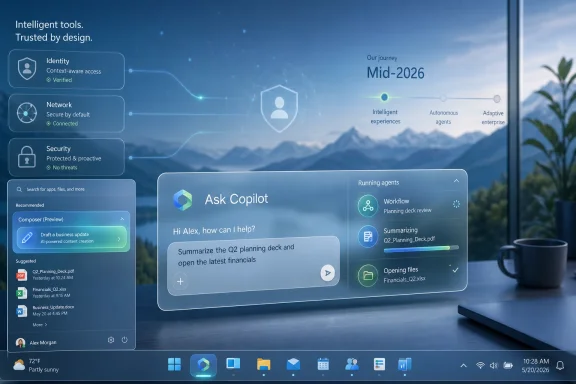
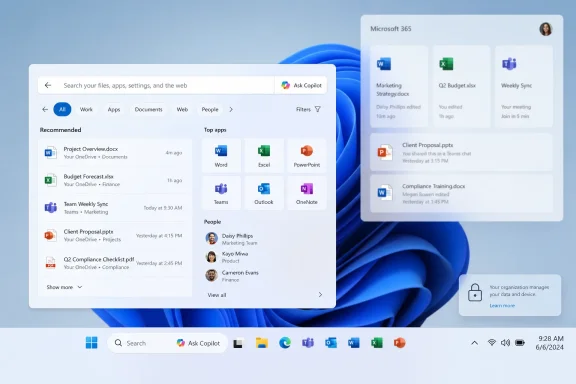
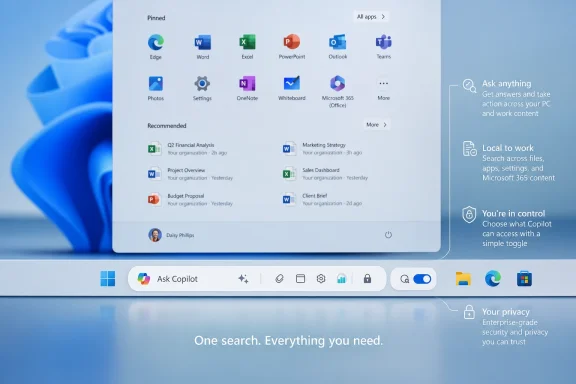
Microsoft plans to bring Ask Copilot to the Windows 11 taskbar and Start menu in mid-2026, turning the optional taskbar search experience into a Copilot Composer entry point for Microsoft 365 Copilot, AI agents, local files, apps, and work content. The move is not a sudden reversal of Microsoft’s recent promise to reduce AI clutter in Windows. It is the company’s attempt to separate noisy Copilot buttons from places where an assistant might plausibly earn its keep. The taskbar, for better and worse, is where that argument will be tested.
The Windows taskbar is not just another strip of interface chrome. It is the most politically sensitive real estate in the operating system, a place where muscle memory, enterprise policy, search habits, app launching, notifications, and user resentment all collide. When Microsoft puts something there, users read it as a statement of priority.
That is why Ask Copilot matters more than another button in another app. The feature is expected to replace the conventional taskbar search box with a floating experience that can handle local search while also opening a conversational path into Copilot and Microsoft 365 agents. In plain terms, Microsoft wants the search box to stop being merely a search box.
The company’s public positioning is careful. Ask Copilot is described as not generally available yet, expected around mid-2026, and subject to change. It is also optional and reportedly not enabled by default, which is Microsoft’s way of saying it knows exactly how much user trust it has burned with unwanted prompts, ads, and AI affordances over the last few years.
That caution is the real story. Microsoft is not abandoning AI in Windows; it is trying to make AI look less like a pop-up strategy and more like an operating-system capability. Ask Copilot is the first serious test of whether that distinction means anything to users.
That history gives Ask Copilot a strange opening. If the new experience is genuinely better at finding local files and apps, as early hands-on reports suggest, it can win users who do not care about Copilot at all. The most effective AI feature in Windows may turn out to be one that quietly fixes Windows Search.
But the risk is equally obvious. Search is fast because it is direct. If Microsoft turns a launcher into a conversation, or makes users wonder whether their query is going to the device, the web, Microsoft 365, or an AI service, the interface could feel clever in a demo and slow in daily use.
The strongest version of Ask Copilot is not a chatbot bolted onto the taskbar. It is a better command surface for Windows: open the app, find the document, summarize the meeting note, pull up the spreadsheet, draft the email, and do so without making users parse where the boundary between local and cloud begins.
The difference matters most in commercial environments. A consumer might disable an unwanted button after grumbling on Reddit. An enterprise administrator has to explain it, document it, test it against policy, consider data handling, and answer a help-desk ticket when an employee asks why the search box changed.
Ask Copilot appears aimed especially at Microsoft 365 customers, which makes sense. The feature becomes more coherent when it can draw from work graphs, enterprise documents, agents, and managed identity. A taskbar AI box that only answers generic web questions is a gimmick; one that can navigate a company’s own documents and workflows is closer to infrastructure.
Still, optional features have a way of becoming defaults after Microsoft decides adoption is not moving fast enough. The company’s credibility here will depend on boring details: clear toggles, admin controls, sensible defaults, and no dark-pattern nudges that keep asking users to reconsider.
Ask Copilot shows the retreat was narrower than that. Microsoft is not saying Copilot belongs nowhere; it is saying Copilot has to justify where it appears. The taskbar is one of the few places where the justification is at least plausible.
This is the logic behind what has been described as Microsoft’s Windows K2 initiative: fewer random AI buttons, more intentional surfaces. The phrase may sound like internal branding, but the product lesson is clear. An assistant that appears everywhere feels needy. An assistant that appears at the point of intent has a chance to feel useful.
The taskbar is a point of intent. Users go there to launch, switch, search, and recover context. If Copilot can reduce context switching without becoming another context to manage, Microsoft has a defensible product. If it merely converts search into another promotional surface, the backlash will be swift and deserved.
For enterprise users, the pitch is sharper. Microsoft wants the Windows desktop to become the front door to Microsoft 365 Copilot and the expanding world of agents. In that model, the taskbar is not just launching Word or Outlook. It is launching workflows.
A project manager could ask for the latest deck related to a client, a sales employee could surface account notes, and an analyst could route a question into an agent trained on internal data. Whether those scenarios work well in practice is another question, but the strategic shape is obvious. Microsoft is trying to make Windows the physical keyboard-and-screen layer of its AI work platform.
That is also why admins will be watching identity, compliance, and telemetry more closely than animation polish. If Ask Copilot crosses boundaries between local files, OneDrive, SharePoint, Teams, Outlook, and third-party agents, organizations will need confidence that permissions are inherited correctly and that answers do not overexpose content. In enterprise AI, the interface is the easy part; governance is the product.
Windows users have complained for years that search too often prefers web results when the obvious answer is a local app, file, or setting. Microsoft has been testing changes that prioritize local results more aggressively, and that work should not be treated as separate from Ask Copilot. If the company wants to replace the search UI, the replacement must be better at search before it asks to become anything else.
That means speed, ranking, and predictability. Typing the first letters of an installed app should not require a cloud round trip. Searching for a file name should not bury the file beneath a Bing suggestion. Looking for a setting should not become a Copilot monologue about what the setting does.
The best outcome is an interface with layers. The first layer should be instant local intent: apps, files, settings, commands. The second layer should be work context for signed-in users who have enabled it. The third layer should be generative assistance when the user actually asks for it. Reverse that order and Microsoft will have rebuilt the same frustration in a shinier box.
The danger is that “always visible” becomes “always asking.” Windows is already crowded with system tray icons, notifications, widgets, search prompts, cloud backup nudges, account warnings, and subscription upsells. Adding agents to that environment requires more discipline than Microsoft has historically shown.
A good agent entry point should be quiet until invoked. It should make clear what it can see, what it is sending, and what it is about to do. It should fail safely, especially when handling files, messages, or administrative tasks. Above all, it should not treat every user action as an invitation to intervene.
This is where Ask Copilot can either become a model for restrained AI integration or another exhibit in the case against Windows clutter. Microsoft’s language about “less context switching” is compelling only if the tool does not introduce a new form of cognitive overhead.
Microsoft will likely argue that enterprise permissions, Microsoft 365 controls, and tenant policies govern what Copilot can access. That may be true, but it will not be enough for everyone. Administrators will want plain documentation, not marketing diagrams. Privacy-minded users will want a simple way to keep local search local.
The distinction between Windows Copilot, Microsoft Copilot, and Microsoft 365 Copilot has also been confusing for ordinary users. Ask Copilot risks adding another name to a stack of overlapping brands. If a user types into the taskbar, are they using Windows Search, Copilot, Microsoft 365 Copilot, Copilot Chat, or an agent? Product naming is not merely cosmetic when it affects expectations about data and capability.
Microsoft has an opportunity to simplify that story. The UI can say what mode it is in. The settings page can show what sources are enabled. The enterprise controls can make rollout status unambiguous. If the company buries those answers, the feature will inherit every fear attached to AI in Windows.
The timing also reflects a Windows team caught between two mandates. One mandate is to improve the fundamentals: performance, taskbar flexibility, search quality, settings cleanup, and reliability. The other is to prove that Windows is not merely a legacy desktop shell in an AI-first Microsoft.
Ask Copilot sits exactly at that intersection. It is a fundamentals feature if it improves search and launching. It is an AI strategy feature if it brings agents into the everyday workflow. It is a liability if it does neither cleanly.
Mid-2026 is therefore less a date than a checkpoint. If Microsoft ships Ask Copilot as an opt-in, well-governed, locally useful enhancement, it can argue that Windows AI has matured. If it ships as another half-finished surface with vague boundaries, it will reinforce the belief that the company is using Windows as a distribution channel before it has earned user consent.
There are a few concrete tests Microsoft must pass if it wants Ask Copilot to survive beyond the first wave of curiosity:
Microsoft appears to believe that this layer belongs close to the core of Windows, not hidden inside a browser tab or a standalone app. That is a rational bet. The company controls the operating system, the productivity suite, the identity stack, the management tools, and the cloud back end. No rival is better positioned to connect those pieces for managed workplaces.
But Windows is not Teams, and it is not Microsoft 365. It is the substrate on which users run everything else, including software that has nothing to do with Microsoft’s AI ambitions. That makes restraint more important on Windows than almost anywhere else in the company’s portfolio.
Ask Copilot could become the version of Copilot that finally makes sense: a taskbar entry point that starts with search, respects user choice, and expands into work assistance when the context is right. Or it could become another reminder that Microsoft often identifies the right surface before it learns the right manners. The summer rollout will not decide the future of AI in Windows, but it will show whether Microsoft understands the difference between integration and intrusion.
 Microsoft Has Chosen the Taskbar as Copilot’s Trial by Fire
The Windows taskbar is not just another strip of interface chrome. It is the most politically sensitive real estate in the operating system, a place where muscle memory, enterprise policy, search habits, app launching, notifications, and user resentment all collide. When Microsoft puts something there, users read it as a statement of priority.That is why Ask Copilot matters more than another button in another app. The feature is expected to replace the conventional taskbar search box with a floating experience that can handle local search while also opening a conversational path into Copilot and Microsoft 365 agents. In plain terms, Microsoft wants the search box to stop being merely a search box.
The company’s public positioning is careful. Ask Copilot is described as not generally available yet, expected around mid-2026, and subject to change. It is also optional and reportedly not enabled by default, which is Microsoft’s way of saying it knows exactly how much user trust it has burned with unwanted prompts, ads, and AI affordances over the last few years.
That caution is the real story. Microsoft is not abandoning AI in Windows; it is trying to make AI look less like a pop-up strategy and more like an operating-system capability. Ask Copilot is the first serious test of whether that distinction means anything to users.
The Search Box Was Always More Than Search
Windows Search has spent years being both indispensable and irritating. It is the thing users hit reflexively to launch Notepad, find a downloaded PDF, open Settings, or search the web by accident because Windows guessed wrong. When it works, nobody praises it; when it does not, it becomes evidence that Microsoft has forgotten the desktop.That history gives Ask Copilot a strange opening. If the new experience is genuinely better at finding local files and apps, as early hands-on reports suggest, it can win users who do not care about Copilot at all. The most effective AI feature in Windows may turn out to be one that quietly fixes Windows Search.
But the risk is equally obvious. Search is fast because it is direct. If Microsoft turns a launcher into a conversation, or makes users wonder whether their query is going to the device, the web, Microsoft 365, or an AI service, the interface could feel clever in a demo and slow in daily use.
The strongest version of Ask Copilot is not a chatbot bolted onto the taskbar. It is a better command surface for Windows: open the app, find the document, summarize the meeting note, pull up the spreadsheet, draft the email, and do so without making users parse where the boundary between local and cloud begins.
Optional Is Doing a Lot of Work Here
Microsoft’s insistence that Ask Copilot is optional is not a minor implementation detail. It is the political cover for the entire feature. The company has learned, sometimes slowly, that Windows users distinguish sharply between capabilities they can choose and experiences that arrive as if the OS has been repurposed for engagement metrics.The difference matters most in commercial environments. A consumer might disable an unwanted button after grumbling on Reddit. An enterprise administrator has to explain it, document it, test it against policy, consider data handling, and answer a help-desk ticket when an employee asks why the search box changed.
Ask Copilot appears aimed especially at Microsoft 365 customers, which makes sense. The feature becomes more coherent when it can draw from work graphs, enterprise documents, agents, and managed identity. A taskbar AI box that only answers generic web questions is a gimmick; one that can navigate a company’s own documents and workflows is closer to infrastructure.
Still, optional features have a way of becoming defaults after Microsoft decides adoption is not moving fast enough. The company’s credibility here will depend on boring details: clear toggles, admin controls, sensible defaults, and no dark-pattern nudges that keep asking users to reconsider.
Windows K2 Makes This Less Contradictory Than It Looks
At first glance, Ask Copilot seems to conflict with Microsoft’s recent effort to reduce unnecessary Copilot entry points across Windows. The company has reportedly backed away from scattering AI buttons through places like notifications, Settings, and small inbox apps. That retreat was widely read as Microsoft admitting that “Copilot everywhere” had become a liability.Ask Copilot shows the retreat was narrower than that. Microsoft is not saying Copilot belongs nowhere; it is saying Copilot has to justify where it appears. The taskbar is one of the few places where the justification is at least plausible.
This is the logic behind what has been described as Microsoft’s Windows K2 initiative: fewer random AI buttons, more intentional surfaces. The phrase may sound like internal branding, but the product lesson is clear. An assistant that appears everywhere feels needy. An assistant that appears at the point of intent has a chance to feel useful.
The taskbar is a point of intent. Users go there to launch, switch, search, and recover context. If Copilot can reduce context switching without becoming another context to manage, Microsoft has a defensible product. If it merely converts search into another promotional surface, the backlash will be swift and deserved.
The Enterprise Pitch Is Stronger Than the Consumer Pitch
For home users, Ask Copilot may feel like another round in the long campaign to make Windows more cloud-connected than many people want it to be. The value proposition is harder to explain if your taskbar searches are mostly “Steam,” “Downloads,” and “printer settings.” Local search accuracy matters, but the Copilot part may feel surplus.For enterprise users, the pitch is sharper. Microsoft wants the Windows desktop to become the front door to Microsoft 365 Copilot and the expanding world of agents. In that model, the taskbar is not just launching Word or Outlook. It is launching workflows.
A project manager could ask for the latest deck related to a client, a sales employee could surface account notes, and an analyst could route a question into an agent trained on internal data. Whether those scenarios work well in practice is another question, but the strategic shape is obvious. Microsoft is trying to make Windows the physical keyboard-and-screen layer of its AI work platform.
That is also why admins will be watching identity, compliance, and telemetry more closely than animation polish. If Ask Copilot crosses boundaries between local files, OneDrive, SharePoint, Teams, Outlook, and third-party agents, organizations will need confidence that permissions are inherited correctly and that answers do not overexpose content. In enterprise AI, the interface is the easy part; governance is the product.
The Feature Succeeds Only If Local Search Gets Better
The most important claim around Ask Copilot is not that it can chat. It is that it may improve local search. That sounds almost quaint in an AI news cycle obsessed with agents, but it is the difference between a feature people tolerate and one they keep enabled.Windows users have complained for years that search too often prefers web results when the obvious answer is a local app, file, or setting. Microsoft has been testing changes that prioritize local results more aggressively, and that work should not be treated as separate from Ask Copilot. If the company wants to replace the search UI, the replacement must be better at search before it asks to become anything else.
That means speed, ranking, and predictability. Typing the first letters of an installed app should not require a cloud round trip. Searching for a file name should not bury the file beneath a Bing suggestion. Looking for a setting should not become a Copilot monologue about what the setting does.
The best outcome is an interface with layers. The first layer should be instant local intent: apps, files, settings, commands. The second layer should be work context for signed-in users who have enabled it. The third layer should be generative assistance when the user actually asks for it. Reverse that order and Microsoft will have rebuilt the same frustration in a shinier box.
The Agent Era Needs Restraint More Than Demos
Microsoft’s broader Copilot strategy is now shifting from chatbots toward agents. That word gets abused, but in Microsoft’s world it generally means AI systems that can take action across files, apps, and business processes, often with organizational data as context. The taskbar is a tempting launchpad for that future because it is always visible.The danger is that “always visible” becomes “always asking.” Windows is already crowded with system tray icons, notifications, widgets, search prompts, cloud backup nudges, account warnings, and subscription upsells. Adding agents to that environment requires more discipline than Microsoft has historically shown.
A good agent entry point should be quiet until invoked. It should make clear what it can see, what it is sending, and what it is about to do. It should fail safely, especially when handling files, messages, or administrative tasks. Above all, it should not treat every user action as an invitation to intervene.
This is where Ask Copilot can either become a model for restrained AI integration or another exhibit in the case against Windows clutter. Microsoft’s language about “less context switching” is compelling only if the tool does not introduce a new form of cognitive overhead.
The Privacy Debate Will Not Wait for General Availability
Even if Ask Copilot is optional, the feature will land in a climate of suspicion. Users have seen enough AI rollouts to ask what is indexed, what is uploaded, what is retained, and who can audit it. Those are not fringe concerns. They are table stakes for any assistant that sits between a user and their files.Microsoft will likely argue that enterprise permissions, Microsoft 365 controls, and tenant policies govern what Copilot can access. That may be true, but it will not be enough for everyone. Administrators will want plain documentation, not marketing diagrams. Privacy-minded users will want a simple way to keep local search local.
The distinction between Windows Copilot, Microsoft Copilot, and Microsoft 365 Copilot has also been confusing for ordinary users. Ask Copilot risks adding another name to a stack of overlapping brands. If a user types into the taskbar, are they using Windows Search, Copilot, Microsoft 365 Copilot, Copilot Chat, or an agent? Product naming is not merely cosmetic when it affects expectations about data and capability.
Microsoft has an opportunity to simplify that story. The UI can say what mode it is in. The settings page can show what sources are enabled. The enterprise controls can make rollout status unambiguous. If the company buries those answers, the feature will inherit every fear attached to AI in Windows.
The Timing Reveals Microsoft’s Patience Problem
Ask Copilot was announced in 2025-era previews, tested with Insiders, and is now apparently aimed at mid-2026 general availability. That is a long runway by the standards of AI hype and a short runway by the standards of operating-system trust. Microsoft is trying to move quickly without looking reckless.The timing also reflects a Windows team caught between two mandates. One mandate is to improve the fundamentals: performance, taskbar flexibility, search quality, settings cleanup, and reliability. The other is to prove that Windows is not merely a legacy desktop shell in an AI-first Microsoft.
Ask Copilot sits exactly at that intersection. It is a fundamentals feature if it improves search and launching. It is an AI strategy feature if it brings agents into the everyday workflow. It is a liability if it does neither cleanly.
Mid-2026 is therefore less a date than a checkpoint. If Microsoft ships Ask Copilot as an opt-in, well-governed, locally useful enhancement, it can argue that Windows AI has matured. If it ships as another half-finished surface with vague boundaries, it will reinforce the belief that the company is using Windows as a distribution channel before it has earned user consent.
The Taskbar Becomes Microsoft’s AI Honesty Test
The clearest way to judge Ask Copilot is not by whether it uses the latest model or whether the animation looks modern. It is whether users understand what happened when the search box changed. Good operating-system features reduce ambiguity; bad ones make users feel managed.There are a few concrete tests Microsoft must pass if it wants Ask Copilot to survive beyond the first wave of curiosity:
- Ask Copilot must remain genuinely optional, with clear user and administrator controls that do not require registry spelunking or policy guesswork.
- Local apps, files, and settings must appear quickly and predictably before web or generative results try to take over the interaction.
- Microsoft 365 and agent features must respect existing permissions and make their data sources visible enough for users and admins to trust the output.
- The interface must avoid turning every search into a conversation, because the fastest answer is often just opening the right thing.
- Microsoft must explain the difference between consumer Copilot, Microsoft 365 Copilot, and taskbar search in language normal Windows users can understand.
- The feature must improve Windows even for people who never ask it to draft, summarize, or reason about anything.
Microsoft’s Real Bet Is That Search Becomes the New Shell
For decades, the desktop metaphor was built around windows, folders, menus, and icons. Search complicated that model by letting users bypass navigation. AI now threatens to complicate it again by turning the command surface into a conversational layer that can both find and act.Microsoft appears to believe that this layer belongs close to the core of Windows, not hidden inside a browser tab or a standalone app. That is a rational bet. The company controls the operating system, the productivity suite, the identity stack, the management tools, and the cloud back end. No rival is better positioned to connect those pieces for managed workplaces.
But Windows is not Teams, and it is not Microsoft 365. It is the substrate on which users run everything else, including software that has nothing to do with Microsoft’s AI ambitions. That makes restraint more important on Windows than almost anywhere else in the company’s portfolio.
Ask Copilot could become the version of Copilot that finally makes sense: a taskbar entry point that starts with search, respects user choice, and expands into work assistance when the context is right. Or it could become another reminder that Microsoft often identifies the right surface before it learns the right manners. The summer rollout will not decide the future of AI in Windows, but it will show whether Microsoft understands the difference between integration and intrusion.
References
- Primary source: Windows Central
Published: Tue, 26 May 2026 14:47:09 GMT
Microsoft confirms plans to integrate Copilot with the Taskbar on Windows 11 this summer: Ask Copilot expected to debut "mid-2026" | Windows Central
First announced last year, a new document has confirmed that Microsoft's upcoming "Ask Copilot" feature for Windows 11's Taskbar is arriving mid-2026.www.windowscentral.com - Official source: learn.microsoft.com
Pin Microsoft 365 Copilot and its companion apps to the Windows taskbar | Microsoft Learn
Learn how to improve the use of Microsoft 365 Copilot across your organization by pinning the Copilot app to the Windows taskbar.learn.microsoft.com - Official source: microsoft.com
Microsoft 365 Roadmap | Microsoft 365
The Microsoft 365 Roadmap lists updates that are currently planned for applicable subscribers. Check here for more information on the status of new features and updates.www.microsoft.com
- Related coverage: windowslatest.com
Microsoft confirms AI agents are still coming to the Windows 11 taskbar as it prepares for public rollout
Microsoft has clarified that it's not giving up on an agentic Windows 11 experience and is still bringing agents to your taskbar. www.windowslatest.com
- Official source: support.microsoft.com

Getting started with Copilot on Windows | Microsoft Support
Discover how Microsoft Copilot, your everyday AI companion, can help you achieve anything you can imagine.
support.microsoft.com
- Related coverage: pcworld.com
Copilot Vision gains ability to analyze apps in the Windows 11 taskbar
Microsoft's Copilot AI assistant can now analyze apps in the taskbar and offer assistance—only when you explicitly ask for it. www.pcworld.com
- Related coverage: techradar.com
Microsoft's planned new AI trick for Edge will 'automatically open the Copilot side pane' with Outlook email links — and I can feel the hate already | TechRadar
New feature is on the roadmap for May 2026www.techradar.com - Related coverage: tomshardware.com
Admins finally get the power to uninstall Microsoft Copilot on Windows 11 Pro, Enterprise, and EDU versions — devices must meet specific conditions to allow the removal of the AI app | Tom's Hardware
One less bloatware on Windows 11.www.tomshardware.com - Related coverage: tomsguide.com
Microsoft is hiding Windows 11's 'eyes' — here's how to find Copilot Vision (and fully delete it) | Tom's Guide
Microsoft’s new AI can "see" your screen to fix errors and summarize docs. Here's how to master Copilot Vision or disable it entirely to protect your privacy.www.tomsguide.com - Official source: news.microsoft.com
- Official source: adoption.microsoft.com
- Related coverage: nubis365.com
</rdf:Alt> </dc:title> <dc:description> <rdf:Alt> <rdf:li xml:lang="x-default"/> </rdf:Alt> </dc:description> <dc:creator> <rdf:Seq> <rdf:li>Mike Wi
</rdf:Alt> </dc:description> <dc:creator> <rdf:Seq> <rdf:li>Mike Windsornubis365.com