

Google disclosed CVE-2026-14074 on June 30, 2026, as a low-severity Chrome for iOS WebAuthentication side-channel flaw fixed before version 150.0.7871.47, where a crafted HTML page could let a remote attacker leak cross-origin data. The National Vulnerability Database entry is still being enriched, while CISA’s ADP scoring has already assigned it a medium CVSS 3.1 score. That mismatch is the story: a bug Google labels “Low” can still matter when it touches authentication, origin boundaries, and mobile browser behavior. For WindowsForum readers, the practical lesson is not panic, but patch discipline across every Chromium surface your users carry — including the iPhones that rarely show up in desktop patch dashboards.
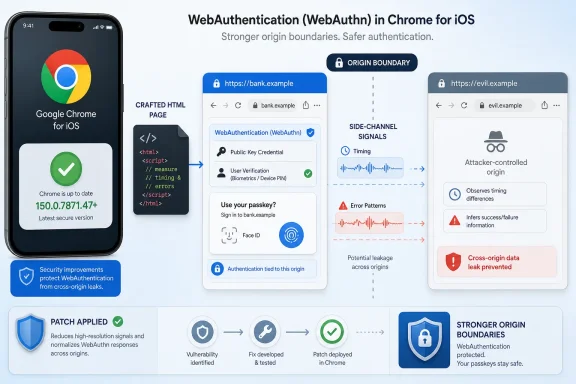
CVE-2026-14074 is not one of the headline-grabbing Chrome memory-corruption flaws that immediately conjures images of sandbox escapes, remote code execution, or emergency patch windows. Google’s Chrome Releases blog lists it among the low-severity fixes in the Chrome 150 stable update, specifically as “side-channel information leakage in WebAuthentication,” reported by Google on May 10, 2026. NVD’s description narrows the affected product to Google Chrome on iOS before 150.0.7871.47.
That combination is easy to underestimate. “Low severity” sounds like background noise in a release that Google says contains 433 security fixes. But WebAuthentication is not ornamental browser plumbing; it is the browser-mediated bridge between websites and modern sign-in mechanisms such as passkeys, platform authenticators, and security keys.
The known public description does not say that an attacker could steal a passkey, bypass biometric prompts, or impersonate a user. It says a crafted HTML page could leak cross-origin data through a side channel. That is narrower, but it still lands in a part of the browser designed to enforce extremely strong separation between sites.
The phrase cross-origin data is doing a lot of work here. The same-origin policy is one of the web’s central guardrails: one site should not be able to read another site’s sensitive state just because both happen to be open, embedded, redirected, or reachable through browser APIs. When a side channel chips away at that boundary, the severity depends less on the bug’s label and more on what secrets the surrounding application patterns expose.
CVE-2026-14074 appears deep in the low-severity section of that advisory, far below critical use-after-free and type-confusion entries affecting components such as Extensions, GPU, Dawn, WebUSB, Skia, Bluetooth, and V8-related surfaces. In a triage meeting, it would be rational to focus first on the critical and high bugs. In a mature patch program, however, it would be a mistake to treat the low-severity tail as irrelevant.
Chrome’s release notes increasingly read like a map of the modern browser’s attack surface. The browser is no longer just an HTML renderer with a JavaScript engine; it is an operating environment for identity, graphics, device access, payments, storage, media, enterprise policy, and AI-adjacent local capabilities. A “small” bug in one of those subsystems can become meaningful when chained with another browser quirk, a confusing user journey, or a badly isolated enterprise web app.
That is why CVE-2026-14074 deserves its own look. It is not the scariest item in Chrome 150. It is a reminder that identity-era browser security is not only about crashing processes and controlling instruction pointers; it is also about what can be inferred when APIs behave slightly differently under conditions they were supposed to hide.
That architecture is elegant because it limits what a phishing site can do. A passkey or security key credential is scoped to a relying party, and the browser plays a gatekeeping role in making sure one origin cannot casually claim another’s identity context. The origin boundary is not an implementation detail here; it is the security model.
On iOS, this gets more interesting because every browser is constrained by Apple’s platform rules and WebKit underpinnings, while still carrying each vendor’s account, sync, UI, and feature layers. Chrome on iOS is Chrome, but it is not Chrome for Windows in a simple engine-for-engine sense. Bugs in “Chrome for iOS” can therefore sit at the intersection of Google’s browser code, Apple’s platform services, and web standards machinery.
CVE-2026-14074’s public wording does not identify a passkey theft scenario, and we should not invent one. But WebAuthentication is sensitive because even metadata, timing, state, or behavioral discrepancies can help an attacker answer questions they should not be able to ask. Does a user have a credential for a given service? Did a cross-origin flow reach a certain state? Did a browser-controlled authentication surface react differently depending on hidden data?
Side channels often matter precisely because they do not look like classic data reads. The attacker does not receive a neat JSON object marked “secret.” Instead, they observe timing, error behavior, UI state, cache effects, dimensions, navigation outcomes, or some other discrepancy that correlates with protected information.
But side-channel vulnerabilities are often where browser security’s abstractions meet physical and behavioral reality. The browser may prevent direct access to another origin’s data while still allowing an attacker to measure a behavior influenced by that data. Over enough measurements, the difference between “cannot read” and “can infer” starts to narrow.
CISA’s ADP enrichment lists CWE-203, Observable Discrepancy, and CWE-1300, Improper Protection of Physical Side Channels, for CVE-2026-14074. Those labels are not proof of a dramatic exploit in the wild, and CISA’s SSVC data says exploitation is “none” and the bug is not automatable. They do, however, frame the weakness as an information-disclosure issue rather than a harmless oddity.
That is the right mental model for administrators. A side channel is not necessarily a breach by itself. It is an information advantage. In authentication contexts, information advantages can support phishing refinement, account targeting, cross-site tracking, or exploit chaining.
There is also a browser-specific reason to take this class seriously. The web platform is built around composing independent features: iframes, redirects, credential APIs, storage partitioning, permissions, autofill, device APIs, and UI mediation. An attacker does not need one API to do everything if several APIs each reveal a sliver of state.
This is not necessarily an argument between Google and CISA. It is a useful example of how severity systems answer different questions. Vendor severity often incorporates exploitability, product-specific mitigations, bug class norms, and internal knowledge that may not be public. CVSS tries to express generic technical impact in a standardized way.
A low Chromium severity can coexist with a medium CVSS score because “confidentiality impact” weighs heavily when the vulnerable condition can disclose protected information. At the same time, user interaction is required, exploitation is not reported, and the bug is not described as automatable by CISA’s SSVC assessment. Those details lower urgency compared with a drive-by remote code execution flaw.
For enterprise defenders, the practical answer is boring but important: do not let the lower label become an excuse for drift. If Chrome for iOS before 150.0.7871.47 is in your fleet, the corrective action is to update. The debate over whether the bug is “low” or “medium” should not outlast the patch cycle.
The more interesting question is operational visibility. Many organizations have tight reporting for Windows Chrome versions, Edge versions, and perhaps managed Android browsers, but far less confidence around iOS browser inventory. If mobile devices access corporate identity providers, SaaS consoles, internal portals, or privileged admin workflows, unmanaged browser lag is not a theoretical gap.
That assumption is only partly right. Apple’s iOS security model does reduce many classes of browser exploitation, especially compared with a fully privileged desktop process ecosystem. But platform containment does not make web-origin bugs disappear. If the weakness is about a malicious page learning something across an origin boundary, the attack may not need traditional native-code escape to matter.
Chrome for iOS also occupies a peculiar place in enterprise life. A company may standardize on Edge or Safari for managed workflows, while users still open links in Chrome because it syncs with their Google account, remembers personal browsing state, or feels familiar from Windows. The identity boundary between personal and work usage becomes porous long before a formal incident occurs.
That matters for CVE-2026-14074 because the attack condition is a crafted HTML page and user interaction. The vulnerable path is not “attacker compromises the phone from nowhere.” It is closer to the ordinary web-risk model: a user visits or is directed to content that exercises browser behavior in a way the browser should have contained.
Security teams that treat mobile browser patching as a background consumer-app concern are therefore undercounting exposure. The browser is where enterprise identity happens. On mobile, it is also where corporate links, QR-code sign-ins, passwordless prompts, and SaaS deep links collide with personal browsing.
A crafted page is the web’s universal delivery mechanism. It can be sent in email, embedded in a compromised site, delivered through an ad network, opened from a messaging app, or reached through a redirect chain. It does not have to look like a malware download, and it does not have to ask the user to install anything.
The user-interaction requirement matters, but in browser security it is not as comforting as it sounds. “Interaction” might mean visiting a page, tapping a prompt, following a link, or triggering a flow that a malicious page has dressed up as something benign. We do not know the exact interaction for CVE-2026-14074, and Google has likely restricted technical details while updates roll out, but the general risk model is familiar.
This is why web-authentication bugs are uncomfortable even when constrained. Authentication flows already train users to follow browser prompts, approve biometric checks, switch between apps, or respond to identity-provider redirects. Attackers do not need to invent unusual behavior; they can often hide inside behavior users already associate with login.
None of this means CVE-2026-14074 is being exploited in the wild. CISA’s SSVC enrichment says there is no known exploitation. It does mean defenders should avoid the opposite mistake: treating “no known exploitation” as “no urgency.” Chrome’s update machinery exists because the safest browser bug is the one that ages out of the installed base before researchers and attackers can fully weaponize it.
Many organizations still depend on NVD-derived CVSS, CPE matching, and CWE metadata to drive scanners, dashboards, service-level agreements, and exception workflows. When NVD has not yet supplied its own assessment, downstream systems may show incomplete severity, mismatched product applicability, or delayed prioritization. In this case, CISA’s ADP data fills some of the gap, but not every tool chain consumes or displays that enrichment consistently.
This is not a reason to abandon CVE automation. It is a reason to stop pretending that automation is the same as judgment. The most reliable signal here is the vendor fix: Chrome before 150.0.7871.47 on iOS is affected, and the Chrome 150 update train contains the correction. If your process waits for every database field to settle before acting, your process is too slow for browser security.
The problem is especially sharp for cross-platform software. Chrome’s desktop stable update, Chrome for iOS, Android Chrome, Extended Stable, and Chromium-based downstream browsers do not always line up in clean, scanner-friendly ways. A CVE entry can mention one platform while the release blog covers a broader update. Administrators must read the affected-product statement, the vendor advisory, and their own fleet reality together.
For WindowsForum readers managing Microsoft-heavy environments, there is another wrinkle: Edge is Chromium-based, but not every Chrome CVE maps to Edge in the same way, especially when the bug is specific to Chrome for iOS. A Chrome for iOS WebAuthentication flaw should not automatically be treated as an Edge desktop flaw. It should, however, prompt the broader question of whether the organization’s browser-update assumptions cover all Chromium-derived clients in use.
But better authentication also concentrates trust in the browser and platform mediation layer. When a password field was just a form, the browser mattered mostly as a renderer and password manager. With passkeys, the browser becomes an active participant in deciding which credential may be used, which origin is asking, how the user is prompted, and what response is returned.
That does not make passkeys fragile. It makes implementation correctness more important. The promise of passkeys depends on users and administrators not needing to understand the cryptographic details. The browser has to get the boundaries right every time, even when confronted with hostile HTML, nested contexts, timing probes, and edge-case UI flows.
CVE-2026-14074 does not undermine WebAuthn as a standard. It does illustrate the kind of subtle failure that comes with moving authentication deeper into platform-managed workflows. A bug that leaks cross-origin data is not a password database dump, but it is a failure at the same boundary passkeys rely on to defeat phishing.
This is where security messaging must be careful. The answer is not to retreat to passwords or disable modern authentication. The answer is to patch browsers aggressively, monitor identity flows, and understand that the passkey era does not eliminate browser security work. It moves more of that work into the browser’s correctness guarantees.
The boundary of the Windows estate is no longer the Windows device. It is the identity plane, the browser plane, and the management plane. If a user’s iPhone browser can reach the same Entra ID-backed apps, Google Workspace consoles, Okta dashboards, GitHub organizations, or internal portals as their Windows laptop, then mobile browser risk belongs in the same security conversation.
That does not mean every desktop admin must become an iOS specialist. It means patch governance has to follow access. If mobile browsers are allowed to touch sensitive resources, they should be within the organization’s update expectations, conditional access checks, and incident-response assumptions.
For small businesses and home labs, the same logic applies at a smaller scale. If you use Chrome sync, passkeys, cloud admin consoles, and mobile approval prompts, your phone is part of your administrative perimeter. Updating Chrome on iOS is not just consumer hygiene; it is part of protecting the accounts that control your Windows systems.
The irony is that desktop Chrome may be easier to verify than mobile Chrome even in organizations that obsess over desktop risk. A sysadmin can query Windows software inventory, enforce Chrome policies, and check version compliance. On iOS, the same admin may depend on MDM app inventory, App Store auto-update behavior, or user self-reporting.
On desktops, Chrome 150’s June 30 release is also a significant security update, even though CVE-2026-14074 itself is described as Chrome on iOS. Windows and Mac received 150.0.7871.46/.47, and Google said rollout would occur over the following days and weeks. Waiting for a gradual rollout is acceptable for normal consumer convenience, but administrators should know when their fleet actually crossed the fixed threshold.
The bigger operational task is to make sure browser patch compliance does not stop at the primary Windows browser. If an organization allows Chrome, Edge, Safari, Firefox, and mobile browsers into the same identity workflows, then update reporting should reflect that reality. Otherwise, the “managed browser” is a comforting fiction.
There is no public evidence in the supplied NVD and CISA information that CVE-2026-14074 is being exploited. There is also no public proof-of-concept in the official material. Those are good signs, and they should keep the response proportional.
Proportional does not mean passive. Browser bugs age quickly. Once patches are broadly distributed and restricted bug details begin to loosen, the technical cost of rediscovery can drop. That is why the best time to close a low-profile browser information leak is before it becomes an interesting building block.
The spectacular vulnerabilities still deserve emergency treatment. Critical use-after-free bugs, sandbox escapes, and actively exploited zero-days should interrupt the day. But the quieter bugs define whether an organization’s baseline is resilient or brittle. A fleet that falls behind on “low” browser fixes is usually the same fleet that scrambles when the next zero-day arrives.
CVE-2026-14074 also highlights the ambiguity of severity language. Users hear “low” and think “optional.” Security teams see “cross-origin data leak in WebAuthentication” and think “patch in the normal browser window, but do not ignore.” Both reactions are understandable; only one is operationally safe.
The safest reading is this: the bug is probably not a crisis, but it affects a trust boundary that matters. It requires user interaction, is not known to be exploited, and has a vendor fix. That is exactly the kind of vulnerability mature teams should eliminate quickly and quietly.
 A “Low” Chrome Bug Lands in a High-Trust Part of the Browser
CVE-2026-14074 is not one of the headline-grabbing Chrome memory-corruption flaws that immediately conjures images of sandbox escapes, remote code execution, or emergency patch windows. Google’s Chrome Releases blog lists it among the low-severity fixes in the Chrome 150 stable update, specifically as “side-channel information leakage in WebAuthentication,” reported by Google on May 10, 2026. NVD’s description narrows the affected product to Google Chrome on iOS before 150.0.7871.47.That combination is easy to underestimate. “Low severity” sounds like background noise in a release that Google says contains 433 security fixes. But WebAuthentication is not ornamental browser plumbing; it is the browser-mediated bridge between websites and modern sign-in mechanisms such as passkeys, platform authenticators, and security keys.
The known public description does not say that an attacker could steal a passkey, bypass biometric prompts, or impersonate a user. It says a crafted HTML page could leak cross-origin data through a side channel. That is narrower, but it still lands in a part of the browser designed to enforce extremely strong separation between sites.
The phrase cross-origin data is doing a lot of work here. The same-origin policy is one of the web’s central guardrails: one site should not be able to read another site’s sensitive state just because both happen to be open, embedded, redirected, or reachable through browser APIs. When a side channel chips away at that boundary, the severity depends less on the bug’s label and more on what secrets the surrounding application patterns expose.
Chrome 150 Was a Security Flood, and This Was One Drop Worth Studying
Google’s June 30 Chrome 150 stable-channel post promoted Chrome 150 to Windows, Mac, and Linux, with Windows and Mac receiving 150.0.7871.46/.47 and Linux receiving 150.0.7871.46. The same advisory says the update includes 433 security fixes and warns that bug details may remain restricted until most users have updated. That is standard Chrome practice, but it also means defenders must act with incomplete technical detail.CVE-2026-14074 appears deep in the low-severity section of that advisory, far below critical use-after-free and type-confusion entries affecting components such as Extensions, GPU, Dawn, WebUSB, Skia, Bluetooth, and V8-related surfaces. In a triage meeting, it would be rational to focus first on the critical and high bugs. In a mature patch program, however, it would be a mistake to treat the low-severity tail as irrelevant.
Chrome’s release notes increasingly read like a map of the modern browser’s attack surface. The browser is no longer just an HTML renderer with a JavaScript engine; it is an operating environment for identity, graphics, device access, payments, storage, media, enterprise policy, and AI-adjacent local capabilities. A “small” bug in one of those subsystems can become meaningful when chained with another browser quirk, a confusing user journey, or a badly isolated enterprise web app.
That is why CVE-2026-14074 deserves its own look. It is not the scariest item in Chrome 150. It is a reminder that identity-era browser security is not only about crashing processes and controlling instruction pointers; it is also about what can be inferred when APIs behave slightly differently under conditions they were supposed to hide.
WebAuthentication Makes the Browser an Identity Broker
The WebAuthentication API, commonly referred to as WebAuthn, exists because passwords failed the web at scale. Rather than typing a shared secret into every site, users can authenticate with public-key credentials bound to authenticators such as a device’s secure hardware, a roaming security key, or a platform passkey implementation. The browser mediates the conversation so websites can request authentication without directly handling private keys.That architecture is elegant because it limits what a phishing site can do. A passkey or security key credential is scoped to a relying party, and the browser plays a gatekeeping role in making sure one origin cannot casually claim another’s identity context. The origin boundary is not an implementation detail here; it is the security model.
On iOS, this gets more interesting because every browser is constrained by Apple’s platform rules and WebKit underpinnings, while still carrying each vendor’s account, sync, UI, and feature layers. Chrome on iOS is Chrome, but it is not Chrome for Windows in a simple engine-for-engine sense. Bugs in “Chrome for iOS” can therefore sit at the intersection of Google’s browser code, Apple’s platform services, and web standards machinery.
CVE-2026-14074’s public wording does not identify a passkey theft scenario, and we should not invent one. But WebAuthentication is sensitive because even metadata, timing, state, or behavioral discrepancies can help an attacker answer questions they should not be able to ask. Does a user have a credential for a given service? Did a cross-origin flow reach a certain state? Did a browser-controlled authentication surface react differently depending on hidden data?
Side channels often matter precisely because they do not look like classic data reads. The attacker does not receive a neat JSON object marked “secret.” Instead, they observe timing, error behavior, UI state, cache effects, dimensions, navigation outcomes, or some other discrepancy that correlates with protected information.
Side Channels Are the Bugs That Refuse to Look Dramatic
The security industry tends to communicate best when the exploit story is theatrical. Remote code execution is easy to explain. Credential theft is easy to explain. A malicious page that “leaks cross-origin data” via “observable discrepancy” is harder to sell to leadership unless the stolen value can be named.But side-channel vulnerabilities are often where browser security’s abstractions meet physical and behavioral reality. The browser may prevent direct access to another origin’s data while still allowing an attacker to measure a behavior influenced by that data. Over enough measurements, the difference between “cannot read” and “can infer” starts to narrow.
CISA’s ADP enrichment lists CWE-203, Observable Discrepancy, and CWE-1300, Improper Protection of Physical Side Channels, for CVE-2026-14074. Those labels are not proof of a dramatic exploit in the wild, and CISA’s SSVC data says exploitation is “none” and the bug is not automatable. They do, however, frame the weakness as an information-disclosure issue rather than a harmless oddity.
That is the right mental model for administrators. A side channel is not necessarily a breach by itself. It is an information advantage. In authentication contexts, information advantages can support phishing refinement, account targeting, cross-site tracking, or exploit chaining.
There is also a browser-specific reason to take this class seriously. The web platform is built around composing independent features: iframes, redirects, credential APIs, storage partitioning, permissions, autofill, device APIs, and UI mediation. An attacker does not need one API to do everything if several APIs each reveal a sliver of state.
The Severity Split Is a Signal, Not a Contradiction
Google rates CVE-2026-14074 as low severity within Chromium’s security taxonomy. CISA’s ADP contribution, meanwhile, assigns a CVSS 3.1 base score of 6.5, which lands in medium territory, with network attack vector, low attack complexity, no privileges required, user interaction required, unchanged scope, high confidentiality impact, and no integrity or availability impact. NVD itself had not provided its own CVSS score when the entry was described as undergoing enrichment.This is not necessarily an argument between Google and CISA. It is a useful example of how severity systems answer different questions. Vendor severity often incorporates exploitability, product-specific mitigations, bug class norms, and internal knowledge that may not be public. CVSS tries to express generic technical impact in a standardized way.
A low Chromium severity can coexist with a medium CVSS score because “confidentiality impact” weighs heavily when the vulnerable condition can disclose protected information. At the same time, user interaction is required, exploitation is not reported, and the bug is not described as automatable by CISA’s SSVC assessment. Those details lower urgency compared with a drive-by remote code execution flaw.
For enterprise defenders, the practical answer is boring but important: do not let the lower label become an excuse for drift. If Chrome for iOS before 150.0.7871.47 is in your fleet, the corrective action is to update. The debate over whether the bug is “low” or “medium” should not outlast the patch cycle.
The more interesting question is operational visibility. Many organizations have tight reporting for Windows Chrome versions, Edge versions, and perhaps managed Android browsers, but far less confidence around iOS browser inventory. If mobile devices access corporate identity providers, SaaS consoles, internal portals, or privileged admin workflows, unmanaged browser lag is not a theoretical gap.
iOS Makes Browser Risk Easier to Miss
Windows administrators are trained to look at desktop Chrome and Edge as first-class patch targets. They know where the update rings live, where enterprise policies apply, and how to verify versions across a fleet. iOS browsers often sit in a softer category: user-installed, App Store-updated, MDM-observed only in broad strokes, and assumed to be safer because of platform sandboxing.That assumption is only partly right. Apple’s iOS security model does reduce many classes of browser exploitation, especially compared with a fully privileged desktop process ecosystem. But platform containment does not make web-origin bugs disappear. If the weakness is about a malicious page learning something across an origin boundary, the attack may not need traditional native-code escape to matter.
Chrome for iOS also occupies a peculiar place in enterprise life. A company may standardize on Edge or Safari for managed workflows, while users still open links in Chrome because it syncs with their Google account, remembers personal browsing state, or feels familiar from Windows. The identity boundary between personal and work usage becomes porous long before a formal incident occurs.
That matters for CVE-2026-14074 because the attack condition is a crafted HTML page and user interaction. The vulnerable path is not “attacker compromises the phone from nowhere.” It is closer to the ordinary web-risk model: a user visits or is directed to content that exercises browser behavior in a way the browser should have contained.
Security teams that treat mobile browser patching as a background consumer-app concern are therefore undercounting exposure. The browser is where enterprise identity happens. On mobile, it is also where corporate links, QR-code sign-ins, passwordless prompts, and SaaS deep links collide with personal browsing.
The Crafted Page Is Still the Oldest Trick in the Browser Book
The public description says a remote attacker could exploit the flaw via a crafted HTML page. That phrase appears so often in browser advisories that it risks becoming invisible. It should not.A crafted page is the web’s universal delivery mechanism. It can be sent in email, embedded in a compromised site, delivered through an ad network, opened from a messaging app, or reached through a redirect chain. It does not have to look like a malware download, and it does not have to ask the user to install anything.
The user-interaction requirement matters, but in browser security it is not as comforting as it sounds. “Interaction” might mean visiting a page, tapping a prompt, following a link, or triggering a flow that a malicious page has dressed up as something benign. We do not know the exact interaction for CVE-2026-14074, and Google has likely restricted technical details while updates roll out, but the general risk model is familiar.
This is why web-authentication bugs are uncomfortable even when constrained. Authentication flows already train users to follow browser prompts, approve biometric checks, switch between apps, or respond to identity-provider redirects. Attackers do not need to invent unusual behavior; they can often hide inside behavior users already associate with login.
None of this means CVE-2026-14074 is being exploited in the wild. CISA’s SSVC enrichment says there is no known exploitation. It does mean defenders should avoid the opposite mistake: treating “no known exploitation” as “no urgency.” Chrome’s update machinery exists because the safest browser bug is the one that ages out of the installed base before researchers and attackers can fully weaponize it.
The NVD Enrichment Gap Is Now Part of the Patch Story
The NVD entry for CVE-2026-14074 is marked as undergoing enrichment, with NVD’s own CVSS fields not yet assessed. That used to be a minor footnote. In 2026, it has become part of the vulnerability-management problem.Many organizations still depend on NVD-derived CVSS, CPE matching, and CWE metadata to drive scanners, dashboards, service-level agreements, and exception workflows. When NVD has not yet supplied its own assessment, downstream systems may show incomplete severity, mismatched product applicability, or delayed prioritization. In this case, CISA’s ADP data fills some of the gap, but not every tool chain consumes or displays that enrichment consistently.
This is not a reason to abandon CVE automation. It is a reason to stop pretending that automation is the same as judgment. The most reliable signal here is the vendor fix: Chrome before 150.0.7871.47 on iOS is affected, and the Chrome 150 update train contains the correction. If your process waits for every database field to settle before acting, your process is too slow for browser security.
The problem is especially sharp for cross-platform software. Chrome’s desktop stable update, Chrome for iOS, Android Chrome, Extended Stable, and Chromium-based downstream browsers do not always line up in clean, scanner-friendly ways. A CVE entry can mention one platform while the release blog covers a broader update. Administrators must read the affected-product statement, the vendor advisory, and their own fleet reality together.
For WindowsForum readers managing Microsoft-heavy environments, there is another wrinkle: Edge is Chromium-based, but not every Chrome CVE maps to Edge in the same way, especially when the bug is specific to Chrome for iOS. A Chrome for iOS WebAuthentication flaw should not automatically be treated as an Edge desktop flaw. It should, however, prompt the broader question of whether the organization’s browser-update assumptions cover all Chromium-derived clients in use.
Passkeys Raised the Stakes for Browser Bugs Without Making Passwords Worse Again
The industry’s move toward passkeys is still the right direction. Passwords are reusable, phishable, frequently leaked, and operationally expensive. WebAuthn and passkeys reduce entire categories of credential theft by binding authentication to origins and devices in ways passwords never could.But better authentication also concentrates trust in the browser and platform mediation layer. When a password field was just a form, the browser mattered mostly as a renderer and password manager. With passkeys, the browser becomes an active participant in deciding which credential may be used, which origin is asking, how the user is prompted, and what response is returned.
That does not make passkeys fragile. It makes implementation correctness more important. The promise of passkeys depends on users and administrators not needing to understand the cryptographic details. The browser has to get the boundaries right every time, even when confronted with hostile HTML, nested contexts, timing probes, and edge-case UI flows.
CVE-2026-14074 does not undermine WebAuthn as a standard. It does illustrate the kind of subtle failure that comes with moving authentication deeper into platform-managed workflows. A bug that leaks cross-origin data is not a password database dump, but it is a failure at the same boundary passkeys rely on to defeat phishing.
This is where security messaging must be careful. The answer is not to retreat to passwords or disable modern authentication. The answer is to patch browsers aggressively, monitor identity flows, and understand that the passkey era does not eliminate browser security work. It moves more of that work into the browser’s correctness guarantees.
Windows Shops Should Care Because Their Users Do Not Live Only on Windows
A Chrome for iOS CVE may sound out of scope for a Windows community. In practice, Windows environments are full of iPhones. Executives approve sign-ins from them. Help desk staff open ticket links on them. Administrators use them for MFA, SaaS access, password managers, and emergency work when away from a desk.The boundary of the Windows estate is no longer the Windows device. It is the identity plane, the browser plane, and the management plane. If a user’s iPhone browser can reach the same Entra ID-backed apps, Google Workspace consoles, Okta dashboards, GitHub organizations, or internal portals as their Windows laptop, then mobile browser risk belongs in the same security conversation.
That does not mean every desktop admin must become an iOS specialist. It means patch governance has to follow access. If mobile browsers are allowed to touch sensitive resources, they should be within the organization’s update expectations, conditional access checks, and incident-response assumptions.
For small businesses and home labs, the same logic applies at a smaller scale. If you use Chrome sync, passkeys, cloud admin consoles, and mobile approval prompts, your phone is part of your administrative perimeter. Updating Chrome on iOS is not just consumer hygiene; it is part of protecting the accounts that control your Windows systems.
The irony is that desktop Chrome may be easier to verify than mobile Chrome even in organizations that obsess over desktop risk. A sysadmin can query Windows software inventory, enforce Chrome policies, and check version compliance. On iOS, the same admin may depend on MDM app inventory, App Store auto-update behavior, or user self-reporting.
The Right Response Is Patch Verification, Not Alarmism
The fix path is straightforward: Chrome for iOS should be updated to 150.0.7871.47 or later. Users can check the App Store update status and the Chrome app version. Managed environments should verify through MDM or endpoint management inventory that the vulnerable version range is no longer present.On desktops, Chrome 150’s June 30 release is also a significant security update, even though CVE-2026-14074 itself is described as Chrome on iOS. Windows and Mac received 150.0.7871.46/.47, and Google said rollout would occur over the following days and weeks. Waiting for a gradual rollout is acceptable for normal consumer convenience, but administrators should know when their fleet actually crossed the fixed threshold.
The bigger operational task is to make sure browser patch compliance does not stop at the primary Windows browser. If an organization allows Chrome, Edge, Safari, Firefox, and mobile browsers into the same identity workflows, then update reporting should reflect that reality. Otherwise, the “managed browser” is a comforting fiction.
There is no public evidence in the supplied NVD and CISA information that CVE-2026-14074 is being exploited. There is also no public proof-of-concept in the official material. Those are good signs, and they should keep the response proportional.
Proportional does not mean passive. Browser bugs age quickly. Once patches are broadly distributed and restricted bug details begin to loosen, the technical cost of rediscovery can drop. That is why the best time to close a low-profile browser information leak is before it becomes an interesting building block.
The Chrome 150 Lesson Is Hidden in the Small Print
Chrome 150’s advisory is a wall of CVEs, and CVE-2026-14074 is just one line in it. That is precisely why it is useful. Modern browser security is now a high-volume maintenance discipline, not a rare emergency discipline.The spectacular vulnerabilities still deserve emergency treatment. Critical use-after-free bugs, sandbox escapes, and actively exploited zero-days should interrupt the day. But the quieter bugs define whether an organization’s baseline is resilient or brittle. A fleet that falls behind on “low” browser fixes is usually the same fleet that scrambles when the next zero-day arrives.
CVE-2026-14074 also highlights the ambiguity of severity language. Users hear “low” and think “optional.” Security teams see “cross-origin data leak in WebAuthentication” and think “patch in the normal browser window, but do not ignore.” Both reactions are understandable; only one is operationally safe.
The safest reading is this: the bug is probably not a crisis, but it affects a trust boundary that matters. It requires user interaction, is not known to be exploited, and has a vendor fix. That is exactly the kind of vulnerability mature teams should eliminate quickly and quietly.
The Practical Read for Chrome-on-iOS Fleets
The most concrete lesson from CVE-2026-14074 is that mobile browser patching belongs in the same conversation as identity security. Chrome’s iOS build is not a side quest when users rely on it to reach corporate authentication flows, passkey prompts, and sensitive SaaS applications.- Organizations should verify that Chrome for iOS is updated to 150.0.7871.47 or later wherever it is used for work-related browsing.
- Administrators should not wait for NVD’s own CVSS enrichment before acting on a clear vendor-fixed browser vulnerability.
- Security teams should treat “low” browser side-channel flaws as patchable risk, especially when they involve cross-origin data or authentication-adjacent APIs.
- Mobile device management inventories should include browser app versions, not merely device OS versions and enrollment status.
- Conditional access policies should reflect the reality that unmanaged mobile browsers often reach the same identity systems as managed Windows endpoints.
- Users should keep App Store automatic updates enabled, but IT teams should still verify update completion for sensitive roles.
References
- Primary source: NVD / Chromium
Published: 2026-07-03T07:00:00-07:00
NVD - CVE-2026-14074
 nvd.nist.gov
- Security advisory: MSRC
Published: 2026-07-03T07:00:00-07:00
Original feed URL
Security Update Guide - Microsoft Security Response Center
 msrc.microsoft.com
- Related coverage: cvefeed.io
CVE-2026-14074 - Google Chrome iOS Side-Channel Information Leak
Side-channel information leakage in WebAuthentication in Google Chrome on iOS prior to 150.0.7871.47 allowed a remote attacker to leak cross-origin data via a crafted HTML page. (Chromium security severity: Low)cvefeed.io - Related coverage: radar.offseq.com
CVE-2026-14074: Side-channel information leakage in Google Chrome - Live Threat Intelligence - Threat Radar | OffSeq.com
Detailed information about CVE-2026-14074: Side-channel information leakage in Google Chrome affecting Google Chrome. Get real-time updates, technical details,radar.offseq.com - Official source: nist.gov
National Vulnerability Database
NIST maintains the National Vulnerability Database (NVD), a repository of information on software and hardware flaws that can compromise computer security. This is a key piece of the nation’s cybersecurity infrastructure.www.nist.gov - Related coverage: labs.cloudsecurityalliance.org
NVD Enrichment Triage: Enterprise Vulnerability Programs Must Adapt
PDF documentlabs.cloudsecurityalliance.org
- Official source: nvlpubs.nist.gov
Technical Specification for the Security Content Automation Protocol (SCAP): SCAP Version 1.4
The Security Content Automation Protocol (SCAP) is a suite of specifications that standardize the format and nomenclature by which software flaw and security configuration information is communicated, both to machines and humans. This publication, along with its annex (NIST Special Publication...nvlpubs.nist.gov
