

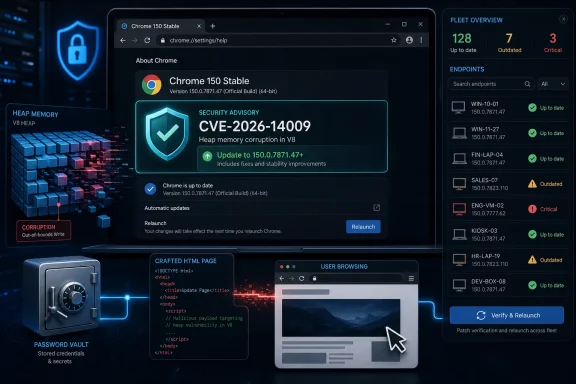
Google fixed CVE-2026-14009 in the June 30, 2026 Chrome 150 stable desktop update, patching an insufficient data validation flaw in Chrome’s Passwords component that affected versions before 150.0.7871.47 and could allow heap corruption through a crafted HTML page. The short version is simple: update Chrome, and make sure Chromium-based browsers in your fleet are not lagging behind the upstream fix. The more interesting version is that a “Medium” Chromium bug can still carry a “High” operational risk when it touches password-handling code, browser memory safety, and user-triggered web content. This is exactly the kind of vulnerability that looks ordinary in a mega-release but deserves a closer read from Windows admins.
Google’s Chrome Releases blog framed the June 30 update as the promotion of Chrome 150 to the stable channel for Windows, macOS, and Linux, with Windows and Mac moving into the 150.0.7871.46/.47 range and Linux to 150.0.7871.46. Buried inside that release was a sprawling security payload: Google said the update included 433 security fixes, and CVE-2026-14009 appeared as a Medium-severity entry reported internally by Google on May 26.
That context matters because CVE-2026-14009 is not a lonely emergency patch with flashing red lights. It is one entry in a release train full of critical, high, medium, and low defects across rendering, GPU, extensions, browser UI, and platform integration code. In modern Chrome, that is increasingly the norm: the browser is not one application so much as an operating environment with a release cadence that resembles a miniature OS.
The National Vulnerability Database entry, sourced from Chrome and later enriched by CISA’s ADP process, describes the flaw as an inappropriate implementation in Passwords that could let a remote attacker potentially exploit heap corruption via a crafted HTML page. NIST had not yet provided its own CVSS scoring when the entry was modified on July 1, but CISA-ADP assigned a CVSS 3.1 base score of 8.8, a High rating, with network attack vector, low attack complexity, no privileges required, and required user interaction.
That split between Chromium’s Medium severity and CISA-ADP’s High score is not a clerical curiosity. It is the tension at the center of browser security in 2026: vendor severity often accounts for exploitability within the browser’s layered mitigations, while CVSS is more abstract and impact-driven. For administrators deciding whether to accelerate deployment, the higher practical lesson is that a memory-corruption bug reachable from web content should not be allowed to sit around simply because the vendor label says Medium.
That does not mean CVE-2026-14009 automatically leaks saved passwords. The public description does not say that, and Google’s linked Chromium issue remains access-restricted in the usual post-release fashion while users update. But a bug in a password-related component that can be reached by crafted HTML is still notable because web pages are exactly the untrusted input Chrome spends its life trying to safely interpret.
The phrase insufficient data validation is dry, but it is doing real work here. It means some input or state crossing into the Passwords component was not checked tightly enough before the code acted on it. When the consequence is heap corruption, the risk moves from “bad data produced a bad result” into the realm of memory safety, where malformed inputs can destabilize process memory and, in worse cases, become primitives for code execution or data access.
Chrome’s sandbox, site isolation, memory allocators, control-flow defenses, and exploit mitigations all exist to make that path difficult. They are not magic. A single heap corruption bug may be only one ingredient in a working exploit chain, but security teams do not get to assume attackers lack the other ingredients.
A crafted HTML page is not necessarily a suspicious download or executable attachment. It can be a compromised legitimate site, a malicious ad frame, a link in a chat message, a redirected OAuth lure, an internal wiki page that accepts unsafe content, or a staging domain used in a targeted phishing campaign. The browser’s job is to parse hostile input all day long, and attackers understand that the easiest way into a heavily managed Windows estate is often through a user doing something that looks completely normal.
CISA-ADP’s scoring reflects that reality: the attack is network reachable and requires no privileges, but it does require user interaction. That user interaction requirement is important, but it should not be overvalued. In web security, “the user must visit a page” is not a high bar; it is the basic operating model of the internet.
There is no public indication from Google or NVD that CVE-2026-14009 is being exploited in the wild. CISA’s SSVC enrichment listed exploitation as “none” at the time of its July 1 update. That should lower the panic level, not the patch priority.
Security teams often build SLAs around severity labels. Critical patches get emergency change windows, High patches get accelerated deployment, Medium patches wait for normal cycles, and Low patches become background noise. CVE-2026-14009 cuts across that machinery because different authorities describe the same bug through different lenses.
Google’s severity is likely shaped by Chrome’s internal exploitability model and the broader security architecture. CVSS, by contrast, assumes a successful exploit path and scores the theoretical impact across confidentiality, integrity, and availability. Neither lens is useless. Neither lens is complete.
For Windows admins, the practical answer is to treat the Chrome 150 update as the unit of remediation, not CVE-2026-14009 in isolation. Google shipped hundreds of fixes in the same stable release, including critical memory-safety bugs and multiple password-, credential-, autofill-, policy-, and UI-adjacent issues. Arguing over whether one Passwords component bug is Medium or High misses the point: the browser build before 150.0.7871.47 is now known-bad.
That restraint frustrates defenders who want technical clarity, but it is a rational part of browser patching. Public exploit details released before update saturation can turn a patch into a blueprint. In a consumer browser with billions of installations and uneven update behavior, Google’s security team has strong incentives to delay full disclosure.
The downside lands on enterprise IT. Administrators are left to infer risk from sparse labels and external enrichment. A bug in Passwords, insufficient data validation, heap corruption, crafted HTML, user interaction required, no known exploitation — that is the puzzle, and patch managers must decide where it fits among Windows cumulative updates, Edge baselines, third-party app updates, VPN client fixes, and the usual July operational load.
The answer is not to demand perfect information before action. The answer is to make browser updates boring enough that sparse advisories do not create a crisis.
The affected line is straightforward: Google Chrome prior to 150.0.7871.47 is vulnerable according to the NVD CPE configuration added on July 1. On Windows, the target build to verify is 150.0.7871.47 or later. If an endpoint reports 150.0.7871.46 on Windows or Mac, administrators should not assume it is equivalent for this CVE unless their management source explicitly confirms the patched build state; the public NVD entry draws the exclusion line at 150.0.7871.47.
That distinction matters in tools that normalize software versions poorly. Browser versions are long dotted strings, and asset systems sometimes collapse them, compare them lexically instead of numerically, or group .46 and .47 as the same release family. A vulnerability scanner that sees “Chrome 150” and moves on is not doing enough here.
For Microsoft Edge, Brave, Vivaldi, Opera, and other Chromium-based browsers, the story is adjacent but not identical. CVE-2026-14009 is a Chromium/Chrome issue, and downstream browser vendors need to merge the relevant Chromium fixes into their own builds. Admins should check each vendor’s release notes and version mappings rather than assuming a Chrome version number directly applies.
This is a common trap in browser security. A component name can tempt administrators into assuming a policy toggle neutralizes the bug. Unless Google documents such a mitigation, the safe assumption is that the fix is the fix.
Still, the bug is a good reason to revisit browser credential policy. Password managers built into browsers have improved substantially, especially around breach checks, passkey support, phishing-resistant flows, and sync protections. But they also concentrate sensitive user workflows inside the same application that renders arbitrary web content. That is not an argument to panic; it is an argument to manage the feature deliberately.
Enterprises should know whether Chrome password saving is allowed, whether sync is permitted, whether enterprise profiles are separated from personal profiles, whether password export is controlled, and whether endpoint telemetry can distinguish managed Chrome from unmanaged Chromium derivatives. CVE-2026-14009 does not create those questions, but it makes them harder to ignore.
Chrome has invested heavily in reducing the exploitability of memory corruption. Site isolation, sandboxing, hardened allocators, compiler mitigations, MiraclePtr-style protections, and process separation all make the attacker’s job harder. But the persistence of heap bugs across major browser releases shows that the codebase remains too complex to eliminate them outright.
The Passwords component is also not isolated from complexity. Credential handling touches forms, frames, navigation, autofill heuristics, account state, sync, UI prompts, permissions, enterprise settings, and increasingly passkey-adjacent flows. Every boundary between untrusted page input and privileged browser behavior is a place where validation has to be exact.
That is why “insufficient data validation” can deserve more respect than it gets. Validation failures are often the first domino. Once the wrong object, size, state, or assumption enters a memory-sensitive path, the rest of the exploit story becomes a question of engineering.
That scale creates a communications problem. When a release contains hundreds of fixes, individual CVEs can blur together. A Medium issue in Passwords sits near other Medium issues in WebXR, Navigation, SVG, Network, and Updater, surrounded by dozens of High and Critical entries. For a human reader, the list becomes almost numbing.
Attackers do not experience the list that way. They look for reachable surfaces, useful primitives, patch diffs, and lagging populations. A bug that seems unremarkable in the middle of a long advisory may become interesting if it maps cleanly to a common user action or an enterprise configuration.
Defenders therefore need a different reading habit. Instead of treating the advisory as a ranked list of curiosities, treat the fixed build as the security boundary. The relevant question is not “Which of these 433 bugs will be weaponized?” but “How quickly can we get the fixed browser onto machines that touch email, identity, admin portals, and the open web?”
The user-facing NVD page even includes the familiar “Are we missing a CPE here?” prompt. That is a reminder that vulnerability data is not born perfect. It is assembled from vendor advisories, CNA submissions, enrichment pipelines, software identifiers, and later corrections. For mainstream Chrome on Windows, the CPE is clear enough. For embedded Chromium runtimes, bundled browser controls, Electron apps, and downstream browsers, the mapping is often less direct.
Windows environments are full of Chromium beyond Chrome. Teams, WebView2-based line-of-business apps, Electron desktop apps, security consoles, device-management portals, and third-party browsers may all carry Chromium-derived code at different cadences. CVE-2026-14009’s published CPE points to Google Chrome, not every Chromium consumer, but defenders should use it as a prompt to check their broader browser-runtime inventory.
That does not mean every Electron app is automatically vulnerable to this Passwords component bug. It means the organization should know where Chromium exists, who patches it, and how quickly upstream security fixes flow downstream. If that answer is “we find out when the scanner yells,” the process is already behind.
For individual Windows users, the fix is mundane: open Chrome’s About page, let it check for updates, relaunch, and confirm the version is 150.0.7871.47 or later. For managed environments, the better path is policy and telemetry: confirm update channel health, inspect version distribution, identify holdouts, and force relaunch where necessary.
The relaunch step is frequently the forgotten one. Chrome can download an update in the background, but the running browser process remains old until restarted. On machines that stay logged in for days or weeks, particularly developer workstations and privileged admin laptops, update availability is not the same thing as update completion.
Security teams should also watch for browser forks. If Chrome is patched but a secondary Chromium-based browser remains stale and registered as a default handler for some users, the exposure has not disappeared. Browser risk follows user behavior, not procurement preference.
 Chrome 150 Turns a Passwords Bug Into a Fleet Hygiene Test
Google’s Chrome Releases blog framed the June 30 update as the promotion of Chrome 150 to the stable channel for Windows, macOS, and Linux, with Windows and Mac moving into the 150.0.7871.46/.47 range and Linux to 150.0.7871.46. Buried inside that release was a sprawling security payload: Google said the update included 433 security fixes, and CVE-2026-14009 appeared as a Medium-severity entry reported internally by Google on May 26.That context matters because CVE-2026-14009 is not a lonely emergency patch with flashing red lights. It is one entry in a release train full of critical, high, medium, and low defects across rendering, GPU, extensions, browser UI, and platform integration code. In modern Chrome, that is increasingly the norm: the browser is not one application so much as an operating environment with a release cadence that resembles a miniature OS.
The National Vulnerability Database entry, sourced from Chrome and later enriched by CISA’s ADP process, describes the flaw as an inappropriate implementation in Passwords that could let a remote attacker potentially exploit heap corruption via a crafted HTML page. NIST had not yet provided its own CVSS scoring when the entry was modified on July 1, but CISA-ADP assigned a CVSS 3.1 base score of 8.8, a High rating, with network attack vector, low attack complexity, no privileges required, and required user interaction.
That split between Chromium’s Medium severity and CISA-ADP’s High score is not a clerical curiosity. It is the tension at the center of browser security in 2026: vendor severity often accounts for exploitability within the browser’s layered mitigations, while CVSS is more abstract and impact-driven. For administrators deciding whether to accelerate deployment, the higher practical lesson is that a memory-corruption bug reachable from web content should not be allowed to sit around simply because the vendor label says Medium.
The Password Manager Is No Longer a Side Feature
The “Passwords” component name can make this bug sound narrower than it probably feels to users. Chrome’s password stack is part credential vault, part form-filling engine, part account-security surface, and part enterprise policy target. It lives at the intersection of browser UI, saved secrets, synchronization, phishing resistance, and web-page interaction.That does not mean CVE-2026-14009 automatically leaks saved passwords. The public description does not say that, and Google’s linked Chromium issue remains access-restricted in the usual post-release fashion while users update. But a bug in a password-related component that can be reached by crafted HTML is still notable because web pages are exactly the untrusted input Chrome spends its life trying to safely interpret.
The phrase insufficient data validation is dry, but it is doing real work here. It means some input or state crossing into the Passwords component was not checked tightly enough before the code acted on it. When the consequence is heap corruption, the risk moves from “bad data produced a bad result” into the realm of memory safety, where malformed inputs can destabilize process memory and, in worse cases, become primitives for code execution or data access.
Chrome’s sandbox, site isolation, memory allocators, control-flow defenses, and exploit mitigations all exist to make that path difficult. They are not magic. A single heap corruption bug may be only one ingredient in a working exploit chain, but security teams do not get to assume attackers lack the other ingredients.
“Crafted HTML Page” Is the Browser’s Oldest Attack Surface
The NVD description says exploitation could occur via a crafted HTML page. That phrase appears so often in browser advisories that it risks becoming background noise. It should not.A crafted HTML page is not necessarily a suspicious download or executable attachment. It can be a compromised legitimate site, a malicious ad frame, a link in a chat message, a redirected OAuth lure, an internal wiki page that accepts unsafe content, or a staging domain used in a targeted phishing campaign. The browser’s job is to parse hostile input all day long, and attackers understand that the easiest way into a heavily managed Windows estate is often through a user doing something that looks completely normal.
CISA-ADP’s scoring reflects that reality: the attack is network reachable and requires no privileges, but it does require user interaction. That user interaction requirement is important, but it should not be overvalued. In web security, “the user must visit a page” is not a high bar; it is the basic operating model of the internet.
There is no public indication from Google or NVD that CVE-2026-14009 is being exploited in the wild. CISA’s SSVC enrichment listed exploitation as “none” at the time of its July 1 update. That should lower the panic level, not the patch priority.
The Severity Mismatch Is a Warning About Labels
Chromium classified CVE-2026-14009 as Medium. CISA-ADP’s CVSS vector produces an 8.8 High. NVD had not supplied its own CVSS score when the change history was recorded. If you run a vulnerability management program, this is exactly the kind of entry that can produce awkward ticket queues.Security teams often build SLAs around severity labels. Critical patches get emergency change windows, High patches get accelerated deployment, Medium patches wait for normal cycles, and Low patches become background noise. CVE-2026-14009 cuts across that machinery because different authorities describe the same bug through different lenses.
Google’s severity is likely shaped by Chrome’s internal exploitability model and the broader security architecture. CVSS, by contrast, assumes a successful exploit path and scores the theoretical impact across confidentiality, integrity, and availability. Neither lens is useless. Neither lens is complete.
For Windows admins, the practical answer is to treat the Chrome 150 update as the unit of remediation, not CVE-2026-14009 in isolation. Google shipped hundreds of fixes in the same stable release, including critical memory-safety bugs and multiple password-, credential-, autofill-, policy-, and UI-adjacent issues. Arguing over whether one Passwords component bug is Medium or High misses the point: the browser build before 150.0.7871.47 is now known-bad.
Chrome’s Release Note Is Sparse by Design
Google’s advisory gives administrators just enough to act and not enough to reverse-engineer the flaw. It lists the CVE, the affected component, the rough bug class, the reporter, the severity, and the fixed version. It also repeats the familiar warning that access to bug details and links may remain restricted until a majority of users are updated.That restraint frustrates defenders who want technical clarity, but it is a rational part of browser patching. Public exploit details released before update saturation can turn a patch into a blueprint. In a consumer browser with billions of installations and uneven update behavior, Google’s security team has strong incentives to delay full disclosure.
The downside lands on enterprise IT. Administrators are left to infer risk from sparse labels and external enrichment. A bug in Passwords, insufficient data validation, heap corruption, crafted HTML, user interaction required, no known exploitation — that is the puzzle, and patch managers must decide where it fits among Windows cumulative updates, Edge baselines, third-party app updates, VPN client fixes, and the usual July operational load.
The answer is not to demand perfect information before action. The answer is to make browser updates boring enough that sparse advisories do not create a crisis.
Windows Shops Should Care Even If Chrome Auto-Updates
Chrome’s auto-update machinery is good, but “Chrome auto-updates” is not the same as “every endpoint is fixed.” Managed Windows environments commonly contain update deferrals, frozen VDI images, kiosk systems, app-compat exceptions, offline laptops, nonpersistent desktops, privileged admin workstations, and servers where a browser exists because some legacy console still demands it.The affected line is straightforward: Google Chrome prior to 150.0.7871.47 is vulnerable according to the NVD CPE configuration added on July 1. On Windows, the target build to verify is 150.0.7871.47 or later. If an endpoint reports 150.0.7871.46 on Windows or Mac, administrators should not assume it is equivalent for this CVE unless their management source explicitly confirms the patched build state; the public NVD entry draws the exclusion line at 150.0.7871.47.
That distinction matters in tools that normalize software versions poorly. Browser versions are long dotted strings, and asset systems sometimes collapse them, compare them lexically instead of numerically, or group .46 and .47 as the same release family. A vulnerability scanner that sees “Chrome 150” and moves on is not doing enough here.
For Microsoft Edge, Brave, Vivaldi, Opera, and other Chromium-based browsers, the story is adjacent but not identical. CVE-2026-14009 is a Chromium/Chrome issue, and downstream browser vendors need to merge the relevant Chromium fixes into their own builds. Admins should check each vendor’s release notes and version mappings rather than assuming a Chrome version number directly applies.
The Passwords Component Raises Enterprise Policy Questions
Many organizations already disable Chrome’s built-in password manager in favor of enterprise password vaults, single sign-on, passkeys, or managed credential providers. That is sensible governance, but it is not a guaranteed mitigation for CVE-2026-14009. The public advisory does not state that disabling password saving removes the vulnerable code path.This is a common trap in browser security. A component name can tempt administrators into assuming a policy toggle neutralizes the bug. Unless Google documents such a mitigation, the safe assumption is that the fix is the fix.
Still, the bug is a good reason to revisit browser credential policy. Password managers built into browsers have improved substantially, especially around breach checks, passkey support, phishing-resistant flows, and sync protections. But they also concentrate sensitive user workflows inside the same application that renders arbitrary web content. That is not an argument to panic; it is an argument to manage the feature deliberately.
Enterprises should know whether Chrome password saving is allowed, whether sync is permitted, whether enterprise profiles are separated from personal profiles, whether password export is controlled, and whether endpoint telemetry can distinguish managed Chrome from unmanaged Chromium derivatives. CVE-2026-14009 does not create those questions, but it makes them harder to ignore.
Heap Corruption Still Defines the Browser Risk Model
Heap corruption is one of those terms that security veterans read quickly and everyone else skims past. In practical terms, it means the browser’s memory bookkeeping can be disturbed in a way the program did not intend. Depending on the bug and the surrounding mitigations, that can lead to a crash, information exposure, arbitrary code execution inside a sandbox, or one step in a broader exploit chain.Chrome has invested heavily in reducing the exploitability of memory corruption. Site isolation, sandboxing, hardened allocators, compiler mitigations, MiraclePtr-style protections, and process separation all make the attacker’s job harder. But the persistence of heap bugs across major browser releases shows that the codebase remains too complex to eliminate them outright.
The Passwords component is also not isolated from complexity. Credential handling touches forms, frames, navigation, autofill heuristics, account state, sync, UI prompts, permissions, enterprise settings, and increasingly passkey-adjacent flows. Every boundary between untrusted page input and privileged browser behavior is a place where validation has to be exact.
That is why “insufficient data validation” can deserve more respect than it gets. Validation failures are often the first domino. Once the wrong object, size, state, or assumption enters a memory-sensitive path, the rest of the exploit story becomes a question of engineering.
The Mega-Patch Era Makes Individual CVEs Harder to Read
Chrome 150’s 433 security fixes are not a normal patch note in the old desktop software sense. They are a signal that modern browsers are under constant internal fuzzing, automated testing, variant analysis, and large-scale code hardening. Many of the entries were reported by Google itself, reflecting the internal machinery now required to keep a browser alive on the public internet.That scale creates a communications problem. When a release contains hundreds of fixes, individual CVEs can blur together. A Medium issue in Passwords sits near other Medium issues in WebXR, Navigation, SVG, Network, and Updater, surrounded by dozens of High and Critical entries. For a human reader, the list becomes almost numbing.
Attackers do not experience the list that way. They look for reachable surfaces, useful primitives, patch diffs, and lagging populations. A bug that seems unremarkable in the middle of a long advisory may become interesting if it maps cleanly to a common user action or an enterprise configuration.
Defenders therefore need a different reading habit. Instead of treating the advisory as a ranked list of curiosities, treat the fixed build as the security boundary. The relevant question is not “Which of these 433 bugs will be weaponized?” but “How quickly can we get the fixed browser onto machines that touch email, identity, admin portals, and the open web?”
The CPE Line Is Small but Operationally Important
The NVD change history added a CPE configuration for Google Chrome versions up to, but excluding, 150.0.7871.47. That is the machine-readable hinge on which many scanners, dashboards, and compliance reports will turn. It is also the place where small errors can become large operational blind spots.The user-facing NVD page even includes the familiar “Are we missing a CPE here?” prompt. That is a reminder that vulnerability data is not born perfect. It is assembled from vendor advisories, CNA submissions, enrichment pipelines, software identifiers, and later corrections. For mainstream Chrome on Windows, the CPE is clear enough. For embedded Chromium runtimes, bundled browser controls, Electron apps, and downstream browsers, the mapping is often less direct.
Windows environments are full of Chromium beyond Chrome. Teams, WebView2-based line-of-business apps, Electron desktop apps, security consoles, device-management portals, and third-party browsers may all carry Chromium-derived code at different cadences. CVE-2026-14009’s published CPE points to Google Chrome, not every Chromium consumer, but defenders should use it as a prompt to check their broader browser-runtime inventory.
That does not mean every Electron app is automatically vulnerable to this Passwords component bug. It means the organization should know where Chromium exists, who patches it, and how quickly upstream security fixes flow downstream. If that answer is “we find out when the scanner yells,” the process is already behind.
The Right Response Is Fast Verification, Not Alarm
There is no public exploitation claim for CVE-2026-14009 at the time of the NVD and CISA-ADP updates described here. There is no public proof-of-concept from Google. There is no vendor statement saying saved passwords are being stolen. The responsible tone is urgency without theatrics.For individual Windows users, the fix is mundane: open Chrome’s About page, let it check for updates, relaunch, and confirm the version is 150.0.7871.47 or later. For managed environments, the better path is policy and telemetry: confirm update channel health, inspect version distribution, identify holdouts, and force relaunch where necessary.
The relaunch step is frequently the forgotten one. Chrome can download an update in the background, but the running browser process remains old until restarted. On machines that stay logged in for days or weeks, particularly developer workstations and privileged admin laptops, update availability is not the same thing as update completion.
Security teams should also watch for browser forks. If Chrome is patched but a secondary Chromium-based browser remains stale and registered as a default handler for some users, the exposure has not disappeared. Browser risk follows user behavior, not procurement preference.
Chrome’s Password Bug Leaves Administrators With a Short Checklist
CVE-2026-14009 is not the loudest Chrome bug of the summer, but it is a useful test of whether an organization treats browsers as first-class security infrastructure. The patch is available, the affected version boundary is clear, and the exploit path is plausible enough to justify quick action.- Chrome on Windows should be verified at 150.0.7871.47 or later, not merely “Chrome 150.”
- The June 30 Chrome 150 stable update should be treated as a browser security baseline because it contains hundreds of fixes, not just CVE-2026-14009.
- The absence of known exploitation should reduce panic but should not extend patch windows for internet-facing browsers.
- Built-in password-manager policy should be reviewed, but administrators should not assume policy disables mitigate this flaw unless Google documents that explicitly.
- Chromium-based browsers and Chromium runtimes should be checked through their own vendor release channels rather than inferred from Chrome’s version number.
- Update telemetry should confirm both installation and relaunch, because a downloaded browser update does not protect a still-running old process.
References
- Primary source: NVD / Chromium
Published: 2026-07-03T07:00:46-07:00
NVD - CVE-2026-14009
 nvd.nist.gov
- Security advisory: MSRC
Published: 2026-07-03T07:00:46-07:00
Original feed URL
Security Update Guide - Microsoft Security Response Center
 msrc.microsoft.com
- Related coverage: cvefeed.io
CVE-2026-14009 - Google Chrome Heap Corruption
Inappropriate implementation in Passwords in Google Chrome prior to 150.0.7871.47 allowed a remote attacker to potentially exploit heap corruption via a crafted HTML page. (Chromium security severity: Medium)cvefeed.io
