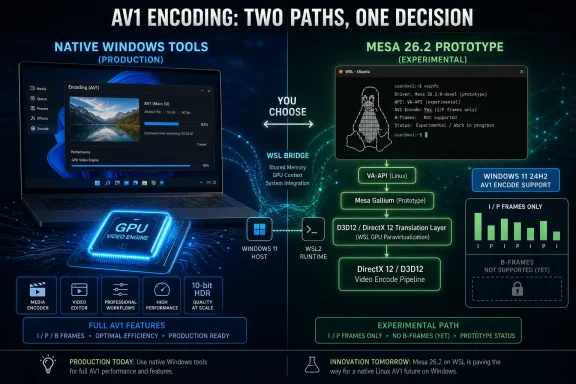
Microsoft engineers merged an initial Mesa 26.2 implementation on July 6, 2026 that enables prototype GPU-accelerated AV1 video encoding on Windows through DirectX 12 and Hardware Media Foundation Transform support, primarily to advance Windows Subsystem for Linux media acceleration. The change, first reported by Phoronix, is not a consumer-facing Windows feature in the usual sense. It is plumbing. But in modern Windows, plumbing is increasingly where the platform war is fought.
The immediate story is modest: roughly 900 lines of Mesa-side code, I- and P-frame AV1 encoding, and no advanced encode features yet. The larger story is that Microsoft continues to make WSL less like a compatibility layer and more like a parallel Windows runtime with access to real GPU media capabilities. That matters for developers, creators, AI-adjacent tooling, browser stacks, remote desktops, and every workflow where Linux software is expected to run on a Windows laptop without feeling like it is trapped behind glass.
The interesting part of this Mesa merge is not simply that AV1 encoding is being wired up. It is where Microsoft chose to wire it.
Mesa is the open-source graphics and media stack most Windows users never think about, but Linux users live with every day. It provides OpenGL, Vulkan, Gallium drivers, video acceleration pieces, and an enormous amount of connective tissue between applications and GPU hardware. When Mesa gains support for a capability, Linux applications can often start seeing that capability through familiar interfaces rather than through a vendor-specific Windows SDK.
Microsoft’s WSL strategy depends on exactly that kind of connective tissue. A Linux application inside WSL should not need to know that the physical GPU is being mediated through Windows, Direct3D, and Windows drivers. It wants VA-API, FFmpeg, GStreamer, Mesa, and the rest of the stack it already understands. Microsoft’s job is to make Windows look enough like Linux from above while still being Windows below.
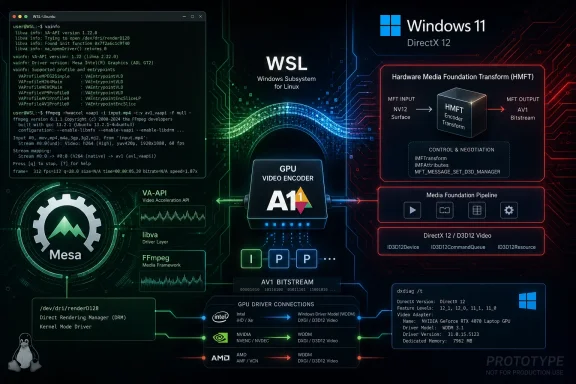
That is why DirectX 12 plus HMFT is such a revealing combination. DirectX 12 is the low-level Windows graphics and compute foundation; Hardware Media Foundation Transform support sits in the Windows Media Foundation layer and exposes hardware-backed media processing. Mesa sits above that world and gives Linux-side applications a route into it. In other words, Microsoft is not asking every Linux media app to learn Windows. It is teaching Windows to masquerade as the GPU media backend Linux software expected all along.
The result is a cross-vendor play. Instead of building only against one GPU vendor’s encode SDK, Microsoft can route through Windows’ own media abstractions and Direct3D driver support. That is very Windows: normalize the hardware differences underneath a system API, then let the application ecosystem target the abstraction.
AV1 encoding is not merely a checkbox. Serious encoders care about rate control, reference frames, tiling, temporal layers, quality presets, latency modes, bitrate stability, scene changes, and a long list of vendor-specific quirks. The hardware block may support AV1, the driver may expose AV1, and the API may describe AV1, but the usable experience depends on how much of that complexity has been surfaced and tested.
That is especially true for WSL. The user sitting inside a Linux environment may invoke FFmpeg, GStreamer, a browser, or a custom pipeline. Each layer has its own expectations about capability discovery and failure modes. If Mesa advertises too much too early, applications can make bad assumptions. If it advertises too little, the feature sits unused. The prototype has to grow into a credible contract.
Still, prototypes in Mesa matter because they create the place where future work can attach. The first implementation is rarely the glamorous one. It defines the interfaces, proves the transport path, shakes out object lifetime problems, and gives developers a target for adding the unpleasant but necessary pieces. The boring merge is often the one that makes the later user-visible feature possible.
For Windows users, AV1 has already moved from “future codec” to “present checkbox.” Modern GPUs from Intel, AMD, and Nvidia have been adding AV1 decode and encode capabilities across recent generations, and Windows 11’s media and graphics stack has gradually caught up. Microsoft’s own documentation says Direct3D 12 video encoding support extends to AV1 starting with Windows 11 version 24H2 and WDDM 3.2, which is exactly the kind of platform-level prerequisite that makes a Mesa bridge plausible.
For WSL, AV1 is even more important. Developers increasingly handle video not only as entertainment media but as data: recorded meetings, computer-vision datasets, game captures, remote sessions, browser automation output, and ML training or evaluation clips. Efficient encoding becomes infrastructure. A Linux toolchain running on a Windows workstation should not have to fall back to CPU encoding simply because the software boundary crosses from WSL into the host.
The competitive pressure is also obvious. Apple has spent years making media acceleration feel like an integrated part of the Mac developer platform. Linux on bare metal has increasingly capable native paths through VA-API, Vulkan Video, and vendor stacks. If Windows wants to remain the default workstation OS for developers who also live in Linux tooling, WSL cannot be a second-class media environment.
Media acceleration is part of that same arc. Microsoft announced D3D12 GPU video acceleration for WSL in 2023, describing a path where WSLg applications could use VA-API through Mesa’s D3D12 driver for workloads such as decode, encode, and video processing. The company also described VA-API on Windows through VAOn12, with Mesa acting as a bridge from Linux-style media APIs into Direct3D-backed Windows capabilities.
The AV1 encode prototype is therefore not a random one-off. It is the next square in a grid Microsoft has been filling for years. First, make Linux GUI apps usable. Then make GPU acceleration work. Then make compute plausible. Then make media pipelines practical. The destination is a Windows machine where Linux development workloads can assume hardware acceleration without caring that they are not running on a conventional Linux desktop.
That matters because WSL’s audience has changed. It is no longer only a place to run
Microsoft has learned that compatibility without acceleration is not enough. A feature that technically works but burns CPU, drains battery, drops frames, or creates unpredictable latency will be abandoned by the people most likely to notice. Hardware media support is the difference between “WSL can run it” and “WSL can run it well.”
Historically, one advantage of Windows has been vendor driver availability. GPU makers prioritize Windows because the gaming, workstation, and OEM markets demand it. Linux has excellent open-source graphics work, especially around Mesa, but hardware media support can still depend on vendor commitment, kernel versions, firmware packaging, distribution choices, and application integration. WSL lets Microsoft use Windows’ driver centrality as the substrate for Linux acceleration.
That is the strategic logic of DX12-backed Mesa work. If the Windows host has a supported GPU and a capable driver, Microsoft can expose a Linux-facing API path inside WSL that rides on top of the Windows stack. The user does not install a separate Linux GPU driver inside the WSL environment. The Linux application sees something familiar, while the host arbitrates the real hardware.
This approach has obvious benefits for portability. A developer with an Intel laptop, an Nvidia desktop, or an AMD workstation can, in theory, run similar Linux media software through the same WSL pathway. The abstraction is not magic, and each vendor’s driver quality still matters. But it reduces the number of bespoke paths an application developer has to care about.
It also reinforces Windows as the host operating system even for people who increasingly prefer Linux tools. Microsoft is not trying to persuade every developer to stop using Linux workflows. It is trying to make Windows the best place to run them when the machine in front of you is a PC. That is a subtler platform strategy than the old Windows-versus-Linux framing, and it is much more durable.
The pragmatic benefits are clear. Upstreaming code reduces long-term maintenance pain, invites review, and puts the work where Linux applications already expect it. It also prevents WSL-specific support from becoming a private fork that slowly rots. If Microsoft wants WSL media acceleration to be credible, Mesa is one of the right places to do the work.
But the optics cut both ways. Some Linux users will see this as Microsoft helping itself first and the broader ecosystem second. That critique is not baseless: the DX12 and HMFT path is chiefly useful on Windows and WSL, not on a conventional Linux installation running a native Mesa driver. This is open source in service of a Windows platform objective.
That does not make it bad. Open-source infrastructure has always been shaped by companies pursuing their own needs in public. Valve’s work on Proton, AMD’s work on open Linux graphics drivers, Intel’s Mesa investments, Google’s Android and ChromeOS graphics needs, and Microsoft’s WSL efforts all fit that pattern. The relevant question is not whether the contribution is altruistic. It is whether the code is reviewable, maintainable, and useful enough to earn its place.
On that score, Mesa is a demanding venue. Prototype code can land, but it does not become a trusted path without testing, users, bug reports, and follow-up patches. Microsoft has put a marker down. The community will judge the work by whether it continues.
WSL is becoming more capable in precisely the areas that used to separate “developer workstation” from “standard Windows endpoint.” GPU acceleration, Linux GUI apps, container workflows, and media pipelines all increase the range of work that can happen locally on a managed Windows device. That can be a win for security and fleet management if it keeps developers on compliant machines instead of unmanaged Linux laptops or shadow cloud workstations.
It also creates governance questions. Hardware-accelerated media encoding can affect data-loss risk, remote collaboration tooling, screen capture, automated video generation, and workload classification. The more WSL behaves like a complete Linux environment with access to host GPU capabilities, the more administrators need to understand it as part of the endpoint’s real attack and data surface.
That does not mean disabling WSL by reflex. For many organizations, WSL is the compromise that keeps developers productive while preserving Windows management, identity, security tooling, and device compliance. But the security model cannot stop at “it is only a subsystem.” The subsystem now has a display server, GPU paths, networked services, filesystem integration, and media acceleration.
The AV1 merge is a reminder that WSL should be governed as a first-class platform component. Policies around who can enable it, which distributions are allowed, how updates are handled, what filesystem boundaries exist, and how developer workloads are monitored all become more important as the capability gap narrows.
Consider a developer testing a web application that records canvas output or screen sessions. Or a tool author building a Linux pipeline around FFmpeg. Or a data engineer compressing video samples before upload. CPU-only encoding can make those tasks slow, hot, and battery-hostile. Hardware AV1 support can make them routine, assuming the stack exposes enough controls and behaves predictably.
The “eventually” matters. Because this implementation is currently a prototype, developers should not expect immediate miracles. It will need application integration, distribution packaging, runtime detection, driver support, and real-world bug fixing. AV1 encode hardware availability also depends on the actual GPU generation and driver stack in the host machine.
Still, early plumbing changes are how platform support arrives. A future release of WSL, Mesa, or Windows graphics drivers may make this feel automatic. When that happens, most users will not know which merge request made it possible. They will simply notice that a command that used to peg the CPU now uses the GPU.
That raises an architectural question: is Microsoft’s DX12-plus-HMFT route the future, or merely the WSL future? The likely answer is that it is a pragmatic bridge for Windows-hosted Linux workloads rather than a universal media philosophy. On bare-metal Linux, developers will still care about VA-API, Vulkan Video, and vendor-specific capabilities. On Windows, Microsoft will naturally prefer Direct3D and Media Foundation as the foundation.
WSL sits between those worlds. It needs to satisfy Linux software expectations while respecting the Windows host’s driver model. That makes translation layers inevitable. The art is choosing where to translate, how much capability to expose, and how to keep behavior close enough to native Linux that applications do not need WSL-specific hacks.
This is where Microsoft’s approach is both clever and fragile. It is clever because it uses the host OS strengths instead of pretending WSL is a separate bare-metal Linux machine. It is fragile because translation layers accumulate edge cases. Every encoder option, memory layout, synchronization primitive, and driver behavior can become a place where “works on Linux” and “works on WSL” diverge.
The best outcome is not that developers think about DirectX 12 when they run Linux video tools. The best outcome is that they do not think about it at all. But making that happen requires a lot of unglamorous work below the waterline.
Users should not need to know whether their AV1 encode job inside WSL is using D3D12 video encode, HMFT, Mesa Gallium media code, VA-API, or some combination of those pieces. They should see that the GPU supports AV1 encode, that the software can request it, and that the output is correct. Administrators should be able to document the supported Windows, driver, and GPU requirements without spelunking through forum posts. Developers should be able to detect capabilities cleanly.
The difficulty is that cross-vendor GPU media is rarely boring at first. One GPU may expose a feature differently from another. One driver may support a rate-control mode that another lacks. One vendor may produce better quality at a given bitrate. A path that works on a desktop card may fail on a laptop iGPU, or vice versa. AV1 encode adds another layer of maturity variation because hardware support is still newer than H.264 and HEVC.
That is why Microsoft’s use of Windows abstractions is sensible. If the Windows media and graphics stack can absorb some vendor differences, the Mesa layer has a better chance of presenting a coherent Linux-facing surface. But abstraction cannot eliminate every difference. It can only make the common path easier and the exceptional paths discoverable.
For Windows enthusiasts, this is the part to watch. The first prototype tells us Microsoft wants the capability. The follow-up work will tell us whether it wants the messy responsibility of making it reliable across real hardware.
That is a major shift from the Windows of old. The old model was to win by making developers target Win32, DirectX, COM, .NET, UWP, or whatever Microsoft wanted to push at the time. The newer model is more accommodating and more strategic: let developers bring Linux tools, containers, open-source stacks, and cross-platform workflows, then make Windows the best-managed, best-integrated host for them.
AV1 encoding in Mesa through DX12 and HMFT fits that model perfectly. It does not ask Linux software to become Windows software. It makes Windows capabilities reachable from Linux-shaped interfaces. That is the pitch of WSL in one sentence.
There is also a defensive dimension. If Microsoft cannot make Windows hospitable to Linux-native developer workflows, developers have plenty of alternatives: macOS laptops, native Linux workstations, cloud development environments, and remote GPU instances. WSL’s job is to reduce the reasons to leave Windows. Hardware-accelerated media is one more reason removed.
The immediate story is modest: roughly 900 lines of Mesa-side code, I- and P-frame AV1 encoding, and no advanced encode features yet. The larger story is that Microsoft continues to make WSL less like a compatibility layer and more like a parallel Windows runtime with access to real GPU media capabilities. That matters for developers, creators, AI-adjacent tooling, browser stacks, remote desktops, and every workflow where Linux software is expected to run on a Windows laptop without feeling like it is trapped behind glass.
 Microsoft Moves the Linux Media Stack Closer to the Windows Driver Model
The interesting part of this Mesa merge is not simply that AV1 encoding is being wired up. It is where Microsoft chose to wire it.Mesa is the open-source graphics and media stack most Windows users never think about, but Linux users live with every day. It provides OpenGL, Vulkan, Gallium drivers, video acceleration pieces, and an enormous amount of connective tissue between applications and GPU hardware. When Mesa gains support for a capability, Linux applications can often start seeing that capability through familiar interfaces rather than through a vendor-specific Windows SDK.
Microsoft’s WSL strategy depends on exactly that kind of connective tissue. A Linux application inside WSL should not need to know that the physical GPU is being mediated through Windows, Direct3D, and Windows drivers. It wants VA-API, FFmpeg, GStreamer, Mesa, and the rest of the stack it already understands. Microsoft’s job is to make Windows look enough like Linux from above while still being Windows below.
That is why DirectX 12 plus HMFT is such a revealing combination. DirectX 12 is the low-level Windows graphics and compute foundation; Hardware Media Foundation Transform support sits in the Windows Media Foundation layer and exposes hardware-backed media processing. Mesa sits above that world and gives Linux-side applications a route into it. In other words, Microsoft is not asking every Linux media app to learn Windows. It is teaching Windows to masquerade as the GPU media backend Linux software expected all along.
The result is a cross-vendor play. Instead of building only against one GPU vendor’s encode SDK, Microsoft can route through Windows’ own media abstractions and Direct3D driver support. That is very Windows: normalize the hardware differences underneath a system API, then let the application ecosystem target the abstraction.
The Prototype Label Is Doing Real Work
The new Mesa code is described as a prototype, and that word should not be waved away. According to Phoronix, the merged implementation is good enough for I- and P-frame encoding but does not yet include the advanced features users would associate with a mature AV1 encoder path. That means it is not a drop-in replacement for a polished production encoder stack in a high-end streaming or video-editing workflow.AV1 encoding is not merely a checkbox. Serious encoders care about rate control, reference frames, tiling, temporal layers, quality presets, latency modes, bitrate stability, scene changes, and a long list of vendor-specific quirks. The hardware block may support AV1, the driver may expose AV1, and the API may describe AV1, but the usable experience depends on how much of that complexity has been surfaced and tested.
That is especially true for WSL. The user sitting inside a Linux environment may invoke FFmpeg, GStreamer, a browser, or a custom pipeline. Each layer has its own expectations about capability discovery and failure modes. If Mesa advertises too much too early, applications can make bad assumptions. If it advertises too little, the feature sits unused. The prototype has to grow into a credible contract.
Still, prototypes in Mesa matter because they create the place where future work can attach. The first implementation is rarely the glamorous one. It defines the interfaces, proves the transport path, shakes out object lifetime problems, and gives developers a target for adding the unpleasant but necessary pieces. The boring merge is often the one that makes the later user-visible feature possible.
AV1 Is the Right Codec for This Moment
Microsoft’s choice of AV1 is not accidental. AV1 has become the codec that platform vendors like to support because it aligns technical, commercial, and political incentives unusually well. It is designed for high compression efficiency, it is widely associated with royalty-free ambitions, and it has backing from major browser, silicon, cloud, and streaming players through the Alliance for Open Media.For Windows users, AV1 has already moved from “future codec” to “present checkbox.” Modern GPUs from Intel, AMD, and Nvidia have been adding AV1 decode and encode capabilities across recent generations, and Windows 11’s media and graphics stack has gradually caught up. Microsoft’s own documentation says Direct3D 12 video encoding support extends to AV1 starting with Windows 11 version 24H2 and WDDM 3.2, which is exactly the kind of platform-level prerequisite that makes a Mesa bridge plausible.
For WSL, AV1 is even more important. Developers increasingly handle video not only as entertainment media but as data: recorded meetings, computer-vision datasets, game captures, remote sessions, browser automation output, and ML training or evaluation clips. Efficient encoding becomes infrastructure. A Linux toolchain running on a Windows workstation should not have to fall back to CPU encoding simply because the software boundary crosses from WSL into the host.
The competitive pressure is also obvious. Apple has spent years making media acceleration feel like an integrated part of the Mac developer platform. Linux on bare metal has increasingly capable native paths through VA-API, Vulkan Video, and vendor stacks. If Windows wants to remain the default workstation OS for developers who also live in Linux tooling, WSL cannot be a second-class media environment.
WSL’s Original Bargain Keeps Expanding
WSL began as a developer convenience: run Linux command-line tools without dual-booting, remote machines, or heavyweight virtual machines. WSL 2 changed the bargain by putting a real Linux kernel in a lightweight VM. WSLg then made graphical Linux applications feel more native. GPU compute and D3D12-backed Mesa support pushed the boundary further.Media acceleration is part of that same arc. Microsoft announced D3D12 GPU video acceleration for WSL in 2023, describing a path where WSLg applications could use VA-API through Mesa’s D3D12 driver for workloads such as decode, encode, and video processing. The company also described VA-API on Windows through VAOn12, with Mesa acting as a bridge from Linux-style media APIs into Direct3D-backed Windows capabilities.
The AV1 encode prototype is therefore not a random one-off. It is the next square in a grid Microsoft has been filling for years. First, make Linux GUI apps usable. Then make GPU acceleration work. Then make compute plausible. Then make media pipelines practical. The destination is a Windows machine where Linux development workloads can assume hardware acceleration without caring that they are not running on a conventional Linux desktop.
That matters because WSL’s audience has changed. It is no longer only a place to run
grep, ssh, and a package manager. It is a place where developers run containers, browsers, IDE helpers, test harnesses, GPU-aware libraries, media processing pipelines, and increasingly complicated local services. The more those workflows resemble full Linux desktops or servers, the more obvious the missing hardware paths become.Microsoft has learned that compatibility without acceleration is not enough. A feature that technically works but burns CPU, drains battery, drops frames, or creates unpredictable latency will be abandoned by the people most likely to notice. Hardware media support is the difference between “WSL can run it” and “WSL can run it well.”
The Windows Driver Stack Becomes a Linux Feature
There is a quiet inversion here that WindowsForum readers should appreciate: Microsoft is turning the Windows driver ecosystem into a feature for Linux software.Historically, one advantage of Windows has been vendor driver availability. GPU makers prioritize Windows because the gaming, workstation, and OEM markets demand it. Linux has excellent open-source graphics work, especially around Mesa, but hardware media support can still depend on vendor commitment, kernel versions, firmware packaging, distribution choices, and application integration. WSL lets Microsoft use Windows’ driver centrality as the substrate for Linux acceleration.
That is the strategic logic of DX12-backed Mesa work. If the Windows host has a supported GPU and a capable driver, Microsoft can expose a Linux-facing API path inside WSL that rides on top of the Windows stack. The user does not install a separate Linux GPU driver inside the WSL environment. The Linux application sees something familiar, while the host arbitrates the real hardware.
This approach has obvious benefits for portability. A developer with an Intel laptop, an Nvidia desktop, or an AMD workstation can, in theory, run similar Linux media software through the same WSL pathway. The abstraction is not magic, and each vendor’s driver quality still matters. But it reduces the number of bespoke paths an application developer has to care about.
It also reinforces Windows as the host operating system even for people who increasingly prefer Linux tools. Microsoft is not trying to persuade every developer to stop using Linux workflows. It is trying to make Windows the best place to run them when the machine in front of you is a PC. That is a subtler platform strategy than the old Windows-versus-Linux framing, and it is much more durable.
The Open-Source Optics Are Complicated but Useful
Microsoft contributing to Mesa no longer feels shocking, but it remains politically interesting. Mesa is not a Microsoft project. It is a core part of the open-source graphics stack, with deep involvement from the Linux, gaming, desktop, embedded, and GPU communities. When Microsoft engineers land code there, they are participating in an ecosystem that historically existed partly because Windows graphics was closed and vendor-driven.The pragmatic benefits are clear. Upstreaming code reduces long-term maintenance pain, invites review, and puts the work where Linux applications already expect it. It also prevents WSL-specific support from becoming a private fork that slowly rots. If Microsoft wants WSL media acceleration to be credible, Mesa is one of the right places to do the work.
But the optics cut both ways. Some Linux users will see this as Microsoft helping itself first and the broader ecosystem second. That critique is not baseless: the DX12 and HMFT path is chiefly useful on Windows and WSL, not on a conventional Linux installation running a native Mesa driver. This is open source in service of a Windows platform objective.
That does not make it bad. Open-source infrastructure has always been shaped by companies pursuing their own needs in public. Valve’s work on Proton, AMD’s work on open Linux graphics drivers, Intel’s Mesa investments, Google’s Android and ChromeOS graphics needs, and Microsoft’s WSL efforts all fit that pattern. The relevant question is not whether the contribution is altruistic. It is whether the code is reviewable, maintainable, and useful enough to earn its place.
On that score, Mesa is a demanding venue. Prototype code can land, but it does not become a trusted path without testing, users, bug reports, and follow-up patches. Microsoft has put a marker down. The community will judge the work by whether it continues.
Enterprise IT Should Read This as a Platform Signal
For most enterprise administrators, an AV1 encode prototype in Mesa 26.2 is not an action item. Nobody should redesign a managed endpoint image because a prototype media path landed upstream. But IT departments should pay attention to the platform signal.WSL is becoming more capable in precisely the areas that used to separate “developer workstation” from “standard Windows endpoint.” GPU acceleration, Linux GUI apps, container workflows, and media pipelines all increase the range of work that can happen locally on a managed Windows device. That can be a win for security and fleet management if it keeps developers on compliant machines instead of unmanaged Linux laptops or shadow cloud workstations.
It also creates governance questions. Hardware-accelerated media encoding can affect data-loss risk, remote collaboration tooling, screen capture, automated video generation, and workload classification. The more WSL behaves like a complete Linux environment with access to host GPU capabilities, the more administrators need to understand it as part of the endpoint’s real attack and data surface.
That does not mean disabling WSL by reflex. For many organizations, WSL is the compromise that keeps developers productive while preserving Windows management, identity, security tooling, and device compliance. But the security model cannot stop at “it is only a subsystem.” The subsystem now has a display server, GPU paths, networked services, filesystem integration, and media acceleration.
The AV1 merge is a reminder that WSL should be governed as a first-class platform component. Policies around who can enable it, which distributions are allowed, how updates are handled, what filesystem boundaries exist, and how developer workloads are monitored all become more important as the capability gap narrows.
Developers Get a Better Local Story, Eventually
The developer upside is straightforward: less friction. A Linux-first media application, CI test, browser capture workflow, or video-processing script running under WSL should eventually be able to reach AV1 hardware encoding without abandoning familiar Linux interfaces. That is the kind of improvement that rarely appears in a keynote but changes daily workflow quality.Consider a developer testing a web application that records canvas output or screen sessions. Or a tool author building a Linux pipeline around FFmpeg. Or a data engineer compressing video samples before upload. CPU-only encoding can make those tasks slow, hot, and battery-hostile. Hardware AV1 support can make them routine, assuming the stack exposes enough controls and behaves predictably.
The “eventually” matters. Because this implementation is currently a prototype, developers should not expect immediate miracles. It will need application integration, distribution packaging, runtime detection, driver support, and real-world bug fixing. AV1 encode hardware availability also depends on the actual GPU generation and driver stack in the host machine.
Still, early plumbing changes are how platform support arrives. A future release of WSL, Mesa, or Windows graphics drivers may make this feel automatic. When that happens, most users will not know which merge request made it possible. They will simply notice that a command that used to peg the CPU now uses the GPU.
Vulkan Video Still Looms Over the Architecture
The Mesa ecosystem is not short of video API activity. Vulkan Video has been steadily developing as a cross-platform, explicit API path for decode and encode, including AV1 encode extensions announced by Khronos. Native Linux drivers, especially in the gaming and workstation orbit, have been gaining more video capability through Vulkan-facing paths as well as VA-API and vendor interfaces.That raises an architectural question: is Microsoft’s DX12-plus-HMFT route the future, or merely the WSL future? The likely answer is that it is a pragmatic bridge for Windows-hosted Linux workloads rather than a universal media philosophy. On bare-metal Linux, developers will still care about VA-API, Vulkan Video, and vendor-specific capabilities. On Windows, Microsoft will naturally prefer Direct3D and Media Foundation as the foundation.
WSL sits between those worlds. It needs to satisfy Linux software expectations while respecting the Windows host’s driver model. That makes translation layers inevitable. The art is choosing where to translate, how much capability to expose, and how to keep behavior close enough to native Linux that applications do not need WSL-specific hacks.
This is where Microsoft’s approach is both clever and fragile. It is clever because it uses the host OS strengths instead of pretending WSL is a separate bare-metal Linux machine. It is fragile because translation layers accumulate edge cases. Every encoder option, memory layout, synchronization primitive, and driver behavior can become a place where “works on Linux” and “works on WSL” diverge.
The best outcome is not that developers think about DirectX 12 when they run Linux video tools. The best outcome is that they do not think about it at all. But making that happen requires a lot of unglamorous work below the waterline.
The Real Win Is Cross-Vendor Boringness
A successful version of this feature will be boring. That is the highest compliment infrastructure can earn.Users should not need to know whether their AV1 encode job inside WSL is using D3D12 video encode, HMFT, Mesa Gallium media code, VA-API, or some combination of those pieces. They should see that the GPU supports AV1 encode, that the software can request it, and that the output is correct. Administrators should be able to document the supported Windows, driver, and GPU requirements without spelunking through forum posts. Developers should be able to detect capabilities cleanly.
The difficulty is that cross-vendor GPU media is rarely boring at first. One GPU may expose a feature differently from another. One driver may support a rate-control mode that another lacks. One vendor may produce better quality at a given bitrate. A path that works on a desktop card may fail on a laptop iGPU, or vice versa. AV1 encode adds another layer of maturity variation because hardware support is still newer than H.264 and HEVC.
That is why Microsoft’s use of Windows abstractions is sensible. If the Windows media and graphics stack can absorb some vendor differences, the Mesa layer has a better chance of presenting a coherent Linux-facing surface. But abstraction cannot eliminate every difference. It can only make the common path easier and the exceptional paths discoverable.
For Windows enthusiasts, this is the part to watch. The first prototype tells us Microsoft wants the capability. The follow-up work will tell us whether it wants the messy responsibility of making it reliable across real hardware.
The Small Merge That Points to a Bigger Windows
This Mesa 26.2 change is easy to underestimate because it is not a Start menu redesign, a Copilot button, or a flashy Windows feature drop. It is a low-level contribution in a project many Windows users know only by reputation. But it points toward a Windows platform that increasingly competes by hosting other platforms well.That is a major shift from the Windows of old. The old model was to win by making developers target Win32, DirectX, COM, .NET, UWP, or whatever Microsoft wanted to push at the time. The newer model is more accommodating and more strategic: let developers bring Linux tools, containers, open-source stacks, and cross-platform workflows, then make Windows the best-managed, best-integrated host for them.
AV1 encoding in Mesa through DX12 and HMFT fits that model perfectly. It does not ask Linux software to become Windows software. It makes Windows capabilities reachable from Linux-shaped interfaces. That is the pitch of WSL in one sentence.
There is also a defensive dimension. If Microsoft cannot make Windows hospitable to Linux-native developer workflows, developers have plenty of alternatives: macOS laptops, native Linux workstations, cloud development environments, and remote GPU instances. WSL’s job is to reduce the reasons to leave Windows. Hardware-accelerated media is one more reason removed.
The Practical Reading for WindowsForum Regulars
The practical reading is not that everyone should rush to test AV1 encoding in WSL today. The practical reading is that Microsoft continues to fill in the low-level gaps that separate a convenient Linux shell from a serious Linux workstation environment on Windows.- Microsoft’s Mesa 26.2 contribution is an initial prototype, not a mature AV1 encoding stack ready to replace established production pipelines.
- The implementation matters because it connects Linux-facing media software to Windows GPU acceleration through DirectX 12 and Hardware Media Foundation Transform support.
- WSL users stand to benefit most, especially those running FFmpeg, GStreamer, browser, capture, or media-processing workloads inside Linux environments on Windows.
- Hardware and driver support will remain decisive, because AV1 encode capability depends on the host GPU generation, Windows version, WDDM support, and vendor driver behavior.
- Enterprise administrators should treat this as another sign that WSL is a first-class endpoint capability, not a harmless developer toy.
- The next milestones will be advanced encoder features, broader application exposure, better capability reporting, and enough real-world testing to make the path boring.
References
- Primary source: Phoronix
Published: Tue, 07 Jul 2026 00:34:00 GMT
Microsoft Lands Initial AV1 Encoding Using DirectX 12 + HMFT Within Mesa 26.2 - Phoronix
The newest, unexpected addition to the Mesa codebase by Microsoft engineers is contributed accelerated AV1 video encoding on the GPU using a combination of DirectX 12 and the Hardware Media Foundation Transform (HMFT) support that is part of the Windows Media Foundation layer.www.phoronix.com
- Official source: learn.microsoft.com
D3D12 AV1 Video Encoding - Windows drivers | Microsoft Learn
Describes the points of extension to D3D12 video encoding to support AV1 Encode.learn.microsoft.com - Related coverage: tomshardware.com
Microsoft Launches DirectX 12 Video Encode API | Tom's Hardware
Windows 11 gets native Video Encode API for DirectX 12.www.tomshardware.com - Related coverage: techspot.com
Microsoft adds video encoding API to DirectX 12 | TechSpot
Microsoft explained the new API's features and requirements on Wednesday. Video encoding joins APIs for features like video decoding, video processing, and motion estimation, which Microsoft had...www.techspot.com - Official source: devblogs.microsoft.com
D3D12 GPU Video acceleration in the Windows Subsystem for Linux now available! - Windows Command Line
Introduction In DirectX ❤ Linux - DirectX Developer Blog we wrote about DXCore & D3D12 support on WSLg and described OpenGL & OpenCL support bydevblogs.microsoft.com - Related coverage: khronos.org
Khronos Announces Vulkan Video Encode AV1 & Encode Quantization Map Extensions
Today, with the release of Vulkan 1.3.302, Khronos is proud to announce two new encode extensions. First, the highly anticipated Encode AV1 extension enhances Vulkan Video by adding AV1 encode functionality to complement its existing AV1 decode support. This milestone means that Vulkan Video now... www.khronos.org
- Related coverage: chromium.googlesource.com
- Related coverage: wccftech.com
MESA RADV Vulkan Driver For AMD Radeon GPUs Gets Vulkan Video H.264 & H.265 Encode Support
MESA's open-source RADV Vulkan driver for Radeon GPUs has witnessed the integration of Vulkan Video accelerated encoding.wccftech.com