

Epic Games released RealityScan 2.2 on June 24, 2026, adding AMD GPU acceleration to its Windows desktop photogrammetry software and letting supported AMD and NVIDIA cards share reconstruction work inside the same workstation. That sounds like a checkbox feature, but it is really a small rupture in a long-running assumption about professional 3D pipelines: if you wanted maximum acceleration, you bought NVIDIA. For Windows users building scan rigs, content pipelines, or workstation fleets, RealityScan 2.2 makes GPU choice less ideological and more practical. It also gives AMD a visible win in a corner of computer graphics where software support often matters more than raw silicon.
RealityScan is not a casual camera app with a desktop icon. It is the renamed successor to RealityCapture, the photogrammetry package first released in 2016 and later folded into Epic’s expanding production-tool empire after the company acquired Capturing Reality in 2021. Its job is to turn overlapping photos, laser scan data, and survey inputs into textured, triangle-based 3D meshes that can be used in games, VFX, architecture, visualization, mapping, and urban planning.
That breadth matters because photogrammetry sits at an awkward intersection of art and computation. The artist sees a prop, a building facade, a dig site, or a street corner; the software sees image alignment, depth estimation, mesh generation, texture projection, and a long list of numerical chores that can punish weak CPUs, GPUs, storage, and memory. RealityScan’s appeal has always been that it can take messy real-world capture data and produce production-grade geometry with startling speed.
Until now, however, its GPU story carried an old industry caveat. Acceleration meant NVIDIA. For many studios, that was not a blocker so much as the ambient condition of doing work in high-end computer graphics. CUDA became the invisible tax on workstation procurement: not always loved, not always explicitly named, but frequently assumed.
RealityScan 2.2 changes that assumption. Epic says every stage of the reconstruction pipeline currently accelerated on NVIDIA GPUs is now equally accelerated on supported AMD hardware, with the company describing the result as the same speed and no compromises. The language is deliberately aggressive because the audience understands what is being challenged. This is not “AMD support, but only for preview mode.” It is Epic saying that AMD cards are now first-class compute devices for the application’s accelerated workload.
For WindowsForum readers, the Windows detail is more than trivia. AMD GPU acceleration in RealityScan 2.2 is available on Windows first, while Linux support is still promised for later. That means the immediate beneficiaries are desktop workstations, small studios, freelancers, labs, and capture teams whose production machines already run Windows 10, Windows 11, or Windows Server-era environments rather than Linux render or processing farms.
The old argument for NVIDIA in creative workstations was not just performance. It was predictability. A studio buying a GPU for 3D production was buying into CUDA support, driver maturity, ISV certification, renderer compatibility, AI tooling, denoising libraries, and years of forum posts explaining why some feature did or did not work. AMD could win benchmarks and still lose the purchase order if the critical application refused to accelerate on Radeon or Radeon Pro hardware.
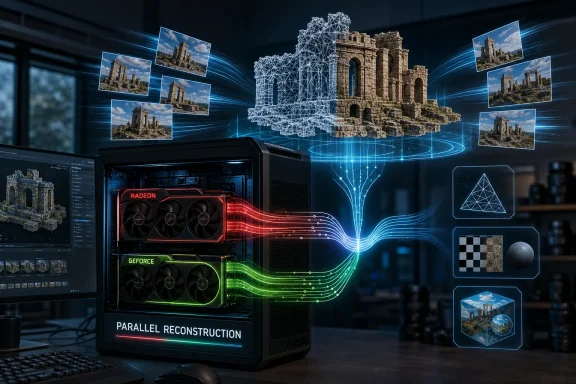
That is why RealityScan 2.2’s support for mixed AMD and NVIDIA systems is particularly interesting. Epic says the software can split work across every supported GPU in parallel, even when those GPUs come from different vendors. In practice, that means a workstation does not have to become a theological statement. A studio can keep an NVIDIA board already installed, add a supported AMD card, and let the application use both.
This does not erase the reasons many professionals still prefer NVIDIA in certain workloads. CUDA remains deeply embedded in rendering, simulation, machine learning, and niche production tools. But the direction of travel is clear: large software vendors are under pressure to avoid tying expensive workflows to a single GPU supplier when customers are already dealing with volatile prices, power limits, supply constraints, and workstation refresh cycles.
The AMD support also lands at a time when the company has been trying to convert hardware relevance into software credibility. Radeon gaming cards have often been judged by frame rates, but professional adoption depends on whether the right buttons light up inside the right applications. RealityScan is one of those applications. It may not be installed on every enthusiast desktop, but among users who need it, support carries weight.
By focusing on recent hardware, Epic avoids promising professional acceleration on devices that may lack the throughput, driver behavior, or memory configuration needed for heavy reconstruction jobs. Photogrammetry can be brutally sensitive to project size. A small object scan and a city-block reconstruction may both fall under the same software brand, but they do not stress a machine in the same way.
The inclusion of consumer Radeon RX cards is still important. Many small scanning operations and indie artists do not buy certified workstation GPUs. They build high-end Windows PCs from gaming parts because that is where performance per dollar often lives. For those users, AMD support in RealityScan does not merely widen a spec sheet; it makes an existing purchase more useful.
The workstation cards matter for a different reason. Radeon Pro W7000 and Radeon AI Pro 9000 support gives resellers, IT departments, and production managers a more conventional path to deploying AMD-based workstations in environments that care about warranty terms, driver qualification, vendor support, and fleet consistency. The moment a tool like RealityScan supports both consumer and professional AMD lines, it becomes easier to discuss AMD without immediately sounding like a compromise.
Strix Halo support is the most intriguing edge case. Integrated graphics are not what most people imagine when they think of serious photogrammetry, but AMD’s high-end APU strategy is trying to blur the line between mobile workstation, compact desktop, and GPU-accelerated creator box. If RealityScan can make meaningful use of those processors, portable capture review and smaller field workflows become more plausible.
Linux is a different story. RealityScan’s command-line edition matters for automation, batch processing, and server-farm workflows where nobody is clicking through a GUI. In those environments, AMD support arriving later leaves a gap. It means Windows workstations can begin using AMD acceleration now, while larger automated deployments may still need to wait before they can redesign around mixed-vendor or AMD-heavy nodes.
That split mirrors a broader industry pattern. Windows often remains the path of least resistance for interactive creative tools, while Linux dominates many scale-out compute and render workloads. Vendors frequently deliver features first where the customer count is largest, then extend them to headless environments once the plumbing is stable. It is rational, but it still creates an awkward transition period for studios that want unified behavior across artist workstations and backend farms.
For Windows administrators, the short-term implications are practical. GPU driver versioning, workstation images, application packaging, and hardware validation all become part of the RealityScan 2.2 adoption process. Mixed GPU support sounds simple in a release note, but anyone who has maintained production desktops knows that “it works” must survive sleep states, Windows updates, driver rollbacks, remote access tools, and the one artist who keeps a five-year-old plug-in installed because a client project depends on it.
The upside is that Windows shops can test without rebuilding the entire pipeline. A single workstation with a supported Radeon card can become the pilot machine. If the performance and stability claims hold, AMD can move from “interesting alternative” to “approved option” in the next purchasing round.
The problem is simple: 360-degree cameras are attractive because they capture a lot of environment quickly, but their panoramic output is not what conventional reconstruction pipelines expect. Equirectangular images are great for human viewing and VR-style playback. Photogrammetry software, however, generally wants images that behave more like conventional camera views with predictable projection.
Pano2Views bridges that gap by converting JPG, PNG, MP4, and MOV inputs into cube maps and attaching XMP sidecar data that tells RealityScan how to treat the generated images. This is the sort of utility that sounds boring until you have spent hours trying to turn field footage into something a reconstruction tool will ingest cleanly. It makes the capture side less brittle.
The online nature of the tool will raise obvious questions for some users. Uploading footage to a web utility may be acceptable for a hobbyist scanning a room, but less acceptable for a production team dealing with unreleased film sets, private property, regulated facilities, or sensitive infrastructure. Epic’s decision to make the tool free lowers friction, but organizations with data-handling rules will still need to decide whether the workflow fits their policies.
Even so, Pano2Views reflects the same strategic impulse as AMD GPU support. Epic is trying to remove reasons not to use RealityScan. If your GPU is AMD, the answer is no longer “buy NVIDIA.” If your camera is a 360-degree device producing panoramic footage, the answer is no longer “your capture format is wrong.” Each removed obstacle widens the funnel.
The strategy is not subtle. Epic wants the real world scanned, cleaned up, textured, and moved into Unreal Engine-era production pipelines with as little friction as possible. RealityScan is not an isolated product in that worldview. It sits alongside Unreal Engine, Twinmotion, Fab, MetaHuman, Quixel’s legacy influence, and the company’s long campaign to make real-time 3D infrastructure feel like the default layer for games, film, visualization, and spatial computing.
That is why AMD support matters beyond the immediate customer satisfaction win. A toolchain that depends too visibly on one GPU vendor creates hesitation. It complicates laptop choices, workstation bids, cloud planning, and international procurement. If Epic wants RealityScan to be a default capture tool, it cannot behave like a niche plug-in locked to a single hardware ecosystem.
There is also a defensive angle. Photogrammetry no longer exists in a quiet corner of 3D production. Neural reconstruction, Gaussian splatting, AI-assisted asset generation, lidar-equipped mobile devices, drone mapping platforms, and game-engine-native capture workflows are all competing for attention. Epic’s answer is to make RealityScan more accessible, more hardware-flexible, and more tightly integrated into professional pipelines before alternatives can peel away users.
The name change from RealityCapture to RealityScan signaled that broader positioning. “Capture” sounded like a specialized photogrammetry product. “Scan” is more legible to the expanding market of creators who may not care what algorithm is running underneath. RealityScan 2.2 continues that shift from specialist tool to platform component.
RealityScan 2.2 gives AMD a cleaner story. Here is a high-profile Epic Games tool. Here is a demanding GPU-accelerated workload. Here is explicit support for recent consumer and workstation cards. Here is mixed-vendor operation rather than a demand that users choose sides. That is the kind of example AMD can point to when arguing that the professional software gap is narrowing.
The likely technical path, though not explicitly confirmed by Epic in the announcement, is familiar. AMD’s HIP framework has been used in other formerly NVIDIA-centered graphics applications to help developers target both AMD and NVIDIA GPUs from a shared code base. Whether RealityScan’s implementation uses HIP or another abstraction, the commercial message is the same: the industry is looking for escape hatches from single-vendor compute dependencies.
That does not mean AMD suddenly owns the creator workstation. NVIDIA’s ecosystem lead remains substantial, especially where CUDA-specific tools, AI frameworks, and GPU rendering engines are central to the workflow. But creator hardware decisions are rarely all-or-nothing. A shop may standardize on NVIDIA for rendering and still consider AMD for scanning workstations if the software performs, the price is right, and driver stability proves acceptable.
The most important word here is acceptable. Professional users are often less interested in theoretical openness than in whether Monday morning’s job finishes by Tuesday. AMD does not need every RealityScan user to become a Radeon evangelist. It needs enough of them to stop treating AMD as an automatic disqualifier.
Photogrammetry is particularly tricky because not every stage of the pipeline stresses hardware the same way. Some phases may benefit from parallel GPU throughput. Others may bottleneck on CPU, RAM, disk I/O, image count, feature matching complexity, or memory capacity. A workstation with multiple GPUs is not automatically twice as fast, and a mixed-vendor workstation introduces more variables for IT to validate.
Still, the option is valuable even if scaling is imperfect. Mixed GPU support lets users experiment with incremental upgrades rather than forklift replacements. It also extends the useful life of existing hardware. A studio with an NVIDIA card already installed can add a supported AMD GPU and see whether the combination improves throughput enough to justify broader adoption.
The Windows ecosystem makes that experimentation relatively accessible. Enthusiast and professional users have a vast supply of motherboard, PSU, case, and cooling configurations capable of hosting multiple GPUs, even if the mainstream gaming market has largely moved away from multi-GPU rendering. For compute-heavy applications, those slots still matter.
The caution is that RealityScan users should benchmark real jobs, not demo scenes. Scan projects vary wildly, and a pipeline built around drone imagery, laser scans, texture-heavy object captures, or 360-degree source conversion may reveal different bottlenecks. The release is a door opening, not a universal performance guarantee.
Small studios, solo artists, educators, and field teams can move faster. They are also more likely to own heterogeneous hardware because they buy opportunistically. One machine may have an older NVIDIA card, another a newer Radeon, and a third a high-end Ryzen AI laptop or compact workstation. RealityScan 2.2 makes that mess less punitive.
For indie game developers and visualization artists under Epic’s free-use revenue threshold, the economics are especially favorable. A free photogrammetry package that can use AMD GPUs lowers the total cost of entering serious asset capture. That does not make scanning easy. Good photogrammetry still depends on lighting, overlap, lens behavior, surface texture, scale control, and patient cleanup. But it removes one of the more expensive barriers.
Educational institutions may also benefit. Labs often contain mixed hardware donated, purchased across fiscal years, or assembled from whatever was available under grant constraints. Software that can use a broader range of current GPUs makes classroom and research deployments easier to justify. Students learn the workflow rather than learning that the workflow only works on the expensive machines.
Enterprise users still get the strategic benefit, but later. For them, RealityScan 2.2 is the beginning of a validation cycle: driver matrices, procurement options, IT images, support contracts, and maybe new workstation SKUs. The headline feature arrives immediately; institutional confidence arrives only after months of boring success.
That matters in a market where GPUs are no longer simple components. They are expensive, power-hungry, supply-sensitive strategic assets. AI demand has distorted pricing and availability across the high end. Workstation builders and IT departments want options not because they enjoy variety, but because single-source dependency is expensive.
AMD support may also make compact and mobile Windows systems more interesting for capture-adjacent workflows. A laptop or small-form-factor workstation built around a powerful AMD APU is not going to replace every multi-GPU desktop, but it may be good enough for review, smaller projects, field preprocessing, or education. If software support continues to improve, the definition of a viable scanning machine broadens.
The larger cultural shift is that Windows creative workstations are becoming less vendor-prescribed. CPU rendering moved from Intel dominance to a more balanced world after AMD’s Ryzen and Threadripper resurgence. GPU compute has been slower to open up because software ecosystems are harder to dislodge than benchmark charts. RealityScan 2.2 is another sign that the GPU side is finally becoming more contestable.
Microsoft’s own platform role is mostly indirect here, but not irrelevant. Windows remains the common ground where gaming GPUs, professional drivers, creative tools, and enthusiast hardware collide. When an application like RealityScan adds AMD acceleration on Windows first, it reinforces the desktop PC as the experimental surface where hardware competition becomes usable before it becomes standardized elsewhere.
These are not cynical objections. They are the ordinary questions that turn a release announcement into a production deployment. Professional users do not merely ask whether a feature exists; they ask whether it can be trusted under deadline pressure.
Epic’s “same speed, no compromises” phrasing sets a high bar. Users will test that claim against real capture sets, not press examples. If AMD cards deliver comparable acceleration across common project types, the release will earn credibility quickly. If performance depends heavily on scene type, card class, or driver tuning, the community will find the caveats just as quickly.
The lack of Linux AMD support at launch is the other major footnote. Windows-first is understandable, but server-side and CLI workflows matter for larger scanning operations. Until Linux support arrives, AMD acceleration remains uneven across the full RealityScan ecosystem. That does not diminish the Windows release, but it does define its boundary.
Pano2Views has its own fine print. Free online conversion is convenient, yet online tools are never neutral in professional environments. Sensitive footage, client-controlled locations, and regulated sites may require offline equivalents or internal processing paths. Epic has solved a format problem; some organizations will still need a governance answer.
That is a powerful kind of product development because it does not ask users to change their ambitions. It reduces the number of reasons they stop before beginning. The same artist who already owns a Radeon RX 7900-class workstation can now test RealityScan without treating the GPU as a sunk-cost mistake. The same studio with mixed hardware can consider using all of it. The same capture team intrigued by 360-degree footage has a supported conversion path.
Epic’s broader ecosystem benefits from each of those decisions. A mesh generated in RealityScan is more likely to feed an Unreal Engine project, a Twinmotion visualization, a game asset workflow, or a real-time production pipeline. The company does not need every user to pay immediately for RealityScan if the tool helps pull them deeper into Epic’s orbit.
That is why the release is both user-friendly and strategic. Epic is not merely being generous by supporting AMD and offering Pano2Views. It is expanding the addressable surface area of its 3D ecosystem. In platform terms, friction is the enemy, and RealityScan 2.2 removes a visible patch of it.
For AMD, the win is different but complementary. Every major application that treats Radeon and Radeon Pro as real compute hardware makes the next adoption conversation easier. Software support compounds slowly, then suddenly feels normal.
 Epic Turns Photogrammetry Into a Hardware Fight
RealityScan is not a casual camera app with a desktop icon. It is the renamed successor to RealityCapture, the photogrammetry package first released in 2016 and later folded into Epic’s expanding production-tool empire after the company acquired Capturing Reality in 2021. Its job is to turn overlapping photos, laser scan data, and survey inputs into textured, triangle-based 3D meshes that can be used in games, VFX, architecture, visualization, mapping, and urban planning.That breadth matters because photogrammetry sits at an awkward intersection of art and computation. The artist sees a prop, a building facade, a dig site, or a street corner; the software sees image alignment, depth estimation, mesh generation, texture projection, and a long list of numerical chores that can punish weak CPUs, GPUs, storage, and memory. RealityScan’s appeal has always been that it can take messy real-world capture data and produce production-grade geometry with startling speed.
Until now, however, its GPU story carried an old industry caveat. Acceleration meant NVIDIA. For many studios, that was not a blocker so much as the ambient condition of doing work in high-end computer graphics. CUDA became the invisible tax on workstation procurement: not always loved, not always explicitly named, but frequently assumed.
RealityScan 2.2 changes that assumption. Epic says every stage of the reconstruction pipeline currently accelerated on NVIDIA GPUs is now equally accelerated on supported AMD hardware, with the company describing the result as the same speed and no compromises. The language is deliberately aggressive because the audience understands what is being challenged. This is not “AMD support, but only for preview mode.” It is Epic saying that AMD cards are now first-class compute devices for the application’s accelerated workload.
For WindowsForum readers, the Windows detail is more than trivia. AMD GPU acceleration in RealityScan 2.2 is available on Windows first, while Linux support is still promised for later. That means the immediate beneficiaries are desktop workstations, small studios, freelancers, labs, and capture teams whose production machines already run Windows 10, Windows 11, or Windows Server-era environments rather than Linux render or processing farms.
The NVIDIA-Only Era Ends One Application at a Time
No single app breaks a platform lock-in by itself. What matters is the pattern. RealityScan joining the list of professional graphics tools that no longer treat AMD support as a second-tier afterthought is significant because production pipelines are built from many such decisions, each of them mundane until they accumulate into procurement policy.The old argument for NVIDIA in creative workstations was not just performance. It was predictability. A studio buying a GPU for 3D production was buying into CUDA support, driver maturity, ISV certification, renderer compatibility, AI tooling, denoising libraries, and years of forum posts explaining why some feature did or did not work. AMD could win benchmarks and still lose the purchase order if the critical application refused to accelerate on Radeon or Radeon Pro hardware.
That is why RealityScan 2.2’s support for mixed AMD and NVIDIA systems is particularly interesting. Epic says the software can split work across every supported GPU in parallel, even when those GPUs come from different vendors. In practice, that means a workstation does not have to become a theological statement. A studio can keep an NVIDIA board already installed, add a supported AMD card, and let the application use both.
This does not erase the reasons many professionals still prefer NVIDIA in certain workloads. CUDA remains deeply embedded in rendering, simulation, machine learning, and niche production tools. But the direction of travel is clear: large software vendors are under pressure to avoid tying expensive workflows to a single GPU supplier when customers are already dealing with volatile prices, power limits, supply constraints, and workstation refresh cycles.
The AMD support also lands at a time when the company has been trying to convert hardware relevance into software credibility. Radeon gaming cards have often been judged by frame rates, but professional adoption depends on whether the right buttons light up inside the right applications. RealityScan is one of those applications. It may not be installed on every enthusiast desktop, but among users who need it, support carries weight.
The Supported Hardware List Shows Who Epic Is Targeting
RealityScan 2.2 does not open the door to every AMD GPU still sitting in a Windows tower. Epic’s support extends to relatively recent AMD architectures, including RDNA 3 and RDNA 4 hardware, with named families spanning Radeon RX 7000 and RX 9000 gaming cards, Radeon Pro W7000 and Radeon AI Pro 9000 workstation products, and Ryzen AI Max Pro “Strix Halo” integrated processors. That lineup tells a story about both performance expectations and market positioning.By focusing on recent hardware, Epic avoids promising professional acceleration on devices that may lack the throughput, driver behavior, or memory configuration needed for heavy reconstruction jobs. Photogrammetry can be brutally sensitive to project size. A small object scan and a city-block reconstruction may both fall under the same software brand, but they do not stress a machine in the same way.
The inclusion of consumer Radeon RX cards is still important. Many small scanning operations and indie artists do not buy certified workstation GPUs. They build high-end Windows PCs from gaming parts because that is where performance per dollar often lives. For those users, AMD support in RealityScan does not merely widen a spec sheet; it makes an existing purchase more useful.
The workstation cards matter for a different reason. Radeon Pro W7000 and Radeon AI Pro 9000 support gives resellers, IT departments, and production managers a more conventional path to deploying AMD-based workstations in environments that care about warranty terms, driver qualification, vendor support, and fleet consistency. The moment a tool like RealityScan supports both consumer and professional AMD lines, it becomes easier to discuss AMD without immediately sounding like a compromise.
Strix Halo support is the most intriguing edge case. Integrated graphics are not what most people imagine when they think of serious photogrammetry, but AMD’s high-end APU strategy is trying to blur the line between mobile workstation, compact desktop, and GPU-accelerated creator box. If RealityScan can make meaningful use of those processors, portable capture review and smaller field workflows become more plausible.
Windows Gets the First-Class Seat, Linux Waits Outside
The Windows-first rollout is both unsurprising and revealing. RealityScan’s desktop user base is heavily tied to Windows workstations, and the practical near-term audience for AMD support is sitting in front of those machines. For artists, visualization teams, survey shops, and game asset departments, that is enough to make 2.2 a meaningful release today.Linux is a different story. RealityScan’s command-line edition matters for automation, batch processing, and server-farm workflows where nobody is clicking through a GUI. In those environments, AMD support arriving later leaves a gap. It means Windows workstations can begin using AMD acceleration now, while larger automated deployments may still need to wait before they can redesign around mixed-vendor or AMD-heavy nodes.
That split mirrors a broader industry pattern. Windows often remains the path of least resistance for interactive creative tools, while Linux dominates many scale-out compute and render workloads. Vendors frequently deliver features first where the customer count is largest, then extend them to headless environments once the plumbing is stable. It is rational, but it still creates an awkward transition period for studios that want unified behavior across artist workstations and backend farms.
For Windows administrators, the short-term implications are practical. GPU driver versioning, workstation images, application packaging, and hardware validation all become part of the RealityScan 2.2 adoption process. Mixed GPU support sounds simple in a release note, but anyone who has maintained production desktops knows that “it works” must survive sleep states, Windows updates, driver rollbacks, remote access tools, and the one artist who keeps a five-year-old plug-in installed because a client project depends on it.
The upside is that Windows shops can test without rebuilding the entire pipeline. A single workstation with a supported Radeon card can become the pilot machine. If the performance and stability claims hold, AMD can move from “interesting alternative” to “approved option” in the next purchasing round.
Pano2Views Solves the Other Bottleneck: Capture Format
RealityScan 2.2 is not only about GPUs. Epic has also released Pano2Views, a free online tool that converts equirectangular footage and image sequences from 360-degree cameras into cube-map views that RealityScan can process. It is a smaller announcement, but in some workflows it may be just as consequential.The problem is simple: 360-degree cameras are attractive because they capture a lot of environment quickly, but their panoramic output is not what conventional reconstruction pipelines expect. Equirectangular images are great for human viewing and VR-style playback. Photogrammetry software, however, generally wants images that behave more like conventional camera views with predictable projection.
Pano2Views bridges that gap by converting JPG, PNG, MP4, and MOV inputs into cube maps and attaching XMP sidecar data that tells RealityScan how to treat the generated images. This is the sort of utility that sounds boring until you have spent hours trying to turn field footage into something a reconstruction tool will ingest cleanly. It makes the capture side less brittle.
The online nature of the tool will raise obvious questions for some users. Uploading footage to a web utility may be acceptable for a hobbyist scanning a room, but less acceptable for a production team dealing with unreleased film sets, private property, regulated facilities, or sensitive infrastructure. Epic’s decision to make the tool free lowers friction, but organizations with data-handling rules will still need to decide whether the workflow fits their policies.
Even so, Pano2Views reflects the same strategic impulse as AMD GPU support. Epic is trying to remove reasons not to use RealityScan. If your GPU is AMD, the answer is no longer “buy NVIDIA.” If your camera is a 360-degree device producing panoramic footage, the answer is no longer “your capture format is wrong.” Each removed obstacle widens the funnel.
Epic’s Real Strategy Is the Full Capture-to-Engine Stack
RealityScan’s pricing remains one of the most aggressive parts of the story. Epic makes the software free for artists, students, educators, and companies under the $1 million annual revenue threshold, while larger studios pay a seat subscription. That structure echoes Epic’s broader playbook: make the tools easy to adopt early, then monetize at the point where a user or company has become commercially meaningful.The strategy is not subtle. Epic wants the real world scanned, cleaned up, textured, and moved into Unreal Engine-era production pipelines with as little friction as possible. RealityScan is not an isolated product in that worldview. It sits alongside Unreal Engine, Twinmotion, Fab, MetaHuman, Quixel’s legacy influence, and the company’s long campaign to make real-time 3D infrastructure feel like the default layer for games, film, visualization, and spatial computing.
That is why AMD support matters beyond the immediate customer satisfaction win. A toolchain that depends too visibly on one GPU vendor creates hesitation. It complicates laptop choices, workstation bids, cloud planning, and international procurement. If Epic wants RealityScan to be a default capture tool, it cannot behave like a niche plug-in locked to a single hardware ecosystem.
There is also a defensive angle. Photogrammetry no longer exists in a quiet corner of 3D production. Neural reconstruction, Gaussian splatting, AI-assisted asset generation, lidar-equipped mobile devices, drone mapping platforms, and game-engine-native capture workflows are all competing for attention. Epic’s answer is to make RealityScan more accessible, more hardware-flexible, and more tightly integrated into professional pipelines before alternatives can peel away users.
The name change from RealityCapture to RealityScan signaled that broader positioning. “Capture” sounded like a specialized photogrammetry product. “Scan” is more legible to the expanding market of creators who may not care what algorithm is running underneath. RealityScan 2.2 continues that shift from specialist tool to platform component.
AMD Gets a Software Win It Can Actually Use
AMD has spent years trying to convince creators that its GPUs are not just gaming hardware with extra memory. The challenge has rarely been a lack of ambition. It has been the slow, application-by-application grind of convincing software vendors that supporting Radeon and Radeon Pro is worth the engineering cost.RealityScan 2.2 gives AMD a cleaner story. Here is a high-profile Epic Games tool. Here is a demanding GPU-accelerated workload. Here is explicit support for recent consumer and workstation cards. Here is mixed-vendor operation rather than a demand that users choose sides. That is the kind of example AMD can point to when arguing that the professional software gap is narrowing.
The likely technical path, though not explicitly confirmed by Epic in the announcement, is familiar. AMD’s HIP framework has been used in other formerly NVIDIA-centered graphics applications to help developers target both AMD and NVIDIA GPUs from a shared code base. Whether RealityScan’s implementation uses HIP or another abstraction, the commercial message is the same: the industry is looking for escape hatches from single-vendor compute dependencies.
That does not mean AMD suddenly owns the creator workstation. NVIDIA’s ecosystem lead remains substantial, especially where CUDA-specific tools, AI frameworks, and GPU rendering engines are central to the workflow. But creator hardware decisions are rarely all-or-nothing. A shop may standardize on NVIDIA for rendering and still consider AMD for scanning workstations if the software performs, the price is right, and driver stability proves acceptable.
The most important word here is acceptable. Professional users are often less interested in theoretical openness than in whether Monday morning’s job finishes by Tuesday. AMD does not need every RealityScan user to become a Radeon evangelist. It needs enough of them to stop treating AMD as an automatic disqualifier.
The Mixed-GPU Promise Will Live or Die in Real Projects
Epic’s claim that RealityScan can split work across supported AMD and NVIDIA GPUs in parallel is the most exciting part of the release, but it is also the part users should test with their own data before rewriting hardware policy. Multi-GPU acceleration has a long history of sounding cleaner in marketing copy than it feels in production. Scaling depends on workload partitioning, memory constraints, driver behavior, thermal limits, and how gracefully the application handles mismatched cards.Photogrammetry is particularly tricky because not every stage of the pipeline stresses hardware the same way. Some phases may benefit from parallel GPU throughput. Others may bottleneck on CPU, RAM, disk I/O, image count, feature matching complexity, or memory capacity. A workstation with multiple GPUs is not automatically twice as fast, and a mixed-vendor workstation introduces more variables for IT to validate.
Still, the option is valuable even if scaling is imperfect. Mixed GPU support lets users experiment with incremental upgrades rather than forklift replacements. It also extends the useful life of existing hardware. A studio with an NVIDIA card already installed can add a supported AMD GPU and see whether the combination improves throughput enough to justify broader adoption.
The Windows ecosystem makes that experimentation relatively accessible. Enthusiast and professional users have a vast supply of motherboard, PSU, case, and cooling configurations capable of hosting multiple GPUs, even if the mainstream gaming market has largely moved away from multi-GPU rendering. For compute-heavy applications, those slots still matter.
The caution is that RealityScan users should benchmark real jobs, not demo scenes. Scan projects vary wildly, and a pipeline built around drone imagery, laser scans, texture-heavy object captures, or 360-degree source conversion may reveal different bottlenecks. The release is a door opening, not a universal performance guarantee.
The Small Studio Wins Before the Enterprise Does
The immediate winners are not necessarily the largest studios. Big organizations move slowly, especially when hardware standards and approved software stacks are involved. They will test, document, benchmark, and wait for known issues to surface. Some will also wait for Linux support before treating AMD acceleration as a full pipeline feature.Small studios, solo artists, educators, and field teams can move faster. They are also more likely to own heterogeneous hardware because they buy opportunistically. One machine may have an older NVIDIA card, another a newer Radeon, and a third a high-end Ryzen AI laptop or compact workstation. RealityScan 2.2 makes that mess less punitive.
For indie game developers and visualization artists under Epic’s free-use revenue threshold, the economics are especially favorable. A free photogrammetry package that can use AMD GPUs lowers the total cost of entering serious asset capture. That does not make scanning easy. Good photogrammetry still depends on lighting, overlap, lens behavior, surface texture, scale control, and patient cleanup. But it removes one of the more expensive barriers.
Educational institutions may also benefit. Labs often contain mixed hardware donated, purchased across fiscal years, or assembled from whatever was available under grant constraints. Software that can use a broader range of current GPUs makes classroom and research deployments easier to justify. Students learn the workflow rather than learning that the workflow only works on the expensive machines.
Enterprise users still get the strategic benefit, but later. For them, RealityScan 2.2 is the beginning of a validation cycle: driver matrices, procurement options, IT images, support contracts, and maybe new workstation SKUs. The headline feature arrives immediately; institutional confidence arrives only after months of boring success.
The Windows Workstation Becomes More Negotiable
For years, the professional Windows workstation market has had an oddly fixed center of gravity: Intel or AMD CPU debates on one side, NVIDIA GPU assumptions on the other. RealityScan 2.2 does not overturn that arrangement, but it weakens one of its supports. If a heavyweight capture application can accelerate equally on supported Radeon and GeForce or RTX-class hardware, buyers have more room to negotiate.That matters in a market where GPUs are no longer simple components. They are expensive, power-hungry, supply-sensitive strategic assets. AI demand has distorted pricing and availability across the high end. Workstation builders and IT departments want options not because they enjoy variety, but because single-source dependency is expensive.
AMD support may also make compact and mobile Windows systems more interesting for capture-adjacent workflows. A laptop or small-form-factor workstation built around a powerful AMD APU is not going to replace every multi-GPU desktop, but it may be good enough for review, smaller projects, field preprocessing, or education. If software support continues to improve, the definition of a viable scanning machine broadens.
The larger cultural shift is that Windows creative workstations are becoming less vendor-prescribed. CPU rendering moved from Intel dominance to a more balanced world after AMD’s Ryzen and Threadripper resurgence. GPU compute has been slower to open up because software ecosystems are harder to dislodge than benchmark charts. RealityScan 2.2 is another sign that the GPU side is finally becoming more contestable.
Microsoft’s own platform role is mostly indirect here, but not irrelevant. Windows remains the common ground where gaming GPUs, professional drivers, creative tools, and enthusiast hardware collide. When an application like RealityScan adds AMD acceleration on Windows first, it reinforces the desktop PC as the experimental surface where hardware competition becomes usable before it becomes standardized elsewhere.
The Fine Print Is Where Adoption Will Be Decided
RealityScan 2.2 is easy to celebrate, but the practical questions are familiar. Which exact driver versions behave best? How much VRAM does a given project need? How does performance scale across mismatched GPUs? What happens when a workstation has an integrated AMD GPU and a discrete NVIDIA card? How cleanly does the software fail when one GPU is unsupported or runs out of memory?These are not cynical objections. They are the ordinary questions that turn a release announcement into a production deployment. Professional users do not merely ask whether a feature exists; they ask whether it can be trusted under deadline pressure.
Epic’s “same speed, no compromises” phrasing sets a high bar. Users will test that claim against real capture sets, not press examples. If AMD cards deliver comparable acceleration across common project types, the release will earn credibility quickly. If performance depends heavily on scene type, card class, or driver tuning, the community will find the caveats just as quickly.
The lack of Linux AMD support at launch is the other major footnote. Windows-first is understandable, but server-side and CLI workflows matter for larger scanning operations. Until Linux support arrives, AMD acceleration remains uneven across the full RealityScan ecosystem. That does not diminish the Windows release, but it does define its boundary.
Pano2Views has its own fine print. Free online conversion is convenient, yet online tools are never neutral in professional environments. Sensitive footage, client-controlled locations, and regulated sites may require offline equivalents or internal processing paths. Epic has solved a format problem; some organizations will still need a governance answer.
Epic’s Real Win Is Removing Excuses
The most concrete way to read RealityScan 2.2 is as a release about compatibility. More GPUs work. More camera formats can be converted. More Windows machines become plausible scan-processing systems. More users can try professional photogrammetry without first accepting a narrow hardware prescription.That is a powerful kind of product development because it does not ask users to change their ambitions. It reduces the number of reasons they stop before beginning. The same artist who already owns a Radeon RX 7900-class workstation can now test RealityScan without treating the GPU as a sunk-cost mistake. The same studio with mixed hardware can consider using all of it. The same capture team intrigued by 360-degree footage has a supported conversion path.
Epic’s broader ecosystem benefits from each of those decisions. A mesh generated in RealityScan is more likely to feed an Unreal Engine project, a Twinmotion visualization, a game asset workflow, or a real-time production pipeline. The company does not need every user to pay immediately for RealityScan if the tool helps pull them deeper into Epic’s orbit.
That is why the release is both user-friendly and strategic. Epic is not merely being generous by supporting AMD and offering Pano2Views. It is expanding the addressable surface area of its 3D ecosystem. In platform terms, friction is the enemy, and RealityScan 2.2 removes a visible patch of it.
For AMD, the win is different but complementary. Every major application that treats Radeon and Radeon Pro as real compute hardware makes the next adoption conversation easier. Software support compounds slowly, then suddenly feels normal.
The Scan Pipeline Just Got Less NVIDIA-Shaped
RealityScan 2.2 does not make GPU choice irrelevant, and it does not turn every Windows PC into a photogrammetry workstation. It does, however, change the default conversation around one of the most demanding desktop capture tools in professional 3D. Near-term buyers and admins should treat the release as an opportunity to test real projects on hardware they may already own.- RealityScan 2.2 adds AMD GPU acceleration on Windows for supported recent Radeon, Radeon Pro, Radeon AI Pro, and Ryzen AI Max Pro hardware.
- The software can use supported AMD and NVIDIA GPUs together in the same workstation, splitting reconstruction work across available devices.
- Linux support for AMD acceleration is not available at launch, which limits immediate usefulness for CLI-based server and farm workflows.
- Pano2Views gives 360-degree camera users a free path from equirectangular footage to cube-map inputs that RealityScan can process.
- The free tier for users and organizations under the $1 million annual revenue threshold makes the update especially meaningful for indie artists, educators, and small studios.
- Production teams should benchmark their own scans before assuming perfect scaling, especially in mixed-GPU systems or projects with heavy memory demands.
References
- Primary source: CG Channel
Published: 2026-06-25T09:25:13.433697
Epic Games releases RealityScan 2.2 with AMD GPU support | CG Channel
Pro photogrammetry tool can now use both AMD consumer and workstation GPUs to speed up processing. Free to indie artists.www.cgchannel.com
- Related coverage: realityscan.com
RealityScan 2.2 is here with full AMD GPU support—download today - RealityScan
RealityScan 2.2 adds full AMD GPU support on Windows, parallel processing for mixed AMD/NVIDIA rigs, and 360 camera tips. www.realityscan.com
- Related coverage: arstechnica.com
Epic Games Store completely eliminates revenue fees for smaller developers - Ars Technica
Epic takes no cut for first $1 million in annual per-game revenue under new plan.arstechnica.com - Related coverage: dev.epicgames.com
- Related coverage: cdm.link
Epic's free 3D scanner is now RealityScan, and does desktop and mobile - CDM Create Digital Music
Get a phone, scan the world, make 3D models and scenes. You know the pitch, and it's been powerful for advanced pros and visual hobbyists alike. But Epic's own RealityCapture had fallen behind offerings like PolyCam, Luma 3D, and others. Now Epic is back, and we might have a reason to...cdm.link - Related coverage: cambridge.org
SAA LOGO.eps
https://doi.org/10.1017/aap.2025.10106 Published online by Cambridge University Presswww.cambridge.org
- Related coverage: sacra-pdfs.s3.us-east-2.amazonaws.com
- Related coverage: americanactionforum.org

