

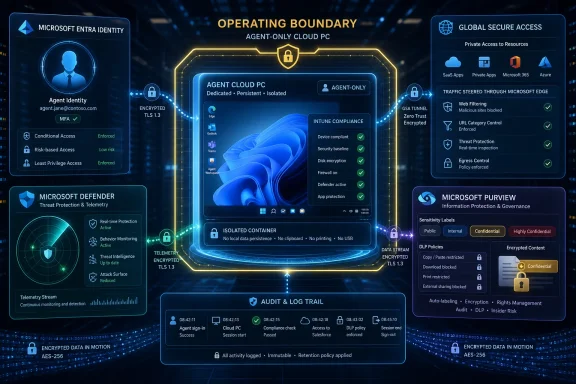
Microsoft is positioning Windows 365 for Agents as a secured, managed Cloud PC environment for enterprise AI agents, tying agent execution to Microsoft Entra identity, Intune management, Defender protection, Purview governance, Global Secure Access networking, and Agent 365 visibility controls. The announcement matters because it moves the argument about enterprise AI agents away from demos and productivity theater and into the older, harder world of endpoint management, conditional access, audit trails, and data loss prevention. Microsoft’s pitch is blunt: if agents are going to act inside corporate systems, they need to stop looking like scripts running wherever someone happened to launch them. They need an operating boundary.
That boundary is the real product here. Windows 365 for Agents is less about giving an AI agent a familiar Windows desktop than about giving security teams a place to impose identity, compliance, network, and data controls before the agent starts touching production systems. Microsoft is effectively saying that agentic computing should not be treated as a feature bolted onto chat apps or workflow tools, but as a workload class that deserves its own managed execution environment.
The most important thing about Windows 365 for Agents is not that it uses Cloud PCs. It is that Microsoft is trying to make AI agents legible to the same administrative machinery enterprises already use for people, devices, and applications.
Per Microsoft’s Windows IT Pro Blog, agents running in Windows 365 for Agents are provisioned with their own identity in Microsoft Entra, separate from any human user. That is the foundation of the entire model. An agent that borrows a human account, runs on a shared virtual machine, or executes from unmanaged infrastructure is hard to govern because its actions blur into someone else’s session, someone else’s endpoint, or some infrastructure team’s catch-all service context. Microsoft’s answer is to make the agent a first-class managed actor.
That is a subtle but significant shift. For years, automation in enterprises has often lived in the gray zone: service accounts with too many permissions, scripts run from admin workstations, scheduled jobs no one wants to touch, shared credentials hidden in brittle pipelines. AI agents raise the stakes because they do not merely repeat fixed steps. They can interpret instructions, select tools, and interact with systems in ways that may be useful, surprising, or dangerous depending on the controls around them.
Microsoft’s argument is that identity must come first. If every action is attributable to a specific agent, permissions can be scoped precisely and access can be revoked when necessary. That sounds obvious, but it is exactly where many early agent deployments are likely to fail. The agent that starts life as a convenience tool inside a department can quickly become an untracked automation surface with access to mailboxes, documents, CRM systems, internal websites, ticketing platforms, or source repositories.
Windows 365 for Agents tries to prevent that sprawl by binding the agent to Microsoft Entra from the start. The agent is not merely a process. It has a distinct identity, lifecycle management, role-based access control, and auditability built in. In Microsoft’s framing, that distinct identity establishes the Zero Trust foundation for agentic workloads.
The practical implication is clear: the agent should be treated less like a clever macro and more like a non-human employee with a device, a network path, a compliance state, and a record of behavior. That will not thrill every developer or business unit that wants rapid experimentation. It will, however, sound familiar to administrators who have spent the last decade cleaning up the consequences of unmanaged endpoints and overprivileged accounts.
According to Microsoft, Windows 365 for Agents Cloud PCs are reserved exclusively for agents and run in isolated, enterprise-managed compute environments. That exclusivity is important. If agents and humans share the same machine, session, or account boundary, the organization inherits a messy set of crossover risks. Did the human user initiate the action, or did the agent? Did the agent access a file because it was explicitly permitted, or because it was running in a human context that already had access? Did a compromised agent move laterally through shared credentials?
Microsoft names the risks directly: privilege escalation, accidental human-agent crossover, and lateral movement across shared accounts. Those are not science-fiction AI risks. They are old enterprise security failures with a new, more autonomous actor placed inside them.
The agent-only Cloud PC model is meant to reduce those risks by design. An agent gets a dedicated and contained execution environment. Administrators can reinforce the boundary through Intune provisioning policies that assign Cloud PCs only to agent users. The point is not merely to prevent humans from logging into an agent’s machine for convenience, though that is part of it. The point is to preserve a clean line between human action, agent action, device state, and policy enforcement.
That line will matter in incident response. If an agent modifies a record, exports data, opens a risky URL, or invokes a tool it should not have used, security teams need to know which identity acted, from which managed environment, under which policy state. Without that, the investigation quickly devolves into inference: a log entry here, a shared VM there, a service account somewhere in the middle. Windows 365 for Agents is Microsoft’s attempt to make the execution context itself part of the evidence.
This is also where the product inherits both the strengths and burdens of Windows 365. Enterprises already familiar with Cloud PCs will understand the appeal of centralized provisioning, management, and policy enforcement. They will also understand that a Cloud PC estate is still an estate: it must be designed, licensed, monitored, updated, and governed. Microsoft’s licensing note is therefore not incidental. Access to and use of Microsoft Entra, Intune, Defender, Purview, and Agent 365 capabilities are subject to applicable licensing requirements and may require separate purchases.
In other words, the neat security architecture may depend on a stack of Microsoft services that not every customer already owns in the required form. The product is architecturally coherent because it is deeply integrated. It may also be commercially complex for exactly the same reason.
That is the kind of sentence that can sound routine in a Microsoft security announcement. It is not routine in the context of AI agents. It means access decisions are not supposed to depend only on who the agent is, but also on where the agent is running and whether that environment meets the organization’s compliance rules.
For human users, this pattern is now familiar. A user may be blocked from accessing corporate resources if the device is unmanaged, noncompliant, missing required controls, or connecting in an unacceptable way. Windows 365 for Agents extends that logic to agentic workloads. The agent’s identity alone is not enough. The Cloud PC must also be compliant.
That matters because agent compromise will not always look like credential theft. An agent could be manipulated into visiting unsafe destinations, handling sensitive data incorrectly, invoking tools in the wrong sequence, or exposing information through an allowed channel. Conditional Access tied to compliance does not solve all of those problems, but it gives administrators a baseline enforcement point: agents should not access enterprise resources from unmanaged or noncompliant execution environments.
Microsoft frames this as extending its Zero Trust policy engine to agents with the same rigor used for human users. That is the thesis in miniature. Zero Trust, in this context, is not a marketing label pasted onto an AI feature. It is the insistence that an agent should continuously prove identity, device compliance, and policy alignment before it receives access.
The risk is that organizations will mistake the existence of the control plane for the existence of good controls. Conditional Access can enforce only the policies an organization designs. Intune compliance can measure only the conditions configured. A distinct agent identity can still be overprivileged if administrators grant it broad access for convenience. Windows 365 for Agents gives enterprises a better enforcement surface, but it does not absolve them from least-privilege design.
This is where the product’s promise and its operational burden meet. Microsoft is offering a way to bring agents into the same identity and endpoint governance regime as users. But doing that well means security teams must define agent roles, scope permissions, map access to business tasks, and decide what compliance means for a non-human worker. That is real work, and it is likely to become one of the defining administrative jobs of enterprise AI adoption.
That is not glamorous, but it is the core of enterprise security. Security baselines and compliance policies can be applied from the moment of provisioning. Configuration, hardening, and updates are centrally managed. Agents inherit endpoint security controls including antivirus, encryption, and device compliance checks. Microsoft’s pitch is that organizations can extend existing endpoint security investments directly to agentic workloads.
For IT departments, this is likely the most practical part of the announcement. Instead of building a separate agent operations model from scratch, they can apply a management pattern they already understand. Provision the Cloud PC. Join it to Entra. Enroll it in Intune. Apply baseline configuration. Enforce compliance. Monitor state. Update centrally. Investigate when something deviates.
That continuity matters because many enterprises do not need another island of AI administration. They already have too many portals, too many exception processes, and too many bespoke security models for cloud services, SaaS apps, privileged access, endpoint detection, and compliance. Windows 365 for Agents is designed to say: do not create a separate unmanaged runtime for agents; bring them into the device-management estate.
There is a strategic benefit for Microsoft as well. If agents become another class of managed endpoint, Microsoft’s existing security and management platforms become more central, not less. Entra, Intune, Defender, Purview, Global Secure Access, and Agent 365 are not supporting characters in this model. They are the product surface through which the agent is made acceptable to enterprise risk committees.
The limitation is equally obvious. Organizations that have inconsistent Intune hygiene for human endpoints should not expect agent endpoints to be magically better. If security baselines are weak, compliance policies permissive, update rings chaotic, or device groups poorly maintained, Windows 365 for Agents may simply reproduce those weaknesses in a new workload category.
That is why the phrase from the moment of provisioning deserves attention. The safest time to impose standards on an agent Cloud PC is before the agent begins work. Retrofitting controls after agents are already integrated into business processes will be harder, particularly if business units come to rely on them. Microsoft’s architecture encourages enterprises to build the control plane first and scale agent usage second. That is the right order, even if it is not the order organizations naturally prefer.
Per Microsoft’s description, Global Secure Access provides an identity-driven network security layer for agents. Organizations can route internet traffic through secure, policy-enforced profiles to help protect agents from malicious destinations, risky connections, and unsafe web activity. Security teams can apply web content filtering, URL-based access policies, and inline threat protection.
That is a crucial addition because agentic systems expand the meaning of “network risk.” A conventional user may click a malicious link. An agent may be instructed, tricked, or configured to retrieve content from a risky destination as part of an automated task. The traffic may be machine-driven, repetitive, and fast. It may also be semantically plausible: the agent is doing what it thinks the task requires.
By combining network signals with identity and device context, Microsoft says organizations can extend Zero Trust protection beyond authentication and into every network connection an agent makes. The sentence matters because it recognizes that authentication is only the beginning of agent risk. Once an agent is authenticated, the interesting question becomes: what does it do next?
Global Secure Access gives administrators a way to make network policy part of the answer. Agents can be constrained away from malicious destinations. URL-based policies can shape where they are allowed to go. Inline threat protection can inspect activity as it happens. None of that eliminates the need for careful agent design, but it reduces the chance that an agent’s runtime becomes a blind outbound channel.
For Windows administrators, this also suggests a familiar future: agent traffic will need its own policy planning. Which agents need internet access? Which should reach only internal resources? Which external domains are necessary for a business process? Which agents should be blocked from general web browsing entirely? Which tools should be callable, and from what network context?
Those questions are not theoretical. If agents are assigned to procurement, HR, finance, legal discovery, customer support, or engineering operations, their network patterns will differ. A one-size-fits-all policy may either break the agent or leave it too free. Windows 365 for Agents provides the enforcement surface, but administrators still have to translate business intent into policy.
The other practical consequence is logging. If an agent’s network activity is tied to identity and device context, investigations become more precise. Security teams can ask not just whether a suspicious destination was contacted, but which agent contacted it, from which Cloud PC, under which policy, and as part of what sequence of activity. That is the difference between vague concern and actionable evidence.
According to Microsoft, Windows 365 for Agents integrates with Microsoft Agent 365 so organizations gain visibility into agent activity and can apply governance and policy controls across agent execution environments. More specifically, Windows 365 for Agents is exposed as a model context protocol server in Agent 365, and telemetry flows into Microsoft Defender and Microsoft Purview.
That MCP detail is important because it points to how Microsoft wants agent tooling to be organized. Model context protocol has become a common way to connect AI systems to tools and data sources. By exposing Windows 365 for Agents as an MCP server in Agent 365, Microsoft is placing the agent execution environment inside a broader governance framework rather than treating it as a standalone desktop abstraction.
The telemetry path is just as important. Defender and Purview are where security teams already expect to hunt threats, investigate behavior, and govern sensitive data. If agent activity lands there, agents become visible to existing workflows. If it does not, organizations end up with yet another silo: the AI team can see the agent, but the security team cannot investigate it properly.
Microsoft says Defender integrates agent activity into its AI agent inventory and protection, letting administrators discover Agent 365-enabled agents in the estate. For agents, Defender offers advanced hunting across all agent activity, traceability of agent identity, tools, and actions, and threat detection and investigation workflows. Those capabilities move the conversation from “we have an agent” to “we can account for this agent.”
That distinction will become decisive. Enterprises are likely to accumulate agents quickly: departmental agents, process agents, development agents, support agents, compliance agents, analytics agents. Without inventory, security teams will not even know what exists. Without traceability, they will not know which tools were used. Without hunting, they will not be able to ask broad questions across agent behavior.
Agent 365, Defender, and Purview are therefore the visibility layer that makes the Cloud PC model more than containment. The agent has an identity. The runtime is managed. The network path is protected. The activity is observable. That is the stack Microsoft wants enterprises to buy into.
Microsoft says Purview extends existing security and compliance controls to agentic workloads. Data Security Posture Management for AI continuously assesses how agents interact with data and helps evaluate alignment with organizational policies. Activity Explorer provides granular visibility into agent data usage, including what was accessed, classified, or shared. Sensitivity labels, Data Loss Prevention policies, and retention policies apply to agent actions similar to human users. Insider Risk Management detects risky agent behaviors, identifies elevated risk levels, and prioritizes investigations before sensitive data is exposed or misused.
That is a dense set of controls, but the underlying point is simple: an agent should not become a loophole in the data governance program. If a human user cannot send a labeled document to an unauthorized destination, an agent should not be able to do it merely because it is acting through a different execution channel. If retention rules apply to business records, agent-generated or agent-handled actions should not escape them. If risky behavior patterns matter for employees, they should matter for agents too.
This is where Microsoft’s “same controls as human users” argument has the most force. Enterprises have spent years classifying data, applying labels, defining DLP policies, and building compliance workflows. The arrival of agents threatens to route around that work if the agent accesses, summarizes, moves, or shares data outside the normal policy fabric. Purview is Microsoft’s attempt to keep agent data activity inside that fabric.
The difficult part will be interpretation. Human insider risk is already hard to assess because context matters. Agent risk may be harder. A large data access event could be suspicious, or it could be exactly what a document-processing agent was designed to do. An unusual sharing pattern could indicate misuse, or it could reflect a newly automated business process. Organizations will need to tune policies so they detect genuinely risky agent behavior without drowning teams in alerts.
Still, visibility is a prerequisite for judgment. Activity Explorer’s promise of granular visibility into what was accessed, classified, or shared gives compliance teams a starting point. DSPM for AI’s continuous assessment gives them a way to compare behavior against policy. Insider Risk Management gives them a workflow for elevated risk. The combined message is that agent data behavior should be measured, not trusted.
The phrase similar to human users also deserves careful reading. Similar does not mean identical. Agents may operate faster, longer, and more consistently than people. They may access systems in patterns no human would produce. They may also lack human common sense about sensitive context unless that context is encoded in tools, prompts, policies, or guardrails. Existing Purview controls are a strong base, but agent governance will require organizations to revisit what “normal” data usage looks like.
The strength is integration. Each layer answers a different question. Entra asks who the agent is. Intune asks whether the environment is compliant. Global Secure Access asks where the agent is connecting and under what network policy. Defender asks whether the agent and its actions look threatening. Purview asks how the agent is interacting with sensitive data. Agent 365 ties the governance plane together.
That layered model is much more credible than simply telling organizations to “trust” agents because the model is advanced or the application is approved. Enterprise security does not work that way. Systems are trusted only to the extent that their identity, configuration, behavior, and access can be constrained and observed. Microsoft’s architecture acknowledges that agentic AI must earn its place inside enterprise systems.
The trade-off is lock-in and licensing complexity. Microsoft’s own footnote says access to and use of Entra, Intune, Defender, Purview, and Agent 365 capabilities are subject to applicable licensing requirements and may require separate purchases. That caveat matters because the security story is not one feature. It is a bundle of capabilities distributed across Microsoft’s enterprise stack.
For customers already standardized on Microsoft 365 security, the model may feel like a natural extension. For organizations with mixed identity providers, third-party endpoint management, separate data governance tools, or non-Microsoft security operations platforms, the architecture may be harder to adopt without duplicating controls or reshaping workflows around Microsoft’s platform assumptions.
That does not make the model wrong. It does mean buyers should evaluate Windows 365 for Agents as a platform decision, not a point feature. The value comes from the way the pieces connect. If an organization cannot or will not use the relevant Entra, Intune, Defender, Purview, Global Secure Access, and Agent 365 capabilities, the practical security benefits may be narrower than the architecture suggests.
There is also a cultural trade-off. Developers and business teams often want agents to be easy to spin up. Security teams want agents to be controlled from the beginning. Windows 365 for Agents clearly sides with the latter. It treats agent deployment as an enterprise-managed act, not an ad hoc experiment. That may slow some projects, but it may also prevent the kind of unmanaged proliferation that turns promising automation into audit pain.
Microsoft’s source material describes the current state plainly: many agents operate in fragmented environments such as local machines, shared virtual machines, or unmanaged cloud infrastructure. That fragmentation makes it hard to consistently enforce identity, apply policies, and maintain the visibility security teams need. In the real world, those fragmented environments will persist because they are easy, familiar, and often already available.
A developer can run an agent locally. A department can stand one up on a shared VM. A cloud team can deploy one into generic infrastructure. A business unit can connect a workflow agent to a SaaS platform before central IT has finished writing its policy. Each decision may appear reasonable in isolation. Together, they create an agent estate no one fully owns.
Windows 365 for Agents is Microsoft’s attempt to make the secure path the standardized path. It gives central IT a pattern they can approve: agents get their own identities, agent-only Cloud PCs, Intune management, Conditional Access enforcement, network protection, Defender visibility, and Purview governance. If that pattern becomes easy enough to request and provision, it could reduce the temptation to improvise.
But ease will be decisive. If provisioning an agent Cloud PC requires too many approvals, licensing checks, manual configurations, or cross-team dependencies, teams will route around it. If the environment breaks common agent workflows, developers will complain that security has made the system unusable. If costs are unclear, business units may experiment elsewhere until the risk becomes visible.
That is why Microsoft’s architecture needs operational product maturity, not just conceptual correctness. The secure route must be fast enough for experimentation and strict enough for production. It must allow organizations to distinguish a low-risk test agent from a high-risk finance or HR agent. It must support policy templates without encouraging blind reuse. It must make the right thing easier than the unmanaged thing.
The stakes are bigger than one product. If enterprises conclude that agentic AI is too risky to run in production, adoption will slow or retreat into narrow use cases. If they deploy agents recklessly, incidents will create backlash. Windows 365 for Agents is Microsoft’s bet that the answer is not to avoid agents, but to domesticate them inside the enterprise control plane.
Who approves an agent? Who owns it? What business process does it serve? Which systems can it access? What data classifications can it handle? How is its access reviewed? When is it retired? Which logs prove what it did? These are governance questions first and technical questions second.
Windows 365 for Agents supplies mechanisms for many of those answers, but it does not define the organization’s policy. Microsoft Entra can hold the identity. Intune can enforce device compliance. Conditional Access can gate resources. Global Secure Access can shape traffic. Defender can support investigation. Purview can govern data interaction. Agent 365 can provide visibility. The enterprise still has to decide what the agent is allowed to be.
That means early deployments should be boring by design. Start with narrow tasks, scoped permissions, and clear data boundaries. Use agent-only Cloud PCs rather than shared environments. Apply baselines at provisioning. Require compliance before resource access. Monitor tool use and data access. Review whether the agent’s actual behavior matches its intended role.
The biggest mistake would be to treat Windows 365 for Agents as a security blanket that permits broad experimentation without design discipline. A managed Cloud PC is not a substitute for least privilege. Defender telemetry is not a substitute for thoughtful permission scoping. Purview visibility is not a substitute for minimizing sensitive data exposure. The platform can enforce boundaries only if the organization draws them.
That single caveat changes how enterprises should read the announcement. Windows 365 for Agents is not just a product with security features. It is an integration point across a security, compliance, identity, management, and AI governance stack. The more of that stack a customer already uses, the more complete the story becomes. The less of it a customer has, the more the story becomes a purchasing and architecture discussion.
This is a familiar Microsoft pattern. The company often turns a new enterprise problem into a reason to adopt more of the Microsoft cloud control plane. In this case, the argument is stronger than usual because agent security really does span identity, endpoint state, network behavior, threat detection, and data governance. No single narrow control can solve the problem.
Still, buyers should be clear-eyed. If the organization wants Defender’s AI agent inventory and protection, Purview’s DSPM for AI and Activity Explorer, Global Secure Access network controls, Intune management, Entra Conditional Access, and Agent 365 governance, it must verify entitlement, configuration requirements, and operational ownership across those services. The architecture diagram may be clean; procurement and administration rarely are.
There is also a budgeting implication. Agentic AI projects often begin as innovation experiments, not fully funded infrastructure programs. Windows 365 for Agents reframes them as managed enterprise workloads that may require incremental licensing and security operations capacity. That may be exactly the discipline the market needs, but it will force some organizations to confront the real cost of secure agent deployment.
The upside is that this cost may be easier to defend than open-ended AI experimentation. Security leaders can point to concrete controls: distinct identity, agent-only environments, Intune compliance, Conditional Access, Global Secure Access, Defender investigation, Purview governance, Agent 365 visibility. That is a more credible funding case than “we need a sandbox for bots.”
That is a notable evolution. Windows has long been the place where human users run applications. Windows 365 made that desktop cloud-hosted and centrally manageable. Windows 365 for Agents adapts the concept again: a Cloud PC that exists not for a person, but for an AI agent performing work across enterprise systems.
This does not mean agents need a desktop in the traditional sense. It means enterprises need a familiar security container. Windows, Entra, Intune, Defender, Purview, and the Microsoft 365 control plane provide that container. The agent can be new; the governance model can be old enough to trust.
There is something almost conservative about that vision. Amid the excitement around autonomous software, Microsoft is emphasizing compliance, auditability, endpoint baselines, Conditional Access, and network filtering. That may sound dull compared with agent demos, but it is precisely what will determine whether agents move from pilot projects into production workflows.
The bet is that enterprises do not want AI agents to be magical. They want them to be manageable. They want to know who the agent is, what it can access, where it runs, how it connects, what it touched, and how to shut it down. Windows 365 for Agents is Microsoft’s attempt to answer those questions with products administrators already recognize.
The challenge is that manageability can become complexity. If every agent requires identity design, endpoint configuration, network policy, data governance, monitoring, and licensing review, organizations will need processes that scale. The winners will not be the enterprises that deploy the most agents the fastest. They will be the ones that create reusable patterns for safe agent deployment without turning governance into a bottleneck.
That has immediate consequences for Windows and Microsoft 365 administrators.
If Windows 365 for Agents succeeds, it will be because enterprises decide that the next generation of AI automation cannot run from someone’s laptop, a forgotten shared VM, or a loosely governed cloud instance. It will need identity, containment, compliance, network control, and data governance from the start. Microsoft’s answer is a managed Cloud PC for agents; the industry’s next test is whether organizations are willing to treat their new non-human workers with the discipline they should have applied to automation all along.
That boundary is the real product here. Windows 365 for Agents is less about giving an AI agent a familiar Windows desktop than about giving security teams a place to impose identity, compliance, network, and data controls before the agent starts touching production systems. Microsoft is effectively saying that agentic computing should not be treated as a feature bolted onto chat apps or workflow tools, but as a workload class that deserves its own managed execution environment.
 Microsoft Turns the Agent Problem Into an Endpoint Problem
The most important thing about Windows 365 for Agents is not that it uses Cloud PCs. It is that Microsoft is trying to make AI agents legible to the same administrative machinery enterprises already use for people, devices, and applications.Per Microsoft’s Windows IT Pro Blog, agents running in Windows 365 for Agents are provisioned with their own identity in Microsoft Entra, separate from any human user. That is the foundation of the entire model. An agent that borrows a human account, runs on a shared virtual machine, or executes from unmanaged infrastructure is hard to govern because its actions blur into someone else’s session, someone else’s endpoint, or some infrastructure team’s catch-all service context. Microsoft’s answer is to make the agent a first-class managed actor.
That is a subtle but significant shift. For years, automation in enterprises has often lived in the gray zone: service accounts with too many permissions, scripts run from admin workstations, scheduled jobs no one wants to touch, shared credentials hidden in brittle pipelines. AI agents raise the stakes because they do not merely repeat fixed steps. They can interpret instructions, select tools, and interact with systems in ways that may be useful, surprising, or dangerous depending on the controls around them.
Microsoft’s argument is that identity must come first. If every action is attributable to a specific agent, permissions can be scoped precisely and access can be revoked when necessary. That sounds obvious, but it is exactly where many early agent deployments are likely to fail. The agent that starts life as a convenience tool inside a department can quickly become an untracked automation surface with access to mailboxes, documents, CRM systems, internal websites, ticketing platforms, or source repositories.
Windows 365 for Agents tries to prevent that sprawl by binding the agent to Microsoft Entra from the start. The agent is not merely a process. It has a distinct identity, lifecycle management, role-based access control, and auditability built in. In Microsoft’s framing, that distinct identity establishes the Zero Trust foundation for agentic workloads.
The practical implication is clear: the agent should be treated less like a clever macro and more like a non-human employee with a device, a network path, a compliance state, and a record of behavior. That will not thrill every developer or business unit that wants rapid experimentation. It will, however, sound familiar to administrators who have spent the last decade cleaning up the consequences of unmanaged endpoints and overprivileged accounts.
The Cloud PC Is a Containment Strategy, Not a Convenience Layer
Microsoft describes Windows 365 for Agents as a Cloud PC for enterprise agents, with security built in. That phrasing risks underselling the security idea. The Cloud PC is not just where the agent runs; it is the container that lets the organization apply policy before the agent reaches anything valuable.According to Microsoft, Windows 365 for Agents Cloud PCs are reserved exclusively for agents and run in isolated, enterprise-managed compute environments. That exclusivity is important. If agents and humans share the same machine, session, or account boundary, the organization inherits a messy set of crossover risks. Did the human user initiate the action, or did the agent? Did the agent access a file because it was explicitly permitted, or because it was running in a human context that already had access? Did a compromised agent move laterally through shared credentials?
Microsoft names the risks directly: privilege escalation, accidental human-agent crossover, and lateral movement across shared accounts. Those are not science-fiction AI risks. They are old enterprise security failures with a new, more autonomous actor placed inside them.
The agent-only Cloud PC model is meant to reduce those risks by design. An agent gets a dedicated and contained execution environment. Administrators can reinforce the boundary through Intune provisioning policies that assign Cloud PCs only to agent users. The point is not merely to prevent humans from logging into an agent’s machine for convenience, though that is part of it. The point is to preserve a clean line between human action, agent action, device state, and policy enforcement.
That line will matter in incident response. If an agent modifies a record, exports data, opens a risky URL, or invokes a tool it should not have used, security teams need to know which identity acted, from which managed environment, under which policy state. Without that, the investigation quickly devolves into inference: a log entry here, a shared VM there, a service account somewhere in the middle. Windows 365 for Agents is Microsoft’s attempt to make the execution context itself part of the evidence.
This is also where the product inherits both the strengths and burdens of Windows 365. Enterprises already familiar with Cloud PCs will understand the appeal of centralized provisioning, management, and policy enforcement. They will also understand that a Cloud PC estate is still an estate: it must be designed, licensed, monitored, updated, and governed. Microsoft’s licensing note is therefore not incidental. Access to and use of Microsoft Entra, Intune, Defender, Purview, and Agent 365 capabilities are subject to applicable licensing requirements and may require separate purchases.
In other words, the neat security architecture may depend on a stack of Microsoft services that not every customer already owns in the required form. The product is architecturally coherent because it is deeply integrated. It may also be commercially complex for exactly the same reason.
| Execution model | Identity boundary | Management posture | Main security gap Microsoft highlights | Windows 365 for Agents response |
|---|---|---|---|---|
| Local machines | Often tied to a human or local device context | May be inconsistently managed | Hard to consistently enforce identity, policies, and visibility | Agent has its own Microsoft Entra identity and runs in a managed Cloud PC |
| Shared virtual machines | Shared environment can blur human and agent activity | May be managed but not agent-specific | Risk of privilege escalation, crossover, and lateral movement across shared accounts | Cloud PCs are reserved exclusively for agents |
| Unmanaged cloud infrastructure | May sit outside standard endpoint governance | Fragmented or separate from enterprise controls | Limited compliance enforcement and audit visibility | Cloud PCs are Entra-joined, Intune-enrolled, and governed through Microsoft security tools |
| Windows 365 for Agents | Distinct agent identity separate from any human user | Entra-joined and Intune-enrolled from provisioning | Depends on correct policy design and licensing coverage | Centralized identity, compliance, network protection, telemetry, and governance |
Conditional Access Becomes the Gatekeeper for Non-Human Work
The most consequential control in Microsoft’s model may be the way it combines Microsoft Entra Conditional Access with Intune device compliance. Microsoft says organizations can enforce access policies by allowing access to organizational resources only when the Windows 365 for Agents Cloud PC is compliant with the organization’s security requirements.That is the kind of sentence that can sound routine in a Microsoft security announcement. It is not routine in the context of AI agents. It means access decisions are not supposed to depend only on who the agent is, but also on where the agent is running and whether that environment meets the organization’s compliance rules.
For human users, this pattern is now familiar. A user may be blocked from accessing corporate resources if the device is unmanaged, noncompliant, missing required controls, or connecting in an unacceptable way. Windows 365 for Agents extends that logic to agentic workloads. The agent’s identity alone is not enough. The Cloud PC must also be compliant.
That matters because agent compromise will not always look like credential theft. An agent could be manipulated into visiting unsafe destinations, handling sensitive data incorrectly, invoking tools in the wrong sequence, or exposing information through an allowed channel. Conditional Access tied to compliance does not solve all of those problems, but it gives administrators a baseline enforcement point: agents should not access enterprise resources from unmanaged or noncompliant execution environments.
Microsoft frames this as extending its Zero Trust policy engine to agents with the same rigor used for human users. That is the thesis in miniature. Zero Trust, in this context, is not a marketing label pasted onto an AI feature. It is the insistence that an agent should continuously prove identity, device compliance, and policy alignment before it receives access.
The risk is that organizations will mistake the existence of the control plane for the existence of good controls. Conditional Access can enforce only the policies an organization designs. Intune compliance can measure only the conditions configured. A distinct agent identity can still be overprivileged if administrators grant it broad access for convenience. Windows 365 for Agents gives enterprises a better enforcement surface, but it does not absolve them from least-privilege design.
This is where the product’s promise and its operational burden meet. Microsoft is offering a way to bring agents into the same identity and endpoint governance regime as users. But doing that well means security teams must define agent roles, scope permissions, map access to business tasks, and decide what compliance means for a non-human worker. That is real work, and it is likely to become one of the defining administrative jobs of enterprise AI adoption.
Intune Makes the Agent Estate Look Like a Device Estate
Every Windows 365 for Agents Cloud PC is Entra-joined and Intune-enrolled, according to Microsoft. Those two properties turn agent infrastructure into something administrators can recognize: a managed endpoint fleet.That is not glamorous, but it is the core of enterprise security. Security baselines and compliance policies can be applied from the moment of provisioning. Configuration, hardening, and updates are centrally managed. Agents inherit endpoint security controls including antivirus, encryption, and device compliance checks. Microsoft’s pitch is that organizations can extend existing endpoint security investments directly to agentic workloads.
For IT departments, this is likely the most practical part of the announcement. Instead of building a separate agent operations model from scratch, they can apply a management pattern they already understand. Provision the Cloud PC. Join it to Entra. Enroll it in Intune. Apply baseline configuration. Enforce compliance. Monitor state. Update centrally. Investigate when something deviates.
That continuity matters because many enterprises do not need another island of AI administration. They already have too many portals, too many exception processes, and too many bespoke security models for cloud services, SaaS apps, privileged access, endpoint detection, and compliance. Windows 365 for Agents is designed to say: do not create a separate unmanaged runtime for agents; bring them into the device-management estate.
There is a strategic benefit for Microsoft as well. If agents become another class of managed endpoint, Microsoft’s existing security and management platforms become more central, not less. Entra, Intune, Defender, Purview, Global Secure Access, and Agent 365 are not supporting characters in this model. They are the product surface through which the agent is made acceptable to enterprise risk committees.
The limitation is equally obvious. Organizations that have inconsistent Intune hygiene for human endpoints should not expect agent endpoints to be magically better. If security baselines are weak, compliance policies permissive, update rings chaotic, or device groups poorly maintained, Windows 365 for Agents may simply reproduce those weaknesses in a new workload category.
That is why the phrase from the moment of provisioning deserves attention. The safest time to impose standards on an agent Cloud PC is before the agent begins work. Retrofitting controls after agents are already integrated into business processes will be harder, particularly if business units come to rely on them. Microsoft’s architecture encourages enterprises to build the control plane first and scale agent usage second. That is the right order, even if it is not the order organizations naturally prefer.
Global Secure Access Pushes Zero Trust Into the Network Path
Identity and endpoint compliance are necessary, but they are not enough. Agents do not merely authenticate; they connect. They browse, call APIs, retrieve documents, invoke tools, and interact with internal and external resources. Microsoft’s answer is to integrate Windows 365 for Agents with Microsoft Entra Global Secure Access.Per Microsoft’s description, Global Secure Access provides an identity-driven network security layer for agents. Organizations can route internet traffic through secure, policy-enforced profiles to help protect agents from malicious destinations, risky connections, and unsafe web activity. Security teams can apply web content filtering, URL-based access policies, and inline threat protection.
That is a crucial addition because agentic systems expand the meaning of “network risk.” A conventional user may click a malicious link. An agent may be instructed, tricked, or configured to retrieve content from a risky destination as part of an automated task. The traffic may be machine-driven, repetitive, and fast. It may also be semantically plausible: the agent is doing what it thinks the task requires.
By combining network signals with identity and device context, Microsoft says organizations can extend Zero Trust protection beyond authentication and into every network connection an agent makes. The sentence matters because it recognizes that authentication is only the beginning of agent risk. Once an agent is authenticated, the interesting question becomes: what does it do next?
Global Secure Access gives administrators a way to make network policy part of the answer. Agents can be constrained away from malicious destinations. URL-based policies can shape where they are allowed to go. Inline threat protection can inspect activity as it happens. None of that eliminates the need for careful agent design, but it reduces the chance that an agent’s runtime becomes a blind outbound channel.
For Windows administrators, this also suggests a familiar future: agent traffic will need its own policy planning. Which agents need internet access? Which should reach only internal resources? Which external domains are necessary for a business process? Which agents should be blocked from general web browsing entirely? Which tools should be callable, and from what network context?
Those questions are not theoretical. If agents are assigned to procurement, HR, finance, legal discovery, customer support, or engineering operations, their network patterns will differ. A one-size-fits-all policy may either break the agent or leave it too free. Windows 365 for Agents provides the enforcement surface, but administrators still have to translate business intent into policy.
The other practical consequence is logging. If an agent’s network activity is tied to identity and device context, investigations become more precise. Security teams can ask not just whether a suspicious destination was contacted, but which agent contacted it, from which Cloud PC, under which policy, and as part of what sequence of activity. That is the difference between vague concern and actionable evidence.
Agent 365 Becomes the Governance Plane Microsoft Needed
Windows 365 for Agents would be much weaker if it stopped at identity, endpoint management, and network filtering. Those controls govern the runtime, but they do not fully answer what the agent did. Microsoft addresses that layer through Agent 365.According to Microsoft, Windows 365 for Agents integrates with Microsoft Agent 365 so organizations gain visibility into agent activity and can apply governance and policy controls across agent execution environments. More specifically, Windows 365 for Agents is exposed as a model context protocol server in Agent 365, and telemetry flows into Microsoft Defender and Microsoft Purview.
That MCP detail is important because it points to how Microsoft wants agent tooling to be organized. Model context protocol has become a common way to connect AI systems to tools and data sources. By exposing Windows 365 for Agents as an MCP server in Agent 365, Microsoft is placing the agent execution environment inside a broader governance framework rather than treating it as a standalone desktop abstraction.
The telemetry path is just as important. Defender and Purview are where security teams already expect to hunt threats, investigate behavior, and govern sensitive data. If agent activity lands there, agents become visible to existing workflows. If it does not, organizations end up with yet another silo: the AI team can see the agent, but the security team cannot investigate it properly.
Microsoft says Defender integrates agent activity into its AI agent inventory and protection, letting administrators discover Agent 365-enabled agents in the estate. For agents, Defender offers advanced hunting across all agent activity, traceability of agent identity, tools, and actions, and threat detection and investigation workflows. Those capabilities move the conversation from “we have an agent” to “we can account for this agent.”
That distinction will become decisive. Enterprises are likely to accumulate agents quickly: departmental agents, process agents, development agents, support agents, compliance agents, analytics agents. Without inventory, security teams will not even know what exists. Without traceability, they will not know which tools were used. Without hunting, they will not be able to ask broad questions across agent behavior.
Agent 365, Defender, and Purview are therefore the visibility layer that makes the Cloud PC model more than containment. The agent has an identity. The runtime is managed. The network path is protected. The activity is observable. That is the stack Microsoft wants enterprises to buy into.
Purview Is Where the Data-Risk Argument Gets Serious
For many organizations, the greatest fear around AI agents is not that an agent will crash a machine. It is that an agent will mishandle sensitive data at scale. Microsoft’s Purview integration is aimed directly at that concern.Microsoft says Purview extends existing security and compliance controls to agentic workloads. Data Security Posture Management for AI continuously assesses how agents interact with data and helps evaluate alignment with organizational policies. Activity Explorer provides granular visibility into agent data usage, including what was accessed, classified, or shared. Sensitivity labels, Data Loss Prevention policies, and retention policies apply to agent actions similar to human users. Insider Risk Management detects risky agent behaviors, identifies elevated risk levels, and prioritizes investigations before sensitive data is exposed or misused.
That is a dense set of controls, but the underlying point is simple: an agent should not become a loophole in the data governance program. If a human user cannot send a labeled document to an unauthorized destination, an agent should not be able to do it merely because it is acting through a different execution channel. If retention rules apply to business records, agent-generated or agent-handled actions should not escape them. If risky behavior patterns matter for employees, they should matter for agents too.
This is where Microsoft’s “same controls as human users” argument has the most force. Enterprises have spent years classifying data, applying labels, defining DLP policies, and building compliance workflows. The arrival of agents threatens to route around that work if the agent accesses, summarizes, moves, or shares data outside the normal policy fabric. Purview is Microsoft’s attempt to keep agent data activity inside that fabric.
The difficult part will be interpretation. Human insider risk is already hard to assess because context matters. Agent risk may be harder. A large data access event could be suspicious, or it could be exactly what a document-processing agent was designed to do. An unusual sharing pattern could indicate misuse, or it could reflect a newly automated business process. Organizations will need to tune policies so they detect genuinely risky agent behavior without drowning teams in alerts.
Still, visibility is a prerequisite for judgment. Activity Explorer’s promise of granular visibility into what was accessed, classified, or shared gives compliance teams a starting point. DSPM for AI’s continuous assessment gives them a way to compare behavior against policy. Insider Risk Management gives them a workflow for elevated risk. The combined message is that agent data behavior should be measured, not trusted.
The phrase similar to human users also deserves careful reading. Similar does not mean identical. Agents may operate faster, longer, and more consistently than people. They may access systems in patterns no human would produce. They may also lack human common sense about sensitive context unless that context is encoded in tools, prompts, policies, or guardrails. Existing Purview controls are a strong base, but agent governance will require organizations to revisit what “normal” data usage looks like.
The Security Model Is Coherent Because It Is Opinionated
Windows 365 for Agents is not a neutral runtime. It is an opinionated Microsoft architecture for how enterprise agents should exist: Entra identity, Intune-managed Cloud PC, Global Secure Access network controls, Agent 365 governance, Defender telemetry, Purview data protection. That is its strength and its trade-off.The strength is integration. Each layer answers a different question. Entra asks who the agent is. Intune asks whether the environment is compliant. Global Secure Access asks where the agent is connecting and under what network policy. Defender asks whether the agent and its actions look threatening. Purview asks how the agent is interacting with sensitive data. Agent 365 ties the governance plane together.
That layered model is much more credible than simply telling organizations to “trust” agents because the model is advanced or the application is approved. Enterprise security does not work that way. Systems are trusted only to the extent that their identity, configuration, behavior, and access can be constrained and observed. Microsoft’s architecture acknowledges that agentic AI must earn its place inside enterprise systems.
The trade-off is lock-in and licensing complexity. Microsoft’s own footnote says access to and use of Entra, Intune, Defender, Purview, and Agent 365 capabilities are subject to applicable licensing requirements and may require separate purchases. That caveat matters because the security story is not one feature. It is a bundle of capabilities distributed across Microsoft’s enterprise stack.
For customers already standardized on Microsoft 365 security, the model may feel like a natural extension. For organizations with mixed identity providers, third-party endpoint management, separate data governance tools, or non-Microsoft security operations platforms, the architecture may be harder to adopt without duplicating controls or reshaping workflows around Microsoft’s platform assumptions.
That does not make the model wrong. It does mean buyers should evaluate Windows 365 for Agents as a platform decision, not a point feature. The value comes from the way the pieces connect. If an organization cannot or will not use the relevant Entra, Intune, Defender, Purview, Global Secure Access, and Agent 365 capabilities, the practical security benefits may be narrower than the architecture suggests.
There is also a cultural trade-off. Developers and business teams often want agents to be easy to spin up. Security teams want agents to be controlled from the beginning. Windows 365 for Agents clearly sides with the latter. It treats agent deployment as an enterprise-managed act, not an ad hoc experiment. That may slow some projects, but it may also prevent the kind of unmanaged proliferation that turns promising automation into audit pain.
The Real Competition Is Not Another Agent Runtime
The most interesting competitor to Windows 365 for Agents is not necessarily another vendor’s managed agent environment. It is the path of least resistance.Microsoft’s source material describes the current state plainly: many agents operate in fragmented environments such as local machines, shared virtual machines, or unmanaged cloud infrastructure. That fragmentation makes it hard to consistently enforce identity, apply policies, and maintain the visibility security teams need. In the real world, those fragmented environments will persist because they are easy, familiar, and often already available.
A developer can run an agent locally. A department can stand one up on a shared VM. A cloud team can deploy one into generic infrastructure. A business unit can connect a workflow agent to a SaaS platform before central IT has finished writing its policy. Each decision may appear reasonable in isolation. Together, they create an agent estate no one fully owns.
Windows 365 for Agents is Microsoft’s attempt to make the secure path the standardized path. It gives central IT a pattern they can approve: agents get their own identities, agent-only Cloud PCs, Intune management, Conditional Access enforcement, network protection, Defender visibility, and Purview governance. If that pattern becomes easy enough to request and provision, it could reduce the temptation to improvise.
But ease will be decisive. If provisioning an agent Cloud PC requires too many approvals, licensing checks, manual configurations, or cross-team dependencies, teams will route around it. If the environment breaks common agent workflows, developers will complain that security has made the system unusable. If costs are unclear, business units may experiment elsewhere until the risk becomes visible.
That is why Microsoft’s architecture needs operational product maturity, not just conceptual correctness. The secure route must be fast enough for experimentation and strict enough for production. It must allow organizations to distinguish a low-risk test agent from a high-risk finance or HR agent. It must support policy templates without encouraging blind reuse. It must make the right thing easier than the unmanaged thing.
The stakes are bigger than one product. If enterprises conclude that agentic AI is too risky to run in production, adoption will slow or retreat into narrow use cases. If they deploy agents recklessly, incidents will create backlash. Windows 365 for Agents is Microsoft’s bet that the answer is not to avoid agents, but to domesticate them inside the enterprise control plane.
Where Admins Should Start Before the First Agent Is Hired
The phrase “when an agent is hired” in Microsoft’s material is revealing. It frames agents as members of the enterprise workforce, even if they are non-human and task-specific. That framing can be useful for administrators because it forces lifecycle questions early.Who approves an agent? Who owns it? What business process does it serve? Which systems can it access? What data classifications can it handle? How is its access reviewed? When is it retired? Which logs prove what it did? These are governance questions first and technical questions second.
Windows 365 for Agents supplies mechanisms for many of those answers, but it does not define the organization’s policy. Microsoft Entra can hold the identity. Intune can enforce device compliance. Conditional Access can gate resources. Global Secure Access can shape traffic. Defender can support investigation. Purview can govern data interaction. Agent 365 can provide visibility. The enterprise still has to decide what the agent is allowed to be.
That means early deployments should be boring by design. Start with narrow tasks, scoped permissions, and clear data boundaries. Use agent-only Cloud PCs rather than shared environments. Apply baselines at provisioning. Require compliance before resource access. Monitor tool use and data access. Review whether the agent’s actual behavior matches its intended role.
The biggest mistake would be to treat Windows 365 for Agents as a security blanket that permits broad experimentation without design discipline. A managed Cloud PC is not a substitute for least privilege. Defender telemetry is not a substitute for thoughtful permission scoping. Purview visibility is not a substitute for minimizing sensitive data exposure. The platform can enforce boundaries only if the organization draws them.
Action checklist for admins
- Define agent roles before provisioning, including owner, business purpose, approved tools, data scope, and retirement conditions.
- Provision each agent with its own Microsoft Entra identity separate from any human user.
- Use Intune provisioning policies to keep Windows 365 for Agents Cloud PCs reserved exclusively for agent users.
- Apply security baselines, compliance policies, antivirus, encryption, and update controls from the moment of provisioning.
- Require Entra Conditional Access so organizational resources are available only from compliant Windows 365 for Agents Cloud PCs.
- Configure Global Secure Access policies for agent traffic, including web content filtering, URL-based access rules, and inline threat protection.
- Use Defender for inventory, advanced hunting, traceability of agent identity, tools, and actions, and investigation workflows.
- Use Purview DSPM for AI, Activity Explorer, sensitivity labels, DLP, retention, and Insider Risk Management to monitor and govern agent data behavior.
- Confirm licensing requirements for Entra, Intune, Defender, Purview, and Agent 365 before scaling deployments.
The Licensing Footnote Is a Strategy Warning
Microsoft’s licensing note is brief, but it should not be skipped. Access to and use of Microsoft Entra, Microsoft Intune, Microsoft Defender, Microsoft Purview, and Microsoft Agent 365 capabilities are subject to applicable licensing requirements and may require separate purchases.That single caveat changes how enterprises should read the announcement. Windows 365 for Agents is not just a product with security features. It is an integration point across a security, compliance, identity, management, and AI governance stack. The more of that stack a customer already uses, the more complete the story becomes. The less of it a customer has, the more the story becomes a purchasing and architecture discussion.
This is a familiar Microsoft pattern. The company often turns a new enterprise problem into a reason to adopt more of the Microsoft cloud control plane. In this case, the argument is stronger than usual because agent security really does span identity, endpoint state, network behavior, threat detection, and data governance. No single narrow control can solve the problem.
Still, buyers should be clear-eyed. If the organization wants Defender’s AI agent inventory and protection, Purview’s DSPM for AI and Activity Explorer, Global Secure Access network controls, Intune management, Entra Conditional Access, and Agent 365 governance, it must verify entitlement, configuration requirements, and operational ownership across those services. The architecture diagram may be clean; procurement and administration rarely are.
There is also a budgeting implication. Agentic AI projects often begin as innovation experiments, not fully funded infrastructure programs. Windows 365 for Agents reframes them as managed enterprise workloads that may require incremental licensing and security operations capacity. That may be exactly the discipline the market needs, but it will force some organizations to confront the real cost of secure agent deployment.
The upside is that this cost may be easier to defend than open-ended AI experimentation. Security leaders can point to concrete controls: distinct identity, agent-only environments, Intune compliance, Conditional Access, Global Secure Access, Defender investigation, Purview governance, Agent 365 visibility. That is a more credible funding case than “we need a sandbox for bots.”
Microsoft’s Agent Future Looks Like Managed Windows, Not Magic
There is a broader Windows story hiding inside this announcement. Microsoft is extending the Windows 365 Cloud PC idea beyond human desktops and into machine workers. The PC becomes less a personal computing device and more a managed execution boundary.That is a notable evolution. Windows has long been the place where human users run applications. Windows 365 made that desktop cloud-hosted and centrally manageable. Windows 365 for Agents adapts the concept again: a Cloud PC that exists not for a person, but for an AI agent performing work across enterprise systems.
This does not mean agents need a desktop in the traditional sense. It means enterprises need a familiar security container. Windows, Entra, Intune, Defender, Purview, and the Microsoft 365 control plane provide that container. The agent can be new; the governance model can be old enough to trust.
There is something almost conservative about that vision. Amid the excitement around autonomous software, Microsoft is emphasizing compliance, auditability, endpoint baselines, Conditional Access, and network filtering. That may sound dull compared with agent demos, but it is precisely what will determine whether agents move from pilot projects into production workflows.
The bet is that enterprises do not want AI agents to be magical. They want them to be manageable. They want to know who the agent is, what it can access, where it runs, how it connects, what it touched, and how to shut it down. Windows 365 for Agents is Microsoft’s attempt to answer those questions with products administrators already recognize.
The challenge is that manageability can become complexity. If every agent requires identity design, endpoint configuration, network policy, data governance, monitoring, and licensing review, organizations will need processes that scale. The winners will not be the enterprises that deploy the most agents the fastest. They will be the ones that create reusable patterns for safe agent deployment without turning governance into a bottleneck.
The Practical Read on Microsoft’s Agent Cloud PC Bet
The useful way to read Windows 365 for Agents is not as a finished answer to every AI security problem, but as Microsoft’s clearest statement of what enterprise-grade agent execution is supposed to look like. The product puts a stake in the ground: agents should have distinct identities, dedicated environments, managed compliance, protected network paths, observable activity, and enforceable data controls.That has immediate consequences for Windows and Microsoft 365 administrators.
- Windows 365 for Agents is a secured, managed Cloud PC model built specifically for AI agents, not a general-purpose shared automation box.
- Microsoft Entra identity separation is the foundation: agents get their own identities apart from human users.
- Intune management is central because every Windows 365 for Agents Cloud PC is Entra-joined and Intune-enrolled.
- Global Secure Access adds identity-aware network protection through policy-enforced traffic routing, web filtering, URL controls, and inline threat protection.
- Agent 365, Defender, and Purview provide the governance and visibility layer, including inventory, advanced hunting, traceability, DSPM for AI, Activity Explorer, DLP, retention, and Insider Risk Management.
- Licensing and operational readiness matter because the security model depends on multiple Microsoft services that may require separate purchases or configuration.
If Windows 365 for Agents succeeds, it will be because enterprises decide that the next generation of AI automation cannot run from someone’s laptop, a forgotten shared VM, or a loosely governed cloud instance. It will need identity, containment, compliance, network control, and data governance from the start. Microsoft’s answer is a managed Cloud PC for agents; the industry’s next test is whether organizations are willing to treat their new non-human workers with the discipline they should have applied to automation all along.
References
- Primary source: Windows IT Pro Blog
Published: Wed, 08 Jul 2026 16:00:00 GMT
