

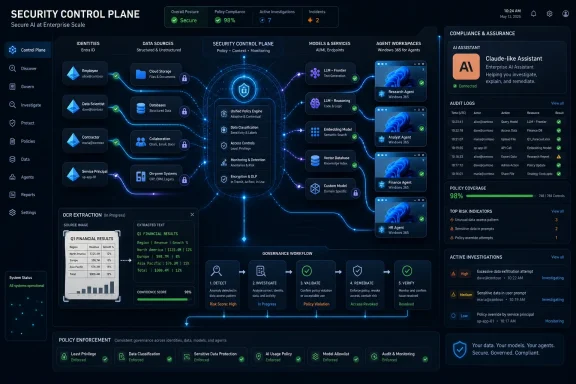
On May 21, 2026, Microsoft Security detailed its May update wave, adding Purview visibility for Anthropic Claude, a generally available Purview data security posture experience, deeper data investigations, Entra ID account recovery, and expanded preview support for Windows 365 for Agents. The announcement is not just another monthly product rollup. It is Microsoft’s clearest recent statement that AI security is becoming less about blocking chatbots and more about governing an expanding mesh of agents, identities, data flows, and execution environments. For Windows admins and security teams, the message is blunt: the old perimeter has not disappeared, but it now includes every AI tool that can read, reason, act, and remember.
Microsoft’s May security update lands at a moment when “AI governance” is starting to sound too polite for the problem it describes. In many organizations, generative AI has moved from browser tabs and sanctioned copilots into developer tools, SaaS platforms, local agents, cloud workflows, and experimental automation glued together by APIs. That diffusion creates a familiar IT problem in a new costume: security teams are being asked to protect assets they cannot fully see.
The company’s answer is to pull AI activity into the same management grammar it has spent years building around identities, devices, data, and cloud resources. Purview is no longer positioned merely as a compliance repository. Entra is no longer just the front door for human sign-ins. Windows 365 is no longer only a remote desktop service for employees. In Microsoft’s telling, these products become the control plane for a new class of semi-autonomous workers.
That framing matters because it moves the industry away from the simplistic question of whether a given model is “safe.” A model can be well-behaved and still become a compliance headache if it is connected to sensitive documents, used by the wrong identity, or allowed to act through poorly governed tools. Microsoft’s May updates are built around that more practical concern: what happens after AI is embedded into ordinary work?
There is also a competitive subtext. Microsoft has every reason to make its own security stack the default visibility layer for AI adoption, including AI tools it does not own. By extending Purview visibility to Claude, Microsoft is acknowledging that enterprise AI will not be a single-vendor story. But it is also arguing that even if customers choose multiple models, the governance layer should still look like Microsoft.
That is a notable shift from the earlier phase of enterprise AI, when vendors tended to talk as if customers would standardize on a preferred assistant and move neatly forward. Reality has been messier. Developers use one agentic coding tool, analysts use another model for long-context reasoning, executives experiment with consumer-grade tools, and business units sign up for SaaS platforms that quietly add AI features before central IT has mapped the risk.
Claude’s inclusion in Purview is Microsoft conceding that the security boundary cannot stop at Copilot. It also reflects a more mature enterprise stance: the organization may not be able to prevent every approved team from using non-Microsoft AI, but it can demand logs, oversight, and policy hooks. That is the difference between shadow AI as a panic phrase and shadow AI as an operational problem.
The practical value will depend on depth. Visibility into chat conversations, platform activity, and audit events is useful, but security teams will ask how consistently those signals map to data-loss prevention policies, insider risk workflows, eDiscovery requirements, and retention obligations. If Purview can treat Claude activity as first-class evidence rather than a bolt-on feed, the integration becomes more than vendor diplomacy.
For WindowsForum readers managing Microsoft 365 estates, the immediate implication is that AI governance is moving toward the same pattern as SaaS governance. The sanctioned application list is no longer enough. Admins will need to know which AI services are active, which identities are using them, what data is being submitted, what outputs are being retained, and whether those interactions can be investigated after an incident.
Traditional data governance has often failed because it asks organizations to classify everything before they can protect anything. AI makes that model even harder to sustain. Sensitive information is copied into prompts, summarized into new documents, embedded in vector stores, surfaced by agents, and exposed through connectors that may not resemble conventional file access. A posture-management approach is Microsoft’s attempt to prioritize risk rather than worship completeness.
The phrase data security posture management also borrows from the cloud security world, where posture tools identify misconfigurations and risky exposure before attackers exploit them. Applying that logic to information protection is sensible. The most dangerous data in an AI-enabled enterprise is not always the most confidential file in the most secure repository; it may be the moderately sensitive file sitting in a broadly accessible SharePoint site that an agent can now query at machine speed.
For administrators, the appeal is workflow consolidation. A tool that discovers sensitive data but punts remediation to another portal becomes shelfware under pressure. Microsoft is promising that teams can investigate risk and take action in the same flow, which is exactly what overburdened security operations teams want to hear.
The catch is that unified workflows are only as unified as the licensing, connectors, and organizational politics behind them. Many enterprises have Purview deployed unevenly, with security, compliance, legal, and infrastructure teams owning different slices. Microsoft can ship a cleaner experience, but customers still have to align the people and processes that decide whether discovered risk actually gets remediated.
This is one of those updates that reveals how incomplete older compliance assumptions have become. For years, many controls treated text as the manageable substrate and images as an awkward exception. AI collapses that distinction. A screenshot of a credential, a diagram containing network details, or an image of a customer record can be just as sensitive as a text file, and sometimes harder to detect because it bypasses conventional pattern matching.
OCR brings that content into scope for AI-powered analysis. In plain English, Purview can now extract text from images and subject that text to deeper examination. That does not magically solve context, intent, or accuracy problems, but it closes a conspicuous gap.
Custom examinations may prove even more useful for mature teams. Microsoft already offers examination types for credentials, risk, and personally identifiable information, but every regulated organization has its own weird data. A hospital, a defense contractor, a law firm, and a financial services company all have different signals that matter. Allowing investigators to define their own analysis is a step toward making Purview fit actual business risk rather than forcing business risk into generic templates.
There is a privacy and governance tension here as well. The more capable these tools become at extracting and analyzing content, the more organizations need clear internal rules about who can run investigations, what approvals are required, how results are retained, and how employee monitoring concerns are handled. Security teams may welcome deeper visibility, but deeper visibility without governance can create a new trust problem inside the company.
Traditional password reset is increasingly inadequate in a world where phishing-resistant authentication, device-bound credentials, passkeys, multifactor methods, and conditional access policies are expected. If a user loses a phone, replaces a device, leaves a hardware key at home, or gets locked out after a compromise, the recovery process can become the weakest link in the identity chain. Attackers know this. Help desks know this. Anyone who has handled executive lockouts knows this.
By emphasizing trust re-establishment rather than simple credential recovery, Microsoft is aligning account recovery with the broader zero-trust model. The question is not “can this person answer a security question?” It is “can the organization establish enough confidence to safely rebind authentication methods to this identity?” That is a harder and more appropriate standard.
For IT departments, the benefit is not merely user convenience. A bad recovery process can undo strong authentication. If an attacker can socially engineer a help desk into resetting methods, the organization’s expensive identity controls become theater. Stronger recovery workflows can reduce that risk while also lowering the operational burden of manual exceptions.
Still, implementation will be everything. Recovery policy is one of those areas where security ideals collide with business continuity. Lock the process down too tightly and legitimate users are stranded; loosen it too much and attackers find the seam. Entra’s account recovery mechanism gives organizations a better instrument, but they still have to tune it.
That is a clever repurposing of the Cloud PC model. Windows 365 began as a way to stream managed desktops to human workers. In the agentic AI era, Microsoft is positioning it as a controlled execution substrate for non-human workers as well. The desktop becomes not merely a user interface, but a containment and observability layer.
This matters because many agents are not confined to neat API calls. They open applications, navigate interfaces, read files, manipulate documents, interact with browsers, and trigger workflows. From a security perspective, that looks less like a chatbot and more like a privileged user with a very fast attention span. Giving that actor its own managed environment is a way to reduce ambiguity.
The model also fits Microsoft’s strengths. Windows, Intune, Defender, Entra, Purview, and Microsoft 365 already form the administrative fabric for many enterprises. If agents run inside a Windows 365 environment governed by organizational identity and policy, Microsoft can offer familiar controls: logging, device posture, conditional access, endpoint monitoring, compliance boundaries, and administrative lifecycle management.
But the move also raises a new operational question: how many desktops does an AI workforce need? If agents become common, organizations may need to manage not only employee devices and virtual desktops, but fleets of agent workspaces. That means naming conventions, ownership, lifecycle rules, cost controls, audit policies, and incident response playbooks for machines no human directly uses.
This is where Microsoft’s approach is strongest. It can frame agents as part of the same identity and access continuum that already includes employees, guests, service principals, managed identities, and devices. That does not make the problem easy, but it makes it administratively legible.
The danger is that organizations will underestimate the difference between a service account and an agent. A service account typically executes a defined workload. An agent may interpret goals, select tools, summarize data, retry actions, and make choices within a policy envelope. That added flexibility is the point of agentic AI, but it also creates ambiguity when something goes wrong.
Audit logs will therefore need to answer more than the old who-did-what question. They will need to show what instruction the agent received, what context it used, what tools it invoked, what data it accessed, what output it generated, and which human or policy chain authorized the activity. Without that lineage, post-incident review becomes guesswork wrapped in JSON.
Microsoft’s May announcement does not solve all of that, but it shows where the platform is heading. The company wants the agent to be a governed participant in the enterprise estate, not an invisible automation script hiding under somebody’s API key. That is the right instinct.
That is important because enterprise security tools lose credibility when they pretend otherwise. The average organization already has Microsoft 365, SaaS sprawl, cloud sprawl, unmanaged scripts, developer experimentation, and business-led procurement. AI accelerates each of those forces. A security product that only watches the vendor’s own garden is useful, but incomplete.
Microsoft’s bet is that it can be the governance layer across that mess. It has a plausible claim because so much enterprise work already passes through Microsoft identity, productivity, endpoint, and compliance systems. Even when the model is not Microsoft’s, the user, file, device, or workflow often is.
The risk is lock-in by gravity rather than mandate. If every AI governance question routes through Purview, Entra, Defender, Intune, and Windows 365, customers may gain integration at the cost of flexibility. That may be an acceptable trade for many enterprises, especially those already deep in Microsoft 365 E5-style licensing. But it is still a trade.
For security teams, the pragmatic stance is to judge by signal quality and workflow outcomes. Does the tool reveal activity they could not previously see? Does it reduce investigation time? Does it enforce policy consistently? Does it integrate with existing incident response and compliance processes? The vendor architecture matters, but the operational answer matters more.
This is especially relevant for regulated organizations. A compliance officer does not only care whether a user accessed Claude, Copilot, or another AI service. They care whether customer data was exposed, whether records were retained appropriately, whether privileged information was summarized into another system, and whether the organization can reconstruct the event later. Those are evidence problems.
Purview’s expanded role is therefore not cosmetic. If Microsoft can bring AI interactions, data classification, risk detection, OCR, custom examinations, and remediation into a coherent investigation path, it gives compliance teams a stronger answer than “we told employees not to paste sensitive data.” Policy without telemetry has always been fragile. AI makes it indefensible.
Windows admins should also note the endpoint angle. Local agents, desktop automation, browser-based assistants, and developer tools can blur the line between user action and automated action. If an AI agent running on or through a Windows environment accesses a file, invokes an app, or connects to a service, traditional endpoint and identity telemetry become crucial to understanding what happened.
That does not mean every organization should rush into every preview. It means the inventory work should start now. Which AI tools are approved? Which are merely present? Which identities can use them? Which data stores can they reach? Which logs exist? Which logs are actually reviewed? The organizations that can answer those questions will be in a much better position than those still arguing over whether employees are “allowed” to use AI.
The company’s language around “ambient and autonomous” security is aspirational, and it deserves skepticism. Security tools have a long history of promising automation while delivering dashboards that humans must still interpret at midnight. AI may improve that, but it can also generate more alerts, more opaque decisions, and more dependence on vendor-defined risk scoring.
Even so, the direction is hard to dismiss. AI systems create speed and scale problems that manual security processes cannot match. If agents can touch data faster than humans can review permissions, the control plane has to become more automated. The question is not whether security becomes more autonomous; it is whether that autonomy is observable, accountable, and reversible.
That last word matters. Enterprises should be wary of any security automation that cannot explain itself or be safely overridden. As Microsoft pushes toward AI-assisted governance, customers should demand clear audit trails, policy simulation, scoped rollout, and human review points for high-impact actions. Autonomy is useful only when it does not become another black box.
The practical work will be unglamorous. Admins will need to revisit conditional access policies, data-loss prevention rules, retention settings, audit-log coverage, endpoint baselines, and SaaS discovery. They will need to decide who owns agent approval, who reviews AI activity, and who responds when an agent does something unexpected. They will need to document not only what humans can access, but what AI systems can infer, summarize, and act upon.
Microsoft is making that work easier in some ways and more urgent in others. Visibility into Claude reduces one blind spot, but it also makes clear how many other blind spots may remain. OCR improves investigations, but it expands the content universe security teams must think about. Windows 365 for Agents offers containment, but it introduces another class of managed environment. Entra account recovery strengthens identity hygiene, but it reminds everyone that recovery remains a critical attack surface.
There is no single switch here. The May announcement is a collection of platform moves that point in the same direction: AI security is becoming continuous estate management. The organizations that treat it as a one-time policy memo will fall behind.
 Microsoft Turns AI Security Into an Estate Management Problem
Microsoft’s May security update lands at a moment when “AI governance” is starting to sound too polite for the problem it describes. In many organizations, generative AI has moved from browser tabs and sanctioned copilots into developer tools, SaaS platforms, local agents, cloud workflows, and experimental automation glued together by APIs. That diffusion creates a familiar IT problem in a new costume: security teams are being asked to protect assets they cannot fully see.The company’s answer is to pull AI activity into the same management grammar it has spent years building around identities, devices, data, and cloud resources. Purview is no longer positioned merely as a compliance repository. Entra is no longer just the front door for human sign-ins. Windows 365 is no longer only a remote desktop service for employees. In Microsoft’s telling, these products become the control plane for a new class of semi-autonomous workers.
That framing matters because it moves the industry away from the simplistic question of whether a given model is “safe.” A model can be well-behaved and still become a compliance headache if it is connected to sensitive documents, used by the wrong identity, or allowed to act through poorly governed tools. Microsoft’s May updates are built around that more practical concern: what happens after AI is embedded into ordinary work?
There is also a competitive subtext. Microsoft has every reason to make its own security stack the default visibility layer for AI adoption, including AI tools it does not own. By extending Purview visibility to Claude, Microsoft is acknowledging that enterprise AI will not be a single-vendor story. But it is also arguing that even if customers choose multiple models, the governance layer should still look like Microsoft.
Claude Support Shows Microsoft Has Accepted the Multi-Model Workplace
The most symbolically important update is Purview’s new visibility into Anthropic Claude. Microsoft says security and compliance teams can now detect and investigate Claude Enterprise activity alongside other cloud applications, using Anthropic’s Claude Compliance API to expose interactions and audit-log signals inside the broader Purview experience.That is a notable shift from the earlier phase of enterprise AI, when vendors tended to talk as if customers would standardize on a preferred assistant and move neatly forward. Reality has been messier. Developers use one agentic coding tool, analysts use another model for long-context reasoning, executives experiment with consumer-grade tools, and business units sign up for SaaS platforms that quietly add AI features before central IT has mapped the risk.
Claude’s inclusion in Purview is Microsoft conceding that the security boundary cannot stop at Copilot. It also reflects a more mature enterprise stance: the organization may not be able to prevent every approved team from using non-Microsoft AI, but it can demand logs, oversight, and policy hooks. That is the difference between shadow AI as a panic phrase and shadow AI as an operational problem.
The practical value will depend on depth. Visibility into chat conversations, platform activity, and audit events is useful, but security teams will ask how consistently those signals map to data-loss prevention policies, insider risk workflows, eDiscovery requirements, and retention obligations. If Purview can treat Claude activity as first-class evidence rather than a bolt-on feed, the integration becomes more than vendor diplomacy.
For WindowsForum readers managing Microsoft 365 estates, the immediate implication is that AI governance is moving toward the same pattern as SaaS governance. The sanctioned application list is no longer enough. Admins will need to know which AI services are active, which identities are using them, what data is being submitted, what outputs are being retained, and whether those interactions can be investigated after an incident.
Purview’s New DSPM Experience Is the Center of Gravity
The generally available Microsoft Purview Data Security Posture Management experience may be the least flashy item in the announcement, but it is arguably the most important. Microsoft says the new DSPM experience unifies discovery, protection, investigation, and remediation into goal-oriented workflows with expanded reporting and third-party visibility. That is product-marketing language, but the underlying direction is clear: Microsoft wants Purview to become the console where data risk is found and fixed, not merely cataloged.Traditional data governance has often failed because it asks organizations to classify everything before they can protect anything. AI makes that model even harder to sustain. Sensitive information is copied into prompts, summarized into new documents, embedded in vector stores, surfaced by agents, and exposed through connectors that may not resemble conventional file access. A posture-management approach is Microsoft’s attempt to prioritize risk rather than worship completeness.
The phrase data security posture management also borrows from the cloud security world, where posture tools identify misconfigurations and risky exposure before attackers exploit them. Applying that logic to information protection is sensible. The most dangerous data in an AI-enabled enterprise is not always the most confidential file in the most secure repository; it may be the moderately sensitive file sitting in a broadly accessible SharePoint site that an agent can now query at machine speed.
For administrators, the appeal is workflow consolidation. A tool that discovers sensitive data but punts remediation to another portal becomes shelfware under pressure. Microsoft is promising that teams can investigate risk and take action in the same flow, which is exactly what overburdened security operations teams want to hear.
The catch is that unified workflows are only as unified as the licensing, connectors, and organizational politics behind them. Many enterprises have Purview deployed unevenly, with security, compliance, legal, and infrastructure teams owning different slices. Microsoft can ship a cleaner experience, but customers still have to align the people and processes that decide whether discovered risk actually gets remediated.
OCR Makes the AI Data Problem Less Convenient to Ignore
Microsoft Purview Data Security Investigations now includes optical character recognition and custom examination capabilities. The OCR addition sounds mundane until you consider how much sensitive information lives in screenshots, scanned forms, photographed whiteboards, exported dashboards, and images pasted into documents or chats. If AI systems can ingest visual content, security investigations must be able to inspect it too.This is one of those updates that reveals how incomplete older compliance assumptions have become. For years, many controls treated text as the manageable substrate and images as an awkward exception. AI collapses that distinction. A screenshot of a credential, a diagram containing network details, or an image of a customer record can be just as sensitive as a text file, and sometimes harder to detect because it bypasses conventional pattern matching.
OCR brings that content into scope for AI-powered analysis. In plain English, Purview can now extract text from images and subject that text to deeper examination. That does not magically solve context, intent, or accuracy problems, but it closes a conspicuous gap.
Custom examinations may prove even more useful for mature teams. Microsoft already offers examination types for credentials, risk, and personally identifiable information, but every regulated organization has its own weird data. A hospital, a defense contractor, a law firm, and a financial services company all have different signals that matter. Allowing investigators to define their own analysis is a step toward making Purview fit actual business risk rather than forcing business risk into generic templates.
There is a privacy and governance tension here as well. The more capable these tools become at extracting and analyzing content, the more organizations need clear internal rules about who can run investigations, what approvals are required, how results are retained, and how employee monitoring concerns are handled. Security teams may welcome deeper visibility, but deeper visibility without governance can create a new trust problem inside the company.
Entra ID Account Recovery Targets the Worst Moment in Authentication
The Microsoft Entra ID Account recovery update addresses a less glamorous but painfully real scenario: a user has lost access to all registered authentication methods. Microsoft describes the feature as an advanced authentication recovery mechanism focused on identity verification and trust re-establishment before authentication methods are replaced. That distinction matters.Traditional password reset is increasingly inadequate in a world where phishing-resistant authentication, device-bound credentials, passkeys, multifactor methods, and conditional access policies are expected. If a user loses a phone, replaces a device, leaves a hardware key at home, or gets locked out after a compromise, the recovery process can become the weakest link in the identity chain. Attackers know this. Help desks know this. Anyone who has handled executive lockouts knows this.
By emphasizing trust re-establishment rather than simple credential recovery, Microsoft is aligning account recovery with the broader zero-trust model. The question is not “can this person answer a security question?” It is “can the organization establish enough confidence to safely rebind authentication methods to this identity?” That is a harder and more appropriate standard.
For IT departments, the benefit is not merely user convenience. A bad recovery process can undo strong authentication. If an attacker can socially engineer a help desk into resetting methods, the organization’s expensive identity controls become theater. Stronger recovery workflows can reduce that risk while also lowering the operational burden of manual exceptions.
Still, implementation will be everything. Recovery policy is one of those areas where security ideals collide with business continuity. Lock the process down too tightly and legitimate users are stranded; loosen it too much and attackers find the seam. Entra’s account recovery mechanism gives organizations a better instrument, but they still have to tune it.
Windows 365 for Agents Makes the Desktop a Security Boundary Again
Windows 365 for Agents, now expanding in public preview, is Microsoft’s most Windows-specific move in the May security set. The idea is straightforward: if AI agents are going to perform work that resembles what human users do on a PC, give them a managed Cloud PC environment where their actions can be governed, isolated, and audited. Microsoft Agent 365 defines what the agent is allowed to do; Windows 365 for Agents defines where the agent does it.That is a clever repurposing of the Cloud PC model. Windows 365 began as a way to stream managed desktops to human workers. In the agentic AI era, Microsoft is positioning it as a controlled execution substrate for non-human workers as well. The desktop becomes not merely a user interface, but a containment and observability layer.
This matters because many agents are not confined to neat API calls. They open applications, navigate interfaces, read files, manipulate documents, interact with browsers, and trigger workflows. From a security perspective, that looks less like a chatbot and more like a privileged user with a very fast attention span. Giving that actor its own managed environment is a way to reduce ambiguity.
The model also fits Microsoft’s strengths. Windows, Intune, Defender, Entra, Purview, and Microsoft 365 already form the administrative fabric for many enterprises. If agents run inside a Windows 365 environment governed by organizational identity and policy, Microsoft can offer familiar controls: logging, device posture, conditional access, endpoint monitoring, compliance boundaries, and administrative lifecycle management.
But the move also raises a new operational question: how many desktops does an AI workforce need? If agents become common, organizations may need to manage not only employee devices and virtual desktops, but fleets of agent workspaces. That means naming conventions, ownership, lifecycle rules, cost controls, audit policies, and incident response playbooks for machines no human directly uses.
Agent Governance Is Becoming Identity Governance
Microsoft’s pairing of Agent 365 and Windows 365 for Agents points toward a bigger shift: agents are becoming identity-bearing entities in enterprise systems. They need permissions, scopes, owners, audit trails, and constraints. They also need to be discoverable, because an unknown agent with access to production data is not meaningfully different from any other unmanaged workload.This is where Microsoft’s approach is strongest. It can frame agents as part of the same identity and access continuum that already includes employees, guests, service principals, managed identities, and devices. That does not make the problem easy, but it makes it administratively legible.
The danger is that organizations will underestimate the difference between a service account and an agent. A service account typically executes a defined workload. An agent may interpret goals, select tools, summarize data, retry actions, and make choices within a policy envelope. That added flexibility is the point of agentic AI, but it also creates ambiguity when something goes wrong.
Audit logs will therefore need to answer more than the old who-did-what question. They will need to show what instruction the agent received, what context it used, what tools it invoked, what data it accessed, what output it generated, and which human or policy chain authorized the activity. Without that lineage, post-incident review becomes guesswork wrapped in JSON.
Microsoft’s May announcement does not solve all of that, but it shows where the platform is heading. The company wants the agent to be a governed participant in the enterprise estate, not an invisible automation script hiding under somebody’s API key. That is the right instinct.
The Security Pitch Is Strongest When It Admits Heterogeneity
The most interesting thread across the May updates is Microsoft’s willingness to acknowledge a mixed environment. Claude support, third-party visibility in DSPM, multi-cloud security positioning, and agent execution environments all point to the same reality: customers are not going to run a pure Microsoft AI stack.That is important because enterprise security tools lose credibility when they pretend otherwise. The average organization already has Microsoft 365, SaaS sprawl, cloud sprawl, unmanaged scripts, developer experimentation, and business-led procurement. AI accelerates each of those forces. A security product that only watches the vendor’s own garden is useful, but incomplete.
Microsoft’s bet is that it can be the governance layer across that mess. It has a plausible claim because so much enterprise work already passes through Microsoft identity, productivity, endpoint, and compliance systems. Even when the model is not Microsoft’s, the user, file, device, or workflow often is.
The risk is lock-in by gravity rather than mandate. If every AI governance question routes through Purview, Entra, Defender, Intune, and Windows 365, customers may gain integration at the cost of flexibility. That may be an acceptable trade for many enterprises, especially those already deep in Microsoft 365 E5-style licensing. But it is still a trade.
For security teams, the pragmatic stance is to judge by signal quality and workflow outcomes. Does the tool reveal activity they could not previously see? Does it reduce investigation time? Does it enforce policy consistently? Does it integrate with existing incident response and compliance processes? The vendor architecture matters, but the operational answer matters more.
The Admin Burden Moves From Blocking Apps to Proving Control
For years, the default enterprise response to new AI tools was a binary choice: block them or tolerate them. That phase is ending. The new burden is to prove that AI use is governed, logged, and aligned with data policy. Microsoft’s updates are designed for that phase.This is especially relevant for regulated organizations. A compliance officer does not only care whether a user accessed Claude, Copilot, or another AI service. They care whether customer data was exposed, whether records were retained appropriately, whether privileged information was summarized into another system, and whether the organization can reconstruct the event later. Those are evidence problems.
Purview’s expanded role is therefore not cosmetic. If Microsoft can bring AI interactions, data classification, risk detection, OCR, custom examinations, and remediation into a coherent investigation path, it gives compliance teams a stronger answer than “we told employees not to paste sensitive data.” Policy without telemetry has always been fragile. AI makes it indefensible.
Windows admins should also note the endpoint angle. Local agents, desktop automation, browser-based assistants, and developer tools can blur the line between user action and automated action. If an AI agent running on or through a Windows environment accesses a file, invokes an app, or connects to a service, traditional endpoint and identity telemetry become crucial to understanding what happened.
That does not mean every organization should rush into every preview. It means the inventory work should start now. Which AI tools are approved? Which are merely present? Which identities can use them? Which data stores can they reach? Which logs exist? Which logs are actually reviewed? The organizations that can answer those questions will be in a much better position than those still arguing over whether employees are “allowed” to use AI.
The May Release Is a Map of Microsoft’s Security Ambition
The individual updates are useful, but the larger story is architectural. Microsoft is trying to make security for AI feel like an extension of Microsoft security rather than a new standalone market. That is good for customers who want fewer consoles and more integrated enforcement. It is uncomfortable for customers who worry that every new risk category becomes another reason to buy deeper into the stack.The company’s language around “ambient and autonomous” security is aspirational, and it deserves skepticism. Security tools have a long history of promising automation while delivering dashboards that humans must still interpret at midnight. AI may improve that, but it can also generate more alerts, more opaque decisions, and more dependence on vendor-defined risk scoring.
Even so, the direction is hard to dismiss. AI systems create speed and scale problems that manual security processes cannot match. If agents can touch data faster than humans can review permissions, the control plane has to become more automated. The question is not whether security becomes more autonomous; it is whether that autonomy is observable, accountable, and reversible.
That last word matters. Enterprises should be wary of any security automation that cannot explain itself or be safely overridden. As Microsoft pushes toward AI-assisted governance, customers should demand clear audit trails, policy simulation, scoped rollout, and human review points for high-impact actions. Autonomy is useful only when it does not become another black box.
The Signal for Windows Shops Is Clearer Than the Slogan
For Windows-centric organizations, the May update is less about a single feature than a roadmap for the next administrative frontier. The AI estate is becoming part of the Windows estate, the Microsoft 365 estate, the identity estate, and the data estate all at once. That convergence will reward teams that already treat device management, identity, compliance, and security operations as connected disciplines.The practical work will be unglamorous. Admins will need to revisit conditional access policies, data-loss prevention rules, retention settings, audit-log coverage, endpoint baselines, and SaaS discovery. They will need to decide who owns agent approval, who reviews AI activity, and who responds when an agent does something unexpected. They will need to document not only what humans can access, but what AI systems can infer, summarize, and act upon.
Microsoft is making that work easier in some ways and more urgent in others. Visibility into Claude reduces one blind spot, but it also makes clear how many other blind spots may remain. OCR improves investigations, but it expands the content universe security teams must think about. Windows 365 for Agents offers containment, but it introduces another class of managed environment. Entra account recovery strengthens identity hygiene, but it reminds everyone that recovery remains a critical attack surface.
There is no single switch here. The May announcement is a collection of platform moves that point in the same direction: AI security is becoming continuous estate management. The organizations that treat it as a one-time policy memo will fall behind.
The Concrete Work Starts Before the Agents Arrive
Microsoft’s May security release gives IT teams enough substance to act, even if some capabilities are still emerging or expanding through preview channels. The immediate value is not in declaring the AI problem solved. It is in identifying where the organization’s current controls stop being adequate.- Purview’s Claude visibility means sanctioned third-party AI use can be brought closer to normal compliance and investigation workflows.
- The generally available Purview DSPM experience gives security teams a more unified way to move from sensitive-data discovery to remediation.
- OCR and custom examinations in Data Security Investigations widen the evidence base to include visual content and organization-specific risk patterns.
- Entra ID Account recovery treats lost authentication access as a trust-restoration problem, not merely a password-reset problem.
- Windows 365 for Agents suggests that AI workers may need managed desktops, audit trails, and lifecycle controls just like human workers.
- The real administrative challenge is building an inventory of agents, data access, identities, logs, and enforcement points before AI adoption outruns governance.
References
- Primary source: Microsoft
Published: 2026-05-21T16:40:08.066493
What’s new in Microsoft Security: May 2026 | Microsoft Security Blog
Microsoft Security’s latest updates extend visibility, control, and protection across expanding ecosystems as organizations accelerate AI adoption.www.microsoft.com - Official source: learn.microsoft.com
Use Microsoft Purview to manage data security & compliance for AI agents | Microsoft Learn
Use Microsoft Purview to help you protect and manage data security and compliance protections for AI agents.learn.microsoft.com - Official source: techcommunity.microsoft.com
