

The Prompt Window Was Never a Confessional Booth
The popular reaction to this kind of feature is predictable: Microsoft is letting the boss read your AI conversations. That reaction is emotionally understandable and technically incomplete.
In a consumer setting, a chatbot feels like a one-to-one exchange. You type a question, the model replies, and the interface borrows the intimacy of messaging. In a corporate Microsoft 365 tenant, however, that same exchange may involve licensed enterprise services, protected company data, identity controls, retention obligations, eDiscovery requirements, and security policies that predate generative AI by decades.
Microsoft’s move with Purview does not invent workplace monitoring. It extends it into a channel that employees have been treating as conversational, experimental, and sometimes disposable. That gap between how AI feels and how enterprise governance works is where the controversy lives.
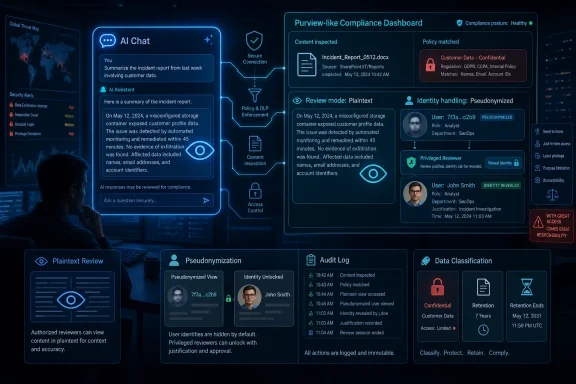
The key phrase in the report is plaintext. Security teams are not merely getting metadata that says an employee interacted with an AI service at 2:17 p.m. They may be able to inspect the actual prompt and the actual response when Microsoft’s risk signals decide the exchange deserves attention.
That is powerful. It is also exactly the kind of power enterprises have been asking for as employees paste source code, customer lists, sales decks, legal drafts, incident notes, and unreleased strategy into AI tools.
Microsoft Is Turning AI Governance Into a Purview Problem
Purview has become Microsoft’s answer to a sprawling enterprise question: where is sensitive data, who touched it, where did it go, and did anyone break a rule along the way? The product family already covers information protection, data loss prevention, audit, eDiscovery, insider risk, data governance, and newer AI-facing security workflows. Bringing AI prompts into Insider Risk Management is not a bolt-on gimmick; it is a logical expansion of that control plane.
The new feature reportedly sits inside Purview Insider Risk Management, the part of Microsoft’s compliance stack designed to detect internal risks such as data leakage, intellectual property theft, policy violations, and unusual user behavior. That placement matters. Microsoft is not presenting prompt review as casual manager visibility or a productivity analytics feature. It is positioning it as an investigative capability for authorized security and compliance personnel.
That distinction will not satisfy everyone. “Only authorized people can read it” is not the same as “nobody can read it.” But in enterprise security, access control is often the difference between defensible governance and a surveillance free-for-all.
Microsoft’s design, as described, leans on familiar Purview controls: pseudonymization, role-based access control, audit logs, and deanonymization only by users with the necessary permissions. In theory, an analyst can review a risky AI interaction without immediately seeing the employee’s name. In practice, the safeguards are only as strong as the tenant’s governance model, its role assignments, its internal policies, and its willingness to audit the auditors.
The uncomfortable truth is that Microsoft is giving organizations a scalpel, not guaranteeing they will avoid using it like a hammer.
Plaintext Review Is the Price of Real Data-Loss Detection
AI security has a metadata problem. Knowing that someone used an AI service is useful, but it is often not enough to determine whether anything bad happened. The risk lives in the content.
If an employee asks an AI assistant to summarize a public blog post, the enterprise risk is low. If the same employee asks it to rewrite a confidential acquisition memo, convert proprietary source code into a competitor-friendly explanation, or generate an answer based on regulated health data, the risk changes completely. Without seeing the prompt and response, a security team may be forced to infer from file labels, app names, timing, or rough classifications.
That is not good enough for serious incident response. A prompt can be the exfiltration path. A response can be the derivative work that reveals confidential material. A model interaction can be both a productivity event and a compliance event.
This is why Microsoft’s choice will be welcomed by many CISOs even as it unnerves employees. Enterprises have spent the last two years being told to embrace Copilot, agents, and AI productivity, while simultaneously being warned that unmanaged AI usage can leak secrets at machine speed. A governance tool that cannot inspect risky content is, from the security team’s perspective, only half a tool.
The plaintext element is therefore not an accidental excess. It is the mechanism that makes the feature operationally meaningful.
Pseudonymization Softens the Blow, But It Does Not Remove the Power Imbalance
Microsoft’s privacy argument rests heavily on pseudonymization. The idea is that security teams can review risky interactions without immediately knowing who wrote them, reducing the chance that prompt monitoring becomes an employee fishing expedition. If the content reveals a serious issue, an authorized person can deanonymize the user.
That is a better model than exposing every prompt with a name attached by default. It recognizes that insider risk programs can become abusive if they are not carefully constrained. It also reflects Microsoft’s long-running attempt to sell Purview as a compliance environment with process controls, not just a dashboard full of employee activity.
But pseudonymization is not anonymity, and employees should not confuse the two. The system is explicitly designed to allow identity revelation when policy and permissions allow it. If the prompt contains enough personal or role-specific context, the reviewer may be able to infer the person anyway.
There is also a cultural problem. Employees do not experience monitoring as a permissions model; they experience it as the knowledge that someone could read what they wrote. That awareness changes behavior. Sometimes that is desirable, especially where confidential data is involved. Sometimes it chills legitimate experimentation, whistleblowing, security research, or requests for help that workers might otherwise make through an AI assistant.
Microsoft can build guardrails, but the trust burden falls on employers. They will need to explain what is monitored, why it is monitored, who can review it, what triggers review, how long records are retained, and how misuse by reviewers is punished. Without that transparency, the feature will be understood less as AI governance and more as quiet surveillance.
Shadow AI Is the Villain Microsoft Needs
The broader strategic context is Microsoft’s campaign against shadow AI: employee use of unsanctioned AI tools outside approved governance channels. This is the AI-era version of shadow IT, but with higher stakes because the payload is often sensitive text rather than merely an unauthorized app.
Microsoft has a business incentive here. If enterprises fear unmanaged AI tools, Microsoft can argue that the safer path is to use Copilot, Azure AI, Edge controls, Defender, Entra, and Purview under one administrative umbrella. The pitch is not just “our AI is useful.” It is “our AI is governable.”
That is a powerful message for regulated industries. Banks, healthcare organizations, law firms, government contractors, and manufacturers do not need a philosophical debate about whether employees should use AI. They need auditability, policy enforcement, retention, incident response, and proof that sensitive data is not being sprayed into uncontrolled services.
The new Purview capability strengthens that pitch. It tells executives that Microsoft can help them see risky AI interactions rather than merely issue acceptable-use memos and hope for the best. It also gives IT departments a more credible answer when employees ask why approved AI tools are preferable to whatever free chatbot is trending this month.
There is a catch. If approved enterprise AI feels more surveilled than unofficial AI, some employees may route around it. Heavy-handed monitoring can push risk into darker corners. The answer is not weaker controls, but clearer boundaries: approved AI should be safe enough to use and governed enough to trust, without making every ordinary prompt feel like a disciplinary record waiting to happen.
The Enterprise Privacy Bargain Is Being Rewritten in Real Time
The Neowin piece makes a blunt point: use of enterprise infrastructure is never really private. That is true, but it is also too simple.
Corporate email is monitored, archived, searched, placed on legal hold, scanned for malware, and inspected for data loss. Teams messages can be retained and discovered. Files in OneDrive and SharePoint can be labeled, audited, blocked, shared, quarantined, or investigated. Endpoint activity can trigger alerts. None of this is new.
What is new is the psychological shape of AI interaction. People use AI tools to brainstorm half-formed thoughts, debug embarrassing mistakes, simplify difficult emails, draft performance reviews, ask naïve technical questions, and translate messy intent into polished work. The prompt box captures the thinking process more directly than a finished document does.
That makes AI telemetry unusually sensitive. A prompt can reveal not only what data a worker used, but what they were trying to do with it. It may expose uncertainty, intent, frustration, or exploration. In some cases, that context is exactly what an investigator needs. In others, it is far more intimate than the compliance objective requires.
This is the privacy bargain enterprises are now renegotiating. Employees will likely accept that confidential data should not be pasted into random AI systems. They may be less comfortable learning that approved AI prompts can be reviewed in plaintext, even under risk-based controls. The difference between “the company protects its data” and “the company reads my prompts” is not legalistic. It is human.
Microsoft’s implementation choices matter, but employer policy will matter more. A well-run program will focus on abnormal risk signals, sensitive data movement, and documented investigations. A bad program will normalize prompt inspection as another managerial convenience.
Windows Admins Should Read This as a Governance Warning, Not Just a Privacy Story
For WindowsForum’s core audience, the practical lesson is not “panic about Microsoft.” It is “do not deploy AI without deciding who owns the evidence trail.”
Many organizations adopted generative AI through pilots, executive enthusiasm, or license bundling before their governance model caught up. Copilot appeared in roadmaps. Edge gained AI features. Users found browser-based tools. Developers experimented with code assistants. Security teams then inherited the blast radius.
Purview’s AI-facing capabilities are Microsoft’s attempt to close that gap after the fact. They give admins and compliance teams ways to discover AI usage, evaluate risky interactions, and integrate AI activity into familiar workflows. But tools do not make policy. They enforce whatever policy exists, including vague ones.
Administrators should assume that AI prompts and responses are becoming records. That means they belong in discussions about retention, eDiscovery, data classification, acceptable use, employee notice, privileged access, and incident response. Treating them as ephemeral chats is no longer realistic in a Microsoft 365 enterprise.
The operational questions are immediate. Which roles can view AI prompt content? Which roles can deanonymize users? Are those actions logged and reviewed? Which AI services are covered? Which risk indicators trigger review? How are false positives handled? What does HR see, and when? What does legal require? What do employees know?
If those questions sound uncomfortable, that is the point. AI governance is no longer a slide in a digital transformation deck. It is a permissions table.
The Real Risk Is Not That Microsoft Can See Too Much, but That Tenants Configure Too Casually
Microsoft’s security stack increasingly assumes that customers can handle very powerful administrative capabilities. In large enterprises, that may be true. In midmarket organizations with thin IT staffing, inherited permissions, and loosely governed admin roles, it is a more dangerous assumption.
Purview Insider Risk Management is not a toy. It sits close to sensitive employee activity and sensitive company data. Adding plaintext AI prompt review raises the stakes because the content can be revealing, ambiguous, and easy to misinterpret. A prompt that looks suspicious out of context may be legitimate research. A response that includes sensitive-looking material may have been generated from already-approved internal sources. A developer asking an AI tool to explain a credential-handling function may be improving security, not stealing code.
This is where risk scoring and human review can collide. Microsoft can surface signals, but organizations must decide how aggressively to act on them. The worst version of this future is one where automated alerts produce HR cases before anyone understands the technical context.
There is also a privilege-management problem. Many Microsoft 365 environments have accumulated admin sprawl over years of mergers, emergency fixes, contractor access, and “temporary” role assignments that never expired. If plaintext AI review becomes available in such tenants, the first governance task is not creating policies. It is reducing who can see what.
Microsoft’s audit logs help, but audit logs are retrospective. They tell you what happened after access was used. Sensible tenants will pair this feature with just-in-time access, separation of duties, approval workflows for deanonymization, and periodic review of privileged roles.
In other words, the most important configuration screen may not be the new AI-risk view. It may be the access-control page that determines who gets to open it.
Microsoft’s AI Security Story Is Becoming a Full-Stack Lock-In Story
There is another layer here that deserves scrutiny. Microsoft’s AI security posture is also a platform strategy.
The company is assembling a vertically integrated enterprise AI stack: Windows, Edge, Microsoft 365, Copilot, Azure AI services, Entra identity, Defender security telemetry, and Purview compliance controls. Each piece can be defended on its own merits. Together, they create a compelling argument that the safest AI is the AI Microsoft can observe, govern, and sell.
That does not make the argument false. Fragmented AI adoption really is hard to secure. Security teams do benefit when identity, data classification, endpoint signals, app discovery, and compliance workflows can talk to one another. A single pane of glass may be cliché, but the alternative is often a dozen panes and no shared context.
Still, customers should recognize the trade. The more Microsoft becomes the control plane for enterprise AI, the more organizational risk management depends on Microsoft’s definitions, dashboards, licenses, and roadmap timing. A feature that looks like governance can also become another reason to consolidate around one vendor.
This is especially relevant for organizations using multiple AI providers. If Microsoft’s tooling has deeper visibility into Microsoft-controlled AI interactions than third-party tools, security teams may gradually prefer the services that are easiest to govern. That is rational. It is also how compliance gravity becomes platform gravity.
For admins, the answer is not to reject integrated controls. It is to document what they actually cover. A dashboard that shows some AI risk can be mistaken for a dashboard that shows all AI risk. Shadow AI thrives in that gap.
Employees Need Rules Written for Humans, Not Just Policies Written for Auditors
The employee-facing lesson should be simple: do not put company secrets into AI tools unless your organization has approved that use. But simple rules are rarely enough.
Workers need examples. Can they paste a customer email into Copilot to draft a response? Can they ask an AI assistant to summarize a Teams transcript? Can a developer submit a proprietary error log? Can finance use AI to reformat forecast commentary? Can HR use it to rewrite performance feedback? The answer may vary depending on sensitivity labels, jurisdiction, contract terms, and tool configuration.
If organizations do not provide clear guidance, employees will invent their own norms. Some will overuse AI carelessly. Others will avoid useful tools entirely. Many will assume that if a feature appears in a Microsoft product, it must be approved for anything they can technically do with it.
Plaintext monitoring does not fix that. It catches or investigates risky behavior after the fact. The better outcome is to prevent the risky prompt from being written in the first place through training, labeling, just-in-time warnings, and sane defaults.
There is also a fairness issue. Employees should not learn about prompt visibility only after an investigation begins. If AI prompts can be reviewed under certain conditions, that should be disclosed in acceptable-use policies and onboarding material. If pseudonymization is used, explain what it does and does not mean. If deanonymization requires approval, say who approves it.
Transparency is not merely a courtesy. It is how organizations preserve trust while deploying controls that can otherwise feel invasive.
The Admin Console Is Now Part of the AI Conversation
The most concrete takeaway from Microsoft’s Purview update is that AI governance has moved from aspiration to instrumentation. Security teams are no longer limited to telling users not to leak data into AI systems. They are getting tools to detect, review, and investigate the interactions themselves.
That changes the job for IT and security leaders. AI rollout is no longer just about licensing, enablement, and productivity. It is about evidentiary controls, privacy boundaries, and who has permission to read the most revealing workplace text a user may produce.
- Organizations should treat AI prompts and responses as enterprise records that may be logged, reviewed, retained, and produced during investigations.
- Security teams should restrict plaintext prompt review to narrowly scoped roles and require strong approval paths for deanonymizing users.
- Employees should assume that AI use on company systems is governed by workplace policy, not by the consumer-like feel of the chat interface.
- Administrators should verify which AI services are covered by Purview controls and which remain outside Microsoft’s visibility.
- Leaders should publish plain-English AI usage rules before enforcement begins, not after the first employee becomes a test case.
- Audit logs should be reviewed for misuse of the monitoring capability, because monitoring tools themselves create insider-risk exposure.
The controversy over plaintext AI prompt review will be framed as a privacy fight, but the more durable story is governance catching up with behavior. Microsoft is not wrong that enterprises need visibility into risky AI use, and employees are not wrong to worry about how intimate that visibility can become. The next phase of workplace AI will be defined by whether organizations can use these controls with discipline: enough oversight to protect data, enough restraint to preserve trust, and enough honesty to tell users that the prompt box at work was never private in the first place.