

Zendesk announced on June 2, 2026, that Zendesk Support Assistant for Microsoft 365 is now available on Microsoft AppSource, integrating Microsoft Agent 365 to bring AI-powered employee-service workflows into Microsoft 365 tools including Teams, Outlook, and Word. The announcement is not just another marketplace listing; it is a small but telling marker in the larger consolidation of workplace AI around the applications employees already live in. Zendesk is betting that the next employee-service battleground is not a portal, a queue, or a chatbot window, but the Microsoft 365 surface itself. For WindowsForum readers, the practical question is whether this makes support meaningfully faster—or simply moves another layer of automation into the tenant governance stack administrators already struggle to control.
The core claim in Zendesk’s Business Wire announcement is straightforward: Zendesk Support Assistant for Microsoft 365 is now available on Microsoft AppSource, Microsoft’s online cloud marketplace for tailored line-of-business solutions. The product integrates Microsoft Agent 365 and is built to streamline employee service, with Zendesk positioning the integration as a faster way for teams to support employees through AI-powered workflows inside tools they already use.
That phrase—inside tools they already use—is doing most of the strategic work. Employee-service software has long suffered from a friction problem: workers are told to open a portal, remember a category, fill out a form, wait for a ticket, and then monitor yet another system for updates. Zendesk’s argument is that the support layer should move toward the employee, not the other way around.
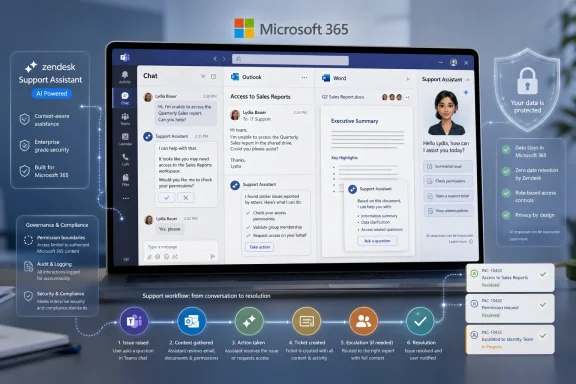
The examples named in the announcement are Teams, Outlook, and Word. That matters because those are not peripheral tools in a Microsoft 365 organization; they are the daily operating surface for communications, documents, approvals, escalations, and informal workarounds. If support assistance appears where a user is already describing a problem, reading a policy, or drafting a request, the support workflow can become less like a destination and more like an embedded service.
Vishnu Parimi, VP Product, Employee Service at Zendesk, framed the premise bluntly in the announcement, saying most service tools ask employees to change how they work. Zendesk, he said, built this integration on the opposite premise: technology should “meet employees where they are” and “not add to the burden.” That is a familiar software pitch, but in the Microsoft 365 context it has sharper implications. The interface is no longer the only product; the governed agent layer becomes part of the product too.
That combination gives the announcement its enterprise pitch. Zendesk is not merely saying that its assistant can answer questions in Teams or help route requests from Outlook. It is saying that the assistant can operate in Microsoft 365 workflows while giving enterprises a unified control plane for AI agents, knowledge access, and communications.
That phrase, unified control plane, is precisely what will catch the attention of IT leaders. In 2023 and 2024, the fear around workplace AI was often framed around data leakage and hallucinated answers. By 2026, the harder governance problem is agent sprawl: dozens of assistants, copilots, bots, connectors, workflow automations, and third-party add-ons all trying to access the same corporate knowledge and act on behalf of users.
Zendesk’s positioning implicitly acknowledges that reality. AI support tooling is not credible in a large organization unless it can be governed alongside identity, permissions, compliance policies, and communications controls. Running within Microsoft’s security and compliance infrastructure is therefore not a cosmetic detail. It is the difference between a support bot that an enthusiastic department buys and an employee-service system that central IT might actually approve.
Srini Raghavan, Corporate Vice President, Microsoft Copilot & Agents Ecosystem at Microsoft Corp., emphasized the marketplace side of that equation, saying Microsoft AppSource helps Zendesk customers find line-of-business partner solutions that work with products they already use. The wording is cautious, as Microsoft partner quotes often are, but the message is clear: Microsoft wants the agent ecosystem to expand through governed, tenant-compatible business applications rather than through disconnected AI tools living outside the Microsoft 365 estate.
That model made sense when support systems were primarily systems of record. The ticket was the artifact that mattered: who opened it, what category it belonged to, who owned it, what service-level clock applied, and how it was closed. But the daily reality for employees is different. Their problem usually begins in a message thread, a meeting, a document, an email, or a missing permission that blocks work.
Zendesk’s Microsoft 365 assistant is aimed directly at that mismatch. By enabling ticket resolution, issue escalation, and support workflow management within employee workflows in Microsoft 365, the product tries to collapse the distance between the place where work breaks and the place where support begins. That is a more important shift than it may sound, because the cost of employee service is not only the time spent by support teams. It is also the time spent by employees navigating support rituals.
The announcement names IT, HR, and service teams as the target audience. Those groups have different pain points, but they share the same problem: they are overloaded with repetitive requests that arrive through too many channels. IT gets access requests and device problems. HR gets policy questions and onboarding issues. Internal service teams get a mix of routing, approvals, exceptions, and escalations.
The promise of an embedded assistant is that these teams can meet employees in the flow of work while maintaining enough structure to resolve, escalate, and manage the request. That is the fine line every enterprise AI support product now has to walk. If it is too conversational, it becomes ungoverned chat. If it is too procedural, it becomes just another front end for a ticketing system.
The table looks simple because the announcement is deliberately broad. Zendesk is not pitching separate feature sets for IT, HR, and service teams. It is pitching a common agent-enabled service layer that those teams can use inside Microsoft 365, backed by Microsoft’s governance environment.
That broadness is useful commercially, but administrators should read it carefully. A tool that can serve IT, HR, and service teams may touch very different data classes: device information, employee records, policy documents, private communications, approval workflows, and operational knowledge. The value of a unified control plane rises as the data gets more sensitive—but so does the importance of configuring that control plane correctly.
Zendesk’s announcement tries to answer those questions at the architectural level rather than the feature level. The integration runs within Microsoft’s security and compliance infrastructure, according to Zendesk. It also gives enterprises a unified control plane for AI agents, knowledge access, and communications. That is a governance-first pitch, and it reflects where the market has moved.
For years, SaaS vendors sold employee experience by promising a better interface. Now the interface is becoming secondary to where the assistant runs, which permissions model it inherits, and how its actions can be governed. In Microsoft 365 environments, that often means the tool’s acceptability depends less on its conversational polish than on whether it respects the organization’s existing security boundaries.
That is also where the phrase Microsoft Agent 365 becomes important. Zendesk is not merely saying it has a Microsoft 365 integration in the older sense of calendar syncs, message notifications, or document links. It is saying the enhanced agent integrates Microsoft Agent 365, which positions the assistant as part of Microsoft’s broader agent ecosystem rather than as a standalone Zendesk widget pasted into Teams.
For IT pros, that distinction changes the evaluation. The question is not simply, “Does this work in Teams?” The question becomes, “Does this fit the organization’s model for AI agent governance across Microsoft 365?” That includes lifecycle management, access to knowledge sources, user permissions, data retention expectations, and the process for disabling or reviewing agent behavior when something goes wrong.
This is where Zendesk’s announcement is both promising and incomplete. It gives the broad enterprise assurances administrators want to hear, but it does not provide a deployment guide, licensing matrix, permission model, or detailed control list in the source material. That does not make the claim weak; it simply means the announcement should be treated as the starting point for evaluation, not the evaluation itself.
But the enterprise benefit is not speed alone. It is containment. If employees are already asking AI tools to help interpret policies, draft support requests, summarize problems, or find answers, organizations face a choice: let that behavior happen in unmanaged tools or route it through governed systems tied to enterprise controls.
Zendesk’s announcement leans heavily toward the second path. By emphasizing Microsoft’s security and compliance infrastructure and the need for oversight across Microsoft 365, Zendesk is acknowledging that enterprises do not just want smarter agents. They want agents that can be watched, constrained, audited, and aligned with existing knowledge sources.
That framing is especially relevant for HR and IT support. A mishandled HR answer can create policy confusion or expose sensitive employee information. A mishandled IT action can create access risk, trigger unnecessary escalations, or expose operational details. The more useful an assistant becomes, the more it needs boundaries.
The industry’s early AI chatbot wave often treated support automation as a deflection problem: reduce tickets, answer common questions, and keep humans out of repetitive work. The newer agent model is more ambitious. It aims to resolve tickets, escalate issues, and manage workflows. That is qualitatively different because the system is not just producing text; it is participating in the service process.
Zendesk’s wording reflects that escalation. The assistant is not described merely as a knowledge bot. It is described as enabling ticket resolution, issue escalation, and support workflow management. Those are operational verbs. They imply handoffs, decisions, state changes, and accountability.
That is why this announcement deserves attention even though it is brief. It shows where the employee-service market is moving: from AI as a support-side efficiency feature to AI as a governed actor inside the productivity suite.
That does not mean every workflow belongs in Microsoft 365. Some support tasks still require specialized forms, secure data capture, approvals, or deep system integration. But the first mile of support—the moment when an employee realizes they need help—often happens in Microsoft 365. Zendesk is trying to occupy that first mile without abandoning the ticketing and workflow discipline that service teams need.
The strategic logic is similar to what happened with collaboration tools. Work did not move into Teams because Teams was always the best tool for every job. It moved there because the communications fabric became the default location for coordination. Once that happened, applications had to meet users there or risk becoming invisible.
Zendesk’s announcement suggests employee service is following the same path. The support portal may still exist, but it is no longer the only front door. The assistant becomes a service layer available in the channels employees interact with daily.
That is attractive to business leaders because it promises less friction. It is attractive to service leaders because it may improve intake quality and resolution speed. It is attractive to Microsoft because it strengthens Microsoft 365 as the workplace operating environment. And it is attractive to Zendesk because it lets the company sell employee service as something embedded in the Microsoft stack rather than adjacent to it.
The risk, of course, is that Microsoft 365 becomes too crowded with assistants. Users already face notifications, apps, tabs, bots, meeting summaries, message extensions, and workflow prompts. If every business system inserts an AI helper into the same surfaces, the productivity suite can become another noisy layer of enterprise middleware.
That is why execution matters. An assistant that appears at the right moment, uses the right knowledge, and escalates cleanly can feel like infrastructure. An assistant that interrupts, misroutes, or duplicates existing processes will feel like clutter with a conversational interface.
That shortcut has value, but it should not be mistaken for due diligence. Marketplace availability does not answer every question an enterprise administrator needs answered before enabling an AI assistant across employee-service workflows. It does not, by itself, define the organization’s acceptable use policy, access boundaries, retention posture, escalation ownership, or incident process.
Zendesk’s announcement does provide useful high-level signals. It identifies the product, the marketplace, the Microsoft Agent 365 integration, the target teams, the supported workplace surfaces, and the broad governance claim. Those are enough to justify a serious evaluation. They are not enough to justify a blind rollout.
The first due-diligence question is scope. Which employees can use the assistant? Which teams can configure it? Which knowledge sources can it access? Does it behave differently in Teams, Outlook, Word, and other Microsoft 365 tools? The announcement names those tools as examples, but it does not define feature parity across them.
The second question is authority. Can the assistant only recommend actions, or can it trigger ticket updates, escalations, and workflow changes directly? Zendesk says the integration enables ticket resolution, issue escalation, and support workflow management. That is useful, but administrators will need to know where human approval remains mandatory and where automation is allowed to proceed.
The third question is observability. If the assistant gives a wrong answer, escalates to the wrong queue, or exposes inappropriate knowledge, who can reconstruct what happened? In traditional ticketing systems, the record is often clear. With AI-powered workflows spanning communications and documents, the audit story must be equally clear.
The fourth question is data classification. IT and HR support may draw from very different repositories, with different privacy and compliance expectations. A unified control plane helps only if the organization has actually mapped which knowledge is appropriate for which employees, roles, and support contexts.
The fifth question is change management. Zendesk’s quote about meeting employees where they are is persuasive, but employees still need to understand what the assistant can do, what it cannot do, and when they are interacting with an AI-powered workflow rather than a human support agent. Reducing friction should not mean reducing transparency.
The real competition is between service systems that remain destinations and service systems that become ambient. A destination system asks the user to come to it. An ambient system appears in the working environment, understands enough context to be useful, and hands off to structured workflow when necessary. Zendesk is trying to make its support assistant part of the second category.
That shift threatens traditional assumptions about employee-service software. If intake begins in Teams, if policy help appears in Word, and if escalations can start from Outlook, the portal becomes less central. The system of record still matters, but the system of engagement changes. Vendors that own the record but not the workstream risk being pushed into the background.
Microsoft’s role complicates the competitive map. Microsoft is not simply a neutral platform provider here; it is building the agent environment in which partner solutions operate. That creates opportunity for vendors such as Zendesk, but it also means the boundaries between platform capability and partner value will keep shifting. If Microsoft 365 becomes the default place where agents are governed, every service vendor must decide how deeply to integrate and how much differentiation it can preserve.
Zendesk’s advantage is its service-process heritage. It understands tickets, escalation, support workflows, and the operational realities of service teams. Microsoft’s advantage is the workplace surface and the governance environment. The announcement is a classic platform-partner bargain: Zendesk brings domain workflow; Microsoft brings distribution, identity-adjacent trust, and the productivity layer.
For customers, that bargain can be powerful. It can also create dependency. The more an employee-service workflow depends on Microsoft 365 surfaces and Microsoft Agent 365 governance, the more the organization’s support architecture becomes tied to Microsoft’s evolution of agents. That may be exactly what Microsoft-centered enterprises want. It may be less appealing to organizations pursuing a more platform-neutral employee experience strategy.
That is not unusual for a marketplace availability announcement. Business Wire releases are designed to establish availability, positioning, and partner validation. They are not written to satisfy every administrator’s deployment checklist. But the lack of granular detail means IT teams should resist turning the announcement into assumptions.
The safe reading is this: Zendesk Support Assistant for Microsoft 365 is available on Microsoft AppSource; it integrates Microsoft Agent 365; it is built for IT, HR, and service teams; it supports ticket resolution, issue escalation, and support workflow management within Microsoft 365 employee workflows; and it runs within Microsoft’s security and compliance infrastructure. Anything beyond that needs validation in product documentation, tenant testing, and vendor conversations.
That distinction matters because AI announcements often invite organizations to fill in the blanks with optimism. A phrase like “inside tools they already use” can sound like universal context awareness. A phrase like “security and compliance infrastructure” can sound like automatic compliance. A phrase like “unified control plane” can sound like simplified governance. In practice, each of those claims depends on configuration, licensing, policies, and operational discipline.
The best way to evaluate this product is therefore not as a magic support layer, but as a new integration point in the employee-service architecture. It should be assessed like any other system that can touch internal knowledge, communicate with employees, and alter service workflows. The AI interface changes the user experience, but it does not eliminate the need for boring controls.
That may sound conservative, but it is the posture that separates successful enterprise AI deployments from pilot theater. The organizations that benefit most from tools like this will not be the ones that merely enable the assistant. They will be the ones that know which workflows to automate, which knowledge to expose, which escalations to preserve, and which metrics define better service.
That pressure creates demand for automation, but it also creates risk. A stretched service team may be tempted to automate too broadly, too quickly, or with too little review. AI assistants can reduce workload, but they can also create new operational debt if they are deployed without ownership. Someone must still maintain knowledge content, review escalations, tune workflows, and handle edge cases.
Zendesk’s pitch is that embedding service in Microsoft 365 reduces burden rather than adding to it. That will be true only if the assistant reduces the number of places employees must go and the number of manual handoffs support teams must perform. If it becomes another channel that must be monitored separately, the burden simply moves.
This is why the Microsoft Agent 365 integration and governance story is central. The assistant has to be more than a chat front end. It has to be part of a managed service environment where actions, knowledge, and communications can be controlled. Otherwise, it risks becoming another well-intentioned AI layer that creates just enough convenience for users and just enough ambiguity for administrators to regret it.
The strongest version of Zendesk’s vision is compelling. An employee asks for help in Teams. The assistant understands enough context to suggest the right path. A routine request is resolved. A complex request is escalated with the right information. The service team sees a managed workflow rather than a vague message. The organization retains oversight through Microsoft’s compliance and security environment.
The weak version is also easy to imagine. Employees ask sensitive questions in the wrong place. The assistant retrieves incomplete knowledge. Tickets are escalated with poor context. HR and IT teams disagree over ownership. Administrators discover that governance was assumed rather than designed. The difference between those two outcomes will not be determined by the press release. It will be determined by deployment discipline.
The immediate practical impact is modest: a Zendesk assistant is available through Microsoft AppSource, and organizations that use Zendesk and Microsoft 365 have a new route to explore employee-service automation. The longer-term impact is larger: more vendors will try to position their assistants as governed agents inside Microsoft 365. Administrators will need a repeatable process for evaluating them.
That process should begin with the same questions every time. What business problem does the assistant solve? Which Microsoft 365 surfaces does it use? Which data can it access? Which actions can it take? Which controls does it inherit? Which logs prove what happened? Which team owns failures?
Those questions are not anti-AI. They are pro-production. The easiest AI pilots are demos where a narrow task works beautifully. The hardest AI deployments are operational systems where hundreds or thousands of employees bring messy, ambiguous, sensitive problems into the same interface. Zendesk is targeting the latter category, which is why the governance promises matter.
There is also a cultural dimension. Employees are more likely to use support tools that appear in familiar channels, but they may also become less aware of the boundaries between conversation, policy, automation, and formal request. Organizations will need to communicate clearly when an AI-powered workflow is being used and how employees should handle sensitive or exceptional cases.
That is especially true in HR contexts. An HR assistant embedded in Microsoft 365 can be useful for policy navigation and request routing, but HR data carries privacy expectations that are different from ordinary IT support. The same assistant architecture may serve IT, HR, and service teams, but the governance model should not treat every knowledge base as equal.
The most concrete points for IT leaders are the least glamorous ones:
The better reading is that Zendesk and Microsoft are pointing toward the next default model for employee service: governed agents embedded in the productivity suite, connected to service workflows, and constrained by enterprise controls. That model will be attractive because it reduces friction. It will be risky because it centralizes more work, more data, and more automation inside the same collaboration environment.
Zendesk’s announcement is therefore less a finish line than an early marker in a broader enterprise shift. The companies that handle this well will treat AI support assistants as operational infrastructure, with the same seriousness they bring to identity, compliance, and service management. The companies that handle it poorly will discover that moving support into the flow of work also moves mistakes, permissions, and governance gaps into the flow of work. The agent era in Microsoft 365 is arriving through exactly these kinds of integrations, and the organizations that prepare now will have a much better chance of making it feel like help instead of another system to manage.
 Zendesk Moves the Help Desk Into the Workstream
The core claim in Zendesk’s Business Wire announcement is straightforward: Zendesk Support Assistant for Microsoft 365 is now available on Microsoft AppSource, Microsoft’s online cloud marketplace for tailored line-of-business solutions. The product integrates Microsoft Agent 365 and is built to streamline employee service, with Zendesk positioning the integration as a faster way for teams to support employees through AI-powered workflows inside tools they already use.That phrase—inside tools they already use—is doing most of the strategic work. Employee-service software has long suffered from a friction problem: workers are told to open a portal, remember a category, fill out a form, wait for a ticket, and then monitor yet another system for updates. Zendesk’s argument is that the support layer should move toward the employee, not the other way around.
The examples named in the announcement are Teams, Outlook, and Word. That matters because those are not peripheral tools in a Microsoft 365 organization; they are the daily operating surface for communications, documents, approvals, escalations, and informal workarounds. If support assistance appears where a user is already describing a problem, reading a policy, or drafting a request, the support workflow can become less like a destination and more like an embedded service.
Vishnu Parimi, VP Product, Employee Service at Zendesk, framed the premise bluntly in the announcement, saying most service tools ask employees to change how they work. Zendesk, he said, built this integration on the opposite premise: technology should “meet employees where they are” and “not add to the burden.” That is a familiar software pitch, but in the Microsoft 365 context it has sharper implications. The interface is no longer the only product; the governed agent layer becomes part of the product too.
AppSource Is the Distribution Channel, but Agent Governance Is the Story
Microsoft AppSource is the visible storefront in this announcement, but it is not the most interesting part. AppSource gives Zendesk a discoverable route into Microsoft-centered organizations, especially those that already prefer procurement and deployment through Microsoft’s marketplace ecosystem. The deeper move is the integration with Microsoft Agent 365 and the claim that it runs within Microsoft’s security and compliance infrastructure.That combination gives the announcement its enterprise pitch. Zendesk is not merely saying that its assistant can answer questions in Teams or help route requests from Outlook. It is saying that the assistant can operate in Microsoft 365 workflows while giving enterprises a unified control plane for AI agents, knowledge access, and communications.
That phrase, unified control plane, is precisely what will catch the attention of IT leaders. In 2023 and 2024, the fear around workplace AI was often framed around data leakage and hallucinated answers. By 2026, the harder governance problem is agent sprawl: dozens of assistants, copilots, bots, connectors, workflow automations, and third-party add-ons all trying to access the same corporate knowledge and act on behalf of users.
Zendesk’s positioning implicitly acknowledges that reality. AI support tooling is not credible in a large organization unless it can be governed alongside identity, permissions, compliance policies, and communications controls. Running within Microsoft’s security and compliance infrastructure is therefore not a cosmetic detail. It is the difference between a support bot that an enthusiastic department buys and an employee-service system that central IT might actually approve.
Srini Raghavan, Corporate Vice President, Microsoft Copilot & Agents Ecosystem at Microsoft Corp., emphasized the marketplace side of that equation, saying Microsoft AppSource helps Zendesk customers find line-of-business partner solutions that work with products they already use. The wording is cautious, as Microsoft partner quotes often are, but the message is clear: Microsoft wants the agent ecosystem to expand through governed, tenant-compatible business applications rather than through disconnected AI tools living outside the Microsoft 365 estate.
The Old Employee-Service Model Was Built Around Interruption
To understand why this announcement matters, it helps to look at the workflow Zendesk is trying to replace. Traditional employee service assumes interruption. A user stops what they are doing, opens a separate system, translates their problem into support taxonomy, and waits for a response that often arrives outside the context where the issue occurred.That model made sense when support systems were primarily systems of record. The ticket was the artifact that mattered: who opened it, what category it belonged to, who owned it, what service-level clock applied, and how it was closed. But the daily reality for employees is different. Their problem usually begins in a message thread, a meeting, a document, an email, or a missing permission that blocks work.
Zendesk’s Microsoft 365 assistant is aimed directly at that mismatch. By enabling ticket resolution, issue escalation, and support workflow management within employee workflows in Microsoft 365, the product tries to collapse the distance between the place where work breaks and the place where support begins. That is a more important shift than it may sound, because the cost of employee service is not only the time spent by support teams. It is also the time spent by employees navigating support rituals.
The announcement names IT, HR, and service teams as the target audience. Those groups have different pain points, but they share the same problem: they are overloaded with repetitive requests that arrive through too many channels. IT gets access requests and device problems. HR gets policy questions and onboarding issues. Internal service teams get a mix of routing, approvals, exceptions, and escalations.
The promise of an embedded assistant is that these teams can meet employees in the flow of work while maintaining enough structure to resolve, escalate, and manage the request. That is the fine line every enterprise AI support product now has to walk. If it is too conversational, it becomes ungoverned chat. If it is too procedural, it becomes just another front end for a ticketing system.
| Target team | Where the assistant fits | Capabilities named by Zendesk | Enterprise control claim |
|---|---|---|---|
| IT teams | Microsoft 365 employee workflows | Ticket resolution, issue escalation, support workflow management | Runs within Microsoft security and compliance infrastructure |
| HR teams | Tools employees already use, such as Teams, Outlook, and Word | Ticket resolution, issue escalation, support workflow management | Unified control plane for agents, knowledge access, and communications |
| Service teams | Microsoft 365 channels employees interact with daily | Ticket resolution, issue escalation, support workflow management | Security and oversight for governing AI agents across Microsoft 365 |
That broadness is useful commercially, but administrators should read it carefully. A tool that can serve IT, HR, and service teams may touch very different data classes: device information, employee records, policy documents, private communications, approval workflows, and operational knowledge. The value of a unified control plane rises as the data gets more sensitive—but so does the importance of configuring that control plane correctly.
AI Support Is Becoming a Tenant Architecture Decision
The most important audience for this announcement may not be the employee who wants faster answers. It may be the Microsoft 365 administrator who has to decide whether another AI-powered workflow belongs inside the tenant. Every new assistant raises old questions in new clothing: What can it read? What can it write? What can it trigger? What gets logged? Who can audit it? What happens when it routes a request incorrectly?Zendesk’s announcement tries to answer those questions at the architectural level rather than the feature level. The integration runs within Microsoft’s security and compliance infrastructure, according to Zendesk. It also gives enterprises a unified control plane for AI agents, knowledge access, and communications. That is a governance-first pitch, and it reflects where the market has moved.
For years, SaaS vendors sold employee experience by promising a better interface. Now the interface is becoming secondary to where the assistant runs, which permissions model it inherits, and how its actions can be governed. In Microsoft 365 environments, that often means the tool’s acceptability depends less on its conversational polish than on whether it respects the organization’s existing security boundaries.
That is also where the phrase Microsoft Agent 365 becomes important. Zendesk is not merely saying it has a Microsoft 365 integration in the older sense of calendar syncs, message notifications, or document links. It is saying the enhanced agent integrates Microsoft Agent 365, which positions the assistant as part of Microsoft’s broader agent ecosystem rather than as a standalone Zendesk widget pasted into Teams.
For IT pros, that distinction changes the evaluation. The question is not simply, “Does this work in Teams?” The question becomes, “Does this fit the organization’s model for AI agent governance across Microsoft 365?” That includes lifecycle management, access to knowledge sources, user permissions, data retention expectations, and the process for disabling or reviewing agent behavior when something goes wrong.
This is where Zendesk’s announcement is both promising and incomplete. It gives the broad enterprise assurances administrators want to hear, but it does not provide a deployment guide, licensing matrix, permission model, or detailed control list in the source material. That does not make the claim weak; it simply means the announcement should be treated as the starting point for evaluation, not the evaluation itself.
The Employee Benefit Is Speed, but the Enterprise Benefit Is Containment
Zendesk’s stated benefit is speed: a faster way to support employees through AI-powered workflows inside familiar tools. That speed can come from several places. Employees may spend less time finding the right service channel. Support teams may spend less time triaging simple requests. Escalations may carry more context because the assistant begins closer to the original work.But the enterprise benefit is not speed alone. It is containment. If employees are already asking AI tools to help interpret policies, draft support requests, summarize problems, or find answers, organizations face a choice: let that behavior happen in unmanaged tools or route it through governed systems tied to enterprise controls.
Zendesk’s announcement leans heavily toward the second path. By emphasizing Microsoft’s security and compliance infrastructure and the need for oversight across Microsoft 365, Zendesk is acknowledging that enterprises do not just want smarter agents. They want agents that can be watched, constrained, audited, and aligned with existing knowledge sources.
That framing is especially relevant for HR and IT support. A mishandled HR answer can create policy confusion or expose sensitive employee information. A mishandled IT action can create access risk, trigger unnecessary escalations, or expose operational details. The more useful an assistant becomes, the more it needs boundaries.
The industry’s early AI chatbot wave often treated support automation as a deflection problem: reduce tickets, answer common questions, and keep humans out of repetitive work. The newer agent model is more ambitious. It aims to resolve tickets, escalate issues, and manage workflows. That is qualitatively different because the system is not just producing text; it is participating in the service process.
Zendesk’s wording reflects that escalation. The assistant is not described merely as a knowledge bot. It is described as enabling ticket resolution, issue escalation, and support workflow management. Those are operational verbs. They imply handoffs, decisions, state changes, and accountability.
That is why this announcement deserves attention even though it is brief. It shows where the employee-service market is moving: from AI as a support-side efficiency feature to AI as a governed actor inside the productivity suite.
Microsoft 365 Is Becoming the Default Front Door for Enterprise Work
For Microsoft-centered organizations, the gravitational pull of Microsoft 365 is difficult to overstate. Teams has become the meeting room, hallway, announcement channel, and escalation path. Outlook remains the durable record for many workflows. Word continues to be where policies, plans, drafts, and formal documents take shape. If employee support can surface inside those tools, it gains an advantage that a standalone portal cannot easily match.That does not mean every workflow belongs in Microsoft 365. Some support tasks still require specialized forms, secure data capture, approvals, or deep system integration. But the first mile of support—the moment when an employee realizes they need help—often happens in Microsoft 365. Zendesk is trying to occupy that first mile without abandoning the ticketing and workflow discipline that service teams need.
The strategic logic is similar to what happened with collaboration tools. Work did not move into Teams because Teams was always the best tool for every job. It moved there because the communications fabric became the default location for coordination. Once that happened, applications had to meet users there or risk becoming invisible.
Zendesk’s announcement suggests employee service is following the same path. The support portal may still exist, but it is no longer the only front door. The assistant becomes a service layer available in the channels employees interact with daily.
That is attractive to business leaders because it promises less friction. It is attractive to service leaders because it may improve intake quality and resolution speed. It is attractive to Microsoft because it strengthens Microsoft 365 as the workplace operating environment. And it is attractive to Zendesk because it lets the company sell employee service as something embedded in the Microsoft stack rather than adjacent to it.
The risk, of course, is that Microsoft 365 becomes too crowded with assistants. Users already face notifications, apps, tabs, bots, meeting summaries, message extensions, and workflow prompts. If every business system inserts an AI helper into the same surfaces, the productivity suite can become another noisy layer of enterprise middleware.
That is why execution matters. An assistant that appears at the right moment, uses the right knowledge, and escalates cleanly can feel like infrastructure. An assistant that interrupts, misroutes, or duplicates existing processes will feel like clutter with a conversational interface.
The Marketplace Listing Is a Trust Shortcut, Not a Substitute for Due Diligence
Availability on Microsoft AppSource gives Zendesk Support Assistant for Microsoft 365 a familiar procurement and discovery path. It also gives customers a psychological trust shortcut: if it is in Microsoft’s marketplace and built to work with Microsoft 365, it feels closer to the approved ecosystem than a random third-party AI tool.That shortcut has value, but it should not be mistaken for due diligence. Marketplace availability does not answer every question an enterprise administrator needs answered before enabling an AI assistant across employee-service workflows. It does not, by itself, define the organization’s acceptable use policy, access boundaries, retention posture, escalation ownership, or incident process.
Zendesk’s announcement does provide useful high-level signals. It identifies the product, the marketplace, the Microsoft Agent 365 integration, the target teams, the supported workplace surfaces, and the broad governance claim. Those are enough to justify a serious evaluation. They are not enough to justify a blind rollout.
The first due-diligence question is scope. Which employees can use the assistant? Which teams can configure it? Which knowledge sources can it access? Does it behave differently in Teams, Outlook, Word, and other Microsoft 365 tools? The announcement names those tools as examples, but it does not define feature parity across them.
The second question is authority. Can the assistant only recommend actions, or can it trigger ticket updates, escalations, and workflow changes directly? Zendesk says the integration enables ticket resolution, issue escalation, and support workflow management. That is useful, but administrators will need to know where human approval remains mandatory and where automation is allowed to proceed.
The third question is observability. If the assistant gives a wrong answer, escalates to the wrong queue, or exposes inappropriate knowledge, who can reconstruct what happened? In traditional ticketing systems, the record is often clear. With AI-powered workflows spanning communications and documents, the audit story must be equally clear.
The fourth question is data classification. IT and HR support may draw from very different repositories, with different privacy and compliance expectations. A unified control plane helps only if the organization has actually mapped which knowledge is appropriate for which employees, roles, and support contexts.
The fifth question is change management. Zendesk’s quote about meeting employees where they are is persuasive, but employees still need to understand what the assistant can do, what it cannot do, and when they are interacting with an AI-powered workflow rather than a human support agent. Reducing friction should not mean reducing transparency.
Action checklist for admins
- Confirm the AppSource listing for Zendesk Support Assistant for Microsoft 365 and verify that it matches the organization’s Zendesk and Microsoft 365 tenant requirements.
- Review how the integration uses Microsoft Agent 365 and which Microsoft 365 surfaces, including Teams, Outlook, and Word, are in scope for deployment.
- Map permitted knowledge sources before enabling broad access, especially for HR and IT support content.
- Define which actions require human approval, particularly for issue escalation and support workflow management.
- Validate logging, auditability, and compliance controls inside Microsoft’s security and compliance infrastructure before pilot expansion.
- Pilot with one service domain before extending the assistant across IT, HR, and other service teams.
Zendesk’s Real Competition Is Not Just ServiceNow or Freshworks
It would be easy to frame this announcement as another move in the competition among service-management platforms. Zendesk wants more employee-service footprint. Microsoft wants more partner solutions in its agent ecosystem. Customers want faster support without building every workflow themselves. That is all true, but it is not the whole story.The real competition is between service systems that remain destinations and service systems that become ambient. A destination system asks the user to come to it. An ambient system appears in the working environment, understands enough context to be useful, and hands off to structured workflow when necessary. Zendesk is trying to make its support assistant part of the second category.
That shift threatens traditional assumptions about employee-service software. If intake begins in Teams, if policy help appears in Word, and if escalations can start from Outlook, the portal becomes less central. The system of record still matters, but the system of engagement changes. Vendors that own the record but not the workstream risk being pushed into the background.
Microsoft’s role complicates the competitive map. Microsoft is not simply a neutral platform provider here; it is building the agent environment in which partner solutions operate. That creates opportunity for vendors such as Zendesk, but it also means the boundaries between platform capability and partner value will keep shifting. If Microsoft 365 becomes the default place where agents are governed, every service vendor must decide how deeply to integrate and how much differentiation it can preserve.
Zendesk’s advantage is its service-process heritage. It understands tickets, escalation, support workflows, and the operational realities of service teams. Microsoft’s advantage is the workplace surface and the governance environment. The announcement is a classic platform-partner bargain: Zendesk brings domain workflow; Microsoft brings distribution, identity-adjacent trust, and the productivity layer.
For customers, that bargain can be powerful. It can also create dependency. The more an employee-service workflow depends on Microsoft 365 surfaces and Microsoft Agent 365 governance, the more the organization’s support architecture becomes tied to Microsoft’s evolution of agents. That may be exactly what Microsoft-centered enterprises want. It may be less appealing to organizations pursuing a more platform-neutral employee experience strategy.
The Announcement Is Short Because the Category Is Still Being Defined
One reason this story requires more analysis than the source announcement provides is that the category itself is still settling. “AI-powered workflows” can mean anything from suggested replies to autonomous workflow execution. “Support Assistant” can mean a chatbot, a triage layer, an escalation interface, a knowledge retrieval agent, or some combination of all of them. Zendesk’s announcement gives the directional architecture, but not the full operating manual.That is not unusual for a marketplace availability announcement. Business Wire releases are designed to establish availability, positioning, and partner validation. They are not written to satisfy every administrator’s deployment checklist. But the lack of granular detail means IT teams should resist turning the announcement into assumptions.
The safe reading is this: Zendesk Support Assistant for Microsoft 365 is available on Microsoft AppSource; it integrates Microsoft Agent 365; it is built for IT, HR, and service teams; it supports ticket resolution, issue escalation, and support workflow management within Microsoft 365 employee workflows; and it runs within Microsoft’s security and compliance infrastructure. Anything beyond that needs validation in product documentation, tenant testing, and vendor conversations.
That distinction matters because AI announcements often invite organizations to fill in the blanks with optimism. A phrase like “inside tools they already use” can sound like universal context awareness. A phrase like “security and compliance infrastructure” can sound like automatic compliance. A phrase like “unified control plane” can sound like simplified governance. In practice, each of those claims depends on configuration, licensing, policies, and operational discipline.
The best way to evaluate this product is therefore not as a magic support layer, but as a new integration point in the employee-service architecture. It should be assessed like any other system that can touch internal knowledge, communicate with employees, and alter service workflows. The AI interface changes the user experience, but it does not eliminate the need for boring controls.
That may sound conservative, but it is the posture that separates successful enterprise AI deployments from pilot theater. The organizations that benefit most from tools like this will not be the ones that merely enable the assistant. They will be the ones that know which workflows to automate, which knowledge to expose, which escalations to preserve, and which metrics define better service.
The Pressure to Do More With Less Is Now a Product Requirement
Parimi’s quote about service teams being under pressure to do more with less is not just marketing language. It captures the economic backdrop for the entire employee-service AI wave. IT and HR teams are being asked to support more tools, more remote and hybrid workflows, more compliance requirements, and more employee expectations without a proportional increase in headcount.That pressure creates demand for automation, but it also creates risk. A stretched service team may be tempted to automate too broadly, too quickly, or with too little review. AI assistants can reduce workload, but they can also create new operational debt if they are deployed without ownership. Someone must still maintain knowledge content, review escalations, tune workflows, and handle edge cases.
Zendesk’s pitch is that embedding service in Microsoft 365 reduces burden rather than adding to it. That will be true only if the assistant reduces the number of places employees must go and the number of manual handoffs support teams must perform. If it becomes another channel that must be monitored separately, the burden simply moves.
This is why the Microsoft Agent 365 integration and governance story is central. The assistant has to be more than a chat front end. It has to be part of a managed service environment where actions, knowledge, and communications can be controlled. Otherwise, it risks becoming another well-intentioned AI layer that creates just enough convenience for users and just enough ambiguity for administrators to regret it.
The strongest version of Zendesk’s vision is compelling. An employee asks for help in Teams. The assistant understands enough context to suggest the right path. A routine request is resolved. A complex request is escalated with the right information. The service team sees a managed workflow rather than a vague message. The organization retains oversight through Microsoft’s compliance and security environment.
The weak version is also easy to imagine. Employees ask sensitive questions in the wrong place. The assistant retrieves incomplete knowledge. Tickets are escalated with poor context. HR and IT teams disagree over ownership. Administrators discover that governance was assumed rather than designed. The difference between those two outcomes will not be determined by the press release. It will be determined by deployment discipline.
What Windows and Microsoft 365 Shops Should Actually Read Into This
For WindowsForum’s audience, the significance of this announcement is less about Zendesk alone and more about the shape of Microsoft 365 administration in the agent era. The Microsoft 365 tenant is becoming a place where third-party AI agents can participate in employee workflows, not merely a suite where add-ins display data. That raises the stakes for governance, identity, compliance, and support ownership.The immediate practical impact is modest: a Zendesk assistant is available through Microsoft AppSource, and organizations that use Zendesk and Microsoft 365 have a new route to explore employee-service automation. The longer-term impact is larger: more vendors will try to position their assistants as governed agents inside Microsoft 365. Administrators will need a repeatable process for evaluating them.
That process should begin with the same questions every time. What business problem does the assistant solve? Which Microsoft 365 surfaces does it use? Which data can it access? Which actions can it take? Which controls does it inherit? Which logs prove what happened? Which team owns failures?
Those questions are not anti-AI. They are pro-production. The easiest AI pilots are demos where a narrow task works beautifully. The hardest AI deployments are operational systems where hundreds or thousands of employees bring messy, ambiguous, sensitive problems into the same interface. Zendesk is targeting the latter category, which is why the governance promises matter.
There is also a cultural dimension. Employees are more likely to use support tools that appear in familiar channels, but they may also become less aware of the boundaries between conversation, policy, automation, and formal request. Organizations will need to communicate clearly when an AI-powered workflow is being used and how employees should handle sensitive or exceptional cases.
That is especially true in HR contexts. An HR assistant embedded in Microsoft 365 can be useful for policy navigation and request routing, but HR data carries privacy expectations that are different from ordinary IT support. The same assistant architecture may serve IT, HR, and service teams, but the governance model should not treat every knowledge base as equal.
The Signal Beneath the Marketplace Listing
This announcement is a signal that enterprise AI is moving from novelty to plumbing. Zendesk is not presenting the Support Assistant for Microsoft 365 as a futuristic experiment. It is presenting it as a line-of-business partner solution available through Microsoft AppSource, integrated with Microsoft Agent 365, and aimed at everyday service work. That is how technologies become normal: not through spectacle, but through procurement channels, admin controls, and workflows that appear where employees already spend their time.The most concrete points for IT leaders are the least glamorous ones:
- Zendesk Support Assistant for Microsoft 365 became available on Microsoft AppSource on June 2, 2026.
- The enhanced agent integrates Microsoft Agent 365 and is built to streamline employee service.
- Zendesk names Teams, Outlook, and Word as examples of Microsoft 365 tools where employees already work.
- The product is aimed at IT, HR, and service teams, with ticket resolution, issue escalation, and support workflow management as named capabilities.
- Zendesk says the integration runs within Microsoft’s security and compliance infrastructure.
- The enterprise pitch is a unified control plane for AI agents, knowledge access, and communications.
The better reading is that Zendesk and Microsoft are pointing toward the next default model for employee service: governed agents embedded in the productivity suite, connected to service workflows, and constrained by enterprise controls. That model will be attractive because it reduces friction. It will be risky because it centralizes more work, more data, and more automation inside the same collaboration environment.
Zendesk’s announcement is therefore less a finish line than an early marker in a broader enterprise shift. The companies that handle this well will treat AI support assistants as operational infrastructure, with the same seriousness they bring to identity, compliance, and service management. The companies that handle it poorly will discover that moving support into the flow of work also moves mistakes, permissions, and governance gaps into the flow of work. The agent era in Microsoft 365 is arriving through exactly these kinds of integrations, and the organizations that prepare now will have a much better chance of making it feel like help instead of another system to manage.
References
- Primary source: aol.com
Published: 2026-07-08T03:12:07.641960

