

Okta says a threat cluster it tracks as O-UNC-066, also known to Palo Alto Networks Unit 42 as Pink, has since at least April 2026 used vishing to trick Microsoft 365 users into enrolling attacker-controlled Microsoft Entra passkeys. The campaign is not a break in passkey cryptography; it is a social-engineering attack against the moment when a strong credential is created. That distinction matters because it makes the story more uncomfortable, not less: the attackers are exploiting the enterprise rollout pattern around passwordless security itself. Microsoft’s push toward passkeys is still directionally right, but this campaign shows that passwordless adoption can become a new helpdesk impersonation surface if organizations treat enrollment as a purely technical migration.
The central trick in this campaign is brutally simple. Instead of stealing a password, stealing a one-time code, or proxying an entire login session at scale, the attackers persuade employees to add a new authentication method to their own Microsoft 365 account — a passkey the attacker controls.
That moves the attack from credential theft into identity administration by proxy. The victim is not merely handing over a secret; the victim is helping authorize a durable credential inside Microsoft Entra. Once that credential exists, the attacker may retain access even after the organization does the incident-response reflex that used to solve many account compromises: resetting the password.
Okta attributes the activity to O-UNC-066. Palo Alto Networks Unit 42 uses the name Pink for the same actor, and Okta places the group in the broader decentralized cybercriminal ecosystem known as The Com. That context is important because the campaign looks less like a commodity phishing blast and more like the kind of operator-driven social engineering The Com’s orbit has made familiar: phone calls, impersonation, real-time manipulation, and fast monetization after access.
The targets are not confined to one vertical. Okta says the campaign has hit organizations in healthcare, technology, automotive, construction, aviation, and food and beverage. That spread suggests the selection logic is not “who runs a vulnerable server?” but “who has enough Microsoft 365 data to extort and enough enterprise identity complexity to be fooled by a plausible rollout call?”
BleepingComputer’s coverage framed the campaign around Microsoft’s newer Entra passkey registration campaigns, and that is the right lens. Microsoft has been making it easier for administrators to nudge users into registering passkeys after normal sign-in and MFA. The attackers appear to have noticed that a user who has already been told to expect new security prompts is easier to manipulate than one being asked for a password out of nowhere.
This is the awkward phase of every security migration. The industry tells users that old login rituals are unsafe, replaces them with new rituals, and then asks users to distinguish legitimate novelty from malicious novelty. Pink’s innovation is to live inside that confusion.
That is a sensible enterprise feature. Passwordless authentication does not deploy itself, and security teams know that passive documentation rarely changes user behavior. If the goal is to replace passwords with phishing-resistant methods, administrators need a controlled way to push users through enrollment.
Microsoft has steadily increased its passwordless investment throughout 2026. Public Microsoft materials and Message Center communications describe passkeys in registration campaigns rolling out during May and June, including support for device-bound or synchronized FIDO2 passkeys. The direction is clear: Microsoft wants passkeys to become a normal part of Microsoft 365 and Entra life, not a specialist option for security teams and executives.
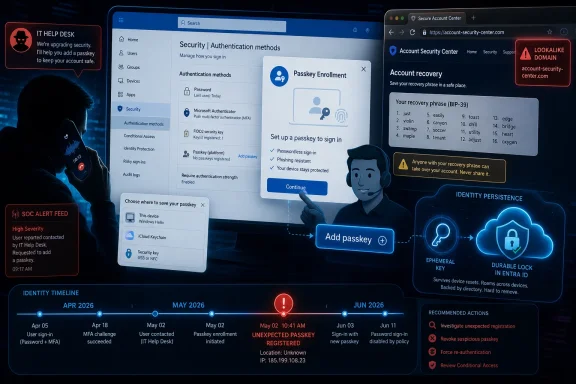
Pink’s campaign exploits that normalization. According to Okta, victims receive calls from people posing as internal IT support personnel or security administrators. The caller claims the organization is rolling out new Microsoft Entra security requirements and instructs the employee to complete an urgent passkey enrollment process.
That is a better pretext than the traditional “your mailbox is full” or “your password expires today” phish. It borrows the language of real enterprise security projects. It also arrives through a channel many employees still associate with internal urgency: a phone call from “IT.”
The phishing websites add a second layer of plausibility. Okta says the domains often contain the word “passkey,” and the pages use company branding, Microsoft logos, and visual elements that resemble Microsoft’s legitimate Entra authentication experience. The victim sees a phone call, a security mandate, familiar branding, and a modern authentication concept that many organizations are genuinely rolling out.
The result is a trap built not around ignorance, but around partial knowledge. A user who has never heard of passkeys may be suspicious. A user who has heard that the company is moving to passwordless sign-in may be more vulnerable, because the request fits the security story they have already been told.
The lesson is not that Microsoft should abandon registration campaigns. It is that enrollment is now a privileged security event, and it needs to be treated like one. If adding a passkey gives an account long-lived authentication power, then the act of adding that passkey deserves monitoring, verification, and user training equal to a password reset or privileged role activation.
The platform reportedly uses one-second heartbeat polling to synchronize what the victim sees with what the attacker needs next. That detail matters because it explains why the campaign can adapt to different Microsoft 365 authentication setups. If a victim uses Microsoft Authenticator push notifications, TOTP, SMS verification codes, or number matching MFA, the operator can adjust the workflow on the fly.
This is not “spray and pray” phishing. It is closer to a fraudulent helpdesk session. The attacker has the victim on the phone, the phishing site in the browser, and the operator panel in front of them. Each MFA challenge becomes another step in a guided con.
That model is expensive compared with commodity phishing kits, but it pays off when the target is enterprise data. A successful compromise can lead to access across Microsoft 365, SharePoint, OneDrive, corporate document repositories, and internal collaboration platforms. If the endgame is extortion, a few minutes of live operator time can be rational.
It also shows why MFA alone is not the whole answer. The victim is not necessarily bypassing MFA; the victim may be completing MFA exactly as configured. The attacker’s advantage is not a cryptographic trick but a social one: the attacker has convinced the employee that the authentication prompts are part of an approved IT task.
That makes this campaign uncomfortable for organizations that have measured identity maturity mainly by MFA coverage. MFA remains essential, but once MFA becomes a stepping stone to enrolling stronger credentials, the enrollment workflow itself becomes a target. The security boundary shifts from “can the attacker sign in?” to “can the attacker persuade the user to authorize the attacker’s future sign-ins?”
That is not how legitimate Microsoft Entra passkey enrollment works. Microsoft Entra passkeys do not use BIP-39 recovery phrases during legitimate enrollment. For defenders, that makes the fake recovery phrase one of the cleanest user-education hooks in the entire campaign.
The trick works because “passkey” sounds cryptographic, and cryptocurrency has trained many users to associate serious security with seed phrases. The fake phrase gives the process ceremony. It makes the victim feel as if they are completing a sophisticated security upgrade rather than being led through an attacker-controlled enrollment.
In practical terms, the recovery phrase may also slow the victim down just enough to reduce critical thinking. A user busy copying words, confirming a word position, and staying on the phone with “IT” is less likely to ask whether Microsoft Entra normally behaves this way. Complexity becomes camouflage.
This is where security awareness training can be unusually concrete. “Do not trust suspicious links” is too broad to survive contact with a polished, branded, time-sensitive phone call. “Microsoft Entra passkey registration does not involve cryptocurrency-style recovery phrases” is specific, memorable, and directly tied to this campaign.
Security teams should not overfit training to one artifact, of course. Attackers can remove the fake recovery phrase tomorrow. But the deeper point holds: legitimate enrollment should have a known, documented shape, and users should be taught that unsolicited deviations from that shape are not harmless.
The campaign succeeds before the passkey does its protective work. The attacker does not steal the private key from the victim’s device or break FIDO2. The attacker persuades the user to authenticate and then enrolls a credential controlled by the attacker. The front door is not picked; someone inside is talked into issuing a new key.
That distinction should shape the response. Turning off passkeys across the board would be a poor reading of the incident. It would move organizations back toward passwords and phishable MFA flows that attackers already understand at industrial scale.
But blindly accelerating passkey enrollment without changing governance would also be a mistake. The old enterprise password world had decades of process around resets, helpdesk verification, temporary access, and account recovery. Passwordless programs need equivalent process around enrollment, replacement, and removal of authentication methods.
Microsoft’s own Entra controls point in that direction. Administrators can configure passkey policies, target users and groups, define profiles, and apply restrictions such as attestation or specific authenticator controls where appropriate. Those controls are not just deployment knobs; in this threat model, they become anti-persistence controls.
The hard question for IT is not “Are passkeys secure?” It is “Who is allowed to create one, from where, under what conditions, after what verification, and with what alerting?” If the answer is “any user who can be talked through a convincing phone call,” the organization has left a gap around one of its strongest credentials.
The ransomware era taught defenders to look for malware detonation, lateral movement, domain admin abuse, and encrypted endpoints. Those risks have not disappeared, but cloud-first extortion can move faster and leave fewer traditional endpoint signals. If the attacker’s objective is to steal documents and threaten publication, Microsoft 365 access may be enough.
Pink reportedly launched its own dedicated leak site in late May and has used samples of stolen corporate information to pressure victims. That places the passkey campaign inside a broader monetization pipeline. The passkey is persistence; the cloud repository is inventory; the leak site is leverage.
For Windows and Microsoft 365 administrators, that means account compromise response has to extend beyond identity cleanup. If a suspicious passkey registration is found, the next questions should be about data access: which SharePoint sites were touched, which OneDrive files were downloaded, which collaboration spaces were accessed, and whether privileged or sensitive repositories were queried shortly after enrollment.
The campaign also blurs the line between identity security and data security. Many organizations still treat Entra logs, Microsoft 365 audit logs, data-loss prevention alerts, and helpdesk workflows as separate operational domains. Pink’s tradecraft crosses them casually. The phone call creates the credential; the credential opens the cloud; the cloud supplies extortion material.
That is why a narrow response — delete the passkey, reset the password, close the ticket — may miss the actual harm. If an attacker had enough time to register a passkey and access Microsoft 365, the organization should assume there may have been data discovery until logs show otherwise.
May and June 2026 — Microsoft’s passkey-oriented Entra registration campaign rollouts begin, increasing the normality of post-authentication passkey enrollment prompts in eligible environments.
Late May 2026 — Pink reportedly launches its own dedicated leak site, giving the group a public extortion channel for stolen corporate data.
Throughout 2026 — Microsoft continues expanding passwordless authentication investment, including support for device-bound or synchronized FIDO2 passkeys and broader Entra passkey adoption.
In this campaign, the attacker impersonates internal IT support or security administrators. That should force organizations to examine not only how users authenticate to Microsoft 365, but how users authenticate the people giving them instructions. A phone call from “security” should not be enough to trigger an authentication-method change.
The fix is procedural as much as technical. Sensitive identity operations should require a known internal channel, a ticket visible in the organization’s approved system, or an independent callback path. Users should be told that real IT will not ask them to enroll a passkey from an unsolicited phone call and will not direct them to a lookalike domain just because it contains the word “passkey.”
For privileged users, the standard should be higher. Newly enrolled authentication methods for privileged accounts should generate alerts. Unexpected passkey registrations should be investigated quickly, especially if followed by Microsoft 365 access from unusual geography, unfamiliar devices, or abnormal data activity.
Microsoft Entra audit logs become central here. Monitoring for unexpected passkey registrations is no longer a nice-to-have detection. It is the signal that the attacker may have moved from transient access to durable identity persistence.
Organizations should also review conditional access policies. Restricting authentication requests from geographic regions where the organization has no legitimate operations can reduce exposure, though it will not stop an attacker using domestic infrastructure or a victim-adjacent network. Conditional access is a layer, not a substitute for enrollment governance.
The bigger cultural shift is that authentication-method enrollment must stop being treated as routine user self-service. It is account security infrastructure. A new passkey can be as consequential as a new administrator password used to be.
Registration campaigns are powerful because they insert security prompts into the user’s normal sign-in experience. But every prompt Microsoft normalizes becomes part of the pattern attackers can imitate. The more common passkey nudges become, the easier it is for a caller to say, “You should be seeing this because of our new Entra requirement.”
This is not unique to Microsoft. Any identity provider that encourages phishing-resistant authenticator enrollment has to solve the same problem. Okta’s own documentation around phishing-resistant authenticator enrollment reflects a broader industry move: organizations want users to enroll strong authenticators, and users need guided flows to do it.
The difference is Microsoft 365’s reach. When Microsoft changes an Entra registration behavior, it affects an enormous population of enterprise users and administrators. A small ambiguity in rollout messaging can become a large social-engineering opportunity.
The safest enterprise deployments will make the rollout boring and verifiable. Users should know the exact internal campaign name, the expected timing, the approved entry point, and the support process. They should also know what will never happen: no unsolicited phone-driven urgency, no passkey domains outside approved Microsoft or corporate portals, and no cryptocurrency-style recovery phrase.
Admins should be equally deliberate about who gets nudged. A broad campaign may be reasonable for low-risk users in a mature environment with strong monitoring. For privileged users, executives, finance staff, legal teams, and data owners, enrollment may need a more controlled process with direct verification and post-enrollment review.
The point is not to slow passwordless adoption into paralysis. It is to avoid turning a mass security improvement into a mass social-engineering rehearsal.
An attacker-controlled passkey is not the same artifact as a stolen password. It is an authorized authentication method in the identity system. If responders fail to remove it, they may leave the attacker with a clean path back into the account.
That makes auditability decisive. Security teams need a reliable way to see when a passkey was registered, by whom, from what context, and what happened afterward. They also need retention and correlation across Entra and Microsoft 365 activity so they can connect enrollment to data access.
The timing matters. If the attacker’s post-access pattern is rapid collection of corporate data, a delayed review may turn a contained account event into an extortion incident. An alert on new passkey registration for a privileged account should not sit in a low-priority queue while the attacker browses SharePoint.
There is also a recovery challenge for users. If a victim believes they completed a legitimate security upgrade, they may not report anything. The fake recovery phrase may even reinforce the belief that they performed a serious, official step. That means detection cannot rely on user reporting alone.
The best playbooks will treat unexpected passkey enrollment as a potential persistence event. They will remove unauthorized methods, reset passwords where relevant, revoke sessions, review MFA devices, examine recent data access, and verify whether the user was contacted by phone. They will also search for similar enrollment patterns across the tenant, because a vishing campaign rarely stops at one employee.
But “phishing-resistant” is not the same as “immune to deception.” This campaign exploits the distinction. The attacker does not trick the passkey into authenticating to the wrong origin; the attacker tricks the user into creating the wrong passkey in the first place.
That does not weaken the case for passkeys. It clarifies it. Passkeys reduce entire categories of attacks, including credential stuffing, password spraying, and many adversary-in-the-middle scenarios. They do not eliminate the need for policy around enrollment, recovery, helpdesk verification, and device trust.
Security vendors and platform providers should be more precise in how they talk about this. If users hear “passkeys cannot be phished,” they may reasonably infer that any passkey-related process is safe. The better message is: passkeys protect sign-in, but enrolling or replacing a passkey is a sensitive account-security action.
That nuance is hard to fit into a product banner, but enterprise security depends on it. Attackers are not bound by our slogans. They search for the operational gap between what the technology prevents and what the organization still permits.
Pink’s campaign is a case study in that gap. It did not need to defeat public-key cryptography. It needed to defeat a phone call, a branded web page, and a user’s trust in the phrase “new security requirements.”
 The Attackers Found the Softest Part of Passwordless Security
The central trick in this campaign is brutally simple. Instead of stealing a password, stealing a one-time code, or proxying an entire login session at scale, the attackers persuade employees to add a new authentication method to their own Microsoft 365 account — a passkey the attacker controls.That moves the attack from credential theft into identity administration by proxy. The victim is not merely handing over a secret; the victim is helping authorize a durable credential inside Microsoft Entra. Once that credential exists, the attacker may retain access even after the organization does the incident-response reflex that used to solve many account compromises: resetting the password.
Okta attributes the activity to O-UNC-066. Palo Alto Networks Unit 42 uses the name Pink for the same actor, and Okta places the group in the broader decentralized cybercriminal ecosystem known as The Com. That context is important because the campaign looks less like a commodity phishing blast and more like the kind of operator-driven social engineering The Com’s orbit has made familiar: phone calls, impersonation, real-time manipulation, and fast monetization after access.
The targets are not confined to one vertical. Okta says the campaign has hit organizations in healthcare, technology, automotive, construction, aviation, and food and beverage. That spread suggests the selection logic is not “who runs a vulnerable server?” but “who has enough Microsoft 365 data to extort and enough enterprise identity complexity to be fooled by a plausible rollout call?”
BleepingComputer’s coverage framed the campaign around Microsoft’s newer Entra passkey registration campaigns, and that is the right lens. Microsoft has been making it easier for administrators to nudge users into registering passkeys after normal sign-in and MFA. The attackers appear to have noticed that a user who has already been told to expect new security prompts is easier to manipulate than one being asked for a password out of nowhere.
This is the awkward phase of every security migration. The industry tells users that old login rituals are unsafe, replaces them with new rituals, and then asks users to distinguish legitimate novelty from malicious novelty. Pink’s innovation is to live inside that confusion.
Microsoft’s Security Nudge Became the Cover Story
Microsoft Entra registration campaigns are designed to move users toward stronger authentication. The legitimate flow displays enrollment prompts immediately after successful authentication and nudges users to register Microsoft Authenticator or a FIDO2-compatible passkey. Administrators can decide which users see the prompts, how often reminders appear, and whether enrollment becomes mandatory.That is a sensible enterprise feature. Passwordless authentication does not deploy itself, and security teams know that passive documentation rarely changes user behavior. If the goal is to replace passwords with phishing-resistant methods, administrators need a controlled way to push users through enrollment.
Microsoft has steadily increased its passwordless investment throughout 2026. Public Microsoft materials and Message Center communications describe passkeys in registration campaigns rolling out during May and June, including support for device-bound or synchronized FIDO2 passkeys. The direction is clear: Microsoft wants passkeys to become a normal part of Microsoft 365 and Entra life, not a specialist option for security teams and executives.
Pink’s campaign exploits that normalization. According to Okta, victims receive calls from people posing as internal IT support personnel or security administrators. The caller claims the organization is rolling out new Microsoft Entra security requirements and instructs the employee to complete an urgent passkey enrollment process.
That is a better pretext than the traditional “your mailbox is full” or “your password expires today” phish. It borrows the language of real enterprise security projects. It also arrives through a channel many employees still associate with internal urgency: a phone call from “IT.”
The phishing websites add a second layer of plausibility. Okta says the domains often contain the word “passkey,” and the pages use company branding, Microsoft logos, and visual elements that resemble Microsoft’s legitimate Entra authentication experience. The victim sees a phone call, a security mandate, familiar branding, and a modern authentication concept that many organizations are genuinely rolling out.
The result is a trap built not around ignorance, but around partial knowledge. A user who has never heard of passkeys may be suspicious. A user who has heard that the company is moving to passwordless sign-in may be more vulnerable, because the request fits the security story they have already been told.
| Attack pattern | What the victim thinks is happening | What the attacker actually gets | Why password reset is insufficient |
|---|---|---|---|
| Traditional credential phishing | Entering a password on a familiar-looking page | Username, password, and sometimes MFA response | A password reset can invalidate the stolen password |
| Adversary-in-the-middle phishing | Completing a normal sign-in through a relayed page | Session tokens or live authentication access | Token revocation and session controls become central |
| Entra passkey enrollment vishing | Completing a required Microsoft Entra security upgrade | An attacker-controlled passkey registered to the account | The passkey can remain usable after the password changes |
The Phishing Kit Is Built for Human Operators, Not Mass Automation
Okta’s technical description of the infrastructure is one of the most revealing parts of the story. The attackers are not simply using a conventional adversary-in-the-middle proxy that transparently relays traffic between the user and Microsoft. Instead, they operate a custom PHP-based control panel that lets an operator steer the victim through the process in near real time.The platform reportedly uses one-second heartbeat polling to synchronize what the victim sees with what the attacker needs next. That detail matters because it explains why the campaign can adapt to different Microsoft 365 authentication setups. If a victim uses Microsoft Authenticator push notifications, TOTP, SMS verification codes, or number matching MFA, the operator can adjust the workflow on the fly.
This is not “spray and pray” phishing. It is closer to a fraudulent helpdesk session. The attacker has the victim on the phone, the phishing site in the browser, and the operator panel in front of them. Each MFA challenge becomes another step in a guided con.
That model is expensive compared with commodity phishing kits, but it pays off when the target is enterprise data. A successful compromise can lead to access across Microsoft 365, SharePoint, OneDrive, corporate document repositories, and internal collaboration platforms. If the endgame is extortion, a few minutes of live operator time can be rational.
It also shows why MFA alone is not the whole answer. The victim is not necessarily bypassing MFA; the victim may be completing MFA exactly as configured. The attacker’s advantage is not a cryptographic trick but a social one: the attacker has convinced the employee that the authentication prompts are part of an approved IT task.
That makes this campaign uncomfortable for organizations that have measured identity maturity mainly by MFA coverage. MFA remains essential, but once MFA becomes a stepping stone to enrolling stronger credentials, the enrollment workflow itself becomes a target. The security boundary shifts from “can the attacker sign in?” to “can the attacker persuade the user to authorize the attacker’s future sign-ins?”
The Fake Recovery Phrase Is a Tell Hiding in Plain Sight
One of the stranger details in Okta’s reporting is the fake recovery phrase shown after passkey registration. Victims reportedly see Microsoft-branded pages telling them to record a recovery phrase resembling a cryptocurrency wallet seed phrase generated under the BIP-39 standard. They are then asked to verify selected words.That is not how legitimate Microsoft Entra passkey enrollment works. Microsoft Entra passkeys do not use BIP-39 recovery phrases during legitimate enrollment. For defenders, that makes the fake recovery phrase one of the cleanest user-education hooks in the entire campaign.
The trick works because “passkey” sounds cryptographic, and cryptocurrency has trained many users to associate serious security with seed phrases. The fake phrase gives the process ceremony. It makes the victim feel as if they are completing a sophisticated security upgrade rather than being led through an attacker-controlled enrollment.
In practical terms, the recovery phrase may also slow the victim down just enough to reduce critical thinking. A user busy copying words, confirming a word position, and staying on the phone with “IT” is less likely to ask whether Microsoft Entra normally behaves this way. Complexity becomes camouflage.
This is where security awareness training can be unusually concrete. “Do not trust suspicious links” is too broad to survive contact with a polished, branded, time-sensitive phone call. “Microsoft Entra passkey registration does not involve cryptocurrency-style recovery phrases” is specific, memorable, and directly tied to this campaign.
Security teams should not overfit training to one artifact, of course. Attackers can remove the fake recovery phrase tomorrow. But the deeper point holds: legitimate enrollment should have a known, documented shape, and users should be taught that unsolicited deviations from that shape are not harmless.
Passkeys Are Still Working; the Enrollment Governance Is What Failed
It is tempting to call this a passkey bypass. That would be wrong. Passkeys remain one of the strongest authentication mechanisms available because they rely on public-key cryptography rather than shared secrets, and they are designed to resist conventional phishing.The campaign succeeds before the passkey does its protective work. The attacker does not steal the private key from the victim’s device or break FIDO2. The attacker persuades the user to authenticate and then enrolls a credential controlled by the attacker. The front door is not picked; someone inside is talked into issuing a new key.
That distinction should shape the response. Turning off passkeys across the board would be a poor reading of the incident. It would move organizations back toward passwords and phishable MFA flows that attackers already understand at industrial scale.
But blindly accelerating passkey enrollment without changing governance would also be a mistake. The old enterprise password world had decades of process around resets, helpdesk verification, temporary access, and account recovery. Passwordless programs need equivalent process around enrollment, replacement, and removal of authentication methods.
Microsoft’s own Entra controls point in that direction. Administrators can configure passkey policies, target users and groups, define profiles, and apply restrictions such as attestation or specific authenticator controls where appropriate. Those controls are not just deployment knobs; in this threat model, they become anti-persistence controls.
The hard question for IT is not “Are passkeys secure?” It is “Who is allowed to create one, from where, under what conditions, after what verification, and with what alerting?” If the answer is “any user who can be talked through a convincing phone call,” the organization has left a gap around one of its strongest credentials.
Pink’s Endgame Is Cloud Data, Not Just Account Access
Okta describes Pink as seeking access to Microsoft 365 environments before rapidly collecting sensitive corporate data from cloud services. Once inside, the attackers commonly target Microsoft SharePoint, Microsoft OneDrive, corporate document repositories, and internal collaboration platforms. That is the modern extortion map.The ransomware era taught defenders to look for malware detonation, lateral movement, domain admin abuse, and encrypted endpoints. Those risks have not disappeared, but cloud-first extortion can move faster and leave fewer traditional endpoint signals. If the attacker’s objective is to steal documents and threaten publication, Microsoft 365 access may be enough.
Pink reportedly launched its own dedicated leak site in late May and has used samples of stolen corporate information to pressure victims. That places the passkey campaign inside a broader monetization pipeline. The passkey is persistence; the cloud repository is inventory; the leak site is leverage.
For Windows and Microsoft 365 administrators, that means account compromise response has to extend beyond identity cleanup. If a suspicious passkey registration is found, the next questions should be about data access: which SharePoint sites were touched, which OneDrive files were downloaded, which collaboration spaces were accessed, and whether privileged or sensitive repositories were queried shortly after enrollment.
The campaign also blurs the line between identity security and data security. Many organizations still treat Entra logs, Microsoft 365 audit logs, data-loss prevention alerts, and helpdesk workflows as separate operational domains. Pink’s tradecraft crosses them casually. The phone call creates the credential; the credential opens the cloud; the cloud supplies extortion material.
That is why a narrow response — delete the passkey, reset the password, close the ticket — may miss the actual harm. If an attacker had enough time to register a passkey and access Microsoft 365, the organization should assume there may have been data discovery until logs show otherwise.
Timeline
At least April 2026 — Okta says the O-UNC-066 campaign has been active since at least this month, targeting Microsoft 365 users across multiple industries.May and June 2026 — Microsoft’s passkey-oriented Entra registration campaign rollouts begin, increasing the normality of post-authentication passkey enrollment prompts in eligible environments.
Late May 2026 — Pink reportedly launches its own dedicated leak site, giving the group a public extortion channel for stolen corporate data.
Throughout 2026 — Microsoft continues expanding passwordless authentication investment, including support for device-bound or synchronized FIDO2 passkeys and broader Entra passkey adoption.
The Helpdesk Is Now Part of the Identity Perimeter
Okta’s recommended defensive theme is identity verification for helpdesk interactions, and that is exactly where many organizations are weakest. The helpdesk is built to solve access problems quickly. Attackers are increasingly built to exploit that helpfulness.In this campaign, the attacker impersonates internal IT support or security administrators. That should force organizations to examine not only how users authenticate to Microsoft 365, but how users authenticate the people giving them instructions. A phone call from “security” should not be enough to trigger an authentication-method change.
The fix is procedural as much as technical. Sensitive identity operations should require a known internal channel, a ticket visible in the organization’s approved system, or an independent callback path. Users should be told that real IT will not ask them to enroll a passkey from an unsolicited phone call and will not direct them to a lookalike domain just because it contains the word “passkey.”
For privileged users, the standard should be higher. Newly enrolled authentication methods for privileged accounts should generate alerts. Unexpected passkey registrations should be investigated quickly, especially if followed by Microsoft 365 access from unusual geography, unfamiliar devices, or abnormal data activity.
Microsoft Entra audit logs become central here. Monitoring for unexpected passkey registrations is no longer a nice-to-have detection. It is the signal that the attacker may have moved from transient access to durable identity persistence.
Organizations should also review conditional access policies. Restricting authentication requests from geographic regions where the organization has no legitimate operations can reduce exposure, though it will not stop an attacker using domestic infrastructure or a victim-adjacent network. Conditional access is a layer, not a substitute for enrollment governance.
The bigger cultural shift is that authentication-method enrollment must stop being treated as routine user self-service. It is account security infrastructure. A new passkey can be as consequential as a new administrator password used to be.
Action checklist for admins
- Review Microsoft Entra audit logs for unexpected passkey registrations, especially on privileged or high-risk accounts.
- Alert on newly enrolled authentication methods for privileged users and accounts with access to sensitive SharePoint, OneDrive, or collaboration repositories.
- Strengthen helpdesk identity verification before any authentication change, passkey enrollment, or MFA reset is requested over the phone.
- Train employees that legitimate Microsoft Entra passkey registration does not involve BIP-39 or cryptocurrency-style recovery phrases.
- Require users to verify unsolicited IT support requests through approved internal channels before following enrollment instructions.
- Reassess conditional access policies for geography, device state, authentication strength, and unusual enrollment behavior.
Microsoft’s Rollout Creates a Communication Problem for Customers
Microsoft is in a difficult but familiar position. The company is pushing customers toward a better security model, and attackers are exploiting the transition. That does not make the transition wrong; it makes communication and control more important.Registration campaigns are powerful because they insert security prompts into the user’s normal sign-in experience. But every prompt Microsoft normalizes becomes part of the pattern attackers can imitate. The more common passkey nudges become, the easier it is for a caller to say, “You should be seeing this because of our new Entra requirement.”
This is not unique to Microsoft. Any identity provider that encourages phishing-resistant authenticator enrollment has to solve the same problem. Okta’s own documentation around phishing-resistant authenticator enrollment reflects a broader industry move: organizations want users to enroll strong authenticators, and users need guided flows to do it.
The difference is Microsoft 365’s reach. When Microsoft changes an Entra registration behavior, it affects an enormous population of enterprise users and administrators. A small ambiguity in rollout messaging can become a large social-engineering opportunity.
The safest enterprise deployments will make the rollout boring and verifiable. Users should know the exact internal campaign name, the expected timing, the approved entry point, and the support process. They should also know what will never happen: no unsolicited phone-driven urgency, no passkey domains outside approved Microsoft or corporate portals, and no cryptocurrency-style recovery phrase.
Admins should be equally deliberate about who gets nudged. A broad campaign may be reasonable for low-risk users in a mature environment with strong monitoring. For privileged users, executives, finance staff, legal teams, and data owners, enrollment may need a more controlled process with direct verification and post-enrollment review.
The point is not to slow passwordless adoption into paralysis. It is to avoid turning a mass security improvement into a mass social-engineering rehearsal.
Incident Response Has to Look for the Credential That Was Added, Not Just the Secret That Was Stolen
Many account-compromise playbooks still begin with password reset, session revocation, and MFA review. Those steps remain useful, but this campaign demands a sharper question: what authentication methods were added during or after the suspicious session?An attacker-controlled passkey is not the same artifact as a stolen password. It is an authorized authentication method in the identity system. If responders fail to remove it, they may leave the attacker with a clean path back into the account.
That makes auditability decisive. Security teams need a reliable way to see when a passkey was registered, by whom, from what context, and what happened afterward. They also need retention and correlation across Entra and Microsoft 365 activity so they can connect enrollment to data access.
The timing matters. If the attacker’s post-access pattern is rapid collection of corporate data, a delayed review may turn a contained account event into an extortion incident. An alert on new passkey registration for a privileged account should not sit in a low-priority queue while the attacker browses SharePoint.
There is also a recovery challenge for users. If a victim believes they completed a legitimate security upgrade, they may not report anything. The fake recovery phrase may even reinforce the belief that they performed a serious, official step. That means detection cannot rely on user reporting alone.
The best playbooks will treat unexpected passkey enrollment as a potential persistence event. They will remove unauthorized methods, reset passwords where relevant, revoke sessions, review MFA devices, examine recent data access, and verify whether the user was contacted by phone. They will also search for similar enrollment patterns across the tenant, because a vishing campaign rarely stops at one employee.
The Security Industry Must Stop Selling “Phishing-Resistant” as “Social-Engineering-Proof”
Passkeys are often described as phishing-resistant, and that description is technically meaningful. A passkey bound to the correct origin is vastly harder to phish than a password or a reusable code. The private key is not typed into a fake website, and the authentication ceremony is designed to prevent classic credential capture.But “phishing-resistant” is not the same as “immune to deception.” This campaign exploits the distinction. The attacker does not trick the passkey into authenticating to the wrong origin; the attacker tricks the user into creating the wrong passkey in the first place.
That does not weaken the case for passkeys. It clarifies it. Passkeys reduce entire categories of attacks, including credential stuffing, password spraying, and many adversary-in-the-middle scenarios. They do not eliminate the need for policy around enrollment, recovery, helpdesk verification, and device trust.
Security vendors and platform providers should be more precise in how they talk about this. If users hear “passkeys cannot be phished,” they may reasonably infer that any passkey-related process is safe. The better message is: passkeys protect sign-in, but enrolling or replacing a passkey is a sensitive account-security action.
That nuance is hard to fit into a product banner, but enterprise security depends on it. Attackers are not bound by our slogans. They search for the operational gap between what the technology prevents and what the organization still permits.
Pink’s campaign is a case study in that gap. It did not need to defeat public-key cryptography. It needed to defeat a phone call, a branded web page, and a user’s trust in the phrase “new security requirements.”
What Windows and Microsoft 365 Shops Should Change This Month
The practical response is not to retreat from passwordless authentication. It is to harden the path into passwordless authentication so that attackers cannot enroll themselves through a victim’s hands. The strongest authentication method in the world becomes a liability if its issuance ceremony is treated casually.- Passkey enrollment should be monitored as a high-value identity event, not a routine profile update.
- Helpdesk and security teams should use independent verification before asking users to change authentication methods.
- Privileged accounts deserve immediate alerting on newly added passkeys or other authentication methods.
- User training should explicitly state that Microsoft Entra passkey registration does not use BIP-39 recovery phrases.
- Microsoft 365 data-access review should follow any suspected malicious passkey enrollment.
- Passkey rollout communications should define approved portals, expected timing, and forbidden support behaviors.
References
- Primary source: LinkedIn
Published: Thu, 09 Jul 2026 09:00:04 GMT
Entra Passkey Enrollment Campaigns Abused In Sophisticated Vishing Attacks Against Microsoft 365 Users
Threat actors are exploiting Microsoft's growing push toward passwordless authentication by impersonating IT support staff and convincing employees to enroll attacker-controlled passkeys on their Microsoft 365 accounts, effectively bypassing traditional credential theft techniques and establishing lwww.linkedin.com
- Official source: learn.microsoft.com
Enable and support passkeys in Authenticator for Microsoft Entra ID - Microsoft Entra ID | Microsoft Learn
Learn about Authenticator-specific requirements, configuration, and troubleshooting for passkeys in Microsoft Authenticator for Microsoft Entra ID.learn.microsoft.com - Official source: techcommunity.microsoft.com
- Official source: microsoft.com
World Passkey Day: Advancing passwordless authentication | Microsoft Security Blog
This World Passkey Day, read how Microsoft is advancing passkey adoption to replace passwords, cut phishing risk, and deliver simpler, more secure sign-ins.www.microsoft.com - Related coverage: bleepingcomputer.com
- Related coverage: tech.xebia.ms
Entra Passkey Registration Campaign - Tech Hub
John Savill explains how Microsoft Entra ID’s passkey registration campaign works, why passkeys are useful, and how the campaign “nudges” users to register....tech.xebia.ms
- Related coverage: hubsite365.com
Entra Passkey Rollout Guide
Microsoft Entra passkey registration campaign guide: benefits, nudging, policies, Azure integration and PowerShell tips www.hubsite365.com
- Related coverage: boddenberg.de
Entra Passkey Registration Campaign erklärt
Wie die Entra Registration Campaign Nutzer zum Passkey-Setup bewegt, was Microsoft managed ändert und worauf Admins bei FIDO2 achten müssen.www.boddenberg.de - Related coverage: docs.yubico.com
- Related coverage: techradar.com
Microsoft is introducing Entra passkeys to Windows – so tough luck if your device is jailbroken, as your credentials will soon be gone forever | TechRadar
Microsoft is making signing in easier and more securewww.techradar.com - Related coverage: windowscentral.com
Microsoft finally makes passkeys viable thanks to Edge on Windows 11 — you can finally sync them across devices | Windows Central
You'll soon be able to sync passkeys to the cloud using Edge and your Microsoft Account, meaning you'll be able to share them across devices going forward.www.windowscentral.com - Related coverage: laptopmag.com
Microsoft moves to passwordless future for its more than 1 billion users | Laptop Mag
Microsoft users will notice a new way to log into their accounts as the company wants them to stop using passwords.www.laptopmag.com - Related coverage: support.okta.com
Okta Support Center (Lightning)
support.okta.com
