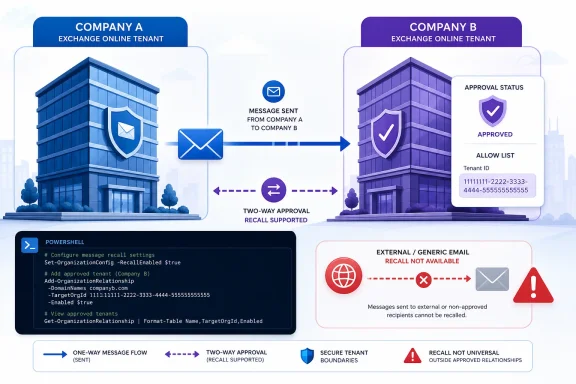
Microsoft announced on July 10, 2026, that Exchange Online will gain Cross-Tenant Message Recall, allowing a sender in one Microsoft 365 tenant to recall a message from another tenant’s mailbox only when the receiving organization has explicitly authorized the sender’s tenant. The capability is disabled by default. The receiving tenant must enable it and add the sender’s tenant ID to an administrator-controlled allow list. Recall in the opposite direction requires an independent configuration by the other tenant.
The change removes a major restriction from cloud-based Message Recall without giving senders unconditional control over email after delivery. Microsoft’s design makes cross-tenant recall an opt-in privilege rather than a universal right attached to every outbound message. For IT departments, the feature creates a directional trust policy that must be approved, configured, tested, documented, reviewed, and eventually revoked when it is no longer justified.
Cloud-based Message Recall has been evolving since its April 2023 release, but the sender and recipient previously had to belong to the same Microsoft 365 tenant. Microsoft subsequently added support for more Outlook experiences, recipient recall notifications, a maximum recallable message age, and external round-trip routing. Cross-Tenant Message Recall now extends recall processing to recipients in separately administered Microsoft 365 tenants when the required authorization is in place.
That distinction is fundamental. Some descriptions may summarize the feature as recalling email “outside your organization,” which is understandable from the sender’s perspective but incomplete from an administrative one. The message crosses an organizational boundary, and the destination organization retains control over whether the sender’s tenant is permitted to initiate recall processing.
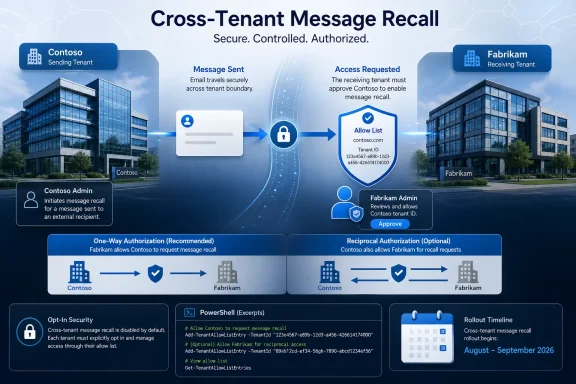
Microsoft’s announcement illustrates the model with Contoso and Fabrikam, two organizations operating separate Microsoft 365 tenants. Their use in the example demonstrates the administrative boundary: a configuration made by Contoso governs messages received by Contoso, while a configuration made by Fabrikam governs messages received by Fabrikam.
Microsoft’s solution is deliberately narrower than automatic cross-tenant compatibility. The direct rule is that the organization administering the recipient mailbox must enable the feature and allow-list the sender’s tenant ID. Microsoft supplies the mechanism, but each receiving organization establishes its own policy.
If both companies want recall to operate in both directions, each must make its own receiving-side configuration. The two-way experience therefore comes from two independent administrative decisions, not from a single shared switch or an automatically reciprocal relationship.
That model matters because a cross-tenant recall is different from ordinary mail delivery. Sending a message transfers information to another organization. Recalling it requests an additional Exchange Online action after delivery. Microsoft has placed approval for that action with the organization administering the destination mailbox.
The allow list should consequently be treated as a trust policy rather than a harmless Outlook preference. Administrators should grant access only where there is a defined business requirement and an identifiable owner for the relationship.
The model allows organizations that actively want the feature to enable it without extending recall authority to every external Microsoft 365 tenant. An organization that makes no configuration change does not opt in.
Service rollout and tenant activation are therefore separate events. Microsoft can deploy the underlying capability without changing cross-tenant recall behavior for an organization that takes no action.
This protects tenants from an unexpected policy change during rollout. Users will not suddenly find that every external Microsoft 365 sender has cross-tenant recall permission merely because Microsoft deployed a new Exchange Online feature. An administrator must intentionally enable the capability and identify the sender tenants that may use it.
The opt-in model will nevertheless produce different results across business relationships. A sender may be authorized to recall a message sent to one organization but not a similar message sent to another. The difference may be that one receiving tenant granted permission and the other did not.
Microsoft says the sender’s recall status report will indicate when a message cannot be recalled across organizations because the required permission is absent. That provides a technical explanation, but help desks should still expect questions from users who do not think in terms of tenant IDs or receiving-side authorization.
The simplest support explanation is also the most accurate: cross-tenant recall requires permission from the organization that received the message. The sender’s administrator cannot unilaterally activate the feature in another organization’s tenant.
Administrators should avoid building an indiscriminate allow list from every company that exchanges email with their users. Approval should be tied to a documented operational requirement, a verified tenant identity, a responsible owner, and a defined review or expiration date.
Microsoft’s announced syntax for enabling the feature is:
To disable it:
The executable commands use
Enabling the tenant-wide switch does not authorize every Microsoft 365 tenant. The receiving organization must separately add the tenant IDs whose senders are to receive cross-tenant recall permission.
Microsoft’s announced syntax for adding sender tenant IDs is:
To remove entries, run a separate command:
The add and remove operations should be presented as independent changes. Keeping them separate makes the administrator’s intent clearer and reduces the chance that an approval record, execution log, or troubleshooting review will confuse authorization with revocation.
An administrator who needs to add one tenant can use the same structure with one value:
The tenant ID must be verified before it is inserted into the command. A familiar company name, brand, email domain, or contact address is not a substitute for the exact Microsoft 365 tenant ID. An organization may use several accepted domains, operate multiple tenants, or move workloads between tenants without changing the names familiar to users.
The parameter name helps prevent another common interpretation error:
If Contoso has not authorized Fabrikam, the cross-organizational recall is not permitted, and Microsoft says the Fabrikam sender’s reporting experience will indicate that the message could not be recalled across organizations.
Reversing the mail flow requires a separate decision. If a Contoso sender needs recall permission for mail delivered to Fabrikam, a Fabrikam administrator must enable the capability and add Contoso’s tenant ID to Fabrikam’s configuration.
Organizations that want a symmetrical user experience must therefore coordinate two changes, one in each tenant. Each change should have its own approval, tenant-ID verification, change record, owner, and test result.
That creates lifecycle work as well as initial setup work. If organizations end a relationship, move users between tenants, change ownership, or consolidate their Microsoft 365 environments, administrators must reassess the entries created under the previous arrangement.
A tenant ID that was appropriate under an earlier operating arrangement may no longer be appropriate after that relationship changes. The configuration should therefore appear in relevant offboarding, divestiture, merger, contract-termination, and tenant-migration procedures rather than remaining an undocumented one-time change.
For an enterprise with several Microsoft 365 tenants, Cross-Tenant Message Recall may reduce one user-visible consequence of that architecture. It does not eliminate the underlying governance requirement. Every permitted direction must still be explicitly identified and maintained.
If confidential information is sent to the wrong organization, attempting recall may be appropriate when the destination tenant has granted permission. The sender’s organization should still follow its normal security, privacy, legal, records-management, and compliance escalation procedures.
Likewise, user guidance should avoid equating a favorable recall status with proof that no person viewed, copied, forwarded, recorded, or acted on the information. The precise meaning of recall outcomes should be described according to Microsoft’s official Message Recall documentation and the status information presented to the sender.
Preventive controls remain important. These may include careful recipient selection, delayed sending where appropriate, sensitivity protections, data-loss-prevention measures, and user training for high-risk communications. Recall provides another response option; it does not make prevention or incident handling unnecessary.
A failed cross-tenant recall also does not necessarily indicate a service malfunction. It may be the expected result because the receiving tenant has not enabled the capability or has not allow-listed the sender’s tenant. In that situation, Exchange Online is enforcing the destination organization’s policy.
The support distinction is important:
That means the external sender does not choose the recipient-notification policy. The organization administering the recipient mailbox controls the experience for its users.
Administrators should review their current notification setting before enabling cross-tenant recall. A policy selected for internal messages may deserve reconsideration when another organization is being permitted to initiate recall activity involving local mailboxes.
Notifications can help users understand why a message they encountered is associated with a recall. They may also reduce support confusion by making the action visible rather than leaving the user to interpret an unexpected mailbox change without context.
Microsoft’s announcement does not describe a separate cross-tenant notification system. Instead, it says the receiving organization’s existing recall-notification settings apply. That consistency simplifies administration, but it also makes advance policy review important.
User education should explain that a recall notification is not, by itself, proof of malicious activity. If a user already acted on the original message or has concerns about the sender, the appropriate response may be to contact the sender through a trusted channel or follow the organization’s internal escalation process.
For the sender, the policy boundary remains firm. If the receiving tenant has not granted permission, the sender cannot override that decision. The recall status report may explain the failed cross-organizational operation, but it does not provide a bypass.
Security and messaging teams should nevertheless treat every allow-list entry as revocable administrative trust. An entry should remain only while it has a current business purpose, a verified tenant identity, an accountable owner, and an approved scope.
Each entry should have:
Because the verified configuration examples establish the setter actions but do not establish a specific inspection cmdlet, administrators should not build a review procedure around an unverified command. Instead, they should retain approved change records, PowerShell execution logs where available, verified tenant IDs, test results, and ownership information. Future inspection or reporting procedures should follow Microsoft documentation available when the feature reaches the tenant.
Removal should be part of the original design, not an afterthought. When a relationship ends or an authorization is no longer required, the receiving organization can remove the sender tenant ID:
If the organization no longer intends to maintain any cross-tenant recall relationships, it can disable the tenant-wide setting:
Those two revocation levels serve different purposes. Removing a tenant ID ends permission for one sender tenant. Disabling the feature ends the receiving tenant’s participation at the tenant-wide level.
Those dates describe Microsoft’s planned service rollout. They do not mean that Cross-Tenant Message Recall will become active automatically in customer tenants. The feature remains disabled by default, and administrators must configure it after the capability becomes available in their environment.
Organizations should not assume a precise deployment date for an individual tenant from the broader schedule. Microsoft’s supplied timeline states that rollout begins in mid-August 2026 and completes in mid-September 2026.
The announced environment list also should not be interpreted as proof that every proposed cross-cloud or cross-environment tenant pairing will work. Administrators should confirm the exact relationship they intend to establish against Microsoft’s applicable documentation and test it after deployment rather than infer compatibility from product branding alone.
The announcement supplies the service mechanism and the
Cross-Tenant Message Recall is ultimately a measured extension of Exchange Online’s recall model. What changed is that recall can cross the boundary between separate Microsoft 365 tenants when the destination organization has opted in. The administrator of the receiving tenant must perform the configuration: first enable the feature with
The change removes a major restriction from cloud-based Message Recall without giving senders unconditional control over email after delivery. Microsoft’s design makes cross-tenant recall an opt-in privilege rather than a universal right attached to every outbound message. For IT departments, the feature creates a directional trust policy that must be approved, configured, tested, documented, reviewed, and eventually revoked when it is no longer justified.
 Microsoft Is Moving Recall Across the Tenant Boundary
Cloud-based Message Recall has been evolving since its April 2023 release, but the sender and recipient previously had to belong to the same Microsoft 365 tenant. Microsoft subsequently added support for more Outlook experiences, recipient recall notifications, a maximum recallable message age, and external round-trip routing. Cross-Tenant Message Recall now extends recall processing to recipients in separately administered Microsoft 365 tenants when the required authorization is in place.That distinction is fundamental. Some descriptions may summarize the feature as recalling email “outside your organization,” which is understandable from the sender’s perspective but incomplete from an administrative one. The message crosses an organizational boundary, and the destination organization retains control over whether the sender’s tenant is permitted to initiate recall processing.
Microsoft’s announcement illustrates the model with Contoso and Fabrikam, two organizations operating separate Microsoft 365 tenants. Their use in the example demonstrates the administrative boundary: a configuration made by Contoso governs messages received by Contoso, while a configuration made by Fabrikam governs messages received by Fabrikam.
Microsoft’s solution is deliberately narrower than automatic cross-tenant compatibility. The direct rule is that the organization administering the recipient mailbox must enable the feature and allow-list the sender’s tenant ID. Microsoft supplies the mechanism, but each receiving organization establishes its own policy.
The Allow List Turns a Convenience Feature Into a Trust Policy
The critical administrative object is an allow list of sender tenant IDs maintained by the receiving organization. If Contoso receives mail from Fabrikam, Contoso must enable Cross-Tenant Message Recall and add Fabrikam’s tenant ID before a Fabrikam sender is authorized to attempt a recall involving a Contoso recipient.If both companies want recall to operate in both directions, each must make its own receiving-side configuration. The two-way experience therefore comes from two independent administrative decisions, not from a single shared switch or an automatically reciprocal relationship.
That model matters because a cross-tenant recall is different from ordinary mail delivery. Sending a message transfers information to another organization. Recalling it requests an additional Exchange Online action after delivery. Microsoft has placed approval for that action with the organization administering the destination mailbox.
The allow list should consequently be treated as a trust policy rather than a harmless Outlook preference. Administrators should grant access only where there is a defined business requirement and an identifiable owner for the relationship.
| Recall scenario | Sender and recipient | Administrative requirement | Expected result | Who controls permission |
|---|---|---|---|---|
| Intra-tenant recall | Same Microsoft 365 tenant | No cross-tenant approval | Standard recall behavior applies | Shared tenant |
| Cross-tenant, authorized | Different Microsoft 365 tenants | Receiving tenant enables the feature and allow-lists the sender tenant ID | Cross-tenant recall is permitted | Receiving tenant |
| Cross-tenant, not authorized | Different Microsoft 365 tenants | Sender tenant is absent from the receiving tenant’s allow list | Cross-tenant recall is not permitted | Receiving tenant |
| Reciprocal cross-tenant recall | Each tenant sends to the other | Each tenant independently enables the feature and allow-lists the other | Recall is permitted in both configured directions | Each receiving tenant |
“Disabled by Default” Is the Most Important Part of the Announcement
Microsoft has chosen an opt-in deployment. TheCrossTenantRecallEnabled setting defaults to $False, and the receiving tenant must also populate its allowed-sender tenant list before another tenant is authorized.Service rollout and tenant activation are therefore separate events. Microsoft can deploy the underlying capability without changing cross-tenant recall behavior for an organization that takes no action.
This protects tenants from an unexpected policy change during rollout. Users will not suddenly find that every external Microsoft 365 sender has cross-tenant recall permission merely because Microsoft deployed a new Exchange Online feature. An administrator must intentionally enable the capability and identify the sender tenants that may use it.
The opt-in model will nevertheless produce different results across business relationships. A sender may be authorized to recall a message sent to one organization but not a similar message sent to another. The difference may be that one receiving tenant granted permission and the other did not.
Microsoft says the sender’s recall status report will indicate when a message cannot be recalled across organizations because the required permission is absent. That provides a technical explanation, but help desks should still expect questions from users who do not think in terms of tenant IDs or receiving-side authorization.
The simplest support explanation is also the most accurate: cross-tenant recall requires permission from the organization that received the message. The sender’s administrator cannot unilaterally activate the feature in another organization’s tenant.
Administrators should avoid building an indiscriminate allow list from every company that exchanges email with their users. Approval should be tied to a documented operational requirement, a verified tenant identity, a responsible owner, and a defined review or expiration date.
What administrators should do now
- Confirm that there is a documented business need for cross-tenant recall.
- Identify the receiving organization in each required direction.
- Obtain and independently verify the exact Microsoft 365 tenant ID for every proposed sender tenant.
- Decide whether the requirement is one-way or reciprocal.
- Assign an owner and review date to every approved allow-list entry.
- Review the receiving tenant’s existing recall-notification policy.
- Prepare an approved Exchange Online administrative change process.
- Record the tenant IDs and intended feature state in the change request.
- Plan a controlled test of an authorized cross-tenant recall.
- Plan a test confirming that an organization without permission remains unauthorized.
- Give the help desk a concise explanation of receiving-side authorization and recall status reports.
- Add allow-list removal to relevant offboarding and tenant-lifecycle procedures.
Exchange Online PowerShell Makes the Policy Explicit
Microsoft is exposing the configuration through Exchange Online PowerShell by usingSet-CrossTenantRecallConfiguration. The verified actions cover two distinct parts of the policy:- Enable or disable Cross-Tenant Message Recall for the receiving tenant.
- Add or remove sender tenant IDs from the receiving tenant’s allow list.
Microsoft’s announced syntax for enabling the feature is:
Set-CrossTenantRecallConfiguration -CrossTenantRecallEnabled $trueTo disable it:
Set-CrossTenantRecallConfiguration -CrossTenantRecallEnabled $falseThe executable commands use
$true or $false directly. Bracketed documentation notation such as [$true | $false] describes alternatives and should not be copied literally into PowerShell.Enabling the tenant-wide switch does not authorize every Microsoft 365 tenant. The receiving organization must separately add the tenant IDs whose senders are to receive cross-tenant recall permission.
Microsoft’s announced syntax for adding sender tenant IDs is:
Code:
Set-CrossTenantRecallConfiguration -AllowedSenderTenantIds @{
    Add = "11111111-1111-1111-1111-111111111111",
          "22222222-2222-2222-2222-222222222222"
}
Code:
Set-CrossTenantRecallConfiguration -AllowedSenderTenantIds @{
    Remove = "11111111-1111-1111-1111-111111111111",
             "22222222-2222-2222-2222-222222222222"
}An administrator who needs to add one tenant can use the same structure with one value:
Code:
Set-CrossTenantRecallConfiguration -AllowedSenderTenantIds @{
    Add = "33333333-3333-3333-3333-333333333333"
}
The parameter name helps prevent another common interpretation error:
AllowedSenderTenantIds identifies external tenants whose senders are being granted recall permission by the receiving organization. It is not a list of destination organizations that local senders want to reach.Concrete configuration workflow
- Identify the organization that administers the recipient mailbox.
- Confirm the business reason for granting cross-tenant recall permission.
- Obtain the proposed sender organization’s exact Microsoft 365 tenant ID.
- Verify the tenant ID through an established administrative channel.
- Record whether the requested relationship is one-way or reciprocal.
- Obtain internal approval from the receiving organization.
- Use the receiving tenant’s established Exchange Online PowerShell process.
- Enable Cross-Tenant Message Recall with
Set-CrossTenantRecallConfiguration -CrossTenantRecallEnabled $true. - Add the approved sender tenant ID with
Set-CrossTenantRecallConfiguration -AllowedSenderTenantIds @{ Add = "tenant-id" }. - Test with a non-sensitive message after the capability is available in the tenant.
- Confirm that a tenant without authorization does not receive the same permission.
- Record the commands executed, tenant IDs, results, business owner, technical owner, and review date.
- Remove an entry with the corresponding
Removeaction when the authorization is no longer justified. - Disable the tenant-wide capability if the organization no longer intends to permit any cross-tenant recall relationships.
Contoso and Fabrikam Show How the Permission Works
Microsoft’s example uses Contoso and Fabrikam, both operating Microsoft 365 tenants. To authorize Fabrikam senders for messages delivered to Contoso recipients, a Contoso administrator enables Cross-Tenant Message Recall and adds Fabrikam’s tenant ID to Contoso’s allowed-sender list.If Contoso has not authorized Fabrikam, the cross-organizational recall is not permitted, and Microsoft says the Fabrikam sender’s reporting experience will indicate that the message could not be recalled across organizations.
Reversing the mail flow requires a separate decision. If a Contoso sender needs recall permission for mail delivered to Fabrikam, a Fabrikam administrator must enable the capability and add Contoso’s tenant ID to Fabrikam’s configuration.
Organizations that want a symmetrical user experience must therefore coordinate two changes, one in each tenant. Each change should have its own approval, tenant-ID verification, change record, owner, and test result.
That creates lifecycle work as well as initial setup work. If organizations end a relationship, move users between tenants, change ownership, or consolidate their Microsoft 365 environments, administrators must reassess the entries created under the previous arrangement.
A tenant ID that was appropriate under an earlier operating arrangement may no longer be appropriate after that relationship changes. The configuration should therefore appear in relevant offboarding, divestiture, merger, contract-termination, and tenant-migration procedures rather than remaining an undocumented one-time change.
For an enterprise with several Microsoft 365 tenants, Cross-Tenant Message Recall may reduce one user-visible consequence of that architecture. It does not eliminate the underlying governance requirement. Every permitted direction must still be explicitly identified and maintained.
Recall Still Cannot Undo Disclosure
Administrators should treat Message Recall as a remediation capability, not as a guarantee that an accidental disclosure never occurred. Cross-tenant support does not change the basic operational caution that a recall attempt should not replace the organization’s established response to misdirected or sensitive email.If confidential information is sent to the wrong organization, attempting recall may be appropriate when the destination tenant has granted permission. The sender’s organization should still follow its normal security, privacy, legal, records-management, and compliance escalation procedures.
Likewise, user guidance should avoid equating a favorable recall status with proof that no person viewed, copied, forwarded, recorded, or acted on the information. The precise meaning of recall outcomes should be described according to Microsoft’s official Message Recall documentation and the status information presented to the sender.
Preventive controls remain important. These may include careful recipient selection, delayed sending where appropriate, sensitivity protections, data-loss-prevention measures, and user training for high-risk communications. Recall provides another response option; it does not make prevention or incident handling unnecessary.
A failed cross-tenant recall also does not necessarily indicate a service malfunction. It may be the expected result because the receiving tenant has not enabled the capability or has not allow-listed the sender’s tenant. In that situation, Exchange Online is enforcing the destination organization’s policy.
The support distinction is important:
- A recall blocked because cross-tenant permission is absent is an authorization outcome.
- A recall attempted before the feature reaches the relevant environment may be an availability issue.
- Other recall outcomes should be evaluated against Microsoft’s official Message Recall behavior and the sender’s recall status report.
Recipient Notifications Become a Governance Decision
Microsoft previously added the ability for organizations to notify recipients about recalls. According to the Cross-Tenant Message Recall announcement, the receiving tenant’s existing recall-notification settings continue to apply when an authorized external tenant initiates a recall.That means the external sender does not choose the recipient-notification policy. The organization administering the recipient mailbox controls the experience for its users.
Administrators should review their current notification setting before enabling cross-tenant recall. A policy selected for internal messages may deserve reconsideration when another organization is being permitted to initiate recall activity involving local mailboxes.
Notifications can help users understand why a message they encountered is associated with a recall. They may also reduce support confusion by making the action visible rather than leaving the user to interpret an unexpected mailbox change without context.
Microsoft’s announcement does not describe a separate cross-tenant notification system. Instead, it says the receiving organization’s existing recall-notification settings apply. That consistency simplifies administration, but it also makes advance policy review important.
User education should explain that a recall notification is not, by itself, proof of malicious activity. If a user already acted on the original message or has concerns about the sender, the appropriate response may be to contact the sender through a trusted channel or follow the organization’s internal escalation process.
For the sender, the policy boundary remains firm. If the receiving tenant has not granted permission, the sender cannot override that decision. The recall status report may explain the failed cross-organizational operation, but it does not provide a bypass.
Security Teams Should Treat the Allow List as Revocable Trust
The opt-in architecture prevents an arbitrary external Microsoft 365 tenant from receiving cross-tenant recall permission merely by sending email. The destination organization must first enable the capability and approve the sender tenant ID.Security and messaging teams should nevertheless treat every allow-list entry as revocable administrative trust. An entry should remain only while it has a current business purpose, a verified tenant identity, an accountable owner, and an approved scope.
Each entry should have:
- A named business sponsor.
- A technical owner.
- The verified sender tenant ID.
- The business reason for granting recall permission.
- The permitted direction or directions.
- The date approved.
- The date last tested.
- A scheduled review or expiration date.
- A removal process tied to relevant organizational and tenant-lifecycle events.
Because the verified configuration examples establish the setter actions but do not establish a specific inspection cmdlet, administrators should not build a review procedure around an unverified command. Instead, they should retain approved change records, PowerShell execution logs where available, verified tenant IDs, test results, and ownership information. Future inspection or reporting procedures should follow Microsoft documentation available when the feature reaches the tenant.
Removal should be part of the original design, not an afterthought. When a relationship ends or an authorization is no longer required, the receiving organization can remove the sender tenant ID:
Code:
Set-CrossTenantRecallConfiguration -AllowedSenderTenantIds @{
    Remove = "33333333-3333-3333-3333-333333333333"
}Set-CrossTenantRecallConfiguration -CrossTenantRecallEnabled $falseThose two revocation levels serve different purposes. Removing a tenant ID ends permission for one sender tenant. Disabling the feature ends the receiving tenant’s participation at the tenant-wide level.
The Rollout Is Broad, but Activation Remains Local
Microsoft says deployment will begin in mid-August 2026 and complete by mid-September 2026. The announced audiences include worldwide tenants, GCC, GCC High, DoD, and Microsoft 365 operated by 21Vianet.Those dates describe Microsoft’s planned service rollout. They do not mean that Cross-Tenant Message Recall will become active automatically in customer tenants. The feature remains disabled by default, and administrators must configure it after the capability becomes available in their environment.
Organizations should not assume a precise deployment date for an individual tenant from the broader schedule. Microsoft’s supplied timeline states that rollout begins in mid-August 2026 and completes in mid-September 2026.
The announced environment list also should not be interpreted as proof that every proposed cross-cloud or cross-environment tenant pairing will work. Administrators should confirm the exact relationship they intend to establish against Microsoft’s applicable documentation and test it after deployment rather than infer compatibility from product branding alone.
The announcement supplies the service mechanism and the
Set-CrossTenantRecallConfiguration actions. Customers must supply the approval process, verified tenant identities, support documentation, test plan, ownership model, review schedule, and removal procedure.Timeline and Administrative Milestones
| Date or phase | Microsoft milestone | Recommended administrator response |
|---|---|---|
| July 10, 2026 | Microsoft announces Cross-Tenant Message Recall | Review the design, identify potential requirements, and brief security and messaging teams |
| Planning period | Organizations prepare for the announced rollout | Verify tenant identities, define approvals, review notification policy, and prepare test cases |
| Mid-August 2026 | Microsoft says rollout begins | Check whether the capability has reached the relevant environment without assuming tenant activation |
| During rollout | Microsoft deploys the service capability | Finalize approved relationships and retain environment-specific implementation guidance |
| Mid-September 2026 | Microsoft says rollout completes | Proceed with approved configuration and controlled testing where the feature is available |
| After configuration | Receiving tenant has enabled the feature and added approved sender tenant IDs | Test the authorized direction and confirm that unapproved tenants remain unauthorized |
| Ongoing | Business relationships and tenant arrangements may change | Review approvals on a defined schedule and remove entries that no longer have an owner or justification |
Set-CrossTenantRecallConfiguration -CrossTenantRecallEnabled $true, and then add each approved sender tenant with Set-CrossTenantRecallConfiguration -AllowedSenderTenantIds @{ Add = "tenant-id" }. Microsoft says rollout will begin in mid-August 2026 and complete by mid-September 2026; until the receiving tenant takes both required actions, another tenant does not receive cross-tenant recall permission.References
- Primary source: Microsoft Exchange Team Blog
Published: Fri, 10 Jul 2026 15:38:58 GMT
- Related coverage: mc.merill.net
RM561330 - Microsoft 365: Introducing Exchange Online Cross-tenant Message Recall | Microsoft 365 Message Center Archive
We're enhancing the Exchange Online Message Recall feature to add support for cross-tenant recalls. Today, you can recall messages only within your organization. Cross-tenant…mc.merill.net - Related coverage: neowin.net
Microsoft is bringing a much-needed feature to Outlook - Neowin
Microsoft is preparing a helpful Outlook improvement that could make everyday email mistakes much easier to fix across more scenarios. www.neowin.net
- Official source: learn.microsoft.com
Work with Cloud-based Message Recall | Microsoft Learn
Learn about the major changes made to the way that message recall works in the service.learn.microsoft.com - Related coverage: windowsreport.com
Microsoft Outlook Is Finally Getting Cross-Tenant Email Recall
Microsoft is developing cross-tenant email recall for Outlook, allowing users to recall emails sent outside their organization. windowsreport.com
- Related coverage: practical365.com
Microsoft Enhances Message Recall for Exchange Online | Practical365
Microsoft released the initial implementation of a cloud-based message recall feature last year. Now they're back with a set of enhancements to take the rough edges off, like explaining to users why messages disappear from the inbox and enabling support for external services like email...practical365.com
- Related coverage: lazyadmin.nl
Exchange Online Message Recall Update — LazyAdmin
New Recall Alerts for Recipients, support for internal recall while using third-party service, and set max age limit for messages.lazyadmin.nl - Related coverage: kbworks.eu
Microsoft Roadmap, messagecenter and blogs updates from 06-05-2026 - KbWorks - SharePoint and Teams Specialist
06-May-2026 Below you will find a collection of news published yesterday. This news consists of Microsoft's Roadmap when it is updated it will be below withkbworks.eu - Related coverage: blog.admindroid.com
Recall Email in New Outlook for Swift Email Corrections - AdminDroid Blog
Recall email in new Outlook to swiftly recover emails, even after they've been read or buried under sub-folders for better email management.blog.admindroid.com - Official source: support.microsoft.com
Recall Message in Outlook Desktop stops working after February 2024 security updates | Microsoft Support
Recall Message in Outlook Desktop stops working after February 2024 security updatessupport.microsoft.com - Related coverage: techriver.com