

FluentCleaner is a free, portable, open-source Windows cleanup utility released by developer Builtbybel in April 2026, combining a WinUI 3 interface, community-maintained cleaning rules, item-level review, and command-line automation for users seeking a leaner alternative to CCleaner. As detailed by MakeUseOf, one test run recovered more than 30GB of storage after Windows’ own cleanup tools had already been available. The number is eye-catching, but FluentCleaner’s stronger argument is not that it deletes more; it is that users can see, question, and control what gets deleted.
That distinction matters because PC cleaners occupy one of the least comfortable positions in the Windows software ecosystem. They ask for privileged access, identify files most users do not understand, and promise improvements that are difficult to measure. FluentCleaner cannot eliminate that risk, but its open code, narrow purpose, and inspectable rules offer a more credible foundation for trust than the sprawling optimization suites many Windows users learned to avoid.
CCleaner became popular in an era when Windows offered a fragmented collection of maintenance tools and hard drives were small enough that every recovered gigabyte mattered. Its appeal was easy to understand: one recognizable button could empty application caches, browser debris, logs, temporary directories, and assorted traces left behind by software.
Over time, however, the utility expanded far beyond that simple proposition. The current CCleaner product line promotes performance optimization, driver updating, software updating, browser management, duplicate detection, system monitoring, privacy features, and paid subscription tiers. Some customers may value that breadth, but it also turns a straightforward cleaner into another resident PC-management platform competing for attention, permissions, and recurring revenue.
Trust was also damaged by events more serious than feature creep. In 2017, attackers compromised CCleaner’s build environment and distributed a maliciously modified release to millions of systems. Avast, which acquired Piriform during the relevant period, later said evidence indicated the compromise began before the acquisition and that selected technology companies were targets of a second-stage attack.
That history does not mean current CCleaner releases are malware. The company states that its software is safe, and a past supply-chain compromise should not be casually converted into an accusation against every later version. But security products and maintenance utilities sell confidence as much as code, and confidence is not automatically restored when the incident response ends.
The broader Avast ecosystem accumulated its own reputational baggage around data collection, bundled offers, and product promotion. Microsoft’s definition of a potentially unwanted application is instructive here: a program need not be malicious to create concern if it displays unexpected advertising, promotes additional software, or performs behavior users did not clearly seek. That gray zone is precisely where many once-beloved Windows utilities lost their standing.
FluentCleaner enters this market with a deliberately narrower pitch. Builtbybel describes it as the cleaner CCleaner might have remained: a focused interface over understandable cleanup rules, without advertising, subscriptions, or tracking. That positioning is undoubtedly promotional, but it responds to a real demand among Windows enthusiasts for utilities that do one job and then get out of the way.
Storage Sense is especially useful because it can run automatically when a device experiences storage pressure or according to a daily, weekly, or monthly schedule. Administrators can configure it through policy to manage temporary files, Recycle Bin retention, Downloads retention, and locally cached cloud content. For fleets of low-capacity laptops, kiosks, and shared devices, that predictable behavior is usually preferable to installing an enthusiast-oriented cleaner.
Microsoft also knows more about the servicing state of Windows than any outside utility can. Cleanup Recommendations can safely identify previous Windows installations, update leftovers, temporary system data, unused applications, and large files while preserving the operating system’s rollback and servicing assumptions. When the objective is simply to recover space without introducing another trust relationship, the built-in tools should remain the first stop.
Their limitation is scope. Microsoft focuses on Windows-owned storage and a relatively conservative set of user files; it cannot be expected to maintain detailed cleanup knowledge for every browser, game launcher, productivity suite, development environment, media tool, and abandoned desktop application. Third-party caches can therefore survive multiple rounds of Windows cleanup.
Storage Sense also works principally on the system drive and is intentionally cautious about personal data. That restraint is a feature, not a defect, but it creates an opening for a utility that understands the directory structures of individual applications. FluentCleaner’s value lies in filling that gap rather than replacing Windows maintenance wholesale.
This is why a 30GB result requires context. It does not prove that Microsoft’s cleaner failed, nor does it mean every Windows PC contains 30GB of harmless debris. The total may include browser caches, package caches, logs, application downloads, thumbnails, crash data, and other content that was created for a reason but can be regenerated. Recoverable space is not the same thing as useless space.
The application is distributed as an archive rather than through a conventional installer. Users extract the package and run
Portability also reduces the amount of machinery surrounding the utility. There is no permanent background service required merely to make the cleaner available, and removing the application is largely a matter of deleting its folder. That is a meaningful advantage over “optimization” products that add startup tasks, notification components, browser extensions, or continuous monitoring in the name of reducing clutter.
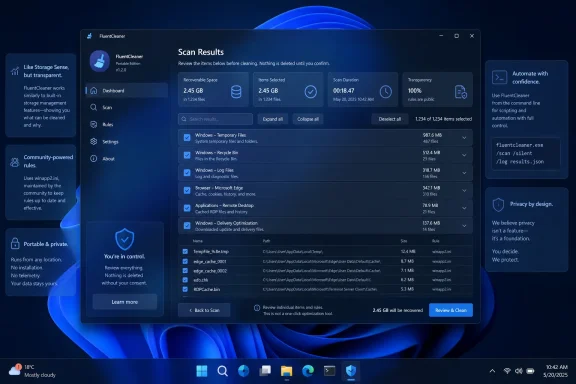
The central interface performs an analysis and organizes the findings into categories. Users can expand those categories, inspect individual entries, examine their reported sizes, and run cleanup against a limited selection rather than approving everything at once. The three-dot controls permit item-level analysis or cleaning, reinforcing the idea that review should precede deletion.
That sounds obvious, yet many cleanup programs have historically trained users to accept a large headline number and click the brightest button. FluentCleaner instead exposes the granularity already present in its rule system. The interface does not make every entry self-explanatory, but it at least keeps the underlying decision visible.
This is where FluentCleaner most convincingly distinguishes itself from both Windows’ built-in controls and commercial cleanup suites. Windows offers a trusted but broad abstraction; commercial tools often sell aggressive automation. FluentCleaner occupies the middle ground by exposing more application-specific targets without insisting that the user surrender the final decision.
Winapp2.ini predates FluentCleaner and is compatible with several established maintenance programs, including CCleaner and BleachBit. That maturity matters because cleanup software is only as useful as its knowledge of where applications store disposable data. A polished interface wrapped around a tiny set of hard-coded folders would offer little beyond a batch script.
The declarative model is also comparatively auditable. A rule can identify an application, specify file or registry locations, add matching patterns, and state the conditions under which the entry applies. In principle, an experienced user can inspect those instructions and determine exactly what the cleaner intends to touch.
Open source improves that auditability, but it should not be confused with an automatic safety certificate. Few people will personally review every line of FluentCleaner, every dependency it uses, every release binary, and every rule imported from a community database. The practical advantage is that such review is possible and that independent users can identify questionable behavior without reverse-engineering an opaque executable.
The same database that gives FluentCleaner its reach can also produce its most intimidating results. Thousands of rules create thousands of assumptions about which data is temporary, which cache is disposable, and which state an application can rebuild. Those assumptions may be correct in general while still being inconvenient for a particular workflow.
Deleting a browser cache may make the next browsing session slower. Purging shader caches can force games or creative applications to rebuild them. Removing installer or package caches may complicate repairs. Clearing recent-item data can erase useful history, while deleting saved sessions or cookies can sign users out of websites.
None of those outcomes necessarily constitutes system damage, but they demonstrate why the phrase junk file is too imprecise for serious maintenance. Much of what cleaners remove is expendable rather than worthless. FluentCleaner’s inspectable rule model is therefore not merely a feature for curious users; it is the safeguard that makes its broader reach defensible.
It should not become a universal performance claim. A recently installed PC may yield only a few hundred megabytes, while a workstation with years of accumulated package downloads and application caches may produce a much larger figure. The result also depends on which categories were selected, how long applications had been running, and whether other cleanup tools had already been used.
Large totals deserve more scrutiny, not less. A 30GB cache associated with a game launcher, video editor, browser profile, or software-development tool may be safe to delete, but it may also be expensive to recreate. The user could trade storage space for additional downloads, longer launches, or temporary performance degradation.
This undercuts the traditional marketing language around “speeding up” a PC by deleting files. Low free space can unquestionably interfere with Windows updates and degrade system behavior, as Microsoft notes in its storage guidance. Recovering space from a nearly full system drive may therefore improve reliability and responsiveness.
On a healthy SSD with ample free capacity, however, removing caches does not automatically make Windows faster. Caches generally exist to avoid repeating work, and registry cleanup has rarely delivered the dramatic performance improvements advertised by older maintenance suites. FluentCleaner is best understood as a storage and privacy tool, not a substitute for troubleshooting startup programs, failing hardware, insufficient memory, malware, thermal throttling, or a damaged Windows installation.
That more modest description actually strengthens the case for the utility. It performs a concrete task whose result can be measured in files reviewed and bytes recovered. FluentCleaner does not need mystical “one-click optimization” claims when it can show users exactly what occupies the space.
An “unrecognized app” warning is not proof of malware. Nor is clicking “Run anyway” a harmless ritual that should be recommended without qualification. SmartScreen exists to interrupt the execution of low-reputation downloads, and bypassing it should be a deliberate choice made only after confirming the source and inspecting the package as far as practical.
Users should obtain FluentCleaner from Builtbybel’s official GitHub releases rather than a download portal, advertisement, search-engine mirror, or repackaged archive. They should verify that the repository and release history match the expected developer, scan the archive with Microsoft Defender, and be wary of copies that add an installer or request unrelated changes. The project’s official site likewise directs downloads to GitHub rather than distributing a separate build.
The history of CCleaner provides an uncomfortable reminder that even legitimate distribution infrastructure can be compromised. Open source makes malicious or accidental changes easier to detect, but most users still execute precompiled binaries rather than reproducing builds from reviewed source. Release signing, reproducible builds, published hashes, and independent review remain valuable even when a project’s intentions are good.
The project is also young. FluentCleaner debuted in April 2026, and its May releases included fixes for cancellation behavior, progress reporting, warning logic, browser detection, and internal cleaner mappings. Rapid fixes are encouraging, but the changelog also shows software still hardening its behavior around potentially destructive operations.
This does not disqualify FluentCleaner. It simply places the app where it belongs: an enthusiast-oriented utility with a promising design, not an unquestioned standard component ready for automatic deployment across thousands of production endpoints.
This is useful for a home lab, repair bench, or carefully managed personal workstation. A user can configure conservative selections in the GUI, test the results, and later call the same routine from Task Scheduler. That workflow preserves some of the transparency of manual use while removing repetitive clicking.
Automation also magnifies every incorrect assumption. A bad selection made once can become a recurring deletion policy, and an application update may change the meaning or usefulness of a previously safe cache. Scheduled cleanup can remove diagnostic logs immediately before they are needed or repeatedly erase data an application then has to recreate.
Sysadmins should be particularly cautious about equating command-line support with enterprise readiness. FluentCleaner does not replace Storage Sense policy, endpoint-management reporting, change control, application packaging, compliance evaluation, or vendor-backed support. Microsoft’s built-in storage controls remain easier to configure consistently through Intune, Group Policy, and the Storage Policy configuration service provider.
The better administrative use case is targeted remediation. A technician who has identified a known cache problem, verified the relevant rule, and tested the cleanup can use FluentCleaner as a repeatable tool. Running every available rule silently across a heterogeneous fleet would discard the very review model that makes the application attractive.
The terminal, then, is not merely an extra interface. It is the point where FluentCleaner changes from an interactive utility into operational policy. That transition should require testing, logging, version control, and a rollback plan rather than enthusiasm for a convenient switch.
Importantly, the AI does not determine the cleanup rules or autonomously choose what should be removed. Scanning and deletion remain driven by the application’s databases and the user’s selections. That separation prevents a language model from improvising file-system operations based on a plausible-sounding guess.
The feature can nevertheless be helpful when a rule name, registry path, or application component is obscure. A readable explanation may encourage users to stop before deleting something they do not recognize. In that limited role, AI serves as documentation on demand rather than an optimization engine.
Its answers should still be treated as summaries, not guarantees. Language models can misunderstand specialized software, overlook version-specific behavior, or confidently describe a path that an application uses differently. The authoritative evidence remains the rule itself, the application vendor’s documentation, and the user’s understanding of the software installed on the machine.
There is also a privacy consideration whenever local information is submitted to an external model provider. Users should understand what text FluentCleaner sends, whether it includes file paths or application names, and how the API provider handles requests. An organization that restricts external AI services should not enable the feature merely because it appears inside a cleanup tool.
The good news is that AI is optional and unnecessary for core operation. FluentCleaner’s strongest qualities remain local, deterministic, and comparatively boring: scan known locations, display matches, accept selections, and delete approved data. That is exactly how a maintenance utility should work.
It does not provide a complete backup of personal files or every item a cleaner can delete. Browser sessions, application caches, locally stored account state, logs, and ordinary user data may not return merely because Windows is restored. A restore point should therefore supplement, not replace, a verified backup.
The safest first run is deliberately unimpressive. Close browsers and other applications, analyze the system, choose one well-understood category, record the amount of data involved, and confirm that the relevant program behaves normally afterward. Only then should the selection be widened.
Keeping applications closed also improves both accuracy and safety. An active browser may hold database files open, a package manager may be writing to its cache, and a game launcher may be downloading an update. Cleaning around active workloads creates opportunities for incomplete deletion, file-lock errors, or corrupted transient state.
Registry entries deserve the highest threshold. The official FluentCleaner site emphasizes that the core experience does not depend on registry “tricks,” but community rules and custom extensions may expose registry-related items. Space recovered from registry cleanup is negligible, and the performance benefit is generally unconvincing, so users should leave entries alone unless they understand the specific purpose.
Custom extensions warrant similar scrutiny. FluentCleaner releases may offer optional packages containing additional tools, but the developer describes these as independent from the cleaner and not required for normal operation. Installing every extension simply because it exists would reproduce the feature accumulation that made commercial maintenance suites unappealing in the first place.
That distinction matters because PC cleaners occupy one of the least comfortable positions in the Windows software ecosystem. They ask for privileged access, identify files most users do not understand, and promise improvements that are difficult to measure. FluentCleaner cannot eliminate that risk, but its open code, narrow purpose, and inspectable rules offer a more credible foundation for trust than the sprawling optimization suites many Windows users learned to avoid.
 CCleaner Lost the Argument Before FluentCleaner Arrived
CCleaner became popular in an era when Windows offered a fragmented collection of maintenance tools and hard drives were small enough that every recovered gigabyte mattered. Its appeal was easy to understand: one recognizable button could empty application caches, browser debris, logs, temporary directories, and assorted traces left behind by software.Over time, however, the utility expanded far beyond that simple proposition. The current CCleaner product line promotes performance optimization, driver updating, software updating, browser management, duplicate detection, system monitoring, privacy features, and paid subscription tiers. Some customers may value that breadth, but it also turns a straightforward cleaner into another resident PC-management platform competing for attention, permissions, and recurring revenue.
Trust was also damaged by events more serious than feature creep. In 2017, attackers compromised CCleaner’s build environment and distributed a maliciously modified release to millions of systems. Avast, which acquired Piriform during the relevant period, later said evidence indicated the compromise began before the acquisition and that selected technology companies were targets of a second-stage attack.
That history does not mean current CCleaner releases are malware. The company states that its software is safe, and a past supply-chain compromise should not be casually converted into an accusation against every later version. But security products and maintenance utilities sell confidence as much as code, and confidence is not automatically restored when the incident response ends.
The broader Avast ecosystem accumulated its own reputational baggage around data collection, bundled offers, and product promotion. Microsoft’s definition of a potentially unwanted application is instructive here: a program need not be malicious to create concern if it displays unexpected advertising, promotes additional software, or performs behavior users did not clearly seek. That gray zone is precisely where many once-beloved Windows utilities lost their standing.
FluentCleaner enters this market with a deliberately narrower pitch. Builtbybel describes it as the cleaner CCleaner might have remained: a focused interface over understandable cleanup rules, without advertising, subscriptions, or tracking. That positioning is undoubtedly promotional, but it responds to a real demand among Windows enthusiasts for utilities that do one job and then get out of the way.
Windows Can Clean Itself, but Only Within Microsoft’s Boundaries
The case for a third-party cleaner should not begin by pretending Windows lacks maintenance features. Windows 10 and Windows 11 include Storage Sense, Temporary Files management, Cleanup Recommendations, OneDrive content dehydration, and the older Disk Cleanup utility. Microsoft recommends these tools for recovering storage and making room for Windows updates.Storage Sense is especially useful because it can run automatically when a device experiences storage pressure or according to a daily, weekly, or monthly schedule. Administrators can configure it through policy to manage temporary files, Recycle Bin retention, Downloads retention, and locally cached cloud content. For fleets of low-capacity laptops, kiosks, and shared devices, that predictable behavior is usually preferable to installing an enthusiast-oriented cleaner.
Microsoft also knows more about the servicing state of Windows than any outside utility can. Cleanup Recommendations can safely identify previous Windows installations, update leftovers, temporary system data, unused applications, and large files while preserving the operating system’s rollback and servicing assumptions. When the objective is simply to recover space without introducing another trust relationship, the built-in tools should remain the first stop.
Their limitation is scope. Microsoft focuses on Windows-owned storage and a relatively conservative set of user files; it cannot be expected to maintain detailed cleanup knowledge for every browser, game launcher, productivity suite, development environment, media tool, and abandoned desktop application. Third-party caches can therefore survive multiple rounds of Windows cleanup.
Storage Sense also works principally on the system drive and is intentionally cautious about personal data. That restraint is a feature, not a defect, but it creates an opening for a utility that understands the directory structures of individual applications. FluentCleaner’s value lies in filling that gap rather than replacing Windows maintenance wholesale.
This is why a 30GB result requires context. It does not prove that Microsoft’s cleaner failed, nor does it mean every Windows PC contains 30GB of harmless debris. The total may include browser caches, package caches, logs, application downloads, thumbnails, crash data, and other content that was created for a reason but can be regenerated. Recoverable space is not the same thing as useless space.
FluentCleaner Moves the Trust Decision Into the Interface
FluentCleaner is built with WinUI 3 and visually resembles a contemporary Windows 11 application rather than a control panel carried forward from the Windows 7 era. Its navigation centers on Cleanup, Terminal, and Custom functionality, with the main experience devoted to scanning and reviewing candidate files. The developer’s May 2026 releases also established support for Windows 10 version 2004, build 19041, and later, although the required Windows App SDK components must be present.The application is distributed as an archive rather than through a conventional installer. Users extract the package and run
FCleaner.exe, which makes the program portable in the ordinary Windows sense: it does not need to be installed before use. That is convenient for technicians and enthusiasts who prefer keeping maintenance utilities in a tools directory or on removable storage.Portability also reduces the amount of machinery surrounding the utility. There is no permanent background service required merely to make the cleaner available, and removing the application is largely a matter of deleting its folder. That is a meaningful advantage over “optimization” products that add startup tasks, notification components, browser extensions, or continuous monitoring in the name of reducing clutter.
The central interface performs an analysis and organizes the findings into categories. Users can expand those categories, inspect individual entries, examine their reported sizes, and run cleanup against a limited selection rather than approving everything at once. The three-dot controls permit item-level analysis or cleaning, reinforcing the idea that review should precede deletion.
That sounds obvious, yet many cleanup programs have historically trained users to accept a large headline number and click the brightest button. FluentCleaner instead exposes the granularity already present in its rule system. The interface does not make every entry self-explanatory, but it at least keeps the underlying decision visible.
This is where FluentCleaner most convincingly distinguishes itself from both Windows’ built-in controls and commercial cleanup suites. Windows offers a trusted but broad abstraction; commercial tools often sell aggressive automation. FluentCleaner occupies the middle ground by exposing more application-specific targets without insisting that the user surrender the final decision.
Winapp2.ini Supplies the Reach and Inherits the Risk
FluentCleaner’s real engine is not WinUI 3. It is the Winapp2.ini ecosystem, a community-maintained collection of declarative cleanup routines accumulated over more than 15 years. The project describes the database as a mapping between Windows applications or components and their transient data, including caches, logs, temporary files, recent-item lists, and related artifacts.Winapp2.ini predates FluentCleaner and is compatible with several established maintenance programs, including CCleaner and BleachBit. That maturity matters because cleanup software is only as useful as its knowledge of where applications store disposable data. A polished interface wrapped around a tiny set of hard-coded folders would offer little beyond a batch script.
The declarative model is also comparatively auditable. A rule can identify an application, specify file or registry locations, add matching patterns, and state the conditions under which the entry applies. In principle, an experienced user can inspect those instructions and determine exactly what the cleaner intends to touch.
Open source improves that auditability, but it should not be confused with an automatic safety certificate. Few people will personally review every line of FluentCleaner, every dependency it uses, every release binary, and every rule imported from a community database. The practical advantage is that such review is possible and that independent users can identify questionable behavior without reverse-engineering an opaque executable.
The same database that gives FluentCleaner its reach can also produce its most intimidating results. Thousands of rules create thousands of assumptions about which data is temporary, which cache is disposable, and which state an application can rebuild. Those assumptions may be correct in general while still being inconvenient for a particular workflow.
Deleting a browser cache may make the next browsing session slower. Purging shader caches can force games or creative applications to rebuild them. Removing installer or package caches may complicate repairs. Clearing recent-item data can erase useful history, while deleting saved sessions or cookies can sign users out of websites.
None of those outcomes necessarily constitutes system damage, but they demonstrate why the phrase junk file is too imprecise for serious maintenance. Much of what cleaners remove is expendable rather than worthless. FluentCleaner’s inspectable rule model is therefore not merely a feature for curious users; it is the safeguard that makes its broader reach defensible.
Thirty Gigabytes Recovered Is a Result, Not a Benchmark
MakeUseOf contributor Tashreef Shareef reported that FluentCleaner removed more than 30GB of temporary files and cached data from a test PC. That result demonstrates the amount of reclaimable data a heavily used Windows installation can accumulate, particularly when browsers, development tools, games, and creative applications maintain their own caches.It should not become a universal performance claim. A recently installed PC may yield only a few hundred megabytes, while a workstation with years of accumulated package downloads and application caches may produce a much larger figure. The result also depends on which categories were selected, how long applications had been running, and whether other cleanup tools had already been used.
Large totals deserve more scrutiny, not less. A 30GB cache associated with a game launcher, video editor, browser profile, or software-development tool may be safe to delete, but it may also be expensive to recreate. The user could trade storage space for additional downloads, longer launches, or temporary performance degradation.
This undercuts the traditional marketing language around “speeding up” a PC by deleting files. Low free space can unquestionably interfere with Windows updates and degrade system behavior, as Microsoft notes in its storage guidance. Recovering space from a nearly full system drive may therefore improve reliability and responsiveness.
On a healthy SSD with ample free capacity, however, removing caches does not automatically make Windows faster. Caches generally exist to avoid repeating work, and registry cleanup has rarely delivered the dramatic performance improvements advertised by older maintenance suites. FluentCleaner is best understood as a storage and privacy tool, not a substitute for troubleshooting startup programs, failing hardware, insufficient memory, malware, thermal throttling, or a damaged Windows installation.
That more modest description actually strengthens the case for the utility. It performs a concrete task whose result can be measured in files reviewed and bytes recovered. FluentCleaner does not need mystical “one-click optimization” claims when it can show users exactly what occupies the space.
Portable Software Still Demands a Supply-Chain Decision
FluentCleaner’s open repository and portable distribution improve transparency, but downloading an unsigned or unfamiliar system utility remains a security decision. Windows Defender SmartScreen may warn that the application is unrecognized because reputation systems have not established sufficient confidence in the binary or because it lacks the kind of widely recognized publisher signature users expect.An “unrecognized app” warning is not proof of malware. Nor is clicking “Run anyway” a harmless ritual that should be recommended without qualification. SmartScreen exists to interrupt the execution of low-reputation downloads, and bypassing it should be a deliberate choice made only after confirming the source and inspecting the package as far as practical.
Users should obtain FluentCleaner from Builtbybel’s official GitHub releases rather than a download portal, advertisement, search-engine mirror, or repackaged archive. They should verify that the repository and release history match the expected developer, scan the archive with Microsoft Defender, and be wary of copies that add an installer or request unrelated changes. The project’s official site likewise directs downloads to GitHub rather than distributing a separate build.
The history of CCleaner provides an uncomfortable reminder that even legitimate distribution infrastructure can be compromised. Open source makes malicious or accidental changes easier to detect, but most users still execute precompiled binaries rather than reproducing builds from reviewed source. Release signing, reproducible builds, published hashes, and independent review remain valuable even when a project’s intentions are good.
The project is also young. FluentCleaner debuted in April 2026, and its May releases included fixes for cancellation behavior, progress reporting, warning logic, browser detection, and internal cleaner mappings. Rapid fixes are encouraging, but the changelog also shows software still hardening its behavior around potentially destructive operations.
This does not disqualify FluentCleaner. It simply places the app where it belongs: an enthusiast-oriented utility with a promising design, not an unquestioned standard component ready for automatic deployment across thousands of production endpoints.
The Command Line Turns Convenience Into Policy
FluentCleaner includes terminal functionality and command-line parameters for users who want maintenance without opening the graphical interface. The April 2026 release introduced an/AUTO option that runs a silent cleanup using the current saved selection and then exits. An additional /SHUTDOWN argument can shut down Windows after the automated cleanup completes.This is useful for a home lab, repair bench, or carefully managed personal workstation. A user can configure conservative selections in the GUI, test the results, and later call the same routine from Task Scheduler. That workflow preserves some of the transparency of manual use while removing repetitive clicking.
Automation also magnifies every incorrect assumption. A bad selection made once can become a recurring deletion policy, and an application update may change the meaning or usefulness of a previously safe cache. Scheduled cleanup can remove diagnostic logs immediately before they are needed or repeatedly erase data an application then has to recreate.
Sysadmins should be particularly cautious about equating command-line support with enterprise readiness. FluentCleaner does not replace Storage Sense policy, endpoint-management reporting, change control, application packaging, compliance evaluation, or vendor-backed support. Microsoft’s built-in storage controls remain easier to configure consistently through Intune, Group Policy, and the Storage Policy configuration service provider.
The better administrative use case is targeted remediation. A technician who has identified a known cache problem, verified the relevant rule, and tested the cleanup can use FluentCleaner as a repeatable tool. Running every available rule silently across a heterogeneous fleet would discard the very review model that makes the application attractive.
The terminal, then, is not merely an extra interface. It is the point where FluentCleaner changes from an interactive utility into operational policy. That transition should require testing, logging, version control, and a rollback plan rather than enthusiasm for a convenient switch.
AI Explanations Solve the Wrong Problem in a Useful Way
FluentCleaner’s optional AI integration is the feature most likely to trigger eye-rolling among readers exhausted by artificial intelligence being added to every Windows application. According to MakeUseOf, users can supply a Groq API key and request a plain-English explanation of an individual cleanup entry. The model describes what a path or registry item is for and outlines possible consequences of deleting it.Importantly, the AI does not determine the cleanup rules or autonomously choose what should be removed. Scanning and deletion remain driven by the application’s databases and the user’s selections. That separation prevents a language model from improvising file-system operations based on a plausible-sounding guess.
The feature can nevertheless be helpful when a rule name, registry path, or application component is obscure. A readable explanation may encourage users to stop before deleting something they do not recognize. In that limited role, AI serves as documentation on demand rather than an optimization engine.
Its answers should still be treated as summaries, not guarantees. Language models can misunderstand specialized software, overlook version-specific behavior, or confidently describe a path that an application uses differently. The authoritative evidence remains the rule itself, the application vendor’s documentation, and the user’s understanding of the software installed on the machine.
There is also a privacy consideration whenever local information is submitted to an external model provider. Users should understand what text FluentCleaner sends, whether it includes file paths or application names, and how the API provider handles requests. An organization that restricts external AI services should not enable the feature merely because it appears inside a cleanup tool.
The good news is that AI is optional and unnecessary for core operation. FluentCleaner’s strongest qualities remain local, deterministic, and comparatively boring: scan known locations, display matches, accept selections, and delete approved data. That is exactly how a maintenance utility should work.
A Restore Point Is Useful, but It Is Not a Time Machine
Creating a restore point before the first aggressive cleanup is sensible, especially when registry entries or unfamiliar system categories are selected. System Restore can roll back certain system files, drivers, installed programs, and registry changes if a cleanup causes instability.It does not provide a complete backup of personal files or every item a cleaner can delete. Browser sessions, application caches, locally stored account state, logs, and ordinary user data may not return merely because Windows is restored. A restore point should therefore supplement, not replace, a verified backup.
The safest first run is deliberately unimpressive. Close browsers and other applications, analyze the system, choose one well-understood category, record the amount of data involved, and confirm that the relevant program behaves normally afterward. Only then should the selection be widened.
Keeping applications closed also improves both accuracy and safety. An active browser may hold database files open, a package manager may be writing to its cache, and a game launcher may be downloading an update. Cleaning around active workloads creates opportunities for incomplete deletion, file-lock errors, or corrupted transient state.
Registry entries deserve the highest threshold. The official FluentCleaner site emphasizes that the core experience does not depend on registry “tricks,” but community rules and custom extensions may expose registry-related items. Space recovered from registry cleanup is negligible, and the performance benefit is generally unconvincing, so users should leave entries alone unless they understand the specific purpose.
Custom extensions warrant similar scrutiny. FluentCleaner releases may offer optional packages containing additional tools, but the developer describes these as independent from the cleaner and not required for normal operation. Installing every extension simply because it exists would reproduce the feature accumulation that made commercial maintenance suites unappealing in the first place.
FluentCleaner Wins by Refusing to Become a Maintenance Empire
FluentCleaner’s appeal rests less on raw deletion totals than on the boundaries it currently respects. The practical case for trying it can be reduced to a handful of concrete conclusions.- FluentCleaner is a young, MIT-licensed WinUI 3 utility whose stable May 2026 releases support Windows 10 build 19041 and later.
- Windows Storage Sense and Cleanup Recommendations should remain the first choice for routine operating-system maintenance.
- The Winapp2.ini database gives FluentCleaner much broader application awareness, but every additional rule introduces another deletion decision.
- The reported 30GB recovery demonstrates possible storage savings on one PC rather than a typical result or guaranteed speed improvement.
- Command-line automation should be limited to selections that have already been reviewed and tested interactively.
- Users should download releases only from the official GitHub repository, retain backups, and treat SmartScreen warnings as security prompts rather than inconveniences.
References
- Primary source: MakeUseOf
Published: 2026-07-11T22:10:08.023292
I stopped trusting CCleaner years ago, and this open-source tool finally replaced it
Ditched CCleaner years ago—this open-source tool finally won me back. www.makeuseof.com
- Related coverage: ccleaner.com
- Related coverage: blog.avast.com
New investigations into the CCleaner incident point to a possible third stage that had keylogger capacities
Activity was found in Piriform network although not on any of the CCleaner customers’ PCsblog.avast.com - Related coverage: time.com
CCleaner Malware Hack: What You Need To Know
Software optimization tool CCleaner was recently hacked. Here's what you need to know to ensure your computer's safety.time.com - Related coverage: windowscentral.com
Why Windows 11 users are switching to Fluent Cleaner, the sleek CCleaner alternative that actually feels native | Windows Central
Fluent Cleaner feels like the PC maintenance utility Windows users have been missing for years.www.windowscentral.com
