

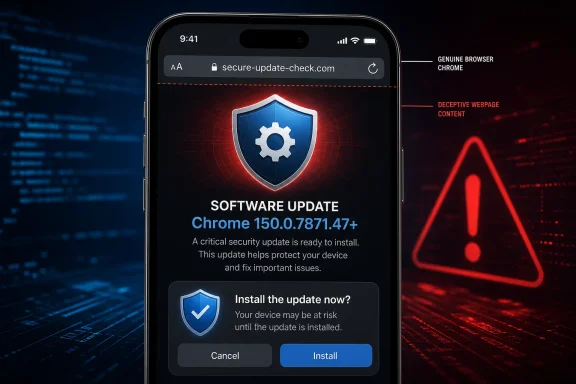
Google disclosed CVE-2026-13980 on June 30, 2026, warning that Chrome for iOS versions before 150.0.7871.47 could let a remote attacker use a crafted HTML page to spoof browser interface information, a Medium-severity flaw whose practical danger lies in making hostile content look trustworthy. The vulnerability does not promise silent code execution, data theft, or a browser crash; it attacks the visual assumptions users make before entering information or approving an action. That makes the patch straightforward—update Chrome—but the risk harder to communicate, because a score of 4.3 can sound minor even when the flaw undermines the interface people use to decide whether a page is safe.
CVE-2026-13980 is best understood not as a conventional browser takeover but as a breach in Chrome’s truth-telling layer. When a browser displays an origin, security indicator, dialog, navigation state, or other trusted interface element, the user assumes that information belongs to the browser rather than the page. UI spoofing succeeds when hostile content blurs that boundary convincingly enough to produce the wrong click, submission, or security judgment.
For consumers, the answer is immediate: Chrome for iOS should be running version 150.0.7871.47 or later. For administrators, the larger lesson is that mobile browser vulnerabilities cannot be triaged solely by severity labels or by looking for direct confidentiality and availability impact. A browser that lies convincingly can become the first stage of an attack even when the CVE itself records only a limited effect on integrity.
Google’s description is short but unusually precise. An “inappropriate implementation” in Chrome for iOS before version 150.0.7871.47 allowed a remote attacker to perform UI spoofing through a crafted HTML page. The attack is network-accessible, requires no privileges, has low complexity, and depends on user interaction.
That combination explains both the modest score and the practical concern. The attacker reportedly does not need an account on the device, local access to the iPhone, or an existing foothold inside Chrome. The attacker needs a victim to encounter a specially constructed page and then believe what the browser appears to be showing.
The distinction matters because the browser interface occupies a privileged psychological position. Users are trained—correctly—to distrust the contents of unfamiliar pages while relying on browser-controlled elements to identify the site, expose permissions, control navigation, or distinguish web content from native prompts. If a page can create a misleading representation of critical interface information, the attacker is no longer merely writing persuasive content; the attacker is borrowing the browser’s apparent authority.
CISA-ADP mapped the vulnerability to CWE-451, formally described as “User Interface (UI) Misrepresentation of Critical Information.” That classification is more informative than broad labels such as phishing or visual deception. It identifies the security failure as a misrepresentation problem: information the user needs to make a security decision is displayed, obscured, or imitated in a way that permits a false conclusion.
The public record does not reveal the exact visual component involved. Google’s linked Chromium issue requires permission, leaving defenders without the reproducer, screenshots, implementation discussion, or test case that would normally show how convincing the spoof can become. That is common during the early life of a browser vulnerability, but it limits what can responsibly be claimed.
There is no basis in the available record for saying the flaw automatically extracts passwords, bypasses authentication, installs software, or compromises the operating system. There is equally no basis for dismissing it as cosmetic. The vulnerability’s security effect is the user making a consequential decision under false visual information.
Every component is important. Network reachability means the crafted page can be delivered remotely. Low complexity indicates that the score does not depend on unusual race conditions, specialized device state, or similarly demanding prerequisites. No privileges means the attacker is not first required to authenticate to Chrome or obtain an account within the victim’s environment.
The counterweight is user interaction. The victim must encounter the content and do something that advances the attack. That requirement appropriately lowers the base score, but it should not be confused with a guarantee of safety: nearly every phishing operation depends on interaction, and browsers are specifically designed to encourage users to interact with pages.
The recorded impact is also narrow. The vector assigns no direct confidentiality loss, low integrity impact, and no availability impact. In other words, the CVE record does not describe the browser reading secrets, destroying data, or becoming unavailable as the immediate result of exploitation.
That is where numerical scoring can conceal the broader security chain. A spoofed interface could reportedly make a malicious workflow appear legitimate, but any later credential capture, fraudulent authorization, or account compromise would depend on what the attacker places around the browser flaw and what the user does next. CVSS scores the vulnerability as recorded, not every social-engineering campaign that might incorporate it.
This is why administrators should resist converting “Medium” into “optional.” Severity is a prioritization signal, not a deployment policy. The cost of updating a managed browser is generally low compared with the difficulty of detecting whether an employee acted on a convincing spoof.
NVD had not supplied its own CVSS 4.0, CVSS 3.x, or CVSS 2.0 assessment when the record was last modified on July 2, 2026. The visible 4.3 rating came from CISA-ADP rather than a completed NVD assessment, a provenance detail that matters when vulnerability-management systems ingest and present scores as though every number originated from the same analytical process.
A malicious page does not need a perfect pixel-for-pixel imitation to succeed. It needs only to create enough confidence, confusion, or urgency that the victim stops checking whether a prompt, destination, or status indication is genuine. On a phone, the available display area is limited, interface elements appear and disappear as the user scrolls, and normal navigation often involves rapid taps rather than sustained inspection.
CVE-2026-13980 therefore sits in the uncomfortable territory between a software defect and social engineering. The crafted page supplies the technical trigger, while human interpretation supplies the security consequence. Neither half alone explains the risk.
The correct defensive model is not “users should look more carefully.” That advice assumes the interface still provides an unambiguous truth that attentive users can discover. CWE-451 exists because software can misrepresent critical information in ways that make even reasonable inspection unreliable.
Training remains useful, particularly warnings against entering credentials after following unsolicited links or approving unexpected requests. But awareness cannot repair a browser implementation. When the browser’s own presentation can be spoofed, the durable control is to remove the vulnerable code path.
This also explains why screenshot-based demonstrations, when they eventually become public, should be handled carefully. A demonstration may reveal whether the spoof affects an address display, a dialog, a transition, or another interface state, but it can also hand opportunistic actors a template. Google’s restricted Chromium issue leaves the current public analysis appropriately bounded: defenders know the affected product, the fixed threshold, the delivery mechanism, and the outcome without receiving an exploitation recipe.
That distinction is crucial for Windows administrators using automated vulnerability scanners. Product matching can become noisy when a feed identifies an application broadly while the vulnerable configuration also depends on a particular operating system. A console that displays “Google Chrome” without preserving the platform condition may create false positives on Windows endpoints.
The reverse mistake is more dangerous: ignoring the alert because the organization thinks of itself as a Windows estate. Windows-centric businesses commonly rely on iPhones for email, identity verification, collaboration, and access to cloud applications. A vulnerability in the mobile browser can target the same employees, accounts, and company data even if no Windows executable is affected.
Administrators should therefore separate platform applicability from organizational relevance. The affected software is Chrome for iOS. The potentially affected business process is any sensitive web interaction conducted through that browser, including workflows connected to services also used from Windows PCs.
The CVE’s CPE configuration provides a useful test for security tooling. A correct result should require both an affected Chrome application version and the Apple mobile operating-system context. A scanner that flags every desktop Chrome installation based only on the application CPE may be overmatching the record.
This is not a theoretical data-quality concern. Vulnerability-management teams often spend more time resolving asset and applicability errors than interpreting exploit mechanics. A Medium browser CVE can either disappear into noise or trigger unnecessary emergency work depending on how accurately platform conditions survive ingestion.
The lesson for mixed-device estates is to keep mobile application inventory distinct enough to answer three basic questions: which devices have Chrome for iOS, which version is installed, and whether the management platform can enforce or at least report the update. Without those answers, the organization is relying on App Store behavior and individual users rather than a verified security state.
That sequence matters because early alerts can arrive before vulnerability-management products have all the fields needed for reliable prioritization. A feed collected on June 30 might contain the CVE and affected threshold but not the later CVSS, CWE, SSVC, or NIST configuration. Organizations should expect records to mature after initial publication rather than treating the first imported snapshot as final.
June 30, 2026: NVD published CVE-2026-13980, listing Chrome as the source.
July 1, 2026: CISA-ADP added an SSVC record at 4:17:07 PM in the NVD change history.
July 1, 2026: CISA-ADP added the CVSS 3.1 vector and CWE-451 classification at 10:16:25 PM.
July 2, 2026: NIST performed its initial analysis at 11:35:47 AM, adding the Chrome-and-iPhone-OS affected configuration and classifying Google’s links as a vendor advisory, release notes, and a permission-restricted issue.
July 2, 2026: NVD recorded the entry as last modified.
CISA’s SSVC data adds a second lens beyond CVSS. As of its July 1 timestamp, the exploitation status was “none,” the vulnerability was marked not automatable, and the technical impact was classified as partial. The record identifies the contributor’s role as CISA Coordinator and uses SSVC version 2.0.3.
“Exploitation: none” is reassuring but limited. It means the assessment did not identify exploitation at that point; it is not proof that no attacker had ever tested or privately used the flaw. Nor does it predict what will happen after disclosure increases awareness.
The “automatable: no” assessment fits the human-dependent nature of UI spoofing. The attack reportedly requires user interaction and a security-relevant interpretation by the victim, making it less suitable for fully autonomous exploitation at scale than a flaw that silently executes upon page load. Yet phishing operations are built to industrialize human interaction, so “not automatable” should not be translated into “not scalable.”
“Technical impact: partial” is similarly consistent with the CVSS vector. The recorded vulnerability damages the integrity of information shown to the user rather than delivering total control over Chrome or the device. The attacker gains a deceptive capability, not an all-purpose browser compromise.
The authoritative record supplied by Chrome and enriched through NVD identifies UI spoofing as the outcome and CWE-451 as the weakness classification. It does not state that CVE-2026-13980 permits arbitrary script execution, HTML injection, universal cross-site scripting, or code execution. Calling it XSS therefore adds a technical conclusion not present in the verified record.
This is more than semantic tidiness. XSS suggests an attacker has crossed a web-origin boundary or injected executable content into a trusted context. UI spoofing may use web content to deceive the user without granting that same execution capability.
Defenders should consequently ground detection and remediation in the vendor’s affected-version statement rather than in secondary category labels. The reliable facts are that the vulnerable product is Chrome for iOS, the vulnerable range ends before 150.0.7871.47, the trigger is a crafted HTML page, and the documented result is UI spoofing.
Secondary databases remain useful for aggregation, notification, and workflow integration. They become dangerous when generated titles or automated classifications are mistaken for newly disclosed technical evidence. In this case, the public Chromium issue is permission-restricted, so outside claims about the exact root cause or exploit capability deserve particular skepticism.
The naming problem also affects executive communication. Calling the flaw “an XSS in Chrome” may cause leadership to assume websites must patch their applications, while calling it “a visual bug” may cause the update to be deprioritized. The accurate message is narrower: Chrome for iOS had an implementation flaw that allowed a malicious page to misrepresent critical interface information, and Google corrected the affected range at version 150.0.7871.47.
The release-notes reference recorded by NVD is notable because its address is titled as a desktop stable-channel update even though the CVE description and affected configuration are specific to Chrome for iOS. That may reflect how Google grouped or cross-referenced the security fixes, but administrators should not infer from the URL alone that Windows Chrome is affected.
This is another example of why normalized vulnerability data matters more than superficial page titles. NIST’s configuration explicitly combines the vulnerable Chrome range with Apple’s iPhone operating system. The CVE description repeats “Chrome for iOS,” and the attack statement is likewise platform-specific.
The restricted issue is the more technically valuable reference, but access controls prevent public inspection. There is no available patch diff, root-cause narrative, proof of concept, or detailed explanation of which interface state was improperly implemented.
The responsible conclusion is therefore bounded. Google fixed a Medium-severity UI-spoofing flaw at the stated version threshold. Anything more detailed about the precise screen behavior, affected feature, or internal implementation would be speculation unless Google makes the issue public or publishes an expanded advisory.
That lack of detail does not block remediation. Version-based browser vulnerabilities are among the easiest classes of endpoint findings to resolve when the vendor has provided an unambiguous fixed threshold. It does, however, limit hunting: defenders cannot confidently search proxy logs or telemetry for a unique exploit pattern when the only public delivery description is “a crafted HTML page.”
Managed environments face a wider set of conditions. A device may not have checked in recently, may have automatic updates disabled, may lack available storage, or may sit outside formal mobile-device management while still accessing company resources. None of those situations changes the affected range; they change the organization’s confidence that the patched build is present.
Inventory is therefore the first control. Administrators need to distinguish Chrome on iOS from Chrome on Windows, macOS, Android, and other platforms rather than searching for the product name alone. They should then compare the reported iOS application version with the fixed threshold.
The next control is update enforcement or encouragement. If the management platform supports application-update commands or minimum-version policies, administrators can use those mechanisms. Where devices are personally owned or otherwise unmanaged, a targeted notice should state the affected platform and required version instead of sending a generic warning about Chrome.
Access policy can supply a backstop when version reporting is trustworthy. An organization may decide that an outdated browser should not reach especially sensitive web applications until it is upgraded. Such a response should be proportionate: the CVE is Medium, requires interaction, and had no known exploitation in the SSVC assessment, but patching is also low-cost.
Help desks should be prepared for version confusion. Users may report that Chrome “is up to date” because the App Store shows no pending update, while management telemetry still contains stale inventory. The practical resolution is to refresh application data, reopen the store listing, restart the application if necessary, and verify the version locally.
Organizations should emphasize workflow-level verification. Users should begin sensitive sessions from a known bookmark, managed application portal, or manually entered destination rather than from an unexpected link. Authentication requests should be treated with suspicion when they arrive outside the normal sequence of a business process.
Unexpected prompts deserve particular care. If a page suddenly requests credentials, payment information, recovery codes, or approval of a security action, the user should close the page and restart the task through a trusted entry point. That practice reduces dependence on determining whether every visual element is genuine.
Password managers can provide a secondary signal because autofill behavior is normally tied to the recognized site, though no single control should be presented as infallible. A refusal to autofill on what appears to be a familiar login page is a reason to stop, not a reason to copy and paste the password manually.
The communications challenge is to avoid panic while preserving urgency. This CVE is not documented as a zero-click takeover, and CISA’s assessment recorded no exploitation. The update is nevertheless warranted because users cannot reliably compensate for a browser flaw that weakens the distinction between trusted interface and attacker-controlled content.
NIST adds an affected configuration that links Chrome before the fixed threshold with Apple’s mobile operating system. This reinforces that the CVE should not be applied indiscriminately to Chrome on every platform.
The record does not identify the spoofed interface element. It does not state that arbitrary JavaScript executes across origins, that the sandbox is bypassed, or that the iPhone operating system is compromised. It provides no evidence of credential theft campaigns, active exploitation, or a working public proof of concept.
It also does not say the vulnerability is harmless. UI-spoofing vulnerabilities are valuable precisely because security controls eventually ask humans to trust something they see. An attacker who can distort that visual decision point may combine a technically limited primitive with a highly consequential lure.
The safest journalistic and operational description is therefore the least sensational one: CVE-2026-13980 is a remotely reachable, user-interaction-dependent UI-spoofing vulnerability in Chrome for iOS before 150.0.7871.47. Its direct impact is limited, its exploitation was not observed in the recorded SSVC assessment, and its remediation is to update.
CVE-2026-13980 is best understood not as a conventional browser takeover but as a breach in Chrome’s truth-telling layer. When a browser displays an origin, security indicator, dialog, navigation state, or other trusted interface element, the user assumes that information belongs to the browser rather than the page. UI spoofing succeeds when hostile content blurs that boundary convincingly enough to produce the wrong click, submission, or security judgment.
For consumers, the answer is immediate: Chrome for iOS should be running version 150.0.7871.47 or later. For administrators, the larger lesson is that mobile browser vulnerabilities cannot be triaged solely by severity labels or by looking for direct confidentiality and availability impact. A browser that lies convincingly can become the first stage of an attack even when the CVE itself records only a limited effect on integrity.
 The Browser Does Not Need to Be Compromised to Betray the User
Google’s description is short but unusually precise. An “inappropriate implementation” in Chrome for iOS before version 150.0.7871.47 allowed a remote attacker to perform UI spoofing through a crafted HTML page. The attack is network-accessible, requires no privileges, has low complexity, and depends on user interaction.That combination explains both the modest score and the practical concern. The attacker reportedly does not need an account on the device, local access to the iPhone, or an existing foothold inside Chrome. The attacker needs a victim to encounter a specially constructed page and then believe what the browser appears to be showing.
The distinction matters because the browser interface occupies a privileged psychological position. Users are trained—correctly—to distrust the contents of unfamiliar pages while relying on browser-controlled elements to identify the site, expose permissions, control navigation, or distinguish web content from native prompts. If a page can create a misleading representation of critical interface information, the attacker is no longer merely writing persuasive content; the attacker is borrowing the browser’s apparent authority.
CISA-ADP mapped the vulnerability to CWE-451, formally described as “User Interface (UI) Misrepresentation of Critical Information.” That classification is more informative than broad labels such as phishing or visual deception. It identifies the security failure as a misrepresentation problem: information the user needs to make a security decision is displayed, obscured, or imitated in a way that permits a false conclusion.
The public record does not reveal the exact visual component involved. Google’s linked Chromium issue requires permission, leaving defenders without the reproducer, screenshots, implementation discussion, or test case that would normally show how convincing the spoof can become. That is common during the early life of a browser vulnerability, but it limits what can responsibly be claimed.
There is no basis in the available record for saying the flaw automatically extracts passwords, bypasses authentication, installs software, or compromises the operating system. There is equally no basis for dismissing it as cosmetic. The vulnerability’s security effect is the user making a consequential decision under false visual information.
A 4.3 Score Measures the Primitive, Not the Entire Attack
CISA-ADP assigned CVE-2026-13980 a CVSS 3.1 base score of 4.3, categorized as Medium. Its vector is CVSS:3.1/AV:N/AC:L/PR:N/UI:R/S:U/C:N/I:L/A:N, a compact description of an attack that is reachable over a network, has low attack complexity, requires no privileges, needs user interaction, remains within the same security scope, and produces a low integrity impact without directly affecting confidentiality or availability.Every component is important. Network reachability means the crafted page can be delivered remotely. Low complexity indicates that the score does not depend on unusual race conditions, specialized device state, or similarly demanding prerequisites. No privileges means the attacker is not first required to authenticate to Chrome or obtain an account within the victim’s environment.
The counterweight is user interaction. The victim must encounter the content and do something that advances the attack. That requirement appropriately lowers the base score, but it should not be confused with a guarantee of safety: nearly every phishing operation depends on interaction, and browsers are specifically designed to encourage users to interact with pages.
The recorded impact is also narrow. The vector assigns no direct confidentiality loss, low integrity impact, and no availability impact. In other words, the CVE record does not describe the browser reading secrets, destroying data, or becoming unavailable as the immediate result of exploitation.
That is where numerical scoring can conceal the broader security chain. A spoofed interface could reportedly make a malicious workflow appear legitimate, but any later credential capture, fraudulent authorization, or account compromise would depend on what the attacker places around the browser flaw and what the user does next. CVSS scores the vulnerability as recorded, not every social-engineering campaign that might incorporate it.
This is why administrators should resist converting “Medium” into “optional.” Severity is a prioritization signal, not a deployment policy. The cost of updating a managed browser is generally low compared with the difficulty of detecting whether an employee acted on a convincing spoof.
NVD had not supplied its own CVSS 4.0, CVSS 3.x, or CVSS 2.0 assessment when the record was last modified on July 2, 2026. The visible 4.3 rating came from CISA-ADP rather than a completed NVD assessment, a provenance detail that matters when vulnerability-management systems ingest and present scores as though every number originated from the same analytical process.
| Chrome for iOS state | Version range | CVE status | Practical interpretation | Required response |
|---|---|---|---|---|
| Older installation | Earlier than 150.0.7871.47 | Affected | A crafted HTML page can reportedly trigger UI spoofing | Update |
| Patched threshold or later | 150.0.7871.47 or later | Not included in the affected range | Contains the correction associated with the disclosed flaw | Verify deployment |
UI Spoofing Turns Familiarity into an Attack Surface
Security discussions often treat a browser as a rendering engine surrounded by controls. From the user’s perspective, however, the controls and the page form one continuous visual experience. Attackers benefit whenever the boundary between those layers is difficult to perceive.A malicious page does not need a perfect pixel-for-pixel imitation to succeed. It needs only to create enough confidence, confusion, or urgency that the victim stops checking whether a prompt, destination, or status indication is genuine. On a phone, the available display area is limited, interface elements appear and disappear as the user scrolls, and normal navigation often involves rapid taps rather than sustained inspection.
CVE-2026-13980 therefore sits in the uncomfortable territory between a software defect and social engineering. The crafted page supplies the technical trigger, while human interpretation supplies the security consequence. Neither half alone explains the risk.
The correct defensive model is not “users should look more carefully.” That advice assumes the interface still provides an unambiguous truth that attentive users can discover. CWE-451 exists because software can misrepresent critical information in ways that make even reasonable inspection unreliable.
Training remains useful, particularly warnings against entering credentials after following unsolicited links or approving unexpected requests. But awareness cannot repair a browser implementation. When the browser’s own presentation can be spoofed, the durable control is to remove the vulnerable code path.
This also explains why screenshot-based demonstrations, when they eventually become public, should be handled carefully. A demonstration may reveal whether the spoof affects an address display, a dialog, a transition, or another interface state, but it can also hand opportunistic actors a template. Google’s restricted Chromium issue leaves the current public analysis appropriately bounded: defenders know the affected product, the fixed threshold, the delivery mechanism, and the outcome without receiving an exploitation recipe.
The iOS Label Does Not Make This a Windows-Only Organization’s Problem
CVE-2026-13980 affects Google Chrome on iOS, not Chrome on Windows. NIST’s affected configuration pairs the Google Chrome application range—versions up to but excluding 150.0.7871.47—with Apple’s iPhone operating system. There is no support in the record for treating the CVE as a Chrome-for-Windows vulnerability merely because the product name is Chrome.That distinction is crucial for Windows administrators using automated vulnerability scanners. Product matching can become noisy when a feed identifies an application broadly while the vulnerable configuration also depends on a particular operating system. A console that displays “Google Chrome” without preserving the platform condition may create false positives on Windows endpoints.
The reverse mistake is more dangerous: ignoring the alert because the organization thinks of itself as a Windows estate. Windows-centric businesses commonly rely on iPhones for email, identity verification, collaboration, and access to cloud applications. A vulnerability in the mobile browser can target the same employees, accounts, and company data even if no Windows executable is affected.
Administrators should therefore separate platform applicability from organizational relevance. The affected software is Chrome for iOS. The potentially affected business process is any sensitive web interaction conducted through that browser, including workflows connected to services also used from Windows PCs.
The CVE’s CPE configuration provides a useful test for security tooling. A correct result should require both an affected Chrome application version and the Apple mobile operating-system context. A scanner that flags every desktop Chrome installation based only on the application CPE may be overmatching the record.
This is not a theoretical data-quality concern. Vulnerability-management teams often spend more time resolving asset and applicability errors than interpreting exploit mechanics. A Medium browser CVE can either disappear into noise or trigger unnecessary emergency work depending on how accurately platform conditions survive ingestion.
The lesson for mixed-device estates is to keep mobile application inventory distinct enough to answer three basic questions: which devices have Chrome for iOS, which version is installed, and whether the management platform can enforce or at least report the update. Without those answers, the organization is relying on App Store behavior and individual users rather than a verified security state.
The Public Record Grew in Stages, and Each Stage Changed the Triage Picture
The disclosure history shows how a bare Chrome report became a more operationally useful vulnerability record over roughly two days. Google supplied the description, affected range, and references first; CISA-ADP then added exploitation and severity context; NIST followed with the platform configuration and reference classifications.That sequence matters because early alerts can arrive before vulnerability-management products have all the fields needed for reliable prioritization. A feed collected on June 30 might contain the CVE and affected threshold but not the later CVSS, CWE, SSVC, or NIST configuration. Organizations should expect records to mature after initial publication rather than treating the first imported snapshot as final.
Timeline
June 30, 2026: Chrome submitted the new CVE record at 7:17:11 PM, describing UI spoofing through a crafted HTML page and identifying Chrome for iOS versions before 150.0.7871.47 as affected.June 30, 2026: NVD published CVE-2026-13980, listing Chrome as the source.
July 1, 2026: CISA-ADP added an SSVC record at 4:17:07 PM in the NVD change history.
July 1, 2026: CISA-ADP added the CVSS 3.1 vector and CWE-451 classification at 10:16:25 PM.
July 2, 2026: NIST performed its initial analysis at 11:35:47 AM, adding the Chrome-and-iPhone-OS affected configuration and classifying Google’s links as a vendor advisory, release notes, and a permission-restricted issue.
July 2, 2026: NVD recorded the entry as last modified.
CISA’s SSVC data adds a second lens beyond CVSS. As of its July 1 timestamp, the exploitation status was “none,” the vulnerability was marked not automatable, and the technical impact was classified as partial. The record identifies the contributor’s role as CISA Coordinator and uses SSVC version 2.0.3.
“Exploitation: none” is reassuring but limited. It means the assessment did not identify exploitation at that point; it is not proof that no attacker had ever tested or privately used the flaw. Nor does it predict what will happen after disclosure increases awareness.
The “automatable: no” assessment fits the human-dependent nature of UI spoofing. The attack reportedly requires user interaction and a security-relevant interpretation by the victim, making it less suitable for fully autonomous exploitation at scale than a flaw that silently executes upon page load. Yet phishing operations are built to industrialize human interaction, so “not automatable” should not be translated into “not scalable.”
“Technical impact: partial” is similarly consistent with the CVSS vector. The recorded vulnerability damages the integrity of information shown to the user rather than delivering total control over Chrome or the device. The attacker gains a deceptive capability, not an all-purpose browser compromise.
Secondary Labels Risk Turning a Specific UI Flaw into a Different Vulnerability
Some secondary vulnerability pages have described CVE-2026-13980 using broader or more dramatic terminology. A SentinelOne vulnerability-database entry, for example, labels it an XSS vulnerability, while other databases summarize it as a generic Chrome iOS UI-spoofing problem. Those descriptions are not equivalent.The authoritative record supplied by Chrome and enriched through NVD identifies UI spoofing as the outcome and CWE-451 as the weakness classification. It does not state that CVE-2026-13980 permits arbitrary script execution, HTML injection, universal cross-site scripting, or code execution. Calling it XSS therefore adds a technical conclusion not present in the verified record.
This is more than semantic tidiness. XSS suggests an attacker has crossed a web-origin boundary or injected executable content into a trusted context. UI spoofing may use web content to deceive the user without granting that same execution capability.
Defenders should consequently ground detection and remediation in the vendor’s affected-version statement rather than in secondary category labels. The reliable facts are that the vulnerable product is Chrome for iOS, the vulnerable range ends before 150.0.7871.47, the trigger is a crafted HTML page, and the documented result is UI spoofing.
Secondary databases remain useful for aggregation, notification, and workflow integration. They become dangerous when generated titles or automated classifications are mistaken for newly disclosed technical evidence. In this case, the public Chromium issue is permission-restricted, so outside claims about the exact root cause or exploit capability deserve particular skepticism.
The naming problem also affects executive communication. Calling the flaw “an XSS in Chrome” may cause leadership to assume websites must patch their applications, while calling it “a visual bug” may cause the update to be deprioritized. The accurate message is narrower: Chrome for iOS had an implementation flaw that allowed a malicious page to misrepresent critical interface information, and Google corrected the affected range at version 150.0.7871.47.
Google’s Reference Trail Is Useful but Imperfect
NVD identifies two Chrome references: a vendor advisory and release-notes page, plus the restricted Chromium issue. That is enough to establish a vendor-originated disclosure trail, but not enough to reconstruct the vulnerability.The release-notes reference recorded by NVD is notable because its address is titled as a desktop stable-channel update even though the CVE description and affected configuration are specific to Chrome for iOS. That may reflect how Google grouped or cross-referenced the security fixes, but administrators should not infer from the URL alone that Windows Chrome is affected.
This is another example of why normalized vulnerability data matters more than superficial page titles. NIST’s configuration explicitly combines the vulnerable Chrome range with Apple’s iPhone operating system. The CVE description repeats “Chrome for iOS,” and the attack statement is likewise platform-specific.
The restricted issue is the more technically valuable reference, but access controls prevent public inspection. There is no available patch diff, root-cause narrative, proof of concept, or detailed explanation of which interface state was improperly implemented.
The responsible conclusion is therefore bounded. Google fixed a Medium-severity UI-spoofing flaw at the stated version threshold. Anything more detailed about the precise screen behavior, affected feature, or internal implementation would be speculation unless Google makes the issue public or publishes an expanded advisory.
That lack of detail does not block remediation. Version-based browser vulnerabilities are among the easiest classes of endpoint findings to resolve when the vendor has provided an unambiguous fixed threshold. It does, however, limit hunting: defenders cannot confidently search proxy logs or telemetry for a unique exploit pattern when the only public delivery description is “a crafted HTML page.”
Mobile Browser Updating Is Easy Until the Device Is Unmanaged
For an individual user, remediation is uncomplicated. Open the App Store, ensure Chrome is updated, and confirm that the installed version is 150.0.7871.47 or later. Automatic application updates reduce exposure, but verification is preferable to assuming the update has already reached every device.Managed environments face a wider set of conditions. A device may not have checked in recently, may have automatic updates disabled, may lack available storage, or may sit outside formal mobile-device management while still accessing company resources. None of those situations changes the affected range; they change the organization’s confidence that the patched build is present.
Inventory is therefore the first control. Administrators need to distinguish Chrome on iOS from Chrome on Windows, macOS, Android, and other platforms rather than searching for the product name alone. They should then compare the reported iOS application version with the fixed threshold.
The next control is update enforcement or encouragement. If the management platform supports application-update commands or minimum-version policies, administrators can use those mechanisms. Where devices are personally owned or otherwise unmanaged, a targeted notice should state the affected platform and required version instead of sending a generic warning about Chrome.
Access policy can supply a backstop when version reporting is trustworthy. An organization may decide that an outdated browser should not reach especially sensitive web applications until it is upgraded. Such a response should be proportionate: the CVE is Medium, requires interaction, and had no known exploitation in the SSVC assessment, but patching is also low-cost.
Help desks should be prepared for version confusion. Users may report that Chrome “is up to date” because the App Store shows no pending update, while management telemetry still contains stale inventory. The practical resolution is to refresh application data, reopen the store listing, restart the application if necessary, and verify the version locally.
Action checklist for admins
- Identify iPhones using Chrome and separate them from desktop or Android Chrome assets.
- Query the installed Chrome version and flag anything earlier than 150.0.7871.47.
- Push or require the current Chrome for iOS update where management controls permit it.
- Reconcile devices that have not recently reported application inventory.
- Notify unmanaged or bring-your-own-device users with the exact affected platform and fixed threshold.
- Review vulnerability-scanner findings that incorrectly map this iOS CVE to Windows endpoints.
- Recheck the Chrome, NVD, and CISA records for later exploitation or severity changes.
Users Need Better Advice Than “Check the Address Bar”
Traditional anti-phishing guidance often asks users to inspect the address bar, confirm the domain, and look for browser security indicators. Those habits are still useful, but CVE-2026-13980 exposes the limitation of relying on interface inspection when the interface itself may be misrepresented.Organizations should emphasize workflow-level verification. Users should begin sensitive sessions from a known bookmark, managed application portal, or manually entered destination rather than from an unexpected link. Authentication requests should be treated with suspicion when they arrive outside the normal sequence of a business process.
Unexpected prompts deserve particular care. If a page suddenly requests credentials, payment information, recovery codes, or approval of a security action, the user should close the page and restart the task through a trusted entry point. That practice reduces dependence on determining whether every visual element is genuine.
Password managers can provide a secondary signal because autofill behavior is normally tied to the recognized site, though no single control should be presented as infallible. A refusal to autofill on what appears to be a familiar login page is a reason to stop, not a reason to copy and paste the password manually.
The communications challenge is to avoid panic while preserving urgency. This CVE is not documented as a zero-click takeover, and CISA’s assessment recorded no exploitation. The update is nevertheless warranted because users cannot reliably compensate for a browser flaw that weakens the distinction between trusted interface and attacker-controlled content.
What the Record Says—and What It Deliberately Does Not
The strongest analysis of CVE-2026-13980 comes from respecting the boundaries of the evidence. Chrome’s disclosure identifies the platform, affected range, attack input, and security outcome. CISA-ADP supplies a Medium score, a UI-misrepresentation weakness, and an assessment of no exploitation, no automation, and partial technical impact at the recorded time.NIST adds an affected configuration that links Chrome before the fixed threshold with Apple’s mobile operating system. This reinforces that the CVE should not be applied indiscriminately to Chrome on every platform.
The record does not identify the spoofed interface element. It does not state that arbitrary JavaScript executes across origins, that the sandbox is bypassed, or that the iPhone operating system is compromised. It provides no evidence of credential theft campaigns, active exploitation, or a working public proof of concept.
It also does not say the vulnerability is harmless. UI-spoofing vulnerabilities are valuable precisely because security controls eventually ask humans to trust something they see. An attacker who can distort that visual decision point may combine a technically limited primitive with a highly consequential lure.
The safest journalistic and operational description is therefore the least sensational one: CVE-2026-13980 is a remotely reachable, user-interaction-dependent UI-spoofing vulnerability in Chrome for iOS before 150.0.7871.47. Its direct impact is limited, its exploitation was not observed in the recorded SSVC assessment, and its remediation is to update.
The Six Facts That Should Drive the Response
The patch decision does not require guessing at the restricted Chromium issue. The verified record already provides the information consumers and IT departments need to remove exposure and avoid misclassifying the vulnerability.- CVE-2026-13980 affects Chrome for iOS, not Chrome on every operating system.
- All versions earlier than 150.0.7871.47 fall within the affected range.
- The documented attack uses a crafted HTML page and requires user interaction.
- The direct outcome is UI spoofing, classified as CWE-451.
- CISA-ADP scored it 4.3 Medium and recorded no exploitation at the time of assessment.
- Administrators should update affected iPhones and suppress false positives attributed to Windows Chrome installations.
References
- Primary source: NVD / Chromium
Published: 2026-07-11T15:40:32-07:00
NVD - CVE-2026-13980
 nvd.nist.gov
- Security advisory: MSRC
Published: 2026-07-11T15:40:32-07:00
Original feed URL
Security Update Guide - Microsoft Security Response Center
 msrc.microsoft.com
- Related coverage: cvefeed.io
CVE-2026-13980 - Google Chrome iOS UI Spoofing
Inappropriate implementation in Chrome for iOS in Google Chrome on iOS prior to 150.0.7871.47 allowed a remote attacker to perform UI spoofing via a crafted HTML page. (Chromium security severity: Medium)cvefeed.io - Related coverage: chromereleases.googleblog.com
Chrome Releases: Chrome Stable for iOS Update
Hi everyone! We've just released Chrome Stable 150 (150.0.7871.34) for iOS; it'll become available on App Store in the next few hours. This ...chromereleases.googleblog.com
- Related coverage: vulnerability.circl.lu
Vulnerability-Lookup
Vulnerability-Lookup - Fast vulnerability lookup correlation from different sources.vulnerability.circl.lu - Related coverage: ubuntu.com
CVE-2026-13812 | Ubuntu
Ubuntu is an open source software operating system that runs from the desktop, to the cloud, to all your internet connected things. ubuntu.com
