OpenAI is hiring a San Francisco product manager for families, caregivers, and older adults; it is not announcing a family plan. The opening is significant because it combines three verified signals: ChatGPT is reaching more parents, older users represent a larger share of its audience than a year earlier, and OpenAI has already introduced parental controls for teen accounts and an optional Trusted Contact safety feature.
The position suggests that OpenAI is beginning to design around relationships between users rather than treating every conversation as an isolated exchange. However, family plans, child profiles, caregiver dashboards, linked accounts, shared household memory, AI tutoring, human-review systems, and age-aware behavior remain possibilities discussed by analysts—not an announced OpenAI roadmap.
The San Francisco position calls for a product manager who can build experiences for families, caregivers, and older adults across OpenAI’s products. According to the job posting, the successful candidate should have experience developing products for parents and families or working on other trust-sensitive consumer experiences.
The language matters because family use introduces unequal responsibilities and overlapping privacy expectations. A teenager may want privacy from a parent while still needing protection during a crisis. An older adult may want help using an assistant without granting a caregiver unrestricted access to every conversation. Parents may want to understand how their children use AI, while children may turn to the same technology for questions about school, health, relationships, or distress.
Traditional account permissions address part of that problem, but conversational AI also generates answers, draws inferences, and may retain context. That creates specific product questions: Who owns a conversation? What can another household member see? Which information can be remembered? Who can revoke access? What happens when a user may be in danger?
Ben Bajarin, chief executive of technology consultancy Creative Strategies, told TechCrunch that OpenAI’s move resembles the evolution of earlier consumer platforms. “This is similar to the path Google, Apple, and Meta eventually followed as their platforms became embedded in everyday life, but AI raises the stakes because the assistant is not just mediating content or devices,” he said.
OpenAI did not respond to TechCrunch’s requests for comment about the job posting, leaving the eventual product roadmap unstated. Bajarin expects the broader consumer AI market to move toward family plans, child and teen profiles, caregiver tools, shared household memory, AI tutoring, and stronger safety controls. Those are Bajarin’s expectations about the market, not evidence that OpenAI has approved or scheduled those products.
The job should therefore be read narrowly: OpenAI is assigning product responsibility to a trust-sensitive audience whose needs cannot be met solely through subscription pricing. It does not tell users what will ship, when it will ship, or whether the eventual work will appear in ChatGPT, another OpenAI product, or several products.
Those figures describe the composition of the measured audience. They do not establish absolute user growth, adoption rates, retention, or whether use increased or decreased within any age group. A group can gain audience share because it is growing, because another group is changing, or because of both effects.
The movement among users aged 45 and above should be interpreted with the same caution. Sensor Tower estimated that the 45-and-older group represented 11% of ChatGPT’s global app audience, compared with 20% for Microsoft Copilot. ChatGPT’s estimated share for that group increased by three percentage points year over year, while Copilot’s increased by two points. That comparison does not prove that ChatGPT added older users faster in absolute numbers or retained them more effectively.
Sensor Tower also estimated that ChatGPT reached 24% of U.S. smartphone users who are parents during the quarter, compared with 16% a year earlier. Gemini’s estimated parent reach was 32%, while Claude and Microsoft Copilot were estimated at 4% and 2%, respectively.
Source note: Every figure in the following table is a Sensor Tower estimate reported by TechCrunch. The percentages describe estimated global app-audience composition or estimated U.S. smartphone reach among parents, not subscriptions, retention, engagement, or absolute user totals.
The table supports a limited conclusion: the assistants have different estimated audience mixes. Copilot had the largest 45-and-older share in this comparison, while Gemini had the greatest estimated reach among U.S. smartphone users who are parents. ChatGPT combined substantial estimated parent reach with a three-point year-over-year increase in its 45-and-older audience share.
Sensor Tower estimated that ChatGPT, Gemini, and Claude each drew 40% of their global app audiences from people aged 25 to 34. Many people in that age range are parents or have household and caregiving responsibilities, but the data does not identify why they use an assistant or whether family responsibilities drive their use.
For OpenAI, the practical product implication is not that one demographic has been “won.” It is that an assistant used across a broader range of ages and household roles needs clearer identity, privacy, safety, and account-separation controls.
Over the past year: OpenAI introduced parental controls for teen accounts, changed the handling of some sensitive conversations, and added an optional Trusted Contact feature.
Second quarter of 2026: Sensor Tower estimated that users aged 35 and older represented 31% of ChatGPT’s global app audience and that ChatGPT reached 24% of U.S. smartphone users who are parents.
July 11, 2026: TechCrunch reported that OpenAI was recruiting a dedicated product manager in San Francisco for work involving families, caregivers, and older adults.
According to the Family Online Safety Institute, 27% of U.S. parents surveyed said their child had used generative AI during the previous week, while 38% of children said they had used it. The research covered more than 4,000 families in the United States and Australia.
These figures do not show that all unobserved use was unsafe. They do show that parents may not have a complete picture of when or why a child uses generative AI. That matters because use can extend beyond visible homework assistance to private questions about friendships, identity, health, fear, or emotional distress.
Stephen Balkam, chief executive of the Family Online Safety Institute, described OpenAI’s hiring as a product correction. “I see this as safety by redesign,” he told TechCrunch. “You take the initial product or service that was released… not really with kids in mind… so this is a much-needed reaction and response.”
Safety by redesign requires more than placing controls in a settings menu. A service must explain which controls are available, what they can and cannot detect, what parents can see, and what remains private. It should also avoid implying that an automated restriction, age declaration, or safety classifier guarantees protection.
The job posting does not confirm that OpenAI will introduce child profiles, broader parental visibility, automated age estimation, or different model behavior by age. Those are possible design approaches, not announced features. If OpenAI considers them, each would require clear limits and protections against excessive monitoring.
A parental dashboard, for example, could help adults confirm that safeguards are enabled without exposing the full text of every sensitive conversation. An age-aware experience could alter explanations and safety responses, but it would depend on age information that may be missing or incorrect. A linked account could support household management while also creating a risk of unwanted access.
The useful test is not whether a product carries a “family” label. It is whether each person can understand who controls the account, what others can see, how settings change the experience, and where to seek human help.
Trusted Contact is intended to involve a family member, friend, or caregiver when a user may be at risk of self-harm. It represents a significant change from a conversation that remains entirely inside the application to a safety process that may involve another person.
The potential benefit is concrete: an AI assistant cannot physically check on someone, provide emergency care, or replace a mental-health professional. A trusted person may be able to make contact, assess the immediate situation, or connect the user with appropriate services.
The limitations are equally important. A system may fail to recognize danger, interpret ambiguous language incorrectly, or send an alert when the recipient is unable to respond. Users and contacts need to understand that the feature is an additional safety measure, not continuous monitoring or a guaranteed emergency-response service.
Households using the feature should review who has been selected, whether that person remains appropriate, and whether their contact details are current. The selected contact should know that they have been chosen and understand what they can realistically do if an alert arrives.
Beyond these existing features, linked accounts, mandatory human review, additional escalation systems, and age-aware model behavior remain potential product approaches. OpenAI’s hiring does not confirm that these features are on its roadmap.
A caregiver might help an older adult prepare questions for a medical appointment, understand a letter, organize household tasks, or compare service options. AI can help structure information, but it can also generate an incorrect answer in confident language.
Caregiver access should not automatically mean administrative control. An older adult may want help signing in or configuring a setting without consenting to another person reading every conversation. Any future caregiver tools should therefore be narrow, visible, and reversible. This is an author’s design analysis, not a description of an announced OpenAI feature.
The same distinction applies to simplified interfaces and voice interaction. Clearer language can improve accessibility, while spoken interaction may be easier for someone with limited vision or dexterity. Neither changes the underlying need to verify consequential information.
Medical, legal, and financial outputs require particular caution. Families can use AI to organize questions, translate unfamiliar terminology, or create a checklist for a professional appointment. They should not treat generated answers as a diagnosis, legal ruling, investment instruction, or final eligibility decision.
AI should support a person’s independence rather than quietly shifting authority to a caregiver or model. The person receiving help should remain involved in decisions whenever possible and should know when information came from the AI rather than a clinician, lawyer, financial professional, government agency, or other accountable source.
A family member who opens an already signed-in browser may be able to view conversation history, continue a chat, change settings, or enter private information under someone else’s identity. If that browser profile also syncs workplace credentials, history, or tabs, household use can expose business information.
Windows users should separate access at three levels:
Saved sessions are especially easy to overlook. Closing a browser window may not sign the user out. Before handing over a shared device, sign out of the AI service, close sensitive tabs, and confirm that the next user is in a different Windows account and browser profile.
Organizations should also distinguish consumer Copilot or ChatGPT use from approved enterprise services. Similar branding does not guarantee the same data handling, retention, administrative controls, or contractual protections.
That is different from announcing a child product or family subscription. It places parents, coaches, and community groups in the role of interpreting where AI may be useful and where adult judgment remains necessary.
Youth sports provide practical examples. An assistant might help a coach outline a practice, rewrite instructions for different reading levels, or brainstorm ways to explain a skill. It cannot observe every child’s physical condition, understand every team relationship, or assume responsibility for safeguarding.
Community workshops can also expose gaps that product analytics miss: whether parents understand account controls, whether children hide their use, whether adults assume generated information has been verified, and whether users can identify when a human expert is needed.
Responsible AI literacy should include reasons not to use the tool. Families need to understand privacy implications, uncertainty, hallucinated information, and the difference between a convenient draft and a reliable decision.
If OpenAI or a competitor creates one, billing would be only the beginning. The product would need understandable identity boundaries, independent accounts, clear consent, private-by-default conversations, age-appropriate safety controls, and safe ways to add or remove household relationships.
Child and teen profiles, caregiver tools, AI tutoring, linked accounts, shared memory, human review, and age-aware behavior are all proposed possibilities in Bajarin’s market expectations or this article’s analysis. None should be presented as a confirmed OpenAI feature.
The standard for any eventual product should be practical. Can a teenager tell what a parent can see? Can an older adult revoke caregiver access? Can a separated family change account relationships safely? Can a person export or delete personal data without affecting everyone else? Can the household distinguish an automated safety response from contact with a human professional?
Until companies answer those questions, families should organize their own boundaries around the tools that already exist.
The next steps remain unknown. OpenAI has not announced a family plan, household memory, caregiver dashboard, child profile, AI tutoring service, or release schedule. Bajarin expects the market to move toward several of those capabilities, but expectations should not be confused with a roadmap.
For families, the safest response is not to wait for a new product. Separate accounts now. Separate Windows and browser profiles now. Review teen controls and Trusted Contact settings now. Keep consequential decisions with people who can evaluate context and accept responsibility.
For OpenAI, the test will be whether future family work produces understandable boundaries rather than merely broader adoption. A useful household assistant must know not only how to answer, but when information belongs to one person, when another person has permission to help, and when the right next step is a qualified human.
The position suggests that OpenAI is beginning to design around relationships between users rather than treating every conversation as an isolated exchange. However, family plans, child profiles, caregiver dashboards, linked accounts, shared household memory, AI tutoring, human-review systems, and age-aware behavior remain possibilities discussed by analysts—not an announced OpenAI roadmap.
What changed / what it means / what families should do now
What changed: OpenAI is recruiting a product manager focused on families, caregivers, and older adults across its products.
What it means: The company recognizes that household AI use creates different privacy, safety, and account-management problems from individual use. The job posting does not confirm any specific feature or release date.
What families should do now: Give each person a separate account, do not share passwords, review available teen-account and Trusted Contact settings, separate personal AI sessions from work accounts on shared Windows PCs, and keep medical, legal, financial, and crisis decisions under qualified human review.
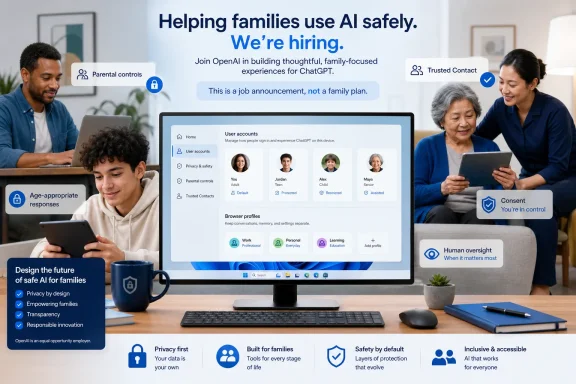 OpenAI Is Designing for Relationships, Not Just Accounts
The San Francisco position calls for a product manager who can build experiences for families, caregivers, and older adults across OpenAI’s products. According to the job posting, the successful candidate should have experience developing products for parents and families or working on other trust-sensitive consumer experiences.The language matters because family use introduces unequal responsibilities and overlapping privacy expectations. A teenager may want privacy from a parent while still needing protection during a crisis. An older adult may want help using an assistant without granting a caregiver unrestricted access to every conversation. Parents may want to understand how their children use AI, while children may turn to the same technology for questions about school, health, relationships, or distress.
Traditional account permissions address part of that problem, but conversational AI also generates answers, draws inferences, and may retain context. That creates specific product questions: Who owns a conversation? What can another household member see? Which information can be remembered? Who can revoke access? What happens when a user may be in danger?
Ben Bajarin, chief executive of technology consultancy Creative Strategies, told TechCrunch that OpenAI’s move resembles the evolution of earlier consumer platforms. “This is similar to the path Google, Apple, and Meta eventually followed as their platforms became embedded in everyday life, but AI raises the stakes because the assistant is not just mediating content or devices,” he said.
OpenAI did not respond to TechCrunch’s requests for comment about the job posting, leaving the eventual product roadmap unstated. Bajarin expects the broader consumer AI market to move toward family plans, child and teen profiles, caregiver tools, shared household memory, AI tutoring, and stronger safety controls. Those are Bajarin’s expectations about the market, not evidence that OpenAI has approved or scheduled those products.
The job should therefore be read narrowly: OpenAI is assigning product responsibility to a trust-sensitive audience whose needs cannot be met solely through subscription pricing. It does not tell users what will ship, when it will ship, or whether the eventual work will appear in ChatGPT, another OpenAI product, or several products.
ChatGPT’s Demographic Shift Changes the Product Brief
Sensor Tower audience-composition estimates shared with TechCrunch indicate that users aged 35 and older accounted for 31% of ChatGPT’s global app audience in the second quarter, up from 26% a year earlier. The estimated share for users aged 18 to 24 moved from 34% to 29%.Those figures describe the composition of the measured audience. They do not establish absolute user growth, adoption rates, retention, or whether use increased or decreased within any age group. A group can gain audience share because it is growing, because another group is changing, or because of both effects.
The movement among users aged 45 and above should be interpreted with the same caution. Sensor Tower estimated that the 45-and-older group represented 11% of ChatGPT’s global app audience, compared with 20% for Microsoft Copilot. ChatGPT’s estimated share for that group increased by three percentage points year over year, while Copilot’s increased by two points. That comparison does not prove that ChatGPT added older users faster in absolute numbers or retained them more effectively.
Sensor Tower also estimated that ChatGPT reached 24% of U.S. smartphone users who are parents during the quarter, compared with 16% a year earlier. Gemini’s estimated parent reach was 32%, while Claude and Microsoft Copilot were estimated at 4% and 2%, respectively.
Source note: Every figure in the following table is a Sensor Tower estimate reported by TechCrunch. The percentages describe estimated global app-audience composition or estimated U.S. smartphone reach among parents, not subscriptions, retention, engagement, or absolute user totals.
| AI assistant | Estimated global audience aged 25–34 | Estimated global audience aged 45+ | Estimated U.S. parent smartphone reach in Q2 |
|---|---|---|---|
| ChatGPT | 40% | 11% | 24% |
| Gemini | 40% | 12% | 32% |
| Claude | 40% | 14% | 4% |
| Microsoft Copilot | 33% | 20% | 2% |
Sensor Tower estimated that ChatGPT, Gemini, and Claude each drew 40% of their global app audiences from people aged 25 to 34. Many people in that age range are parents or have household and caregiving responsibilities, but the data does not identify why they use an assistant or whether family responsibilities drive their use.
For OpenAI, the practical product implication is not that one demographic has been “won.” It is that an assistant used across a broader range of ages and household roles needs clearer identity, privacy, safety, and account-separation controls.
Timeline
More than three years after ChatGPT’s launch: OpenAI’s consumer audience has expanded beyond the younger users who shaped the product’s early public image.Over the past year: OpenAI introduced parental controls for teen accounts, changed the handling of some sensitive conversations, and added an optional Trusted Contact feature.
Second quarter of 2026: Sensor Tower estimated that users aged 35 and older represented 31% of ChatGPT’s global app audience and that ChatGPT reached 24% of U.S. smartphone users who are parents.
July 11, 2026: TechCrunch reported that OpenAI was recruiting a dedicated product manager in San Francisco for work involving families, caregivers, and older adults.
Children Are Already Using AI More Than Some Parents Report
The case for family-oriented design extends beyond the job posting and audience estimates. Research from the Family Online Safety Institute found a gap between parents’ reports of children’s generative-AI use and children’s own reports.According to the Family Online Safety Institute, 27% of U.S. parents surveyed said their child had used generative AI during the previous week, while 38% of children said they had used it. The research covered more than 4,000 families in the United States and Australia.
These figures do not show that all unobserved use was unsafe. They do show that parents may not have a complete picture of when or why a child uses generative AI. That matters because use can extend beyond visible homework assistance to private questions about friendships, identity, health, fear, or emotional distress.
Stephen Balkam, chief executive of the Family Online Safety Institute, described OpenAI’s hiring as a product correction. “I see this as safety by redesign,” he told TechCrunch. “You take the initial product or service that was released… not really with kids in mind… so this is a much-needed reaction and response.”
Safety by redesign requires more than placing controls in a settings menu. A service must explain which controls are available, what they can and cannot detect, what parents can see, and what remains private. It should also avoid implying that an automated restriction, age declaration, or safety classifier guarantees protection.
The job posting does not confirm that OpenAI will introduce child profiles, broader parental visibility, automated age estimation, or different model behavior by age. Those are possible design approaches, not announced features. If OpenAI considers them, each would require clear limits and protections against excessive monitoring.
A parental dashboard, for example, could help adults confirm that safeguards are enabled without exposing the full text of every sensitive conversation. An age-aware experience could alter explanations and safety responses, but it would depend on age information that may be missing or incorrect. A linked account could support household management while also creating a risk of unwanted access.
The useful test is not whether a product carries a “family” label. It is whether each person can understand who controls the account, what others can see, how settings change the experience, and where to seek human help.
Safety Controls Are Becoming Part of the Core Architecture
OpenAI has already introduced several relevant safety components. These include parental controls for teen accounts, changes to the handling of some sensitive conversations, and an optional Trusted Contact feature.Trusted Contact is intended to involve a family member, friend, or caregiver when a user may be at risk of self-harm. It represents a significant change from a conversation that remains entirely inside the application to a safety process that may involve another person.
The potential benefit is concrete: an AI assistant cannot physically check on someone, provide emergency care, or replace a mental-health professional. A trusted person may be able to make contact, assess the immediate situation, or connect the user with appropriate services.
The limitations are equally important. A system may fail to recognize danger, interpret ambiguous language incorrectly, or send an alert when the recipient is unable to respond. Users and contacts need to understand that the feature is an additional safety measure, not continuous monitoring or a guaranteed emergency-response service.
Households using the feature should review who has been selected, whether that person remains appropriate, and whether their contact details are current. The selected contact should know that they have been chosen and understand what they can realistically do if an alert arrives.
Beyond these existing features, linked accounts, mandatory human review, additional escalation systems, and age-aware model behavior remain potential product approaches. OpenAI’s hiring does not confirm that these features are on its roadmap.
The Hard Product Problem: Consent and Shared Memory
Shared household memory is one of the possibilities Bajarin expects the broader AI market to explore. OpenAI has not announced such a feature. If any assistant provider builds it, the product should pass four practical design tests.- Private must be the default. A personal conversation should not become household context merely because accounts share a subscription, Windows PC, browser, or network. Sharing should require a clear user action.
- Permissions must be specific and reversible. Users should be able to distinguish personal, shared, caregiver-delegated, and emergency-access information. They should also be able to see who has access and withdraw that access without closing the entire account.
- Inferences must not bypass consent. An assistant should not expose one person’s activity by answering indirect questions based on patterns inferred from private conversations. Users need a way to inspect and remove retained information where memory features are available.
- Leaving must work safely. A teenager aging out of a family group, an older adult revoking caregiver access, or a person leaving an unsafe household should be able to separate an account without unintentionally transferring private history or losing access to essential personal data.
Older Adults and Caregivers Require Narrow, Visible Access
The inclusion of caregivers and older adults in the role’s remit broadens the challenge beyond parental controls. These users may need accessibility improvements, simpler account recovery, fraud resistance, or help completing specific tasks.A caregiver might help an older adult prepare questions for a medical appointment, understand a letter, organize household tasks, or compare service options. AI can help structure information, but it can also generate an incorrect answer in confident language.
Caregiver access should not automatically mean administrative control. An older adult may want help signing in or configuring a setting without consenting to another person reading every conversation. Any future caregiver tools should therefore be narrow, visible, and reversible. This is an author’s design analysis, not a description of an announced OpenAI feature.
The same distinction applies to simplified interfaces and voice interaction. Clearer language can improve accessibility, while spoken interaction may be easier for someone with limited vision or dexterity. Neither changes the underlying need to verify consequential information.
Medical, legal, and financial outputs require particular caution. Families can use AI to organize questions, translate unfamiliar terminology, or create a checklist for a professional appointment. They should not treat generated answers as a diagnosis, legal ruling, investment instruction, or final eligibility decision.
AI should support a person’s independence rather than quietly shifting authority to a caregiver or model. The person receiving help should remain involved in decisions whenever possible and should know when information came from the AI rather than a clinician, lawyer, financial professional, government agency, or other accountable source.
The WindowsForum Angle: Shared PCs Can Defeat Account Boundaries
For Windows users, the immediate risk is not a hypothetical family plan. It is the shared PC on which several people use the same Windows account, browser profile, saved password store, or active ChatGPT session.A family member who opens an already signed-in browser may be able to view conversation history, continue a chat, change settings, or enter private information under someone else’s identity. If that browser profile also syncs workplace credentials, history, or tabs, household use can expose business information.
Windows users should separate access at three levels:
- Windows accounts: Each regular user of a shared PC should have a separate Windows sign-in. In Windows Settings, open Accounts, select Other users, and add a separate account for the person. Avoid giving a child, guest, or occasional household user the owner’s administrator account.
- Browser profiles: In Microsoft Edge or another browser, use the profile menu to create a separate profile for each person. Confirm which Microsoft, Google, or other identity is syncing before opening ChatGPT or Copilot. Do not treat an InPrivate or incognito window as a substitute for a separate Windows account when sensitive files or credentials are available elsewhere on the device.
- AI service accounts: ChatGPT and Microsoft Copilot are separate services with their own account and data boundaries. Signing in to Windows does not mean that the same identity, privacy settings, conversation history, or organizational protections apply to both. Users should check which account is active before entering personal or workplace information.
Saved sessions are especially easy to overlook. Closing a browser window may not sign the user out. Before handing over a shared device, sign out of the AI service, close sensitive tabs, and confirm that the next user is in a different Windows account and browser profile.
Organizations should also distinguish consumer Copilot or ChatGPT use from approved enterprise services. Similar branding does not guarantee the same data handling, retention, administrative controls, or contractual protections.
OpenAI Is Testing Family Adoption Through Trusted Institutions
OpenAI’s work with the San Antonio Spurs Community Impact organization and the Positive Coaching Alliance offers another clue about how it may approach family adoption. A workshop involving parents, coaches, and community leaders explored AI’s role in learning, coaching, and youth engagement.That is different from announcing a child product or family subscription. It places parents, coaches, and community groups in the role of interpreting where AI may be useful and where adult judgment remains necessary.
Youth sports provide practical examples. An assistant might help a coach outline a practice, rewrite instructions for different reading levels, or brainstorm ways to explain a skill. It cannot observe every child’s physical condition, understand every team relationship, or assume responsibility for safeguarding.
Community workshops can also expose gaps that product analytics miss: whether parents understand account controls, whether children hide their use, whether adults assume generated information has been verified, and whether users can identify when a human expert is needed.
Responsible AI literacy should include reasons not to use the tool. Families need to understand privacy implications, uncertainty, hallucinated information, and the difference between a convenient draft and a reliable decision.
A Future Family Plan Would Need More Than a Discount
Consumer technology companies commonly use “family plan” to mean several accounts under one bill. OpenAI has not announced a ChatGPT family plan, and the hiring does not establish that one is coming.If OpenAI or a competitor creates one, billing would be only the beginning. The product would need understandable identity boundaries, independent accounts, clear consent, private-by-default conversations, age-appropriate safety controls, and safe ways to add or remove household relationships.
Child and teen profiles, caregiver tools, AI tutoring, linked accounts, shared memory, human review, and age-aware behavior are all proposed possibilities in Bajarin’s market expectations or this article’s analysis. None should be presented as a confirmed OpenAI feature.
The standard for any eventual product should be practical. Can a teenager tell what a parent can see? Can an older adult revoke caregiver access? Can a separated family change account relationships safely? Can a person export or delete personal data without affecting everyone else? Can the household distinguish an automated safety response from contact with a human professional?
Until companies answer those questions, families should organize their own boundaries around the tools that already exist.
Checklist for parents of teens
- Give each teenager a separate account; never share a parent’s credentials or payment-account password.
- Review OpenAI’s available teen-account parental controls together rather than enabling settings without explanation.
- Check which account is signed in before a teen uses ChatGPT on a shared PC, tablet, or phone.
- Create separate Windows accounts and browser profiles for parents and teens.
- Discuss what conversation history, memory, or personalization features may retain.
- Tell teens not to enter home addresses, school schedules, passwords, private documents, or another person’s sensitive information.
- Make clear that AI output can be wrong even when it sounds confident.
- Agree on situations that require an adult, teacher, counselor, clinician, or emergency service rather than a chatbot.
- Treat signs of self-harm, abuse, exploitation, threats, or immediate danger as human-safety issues, not prompt-engineering problems.
- Periodically review controls and account access as the teenager’s age and needs change.
Checklist for caregivers and older adults
- Use separate accounts for the older adult and caregiver; do not rely on a shared password.
- Keep the older adult involved in setup and permission decisions whenever possible.
- Limit assistance to the task being performed rather than granting unrestricted access to all conversations.
- Review Trusted Contact settings, confirm that the selected person is appropriate, and keep contact details current.
- Explain that a Trusted Contact alert is not guaranteed monitoring or a replacement for emergency services.
- Verify medical information with a qualified clinician, legal information with an appropriate professional, and financial instructions with a trusted institution or adviser.
- Never use an AI-generated phone number, payment instruction, or account-recovery link without independently checking it.
- Watch for scams that use urgency, impersonation, gift cards, cryptocurrency, wire transfers, or demands for secrecy.
- Keep powers of attorney, consent forms, diagnoses, account numbers, and other sensitive records out of general-purpose chats unless their disclosure is necessary and the service’s data handling is understood.
- Revisit access after a hospital stay, change in caregiving arrangements, family dispute, or suspected account compromise.
Checklist for workplace IT admins
- Prohibit sharing managed AI accounts or organizational credentials with spouses, children, caregivers, or other household members.
- Require separate Windows accounts and browser profiles on PCs used for both work and household activity.
- Configure browser and device policies so work passwords, tabs, history, and AI sessions do not sync into unmanaged personal profiles.
- Explain the difference between approved enterprise AI services and consumer ChatGPT or Copilot accounts.
- Document which service and identity employees should use for company information.
- Set rules for education, healthcare, legal, financial, youth-program, and caregiving workflows where qualified human review is mandatory.
- Do not assume that closing a browser signs the user out; address session persistence in shared-device guidance.
- Include AI conversation history and browser synchronization in incident-response procedures for lost, shared, or compromised devices.
- Treat distress disclosures as a human escalation issue. Direct employees to established safeguarding, emergency, human-resources, clinical, or security procedures rather than asking them to manage a crisis through an AI conversation.
- Audit actual device and browser separation rather than relying only on a written prohibition against credential sharing.
The Hiring Is a Signal, Not a Product Launch
OpenAI’s recruitment of a family-focused product manager is meaningful because it acknowledges that parents, teenagers, caregivers, and older adults cannot be treated as interchangeable individual users. Sensor Tower’s estimates indicate a changing audience mix and substantial reach among parents, while Family Online Safety Institute research indicates that children report more generative-AI use than some parents recognize.The next steps remain unknown. OpenAI has not announced a family plan, household memory, caregiver dashboard, child profile, AI tutoring service, or release schedule. Bajarin expects the market to move toward several of those capabilities, but expectations should not be confused with a roadmap.
For families, the safest response is not to wait for a new product. Separate accounts now. Separate Windows and browser profiles now. Review teen controls and Trusted Contact settings now. Keep consequential decisions with people who can evaluate context and accept responsibility.
For OpenAI, the test will be whether future family work produces understandable boundaries rather than merely broader adoption. A useful household assistant must know not only how to answer, but when information belongs to one person, when another person has permission to help, and when the right next step is a qualified human.
References
- Primary source: TechCrunch
Published: 2026-07-11T14:50:10.700414
OpenAI bets on families as ChatGPT goes deeper into households | TechCrunch
ChatGPT is hiring a dedicated product manager to build experiences for families, caregivers, and older adults, according to a job posting.techcrunch.com - Official source: openai.com
- Official source: help.openai.com
Being someone's trusted contact | OpenAI Help Center
What it means to be a trusted contact, how invitations work, and how to respond to a notification. help.openai.com
- Official source: cdn.openai.com
- Official source: forum.openai.com
OpenAI, the San Antonio Spurs, and Positive Coaching Alliance Empower Parent Communities in Texas with AI Literacy - Video | OpenAI Forum
The San Antonio Spurs Community Impact organization, OpenAI Academy and the Positive Coaching Alliance teamed up to bring together coaches, parents, and community leaders on Sunday to explore how AI can support learning, coaching, and youth engagement—on... forum.openai.com
- Related coverage: pewresearch.org
ChatGPT tops the list of chatbots Americans use, across age groups | Pew Research Center
ChatGPT tops the list of chatbots Americans use, across age groupswww.pewresearch.org

- Related coverage: forbes.com
ChatGPT Loses Ground As Claude Surges In App Downloads
OpenAI’s ChatGPT, still the leading AI chatbot, has lost some of its ground to rivals, particularly Anthropic’s fast-growing Claude, which has surged in app downloads this year.www.forbes.com - Related coverage: techradar.com
The end of the AI honeymoon? ChatGPT market share falls below 50% for first time | TechRadar
Gemini is coming after ChatGPT's market sharewww.techradar.com - Related coverage: androidcentral.com
Battle of Gen AI: Google's Gemini gains ground on its ChatGPT competitor | Android Central
Google's tediousness helps Gemini, as it finally starts achieving higher traffic stats.www.androidcentral.com