

Microsoft has disclosed CVE-2026-55014, a 7.8-rated elevation-of-privilege vulnerability in Windows Remote Help that affects client versions from 5.0.0.0 up to, but not including, 5.2.1037.0. Organizations using the Intune-connected support tool should verify that both help-desk and end-user devices have upgraded to Remote Help 5.2.1037.0.
Published by the Microsoft Security Response Center on July 14, 2026, the vulnerability is described as an improper access-control flaw that allows an authorized attacker to elevate privileges locally. Microsoft’s CVSS vector indicates low attack complexity, low privileges required, no user interaction, and potentially high impact to confidentiality, integrity, and availability.
The National Vulnerability Database has received Microsoft’s CVE record but is still awaiting its own enrichment. Public technical information remains limited: Microsoft has not described the defective access-control check, released proof-of-concept code, or explained precisely which Remote Help operation can be abused.
Windows Remote Help is Microsoft’s enterprise remote-support product for organizations using Microsoft Intune. It is separate from Quick Assist and Remote Desktop, and both the helper and the user receiving assistance normally authenticate with Microsoft Entra ID accounts belonging to the same organization.
The product gives administrators controls that consumer remote-support tools do not provide, including Intune role-based access control, Conditional Access integration, compliance warnings, session monitoring, view-only access, and full-control sessions. Its elevation feature also lets an authorized helper interact with User Account Control prompts and enter administrative credentials on the remote device.
That privileged position explains why an access-control failure warrants prompt attention. An attacker who already has low-level access to a machine could reportedly exploit CVE-2026-55014 without convincing another user to click, approve, or open anything. Successful exploitation could then provide access to resources beyond those available to the attacker’s original account.
The CVSS vector is
The “scope unchanged” component means the security impact remains within the same authority boundary under the CVSS model. It does not mean the consequences are minor. Microsoft assigned high potential impact across data confidentiality, system integrity, and availability.
That build was already available before the July disclosure. The Microsoft Update Catalog lists Remote Help 5.2.1037.0 as last updated on June 3, 2026, while Microsoft’s June Intune release information characterized it as carrying general bug fixes and performance improvements. The later CVE publication now gives administrators a security reason to treat that client update as mandatory rather than merely a reliability upgrade.
Remote Help normally opts users into automatic updating, but enterprise deployment choices can interrupt that path. Microsoft’s deployment documentation allows administrators to disable automatic updates with the
Those environments should not assume the latest client has arrived simply because the update has been available for several weeks. Devices that are rarely connected, deployment groups with staged assignments, failed Win32 app detection rules, and machines excluded from Microsoft Update can all preserve older builds.
Microsoft says Remote Help can receive updates through Microsoft Update when configured appropriately. Otherwise, administrators must deploy a new package through the Enterprise App Catalog or package the installer as a Win32 app.
A focused response should include the following checks:
For a fleet-wide deployment, the important result is not simply whether Remote Help is installed. The compliance test must confirm that the installed version is greater than or equal to 5.2.1037.0.
Those controls can reduce the number of accounts and systems positioned to reach the vulnerable functionality. They do not repair an improper access-control condition inside an affected client, however. A compromised organizational account, malicious insider, or attacker who has already gained low-privileged local access may still satisfy the prerequisites reflected in Microsoft’s score.
Administrators should therefore review Remote Help permissions alongside the client update. Help-desk elevation rights should be limited to personnel who need them, stale helper assignments should be removed, and Remote Help session and Intune audit records should be retained for investigation.
Microsoft’s web-based Remote Help option can provide view-only assistance when a user cannot install the native client. The published affected-product range specifically identifies Windows Remote Help versions, but Microsoft has not provided enough public technical detail to determine whether particular session modes or roles eliminate exposure. Version remediation remains more dependable than trying to infer safety from configuration alone.
There is also no public proof of concept in Microsoft’s advisory, and the available CVE record does not establish that exploitation has been observed in the wild. That uncertainty should prevent alarmist claims, but it should not delay deployment: local privilege-escalation flaws are routinely combined with phishing, token theft, browser compromise, and other initial-access techniques.
For Intune administrators, the immediate milestone is straightforward. Remote Help 5.2.1037.0 has been available since June 3, 2026, and every remaining 5.0.x or 5.1.x installation now represents a known privilege-escalation exposure that should be removed from the fleet.
Published by the Microsoft Security Response Center on July 14, 2026, the vulnerability is described as an improper access-control flaw that allows an authorized attacker to elevate privileges locally. Microsoft’s CVSS vector indicates low attack complexity, low privileges required, no user interaction, and potentially high impact to confidentiality, integrity, and availability.
The National Vulnerability Database has received Microsoft’s CVE record but is still awaiting its own enrichment. Public technical information remains limited: Microsoft has not described the defective access-control check, released proof-of-concept code, or explained precisely which Remote Help operation can be abused.
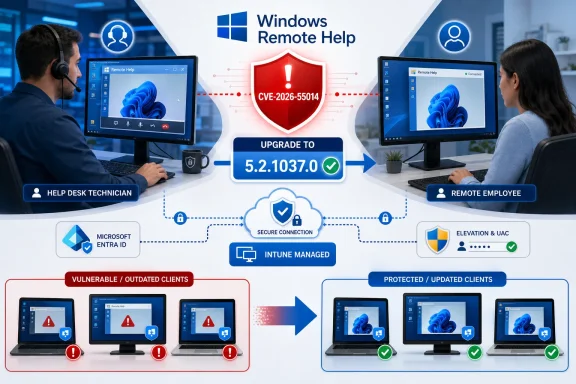 Remote Help’s Privileged Role Raises the Stakes
Windows Remote Help is Microsoft’s enterprise remote-support product for organizations using Microsoft Intune. It is separate from Quick Assist and Remote Desktop, and both the helper and the user receiving assistance normally authenticate with Microsoft Entra ID accounts belonging to the same organization.The product gives administrators controls that consumer remote-support tools do not provide, including Intune role-based access control, Conditional Access integration, compliance warnings, session monitoring, view-only access, and full-control sessions. Its elevation feature also lets an authorized helper interact with User Account Control prompts and enter administrative credentials on the remote device.
That privileged position explains why an access-control failure warrants prompt attention. An attacker who already has low-level access to a machine could reportedly exploit CVE-2026-55014 without convincing another user to click, approve, or open anything. Successful exploitation could then provide access to resources beyond those available to the attacker’s original account.
The CVSS vector is
CVSS:3.1/AV:L/AC:L/PR:L/UI:N/S:U/C:H/I:H/A:H. In practical terms, this is not a drive-by Internet compromise: the attacker needs local access and some existing authorization. It is instead a post-compromise escalation route, the kind of vulnerability that can help an intruder turn an ordinary user foothold into broader control of a workstation.The “scope unchanged” component means the security impact remains within the same authority boundary under the CVSS model. It does not mean the consequences are minor. Microsoft assigned high potential impact across data confidentiality, system integrity, and availability.
Version 5.2.1037.0 Is the Security Boundary
Microsoft’s affected-version data identifies Windows Remote Help 5.0.0.0 and later releases below 5.2.1037.0 as vulnerable. Version 5.2.1037.0 is therefore the minimum safe version listed in the CVE record.That build was already available before the July disclosure. The Microsoft Update Catalog lists Remote Help 5.2.1037.0 as last updated on June 3, 2026, while Microsoft’s June Intune release information characterized it as carrying general bug fixes and performance improvements. The later CVE publication now gives administrators a security reason to treat that client update as mandatory rather than merely a reliability upgrade.
Remote Help normally opts users into automatic updating, but enterprise deployment choices can interrupt that path. Microsoft’s deployment documentation allows administrators to disable automatic updates with the
enableAutoUpdates=0 installer option, and some organizations package Remote Help as a Win32 application or distribute it through the Enterprise App Catalog.Those environments should not assume the latest client has arrived simply because the update has been available for several weeks. Devices that are rarely connected, deployment groups with staged assignments, failed Win32 app detection rules, and machines excluded from Microsoft Update can all preserve older builds.
Microsoft says Remote Help can receive updates through Microsoft Update when configured appropriately. Otherwise, administrators must deploy a new package through the Enterprise App Catalog or package the installer as a Win32 app.
A focused response should include the following checks:
- Administrators should inventory
RemoteHelp.exeand flag every version lower than 5.2.1037.0. - Both helper workstations and devices receiving support should be examined because the application is installed at both ends of native Remote Help sessions.
- Organizations that disabled automatic updates should publish 5.2.1037.0 as a required deployment rather than leaving it available in Company Portal.
- Intune detection rules should compare the executable version against 5.2.1037.0 or later.
- Security teams should investigate unexpected privilege changes or elevated process launches on machines that ran an affected Remote Help build.
C:\Program Files\Remote Help\RemoteHelp.exe. Administrators can retrieve its file version with PowerShell:(Get-Item "$env:ProgramFiles\Remote Help\RemoteHelp.exe").VersionInfo.FileVersionFor a fleet-wide deployment, the important result is not simply whether Remote Help is installed. The compliance test must confirm that the installed version is greater than or equal to 5.2.1037.0.
Authentication Controls Limit Exposure, Not Impact
Remote Help’s existing security model creates meaningful barriers around CVE-2026-55014. The service uses Microsoft Entra authentication, Intune RBAC can restrict who may provide help or perform elevation, and Conditional Access can require multifactor authentication, compliant devices, approved locations, or other access conditions.Those controls can reduce the number of accounts and systems positioned to reach the vulnerable functionality. They do not repair an improper access-control condition inside an affected client, however. A compromised organizational account, malicious insider, or attacker who has already gained low-privileged local access may still satisfy the prerequisites reflected in Microsoft’s score.
Administrators should therefore review Remote Help permissions alongside the client update. Help-desk elevation rights should be limited to personnel who need them, stale helper assignments should be removed, and Remote Help session and Intune audit records should be retained for investigation.
Microsoft’s web-based Remote Help option can provide view-only assistance when a user cannot install the native client. The published affected-product range specifically identifies Windows Remote Help versions, but Microsoft has not provided enough public technical detail to determine whether particular session modes or roles eliminate exposure. Version remediation remains more dependable than trying to infer safety from configuration alone.
Sparse Detail Favors Fast Patching
CVE-2026-55014 is vendor-confirmed, but the disclosure does not yet expose enough information to reproduce the flaw or evaluate reliable compensating controls. The public record identifies CWE-284, Improper Access Control, but does not name a vulnerable service, permission check, executable component, or attack sequence.There is also no public proof of concept in Microsoft’s advisory, and the available CVE record does not establish that exploitation has been observed in the wild. That uncertainty should prevent alarmist claims, but it should not delay deployment: local privilege-escalation flaws are routinely combined with phishing, token theft, browser compromise, and other initial-access techniques.
For Intune administrators, the immediate milestone is straightforward. Remote Help 5.2.1037.0 has been available since June 3, 2026, and every remaining 5.0.x or 5.1.x installation now represents a known privilege-escalation exposure that should be removed from the fleet.
References
- Primary source: MSRC
Published: 2026-07-14T07:00:00-07:00
Security Update Guide - Microsoft Security Response Center
 msrc.microsoft.com
- Official source: learn.microsoft.com
Use Remote Help to Assist Users Authenticated by your Organization - Microsoft Intune | Microsoft Learn
With the Remote Help app, provide remote assistance to authenticated users who also run the Remote Help app.learn.microsoft.com - Related coverage: bighatgroup.com
Intune Remote Help Gets a Performance Upgrade — What IT Teams Should Know | Big Hat Group Inc.
Microsoft released Remote Help for Windows 5.2.1037.0 with performance improvements. What this means for helpdesk operations and the 2605 service release still rolling out.www.bighatgroup.com - Related coverage: systemcenterdudes.com
How to Configure Intune Remote Help (Step-by-Step Guide) - System Center Dudes
Complete deployment of Intune Remote Help, including licensing, configuration, app deployment, RBAC config, and common troubleshooting tips.www.systemcenterdudes.com
