

Microsoft published CVE-2026-58643, a Windows Admin Center spoofing vulnerability, on July 16, 2026. The initial Microsoft Security Response Center entry confirms the issue exists, but the public-facing material currently offers little technical detail beyond the product, impact category, and publication date—meaning administrators should treat it as a patch-validation and exposure-review task rather than assume a specific exploit path.
Windows Admin Center occupies a sensitive position in many environments: it is the browser-based management plane used to administer Windows Server hosts, clusters, Hyper-V, storage, certificates, services, and other infrastructure. A spoofing flaw in that interface does not automatically imply remote code execution or server takeover. It can, however, undermine the trust an administrator places in a management session, an on-screen prompt, a link, a page, or information displayed by the console.
Microsoft’s advisory was published at 7:00 a.m. Pacific time on July 16. As of publication, Microsoft has not publicly supplied the affected version range, CVSS severity, exploitability assessment, mitigation guidance, workaround, or a detailed vulnerability description in the material available for this entry. That lack of detail is important: it limits the ability of defenders to precisely prioritize the CVE against other July patching work, but it is not a reason to defer basic hardening around exposed management infrastructure.
Spoofing vulnerabilities are often underestimated because they do not carry the immediate gravity of a “remote code execution” label. In an administrative console, though, the security boundary is frequently human judgment. If an attacker can make a malicious destination, session state, alert, workflow, or action appear legitimate, the target is not merely a standard browser user—it may be someone with delegated or full administrative access to production servers.
That distinction makes Windows Admin Center a particularly consequential target. The software is routinely installed as a gateway on an administrator workstation or management server, then granted reach into numerous Windows Server systems through WinRM, PowerShell remoting, Remote Desktop, SMB, and related management protocols. An issue affecting the interface or its presentation layer can potentially be useful in phishing, credential capture, session abuse, or social-engineering chains, even if the vulnerability itself does not grant direct code execution.
The advisory’s use of “spoofing” should therefore be read narrowly but seriously. Microsoft has not said that CVE-2026-58643 permits an attacker to impersonate an administrator, bypass authentication, or alter a server configuration without authorization. It does mean that organizations should avoid treating the Windows Admin Center web interface as a harmless convenience layer. It is a privileged operational surface and should be managed accordingly.
For CVE-2026-58643, the practical conclusion is straightforward. Do not invent an attack scenario that Microsoft has not disclosed. There is no basis yet to claim that this is cross-site scripting, a certificate-validation problem, a malicious-link issue, or a gateway authentication flaw. Windows Admin Center has received spoofing fixes in the past involving web-facing behavior, but prior CVEs are not evidence of the root cause of this new one.
At the same time, a thin public description should not become a reason for operational inaction. Security teams can make useful decisions without knowing every implementation detail:
Microsoft’s Windows Admin Center team recently updated the installer to version 2.7.4 and described it as containing multiple security improvements. Administrators should check Microsoft’s current release material and the CVE’s affected-product table before declaring that build—or any earlier build—remediated for CVE-2026-58643. A release that includes broad security work is not necessarily an explicit fix for every newly published advisory.
The safest operational sequence is to inventory first, obtain Microsoft’s current supported installer or update package, validate it in a representative gateway environment, then deploy it under a defined maintenance window. Enterprises that operate Windows Admin Center gateways behind load balancers, use custom certificates, rely on Azure-connected extensions, or have constrained firewall rules should validate post-update access carefully. The management plane is too important to patch blindly, but it is also too important to leave unreviewed while waiting for more detail.
Administrators should also confirm that the update has not changed the gateway’s listening port, service identity, certificate binding, extension availability, or access-control configuration. A technically successful installation can still create an operational incident if the gateway becomes inaccessible during an outage response.
Where possible, Windows Admin Center should sit behind VPN or zero-trust access controls, use multifactor authentication where the identity architecture supports it, and limit inbound access to designated administrator devices or management subnets. Organizations should also avoid placing the gateway on a domain controller or other high-value server role unless there is an unavoidable operational reason. Separation does not eliminate a spoofing risk, but it limits the blast radius of a compromised or deceptive administrative session.
Logging deserves equal attention. Review sign-in events, Windows Admin Center gateway activity, reverse-proxy logs, and unusual management actions around exposed gateways. Security teams should be alert for unexpected administrator access from unfamiliar networks, repeated failed authentication, new gateway certificate warnings, suspicious links in IT service tickets, or reports that the management interface displayed unexpected prompts or redirected users.
These are not indicators unique to CVE-2026-58643. They are, however, the kinds of surrounding signals that matter when an attacker is trying to exploit trust in a privileged web-based management tool.
Until Microsoft expands the advisory, Windows Admin Center operators should treat this as a credible but incompletely characterized management-plane vulnerability. Inventory the gateways, restrict their exposure, validate the latest supported Windows Admin Center release, and watch the Microsoft Security Response Center entry for a revised affected-version table and remediation guidance.
Windows Admin Center occupies a sensitive position in many environments: it is the browser-based management plane used to administer Windows Server hosts, clusters, Hyper-V, storage, certificates, services, and other infrastructure. A spoofing flaw in that interface does not automatically imply remote code execution or server takeover. It can, however, undermine the trust an administrator places in a management session, an on-screen prompt, a link, a page, or information displayed by the console.
Microsoft’s advisory was published at 7:00 a.m. Pacific time on July 16. As of publication, Microsoft has not publicly supplied the affected version range, CVSS severity, exploitability assessment, mitigation guidance, workaround, or a detailed vulnerability description in the material available for this entry. That lack of detail is important: it limits the ability of defenders to precisely prioritize the CVE against other July patching work, but it is not a reason to defer basic hardening around exposed management infrastructure.
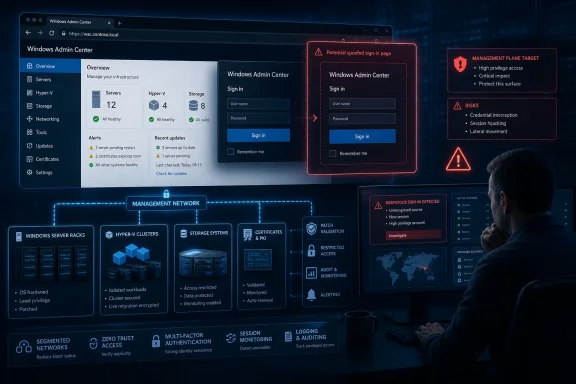 The Management Plane Is the Real Asset
Spoofing vulnerabilities are often underestimated because they do not carry the immediate gravity of a “remote code execution” label. In an administrative console, though, the security boundary is frequently human judgment. If an attacker can make a malicious destination, session state, alert, workflow, or action appear legitimate, the target is not merely a standard browser user—it may be someone with delegated or full administrative access to production servers.That distinction makes Windows Admin Center a particularly consequential target. The software is routinely installed as a gateway on an administrator workstation or management server, then granted reach into numerous Windows Server systems through WinRM, PowerShell remoting, Remote Desktop, SMB, and related management protocols. An issue affecting the interface or its presentation layer can potentially be useful in phishing, credential capture, session abuse, or social-engineering chains, even if the vulnerability itself does not grant direct code execution.
The advisory’s use of “spoofing” should therefore be read narrowly but seriously. Microsoft has not said that CVE-2026-58643 permits an attacker to impersonate an administrator, bypass authentication, or alter a server configuration without authorization. It does mean that organizations should avoid treating the Windows Admin Center web interface as a harmless convenience layer. It is a privileged operational surface and should be managed accordingly.
Sparse Disclosure Changes the Immediate Response
Microsoft’s Security Update Guide is the authoritative source for the CVE, and its entry contains a confidence-oriented explanation for the available technical information. That language is commonly associated with Microsoft’s exploitability and vulnerability-assessment data: it helps defenders distinguish between a confirmed issue with mature public technical detail and one where only a more limited description is available.For CVE-2026-58643, the practical conclusion is straightforward. Do not invent an attack scenario that Microsoft has not disclosed. There is no basis yet to claim that this is cross-site scripting, a certificate-validation problem, a malicious-link issue, or a gateway authentication flaw. Windows Admin Center has received spoofing fixes in the past involving web-facing behavior, but prior CVEs are not evidence of the root cause of this new one.
At the same time, a thin public description should not become a reason for operational inaction. Security teams can make useful decisions without knowing every implementation detail:
- Confirm which servers and administrator endpoints host Windows Admin Center gateways, including temporary management systems and lab deployments that may have been retained in production networks.
- Verify whether the gateway is reachable from the public internet, a broad corporate network segment, VPN users, or only a dedicated administrative network.
- Identify the installed Windows Admin Center version and preserve an inventory record before applying updates.
- Review which accounts and groups can sign in, particularly whether broad help-desk, server-operator, or domain-administrator memberships are unnecessarily permitted.
- Ensure administrators reach the service through an expected HTTPS name and trusted certificate rather than bookmarks, IP addresses, or unvalidated links distributed through tickets and email.
Updating Windows Admin Center Needs Its Own Change Window
Windows Admin Center is not patched through the same rhythm as Windows cumulative updates in every deployment. Depending on the installation method and role, remediation may require updating the Windows Admin Center gateway software itself, rather than simply waiting for a Windows Server monthly cumulative update to arrive through WSUS or Windows Update for Business.Microsoft’s Windows Admin Center team recently updated the installer to version 2.7.4 and described it as containing multiple security improvements. Administrators should check Microsoft’s current release material and the CVE’s affected-product table before declaring that build—or any earlier build—remediated for CVE-2026-58643. A release that includes broad security work is not necessarily an explicit fix for every newly published advisory.
The safest operational sequence is to inventory first, obtain Microsoft’s current supported installer or update package, validate it in a representative gateway environment, then deploy it under a defined maintenance window. Enterprises that operate Windows Admin Center gateways behind load balancers, use custom certificates, rely on Azure-connected extensions, or have constrained firewall rules should validate post-update access carefully. The management plane is too important to patch blindly, but it is also too important to leave unreviewed while waiting for more detail.
Administrators should also confirm that the update has not changed the gateway’s listening port, service identity, certificate binding, extension availability, or access-control configuration. A technically successful installation can still create an operational incident if the gateway becomes inaccessible during an outage response.
Exposure Reduction Is Useful Even Before a Patch Mapping Arrives
The best immediate mitigation is to reduce who can reach and use the Windows Admin Center gateway. A gateway that is directly internet-accessible, exposed through broad reverse-proxy rules, or reachable by a large population of unprivileged users carries substantially more risk than one restricted to a segmented administrative network.Where possible, Windows Admin Center should sit behind VPN or zero-trust access controls, use multifactor authentication where the identity architecture supports it, and limit inbound access to designated administrator devices or management subnets. Organizations should also avoid placing the gateway on a domain controller or other high-value server role unless there is an unavoidable operational reason. Separation does not eliminate a spoofing risk, but it limits the blast radius of a compromised or deceptive administrative session.
Logging deserves equal attention. Review sign-in events, Windows Admin Center gateway activity, reverse-proxy logs, and unusual management actions around exposed gateways. Security teams should be alert for unexpected administrator access from unfamiliar networks, repeated failed authentication, new gateway certificate warnings, suspicious links in IT service tickets, or reports that the management interface displayed unexpected prompts or redirected users.
These are not indicators unique to CVE-2026-58643. They are, however, the kinds of surrounding signals that matter when an attacker is trying to exploit trust in a privileged web-based management tool.
The Next Microsoft Update Must Fill in the Missing Fields
CVE-2026-58643 is now part of the July 2026 security landscape, but the initial disclosure leaves the most important deployment questions unresolved: which Windows Admin Center versions are affected, what update fixes the flaw, whether exploitation requires authentication or user interaction, and whether Microsoft has observed exploitation in the wild.Until Microsoft expands the advisory, Windows Admin Center operators should treat this as a credible but incompletely characterized management-plane vulnerability. Inventory the gateways, restrict their exposure, validate the latest supported Windows Admin Center release, and watch the Microsoft Security Response Center entry for a revised affected-version table and remediation guidance.
References
- Primary source: MSRC
Published: 2026-07-16T07:00:00-07:00
Loading…
msrc.microsoft.com - Related coverage: deepaegis.io
Loading…
deepaegis.io - Related coverage: windowsforum.com
Loading…
windowsforum.com - Related coverage: cve.circl.lu
Loading…
cve.circl.lu - Official source: learn.microsoft.com
- Official source: techcommunity.microsoft.com
Loading…
techcommunity.microsoft.com
