

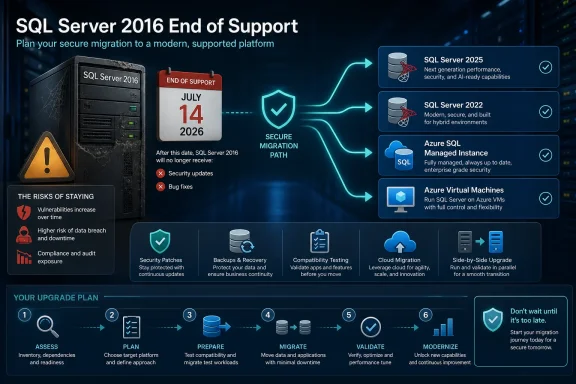
SQL Server 2016 is now out of extended support, closing its standard 10-year servicing window on July 14, 2026. For organizations still running the 13.x database engine, the immediate consequence is not an outage: existing instances and applications will continue to run. The change is that regular security servicing and Microsoft support have ended, making every unpatched vulnerability and operational issue harder to absorb.
Neowin highlighted the deadline this week, including Microsoft’s acknowledgement that SQL Server 2016 remains widely used in enterprise environments. Microsoft’s Lifecycle documentation confirms the chronology: SQL Server 2016 launched on June 1, 2016, left mainstream support on July 13, 2021, and reached its extended-support end date on July 14, 2026.
That distinction matters. A stable, long-lived database server is often exactly what businesses want, particularly when it supports a line-of-business application that has not changed in years. But stability at the application layer no longer means a supported platform beneath it.
Microsoft’s July servicing releases effectively mark the end of the normal patch track for SQL Server 2016. Administrators should confirm whether their estates are on SQL Server 2016 Service Pack 3 and have received the final applicable General Distribution Release update, rather than treating the end-of-support date as a future planning item.
The more difficult issue is that a SQL Server instance is rarely an isolated product. It is typically tied to a Windows Server release, a version of .NET, SQL Server Agent jobs, Reporting Services, Integration Services packages, backup tooling, monitoring agents, application connection strings, third-party drivers, and a database compatibility level that may have remained unchanged for a decade.
That surrounding stack can turn a supposedly simple upgrade into a multi-team project. A direct database-engine upgrade can be technically supported while the host operating system, vendor application, or legacy integration is not. Microsoft’s compatibility matrix, for example, does not support SQL Server 2016 on Windows Server 2022, while newer SQL Server releases are supported there. Organizations that deferred both server and database modernization may therefore face two linked migrations rather than one.
The practical risk is not that SQL Server 2016 will abruptly stop processing transactions. It is that the organization will be left with an unsupported database engine when the next remotely exploitable flaw, authentication issue, or reliability problem appears. For regulated environments, that can also create an audit and cyber-insurance problem before it becomes a technical failure.
There are important limits. Microsoft says the program provides only Critical security updates when such updates are available. It does not restore general product support, deliver feature work, provide non-security hotfixes, or turn the old release back into a fully supported platform. It is explicitly positioned as a bridge while customers upgrade or migrate.
For SQL Server 2016, ESUs can be managed across several deployment models, including Azure Arc-enabled SQL Server installations and SQL Server on Azure Virtual Machines. That gives infrastructure teams a practical way to cover on-premises and other-cloud deployments, but it does not remove the need for asset discovery and licensing review.
Organizations should also avoid assuming that buying ESUs later will save money. Microsoft’s SQL Server ESU guidance says billing may include a charge back to the start of the applicable ESU period when customers subscribe after the original support deadline. This is a contingency service, not a patch subscription that can be casually activated after an incident.
The first action for a SQL Server team should be a clean inventory:
The good news is that Microsoft documents a direct in-place upgrade path from SQL Server 2016 SP3 or later to SQL Server 2025. That can reduce the number of version hops and avoid a temporary SQL Server 2019 or 2022 landing zone. It does not mean that an in-place upgrade is always the lowest-risk strategy.
An in-place upgrade replaces the SQL Server binaries on the existing host and upgrades system and user databases in place. It can be appropriate for a well-understood standalone server with a tested rollback plan. But it also concentrates risk: a failed upgrade, unexpected application behavior, or host-level dependency can take the production service down at the moment the organization has the least room to troubleshoot.
A side-by-side migration is often safer for critical workloads. It allows teams to build a new SQL Server 2025 or SQL Server 2022 instance, transfer databases and logins, test application behavior, rehearse cutover, and retain the old environment for rollback. The price is more planning, capacity, and synchronization work.
Microsoft’s current SQL Server Management Studio migration component can run an Upgrade Assessment that flags breaking changes, behavior changes, and deprecated features. That assessment should be treated as the start of the project, not its sign-off. Real-world validation still requires application testing under the intended database compatibility level, performance baselining, failover testing, and a review of security features such as Transparent Data Encryption certificates and service-account permissions.
SQL Server on Azure VMs is closest to a lift-and-shift move. The organization retains control of the operating system and SQL Server instance, making it useful when a workload depends on instance-level features, a particular file layout, third-party agents, or legacy application assumptions. It can reduce datacenter hardware pressure, but it does not automatically remove the responsibility for SQL administration, architecture, performance tuning, and application compatibility.
Azure SQL Managed Instance is more of a platform modernization move. It can reduce operating-system and instance-management burden, but its feature set and operational model need a careful review. An application that relies on SQL Server Agent behavior, linked servers, CLR assemblies, file-system access, cross-database dependencies, or a specialized backup process may require redesign rather than a simple migration.
That is why Microsoft’s own migration guidance emphasizes assessment before selecting a target. A workload that looks like a candidate for cloud migration on a spreadsheet may prove to be an easier upgrade to SQL Server 2025 on a modern Windows Server host. Conversely, a lightly customized transactional database may be an ideal opportunity to retire infrastructure that the IT team no longer wants to manage.
For the many enterprises still depending on the 2016 release, the sensible near-term milestone is not merely purchasing an ESU subscription. It is producing a named, tested migration plan for every instance before the first ESU year ends on July 13, 2027.
Neowin highlighted the deadline this week, including Microsoft’s acknowledgement that SQL Server 2016 remains widely used in enterprise environments. Microsoft’s Lifecycle documentation confirms the chronology: SQL Server 2016 launched on June 1, 2016, left mainstream support on July 13, 2021, and reached its extended-support end date on July 14, 2026.
That distinction matters. A stable, long-lived database server is often exactly what businesses want, particularly when it supports a line-of-business application that has not changed in years. But stability at the application layer no longer means a supported platform beneath it.
 The Last Regular Updates Have Already Landed
Microsoft’s July servicing releases effectively mark the end of the normal patch track for SQL Server 2016. Administrators should confirm whether their estates are on SQL Server 2016 Service Pack 3 and have received the final applicable General Distribution Release update, rather than treating the end-of-support date as a future planning item.The more difficult issue is that a SQL Server instance is rarely an isolated product. It is typically tied to a Windows Server release, a version of .NET, SQL Server Agent jobs, Reporting Services, Integration Services packages, backup tooling, monitoring agents, application connection strings, third-party drivers, and a database compatibility level that may have remained unchanged for a decade.
That surrounding stack can turn a supposedly simple upgrade into a multi-team project. A direct database-engine upgrade can be technically supported while the host operating system, vendor application, or legacy integration is not. Microsoft’s compatibility matrix, for example, does not support SQL Server 2016 on Windows Server 2022, while newer SQL Server releases are supported there. Organizations that deferred both server and database modernization may therefore face two linked migrations rather than one.
The practical risk is not that SQL Server 2016 will abruptly stop processing transactions. It is that the organization will be left with an unsupported database engine when the next remotely exploitable flaw, authentication issue, or reliability problem appears. For regulated environments, that can also create an audit and cyber-insurance problem before it becomes a technical failure.
Extended Security Updates Buy Time, Not Support
Microsoft’s immediate off-ramp for organizations that cannot migrate on schedule is the Extended Security Updates program. SQL Server 2016 ESUs began on July 15, 2026 and can run for up to three years, through July 17, 2029.There are important limits. Microsoft says the program provides only Critical security updates when such updates are available. It does not restore general product support, deliver feature work, provide non-security hotfixes, or turn the old release back into a fully supported platform. It is explicitly positioned as a bridge while customers upgrade or migrate.
For SQL Server 2016, ESUs can be managed across several deployment models, including Azure Arc-enabled SQL Server installations and SQL Server on Azure Virtual Machines. That gives infrastructure teams a practical way to cover on-premises and other-cloud deployments, but it does not remove the need for asset discovery and licensing review.
Organizations should also avoid assuming that buying ESUs later will save money. Microsoft’s SQL Server ESU guidance says billing may include a charge back to the start of the applicable ESU period when customers subscribe after the original support deadline. This is a contingency service, not a patch subscription that can be casually activated after an incident.
The first action for a SQL Server team should be a clean inventory:
- Identify every SQL Server 2016 instance, including Express editions embedded in applications and forgotten reporting or test servers.
- Record the edition, Service Pack level, build number, host operating system, database compatibility level, and business owner for each instance.
- Determine whether every production instance has either an approved modernization path or valid ESU coverage.
- Verify backups, restore tests, high-availability configuration, SQL Server Agent jobs, and monitoring before any migration window is scheduled.
SQL Server 2025 Is the Straightforward Destination—With Caveats
Microsoft’s preferred on-premises destination is now SQL Server 2025, which reached general availability in November 2025. SQL Server 2022 remains a supported alternative for organizations with application certifications or deployment standards built around the previous release.The good news is that Microsoft documents a direct in-place upgrade path from SQL Server 2016 SP3 or later to SQL Server 2025. That can reduce the number of version hops and avoid a temporary SQL Server 2019 or 2022 landing zone. It does not mean that an in-place upgrade is always the lowest-risk strategy.
An in-place upgrade replaces the SQL Server binaries on the existing host and upgrades system and user databases in place. It can be appropriate for a well-understood standalone server with a tested rollback plan. But it also concentrates risk: a failed upgrade, unexpected application behavior, or host-level dependency can take the production service down at the moment the organization has the least room to troubleshoot.
A side-by-side migration is often safer for critical workloads. It allows teams to build a new SQL Server 2025 or SQL Server 2022 instance, transfer databases and logins, test application behavior, rehearse cutover, and retain the old environment for rollback. The price is more planning, capacity, and synchronization work.
Microsoft’s current SQL Server Management Studio migration component can run an Upgrade Assessment that flags breaking changes, behavior changes, and deprecated features. That assessment should be treated as the start of the project, not its sign-off. Real-world validation still requires application testing under the intended database compatibility level, performance baselining, failover testing, and a review of security features such as Transparent Data Encryption certificates and service-account permissions.
Cloud Migration Is Not a Lift-and-Shift Synonym
Microsoft is also steering customers toward Azure SQL Managed Instance or SQL Server on Azure Virtual Machines. Those options solve different problems.SQL Server on Azure VMs is closest to a lift-and-shift move. The organization retains control of the operating system and SQL Server instance, making it useful when a workload depends on instance-level features, a particular file layout, third-party agents, or legacy application assumptions. It can reduce datacenter hardware pressure, but it does not automatically remove the responsibility for SQL administration, architecture, performance tuning, and application compatibility.
Azure SQL Managed Instance is more of a platform modernization move. It can reduce operating-system and instance-management burden, but its feature set and operational model need a careful review. An application that relies on SQL Server Agent behavior, linked servers, CLR assemblies, file-system access, cross-database dependencies, or a specialized backup process may require redesign rather than a simple migration.
That is why Microsoft’s own migration guidance emphasizes assessment before selecting a target. A workload that looks like a candidate for cloud migration on a spreadsheet may prove to be an easier upgrade to SQL Server 2025 on a modern Windows Server host. Conversely, a lightly customized transactional database may be an ideal opportunity to retire infrastructure that the IT team no longer wants to manage.
The Deadline Has Changed the Default Answer
The key change after July 14 is that keeping SQL Server 2016 untouched is no longer a neutral decision. It is now a deliberate acceptance of unsupported software, or a paid decision to use ESUs while a migration is completed.For the many enterprises still depending on the 2016 release, the sensible near-term milestone is not merely purchasing an ESU subscription. It is producing a named, tested migration plan for every instance before the first ESU year ends on July 13, 2027.
References
- Primary source: Neowin
Published: 2026-07-18T06:14:01+00:00
Microsoft ends support for SQL Server 2016, but admits that it is still "heavily deployed" | Neowin
Still relying on SQL Server 2016? Microsoft's latest guidance outlines the options available as security risks start piling up. www.neowin.net
- Official source: learn.microsoft.com
SQL Server 2016 - Microsoft Lifecycle | Microsoft Learn
SQL Server 2016 follows the Fixed Lifecycle Policy.learn.microsoft.com - Official source: techcommunity.microsoft.com
- Official source: cdn-dynmedia-1.microsoft.com
- Official source: microsoft.com
