

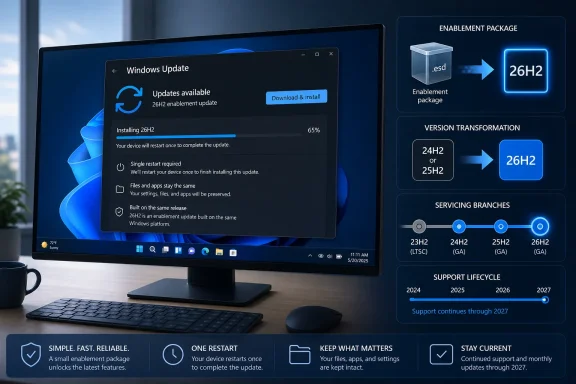
Windows 11 version 26H2 is expected to arrive in the second half of 2026 as a fast enablement-package update for most PCs already on Windows 11 24H2 or 25H2, rather than another full operating-system replacement. The practical payoff is simple: the annual version change should take one restart, preserve the existing installation, and reset the support clock—without delivering an exclusive bundle of headline features on day one.
Windows Central first outlined the release’s unusual positioning, and Microsoft’s own Windows IT Pro documentation now confirms the important technical point: Windows 11 24H2, 25H2, and 26H2 share a servicing branch. That makes 26H2 less like the transition from Windows 11 23H2 to 24H2, and more like flipping a carefully managed switch on an already-installed code base.
Here are the details that matter before deciding when—and how—to move.
The naming is potentially confusing because Windows 11 version 26H1 already exists. Microsoft released 26H1 on February 10, 2026, but it is a separate platform release intended for certain new devices, not a conventional feature update for existing 24H2 or 25H2 installations.
Microsoft lists 26H1 under build 28000, while the 26H2 Insider track uses the 26300 build series. The difference is not cosmetic: 26H1 is built on a newer platform for specific hardware, whereas 26H2 remains tied to the Germanium servicing branch used by Windows 11 24H2 and 25H2.
For the vast majority of existing Windows PCs, 26H2—not 26H1—is the version to watch this fall.
Microsoft’s shared-servicing guidance says that devices on either 24H2 or 25H2 can move to 26H2 through an enablement package, or eKB. These packages are deliberately small because the underlying components are already installed through cumulative updates; the eKB activates the next version state and adjusts the build identity.
That means a PC on build 26100.x or 26200.x should ultimately be able to advance to the 26300 series without downloading a multi-gigabyte Windows image. The experience should resemble installing a monthly cumulative update: download, restart, return to work.
There is an important caveat. The small package does not mean “nothing changed.” Version labels determine servicing eligibility, deployment targeting, compatibility reporting, and support lifecycle. For administrators, those are operationally meaningful changes even if the desktop appears unchanged.
Microsoft has increasingly shipped Windows capabilities through monthly updates, Controlled Feature Rollouts, and server-side activation rather than holding every change for a once-a-year release. Version 26H2 is the logical result: it is a support and servicing milestone first, not a traditional feature-drop moment.
That does not mean Windows development has stopped. Insider builds in the 26300 range are already carrying fixes and experiments. But a feature appearing during the 26H2 development cycle does not automatically make it a 26H2-exclusive feature, and it may arrive on 25H2 or 24H2 first—or only reach subsets of devices initially.
For enthusiasts, that distinction matters. Follow build notes and monthly update documentation, not just the number shown by
The situation is different for 24H2. Windows 11 24H2 Home and Pro editions reach end of servicing on October 13, 2026. Organizations still operating 24H2 should treat 26H2 as a convenient migration target, but they should not wait for its eventual broad rollout without a contingency plan. Windows 11 25H2 is already available and carries support to October 2027 for consumer and business Pro editions.
Microsoft’s standard Windows 11 lifecycle gives Home and Pro releases 24 months of support from general availability, while Enterprise and Education releases receive 36 months. Assuming the company maintains that cadence for 26H2, the new version should extend support by roughly another year beyond 25H2’s timetable.
In other words, 26H2 is an easy lifecycle reset, not an emergency patch for machines already on 25H2.
The familiar Windows 11 baseline remains relevant: a supported 64-bit CPU or SoC with two or more cores, 4GB of RAM, 64GB of storage, UEFI firmware with Secure Boot capability, TPM 2.0, and DirectX 12-compatible graphics with a WDDM 2.0 driver.
That does not eliminate compatibility risk. Driver failures, application conflicts, firmware oddities, security software, and bespoke management agents are precisely why Microsoft continues to use safeguard holds and phased distribution. Identical platform roots reduce upgrade complexity, but they do not make every device configuration identical.
A missing 26H2 offer in Windows Update will not necessarily indicate that a PC is unsupported. It may simply be outside the current rollout wave or subject to a compatibility safeguard hold.
For unmanaged home PCs, patience is usually the sensible approach. For managed environments, the right response is more deliberate: validate 26H2 with representative hardware, line-of-business applications, VPN and endpoint-security tooling, print drivers, and management policies before broad deployment. The eKB’s small size reduces download and installation disruption, but it does not replace change control.
Microsoft has not announced a final general-availability date for Windows 11 26H2. What is already clear is that the 26300-series release will make the next annual upgrade unusually uneventful for 24H2 and 25H2 users—which may be exactly the point.
Windows Central first outlined the release’s unusual positioning, and Microsoft’s own Windows IT Pro documentation now confirms the important technical point: Windows 11 24H2, 25H2, and 26H2 share a servicing branch. That makes 26H2 less like the transition from Windows 11 23H2 to 24H2, and more like flipping a carefully managed switch on an already-installed code base.
Here are the details that matter before deciding when—and how—to move.
 26H2 Is Not the Same Thing as 26H1
The naming is potentially confusing because Windows 11 version 26H1 already exists. Microsoft released 26H1 on February 10, 2026, but it is a separate platform release intended for certain new devices, not a conventional feature update for existing 24H2 or 25H2 installations.Microsoft lists 26H1 under build 28000, while the 26H2 Insider track uses the 26300 build series. The difference is not cosmetic: 26H1 is built on a newer platform for specific hardware, whereas 26H2 remains tied to the Germanium servicing branch used by Windows 11 24H2 and 25H2.
For the vast majority of existing Windows PCs, 26H2—not 26H1—is the version to watch this fall.
The Version Number Changes More Than the Desktop
A new Windows version traditionally signals a fresh underlying platform and a long in-place upgrade. That was true for Windows 11 24H2, which required a full OS swap for machines coming from 23H2. It will not be true for 26H2 on supported 24H2 and 25H2 systems.Microsoft’s shared-servicing guidance says that devices on either 24H2 or 25H2 can move to 26H2 through an enablement package, or eKB. These packages are deliberately small because the underlying components are already installed through cumulative updates; the eKB activates the next version state and adjusts the build identity.
That means a PC on build 26100.x or 26200.x should ultimately be able to advance to the 26300 series without downloading a multi-gigabyte Windows image. The experience should resemble installing a monthly cumulative update: download, restart, return to work.
There is an important caveat. The small package does not mean “nothing changed.” Version labels determine servicing eligibility, deployment targeting, compatibility reporting, and support lifecycle. For administrators, those are operationally meaningful changes even if the desktop appears unchanged.
Do Not Expect a 26H2-Only Feature Wave
Windows 11 26H2 will share feature parity with 25H2, and Microsoft’s servicing model extends that relationship back to 24H2. In plain language, users should not expect to install 26H2 and suddenly discover a redesigned Start menu, an exclusive File Explorer overhaul, or a new AI platform unavailable to the previous release.Microsoft has increasingly shipped Windows capabilities through monthly updates, Controlled Feature Rollouts, and server-side activation rather than holding every change for a once-a-year release. Version 26H2 is the logical result: it is a support and servicing milestone first, not a traditional feature-drop moment.
That does not mean Windows development has stopped. Insider builds in the 26300 range are already carrying fixes and experiments. But a feature appearing during the 26H2 development cycle does not automatically make it a 26H2-exclusive feature, and it may arrive on 25H2 or 24H2 first—or only reach subsets of devices initially.
For enthusiasts, that distinction matters. Follow build notes and monthly update documentation, not just the number shown by
winver.Your Current Version Determines the Upgrade Experience
The cleanest path will be through Windows Update, but the installation method changes based on what is installed today.- PCs on Windows 11 24H2 or 25H2 should receive 26H2 as an enablement-package upgrade once Microsoft offers it to their hardware configuration.
- PCs on Windows 11 23H2, 22H2, or earlier Windows 11 releases will require a full in-place feature update because those releases do not share the 24H2/25H2/26H2 servicing branch.
- Windows 10 PCs that meet Windows 11’s requirements can upgrade directly to the latest supported Windows 11 release offered to them; they will not need to step through every interim Windows 11 version.
- Using an ISO file, Installation Assistant, or installation media can still trigger a larger in-place reinstall even on a 24H2 or 25H2 PC. Files, applications, and settings can remain intact, but it is a longer route than accepting the enablement package through Windows Update.
Support Is the Main Reason to Move
Windows 11 25H2 Home and Pro editions remain supported until October 12, 2027. Enterprise and Education editions run through October 10, 2028. Therefore, there is no immediate security-driven need for a fully patched 25H2 device to jump to 26H2 the instant it appears.The situation is different for 24H2. Windows 11 24H2 Home and Pro editions reach end of servicing on October 13, 2026. Organizations still operating 24H2 should treat 26H2 as a convenient migration target, but they should not wait for its eventual broad rollout without a contingency plan. Windows 11 25H2 is already available and carries support to October 2027 for consumer and business Pro editions.
Microsoft’s standard Windows 11 lifecycle gives Home and Pro releases 24 months of support from general availability, while Enterprise and Education releases receive 36 months. Assuming the company maintains that cadence for 26H2, the new version should extend support by roughly another year beyond 25H2’s timetable.
In other words, 26H2 is an easy lifecycle reset, not an emergency patch for machines already on 25H2.
Hardware Requirements Should Stay Put
Nothing in Microsoft’s current documentation suggests that 26H2 will introduce a fresh set of minimum hardware requirements for the 24H2 and 25H2 population. A PC capable of running those releases should be able to run 26H2 through the enablement path.The familiar Windows 11 baseline remains relevant: a supported 64-bit CPU or SoC with two or more cores, 4GB of RAM, 64GB of storage, UEFI firmware with Secure Boot capability, TPM 2.0, and DirectX 12-compatible graphics with a WDDM 2.0 driver.
That does not eliminate compatibility risk. Driver failures, application conflicts, firmware oddities, security software, and bespoke management agents are precisely why Microsoft continues to use safeguard holds and phased distribution. Identical platform roots reduce upgrade complexity, but they do not make every device configuration identical.
A Small Update Can Still Arrive Slowly
Microsoft will almost certainly use a measured rollout for 26H2 rather than expose the update to every eligible device on release day. Its 25H2 launch followed that pattern, initially favoring eligible systems whose users had enabled the “Get the latest updates as soon as they’re available” toggle, then expanding availability while monitoring quality signals.A missing 26H2 offer in Windows Update will not necessarily indicate that a PC is unsupported. It may simply be outside the current rollout wave or subject to a compatibility safeguard hold.
For unmanaged home PCs, patience is usually the sensible approach. For managed environments, the right response is more deliberate: validate 26H2 with representative hardware, line-of-business applications, VPN and endpoint-security tooling, print drivers, and management policies before broad deployment. The eKB’s small size reduces download and installation disruption, but it does not replace change control.
Microsoft has not announced a final general-availability date for Windows 11 26H2. What is already clear is that the 26300-series release will make the next annual upgrade unusually uneventful for 24H2 and 25H2 users—which may be exactly the point.
References
- Primary source: Windows Central
Published: 2026-07-19T13:43:12+00:00
Windows 11's big 2026 update is almost here, and these 10 things you need to know before upgrading could save you time and frustration | Windows Central
Windows 11 2026 (26H2) Update looks like a new version, but it follows Microsoft's newer approach of smaller, faster upgrades.www.windowscentral.com - Official source: learn.microsoft.com
What's new in Windows 11, version 24H2 for IT pros | Microsoft Learn
Learn more about what's new in Windows 11 version 24H2, including servicing updates, Windows Subsystem for Linux, the latest CSPs, and more.learn.microsoft.com - Official source: blogs.windows.com
Releasing Windows 11, version 25H2 to the Release Preview Channel
Hello Windows Insiders! Today, we are making this year’s annual feature update Windows 11, version 25H2 (Build 26200.5074) available in the Release Preview Channel for customers to preview ahead of general availability later thblogs.windows.com
