

For a departed employee’s OneDrive, relicense first when the Entra ID identity still exists and the files are needed immediately; move active business material to SharePoint when it has a continuing team owner; use paid archive only when preservation is justified and its tenant-wide billing effect is understood; and delete content that has no legal, operational, or retention value. Microsoft’s 93-day rule turns license reclamation from a routine cost-control task into a mandatory data-disposition decision.
Microsoft’s documented lifecycle is straightforward but unforgiving: an unlicensed OneDrive for Business account becomes read-only on day 60 and is archived on day 93. Once archived, its files cannot be viewed, downloaded, or edited through normal OneDrive access. The more important distinction for IT is not day 60 versus day 93. It is whether the former employee still exists in Microsoft Entra ID when someone eventually needs the files.
Microsoft’s June 12, 2026 Message Center update adds a longer countdown. Starting in July 2026, unpaid unlicensed OneDrives enter a staged lifecycle that can place their data at risk of deletion after up to 12 cumulative months of nonpayment; the deletion-risk phase begins in July 2027. That makes “we can deal with it later” an increasingly expensive and fragile offboarding policy.
License removal and user deletion are separate administrative actions, yet offboarding processes often collapse them into a single step. That is the mistake that determines whether an archived OneDrive can be restored with a license assignment or becomes a migration-and-billing problem.
When the user remains in Microsoft Entra ID, assigning a valid license can restore the archived OneDrive. Microsoft says automatic reactivation can take up to 48 hours and does not require an archive-reactivation fee. For a manager who needs a former employee’s project files, customer correspondence, or handoff documents, that makes relicensing the least disruptive recovery path.
When the identity has been deleted from Entra ID, relicensing is no longer an option. The OneDrive cannot be attached to a newly restored business need simply by buying or reassigning a license. Microsoft’s guidance is to move actively needed content to SharePoint or to an active, licensed OneDrive account.
That distinction should be explicit in every departure ticket:
The table also exposes a common false economy. Removing licenses quickly can look efficient because it lowers active-seat costs. But an organization that neither transfers essential work nor makes a disposition decision may later face a much worse choice: restore a still-existing user, fund archive billing, or discover that the user deletion path has eliminated relicensing altogether.
WindowsForum’s earlier coverage of unlicensed OneDrive archiving focused on the approaching enforcement timeline. The practical update is that the clock is now an offboarding control: every former employee needs a named owner, a destination, or an approved deletion outcome before day 93.
Microsoft documents a $0.60 per GB reactivation charge and a $0.05 per GB per month storage charge for unlicensed accounts archived longer than 93 days. The immediate recovery request may involve one account, but enabling billing for unlicensed OneDrive accounts changes the cost posture for unlicensed archived storage. Administrators should therefore inventory the broader population before turning the feature on.
The practical calculation is not merely, “How large is this one OneDrive?” It is, “How much unlicensed OneDrive data is already beyond the archive threshold, and who has approved its continued preservation?” A small emergency recovery can expose a sizable recurring storage commitment if the tenant has accumulated years of departed-user content.
Archive is defensible when all of the following are true:
A useful departed-user inventory needs only a few fields, but it must distinguish account state from data value:
The workflow should also separate emergency restoration from policy. If a manager needs a file on day 94 and the Entra ID identity remains, relicensing is the fastest recovery route. But the follow-up task should be to transfer or dispose of the content, not to leave a license permanently assigned to an account whose employee has left.
At day 93, normal OneDrive access is no longer available. That changes the conversation from “Can someone copy the folder?” to “Does the user still exist, is archive billing enabled, and what is the cost to reactivate?” Those are materially different questions, with different owners and approvals.
Microsoft’s 12-month unpaid lifecycle adds another edge case: archive is not identical to indefinite preservation. Organizations that decide to pay for archive should maintain payment and ownership controls. Organizations that do not intend to pay should not let content drift there accidentally.
The immediate task for Microsoft 365 administrators is to add a OneDrive disposition decision to every offboarding workflow before the license is removed or the Entra ID identity is deleted. By July 2027, when the unpaid deletion-risk phase begins, organizations that have not done that work will be managing data loss and billing exposure at the same time.
Microsoft’s documented lifecycle is straightforward but unforgiving: an unlicensed OneDrive for Business account becomes read-only on day 60 and is archived on day 93. Once archived, its files cannot be viewed, downloaded, or edited through normal OneDrive access. The more important distinction for IT is not day 60 versus day 93. It is whether the former employee still exists in Microsoft Entra ID when someone eventually needs the files.
Microsoft’s June 12, 2026 Message Center update adds a longer countdown. Starting in July 2026, unpaid unlicensed OneDrives enter a staged lifecycle that can place their data at risk of deletion after up to 12 cumulative months of nonpayment; the deletion-risk phase begins in July 2027. That makes “we can deal with it later” an increasingly expensive and fragile offboarding policy.
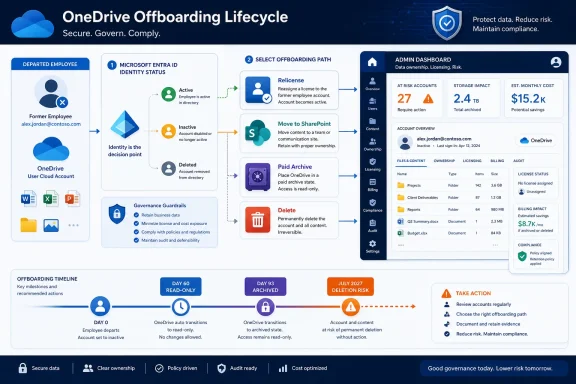 The former employee’s identity determines the fastest exit
License removal and user deletion are separate administrative actions, yet offboarding processes often collapse them into a single step. That is the mistake that determines whether an archived OneDrive can be restored with a license assignment or becomes a migration-and-billing problem.When the user remains in Microsoft Entra ID, assigning a valid license can restore the archived OneDrive. Microsoft says automatic reactivation can take up to 48 hours and does not require an archive-reactivation fee. For a manager who needs a former employee’s project files, customer correspondence, or handoff documents, that makes relicensing the least disruptive recovery path.
When the identity has been deleted from Entra ID, relicensing is no longer an option. The OneDrive cannot be attached to a newly restored business need simply by buying or reassigning a license. Microsoft’s guidance is to move actively needed content to SharePoint or to an active, licensed OneDrive account.
That distinction should be explicit in every departure ticket:
- Confirm whether the employee’s Entra ID object still exists before removing or attempting to restore access to OneDrive.
- Identify whether the files are personally owned work-in-progress, shared team records, or material with no continuing business purpose.
- If the identity exists and urgent access is needed, assign a valid license and allow up to 48 hours for automatic reactivation.
- If the identity no longer exists, treat the content as a transfer or archive decision rather than a relicensing request.
- Record an accountable owner for anything moved to SharePoint or another active OneDrive account.
- Delete data that is no longer required, rather than allowing unowned OneDrive storage to become a permanent paid archive.
The decision matrix: relicense, archive, transfer, or delete
The 93-day deadline is best handled as a four-way decision, not as a generic retention setting.| Business condition | Preferred action | Why it fits | Main caution |
|---|---|---|---|
| Files are urgently needed and the Entra ID identity still exists. | Relicense the user. | Microsoft can automatically reactivate the archived OneDrive within up to 48 hours, with no archive-reactivation fee. | This restores the former user’s storage context; it is not a substitute for assigning a permanent business owner. |
| Files remain useful to a team or business process. | Move them to SharePoint or an active licensed OneDrive. | The content gains an active owner and is no longer stranded behind a former employee’s account. | Move only what is actually needed and establish ownership before treating the transfer as complete. |
| The organization must preserve content but does not need ordinary OneDrive access. | Use Microsoft 365 Archive with pay-as-you-go billing. | Archive can be defensible for data that must remain retained but is rarely accessed. | Billing is not a one-file or one-user convenience switch; enabling it has broader cost consequences for unlicensed archived storage. |
| The content has no operational, legal, or retention value. | Delete it under the organization’s approved disposition process. | Deletion prevents dormant data and archive charges from becoming an unmanaged liability. | Confirm that no requirement to preserve the material applies before deletion. |
WindowsForum’s earlier coverage of unlicensed OneDrive archiving focused on the approaching enforcement timeline. The practical update is that the clock is now an offboarding control: every former employee needs a named owner, a destination, or an approved deletion outcome before day 93.
Archive billing is a tenant decision, not a one-off recovery button
Microsoft 365 Archive is appropriate when preservation is intentional, access is exceptional, and the organization accepts the associated pay-as-you-go model. It is not the automatic best answer when one manager asks for one former employee’s files.Microsoft documents a $0.60 per GB reactivation charge and a $0.05 per GB per month storage charge for unlicensed accounts archived longer than 93 days. The immediate recovery request may involve one account, but enabling billing for unlicensed OneDrive accounts changes the cost posture for unlicensed archived storage. Administrators should therefore inventory the broader population before turning the feature on.
The practical calculation is not merely, “How large is this one OneDrive?” It is, “How much unlicensed OneDrive data is already beyond the archive threshold, and who has approved its continued preservation?” A small emergency recovery can expose a sizable recurring storage commitment if the tenant has accumulated years of departed-user content.
Archive is defensible when all of the following are true:
- The content must be preserved but does not require day-to-day collaboration.
- The organization has identified the stored data volume and accepted both the reactivation and monthly storage model.
- There is a clear owner for the preservation decision, rather than an undefined assumption that old files might become useful.
- The organization understands that unpaid unlicensed storage has a staged deletion risk beginning in July 2027.
Build the alert before the archive event, not after it
The 60-day read-only point should be the operational alert, not the moment someone discovers a missing file. By then, users can still view and download content through normal OneDrive access, but they can no longer edit it. That is the last relatively calm window to finish a transfer, validate ownership, and make a cost decision before archival.A useful departed-user inventory needs only a few fields, but it must distinguish account state from data value:
- The former employee’s name and whether the Microsoft Entra ID identity still exists.
- The date the OneDrive lost its valid license.
- The expected day-60 read-only date and day-93 archive date.
- A business owner who can decide whether content is needed.
- The agreed disposition: relicense, move to SharePoint, preserve in paid archive, or delete.
- A completion check showing that the files were transferred, restored, preserved, or removed.
The workflow should also separate emergency restoration from policy. If a manager needs a file on day 94 and the Entra ID identity remains, relicensing is the fastest recovery route. But the follow-up task should be to transfer or dispose of the content, not to leave a license permanently assigned to an account whose employee has left.
Read-only status is an early-warning state, not preservation
At day 60, read-only access can create a misleading sense that the organization still has time. The files may remain visible and downloadable, but the former employee’s OneDrive is already outside its normal working state. Teams should not treat that as a stable holding pattern for continuing collaboration.At day 93, normal OneDrive access is no longer available. That changes the conversation from “Can someone copy the folder?” to “Does the user still exist, is archive billing enabled, and what is the cost to reactivate?” Those are materially different questions, with different owners and approvals.
Microsoft’s 12-month unpaid lifecycle adds another edge case: archive is not identical to indefinite preservation. Organizations that decide to pay for archive should maintain payment and ownership controls. Organizations that do not intend to pay should not let content drift there accidentally.
Frequently Asked Questions
Can an archived OneDrive be restored without archive fees?
Yes, if the former employee still exists in Microsoft Entra ID and receives a valid license. Microsoft says automatic reactivation can take up to 48 hours and does not require an archive-reactivation fee.Can IT relicense a OneDrive after deleting the employee from Entra ID?
No. Microsoft states that a deleted identity’s OneDrive cannot be relicensed. Actively needed content should instead be moved to SharePoint or an active, licensed OneDrive account.When does the 93-day clock become an access problem?
The OneDrive becomes read-only on day 60 after losing its valid license. On day 93, it is archived and cannot be viewed, downloaded, or edited through normal OneDrive access.Is archive billing suitable for every former employee account?
No. Microsoft 365 Archive can be appropriate for data that must be preserved, but it carries pay-as-you-go charges: $0.60 per GB for reactivation and $0.05 per GB per month for storage of qualifying unlicensed archived accounts. It should follow an inventory and ownership decision, not an ad hoc panic response.The immediate task for Microsoft 365 administrators is to add a OneDrive disposition decision to every offboarding workflow before the license is removed or the Entra ID identity is deleted. By July 2027, when the unpaid deletion-risk phase begins, organizations that have not done that work will be managing data loss and billing exposure at the same time.
References
- Primary source: learn.microsoft.com
OneDrive account archived because it is not licensed - can data still be recovered if I am the end user but not the tenant admin? - Microsoft Q&A
I am using a Microsoft 365 organizational account and recently lost access to OneDrive. The message shown is: “This OneDrive account has been archived because it is not licensed.” I am the end user of this account, but I am not the tenant administrator,…learn.microsoft.com - Independent coverage: support.microsoft.com
What happens when your OneDrive account becomes unlicensed? | Microsoft Support
Learn what happens when your OneDrive account becomes unlicensed, how OneDrive read-only mode and OneDrive archive mode impact your files, and steps to regain access after 60 days. support.microsoft.com
- Independent coverage: mc.merill.net
MC1381110 - OneDrive: Retention enforcement for unlicensed OneDrive accounts | Microsoft 365 Message Center Archive
Starting July 2026, unlicensed OneDrive accounts enter a staged retention lifecycle: read-only at 60 days, archived at 93 days, and risk deletion after 12 months unpaid. Admins…mc.merill.net - Independent coverage: techcommunity.microsoft.com
- Primary source: WindowsForum
Prepare for OneDrive Change: Archiving Unlicensed Accounts Post-January 27 | Windows Forum
Brace yourselves, IT administrators and business users: Microsoft is spring-cleaning, and it's starting with unlicensed OneDrive for Business accounts...windowsforum.com
