

Netflix’s move to gate Ultra HD playback on Windows PCs behind specific hardware and platform checks—most notably Intel’s 7th‑generation “Kaby Lake” silicon and Microsoft’s media stack—changed the desktop streaming landscape and exposed a wider truth: delivering studio‑level DRM and next‑generation codecs on PCs is as much a platform coordination problem as it is an engineering one. The headline claim—4K Netflix on Windows 10 requires a Kaby Lake CPU and Microsoft platform components—is accurate as a technical snapshot of how Netflix, Microsoft and hardware vendors implemented protected UHD playback, but the reality contains important caveats, alternative paths, and long‑term implications for users, IT pros and media enthusiasts.
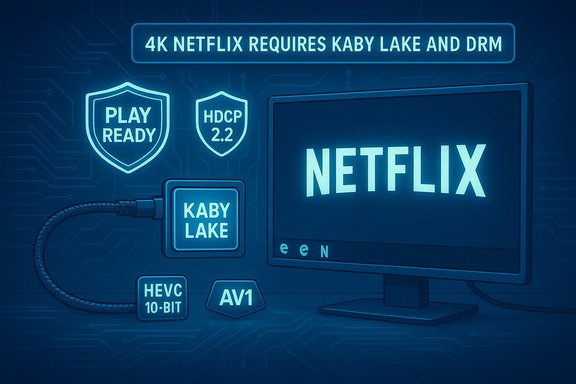
When Netflix began offering selected titles in Ultra HD to PCs, the company and Microsoft limited 4K playback to a narrow set of devices and clients. The restrictions were not arbitrary marketing choices; they were the result of content‑protection requirements (PlayReady DRM), support for 10‑bit HEVC hardware decoding, display‑chain protections such as HDCP 2.2, and the need for an end‑to‑end trusted playback environment on Windows 10. Early reporting and platform documentation made those gates explicit: Microsoft’s Edge browser (and the Windows Store Netflix app) were the only Windows clients that exposed the required DRM and codec pipelines to Netflix, and Intel’s Kaby Lake processors brought the 10‑bit HEVC hardware decode capability that the streaming stack required. These constraints were documented at launch and have been repeated in technical support guidance and community testing since.
1. Confirm your Netflix subscription tier supports Ultra HD (Netflix Premium).
2. Use Windows 10 (keep the OS fully updated). Edge or the Netflix app from Microsoft Store is required for top resolutions.
3. Verify CPU compatibility: historically this meant an Intel 7th‑gen “Kaby Lake” CPU (or later hardware families that explicitly advertise HEVC/DRM support). Intel’s guidance and independent tests emphasize the role of hardware decode. 4. Install HEVC Video Extensions if your device does not already ship with HEVC support. The Microsoft Store carries HEVC/AV1 extensions that enable system‑wide HEVC playback in UWP apps and Edge. 5. Ensure your display and cables support HDCP 2.2 (and that the GPU output advertises the correct compliance). Use a 4K@60Hz display or TV that explicitly lists HDCP 2.2. 6. Keep GPU drivers and platform firmware up to date. Driver regressions can break protected paths and codec offload.
If any single item in this chain is missing or misconfigured, Netflix will reduce the stream to a lower resolution or block playback at UHD.
This architecture’s strengths include robust content protection and efficient hardware decode; its weaknesses are fragility, potential for vendor lock‑in and consumer confusion when incompatible components are present. For most users wanting a reliable 4K Netflix experience today, the pragmatic path remains to use a certified streaming device or a vendor‑validated Windows system that bundles the required codecs and drivers—an approach that avoids the brittle assembly‑line of checks and keeps the focus on watching the show in the best possible picture.
Source: Born2Invest https://born2invest.com/?b=style-690935412/
 Background / Overview
When Netflix began offering selected titles in Ultra HD to PCs, the company and Microsoft limited 4K playback to a narrow set of devices and clients. The restrictions were not arbitrary marketing choices; they were the result of content‑protection requirements (PlayReady DRM), support for 10‑bit HEVC hardware decoding, display‑chain protections such as HDCP 2.2, and the need for an end‑to‑end trusted playback environment on Windows 10. Early reporting and platform documentation made those gates explicit: Microsoft’s Edge browser (and the Windows Store Netflix app) were the only Windows clients that exposed the required DRM and codec pipelines to Netflix, and Intel’s Kaby Lake processors brought the 10‑bit HEVC hardware decode capability that the streaming stack required. These constraints were documented at launch and have been repeated in technical support guidance and community testing since. Why the Kaby Lake + Microsoft requirement existed
The DRM problem: PlayReady and hardware security
Studios license their highest‑value masters only when platforms can guarantee content protection. For Netflix UHD streams, the combination of Microsoft’s PlayReady DRM at elevated security levels and platform‑signed hardware attestation was used to meet studio demands. PlayReady’s newer security profiles (sometimes discussed under PlayReady 3.0 or SL3000 in press coverage) require hardware support and platform integration unavailable in older Windows clients or browsers. Microsoft’s Edge browser and the Netflix Store app could call into Windows’ protected media pipeline and PlayReady implementation; other browsers either lacked that integration or used different CDMs, so they could not meet the same security envelope. This DRM coupling is the primary reason Edge and the Store app were singled out for Ultra HD playback.Codec and decode: 10‑bit HEVC hardware acceleration
Netflix’s 4K streams are encoded with high‑efficiency codecs—historically HEVC (H.265) for many UHD titles and, more recently, AV1 in some cases—to keep bandwidth reasonable. 10‑bit HEVC decoding in hardware is important not just for performance and battery life but also because software decode of those streams at UHD introduces unpredictability and can’t satisfy the real‑time demands of HEVC at high bitrates. At the time of the Kaby Lake roll‑out, Intel’s 7th‑gen processors included integrated media engines with native 10‑bit HEVC hardware decode; earlier Intel CPUs supported 8‑bit only. That made the CPU an important check on whether a system could play the stream reliably and efficiently. Intel’s support documentation and community tests confirm this requirement.Display chain: HDCP 2.2 and output pipeline
Even if the CPU, OS and browser allowed decode, the display path must protect the content. Studios require HDCP 2.2‑compliant connections to certified 4K displays (monitors or TVs) to prevent high‑quality capture or interception downstream. That means your HDMI/DisplayPort ports, cable and monitor must all support the appropriate HDCP version; otherwise Netflix will fall back to a lower resolution. Intel and other vendor guides make HDCP 2.2 an explicit requirement for 4K playback on PCs.The client side: Edge and the Netflix Microsoft Store app
Because of the DRM and platform integration needs, the only Windows clients that could provide the required trust chain at launch were Microsoft Edge and the Netflix app from the Microsoft Store. Those clients could call into Windows runtime services and PlayReady CDMs in a way that browsers like Chrome or Firefox could not (they relied on different CDMs such as Widevine, which did not meet the same studio security profile on Windows at the time). The practical consequence: Chrome and Firefox were capped at lower maximums (720p/1080p) while Edge or the Store app could reach 4K on qualifying hardware.How to get 4K Netflix on a Windows 10 PC — the practical checklist
If your goal is a verified Ultra HD session from Netflix on a Windows device, here’s a step‑by‑step checklist that consolidates the platform and hardware checks:1. Confirm your Netflix subscription tier supports Ultra HD (Netflix Premium).
2. Use Windows 10 (keep the OS fully updated). Edge or the Netflix app from Microsoft Store is required for top resolutions.
3. Verify CPU compatibility: historically this meant an Intel 7th‑gen “Kaby Lake” CPU (or later hardware families that explicitly advertise HEVC/DRM support). Intel’s guidance and independent tests emphasize the role of hardware decode. 4. Install HEVC Video Extensions if your device does not already ship with HEVC support. The Microsoft Store carries HEVC/AV1 extensions that enable system‑wide HEVC playback in UWP apps and Edge. 5. Ensure your display and cables support HDCP 2.2 (and that the GPU output advertises the correct compliance). Use a 4K@60Hz display or TV that explicitly lists HDCP 2.2. 6. Keep GPU drivers and platform firmware up to date. Driver regressions can break protected paths and codec offload.
If any single item in this chain is missing or misconfigured, Netflix will reduce the stream to a lower resolution or block playback at UHD.
Troubleshooting common failure modes
- “I meet the specs but I still see 1080p or lower.”
- Verify the client: open Netflix in Microsoft Edge or use the Netflix Windows Store app. Confirm HEVC extension is present. Check Display → Advanced display settings to ensure Windows reports 3840×2160 at 60Hz. Confirm HDCP is negotiated (some GPUs provide diagnostics). Community threads and support pages show users being blocked by missing HEVC extensions or HDCP mismatches even when they have a 4K monitor.
- “Edge shows a lower bitrate than expected”
- Confirm Netflix playback diagnostics (press Ctrl+Alt+Shift+D in the player) to see the stream bitrate and resolution. Make sure network bandwidth is sufficient (Netflix recommends ~15–25 Mbps for UHD), and eliminate Wi‑Fi congestion.
- “My GPU advertises HEVC but Netflix still refuses 4K”
- Some discrete GPUs have decode capabilities in hardware but may not be included in the certified platform list used by PlayReady/Netflix. At launch, certain NVIDIA hardware technically supported codecs but lacked the validated integration Netflix required. That changed over time for many vendors, but specifics vary by GPU model, driver version and OEM configuration. When in doubt, consult vendor documentation and Microsoft’s compatibility notes.
- “HEVC extension costs money”
- The HEVC Video Extensions on Microsoft Store have historically been a small paid add‑on (some OEM devices include it for free); check whether your OEM shipped that codec with the system before purchasing. Community guides and vendor KBs walk users through confirming HEVC support.
Strengths of the Kaby Lake + PlayReady apst:** By implementing PlayReady and hardware‑based attestation, Netflix satisfied studio requirements to license premium Ultra HD masters for PC playback. That trust enabled Netflix to expand the range of devices authorized to stream 4K beyond dedicated streaming boxes and Smart TVs.
- Efficient decoding: Hardware HEVC decode reduces CPU load and power consumption, producing smoother playback, lower thermals and better battery life for notebooks. Intel and independent testing documented meaningful battery and CPU benefits on Kaby Lake hardware versus software decode.
- Platform integration: Using the Windows Store app and Edge allowed Netflix to leverage platform DRM services and media stacks, simplifying entitlement handling and (for UWP/Store apps) enabling features such as downloads or offline DRM models when supported.
Risks,mer impact
1) Lock‑in to hardware and software policies
The decision to gate 4K behind specific CPUs and a particular browser meant many capable PCs were excluded from UHD playback despite having 4K displays and multi‑gigabit networking. That fragmentation frustrated many customers who had already invested in 4K monitors or high‑end GPUs. The policy illustrated how DRM and content licensing can create artificial ceilings on perceived device capability. Early press at launch captured that frustration and the perception of a “NetWintel” lock‑in.2) Fragility of the playback chain
The full chain—OS, CDM, driver, firmware, HEVC/AV1 codecs, HDCP negotiation, display firmware—creates many single points of failure. Driver updates, firmware mismatches, or even Microsoft Store/Edge runtime updates can break UHD playback for users who previously had it working. That creates higher support costs for IT departments and confusion among power users. Vendor KBs and forum threads show common incidents where driver rollbacks or Windows updates temporarily disabled 4K playback.3) User experience tradeoffs
Requiring specific clients (Edge or the Store app) forced users who prefer other browsers to change habits. It also meant that feature parity between platforms could lag; for example, Chrome users on Windows were capped at lower resolutions until underlying CDM/platform changes occurred. That user friction can drive customers toward alternative devices (Chromecast, smart TV apps, streaming boxes) for a better seamless UHD experience.4) Evolving codecs and future proofing
The streaming world moves fast: AV1, improved DRM profiles, and new hardware decode engines have continued to evolve since Kaby Lake’s introduction. Any single‑generation tie‑in risks obsolescence or the need for repeated certification cycles. While later CPUs and GPUs have expanded support, the early Kaby Lake requirement illustrated the broader challenge: platform certification must keep pace with codec and DRM evolution to avoid locking users out or fragmenting experiences.Alternatives and practical workarounds
For users who cannot meet the PC chain requirements, there are practical alternatives to get Netflix in 4K:- Use a standalone streaming device (Chromecast Ultra, Roku Ultra, Amazon Fire TV, Apple TV 4K). These devices are inexpensive relative to a full PC and are certified to receive 4K streams from Netflix reliably. Many users found this to be the simplest workaround when PCs were blocked by DRM checks.
- Watch on a Smart TV with the native Netflix app. Smart TV apps are built to satisfy DRM and codec requirements that the studios accept, and they bypass the PC DRM chain entirely.
- Upgrade to a platform that vendors certify for UHD playback: newer laptops and desktops from OEMs that advertise Netflix 4K support generally ship with the required codecs, firmware, and validated drivers. Check OEM compatibility lists before purchasing.
What changed after launch — and what remains the same
Over time, vendor support expanded. GPU and SoC vendors added certified playback paths; Microsoft evolved its media stack and Edge moved through platform updates. Netflix’s system requirements pages and vendor documentation were updated to reflect changes. Nevertheless, the core principle remained: Ultra HD playback on a general‑purpose PC is a product of coordinated trust between content owners, DRM vendors, OS vendors and hardware manufacturers. That coordination is what determined whether a particular PC could act as a secure playback endpoint, not simply whether the monitor or GPU could display 3840×2160 pixels. Where claims are time‑sensitive or vendor‑specific (for instance, the exact list of supported GPUs or the current store price for the HEVC extension), those details can change. Readers should treat per‑SKU compatibility listings and paid store extension pricing as items to verify at the time of purchase or troubleshooting rather than permanent facts.Recommendations for Windows power users and IT professionals
- Verify the entire content protection path, not just the display: check CPU, HEVC codec installation, Windows updates, GPU driver version, HDCP negotiation and the Netflix client. Use the Netflix playback diagnostics to see the negotiated profile.
- Prefer OEM‑certified systems if UHD Netflix is a priority. OEMs that advertise “Netflix 4K” typically ship with validated drivers, firmware, and codecs.
- For a predictable living‑room UHD experience, prefer deliances or Smart TV apps over reconfiguring general‑purpose PCs. These devices are cheaper, simpler and designed for compatibility.
- Maintain a rollback plan for GPU drivers when applying updates—some driver updates can break the protected media path unexpectedly.
- When advising non‑technical users, simplify the checklist: Netflix Premium plan, Edge or Netflix app, HEVC support, HDCP 2.2 display and a modern CPU/SoC that vendors list as supported.
Conclusion
The headline that “4K Netflix on Windows 10 requires a Kaby Lake chip and Microsoft” captured a real and consequential intersection of DRM, codec support and platform trust. That intersection forced early adopters to reconcile the technical reality: studio‑grade UHD streaming is less about raw silicon performance and more about whether the system can present a verifiable, tamper‑resistant media pipeline. For end users, the consequence was a short‑term friction—many otherwise capable machines were barred from UHD playback—but also a long‑term lesson: delivering premium, high‑value media at scale requires coordination across hardware, OS, browser/app and content provider ecosystems.This architecture’s strengths include robust content protection and efficient hardware decode; its weaknesses are fragility, potential for vendor lock‑in and consumer confusion when incompatible components are present. For most users wanting a reliable 4K Netflix experience today, the pragmatic path remains to use a certified streaming device or a vendor‑validated Windows system that bundles the required codecs and drivers—an approach that avoids the brittle assembly‑line of checks and keeps the focus on watching the show in the best possible picture.
Source: Born2Invest https://born2invest.com/?b=style-690935412/
