

Ableton launched a public beta of its new Extensions SDK on June 2, 2026, letting Live 12 Suite users build JavaScript- and TypeScript-based tools that run inside Ableton Live through the right-click context menu. The move is not just another convenience feature for producers. It is Ableton’s clearest attempt yet to turn Live from a tightly designed music workstation into a programmable creative platform. For musicians, developers, and Windows power users who already treat their DAWs like operating systems, that is a bigger shift than the modest “extension” label suggests.
For years, Ableton Live’s identity has rested on a contradiction. It is beloved because it feels immediate, minimal, and performance-ready, but it is also one of the most deeply hacked and extended music tools in circulation. Max for Live gave advanced users a way to build instruments, effects, sequencers, and experimental audio machines without waiting for Ableton to bless every idea.
The new Extensions SDK aims at a different layer of the program. Instead of asking users to build devices that sit in a track and process audio or MIDI, Ableton is opening up the set itself: tracks, clips, song structure, metadata, parameters, and workflow actions. That means the right-click menu — usually the most mundane real estate in desktop software — becomes a programmable entry point for reshaping an entire Live project.
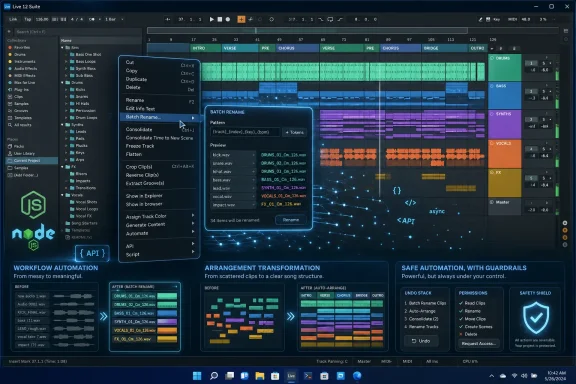
This matters because many of the worst DAW chores are not creative in the glamorous sense. They are naming, arranging, duplicating, slicing, exporting, tidying, converting, and reorganizing. The Verge’s examples are telling: bulk renaming clips, laying out arrangements from a simple song-form template, turning MIDI into notation, chopping and recombining drum loops, and even running Doom inside Live. The joke demo will get the attention, but the batch rename tool is probably the more important signal.
Ableton is betting that Live’s next leap may not come from another synthesizer, compressor, or clip launcher refinement. It may come from giving users a sanctioned way to automate all the tiny operations that interrupt a session before they become music.
Extensions are closer to browser extensions or editor plugins. They are written with familiar web-development tools — JavaScript, TypeScript, Node.js — and they appear contextually inside Live when a user right-clicks an applicable item. Rather than living as a device in the signal flow, an Extension runs when invoked, performs its task, changes or analyzes the project, and then stops.
That distinction makes Extensions less romantic and potentially more disruptive. A Max for Live patch can become a wild synthesizer or probability sequencer. An Extension can become the thing that cleans a 120-track session, reorganizes an arrangement, extracts stems into a naming convention, applies house rules to clip colors, or connects a project to an outside database.
For WindowsForum readers, the analogy is not a VST plug-in. It is closer to PowerShell meeting Visual Studio Code extensions inside a DAW. The value is not only what Ableton ships; it is what users can script once the host application exposes enough stable, documented surfaces.
The SDK’s public beta status is therefore important. Ableton is not simply unveiling a finished marketplace of add-ons. It is inviting musicians and developers to test what should be programmable in Live in the first place. That is both exciting and precarious, because the difference between a useful automation layer and a brittle scripting toy is usually decided by API coverage, documentation quality, permission boundaries, and backward compatibility.
But browser extensions also taught the software industry a harder lesson. Once you let third-party code into a trusted workspace, you inherit questions about security, trust, updates, permissions, and user blame. A malicious or careless browser extension can read pages, manipulate data, or degrade performance. A malicious or careless DAW extension could alter sessions, corrupt metadata, leak information about projects, or simply waste hours in subtle ways.
Ableton appears aware of that line. The company’s messaging frames unofficial Extensions as experimental and user-installed at the user’s own risk. That is honest, but it also means the early ecosystem will depend heavily on community norms. Musicians are used to installing plug-ins from developers large and small, but a plug-in’s danger is usually framed around crashes, compatibility, licensing, and CPU usage. Extensions expand that risk into workflow state.
The most interesting security question is not whether someone can make Live do something silly. They can. The more serious question is how clearly Live communicates what an Extension can see and change. If an Extension can read an entire Set and rewrite parts of it, users will need better trust signals than a clever name in a Discord channel.
This does not make the SDK a bad idea. It makes it a grown-up platform idea. The power to automate a creative environment is always the power to break one.
None of that sounds like the marketing copy usually attached to music software. There is no promise that an AI will replace the songwriter, no claim that one knob will master a record, and no mysticism about “capturing inspiration.” Instead, Ableton is showing tools that remove clerical drag from the recording process.
That is exactly why this could land. DAW users do not only want more sounds; they want fewer interruptions. A guitarist who recorded 40 takes into tracks called “Audio” does not need a new reverb. They need a fast way to make the session legible before the good take disappears into a naming swamp.
The Arrangement Helper example is even more revealing. Live’s Session View has always been exceptional for sketching, looping, and performing ideas, while Arrangement View is where those ideas become linear songs. The transition between the two can be tedious. If an Extension can scaffold a song form, reshuffle sections, and create named placeholders, it reduces the psychological gap between jamming and finishing.
That is where Extensions may become most valuable: not as “creative tools” in the narrow sense, but as tools that make finishing less punishing. In music production, the path from idea to completed work is often paved with tiny administrative defeats. Automating those defeats is creative infrastructure.
That widens the potential builder base. A musician with some web experience can plausibly read an SDK example and adapt it. A developer who has never built a VST can still understand Node.js, package tooling, JSON-style data, and the structure of a context-menu action. The barrier is not gone, but it has moved from “learn a music-specific visual environment” to “write a small app-like script that talks to Live.”
It also means AI coding assistants will inevitably become part of the story. Ableton’s own public framing suggests that users may be able to describe an Extension idea and build a working version with assistance. That does not mean non-programmers will magically produce robust tools, but it does mean the SDK arrives in a world where JavaScript boilerplate is easier to generate than ever.
This could create an explosion of tiny, personal utilities. One user may build a tool that renames drum recording clips according to a studio’s mic layout. Another may build a game-audio export helper. A composer may build a notation handoff script. A live performer may build a setlist organizer that touches tempo, locators, colors, and clip names.
The downside is that JavaScript ecosystems can sprawl. Dependency chains, version drift, abandoned packages, and inconsistent coding quality are not hypothetical concerns. If Ableton wants Extensions to feel like part of Live rather than a drawer full of risky hacks, it will eventually need clear packaging, review, compatibility, and perhaps permission models. The early beta can be loose. A mature ecosystem cannot stay that way forever.
The practical requirement is Live 12 Suite Beta version 12.4.5 or later. That matters because Extensions are not currently a general Live feature, and they are not available across every edition. Users on Intro, Lite, Standard, or older builds should not expect to install the SDK and start customizing their sessions today.
There is also the beta reality. Ableton’s beta program is for testing pre-release software, not for mission-critical production. Anyone tempted to try Extensions on an active album, film score, tour set, or client session should treat it like any other pre-release workflow change: duplicate projects, keep backups, and assume bugs will happen.
On Windows in particular, the appeal of automation often collides with the realities of plug-in folders, audio drivers, hardware controllers, cloud-sync directories, and permissions. Extensions that touch project structure could be tremendously useful in those environments, but they will also need to behave predictably around file paths, missing media, external drives, and collaborative folder setups.
The SDK’s success on Windows will depend less on whether Doom runs in Live and more on whether an Extension can survive a real producer’s messy machine.
Live has always had extensibility, but much of it lived in specialized lanes. Max for Live is powerful, but not everyone wants to patch. Control scripts are useful, but often obscure. Plug-ins extend sound generation and processing, not necessarily project operations. Extensions give Ableton a cleaner answer to a common modern expectation: “Can I make the software do this repetitive thing my way?”
That expectation has been sharpened by developer tools. Visual Studio Code users expect extensions. Browser users expect add-ons. Sysadmins expect scripts. Designers expect plugins. Even note-taking apps now market themselves on community templates and automation. Creative software cannot remain sealed without feeling paternalistic.
Ableton’s challenge is cultural as much as technical. Live’s elegance comes from restraint. Every new surface for customization risks clutter, fragmentation, and support confusion. Yet refusing extensibility would leave too much latent energy outside the application, where users already build workarounds with Max devices, external scripts, file naming conventions, OSC bridges, and hand-rolled project templates.
The SDK is Ableton trying to square that circle: keep the core interface clean while allowing deeper customization to appear only when context demands it. The right-click menu is a clever compromise. It hides complexity until the user asks for it.
But the more useful interpretation is less flashy. Extensions could give musicians control over the boring parts of computation without surrendering the musical parts to automation. A script that lays out a verse and chorus is not writing the song. A batch rename tool is not replacing taste. A notation exporter is not composing for the user. These are tools that reduce the tax around the work.
That distinction matters because musicians are rightly skeptical of software that promises creativity by removing the person. The better promise is software that removes friction so the person can stay in the flow. Ableton’s examples mostly live in that healthier category.
The risk is that the ecosystem drifts toward novelty demos and low-effort AI wrappers. If the most visible Extensions become gimmicks, serious users may dismiss the SDK as a toy. If the most useful Extensions solve everyday pain, the SDK could become one of Live’s defining features.
Ableton can influence that outcome through curation. A good gallery of practical examples, well-documented APIs, and visible best practices would matter more than a chaotic wall of experiments. The community will create the weird stuff regardless. Ableton should make sure the boring, reliable stuff is easy to find.
That is what happens in operating systems, code editors, spreadsheets, and media production suites. The first wave of extensions often looks like convenience: rename this, export that, format these, transform those. Over time, those conveniences become workflows, and workflows become dependencies. A studio may eventually rely on a set of Extensions the way a development team relies on linting rules and editor plugins.
That has consequences. If a Live project’s workflow depends on an Extension, then the Extension must survive Live updates. If a team shares Sets, everyone may need the same tools installed. If an Extension changes arrangement data, users need undo behavior they trust. If a community tool becomes essential, Ableton may face pressure to absorb its functionality into the core product.
This is the normal lifecycle of a platform. First, users hack around missing features. Then the vendor exposes an API. Then the ecosystem proves what people actually need. Then the vendor either blesses, breaks, or buys the best ideas.
Ableton’s history with Max for Live shows it can coexist with a community of deep experimenters. Extensions will test whether it can also support a broader population of utility builders — people who do not necessarily want to invent new instruments, but do want to make Live obey the way they work.
Ableton will need to learn which parts of Live’s object model users most want to touch. Tracks and clips are obvious. Devices, automation, locators, tempo, metadata, follow actions, sample references, and export workflows may become just as important. The more complete the API, the more powerful Extensions become; the more powerful they become, the more Ableton must care about guardrails.
Documentation will be decisive. A weak SDK with strong examples can still grow. A powerful SDK with vague docs will produce brittle cargo-cult code and frustrated users. The fact that Ableton is publishing examples early is encouraging, because musicians often learn by modifying working tools rather than reading abstract API references.
The company also needs to decide how distribution should work. Discord sharing is fine for a beta community, but it is not a durable trust model for mainstream users. If Extensions graduate from beta into stable Live builds, Ableton will face the same marketplace dilemma every extensible app faces: keep distribution informal and flexible, or create a more curated channel that reduces risk but increases gatekeeping.
There is no perfect answer. But there is a wrong one: pretending distribution is not part of the product. For Extensions, install experience, update behavior, and trust signals will shape user perception as much as the API itself.
Imagine a post-production house using Extensions to enforce track naming and color conventions before export. Imagine a game-audio team generating variations and metadata from Live clips. Imagine a music teacher turning student MIDI clips into notation sheets. Imagine a live act rebuilding show arrangements from reusable section templates. Imagine a producer cleaning up a day’s worth of vocal comping in seconds instead of half an hour.
These are not exotic use cases. They are the unglamorous connective tissue of modern music production. If Extensions can reliably handle them, Live becomes more than a DAW with add-ons. It becomes a programmable workspace for musical projects.
There is a danger, though, in overpromising. Extensions are not a replacement for VSTs, Max for Live devices, hardware integration, or proper DAW features. They are not magic buttons for making better songs. They are a layer for manipulating Live’s own world. That is powerful, but bounded.
Ableton should preserve that clarity. The best platforms are opinionated about what belongs where. Max for Live should remain the deep musical laboratory. Plug-ins should remain the broader industry standard for instruments and effects. Extensions should become the scripting and workflow layer that Live never quite had in a first-class form.
For Windows users and IT-minded musicians, the most important details are concrete rather than philosophical.
 Ableton Turns the Right-Click Menu Into a Development Surface
For years, Ableton Live’s identity has rested on a contradiction. It is beloved because it feels immediate, minimal, and performance-ready, but it is also one of the most deeply hacked and extended music tools in circulation. Max for Live gave advanced users a way to build instruments, effects, sequencers, and experimental audio machines without waiting for Ableton to bless every idea.The new Extensions SDK aims at a different layer of the program. Instead of asking users to build devices that sit in a track and process audio or MIDI, Ableton is opening up the set itself: tracks, clips, song structure, metadata, parameters, and workflow actions. That means the right-click menu — usually the most mundane real estate in desktop software — becomes a programmable entry point for reshaping an entire Live project.
This matters because many of the worst DAW chores are not creative in the glamorous sense. They are naming, arranging, duplicating, slicing, exporting, tidying, converting, and reorganizing. The Verge’s examples are telling: bulk renaming clips, laying out arrangements from a simple song-form template, turning MIDI into notation, chopping and recombining drum loops, and even running Doom inside Live. The joke demo will get the attention, but the batch rename tool is probably the more important signal.
Ableton is betting that Live’s next leap may not come from another synthesizer, compressor, or clip launcher refinement. It may come from giving users a sanctioned way to automate all the tiny operations that interrupt a session before they become music.
Max for Live Was a Laboratory; Extensions Are a Scripting Layer
The obvious comparison is Max for Live, but treating Extensions as “Max, but JavaScript” misses the architectural point. Max for Live is a visual programming environment descended from Max/MSP, and its sweet spot is musical behavior: MIDI transformations, audio effects, instruments, generative patches, and interactive devices that live on tracks. It is enormously powerful, but it asks users to think like patch builders.Extensions are closer to browser extensions or editor plugins. They are written with familiar web-development tools — JavaScript, TypeScript, Node.js — and they appear contextually inside Live when a user right-clicks an applicable item. Rather than living as a device in the signal flow, an Extension runs when invoked, performs its task, changes or analyzes the project, and then stops.
That distinction makes Extensions less romantic and potentially more disruptive. A Max for Live patch can become a wild synthesizer or probability sequencer. An Extension can become the thing that cleans a 120-track session, reorganizes an arrangement, extracts stems into a naming convention, applies house rules to clip colors, or connects a project to an outside database.
For WindowsForum readers, the analogy is not a VST plug-in. It is closer to PowerShell meeting Visual Studio Code extensions inside a DAW. The value is not only what Ableton ships; it is what users can script once the host application exposes enough stable, documented surfaces.
The SDK’s public beta status is therefore important. Ableton is not simply unveiling a finished marketplace of add-ons. It is inviting musicians and developers to test what should be programmable in Live in the first place. That is both exciting and precarious, because the difference between a useful automation layer and a brittle scripting toy is usually decided by API coverage, documentation quality, permission boundaries, and backward compatibility.
The Browser Extension Metaphor Is Useful Because It Is Also a Warning
Calling these browser-style extensions is more than a convenient headline. The comparison captures the appeal: small add-ons, written in familiar languages, distributed by a community, and invoked at the moment of need. A producer who wants an arrangement scaffold should not have to wait for Ableton to decide that “verse-chorus-bridge generator” deserves a first-party button. Someone can just build it.But browser extensions also taught the software industry a harder lesson. Once you let third-party code into a trusted workspace, you inherit questions about security, trust, updates, permissions, and user blame. A malicious or careless browser extension can read pages, manipulate data, or degrade performance. A malicious or careless DAW extension could alter sessions, corrupt metadata, leak information about projects, or simply waste hours in subtle ways.
Ableton appears aware of that line. The company’s messaging frames unofficial Extensions as experimental and user-installed at the user’s own risk. That is honest, but it also means the early ecosystem will depend heavily on community norms. Musicians are used to installing plug-ins from developers large and small, but a plug-in’s danger is usually framed around crashes, compatibility, licensing, and CPU usage. Extensions expand that risk into workflow state.
The most interesting security question is not whether someone can make Live do something silly. They can. The more serious question is how clearly Live communicates what an Extension can see and change. If an Extension can read an entire Set and rewrite parts of it, users will need better trust signals than a clever name in a Discord channel.
This does not make the SDK a bad idea. It makes it a grown-up platform idea. The power to automate a creative environment is always the power to break one.
The First Wave Looks Small Because It Targets the Friction Musicians Actually Feel
The early examples are almost comically practical. Arrangement Helper lays out sections of a song without manually copying clips around. RNMR batch-renames clips after a session where the artist forgot to name the channel properly. Other examples turn MIDI into notation, slice and recombine drum loops, or use algorithmic processes to spark new material.None of that sounds like the marketing copy usually attached to music software. There is no promise that an AI will replace the songwriter, no claim that one knob will master a record, and no mysticism about “capturing inspiration.” Instead, Ableton is showing tools that remove clerical drag from the recording process.
That is exactly why this could land. DAW users do not only want more sounds; they want fewer interruptions. A guitarist who recorded 40 takes into tracks called “Audio” does not need a new reverb. They need a fast way to make the session legible before the good take disappears into a naming swamp.
The Arrangement Helper example is even more revealing. Live’s Session View has always been exceptional for sketching, looping, and performing ideas, while Arrangement View is where those ideas become linear songs. The transition between the two can be tedious. If an Extension can scaffold a song form, reshuffle sections, and create named placeholders, it reduces the psychological gap between jamming and finishing.
That is where Extensions may become most valuable: not as “creative tools” in the narrow sense, but as tools that make finishing less punishing. In music production, the path from idea to completed work is often paved with tiny administrative defeats. Automating those defeats is creative infrastructure.
JavaScript Lowers the Wall, but It Also Changes Who Builds for Live
Choosing JavaScript and TypeScript is not neutral. Ableton could have doubled down on Max, Python control scripts, or a proprietary scripting language. Instead, it chose the language family that already powers the web, Electron apps, editor plugins, automation tools, and an enormous ecosystem of developers who may not consider themselves audio programmers.That widens the potential builder base. A musician with some web experience can plausibly read an SDK example and adapt it. A developer who has never built a VST can still understand Node.js, package tooling, JSON-style data, and the structure of a context-menu action. The barrier is not gone, but it has moved from “learn a music-specific visual environment” to “write a small app-like script that talks to Live.”
It also means AI coding assistants will inevitably become part of the story. Ableton’s own public framing suggests that users may be able to describe an Extension idea and build a working version with assistance. That does not mean non-programmers will magically produce robust tools, but it does mean the SDK arrives in a world where JavaScript boilerplate is easier to generate than ever.
This could create an explosion of tiny, personal utilities. One user may build a tool that renames drum recording clips according to a studio’s mic layout. Another may build a game-audio export helper. A composer may build a notation handoff script. A live performer may build a setlist organizer that touches tempo, locators, colors, and clip names.
The downside is that JavaScript ecosystems can sprawl. Dependency chains, version drift, abandoned packages, and inconsistent coding quality are not hypothetical concerns. If Ableton wants Extensions to feel like part of Live rather than a drawer full of risky hacks, it will eventually need clear packaging, review, compatibility, and perhaps permission models. The early beta can be loose. A mature ecosystem cannot stay that way forever.
Windows Users Get the Same Promise, With the Usual Platform Caveats
Ableton says the SDK is for macOS and Windows, and that cross-platform support matters more than it might at first appear. Live has long been a fixture on Mac-heavy stages and studios, but Windows remains central for home producers, game-audio teams, budget-conscious musicians, and performance rigs built around commodity hardware. A JavaScript-based extension model could be especially attractive on Windows, where scripting and automation cultures are already deeply rooted.The practical requirement is Live 12 Suite Beta version 12.4.5 or later. That matters because Extensions are not currently a general Live feature, and they are not available across every edition. Users on Intro, Lite, Standard, or older builds should not expect to install the SDK and start customizing their sessions today.
There is also the beta reality. Ableton’s beta program is for testing pre-release software, not for mission-critical production. Anyone tempted to try Extensions on an active album, film score, tour set, or client session should treat it like any other pre-release workflow change: duplicate projects, keep backups, and assume bugs will happen.
On Windows in particular, the appeal of automation often collides with the realities of plug-in folders, audio drivers, hardware controllers, cloud-sync directories, and permissions. Extensions that touch project structure could be tremendously useful in those environments, but they will also need to behave predictably around file paths, missing media, external drives, and collaborative folder setups.
The SDK’s success on Windows will depend less on whether Doom runs in Live and more on whether an Extension can survive a real producer’s messy machine.
This Is Also a Competitive Move Against DAWs That Feel More Scriptable
Ableton is not operating in a vacuum. Modern DAWs increasingly compete not only on instruments and effects, but on workflow extensibility. Reaper’s scripting culture, Bitwig’s controller and modulation architecture, Logic’s Apple ecosystem integration, FL Studio’s pattern workflow, and Studio One’s production pipeline all shape how users think about customization. A DAW that cannot be bent to a user’s process starts to feel old, even if its audio engine is excellent.Live has always had extensibility, but much of it lived in specialized lanes. Max for Live is powerful, but not everyone wants to patch. Control scripts are useful, but often obscure. Plug-ins extend sound generation and processing, not necessarily project operations. Extensions give Ableton a cleaner answer to a common modern expectation: “Can I make the software do this repetitive thing my way?”
That expectation has been sharpened by developer tools. Visual Studio Code users expect extensions. Browser users expect add-ons. Sysadmins expect scripts. Designers expect plugins. Even note-taking apps now market themselves on community templates and automation. Creative software cannot remain sealed without feeling paternalistic.
Ableton’s challenge is cultural as much as technical. Live’s elegance comes from restraint. Every new surface for customization risks clutter, fragmentation, and support confusion. Yet refusing extensibility would leave too much latent energy outside the application, where users already build workarounds with Max devices, external scripts, file naming conventions, OSC bridges, and hand-rolled project templates.
The SDK is Ableton trying to square that circle: keep the core interface clean while allowing deeper customization to appear only when context demands it. The right-click menu is a clever compromise. It hides complexity until the user asks for it.
The AI Subtext Is There, but the Better Story Is Human Workflow
It would be easy to frame Extensions as an AI story. JavaScript is friendly to AI coding tools, Extensions can connect Live to external services, and music software vendors are under pressure to show how they fit into the generative-AI moment. Someone will build Extensions that generate MIDI, suggest arrangements, classify clips, or call cloud services. That is inevitable.But the more useful interpretation is less flashy. Extensions could give musicians control over the boring parts of computation without surrendering the musical parts to automation. A script that lays out a verse and chorus is not writing the song. A batch rename tool is not replacing taste. A notation exporter is not composing for the user. These are tools that reduce the tax around the work.
That distinction matters because musicians are rightly skeptical of software that promises creativity by removing the person. The better promise is software that removes friction so the person can stay in the flow. Ableton’s examples mostly live in that healthier category.
The risk is that the ecosystem drifts toward novelty demos and low-effort AI wrappers. If the most visible Extensions become gimmicks, serious users may dismiss the SDK as a toy. If the most useful Extensions solve everyday pain, the SDK could become one of Live’s defining features.
Ableton can influence that outcome through curation. A good gallery of practical examples, well-documented APIs, and visible best practices would matter more than a chaotic wall of experiments. The community will create the weird stuff regardless. Ableton should make sure the boring, reliable stuff is easy to find.
A Platform Is Born When the Boring Tools Start to Matter
The most telling early Extension may be the batch renamer. It is not glamorous. It will not sell hardware controllers or make a keynote audience gasp. But every serious creative application becomes a platform when users start customizing its housekeeping.That is what happens in operating systems, code editors, spreadsheets, and media production suites. The first wave of extensions often looks like convenience: rename this, export that, format these, transform those. Over time, those conveniences become workflows, and workflows become dependencies. A studio may eventually rely on a set of Extensions the way a development team relies on linting rules and editor plugins.
That has consequences. If a Live project’s workflow depends on an Extension, then the Extension must survive Live updates. If a team shares Sets, everyone may need the same tools installed. If an Extension changes arrangement data, users need undo behavior they trust. If a community tool becomes essential, Ableton may face pressure to absorb its functionality into the core product.
This is the normal lifecycle of a platform. First, users hack around missing features. Then the vendor exposes an API. Then the ecosystem proves what people actually need. Then the vendor either blesses, breaks, or buys the best ideas.
Ableton’s history with Max for Live shows it can coexist with a community of deep experimenters. Extensions will test whether it can also support a broader population of utility builders — people who do not necessarily want to invent new instruments, but do want to make Live obey the way they work.
The Beta Label Is Doing Real Work
Because the SDK is tied to Live 12.4.5 beta, it should be treated as an invitation, not a finished contract. Public betas are where developers discover that the model they designed in theory does not quite match the habits of users in the wild. Music software makes that especially hard because the wild includes bedroom producers, touring acts, educators, film composers, sound designers, game studios, sample-pack makers, and hardware tinkerers.Ableton will need to learn which parts of Live’s object model users most want to touch. Tracks and clips are obvious. Devices, automation, locators, tempo, metadata, follow actions, sample references, and export workflows may become just as important. The more complete the API, the more powerful Extensions become; the more powerful they become, the more Ableton must care about guardrails.
Documentation will be decisive. A weak SDK with strong examples can still grow. A powerful SDK with vague docs will produce brittle cargo-cult code and frustrated users. The fact that Ableton is publishing examples early is encouraging, because musicians often learn by modifying working tools rather than reading abstract API references.
The company also needs to decide how distribution should work. Discord sharing is fine for a beta community, but it is not a durable trust model for mainstream users. If Extensions graduate from beta into stable Live builds, Ableton will face the same marketplace dilemma every extensible app faces: keep distribution informal and flexible, or create a more curated channel that reduces risk but increases gatekeeping.
There is no perfect answer. But there is a wrong one: pretending distribution is not part of the product. For Extensions, install experience, update behavior, and trust signals will shape user perception as much as the API itself.
The Real Test Will Be Whether Studios Depend on It
A feature becomes important when people complain that they cannot work without it. That is the bar for Extensions. The launch examples show promise, but the real test will come when users build tools that solve specific professional bottlenecks.Imagine a post-production house using Extensions to enforce track naming and color conventions before export. Imagine a game-audio team generating variations and metadata from Live clips. Imagine a music teacher turning student MIDI clips into notation sheets. Imagine a live act rebuilding show arrangements from reusable section templates. Imagine a producer cleaning up a day’s worth of vocal comping in seconds instead of half an hour.
These are not exotic use cases. They are the unglamorous connective tissue of modern music production. If Extensions can reliably handle them, Live becomes more than a DAW with add-ons. It becomes a programmable workspace for musical projects.
There is a danger, though, in overpromising. Extensions are not a replacement for VSTs, Max for Live devices, hardware integration, or proper DAW features. They are not magic buttons for making better songs. They are a layer for manipulating Live’s own world. That is powerful, but bounded.
Ableton should preserve that clarity. The best platforms are opinionated about what belongs where. Max for Live should remain the deep musical laboratory. Plug-ins should remain the broader industry standard for instruments and effects. Extensions should become the scripting and workflow layer that Live never quite had in a first-class form.
The Part Ableton Users Should Watch Now
The launch is early enough that the practical advice is straightforward: experiment, but do not bet a deadline on it. The SDK is free, the beta is available to eligible Live 12 Suite users, and the examples are already broad enough to show the concept. But a beta automation layer that can rewrite project data deserves caution.For Windows users and IT-minded musicians, the most important details are concrete rather than philosophical.
- Extensions are currently tied to Live 12 Suite Beta version 12.4.5 or later, so they are not yet a universal Live feature.
- The SDK uses JavaScript and TypeScript on Node.js, which lowers the barrier for web developers and automation-minded users.
- Extensions run from Live’s context menu and can act on relevant parts of a Set, including tracks, clips, MIDI, devices, tempo, and structure.
- The early examples focus on workflow automation and creative utilities, including arrangement generation, batch renaming, notation, sample slicing, and experimental integrations.
- Unofficial Extensions should be treated like untrusted code until the ecosystem develops stronger review, permission, and distribution norms.
- The feature’s long-term value will depend on API stability, documentation, undo reliability, and whether real studios start building repeatable workflows around it.
References
- Primary source: The Verge
Published: 2026-06-02T16:04:32.898270
Ableton is letting musicians build browser-style extensions for Live | The Verge
Ableton Live is gaining browser-style extensions that let musicians add features to the DAW using JavaScript.www.theverge.com
- Related coverage: ableton.github.io
Ableton Extensions SDK | Ableton
ableton.github.io
- Related coverage: ableton.com
Extensions SDK
Extensions SDK is an open JavaScript toolkit allowing anyone to create custom tools that expand the possibilities inside Live 12 Suitewww.ableton.com - Related coverage: help.ableton.com
Live Beta FAQ – Ableton
Live Beta is pre-release version of Ableton Live that allows users to test upcoming changes and report outstanding issues. During the...help.ableton.com - Related coverage: thefader.com
Ableton is letting users build their own tools | The FADER
Ableton is letting users build their own tools. The new Extensions SDK lets producers make custom add-ons that can read, edit, and reorganize a Live Set.www.thefader.com - Related coverage: soundonsound.com
Ableton announce Extensions SDK
The Extensions Software Development Kit (SDK) is available in the beta version of Live 12.4.5, and is described by the company as the starting point for a collaborative development process that will be shaped by community feedback, experimentation and real-world use.www.soundonsound.com
- Related coverage: cdm.link
Ableton Extensions will let you code your own tools and actions for Live - CDM Create Digital Music
You run up against a limitation in Ableton Live, or you've got a creative idea. What if you could make it happen using code? That's the Ableton Extension SDK, out in public beta now (JavaScript, TypeScript, Node.js). And just like that, we've got Live with handy new workflows...cdm.link - Related coverage: sonicstate.com
Ableton Opens Up Live Extensions With SDK
Build your own customisable tools and workflowssonicstate.com
- Related coverage: downloads.ableton.com
