

Amazon’s latest price cut on the Acemagic V1 mini PC rewrites the bargain map for compact Windows desktops: a tiny, VESA-mountable machine with 16GB of RAM and a 1TB NVMe drive is now selling for a price that undercuts many entry-level Chromebooks while offering a full Windows 11 Pro experience and a surprising amount of real-world capability.
The mini PC market has been quietly maturing for years: where once tiny systems meant heavy compromises in memory, storage, and expandability, manufacturers are now packing mainstream desktop features into packages no larger than a hardcover book. The Acemagic V1 is a crystallized example of that trend. The model currently drawing attention in deal coverage pairs the Intel Processor N150 (Twin Lake/N-series) with 16GB of DDR4 memory and a 1TB M.2 SSD, preloaded with Windows 11 Pro. Recent retailer pricing has repeatedly pushed this configuration into the sub-$220 range, a bracket typically reserved for Chromebooks and entry-level tablets — but with far different functionality.
This article verifies the V1’s core claims, explains what the hardware actually delivers in daily use, compares it to both cheap Chromebooks and Apple’s Mac mini M4, and highlights where buyers should apply caution before hitting “Buy.”
Benchmarks and CPU comparison databases indicate the N150 sits ahead of earlier N-series parts in single-thread responsiveness and offers modest improvements in bursty desktop workloads. The real-world takeaway: the N150 is well-suited for web-heavy multitasking, office productivity suites, video playback, and light photo editing, but it’s not a substitute for higher-power Core or AMD Ryzen processors when sustained multi-core throughput is required.
Cooling is active (small axial fan) but engineered to remain quiet under typical desktop loads. Thermal capacity is sufficient for sustained consumer workloads that don’t push the CPU to continuous full-bore across all cores. Under extreme synthetic stress tests some thermal throttling is possible — an expected trade-off for any very small chassis.
Comparatively, the V1’s strengths are price, Windows application compatibility, and an easier path to cheap Windows licensing. The M4’s strengths are raw per-watt performance for heavy single-thread tasks, excellent media acceleration, and long-term platform support.
That said, the bargain requires attention to detail: specification variance between sellers, potential differences in wireless modules, uncertainty about license provenance, and thermal limits are real caveats. Buyers who verify the SKU, confirm warranty/return terms, and match the device’s strengths to their workload will find the V1 to be an admirably practical and compact PC for the money. For those whose daily work involves sustained heavy compute or who demand the absolute lowest watt-per-work performance, higher-tier systems — including Apple’s M4 Mac mini or Intel/AMD mini-desktops — remain the better choice despite the price premium.
Source: Gizmodo Amazon Drops One of the Best Mini PCs of 2025 to All-Time Low, Now Cheaper Than a Chromebook
 Background
The mini PC market has been quietly maturing for years: where once tiny systems meant heavy compromises in memory, storage, and expandability, manufacturers are now packing mainstream desktop features into packages no larger than a hardcover book. The Acemagic V1 is a crystallized example of that trend. The model currently drawing attention in deal coverage pairs the Intel Processor N150 (Twin Lake/N-series) with 16GB of DDR4 memory and a 1TB M.2 SSD, preloaded with Windows 11 Pro. Recent retailer pricing has repeatedly pushed this configuration into the sub-$220 range, a bracket typically reserved for Chromebooks and entry-level tablets — but with far different functionality.This article verifies the V1’s core claims, explains what the hardware actually delivers in daily use, compares it to both cheap Chromebooks and Apple’s Mac mini M4, and highlights where buyers should apply caution before hitting “Buy.”
Overview of the hardware
The CPU: Intel N150 — low-power but capable
The Acemagic V1 is built around the Intel Processor N150, a Twin Lake (Alder Lake-N family) chip that is targeted at compact, fan-cooled or lightly cooled desktop systems and lightweight laptops. The N150 is a 4-core, 4-thread part with a peak turbo frequency reported at up to 3.6 GHz and a nominal low-power configuration around 6 W TDP, with system vendors commonly allowing a higher sustained envelope in some designs (configurable modes can push the platform toward 15 W sustained boosts depending on cooling and power delivery).Benchmarks and CPU comparison databases indicate the N150 sits ahead of earlier N-series parts in single-thread responsiveness and offers modest improvements in bursty desktop workloads. The real-world takeaway: the N150 is well-suited for web-heavy multitasking, office productivity suites, video playback, and light photo editing, but it’s not a substitute for higher-power Core or AMD Ryzen processors when sustained multi-core throughput is required.
Memory and storage: roomy and responsive for the price
One of the V1’s headline strengths is the 16GB DDR4 RAM configuration. For everyday productivity — dozens of browser tabs, multiple Office/365 apps, and background sync services — 16GB is a meaningful comfort zone that budget machines at the same price rarely supply. The 1TB M.2 SSD provides generous storage and fast boot/application launch times. In practice, the SSD makes the experience feel far snappier than older budget PCs that relied on slower SATA SSDs or hard drives.I/O and connectivity: practical for home and office
The V1’s port selection is built for versatility:- Gigabit Ethernet for stable wired networking on video calls and file access.
- Wi‑Fi 6 (in many listings) for improved wireless throughput and performance in busy environments.
- Bluetooth 5.x (versions vary between listings).
- Two USB 3.2 Gen 2 Type-A ports reported in many product sheets (10 Gbps capable) — useful for external SSDs and fast transfers.
- Two legacy USB 2.0 ports for mice/keyboards.
- HDMI and DisplayPort outputs supporting dual 4K displays on many variants.
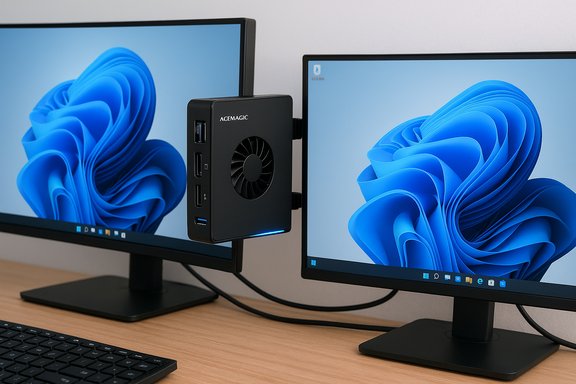
- VESA mounting hardware included, enabling easy attachment to the back of monitors for a compact desktop footprint.
Size, noise and cooling
Measured dimensions in manufacturer documentation are tiny — roughly 100 x 100 x 33 mm (about 3.9 x 3.9 x 1.3 inches). Weight is similarly negligible (roughly 1.3 pounds / ~600 grams in most manufacturer documents), making the V1 a genuine space-saver and easy to mount behind a display.Cooling is active (small axial fan) but engineered to remain quiet under typical desktop loads. Thermal capacity is sufficient for sustained consumer workloads that don’t push the CPU to continuous full-bore across all cores. Under extreme synthetic stress tests some thermal throttling is possible — an expected trade-off for any very small chassis.
What the V1 actually delivers in everyday use
Desktop productivity and multitasking
The combination of a quad-core N150 and 16GB of RAM makes the V1 feel well-provisioned for conventional productivity tasks. Expect:- Rapid wake and near-instant boot from the NVMe SSD.
- Smooth handling of dozens of browser tabs and simultaneous cloud apps (email, documents, Teams/Zoom).
- Flawless streaming of 4K video content when using hardware-accelerated codecs.
- Basic photo editing and occasional light video work at modest resolutions.
Business features through Windows 11 Pro
The V1 ships with Windows 11 Pro on many retail units, giving it business-oriented capabilities that home-focused Chromebooks cannot match:- BitLocker full-disk encryption.
- Remote Desktop host capabilities (connect to a Pro machine remotely).
- Hyper-V virtualization tools for lightweight VM use.
- Domain/ Azure AD join and Group Policy controls.
Power draw and operating costs
The N150’s base power profile is low — the CPU spec lists a 6W nominal TDP, with some vendor implementations allowing higher sustained envelopes. The whole-system power draw will inevitably be higher than the CPU alone (SSD, RAM, network adapters, fans), but a compact N150-based mini PC still consumes only a fraction of the electricity demanded by a tower desktop. Compared with ARM-based Mac mini M4 configurations, Apple’s silicon can be even more efficient under certain loads; however, the V1’s lower absolute purchase price can yield a favorable total-cost-of-ownership for infrequent heavy users or for those who value Windows compatibility above the absolute best energy profile.Strengths: why this deal matters
- Value: For a sub-$220 price point (promotional), the V1 gives 16GB + 1TB + Windows 11 Pro — a combination rarely found at this cost. That makes it a very competitive alternative to low-end Chromebooks and entry-level Windows laptops that skimp on RAM or storage.
- Full desktop OS: Running full Windows 11 Pro allows legacy desktop apps, local developer tools, virtualization, and an ecosystem of software that Chromebooks cannot match natively.
- Compact footprint and VESA mount: Perfect for cramped desks, kiosks, digital signage, and minimalist setups.
- Connectivity: Gigabit Ethernet, fast USB ports (USB 3.2 Gen 2 on many units), and dual-display outputs make it flexible for real-world office setups.
- Low idle power: The N150-based platform is designed to be efficient, which helps keep running costs down when used as a secondary PC or a 24/7 small server.
Risks, caveats and things to verify before buying
1) Specification variance across sellers
Not all V1 listings are identical. Several legitimate product pages and manuals show slightly different radios (Wi‑Fi 6 vs Wi‑Fi 5) and Bluetooth versions (5.2 vs 4.2). Memory implementation also varies: some vendors list soldered RAM or limited single‑slot SODIMM designs, which affects upgradability. Confirm the precise SKU and the seller’s specification sheet before purchase.2) “Windows 11 Pro preinstalled” — license provenance
Many listings advertise a preinstalled Windows 11 Pro license. That is convenient, but buyers should verify whether the license is a retail full license, an OEM key tied to the hardware, or a license provided by the seller (sometimes activated via volume/OEM channels). Warranty and transferability depend on how that license was issued. If you need a transferable retail license, double-check with the seller.3) Thermal limits and sustained loads
The tiny chassis trades airflow for compactness. Under bursty desktop use it will perform very well, but in sustained CPU-GPU stress scenarios the system may throttle to protect thermals. For workloads such as extended multi-hour transcoding, simulation, or video renders, consider a more capable chassis.4) Potential bloatware and driver support
Lower-cost OEMs sometimes include manufacturer software or add-on utilities that range from benign to annoying. Driver support for Wi‑Fi, Bluetooth, and display adapters can be inconsistent across third-party retail channels. Confirm the seller’s reputation for driver updates and support response times if long-term stability is important.5) Warranty, returns and seller trust
At these price points many purchases are through third‑party resellers on large marketplaces. Return policies and warranty periods can be shorter or more limited than first-party offerings. Factor shipping, return logistics, and warranty support into the real cost.6) Benchmarks vs. marketing
Some promotional copy for N150-based machines cites dramatic performance improvements (for example, “30% faster than N100”). Independent benchmarks show reasonable improvements but not universally 30% across every workload. Results vary by benchmark and by system configuration. Treat marketing claims as directional rather than absolute.7) Occasional specification errors in press coverage
Some writeups repeat numbers that are almost certainly mistakes — for example, a published weight of “23.8 pounds” for a sub-0.6 kg mini PC is a clear outlier against manufacturer specifications. Cross-check measurements against the product manual or the official listing.How the V1 stacks up against common alternatives
Vs cheap Chromebooks
Chromebooks at the entry level are typically priced around $150–$250 and are optimized for cloud-first workflows. The Acemagic V1’s advantages:- Full Windows desktop compatibility (local apps, Windows-only software).
- 16GB RAM and 1TB storage — far more than most Chromebooks in the same price band.
- Windows Pro business features (encryption, Hyper-V, Remote Desktop host).
Vs Mac mini M4
Apple’s M4 Mac mini is a significantly more expensive device in stock configurations but brings high single-thread efficiency, an advanced media engine, and an exceptionally tight hardware+software integration. The M4 typically retails at multiples of the V1’s price point and is a stronger option for creative workflows that are optimized for macOS, tight energy efficiency targets, or when you need compact power for occasional high-load tasks like H.265/ProRes transcoding.Comparatively, the V1’s strengths are price, Windows application compatibility, and an easier path to cheap Windows licensing. The M4’s strengths are raw per-watt performance for heavy single-thread tasks, excellent media acceleration, and long-term platform support.
Practical buying checklist
Before buying the Acemagic V1 (or similar N150 mini PCs), confirm the following:- Confirm the exact SKU, RAM configuration (soldered vs SODIMM), and whether the RAM is upgradable.
- Verify the wireless stack (Wi‑Fi 6 vs Wi‑Fi 5, Bluetooth 5.x vs 4.x) on the sale page.
- Check the nature of the Windows license (retail vs OEM; is it transferable?.
- Read recent user reviews for long-term stability, driver issues, and actual noise levels.
- Confirm warranty length and the seller’s return policy.
- If you need sustained heavy workloads, search for thermal or throttling reports for the exact model.
Conclusion
The Acemagic V1 mini PC, when it drops into the low‑$200s, represents one of the clearest value points in the compact desktop market: a full Windows 11 Pro machine with 16GB of RAM and a 1TB NVMe drive at a price that has historically been the domain of underpowered Chromebooks. For home offices, dorm rooms, kiosks, HTPC setups, and small businesses needing economical endpoints with domain/BitLocker support, it’s a compelling option.That said, the bargain requires attention to detail: specification variance between sellers, potential differences in wireless modules, uncertainty about license provenance, and thermal limits are real caveats. Buyers who verify the SKU, confirm warranty/return terms, and match the device’s strengths to their workload will find the V1 to be an admirably practical and compact PC for the money. For those whose daily work involves sustained heavy compute or who demand the absolute lowest watt-per-work performance, higher-tier systems — including Apple’s M4 Mac mini or Intel/AMD mini-desktops — remain the better choice despite the price premium.
Source: Gizmodo Amazon Drops One of the Best Mini PCs of 2025 to All-Time Low, Now Cheaper Than a Chromebook
