

Acer announced on May 29, 2026, that it is adding four Windows 11 Copilot+ PCs to its Aspire AI range: the Aspire X 16 AI, Aspire 18 AI, Aspire C27 AI, and Aspire C24 AI, spanning laptops and all-in-one desktops. The move is less about one flashy machine than about Acer pushing Microsoft’s AI PC label into mainstream home, student, and productivity hardware. That matters because Copilot+ is no longer confined to halo ultraportables or Qualcomm launch systems; it is becoming a checklist item across the Windows aisle. The unanswered question is whether buyers will see these machines as meaningfully smarter PCs, or simply as the next refresh cycle wearing an AI badge.
The original Copilot+ PC pitch was easy to understand and hard to evaluate. Microsoft wanted a new class of Windows 11 machines with neural processing units powerful enough to run AI features locally, and PC makers wanted a reason to sell replacement hardware after several years of incremental laptop updates. Acer’s new Aspire AI quartet shows where that strategy is heading: not just premium business machines, but family desktops, student laptops, creator-adjacent notebooks, and living-room all-in-ones.
That makes this launch more strategically interesting than its spec sheet first suggests. The Aspire brand is not Predator, ConceptD, or TravelMate. It is Acer’s broad consumer workhorse family, the line where features become normal rather than exotic.
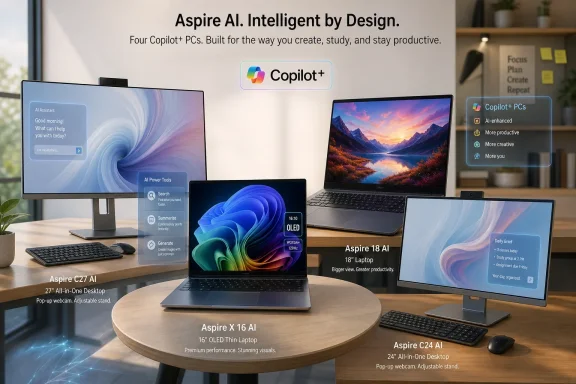
The new machines cover a telling spread. The Aspire X 16 AI is the polished thin-and-light with a 16-inch OLED panel and Intel’s top-end Core Ultra X9 option. The Aspire 18 AI is the big-screen home laptop, less glamorous but potentially more useful for people who want a portable machine that does not feel cramped. The Aspire C27 AI and C24 AI bring the same AI branding into all-in-one desktops, where the selling point is not mobility but simplicity.
That variety is the point. Acer is betting that AI PC demand will not come from a single killer device. It will come from making AI-ready a default expectation when consumers walk into a retailer or compare configurations online.
Acer’s numbers are deliberately bigger than the minimum. The Aspire X 16 AI is listed with up to 180 platform TOPS from an Intel Core Ultra X9 processor. The Aspire 18 AI reaches up to 100 platform TOPS with Intel Core Ultra Series 3. The all-in-one models qualify through AMD Ryzen AI 400 Series or Intel Core Ultra Series 3 options.
The phrase platform TOPS deserves scrutiny. It typically combines AI capability across the NPU, CPU, and GPU rather than isolating NPU performance alone. That does not make it meaningless, but it does mean buyers should avoid reading it as a direct, apples-to-apples measure of how fast every Windows AI feature will run.
This is the same problem PC buyers have seen before with core counts, boost clocks, and battery-life claims. The number matters, but the implementation matters more. A laptop can advertise impressive theoretical AI throughput and still be constrained by thermals, memory bandwidth, firmware tuning, or the limited maturity of the software stack.
For Windows users, the practical question is less “How many TOPS?” and more “Which features will actually run locally, how well will they work, and will they be useful after the novelty fades?” Acer’s launch gives buyers plenty of AI headroom on paper. The real test will come when Copilot+ features are judged against ordinary tasks: searching files, editing images, summarizing material, improving calls, and finding things users forgot they opened.
The processor options run up to Intel Core Ultra X9 with Intel Arc graphics, paired with dual-fan cooling using Acer’s Vortex Flow branding. Acer is not positioning this as a gaming laptop, but it is clearly aimed at users who want more than a browser-and-Office machine. The combination of OLED, integrated Arc graphics, AI silicon, and a portable chassis points toward creators, analysts, consultants, and power users who spend their days bouncing between documents, calls, browser tabs, light media work, and presentation decks.
The port selection is more encouraging than the AI branding. Dual Thunderbolt 4, HDMI 2.1, a microSD slot, Intel Killer Wi-Fi 6E, and Bluetooth 5.4 make the X 16 AI look like a machine designed for actual work rather than just showroom photography. The 1080p infrared webcam and facial sign-in are now table stakes at this level, but they still matter in the post-hybrid-work world.
Acer’s claimed battery life reaches up to 24 hours, but that figure should be treated as a ceiling built under controlled test conditions, not a promise about a normal workday with brightness up, Wi-Fi active, calls running, and several Electron apps quietly eating memory. Even so, the direction of travel is clear. PC makers are trying to make thin Intel laptops feel less like compromises against Arm-based Windows machines and Apple Silicon MacBooks.
The X 16 AI is therefore less a radical design than a rebuttal. Acer is saying that an Intel-based Windows laptop can be thin, premium, long-lasting, OLED-equipped, and Copilot+ certified at the same time. Whether it can do all of those things without becoming expensive is the detail Acer has not yet supplied.
That is not a bad thing. Many people who buy laptops rarely use them on the move in the classic road-warrior sense. They move them from room to room, take them to class, plug them into a monitor occasionally, and use them as their primary household computer. For that audience, a larger display can be more valuable than shaving another few hundred grams from the chassis.
Acer’s inclusion of a 180-degree hinge and an extra-large touchpad reinforces the idea that this is a collaborative, shared-use machine. It is the sort of system that can be opened flat for group viewing, used for video calls with the family, or set up as a semi-permanent workstation without requiring a separate monitor. The FHD infrared camera, privacy shutter, Wi-Fi 7 option, and dual Thunderbolt 4 ports add practical credibility.
The processor story is less extreme than the X 16 AI but still comfortably within Copilot+ territory. Intel Core Ultra Series 3 with up to 100 platform TOPS gives Acer enough AI branding to put the device in the same marketing conversation, while leaving room above it for the more premium X model. Acer also claims up to 22 hours of battery life, though again that should be read as a lab-derived figure rather than a guarantee.
The Aspire 18 AI’s real appeal may be that it treats AI as one capability among many, not the entire identity of the device. A big display, modern ports, biometric sign-in, a privacy shutter, and a high refresh rate are all features people can understand immediately. Copilot+ may help sell the machine, but the screen may be what makes owners keep using it.
By adding Copilot+ branding to this category, Acer is doing something important. It is moving AI PC positioning away from laptop-first assumptions and into fixed-location household computing. That matters because many of Microsoft’s AI features make as much sense on a desktop as on a notebook.
The C27 AI uses a 27-inch display, while the C24 AI uses a 23.8-inch panel. Both are Full HD, with refresh rates up to 144Hz, a 90 percent screen-to-body ratio, optional touch support, and an adjustable ErgoStand. The 5MP infrared pop-up webcam is a sensible privacy and quality move, especially for a machine that might sit in a shared room.
Acer is offering both AMD and Intel variants. The AMD models use Ryzen AI 400 Series processors with Zen 5 architecture and up to Radeon 880M graphics, while the Intel models use Core Ultra Series 3 with Intel Graphics. Acer’s framing suggests AMD as the stronger graphics-oriented option and Intel as the efficiency-oriented alternative, though actual performance will depend on the exact chips, memory configuration, power limits, and cooling.
All-in-ones are also a useful test case for whether AI features become household utilities. A family desktop with local search, image tools, smarter camera effects, and context-aware shortcuts could be more understandable to mainstream users than a business laptop promising productivity gains in abstract terms. If AI PCs are going to become ordinary, they will have to win in exactly these unglamorous places.
This is not new. PC makers have always bundled utilities, control panels, camera enhancers, update managers, and battery tools. What is different now is the attempt to make the bundle feel like part of the AI value proposition rather than the usual layer of OEM software many enthusiasts uninstall on day one.
That creates tension. Enthusiasts and IT admins tend to distrust vendor software unless it is lightweight, useful, and easy to manage. Consumer buyers, meanwhile, often judge a machine by whether its advertised features are visible without configuration gymnastics. Acer needs its AI apps to feel like useful accelerators, not like demos included to justify the sticker.
AcerSense and Intelligence Space may help organize device settings and AI features, but the more concrete tools are easier to understand. QR Capture speaks to a real annoyance: extracting useful information from something on screen. AI Image Generator rides the broader wave of local creative tools. Video Speed Controller could appeal to students, researchers, and anyone who lives inside recorded lectures, webinars, and tutorials.
The danger is fragmentation. Microsoft wants Copilot+ to be a recognizable Windows category, while Acer, Intel, AMD, and other vendors all want their own branded layer on top. If every PC maker ships a different AI dashboard, users may struggle to separate Windows features from OEM features from chip-vendor features. That confusion could slow adoption even if the hardware is capable.
Acer’s Aspire AI expansion lands in a more mature phase of that story. Copilot+ is no longer a speculative label attached to a narrow launch wave. It is spreading across Intel, AMD, and Arm systems, and Microsoft has continued to refine AI features such as Recall, Click to Do, improved Windows search, image actions, live captions, and local model support.
The key shift is from novelty to expectation. Once Copilot+ hardware appears in mainstream Aspire laptops and all-in-ones, users will start assuming that AI features are part of a modern Windows PC, much as webcams, fingerprint readers, SSDs, and USB-C moved from premium extras to baseline assumptions. That does not mean everyone will use the features daily. It means OEMs will have a harder time selling new midrange PCs that lack them.
For Microsoft, this is also about Windows 11’s long game. The company needs reasons for users and organizations to refresh aging Windows 10 and early Windows 11 hardware. AI gives Microsoft a story that security updates and processor generations alone cannot provide. It also gives PC makers a reason to promote new machines in a market where many users already feel their current laptop is “good enough.”
But the strategy depends on trust. Recall’s troubled rollout showed that local AI features touching user activity can trigger serious privacy concerns, even when the processing is on-device. Microsoft and OEMs must persuade users that AI PCs are not surveillance boxes with better battery life. Acer’s hardware can carry the label, but Microsoft’s software experience will determine whether the label feels safe.
The Aspire X 16 AI could be compelling if Acer prices it below premium rivals with similar OLED panels and AI silicon. If it creeps too close to workstation-class or luxury ultraportable pricing, it will face a tougher fight from machines with stronger GPU options, better-known creator branding, or more established enterprise support stories.
The Aspire 18 AI’s value equation will be different. Large laptops can become awkward if they are priced like premium thin-and-lights but deliver mainstream performance. Acer needs to land it where the display size, battery claims, ports, and Copilot+ status feel like a practical bundle rather than a novelty format.
The all-in-ones are even more price-sensitive. Families and small offices often buy AIOs because they want simplicity at a predictable cost. Copilot+ branding may help, but it will not excuse a large premium if the display remains Full HD and the system is being compared against cheaper desktops, mini PCs, or discounted previous-generation all-in-ones.
Regional uncertainty is also significant. The supplied launch details highlight that UAE pricing and availability have not been announced. That means buyers in the region should not assume that global announcements translate into immediate retail options, identical configurations, or comparable pricing. Acer Middle East and authorized retailers will determine what actually appears on shelves.
The X 16 AI’s OLED panel and port mix are likely to matter more on day one than its TOPS figure. The Aspire 18 AI’s size and 165Hz screen will be the reason people stop to consider it. The all-in-ones’ pop-up webcams, optional touchscreens, adjustable stands, and processor choice will matter more to families than the distinction between local and cloud AI inference.
That does not make Copilot+ irrelevant. It means AI hardware is becoming part of the platform baseline rather than a standalone reason to buy. A good 2026 Windows PC should probably have a capable NPU, just as a good laptop should have an SSD. But no one should buy a bad laptop simply because it has an SSD, and no one should buy an otherwise compromised PC simply because it qualifies for Copilot+.
For IT professionals, the question becomes lifecycle planning. If an organization is buying Windows hardware in 2026, it needs to consider whether non-Copilot+ devices will age poorly as Microsoft adds more local AI features to Windows. At the same time, IT teams must decide which AI features to enable, manage, audit, or disable. Hardware readiness is only one part of deployment readiness.
For enthusiasts, the question is sharper. Is this the moment to buy into the AI PC generation, or should buyers wait for the software to mature and for pricing to settle? Acer’s lineup suggests the category is normalizing quickly. But early normalization still comes with early-adopter ambiguity.
In practice, feature timing and performance can still vary by platform. Microsoft’s AI feature rollout has not always arrived identically across Snapdragon, Intel, and AMD systems. Some features have launched first on one platform before expanding to others, and performance can differ depending on the NPU, GPU, drivers, and model optimization.
That makes Acer’s processor diversity useful but also complicated. Intel-based Aspire laptops may appeal to buyers who value Thunderbolt, familiar driver behavior, and broad x86 compatibility. AMD-based all-in-ones may appeal to buyers who want stronger integrated graphics in a desktop-style form factor. Both can be Copilot+ PCs, but they may not feel identical in edge cases.
The broader result is that Windows buying advice is becoming more layered. It is no longer enough to ask whether a laptop runs Windows 11, has enough RAM, and includes a decent SSD. Buyers now have to ask what AI class it belongs to, which NPU it includes, which features are enabled today, which features are promised later, and whether vendor software adds value or clutter.
This is not necessarily bad. Competition among chip vendors could make AI PCs better quickly. But it does mean Microsoft’s job is harder. If Copilot+ is to become a trusted Windows mark, the user experience must feel coherent across devices, not like a loose federation of OEM and silicon-vendor experiments.
 Acer Is Turning Copilot+ From Showcase Into Shelf Space
The original Copilot+ PC pitch was easy to understand and hard to evaluate. Microsoft wanted a new class of Windows 11 machines with neural processing units powerful enough to run AI features locally, and PC makers wanted a reason to sell replacement hardware after several years of incremental laptop updates. Acer’s new Aspire AI quartet shows where that strategy is heading: not just premium business machines, but family desktops, student laptops, creator-adjacent notebooks, and living-room all-in-ones.That makes this launch more strategically interesting than its spec sheet first suggests. The Aspire brand is not Predator, ConceptD, or TravelMate. It is Acer’s broad consumer workhorse family, the line where features become normal rather than exotic.
The new machines cover a telling spread. The Aspire X 16 AI is the polished thin-and-light with a 16-inch OLED panel and Intel’s top-end Core Ultra X9 option. The Aspire 18 AI is the big-screen home laptop, less glamorous but potentially more useful for people who want a portable machine that does not feel cramped. The Aspire C27 AI and C24 AI bring the same AI branding into all-in-one desktops, where the selling point is not mobility but simplicity.
That variety is the point. Acer is betting that AI PC demand will not come from a single killer device. It will come from making AI-ready a default expectation when consumers walk into a retailer or compare configurations online.
The 40 TOPS Threshold Has Become the New Sticker War
Copilot+ PCs are defined by Microsoft as Windows 11 devices with a sufficiently powerful NPU, with the headline threshold set at more than 40 TOPS. TOPS, or tera operations per second, is a useful shorthand for AI acceleration, but it is also a marketer’s dream: a single large number that can be printed on a product page and made to imply future-proofing.Acer’s numbers are deliberately bigger than the minimum. The Aspire X 16 AI is listed with up to 180 platform TOPS from an Intel Core Ultra X9 processor. The Aspire 18 AI reaches up to 100 platform TOPS with Intel Core Ultra Series 3. The all-in-one models qualify through AMD Ryzen AI 400 Series or Intel Core Ultra Series 3 options.
The phrase platform TOPS deserves scrutiny. It typically combines AI capability across the NPU, CPU, and GPU rather than isolating NPU performance alone. That does not make it meaningless, but it does mean buyers should avoid reading it as a direct, apples-to-apples measure of how fast every Windows AI feature will run.
This is the same problem PC buyers have seen before with core counts, boost clocks, and battery-life claims. The number matters, but the implementation matters more. A laptop can advertise impressive theoretical AI throughput and still be constrained by thermals, memory bandwidth, firmware tuning, or the limited maturity of the software stack.
For Windows users, the practical question is less “How many TOPS?” and more “Which features will actually run locally, how well will they work, and will they be useful after the novelty fades?” Acer’s launch gives buyers plenty of AI headroom on paper. The real test will come when Copilot+ features are judged against ordinary tasks: searching files, editing images, summarizing material, improving calls, and finding things users forgot they opened.
The Aspire X 16 AI Is the Machine Acer Wants You to Notice First
The Aspire X 16 AI is clearly the prestige model in this group. Acer has built it around a 16-inch 3K OLED WQXGA+ panel with a 120Hz refresh rate and full DCI-P3 color coverage, wrapped in a 15.9mm aluminium chassis weighing about 1.6kg. That is the classic 2026 premium Windows laptop formula: big display, thin body, OLED contrast, AI processor, and enough ports to avoid looking too much like a minimalist design exercise.The processor options run up to Intel Core Ultra X9 with Intel Arc graphics, paired with dual-fan cooling using Acer’s Vortex Flow branding. Acer is not positioning this as a gaming laptop, but it is clearly aimed at users who want more than a browser-and-Office machine. The combination of OLED, integrated Arc graphics, AI silicon, and a portable chassis points toward creators, analysts, consultants, and power users who spend their days bouncing between documents, calls, browser tabs, light media work, and presentation decks.
The port selection is more encouraging than the AI branding. Dual Thunderbolt 4, HDMI 2.1, a microSD slot, Intel Killer Wi-Fi 6E, and Bluetooth 5.4 make the X 16 AI look like a machine designed for actual work rather than just showroom photography. The 1080p infrared webcam and facial sign-in are now table stakes at this level, but they still matter in the post-hybrid-work world.
Acer’s claimed battery life reaches up to 24 hours, but that figure should be treated as a ceiling built under controlled test conditions, not a promise about a normal workday with brightness up, Wi-Fi active, calls running, and several Electron apps quietly eating memory. Even so, the direction of travel is clear. PC makers are trying to make thin Intel laptops feel less like compromises against Arm-based Windows machines and Apple Silicon MacBooks.
The X 16 AI is therefore less a radical design than a rebuttal. Acer is saying that an Intel-based Windows laptop can be thin, premium, long-lasting, OLED-equipped, and Copilot+ certified at the same time. Whether it can do all of those things without becoming expensive is the detail Acer has not yet supplied.
The Aspire 18 AI Makes the Case That Bigger Laptops Are Back
The Aspire 18 AI is the more quietly interesting laptop because it runs against the old assumption that portability means shrinking everything. Its 18-inch WUXGA display, 1920×1200 resolution, 165Hz refresh rate, and 91 percent screen-to-body ratio suggest a machine designed for a desk, kitchen table, dorm room, or shared family space rather than an airline tray table.That is not a bad thing. Many people who buy laptops rarely use them on the move in the classic road-warrior sense. They move them from room to room, take them to class, plug them into a monitor occasionally, and use them as their primary household computer. For that audience, a larger display can be more valuable than shaving another few hundred grams from the chassis.
Acer’s inclusion of a 180-degree hinge and an extra-large touchpad reinforces the idea that this is a collaborative, shared-use machine. It is the sort of system that can be opened flat for group viewing, used for video calls with the family, or set up as a semi-permanent workstation without requiring a separate monitor. The FHD infrared camera, privacy shutter, Wi-Fi 7 option, and dual Thunderbolt 4 ports add practical credibility.
The processor story is less extreme than the X 16 AI but still comfortably within Copilot+ territory. Intel Core Ultra Series 3 with up to 100 platform TOPS gives Acer enough AI branding to put the device in the same marketing conversation, while leaving room above it for the more premium X model. Acer also claims up to 22 hours of battery life, though again that should be read as a lab-derived figure rather than a guarantee.
The Aspire 18 AI’s real appeal may be that it treats AI as one capability among many, not the entire identity of the device. A big display, modern ports, biometric sign-in, a privacy shutter, and a high refresh rate are all features people can understand immediately. Copilot+ may help sell the machine, but the screen may be what makes owners keep using it.
The All-in-One Models Bring AI PCs to the Family Desk
The Aspire C27 AI and C24 AI are the most revealing products in the launch because all-in-one desktops are rarely treated as the future of computing. They are practical machines for kitchens, reception desks, student bedrooms, family rooms, and small offices. They are bought by people who want fewer cables, a cleaner desk, and a computer that looks more like an appliance than a hobby.By adding Copilot+ branding to this category, Acer is doing something important. It is moving AI PC positioning away from laptop-first assumptions and into fixed-location household computing. That matters because many of Microsoft’s AI features make as much sense on a desktop as on a notebook.
The C27 AI uses a 27-inch display, while the C24 AI uses a 23.8-inch panel. Both are Full HD, with refresh rates up to 144Hz, a 90 percent screen-to-body ratio, optional touch support, and an adjustable ErgoStand. The 5MP infrared pop-up webcam is a sensible privacy and quality move, especially for a machine that might sit in a shared room.
Acer is offering both AMD and Intel variants. The AMD models use Ryzen AI 400 Series processors with Zen 5 architecture and up to Radeon 880M graphics, while the Intel models use Core Ultra Series 3 with Intel Graphics. Acer’s framing suggests AMD as the stronger graphics-oriented option and Intel as the efficiency-oriented alternative, though actual performance will depend on the exact chips, memory configuration, power limits, and cooling.
All-in-ones are also a useful test case for whether AI features become household utilities. A family desktop with local search, image tools, smarter camera effects, and context-aware shortcuts could be more understandable to mainstream users than a business laptop promising productivity gains in abstract terms. If AI PCs are going to become ordinary, they will have to win in exactly these unglamorous places.
Acer’s Software Bundle Shows the PC Industry’s Fear of Being Just a Box Maker
Acer is not relying only on Microsoft’s Copilot+ label. The company is also bundling its own AI software suite, including AcerSense, Acer Intelligence Space, QR Capture, AI Image Generator, and Video Speed Controller. Some of those tools are co-developed with Intel, which hints at another dynamic under the surface: chip vendors and OEMs are trying to build visible experiences around silicon that otherwise disappears into the spec sheet.This is not new. PC makers have always bundled utilities, control panels, camera enhancers, update managers, and battery tools. What is different now is the attempt to make the bundle feel like part of the AI value proposition rather than the usual layer of OEM software many enthusiasts uninstall on day one.
That creates tension. Enthusiasts and IT admins tend to distrust vendor software unless it is lightweight, useful, and easy to manage. Consumer buyers, meanwhile, often judge a machine by whether its advertised features are visible without configuration gymnastics. Acer needs its AI apps to feel like useful accelerators, not like demos included to justify the sticker.
AcerSense and Intelligence Space may help organize device settings and AI features, but the more concrete tools are easier to understand. QR Capture speaks to a real annoyance: extracting useful information from something on screen. AI Image Generator rides the broader wave of local creative tools. Video Speed Controller could appeal to students, researchers, and anyone who lives inside recorded lectures, webinars, and tutorials.
The danger is fragmentation. Microsoft wants Copilot+ to be a recognizable Windows category, while Acer, Intel, AMD, and other vendors all want their own branded layer on top. If every PC maker ships a different AI dashboard, users may struggle to separate Windows features from OEM features from chip-vendor features. That confusion could slow adoption even if the hardware is capable.
Microsoft’s AI PC Strategy Depends on Ordinary Machines Like These
Microsoft’s Copilot+ push began with a grand claim: Windows PCs could become faster, more personal, and more capable by running AI workloads locally. That claim was technically plausible, but the first wave was complicated by uneven feature availability, platform differences, privacy concerns around Recall, and the usual lag between hardware announcements and software maturity.Acer’s Aspire AI expansion lands in a more mature phase of that story. Copilot+ is no longer a speculative label attached to a narrow launch wave. It is spreading across Intel, AMD, and Arm systems, and Microsoft has continued to refine AI features such as Recall, Click to Do, improved Windows search, image actions, live captions, and local model support.
The key shift is from novelty to expectation. Once Copilot+ hardware appears in mainstream Aspire laptops and all-in-ones, users will start assuming that AI features are part of a modern Windows PC, much as webcams, fingerprint readers, SSDs, and USB-C moved from premium extras to baseline assumptions. That does not mean everyone will use the features daily. It means OEMs will have a harder time selling new midrange PCs that lack them.
For Microsoft, this is also about Windows 11’s long game. The company needs reasons for users and organizations to refresh aging Windows 10 and early Windows 11 hardware. AI gives Microsoft a story that security updates and processor generations alone cannot provide. It also gives PC makers a reason to promote new machines in a market where many users already feel their current laptop is “good enough.”
But the strategy depends on trust. Recall’s troubled rollout showed that local AI features touching user activity can trigger serious privacy concerns, even when the processing is on-device. Microsoft and OEMs must persuade users that AI PCs are not surveillance boxes with better battery life. Acer’s hardware can carry the label, but Microsoft’s software experience will determine whether the label feels safe.
The Missing Price Tag Is Not a Footnote
Acer has not announced pricing or UAE availability for these four systems, and that omission matters more than usual. AI PC launches are now crowded enough that specifications alone do not determine competitiveness. Price, configuration discipline, and regional availability will decide whether these machines are serious options or press-release placeholders.The Aspire X 16 AI could be compelling if Acer prices it below premium rivals with similar OLED panels and AI silicon. If it creeps too close to workstation-class or luxury ultraportable pricing, it will face a tougher fight from machines with stronger GPU options, better-known creator branding, or more established enterprise support stories.
The Aspire 18 AI’s value equation will be different. Large laptops can become awkward if they are priced like premium thin-and-lights but deliver mainstream performance. Acer needs to land it where the display size, battery claims, ports, and Copilot+ status feel like a practical bundle rather than a novelty format.
The all-in-ones are even more price-sensitive. Families and small offices often buy AIOs because they want simplicity at a predictable cost. Copilot+ branding may help, but it will not excuse a large premium if the display remains Full HD and the system is being compared against cheaper desktops, mini PCs, or discounted previous-generation all-in-ones.
Regional uncertainty is also significant. The supplied launch details highlight that UAE pricing and availability have not been announced. That means buyers in the region should not assume that global announcements translate into immediate retail options, identical configurations, or comparable pricing. Acer Middle East and authorized retailers will determine what actually appears on shelves.
The Specs Say “AI,” but the Buyers Will Ask About Screens, Ports, and Lifespan
The AI branding may lead the campaign, but the most durable buying factors remain familiar. Displays, build quality, ports, webcams, battery life, thermals, serviceability, memory, storage, and update policy still decide whether a PC feels good after six months. Acer’s new Aspire systems look stronger when judged by that broader checklist than by AI claims alone.The X 16 AI’s OLED panel and port mix are likely to matter more on day one than its TOPS figure. The Aspire 18 AI’s size and 165Hz screen will be the reason people stop to consider it. The all-in-ones’ pop-up webcams, optional touchscreens, adjustable stands, and processor choice will matter more to families than the distinction between local and cloud AI inference.
That does not make Copilot+ irrelevant. It means AI hardware is becoming part of the platform baseline rather than a standalone reason to buy. A good 2026 Windows PC should probably have a capable NPU, just as a good laptop should have an SSD. But no one should buy a bad laptop simply because it has an SSD, and no one should buy an otherwise compromised PC simply because it qualifies for Copilot+.
For IT professionals, the question becomes lifecycle planning. If an organization is buying Windows hardware in 2026, it needs to consider whether non-Copilot+ devices will age poorly as Microsoft adds more local AI features to Windows. At the same time, IT teams must decide which AI features to enable, manage, audit, or disable. Hardware readiness is only one part of deployment readiness.
For enthusiasts, the question is sharper. Is this the moment to buy into the AI PC generation, or should buyers wait for the software to mature and for pricing to settle? Acer’s lineup suggests the category is normalizing quickly. But early normalization still comes with early-adopter ambiguity.
Platform Choice Is Becoming a Windows Feature, Not Just a Processor Preference
The all-in-one models’ AMD-or-Intel split is a preview of where Windows hardware is heading. Copilot+ is not tied to a single architecture or vendor, and that is a strength for the Windows ecosystem. Buyers can choose among Intel, AMD, and Qualcomm systems without leaving the broad Copilot+ category, at least in principle.In practice, feature timing and performance can still vary by platform. Microsoft’s AI feature rollout has not always arrived identically across Snapdragon, Intel, and AMD systems. Some features have launched first on one platform before expanding to others, and performance can differ depending on the NPU, GPU, drivers, and model optimization.
That makes Acer’s processor diversity useful but also complicated. Intel-based Aspire laptops may appeal to buyers who value Thunderbolt, familiar driver behavior, and broad x86 compatibility. AMD-based all-in-ones may appeal to buyers who want stronger integrated graphics in a desktop-style form factor. Both can be Copilot+ PCs, but they may not feel identical in edge cases.
The broader result is that Windows buying advice is becoming more layered. It is no longer enough to ask whether a laptop runs Windows 11, has enough RAM, and includes a decent SSD. Buyers now have to ask what AI class it belongs to, which NPU it includes, which features are enabled today, which features are promised later, and whether vendor software adds value or clutter.
This is not necessarily bad. Competition among chip vendors could make AI PCs better quickly. But it does mean Microsoft’s job is harder. If Copilot+ is to become a trusted Windows mark, the user experience must feel coherent across devices, not like a loose federation of OEM and silicon-vendor experiments.
The Aspire Launch Reveals the AI PC’s Most Practical Truths
Acer’s new Aspire AI devices are not revolutionary in isolation. They are evolutionary PCs with a new baseline: modern processors, local AI capability, Windows 11, and enough manufacturer software to make the AI pitch visible. That is exactly why they matter.- Acer is moving Copilot+ branding into mainstream Aspire laptops and all-in-one desktops rather than reserving it for premium showcase hardware.
- The Aspire X 16 AI is the flagship of the group, with a 16-inch 3K OLED display, Intel Core Ultra X9 options, and up to 180 platform TOPS.
- The Aspire 18 AI makes a practical case for large-screen laptops, pairing an 18-inch 165Hz display with Intel Core Ultra Series 3 and claimed long battery life.
- The Aspire C27 AI and C24 AI bring Copilot+ positioning to family and small-office desktops, with both AMD Ryzen AI 400 and Intel Core Ultra Series 3 configurations.
- Acer’s AI software bundle may help expose useful features, but it will need to avoid becoming another layer of OEM clutter.
- Pricing and regional availability, especially in the UAE, remain the decisive missing pieces.
References
- Primary source: tbreak.com
Published: 2026-06-25T13:38:08.606312
- Related coverage: acer.com
- Related coverage: gadgets360.com
- Related coverage: news.acer.com
Acer Expands Lineup of Aspire AI Copilot+ PCs With New Laptops and All-in-Ones
Editor’s Summarynews.acer.com - Related coverage: prnewswire.com
Acer Expands Lineup of Aspire AI Copilot+ PCs With New Laptops and All-in-Ones
Editor's Summary The Acer Aspire X 16 AI laptop includes up to the latest Intel Core Ultra X9 processors with up to 180 platform TOPS, multi-day battery life,... www.prnewswire.com
- Related coverage: thetechoutlook.com
Acer expands its Aspire AI lineup of Copilot+ PCs with 4 new models; Acer Nitro eCity Plus e-bike, Acer ES Series 3 Select e-scooter, and new Voice Controls in Acer eMobility app also introduced - The Tech Outlook
Yesterday, Acer announced the expansion of its Aspire AI lineup of Copilot+ PCs with four new models: the Acer Aspire X 16 AI laptop, Acer Aspire 18 AI laptop, and Acer Aspire C27 AI and Aspire C24 AI all-in-one desktops. The new Aspire Copilot+ PCs deliver AI experiences designed to boost...www.thetechoutlook.com
- Related coverage: profesionalreview.com
Acer Aspire X 16 AI, Aspire 18 AI, Aspire C27 AI y Aspire C24 AI: Acer amplía su gama Copilot+ con portátiles y todo en uno
Acer ha ampliado su familia Aspire con cuatro nuevos equipos centrados en la inteligencia artificial. La nueva tanda incluye los portátiles Acer Aspire Xwww.profesionalreview.com - Related coverage: medcom.id
Acer Pamer Laptop AI Baru, Aspire X 16 AI hingga All-in-One Aspire C AI Meluncur
Acer meluncurkan Aspire X 16 AI, Aspire 18 AI, dan Aspire C AI Series di Computex 2026. Simak spesifikasi, fitur AI, dan keunggulannya.www.medcom.id
- Related coverage: pinoymetrogeek.com
Acer Expands Aspire AI Copilot+ PC Lineup with New Laptops and All-in-One Desktops
Acer expands Aspire AI Copilot+ PCs with new OLED laptops and AI desktops powered by Intel Core Ultra and AMD Ryzen AI chips.www.pinoymetrogeek.com
- Related coverage: fyi9.com
- Related coverage: staticmultimedia.com
Acer Expands Its Aspire AI Family with New Copilot+ Laptops and All-in-One PCs - Static Multimedia
Acer is continuing its push into the AI-powered PC market with the introduction of four new Aspire devices designed to bring smarter computing experiences to a wider audience. Announced in Taipei, the latest additions to the company’s Copilot+ PC portfolio include the Aspire X 16 AI...staticmultimedia.com - Related coverage: acerid.com
- Related coverage: amd.com
- Official source: microsoft.com
Shop High-Performance Laptops, Computers, PCs, and Tablets | Microsoft Windows
Shop high-performance laptops, PCs, and tablets built for multitasking, advanced AI capabilities, powerful graphics, and all-day performance. Explore premium, high-spec Windows devices.www.microsoft.com - Related coverage: windowscentral.com
Microsoft Copilot+ PC guide: What it is, features, how to access it, and PC requirements, and everything you need to know | Windows Central
Microsoft Copilot+ has been announced for upcoming AI PCs, but what exactly is it? Here's everything you need to know.www.windowscentral.com - Related coverage: tomsguide.com
Microsoft is hiding Windows 11's 'eyes' — here's how to find Copilot Vision (and fully delete it) | Tom's Guide
Microsoft’s new AI can "see" your screen to fix errors and summarize docs. Here's how to master Copilot Vision or disable it entirely to protect your privacy.www.tomsguide.com - Official source: news.microsoft.com
- Official source: cdn-dynmedia-1.microsoft.com
!! SpecificProject Only -MSSurface_Logo_horizontal_C-CoPilot Gray_RGB
PDF documentcdn-dynmedia-1.microsoft.com
